Corporate Headshot Day Workflow: How to Photograph 50–200 Employees Without Chaos
Plan a corporate headshot day for 50–200 employees with better scheduling, identifiers, file naming, retouching, approvals, delivery and retakes.

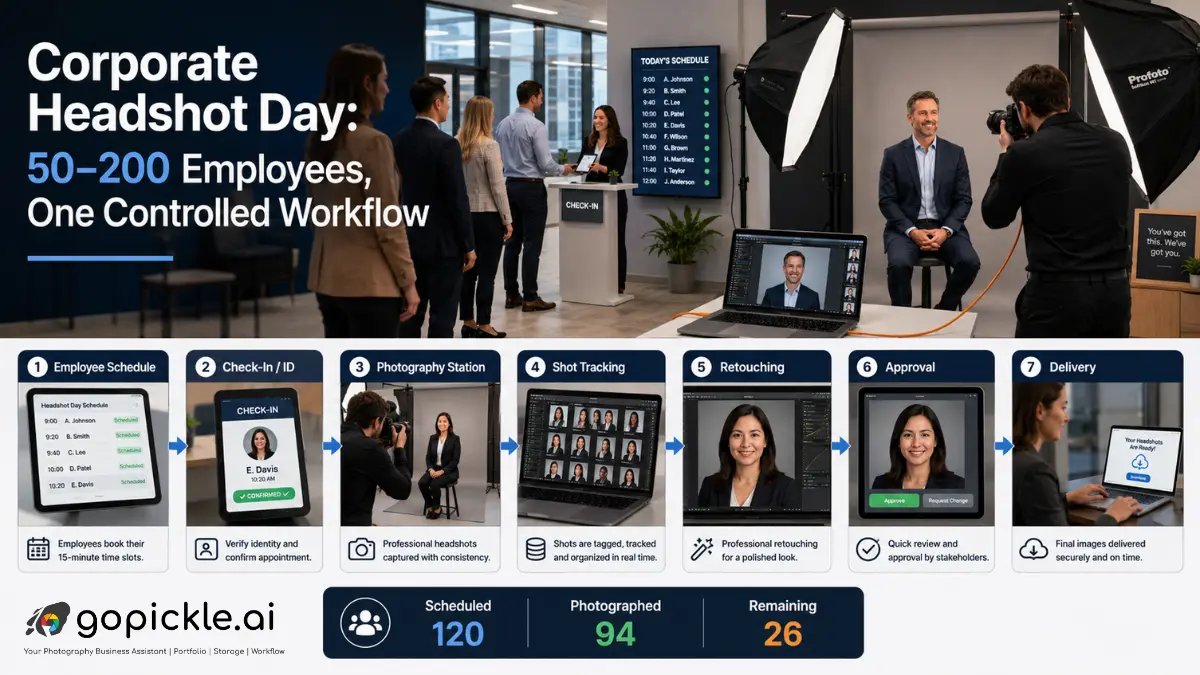
Photographing 10 executives is a portrait assignment. Photographing 100 employees in one working day is also a logistics operation.
The lighting can be perfect and the posing consistent, yet the project can still fail if employees arrive together, photographs are attached to the wrong names, HR cannot identify missing staff, approval responsibility is unclear or the studio delivers 600 files called DSC_4821.jpg. That is why a scalable corporate headshot workflow has to control the movement of people and information as carefully as the photography itself.
For a 50–200-person assignment, we would structure the job around one principle: every employee should move through a known path from scheduled participant to identified subject, photographed subject, selected image and delivered file.
Define the Corporate Headshot Assignment Before Building the Schedule
Start with the company, not the camera setup. Confirm the expected headcount, office location, number of shoot days, intended image uses, required crops, background style, final images per employee, retouching level, delivery formats, turnaround, licensing terms and who has authority to approve the work.
Corporate clients may need the same portrait for a staff directory, website, LinkedIn profile, press release and sales presentation, but those uses can require different crops or export sizes. Current corporate headshot planning guidance similarly recommends agreeing on intended usage, visual style and consistency standards before the shoot begins.
Put those requirements into the quotation rather than leaving them inside an email thread. For studios using GoPickle, Photography Quotations Management can carry the events, services, deliverables and commercial scope into the wider studio workflow once the assignment is approved. The confirmed job can then move into Booking Management for Photographers, where the client, date, location, services, deliverables, payment context and team preparation stay attached to one project record.
Calculate Throughput Before Promising 200 Headshots in a Day
Do the capacity calculation before sending the schedule.
If one photography station averages five minutes per employee, 50 people require 250 minutes of active shooting. One hundred employees require 500 minutes. Two hundred require 1,000 minutes, before delays, breaks, equipment issues, executive interruptions or retakes are considered.
Published corporate photographers commonly use individual appointment windows rather than telling the entire company to arrive during a broad block, with some high-volume providers operating around five- to ten-minute slots.
For a 200-person employee headshot day, one station may therefore be the wrong production design. You may need two or three identical stations, multiple photographers, a second day or a faster approved capture process. If you use several stations, lock the lighting diagram, camera height, focal length, backdrop, crop and retouching reference so employees photographed by different team members still belong to the same visual set.
Do not schedule every available minute. Senior staff get pulled into meetings, someone arrives late, another employee needs more direction and one person will inevitably appear without knowing they were booked for a photograph. A schedule without recovery capacity usually becomes progressively less accurate as the day continues.
Give Every Employee a Unique Identifier
This is the part many general corporate headshot photography guides underplay.
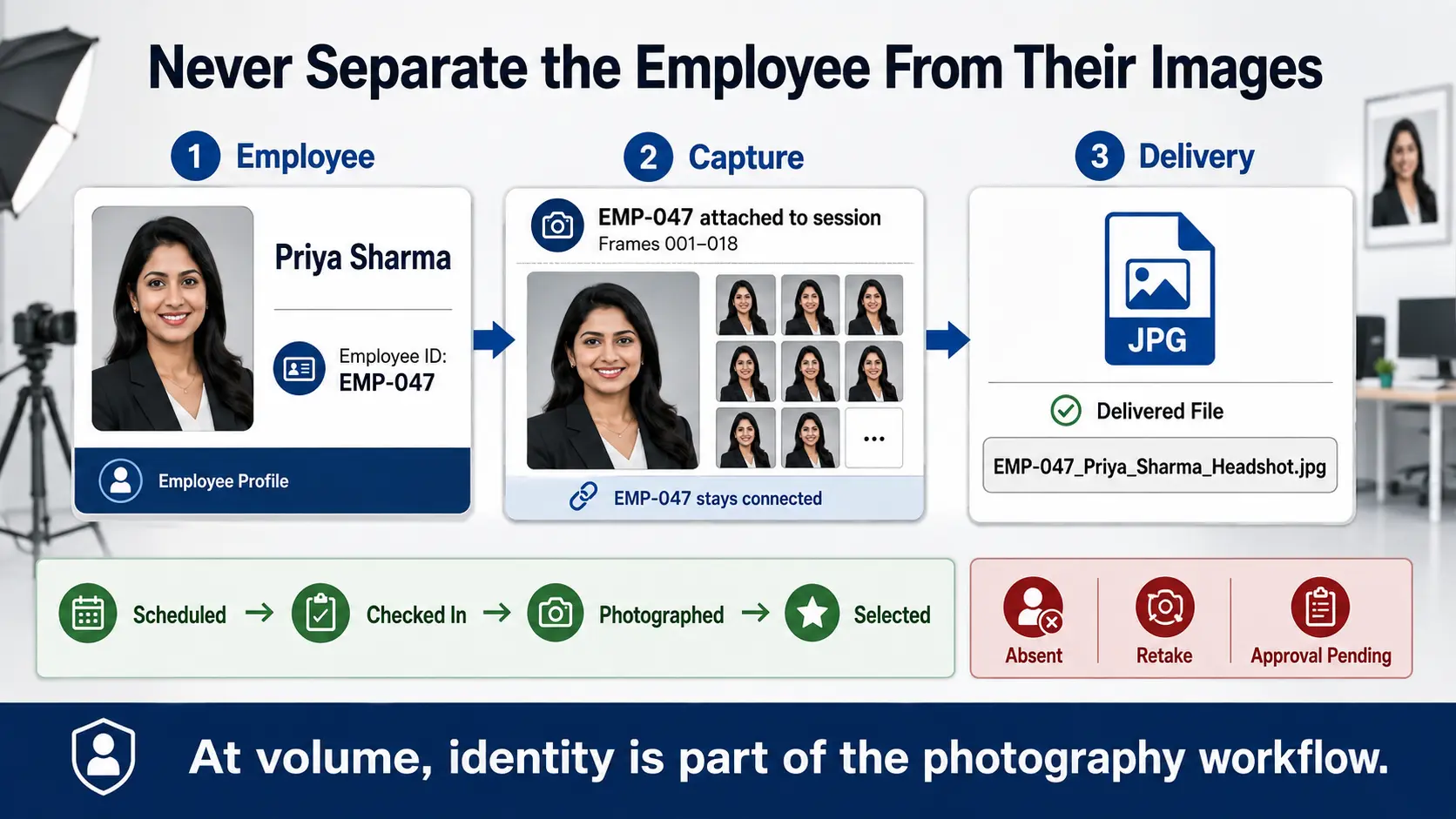
Before the shoot, obtain a clean employee list from the company coordinator. At minimum, use the person's preferred name and a unique identifier such as employee ID or another client-approved reference. Department or office can be useful where duplicate names are possible.
The identifier then needs to follow the employee into the image files. For a smaller 50-person assignment, a disciplined check-in sheet and tethered naming workflow may be enough. At larger volumes, barcode or QR-based workflows become much safer. Current high-volume corporate headshot systems can scan an employee barcode before capture and embed or associate that identifier with the resulting photographs, specifically to prevent manual sorting after the shoot.
Whatever method you use, do not rely on remembering that “the woman in the blue jacket was probably Samantha from Finance.”
A workable naming structure might be:
EmployeeID_LastName_FirstName_01.jpg
or, if the client does not use employee IDs:
LastName_FirstName_Company_Headshot_2026_01.jpg
Photographers working with corporate digital-asset teams also recommend agreeing on naming conventions before delivery because descriptive names are far more usable for websites, internal directories and press teams than camera-generated filenames.
Track Status While People Are Still in the Building
Your participant list should become a live production list on shoot day.
Each person needs a simple status such as:
Scheduled → Checked In → Photographed → Selection Complete
Then maintain exception states separately:
Absent / Retake Required / Approval Pending
This immediately tells the coordinator whether 87 of 100 employees have actually been photographed, rather than whether 100 names appeared on the original spreadsheet.
For larger assignments, designate someone other than the primary photographer to manage the queue. That person verifies names, handles swaps, flags absent employees and tells the next subject when to prepare. Experienced corporate headshot teams similarly separate photography from on-site coordination because meetings and last-minute slot changes are normal in office environments.
If GoPickle is being used to manage the production, the corporate assignment can remain one booking while internal responsibilities and shoot-day tasks are assigned through its Crew Management Software for Photographers. GoPickle supports commercial-studio production roles, task handoffs, timing, venue context and responsibility around a booking rather than leaving crew instructions in separate chats.
Agree on Employee Image Use and Privacy Before Shoot Day
Do not improvise photo consent at the camera.
The corporate client should define where employee photographs will be used and establish the appropriate employee notice, consent or other lawful basis required by its jurisdiction and employment policies. Photographs used to identify employees can constitute personal data depending on how an organisation processes them.
For organisations operating under UK GDPR-style rules, consent is not automatically the correct legal basis merely because a photograph is being taken. The UK Information Commissioner's Office specifically warns that consent in employment relationships can be problematic because employees may not have a genuinely free choice. It advises organisations to establish the appropriate lawful basis for processing rather than treating consent as a universal answer.
The photographer should therefore agree with HR or the company's privacy owner on who is responsible for employee notices, opt-outs, publication permissions and retention requirements before production starts. This is operational guidance, not a substitute for jurisdiction-specific legal advice.
Separate Capture From Retouching Decisions
After the shoot, the job should not become one enormous undifferentiated Lightroom folder.
First verify that every photographed employee maps correctly to the participant list. Then separate selected frames from alternates and apply one retouching standard across the entire project. Corporate headshots become visibly inconsistent when one employee receives heavy skin work, another receives minimal cleanup and a third is cropped differently.
Agree beforehand whether employees choose their own image, HR chooses, the photographer recommends a frame, or the company receives a proof set for approval. That decision has a major effect on workload when 150 employees are involved.
A practical production status becomes:
Captured → Selected → Retouched → QC Checked → Approved → Delivered
Quality control should include identity, crop, background consistency, colour, retouching standard, filename and required output dimensions.
Make Approvals Easy for the Corporate Client
Do not email batches of files called “finals_v3” and expect the marketing manager to maintain an approval record.
For company-level approval, provide a structured proof or gallery where the authorised contact can review the images and identify changes. GoPickle Client Galleries for Photographers can support this final client-facing stage through organised collections, controlled access, favourites and downloads. For a corporate assignment, that can be used for client review and polished final delivery rather than treating a generic cloud-storage folder as the finished experience.
Be precise about who has approval authority. An employee asking for another retouch does not necessarily mean the corporate client has authorised unlimited revisions. Define the number of included revisions or retakes in the original scope.
Plan for Absentees and Retakes Before They Happen
A 150-person company is unlikely to produce 150 perfectly available people on one date.
Someone will be travelling, sick, on leave or trapped in a client meeting. Decide before the shoot whether absent employees receive a studio appointment, a dedicated retake morning, a future quarterly headshot session or no replacement session under the current quotation.
The same policy should cover genuine retakes. Separate technical failures, which the studio should normally correct, from preference-based reshoots that may fall outside the agreed scope.
Consistency matters when employees are photographed later. Keep the lighting diagram, camera position, backdrop reference, crop specification and retouching preset with the project so a new hire photographed three months later does not look as though they work for another company. Corporate headshot photographers serving growing teams commonly maintain repeatable specifications specifically for new hires and missed employees.
The Real Corporate Headshot Workflow
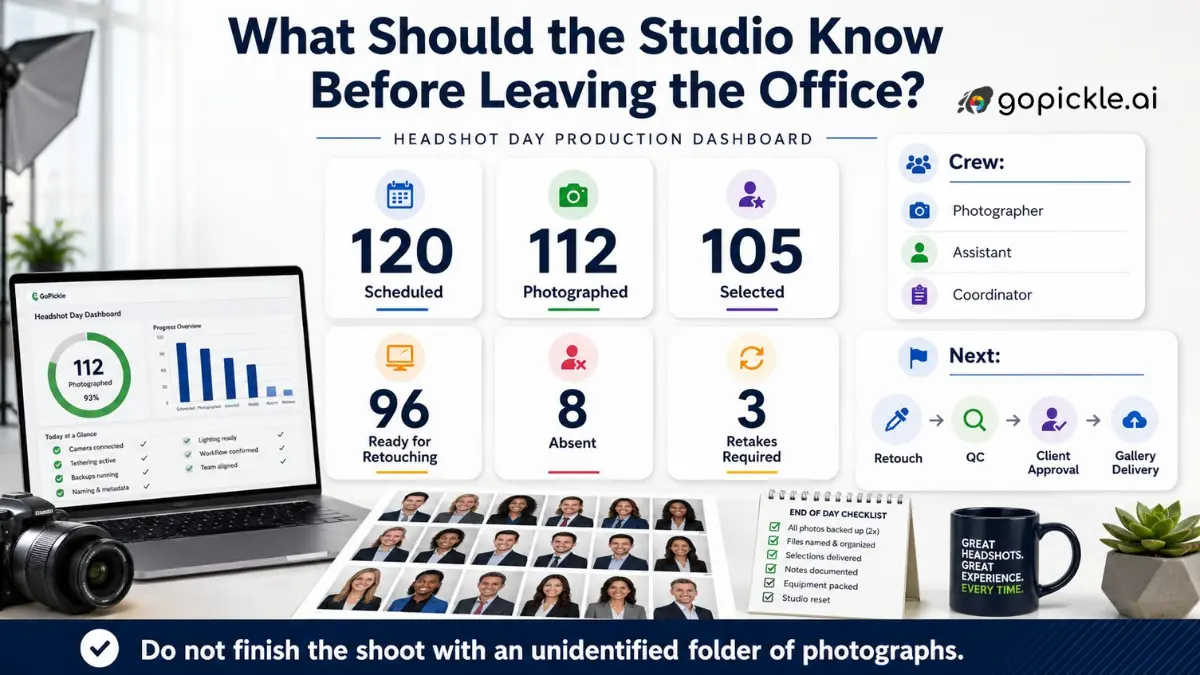
For 50–200 employees, the complete process should be visible before anyone steps in front of the camera:
Scope confirmed → Employee list received → Slots assigned → Employee identified → Photograph captured → Shot status recorded → Image selected → Retouched → QC checked → Client approved → Files named → Delivered → Absentees and retakes resolved
At GoPickle, we see the larger lesson as the same one that applies across commercial photography operations: the photograph is only one part of the assignment. The studio also has to control scope, booking information, people, responsibilities, deliverables and client handoff.
A photographer can improvise a five-person headshot session. At 100 employees, improvisation becomes an operating cost. At 200, it becomes a risk.
The best corporate photography workflow is the one where, at the end of the day, you know exactly who was photographed, which images belong to them, what still needs work and what the client will receive.