End-to-End Photography Workflow From Enquiry to Final Album
Map every stage of a photography workflow, identify common system gaps and organise enquiries, bookings, payments, galleries and albums.

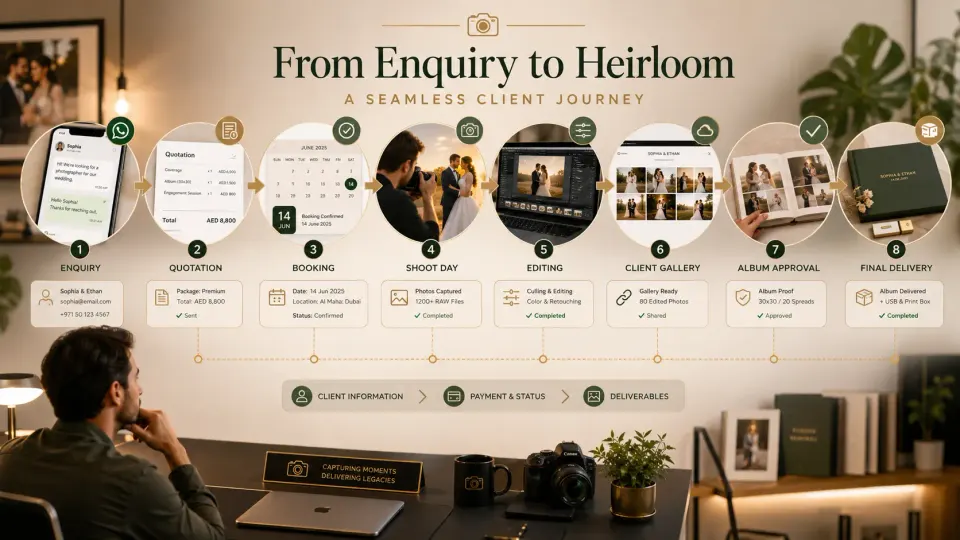
A photography workflow does not begin when the photographer picks up the camera. It begins when a client first sends an enquiry and ends only after the photographs, album, payments and pending commitments are completed.
The difficulty is rarely one large failure. It is usually a series of small gaps.
The event date stays in WhatsApp. Package details sit inside a PDF. Payment information is tracked in a spreadsheet. Crew instructions happen over calls. Photo selections arrive through screenshots. Album corrections are buried inside chat messages.
Each method may work independently. The problem appears when information must move from one stage to the next.
1. Enquiry and Requirement Collection
The workflow begins with an enquiry from Instagram, WhatsApp, Google, a website, Meta Ads or a referral.
The photographer should collect enough information to understand the opportunity:
- Client name and contact details
- Event type
- Event date and location
- Required services
- Approximate budget
- Number of functions
- Expected deliverables
- Next follow-up
The first system gap appears when the enquiry remains only inside the original chat.
The photographer may remember the client today but forget the discussion after five more enquiries arrive. A lead record should show what the client needs, who is handling the enquiry and what must happen next.
GoPickle’s workflow starts by bringing enquiries, shoot dates, packages, deliverables and booking status into one connected process.
2. Qualification and Quotation
Once the basic requirement is clear, the studio decides whether it can handle the date, location, services and budget.
The next step is a quotation built around that requirement.
A photography quotation should clearly show:
- Event coverage
- Crew and equipment scope
- Photography and video services
- Albums, reels or other deliverables
- Package price and add-ons
- Payment stages
- Delivery expectations
- Terms for date changes or additional work
A system gap appears when the quotation is created separately from the enquiry.
If the client changes the event date, adds cinematography or removes an album, the studio may update the PDF but forget to update the notes, payment calculation or booking plan.
The better workflow keeps the client requirement, quotation, approval and next action connected. GoPickle’s quotation workflow is designed to move an approved quotation into booking, invoice and album delivery without repeatedly entering the same client and package details.
3. Booking Confirmation
A client saying “We are ready to proceed” is not the same as a fully confirmed booking.
The booking should record:
- Final event dates and timings
- Venue and contact person
- Confirmed package
- Deliverables
- Advance received
- Balance-payment stages
- Assigned crew
- Special client instructions
- Cancellation and date-change terms
The common gap is assuming that the quotation contains everything the production team needs.
A quotation sells the service. A booking should convert that promise into an operational plan.
Before the date is blocked, the studio should confirm the event scope, payment terms and what happens if the client changes the schedule.
4. Payments, Invoices and Crew Planning
After confirmation, the studio must track money and people.
An invoice should clearly show the package amount, taxes where applicable, advance paid, balance due, payment method and due date. Deliverables such as edited photographs, films and printed albums should also match the booking.
At the same time, the studio assigns photographers, cinematographers, assistants and other crew.
A system gap appears when finance and production use separate information.
The photographer may know that the client requested an extra event, but the invoice is not updated. The owner may confirm drone coverage, but the assigned crew never receives that instruction.
The booking should remain the shared reference point for services, payments, schedules and responsibilities.
5. Pre-Shoot Preparation and Event Coverage
Before the event, the team should review:
- Timings and venue movement
- Important people and ceremonies
- Shot priorities
- Client preferences
- Crew reporting times
- Equipment and backup needs
- Travel and accommodation
- Pending payment or approval items
This stage often fails through incomplete handovers.
A lead is handled by one person, the quotation by another and the shoot by a third. If the important context does not move with the booking, the client must repeat instructions or the crew learns about them at the venue.
The workflow should give the shoot team one reliable source of information.
6. Backup, Selection and Editing
After the event, the visible shoot is complete, but the studio’s operational work continues.
Files must be backed up, organised, selected, edited and prepared for delivery. Editors need to know which events and deliverables are included and which deadlines were promised.
A common gap appears when production status is invisible.
The client keeps asking for an update because the studio cannot quickly see whether the job is waiting for culling, editing, review or upload.
Each booking should move into a clear post-production status with an owner and expected completion date.
7. Client Gallery and Photo Selection
Once approved photographs are ready, the studio shares them through a client gallery.
The client may need to:
- View the complete event
- Download photographs
- Mark favourites
- Select album images
- Share the gallery with family
- Request corrections or additional edits
GoPickle provides branded client galleries with controlled access, downloads and sharing as part of its delivery workflow.
The system gap appears when selections arrive through screenshots, filenames, voice notes and multiple family members.
The studio should provide one selection method, one deadline and one clear place to review the client’s choices.
8. Album Design, Approval and Printing
Album production usually includes another sequence:
Client selection → layout design → internal review → client approval → corrections → final approval → printing
The workflow becomes difficult when every correction is received separately.
One person asks to replace an image, another requests a layout change and a third approves an older version. The designer may not know which instruction is final.
Every album should have:
- Selected photographs
- Current design version
- Consolidated correction notes
- Approval status
- Printing status
- Expected delivery date
No album should move to print based on an unclear message such as “Looks fine.”
9. Final Delivery and Closure
The workflow ends only when the studio confirms:
- Gallery delivered
- Downloads available
- Album approved and handed over
- Videos or other deliverables completed
- Final payment received
- Pending issues closed
- Client feedback or review requested
- Referral opportunity recorded
Many studios move to the next shoot before formally closing the previous job. This leaves pending balances, album corrections and delivery promises hidden in old conversations.
GoPickle positions its photography workflow from enquiry through quotations, bookings, invoices, galleries and album delivery so each stage can continue from the information already collected.
Where Photography Workflow Gaps Usually Appear
| Workflow stage | Common system gap |
|---|---|
| Enquiry | Lead remains inside WhatsApp or Instagram |
| Quotation | Requirement changes are not updated everywhere |
| Booking | Date is blocked without full scope or advance |
| Crew planning | Team receives incomplete instructions |
| Payments | Amounts are tracked separately from deliverables |
| Editing | Nobody can see the current production status |
| Gallery | Clients send selections through multiple channels |
| Album design | Corrections and approvals are not version-controlled |
| Final delivery | Pending payment or deliverables remain open |
Build One Connected Client Journey
A good photography workflow does not require the photographer to automate every creative decision.
It requires each stage to hand the correct information to the next one.
The enquiry should become the quotation. The approved quotation should become the booking. The booking should guide the crew, invoice and production plan. The edited photographs should move into gallery delivery and album selection. Final approval should lead to printing, payment closure and delivery.
When these stages stay connected, the studio spends less time searching for information and more time completing work confidently.
GoPickle.ai helps photographers organise this complete journey, from the first enquiry to the final client album, without depending on separate chats, spreadsheets, calendars and folders.