How to Build a Photography Portfolio That Converts Visitors Into Enquiries
Learn how photographers can build a portfolio website with strong homepage, genre pages, location, package hints, proof, and enquiry forms.

TL;DR
A photography portfolio should not only show beautiful images.
It should guide visitors toward making an enquiry.
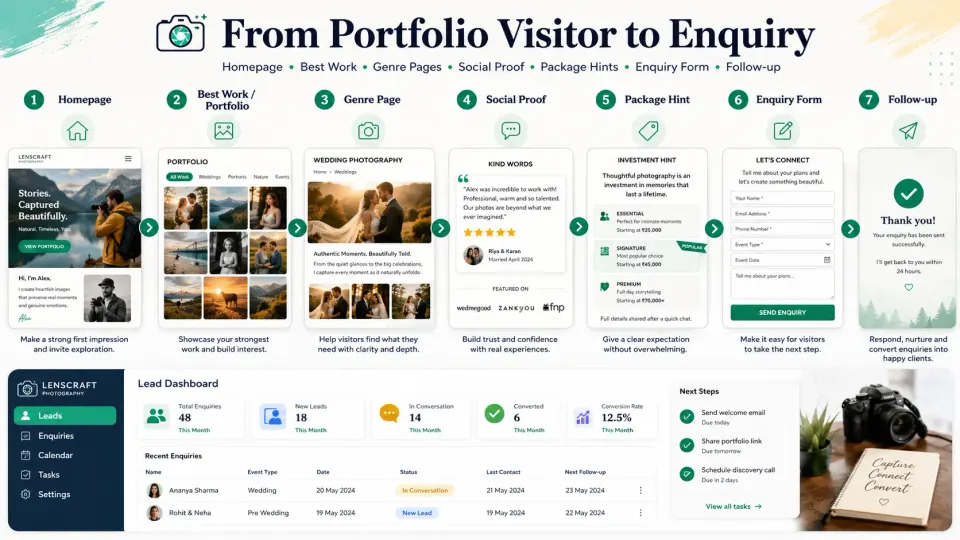
To convert better, your portfolio needs a clear homepage, selected best work, separate genre pages, location details, package hints, social proof, and a simple enquiry form.
The Portfolio Is Not Just a Gallery
Many photographers treat their portfolio like a photo dump.
They upload many images, add a contact button, and expect clients to enquire.
But visitors need direction.
A bride looking for wedding photography wants to know if you shoot weddings like hers.
A parent looking for a baby shoot wants to know if your studio feels safe and warm.
A company looking for event coverage wants to know if you can handle brand, stage, audience, and delivery expectations.
A photography portfolio that converts is built around client decisions, not only photographer taste.
It should answer: “Is this photographer right for me, in my location, for my type of shoot?”
1. Start With a Clear Homepage
Your homepage should explain what you do within a few seconds.
It should show:
- Your studio name
- Main photography services
- Location or service area
- Strong hero image
- Clear enquiry button
- Short trust-building message
Avoid vague lines like “capturing timeless memories” without context.
A better homepage says what you shoot and where you work.
Example:
“Wedding, baby, event, and portrait photography studio serving Bangalore and nearby locations.”
This helps both clients and search engines understand your studio.
For GoPickle.ai users, this also supports a cleaner portfolio website for photographers because service, location, and enquiry flow can stay connected.
2. Show Only Your Best Work
Your portfolio should not include every good photo.
It should include the right photos.
A common mistake photographers make is adding too many similar images. Visitors get tired and stop looking.
Choose images that show:
- Emotion
- Variety
- Lighting skill
- Real client moments
- Different angles
- Final delivery quality
- Your strongest style
For wedding photography portfolio pages, include rituals, couple portraits, family moments, decor, candid shots, and reception coverage.
For baby or portrait pages, show expressions, setup quality, safety, styling, and parent-child moments.
The goal is not to prove you clicked a lot. The goal is to help the visitor trust you quickly.
3. Create Separate Genre Pages
A single portfolio page is usually not enough.
Create separate genre pages for your main services.
Examples:
- Wedding photography
- Pre-wedding photography
- Baby photoshoot
- Maternity photography
- Corporate event photography
- Product photography
- Birthday photography
Photography genre pages help visitors find work that matches their need.
They also help with long-tail searches like “baby photoshoot photographer in Bangalore” or “corporate event photographer near me.”
Each genre page should include:
- Short service explanation
- Relevant portfolio images
- Package hint
- Delivery details
- Reviews or proof
- Enquiry form
This makes the page useful, not just visual.
4. Add Location Clearly
Location matters.
Clients often search for photographers near them or in a specific city.
Your portfolio should clearly mention:
- Studio city
- Areas served
- Destination or outstation availability
- Local venue experience, if relevant
For local SEO and client trust, add real location context.
Example:
“We cover weddings in Bangalore, Mysore, Coorg, and destination events across South India.”
Do not create fake location pages with no real value. A useful location page should include local portfolio work, service details, and a clear contact path.
5. Give Package Hints Without Overloading
Not every photographer wants to show full pricing publicly.
That is fine.
But visitors need some pricing direction.
Package hints can reduce weak enquiries and improve serious enquiries.
You can mention:
- Starting range
- Types of packages
- What affects pricing
- Whether albums, video, or travel are extra
- Custom quotation availability
Example:
“Wedding packages depend on number of functions, team size, deliverables, albums, and travel. Share your event details to receive a customised quotation.”
This helps clients understand how photography pricing works without forcing a public rate card.
6. Use Social Proof
Visitors want proof before they enquire.
Add:
- Client reviews
- Short testimonials
- Venue or event examples
- Published work, if any
- Repeat client mentions, if appropriate
- Behind-the-scenes professionalism
- Delivery experience feedback
Social proof for photographers works best when it is specific.
A review saying “photos were delivered on time and the team handled our family well” is more useful than “best photographer.”
Trust improves when visitors see real client experiences.
7. Make the Enquiry Form Simple
A photographer enquiry form should not feel like an exam.
Ask only what you need to start the conversation.
Useful fields:
- Name
- Phone number
- Event or shoot type
- Date
- Location
- Message or requirement
- Budget range, if needed
The enquiry button should be visible on every important page.
Use clear calls to action:
- Check availability
- Request quotation
- Enquire for your event
- Share your shoot details
Once the enquiry comes in, the follow-up should be quick. A good portfolio brings the lead. A good system converts it.
Where GoPickle Helps
GoPickle helps photographers manage what happens after a portfolio visitor becomes an enquiry.
A studio can track leads, requirements, quotations, bookings, invoices, client albums, galleries, and follow-ups in one place.
So when someone fills an enquiry form from your portfolio website, the studio does not have to depend only on WhatsApp or memory.
The enquiry can move into a proper workflow: requirement captured, quote sent, follow-up scheduled, booking confirmed, invoice created, and album delivered.
Final Takeaway
A strong photography portfolio does more than display images.
It helps the visitor decide.
The homepage gives clarity. Best work builds interest. Genre pages match intent. Location builds relevance. Package hints reduce confusion. Reviews build trust. A simple enquiry form creates action.
If your portfolio gets visitors but not enough enquiries, the issue may not be your photos. The issue may be the flow.
If your studio wants to turn portfolio enquiries into organised leads, quotations, bookings, invoices, and client delivery, GoPickle can help manage the full workflow after the enquiry arrives.