How to Manage Photography Bookings Inside GoPickle.ai
Learn how GoPickle booking management connects client details, events, services, crews, payments, tasks, quotations, invoices and albums.

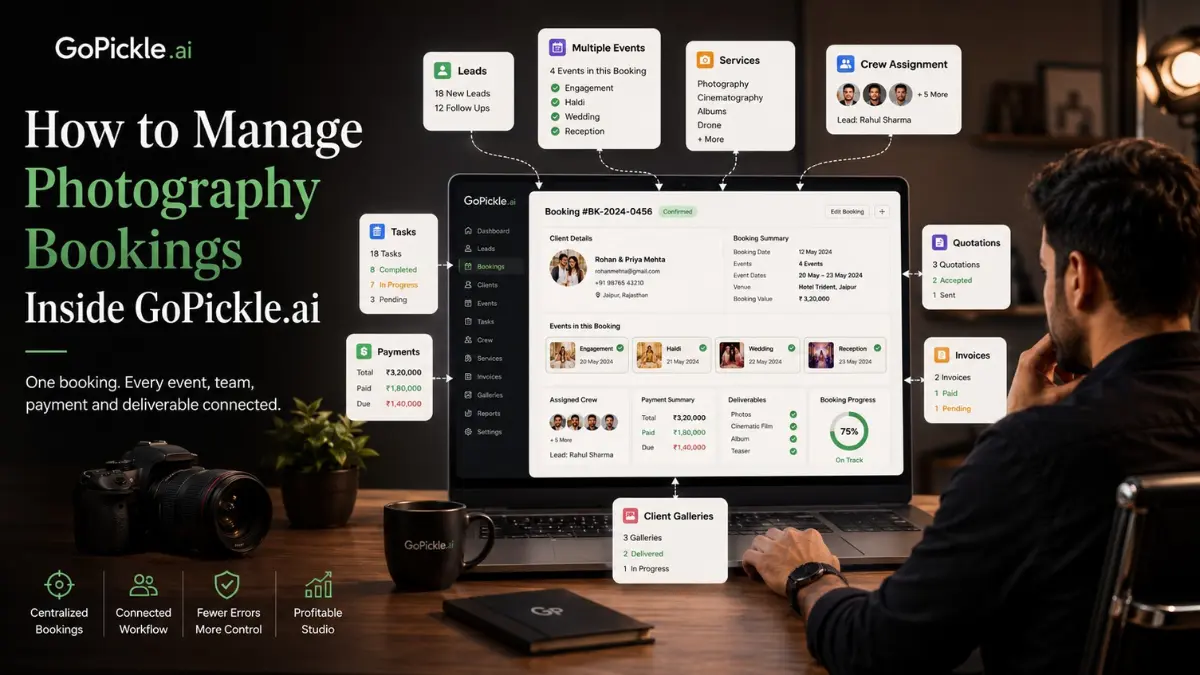
A photography booking is not just a client name and event date.
A wedding booking may include several functions, different venues, multiple crews, photography and cinematography services, separate deliverables, staged payments, editing work, client galleries and a printed album.
When these details are spread across WhatsApp, spreadsheets, calendars and PDFs, the studio loses clarity. Someone remembers the package but not the added service. The crew knows the date but not the reporting time. The editor receives the files but cannot see the promised delivery. Accounts knows the total but not whether the album upgrade was included.
Inside GoPickle, the booking becomes the central record that connects these moving parts.
The Booking Starts From the Lead
Lead management handles the enquiry stage.
The studio records what the potential client needs, including the event type, date, location, budget, services and next follow-up. Once the discussion progresses and the client is ready to proceed, the lead can be converted into a booking.
This avoids starting again with an empty form.
The client information and confirmed requirement move into the operational workflow, where the studio can begin managing dates, events, services, deliverables, payments and team responsibilities.
GoPickle’s wider workflow is designed to keep enquiries, bookings, quotations, invoices, client galleries and team coordination connected rather than maintaining a separate record for every stage.
One Booking Can Contain Multiple Events
A wedding photography booking rarely consists of one continuous event.
It may include:
- Pre-wedding shoot
- Engagement
- Haldi
- Mehendi
- Sangeet
- Wedding ceremony
- Reception
- Post-wedding portrait session
GoPickle allows the studio to record multiple events under the same booking.
Each event can have its own date, timing, venue, contact information and operational requirements. This is important when functions happen across different days or locations.
Instead of creating disconnected calendar entries, the studio keeps every event connected to the same client and booking.
Add Services and Deliverables Per Event
The services required for one function may be different from another.
For example:
| Event | Services |
|---|---|
| Engagement | Traditional photography and candid photography |
| Sangeet | Candid photography, cinematography and reels |
| Wedding | Full photography and cinematography crew |
| Reception | Photography, video and live guest gallery |
GoPickle allows services to be managed per event rather than treating the entire booking as one generic package.
Deliverables can also be recorded according to the agreed scope:
- Edited photographs
- Highlight film
- Full-length video
- Social-media reels
- Wedding album
- Parent albums
- Framed prints
- Client Gallery
- AI Guest Gallery
This gives the studio a clearer answer when a client asks, “Was this included in our package?”
The booking record shows what was promised and which event or service it belongs to.
Track Event Cost and Total Booking Value
A multi-event booking needs more than one overall amount.
GoPickle can help the studio record costs at the event or service level and calculate the complete booking value. Additional services, discounts, taxes and later changes can be reflected without rebuilding the entire project manually.
This makes it easier to understand:
- Cost of each event
- Cost of each service
- Included deliverables
- Additional charges
- Discounts
- Taxes
- Advance received
- Pending balance
- Final booking total
The same booking information can support quotation and invoice creation, reducing the risk that the financial documents show a different scope from the operational plan.
GoPickle’s invoicing workflow connects booking amounts, advances, partial payments and pending balances so the studio does not need to reconstruct the payment history from chat messages or screenshots.
Assign Crew to the Correct Event
Adding crew members to the studio is not enough. They must be assigned to the correct event and role.
A single wedding booking may require different people for different functions:
- Lead photographer
- Second photographer
- Traditional photographer
- Cinematographer
- Drone operator
- Assistant
- Editor
- Album designer
GoPickle allows the studio to connect crew assignments to the actual booking and event.
This gives each person the information required for their responsibility, such as the event date, venue, reporting time and assigned role.
Access can be controlled according to the team member’s role. A crew member can see the booking or event information needed for the assignment without receiving unnecessary access to every client, financial report or studio record.
The result is a cleaner handover between the studio manager and the event team.
Create Tasks Around the Booking
Many activities happen before and after the shoot:
- Confirm venue timing
- Collect client references
- Assign photographers
- Verify travel arrangements
- Collect the next payment
- Back up event files
- Send footage to the editor
- Upload edited photographs
- Request album selection
- Review album corrections
- Confirm final delivery
GoPickle allows tasks to be created in relation to the booking so the team can see what is pending, who owns it and when it is due.
This is more useful than maintaining a separate generic task list because the work remains connected to the client and event.
A task such as “follow up for balance” immediately makes sense when it appears beside the booking amount, advance and due date.
Use the Booking Detail Page as the Main Reference
The booking detail page brings the project information together.
Depending on the booking, the studio can review:
- Client details
- Event dates and venues
- Services
- Deliverables
- Crew assignments
- Tasks
- Quotation
- Invoice
- Payments
- Booking cost
- Galleries and albums
- Current progress
- Notes and instructions
This page becomes the place where the studio checks the complete state of the project.
The sales team can see what the client confirmed. The studio manager can see upcoming events and pending tasks. The crew can see relevant assignments. Accounts can see payment status. The post-production team can see what must be delivered.
GoPickle describes its broader photographer workflow as one connected system for bookings, quotes, invoices, crew, schedules and studio operations.
Link Quotations, Invoices and Albums
The booking should not become isolated after confirmation.
Inside GoPickle, it can remain connected to the documents and delivery stages that follow.
Quotations
A quotation can be created from the client requirement and package. Once approved, its events, services, deliverables and pricing inform the booking.
GoPickle’s quotation workflow is intended to keep the requirement, quotation, approval, booking and invoice connected.
Invoices
The booking can be used to create an invoice showing the agreed services, advance, partial payments and balance due.
This prevents the invoice from being created with outdated package information.
Client Galleries and Albums
The relevant gallery or album can be linked back to the booking. The studio can then see whether photographs have been uploaded, the gallery has been shared, the client has completed selections or album work is still pending.
GoPickle’s product workflow connects bookings with client galleries, album delivery and payment tracking rather than ending at the shoot date.
A Practical Studio Example
Consider a studio managing a four-event wedding.
The client first arrives as a lead asking for coverage of the engagement, haldi, wedding and reception. After the studio confirms the requirement and shares the package, the lead is converted into a booking.
The booking contains:
- Four event dates
- Four venues and reporting times
- Photography and cinematography services per event
- One lead photographer and different supporting crews
- Edited photographs and films
- Two printed albums
- A Client Gallery
- Staged payments
- Tasks for crew confirmation, editing, album selection and payment follow-up
Before each event, the studio manager checks the booking detail page instead of searching old chats.
After the wedding, the shoot lead hands files to the editor through a booking-related task. Once editing is complete, the Client Gallery is linked to the same booking. The album designer receives the approved client selection, and accounts can see the remaining payment before final delivery.
Every department works from one project record.
Why the Booking Becomes the Backbone
The booking connects what the studio sold with what the studio must deliver.
Without that connection:
- Leads may contain outdated requirements.
- Quotations may not match the final package.
- Crew may receive incomplete instructions.
- Invoices may miss additional services.
- Editors may not know delivery commitments.
- Albums may remain pending without visibility.
- Payments may be followed up too late.
With one booking as the single source of truth, every module refers to the same client, events, services and deliverables.
The booking is therefore not one feature among many. It is the operational backbone linking sales, production, finance, team management and delivery.
Manage the Full Booking in GoPickle
GoPickle Booking Management is built for photography businesses that manage more than a simple date on a calendar.
It helps studios move from lead conversion to multi-event planning, service and deliverable management, crew assignment, task tracking, payment follow-up, quotations, invoices and album delivery within one connected workflow.
The practical benefit is clarity.
The studio can see what has been agreed, what is happening now, what is pending and who is responsible, without asking one person to remember the complete history.
Use GoPickle.ai to create one accurate booking record and let the rest of the photography workflow continue from it.