How to Manage Photography Leads in GoPickle.ai
Learn how to manage photography leads in GoPickle, from adding an enquiry and capturing requirements to assigning your team, scheduling follow-ups, sending quotations and converting leads into bookings.

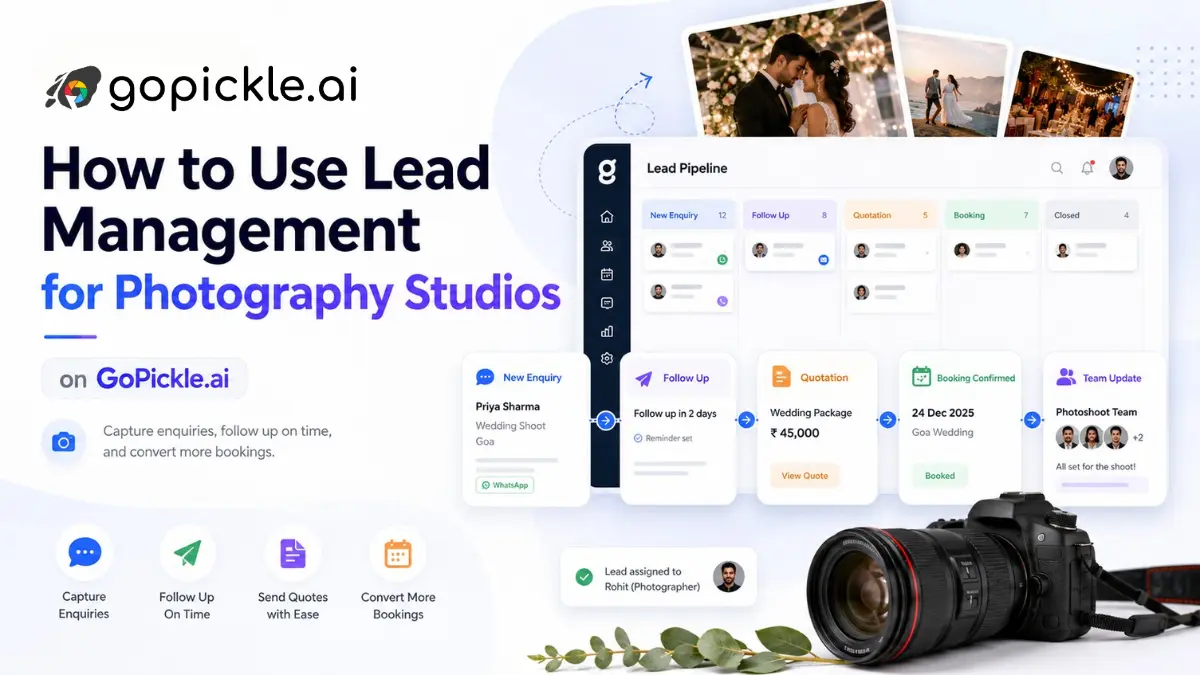
Photography leads rarely arrive with everything you need to prepare a quotation.
A bride may send a WhatsApp message asking for wedding packages. A parent may call about a birthday shoot without confirming the date. A corporate client may enquire by email but still be deciding between photography-only coverage and a photo-plus-video package.
The important first step is not collecting every detail. It is making sure the enquiry is captured and somebody knows what needs to happen next.
GoPickle's Leads & Enquiries workflow is designed around that process:
Capture enquiry → Understand requirement → Assign responsibility → Schedule follow-up → Prepare quotation → Negotiate → Convert to booking → Record the outcome
This guide explains how to manage photography leads in GoPickle, using a realistic wedding enquiry from the first contact through booking.
It also covers the parts of lead management that are easy to get wrong: repeat clients, incomplete requirements, multi-day weddings, team assignments, follow-up ownership, lost reasons and converting a lead without creating duplicate bookings.
What You Need Before Managing Leads in GoPickle
You need a GoPickle studio account and at least one enquiry to capture.
The enquiry does not need to be fully qualified.
For example, this is enough to begin:
Name: Rohan Mehta
Mobile: +91 98XXXXXX21
Source: Referral
Message: Wedding in December. Wants package details.
You may not yet know:
- the exact wedding date;
- how many functions are involved;
- the venue;
- whether video is required;
- the client's budget;
- which package they prefer.
That should not prevent the enquiry from entering your lead workflow.
GoPickle allows the requirement to be collected progressively. If the client requirement is not yet known, the lead can remain in a Requirement Pending state until your team qualifies it.
This is useful for photography studios because the first interaction is often incomplete.
Understand the Difference Between a Contact and a Lead
Before creating leads, understand one of the most important rules in GoPickle:
Contact = Person Lead = One enquiry or business opportunity
These are not the same thing.
Suppose Rohan Mehta first contacts your studio for his wedding:
Contact: Rohan Mehta
Lead 1: Wedding Photography — December 2026
Two years later, the same person enquires about a baby shoot:
Contact: Rohan Mehta
Lead 2: Baby Photography — August 2028
Rohan is still one contact, but there are two different commercial opportunities.
They should have separate:
- requirements
- event dates
- sources
- pipeline stages
- expected values
- follow-ups
- quotations
- outcomes
Do not keep reopening the old wedding lead for every future requirement. This distinction keeps both the lead pipeline and the client's history understandable.
Step 1: Add the Photography Enquiry
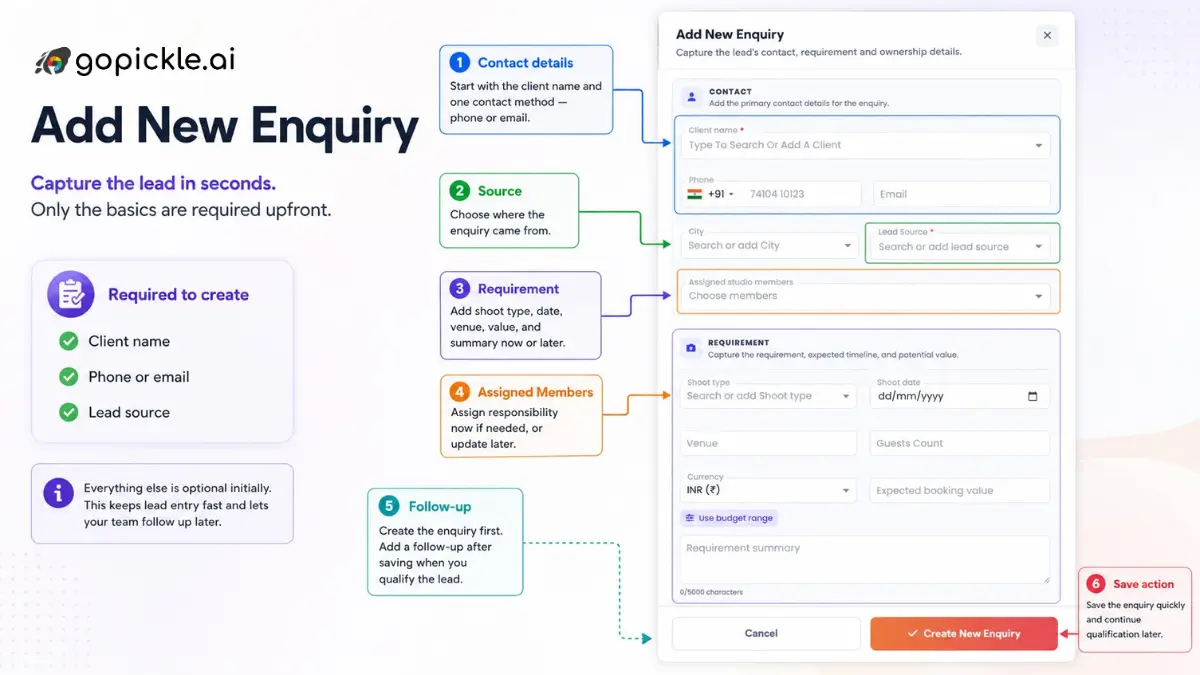
Open Leads & Enquiries and choose Add New Enquiry.
Start with the information you actually have.
A new wedding lead might look like:
Client: Rohan Mehta
Mobile: +91 98XXXXXX21
Email: rohan@example.com
Source: Referral
Requirement: Wedding Photography
Status: New Lead
If the requirement is not known, save the enquiry without inventing information.
It can appear as:
Requirement Pending
The next action may simply be:
Call the client and capture event/service details.
This is preferable to leaving the enquiry buried in WhatsApp or waiting until somebody has enough information to complete every CRM field.
To identify if it is a repeat client, type the lead name and observe the matched suggestion for contact details.
Step 2: Capture the Requirement Progressively
After contacting the client, open the lead and complete the Requirement Details.
For the wedding example, the first conversation may establish:
Service: Wedding Photography & Videography
Location: Bengaluru
Event 1: 12 December — Haldi
Event 2: 13 December — Sangeet
Event 3: 14 December — Wedding
Services discussed: - Traditional Photography - Candid Photography - Traditional Video - Cinematic Video
Estimated budget: ₹2,00,000–₹2,50,000
Expected Value: ₹2,20,000
You may later add:
- venue;
- guest count;
- package preference;
- deliverables;
- additional functions;
- notes;
- client-specific requirements.
The goal is not to force your sales team through a long form during the first call.
The requirement should become more detailed as the enquiry progresses.
Why structured requirements matter
Consider two lead notes:
Wedding enquiry. Wants prices.
and:
Wedding — 12 to 14 December Bengaluru Haldi + Sangeet + Wedding Candid + Traditional + Cinematic Video Budget around ₹2.25 lakh Needs quotation by Friday
The second gives another studio member enough context to continue the conversation without starting again.
That becomes especially important when the enquiry moves between a sales coordinator, photographer, studio owner and accounts team.
Step 3: Keep Multiple Wedding Events Under the Same Lead
Wedding photography frequently involves multiple functions.
For example:
Rohan & Priya Wedding
├── Haldi ├── Sangeet ├── Wedding └── Reception
If all four functions are being sold as one commercial package, they normally belong to the same lead.
Do not create:
Lead 1: Haldi
Lead 2: Sangeet
Lead 3: Wedding
Lead 4: Reception
unless they are genuinely separate commercial opportunities.
Instead, the lead represents the overall opportunity and the individual functions sit inside its requirement.
This becomes valuable during conversion because one wedding deal can become one booking containing several events.
Step 4: Move the Enquiry Through Your Photography Lead Workflow
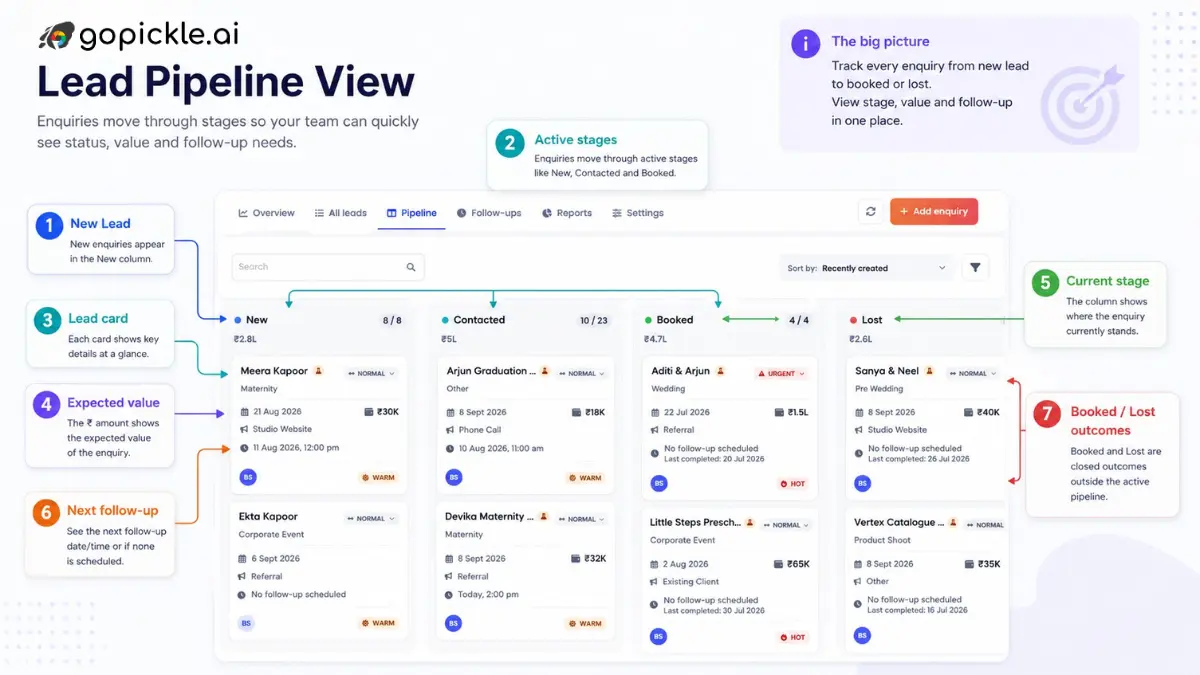
Every active lead should have a current lifecycle stage.
A photography studio might use:
New Lead ↓ Requirement Pending ↓ Contacted ↓ Requirement Collected ↓ Quotation Sent ↓ Follow-up Needed ↓ Negotiation ↓ Token Pending ↓ Booked / Confirmed
Other outcomes can branch away from the active pipeline:
Lost | Future Requirement | Invalid / Spam
Your studio can customize lifecycle stages to better reflect its sales process.
For example, one studio may prefer:
New | Contacted | Quote Sent | Booked | Lost
A larger wedding studio might use:
New Enquiry | Qualified | Consultation | Scheduled | Proposal Sent | Negotiation | Token Pending | Confirmed | Lost
Do not turn every activity into a pipeline stage
A stage should answer:
Where is this opportunity in the sales process?
A follow-up answers:
What do we need to do next?
For example:
Stage: Quotation Sent Next follow-up: Call client Friday at 4 PM
That is much cleaner than creating stages such as:
Quote Sent Call Pending Called Once WhatsApp Sent Waiting for Reply Call Again
Those are activities, not meaningful pipeline states.
Step 5: Assign the People Handling the Lead
GoPickle supports multiple Assigned Members on a lead.
For example:
Assigned Members: - Meera - Arjun - Kiran
One assigned person can optionally be marked as the Lead Manager.
Lead Manager: Meera
These concepts serve different purposes.
Assigned Members
These are the studio members involved with the enquiry.
For example:
- Meera handles client communication.
- Arjun discusses cinematography requirements.
- Kiran reviews the commercial package.
Lead Manager
The Lead Manager is the person primarily responsible for making sure the opportunity progresses.
It is an accountability marker, not ownership of the client.
Avoid thinking of this field as a permission or exclusive owner.
A lead can still have several people working on it.
Follow-up assignee
A follow-up has its own assignee.
This is separate from both Assigned Members and Lead Manager.
For example:
Lead Manager: Meera Assigned Members: Meera, Arjun Follow-up: Discuss drone coverage Assigned to: Arjun
Meera remains responsible for the overall opportunity, while Arjun owns one specific action.
This distinction becomes useful as a studio team grows.
Step 6: Set the Next Follow-Up
A well-organized lead should make the next action obvious.
After each meaningful client interaction, decide what needs to happen next and schedule it.
For example:
Follow-up Type: WhatsApp
Due: 16 December, 11:00 AM
Assigned to: Meera
Purpose: Confirm preferred package before preparing final quotation.
GoPickle's lead workflow can accommodate different follow-up types, including:
- Call
- Meeting
- Quotation
- Payment
- Requirement clarification
- Custom
The follow-up centre can then separate actions into useful buckets such as:
Due Today | Overdue | Upcoming | Completed
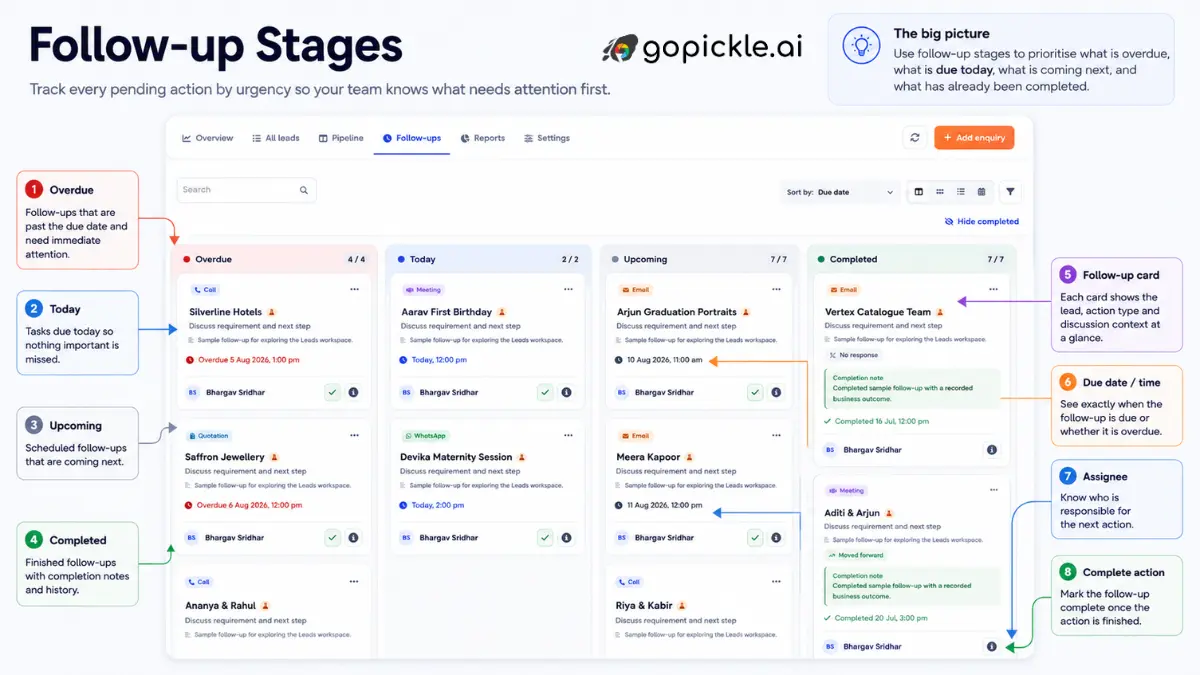
This makes lead management more actionable than simply showing a large list of enquiries.
Why the due date matters
Compare these two entries:
Follow up with Rohan.
and:
Call Rohan Thursday, 4:00 PM Confirm whether the family wants cinematic video. Assigned to Meera.
The second can actually be acted on.
Step 7: Use Notes for Client Context
Not every useful detail belongs in a structured field.
Add notes when the information will help somebody understand the client or prepare the next conversation.
Example:
Client prefers candid-heavy coverage. Parents want traditional photo and video coverage for every function. They are comparing Standard and Premium packages. Asked whether drone footage can be included. Family will decide after speaking on Sunday.
Good notes reduce dependence on memory and private conversations.
Avoid vague entries such as:
Spoke to client.
Record the information that changes what your studio should do next.
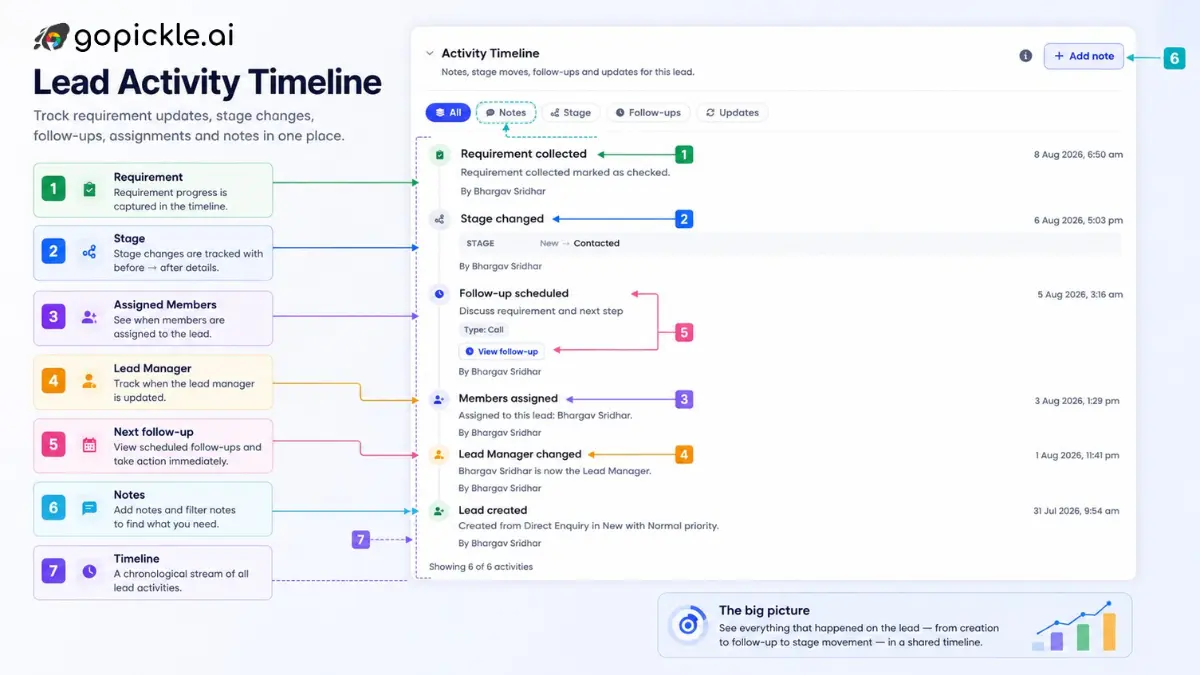
Step 8: Use the Timeline to Understand the Entire Lead Story
The lead timeline should answer:
What has happened with this enquiry so far?
It can record business-level activity such as:
Lead created Requirement updated Meera assigned as Lead Manager Follow-up scheduled Stage changed: Requirement Collected → Quotation Sent Quotation created Follow-up completed Stage changed: Quotation Sent → Negotiation Booking created
For a multi-member studio, this provides context that would otherwise live across individual WhatsApp chats or personal notes.
The timeline is not intended to record every click.
What matters is the commercial history of the opportunity.
Step 9: Prepare the Quotation From a Qualified Lead
A quotation should normally be created after the lead contains enough information to price the requirement meaningfully.
Before creating the quote, confirm:
- Client Contact
- Services & Requirements
- Relevant Event details or Package information
- Quotation Items
- Amount
For our example:
Client: Rohan Mehta Requirement: Three-day wedding coverage Services: Traditional Photography Candid Photography Traditional Video Cinematic Film Proposed Price: ₹2,25,000
Once the quotation is sent, move the lead into the appropriate stage.
For example:
Stage: Quotation Sent
But do not stop there.
A quotation should almost always have a next action.
Next follow-up: Thursday, 4 PM Purpose: Discuss package questions and decision.
That small discipline prevents quotations from becoming forgotten PDFs sitting in a client's inbox.
Step 10: Manage Negotiation Without Losing the Original Context
Clients frequently change requirements while discussing the quote.
For example:
Initial request: Photo + cinematic video for 3 functions After discussion: Photo for all functions Cinematic video only for Wedding + Reception
Update the lead requirement while the opportunity is still being negotiated.
The lead should represent the current sales requirement before confirmation.
Useful changes to capture include:
- additional function;
- removed service;
- revised event date;
- changed venue;
- revised budget;
- different package;
- added deliverable;
- expected value adjustment.
Also add a note explaining significant decisions so another team member can understand why the requirement changed.
Step 11: Use Lost Outcomes Properly
Not every lead should stay open indefinitely.
If the client declines, mark the lead as Lost and record a reason.
Examples include:
- Price too high
- Client chose another photographer
- Date unavailable
- No response
- Budget too low
- Requirement mismatch
- Event postponed
- Event cancelled
- Location issue
- Package mismatch
- Invalid enquiry
- Spam
- Other
For example:
Status: Lost
Reason: Client chose another photographer
Note: Client selected a smaller studio offering a lower package price.
Why does this matter?
Because: Lost tells you almost nothing. But:
18 leads lost because date unavailable
or:
Most premium wedding leads are being lost after quotation because of price can eventually help the studio make better commercial decisions.
Do not delete genuine lost opportunities simply to keep the pipeline clean. Close them with the correct outcome.
Step 12: Separate Invalid Leads From Real Lost Opportunities
A spam message is not the same as a genuine wedding enquiry that chose another studio.
Where your lifecycle supports it, close obvious:
- fake enquiries;
- spam;
- irrelevant requests;
- duplicate submissions;
as invalid rather than treating them like normal lost sales.
This protects the quality of future lead reports.
If 30 spam enquiries are counted as genuine lost leads, your conversion rate becomes misleading.
Step 13: Convert the Lead Into a Booking
When the client confirms the work, the lead can move into the booking workflow.
Before conversion, confirm the booking-critical information.
For example:
Client: Rohan Mehta Project: Rohan & Priya Wedding Events: Haldi — 12 December Sangeet — 13 December Wedding — 14 December Location: Bengaluru Agreed Value: ₹2,10,000
If this is one commercial deal, it should normally become:
1 Lead ↓ 1 Booking ↓ Multiple Booking Events
not:
1 Lead ↓ 3 separate bookings
for Haldi, Sangeet and Wedding.
The individual functions belong inside the booking.
You can learn more about managing the confirmed work in GoPickle Booking Management.
What Happens to the Lead After Conversion?
After conversion, the role of the lead changes.
Before booking:
Lead = current sales opportunity
After booking:
Lead = sales history
Booking = operational source of truth
This distinction avoids having two editable versions of the confirmed project.
Suppose the wedding moves from 14 December to 16 December after booking.
That should be updated in the booking, because the booking now represents the operational commitment.
Similarly, confirmed changes to:
- event dates;
- venue;
- package;
- services;
- commercial amount;
belong in the booking after conversion.
The lead can continue to preserve sales context such as:
- source;
- notes;
- tags;
- original timeline;
- quotation history;
- conversion history.
Review the Lead From the Contact Profile
The lead list is opportunity-based. The contact profile is person-based. That means a repeat client can eventually have a history such as:
Rohan Mehta
2024 Wedding Photography Booked
2025 Maternity Shoot Booked
2026 Baby Photography Quotation Sent
This gives the studio both perspectives:
Lead view: What is happening with this opportunity?
Contact view: What is our overall history with this person?
That distinction is useful for repeat-business photography studios.
Use Lead Source Consistently
Every lead should have a meaningful source wherever possible.
Examples can include:
- Direct Enquiry
- Referral
- Existing Client
- Walk-in
- Website
- Meta Ads
- Google Ads
- other studio-defined sources.
Source data becomes useful only when it is captured consistently.
For example:
Lead A Source: Referral
Expected Value: ₹2,20,000
Booked
Lead B Source: Meta Ads
Expected Value: ₹1,20,000
Lost
Lead C Source: Client Album
Expected Value: ₹1,80,000
Booked
Lead D Source: Meta Ads
Expected Value: ₹5,20,000
Lost
Over time, the useful question is not simply:
Which source generates the most enquiries?
It is: Meta Ads
Which source produces leads that actually convert and generate valuable bookings?
This is one reason not to leave the source field blank or use inconsistent labels for the same channel.
How to Prioritize Leads That Need Attention
Once your studio has more than a handful of enquiries, avoid processing them simply from newest to oldest.
Useful signals include:
- overdue follow-up;
- follow-up due today;
- no action since creation;
- quotation sent but no next follow-up;
- high expected value;
- upcoming event date;
- long time in the same pipeline stage.
For example:
Lead A ₹3,50,000 expected value Quote sent 5 days ago No follow-up scheduled Lead B ₹80,000 expected value New today Follow-up tomorrow
Lead A probably deserves immediate attention even though Lead B is newer.
A lead-management workflow should help the studio decide what requires action, not merely store enquiries.
Common GoPickle Lead Management Mistakes
1. Waiting for complete information before adding the lead
Capture the enquiry first. Requirements can be filled progressively. Otherwise, new enquiries remain scattered across chats, calls and notebooks.
2. Treating the contact and lead as the same record
A repeat client can create several opportunities. Keep the person as the contact and create separate leads for separate requirements.
3. Creating multiple leads for functions sold together
Haldi, Sangeet and Wedding can remain functions within one wedding opportunity when they are sold together.
4. Creating too many pipeline stages
Use stages for genuine sales states. Use follow-ups for tasks.
5. Assigning a Lead Manager but not scheduling the next action
Accountability does not replace a due task.
Ask both:
Who is responsible?
and:
What happens next, and when?
6. Sending the quote and waiting
Every sent quotation should have a next follow-up unless the client has explicitly asked you not to contact them yet.
7. Keeping lost leads open forever
Close genuine lost enquiries and record the reason. Otherwise, your active pipeline becomes unreliable.
8. Deleting lost enquiries
A lost lead contains useful sales information. Close it instead of deleting meaningful history.
9. Using one old lead for repeat business
A new requirement should normally become a new lead under the existing contact.
10. Editing the lead instead of the booking after conversion
Once confirmed, operational changes belong in the booking.
What a Properly Managed Photography Lead Should Tell You
Open any active lead and you should be able to answer these questions without searching through personal chats:
Who is enquiring? Is this a new or existing contact? What are they asking for? Which events or functions are involved? What dates and locations are known? Which services do they need? What is the expected value? Where did the enquiry come from? Which pipeline stage is it in? Which studio members are involved? Who is the Lead Manager? What happened previously? What is the next follow-up? Who is responsible for that follow-up? Has a quotation been created? Has the lead been negotiated? Was it booked, lost, postponed or invalid? If booked, which booking did it create?
If those answers are visible, the lead is no longer dependent on one person's memory.
That is the main purpose of the GoPickle CRM and photography lead workflow: turn a scattered enquiry into a structured sequence of decisions and actions until it reaches a clear outcome.
For a broader explanation of the module, see Photography Lead Management Software.
Once a lead is confirmed, continue the workflow with Booking Management.
To compare available GoPickle plans, visit Pricing.
If you want to see the workflow using a real studio enquiry, book a GoPickle demo.