How to Share Large Photo Albums With Clients Without Confusion
Learn how photographers can share large photo albums through client galleries, download options, and branded delivery without confusing clients.

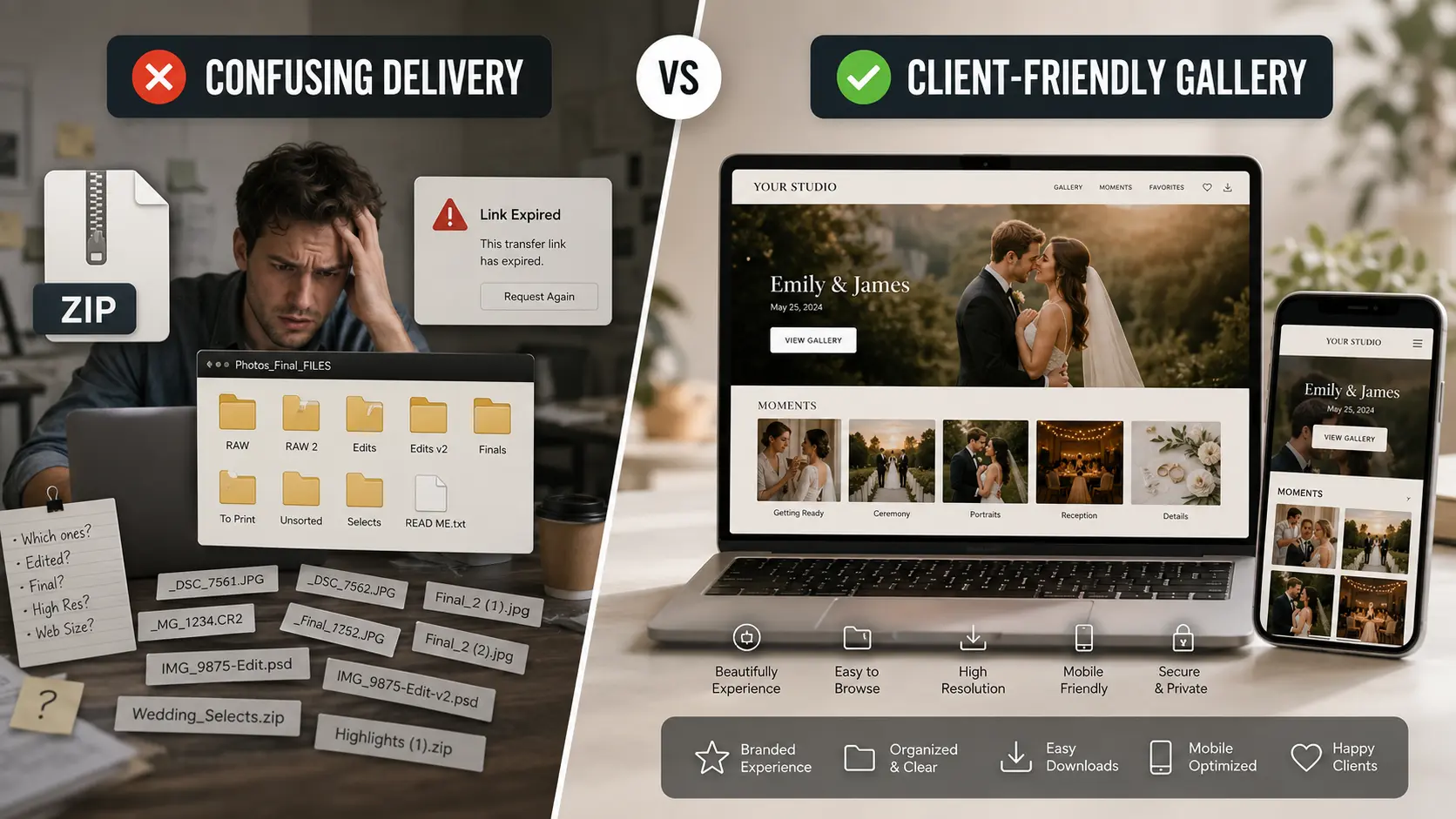
Photographers can share large photo albums more smoothly when delivery is built around a client gallery instead of random ZIP files, scattered folders, or expiring transfer links.
ZIP downloads still have a place, especially for bulk delivery, but they often create confusion when clients are trying to preview, browse, share with family, or understand which version they should use.
A better photo delivery workflow gives clients one clear gallery link, organized moments, simple download choices, and a viewing experience that feels professional on every device.
Why This Matters for Photographers
Large photo delivery is one of the last parts of the client journey, which means it strongly affects how professional the whole experience feels.
Compressed images, confusing folders, missing downloads, repeat “send again” messages, expiring transfer links, and oversized ZIP files that turn photo delivery into unpaid admin work. That is why delivery is not just a storage problem.
It is a client experience problem.
If your photographs look premium but the handoff feels messy, the final impression of your service becomes weaker. We position our client galleries around exactly this idea: “Your photos already look premium. Your delivery should too.”
ZIP Links Still Work, But They Often Create Friction
There is nothing inherently wrong with a ZIP file.
For photographers, ZIP delivery can still be useful when:
- The client wants one full downloadable package
- You are sending archives or backup copies
- The delivery is purely file-based
- The client is comfortable with large downloads
The problem is that most clients are not thinking like photographers.
They are not asking for archive logic.
They are asking:
- Where do I start?
- Which file should I open?
- Why is the link expired?
- Why do the photos look blurry on WhatsApp?
- Why is the file too large?
- Can you resend the gallery again?
Galleries Feel Easier Because They Match How Clients Actually Browse
A client gallery for photographers works better because clients do not need to think in folders first.
They think in moments.
GoPickle describes client galleries as a polished viewing experience where clients can open, explore, download, and share from any device, instead of dealing with a pile of Drive links.
That difference matters because galleries let you structure delivery in a way clients understand:
- Ceremony
- Reception
- Portraits
- Candid moments
- Highlights
The site also emphasizes that galleries can be organized by moments and remain smooth on mobile, tablet, and desktop.
Resolution Options Need to Be Clear
One of the biggest causes of confusion in large album delivery is not only the size of the files. It is the lack of clarity around what the client is downloading.
Clients often do not know the difference between:
- Preview images
- Watermarked previews
- Individual downloads
- Full gallery download
- Print-ready resolution
- Mobile/social sharing versions
GoPickle’s Client Galleries gives photographer control over download permissions, watermark previews, one-click downloads, and whether clients can preview, download individually, or access full galleries.
That is the important operational point.
The better approach is not just “give them files.”
It is “let them understand what they are receiving.”
Client-Friendly Download Flow Matters More Than People Think
A common mistake photographers make is assuming download access alone is enough. It usually is not.
A client-friendly flow should feel like this:
Preview the gallery
↓
Browse by moment
↓
Mark favorites if needed
↓
Download individual photos if needed
↓
Download the full gallery only when needed
↓
Share the same gallery link with family
That kind of flow reduces confusion because it allows the client to behave naturally before downloading everything at once.
GoPickle’s gallery flow supports this style of experience by offering branded gallery browsing, favorites, one-click downloads, family sharing, and organized collections in one place.
What Most Photographers Get Wrong
The delivery mistake is usually not technical.
It is structural.
Many photographers still send:
- Multiple Drive folders
- Expiring transfer links
- “final_v2_final_reception.zip”
- Mixed-resolution files without explanation
- Separate links for different parts of the event
- Downloads that work poorly on phones
The result is more questions, more resends, and more manual support.
Better Workflow for Sharing Large Photo Albums
A practical how to send wedding photos to clients workflow should look like this:
Curate the final photos
↓
Organize them by moment or event section
↓
Publish them into one branded gallery
↓
Control whether previews are watermarked
↓
Choose download permissions clearly
↓
Share one clean gallery link
↓
Let clients browse, favorite, and download easily
↓
Use ZIP delivery only as an optional bulk download, not the main experience
This is very close to how GoPickle presents Client Galleries: one beautiful gallery instead of dozens of files, with private access, watermark protection, organized moments, favorites, mobile-friendly viewing, and download controls.
Where GoPickle Helps
GoPickle’s Client Galleries are built specifically for photographers who want final delivery to feel calm, branded, and easy to use.
According to the Client Galleries page, photographers can deliver weddings, events, and shoots through branded galleries that feel professional on every screen, while controlling downloads, watermarking, private access, favorites, shortlisting, and mobile-friendly viewing.
The broader GoPickle site also positions client galleries as part of a connected workflow alongside bookings, invoices, team management, dashboard visibility, and reports. It describes GoPickle as photography business software for bookings, invoices, and client galleries, with one connected flow from enquiry to delivery.
That matters because delivery should not feel like a disconnected final step.
It should feel like part of the same professional system.
What is the best way to share large photo albums with clients?
For most photographers, the best approach is a branded online client gallery with organized sections, easy downloads, and mobile-friendly browsing. ZIP files can still be offered as an optional bulk download.
Are ZIP files bad for wedding photo delivery?
Not always. ZIP files are useful for bulk delivery, but they often create confusion when clients want to preview, share, or find specific moments quickly.
Why do clients get confused when receiving large photo albums?
They often face expiring links, unclear folders, oversized files, poor mobile experience, or no guidance on resolution and download options. GoPickle’s Client Galleries page lists these as common handoff problems photographers face today.
What should a client gallery include?
A strong client gallery should include clear organization, mobile-friendly viewing, download controls, watermark preview options, favorites, secure access, and easy sharing for family members.