Photography Booking Software for Studios: What to Look for in 2026
Learn what photography booking software should manage beyond a calendar, including clients, multi-event shoots, services, crew, payments and delivery for professional photography studios.

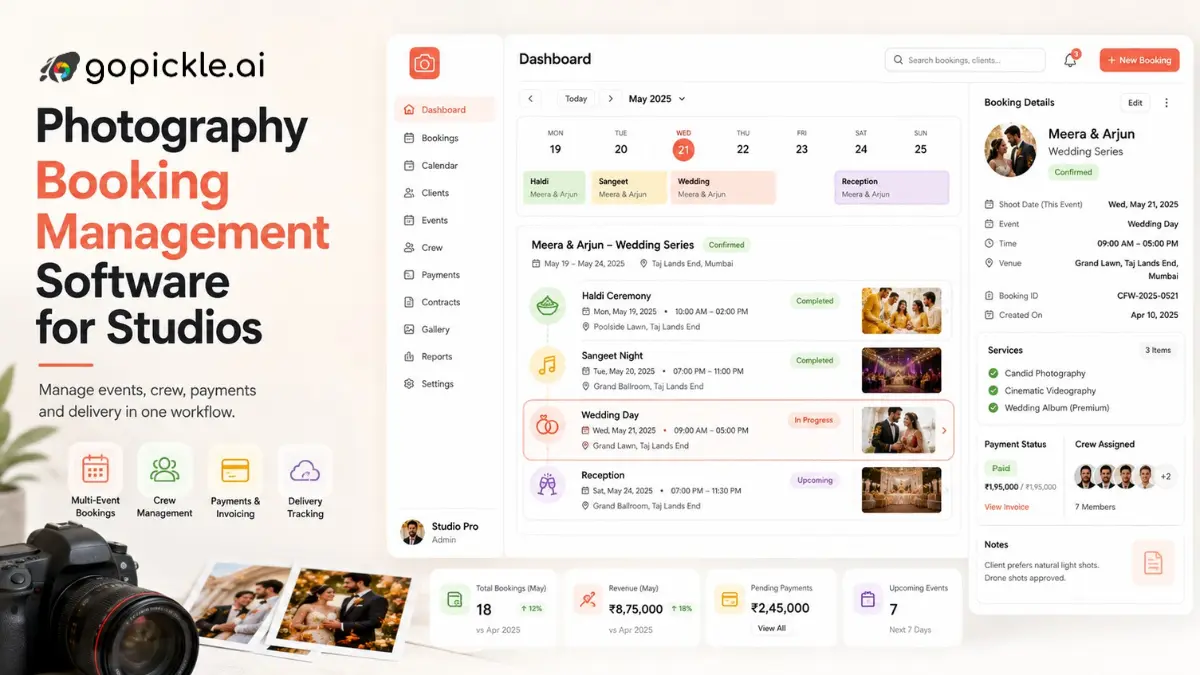
A confirmed photography booking contains much more than a client name and a date. There may be several events, different venues, services promised in a quotation, crew assignments, deliverables, an advance payment and a balance that will not be collected until later.
That is why photography booking software should not be judged only by how easily it puts a shoot on a calendar. For a working photographer or studio, the real value is having one reliable record of what was booked, what was promised, who is involved and what still needs to happen.
A simple scheduling tool may be enough for a portrait photographer handling individual sessions. A wedding or event studio managing several simultaneous projects needs considerably more from its photography booking system.
Photography Booking Software Is Not Just Photographer Scheduling Software
Scheduling answers an important question: when is the shoot?
Booking management answers a much wider set of questions.
Who is the client? Which services did they approve? Where is each event? Who is assigned? What deliverables were promised? How much has been paid? What is still pending?
This distinction matters because search results for photographer booking software often mix appointment schedulers with full photography studio systems. Current scheduling products are typically strongest at availability, self-booking, reminders, rescheduling and staff calendars. Those are valuable capabilities, particularly for repeatable sessions, but they do not necessarily manage the complete photography job.
For a studio, the better question is not simply “Can a client book a time?” It is “What happens to the information after the booking is confirmed?”
A Good Photography Booking System Starts Before the Booking
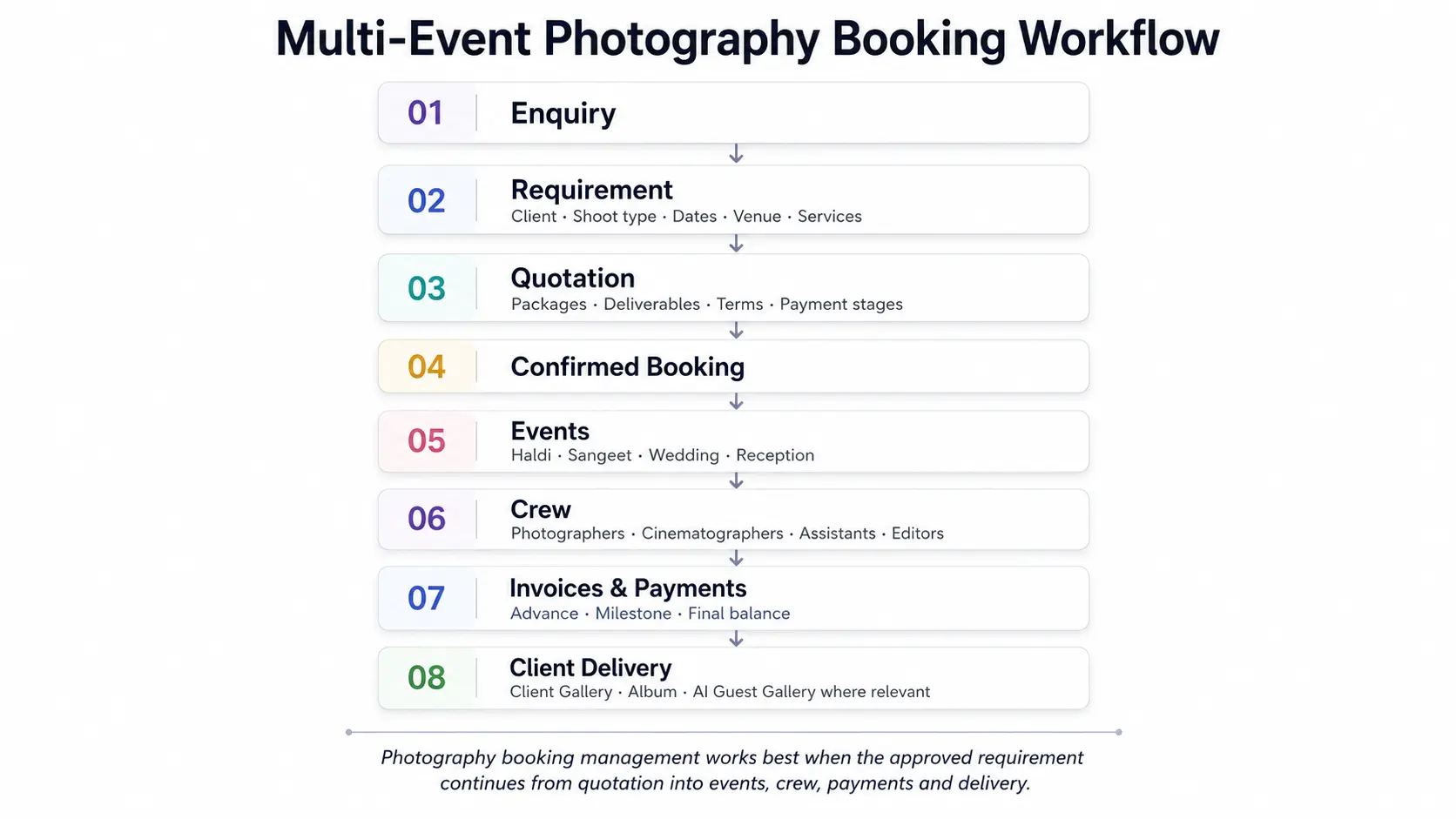
Bookings usually begin as enquiries.
A wedding couple may contact the studio through Instagram. A corporate client may send a requirement over email. A family-portrait enquiry may arrive through WhatsApp after a referral.
If the lead information already contains the shoot type, date, venue, budget, services and client requirement, recreating all of that manually after confirmation adds unnecessary work and creates room for mistakes.
GoPickle's current workflow connects Lead Management with quotations and bookings, so information collected while qualifying the enquiry can continue into the next stage rather than beginning again from an empty booking record.
The Approved Quotation Should Become the Booking Context
A photographer may send several versions of a quotation before the client commits.
Perhaps the first wedding quotation includes pre-wedding photography, two candid photographers, cinematography and an album. After discussion, the couple removes the pre-wedding shoot and adds reception coverage instead.
Once they approve the final quotation, the booking should reflect what was actually agreed.
This is where disconnected systems create problems. The sales team knows what was discussed, the final PDF sits in WhatsApp, and the photographer working the event receives an older version of the requirement.
A connected photography booking workflow keeps approved services, events, deliverables and commercial context beside the confirmed job. GoPickle currently positions quotations and bookings as consecutive stages in the same photography workflow rather than isolated documents.
Multi-Event Bookings Need More Than One Calendar Entry
The limitation of a simple calendar becomes obvious with weddings and larger events.
One booking might contain:
Haldi - Friday morning
Sangeet - Friday evening
Wedding - Saturday morning
Reception - Sunday evening
Each function can have a different venue, timing, service requirement and team.
Putting “Rahul & Priya Wedding” on a calendar from Friday to Sunday does not tell the studio enough to run the assignment.
Effective booking management for photographers should allow the booking to act as the parent record while individual events keep their own operational details. GoPickle's current multi-event workflow is designed around this model, with event details, functions, services, crew needs and deliverables remaining attached to the booking.
This matters outside weddings too. A corporate conference may need coverage across several sessions or days, while a school photography project may involve multiple batches or locations.
Services and Deliverables Should Be Visible Before Shoot Day
The date tells the team where to be. The services tell them what they are expected to produce.
A booking may include candid photography, traditional photography, cinematography, drone coverage, reels, an album and a client gallery. Those details should not depend on someone reading through an old quotation ten minutes before leaving for the venue.
The same applies to deliverables. If the client purchased a 40-page album, two reels and a curated online gallery, the booking should make those commitments easy to find later when the shoot moves into post-production.
This is one reason dedicated photography studio management software can be more useful than a generic appointment scheduler for complex studios: the booking remains an operational record, not merely reserved calendar time.
Crew Should Be Connected to the Event They Are Covering
Team coordination becomes increasingly difficult as a studio grows.
A confirmed booking may need a lead photographer, candid photographer, cinematographer, assistant and editor. Another event on the same weekend may compete for some of the same people.
A useful photography booking system should therefore make crew responsibility visible alongside the event rather than maintaining a separate spreadsheet that can drift out of sync.
GoPickle's crew management workflow supports assigning photographers, cinematographers, editors and assistants against event responsibilities, timing and booking context. Its event-photography workflow similarly keeps crew, event timing and venue information attached to the confirmed work.
For a solo photographer this may be unnecessary. For a studio running multiple teams, it becomes one of the most important reasons to move beyond basic photographer scheduling software.
Booking and Payment Status Need to Tell the Same Story
A confirmed booking does not necessarily mean it has been fully paid.
Photography businesses commonly collect an advance, one or more milestone payments and a final balance. If booking status lives in one system while payment details live in another spreadsheet, studio owners end up checking several places before answering a simple question: how much is still due?
GoPickle's invoicing workflow connects invoices with photography bookings and supports recording advances, partial payments and pending balances. Its public invoicing product also describes GST-ready invoice presentation and booking-linked payment tracking.
A studio evaluating any booking platform should test whether the financial status remains easy to understand throughout the project, particularly when several active bookings are at different payment stages.
Calendar View Still Matters
Saying that booking software should do more than scheduling does not make the calendar unimportant.
A photographer still needs a quick view of upcoming work. A useful calendar helps identify busy weekends, overlapping events and workload concentration without opening every booking individually.
For session-heavy photographers, availability and appointment scheduling may actually be the highest priority. Current photographer scheduling tools commonly focus on booking pages, reminders, availability rules, buffers and staff calendars, which makes them appropriate for repeatable portrait, headshot or mini-session workflows.
The trade-off is straightforward: appointment software is usually stronger at self-scheduling; studio booking software is usually stronger at managing what happens around the photography job.
Some businesses will need both capabilities.
What Should Photography Studios Evaluate?
The required depth depends on the way the studio works.
| Photography business | Booking capabilities that matter most |
|---|---|
| Solo portrait photographer | Calendar, client details, session information, payments |
| Mini-session photographer | Client self-booking, time slots, availability, reminders |
| Wedding photographer | Requirements, quotations, multiple events, payment stages |
| Wedding studio | Multi-event bookings, venues, crew, deliverables, financial status |
| Event photography company | Multi-day schedules, team assignments, client contacts, invoices |
| Growing studio | Shared booking visibility, roles, calendar, financials and delivery status |
The best system is not the one with every possible capability. It is the one that matches the complexity your studio actually has.
A solo photographer should not buy complicated operations software simply because a large studio needs it. Equally, a studio running six weddings in a month should not expect a shared calendar and spreadsheet to behave like a proper photography booking management system.
Booking Software Should Connect to What Happens After the Shoot
The client relationship continues after the event.
There may be a balance invoice, editing work, selections, album approval and final gallery delivery. If the booking disappears from the workflow once the event date passes, the studio loses visibility precisely when clients are waiting for their final work.
GoPickle connects bookings with invoices, Client Galleries and broader delivery workflows, while its AI Guest Galleries provide a separate event-oriented experience where guests can discover photographs using selfie matching.
That connection is not essential for every photographer. If you already have a gallery platform that works well, retaining it may be the better decision.
The important part is knowing whether your booking software ends at scheduling or continues through the operational lifecycle you actually need.
Where GoPickle Fits
GoPickle is designed for photographers whose booking problem extends beyond putting sessions on a calendar.
Its current workflow connects enquiries, quotations, multi-event bookings, invoices, payments, crew and galleries around the same photography job. A booking can carry event context, services, people, financial information and delivery into the wider studio workflow.
For studios already managing those areas comfortably with specialist tools, replacing everything may not be worthwhile. For photographers repeatedly recreating the same booking information across chats, spreadsheets, calendars and billing tools, consolidation has a clearer operational benefit.
GoPickle currently offers a free entry plan with limited bookings and invoicing, while paid plans expand booking, quotation, storage and crew allowances. Check GoPickle pricing for the current plan limits before choosing a tier.
The simplest way to evaluate any photography booking software is to bring one real project into it. If the booking becomes easier to understand and easier for the team to execute, the software is doing the job it should.