Photography Business Management Software for Professional Photographers
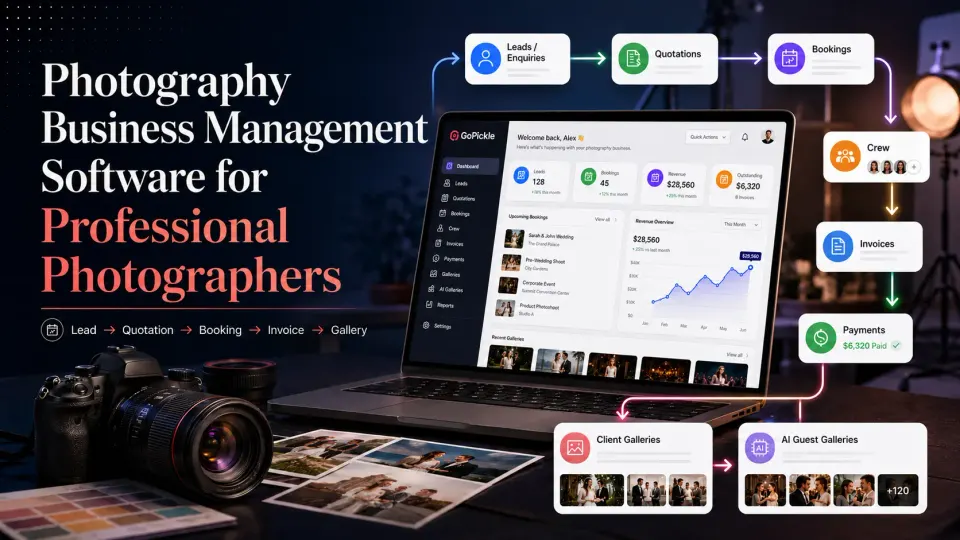
Manage photography leads, quotations, bookings, crew, invoices, payments and gallery delivery in one connected workflow with GoPickle.

Running a photography business involves much more than planning shoots and editing photographs.
An enquiry may arrive through WhatsApp. Client requirements may be recorded in a notebook. Package details may exist in a PDF quotation. Event dates sit in a calendar, advances are tracked in a spreadsheet, crew instructions are sent through messages, and final photographs are delivered using another platform.
Each tool may work individually. The problem appears when information must move from one stage to another.
Was the latest package added to the booking? Has the advance been received? Does the assigned crew know that the venue changed? Was the client promised an album, reels or additional edited photographs? Is the final balance still pending before delivery?
Photography business management software brings these connected responsibilities into one system.
GoPickle is designed specifically for professional photographers and photography studios. It connects leads, quotations, bookings, crew, invoices, payments, Client Galleries and AI Guest Galleries through one photography workflow rather than treating them as unrelated tools.
What is photography business management software?
Photography business management software helps photographers manage the work surrounding a photography assignment, from the first enquiry to final delivery.
A complete system may cover:
- Photography enquiries and follow-ups
- Client requirements
- Quotations and packages
- Confirmed bookings
- Events, services and deliverables
- Crew assignments
- Invoices and payment tracking
- Client photo delivery
- Guest photo sharing
- Business activity and pending actions
The objective is not simply to digitise each task. It is to keep the client, work, people, money and delivery connected.
For example, when a client accepts a quotation, the photographer should not have to recreate the same client, event, service and pricing information inside a booking. When an invoice is generated, it should relate to the approved work. When the gallery is ready, the studio should be able to check the booking and payment status before delivery.
This continuity separates useful photography business software from a collection of disconnected features.
Why photography studios outgrow chats and spreadsheets
WhatsApp, spreadsheets, calendars and cloud folders are useful tools. Many photographers can run a small number of assignments successfully with them.
The limitations become more visible as enquiry volume, booking complexity or team size increases.
Enquiries depend on memory
A photographer may respond to an enquiry while travelling, shooting or editing. Unless the requirement and next action are recorded, the conversation can disappear beneath newer messages.
The studio may remember the client but forget:
- The event date
- The requested package
- The stated budget
- The last discussion
- Who promised to follow up
- When the follow-up was due
Confirmed work is spread across several places
A wedding booking may include a pre-wedding shoot, Haldi, Sangeet, wedding ceremony and reception. Each event can have a different venue, reporting time, crew and service requirement.
A calendar can show the dates, but it may not contain the complete commercial and operational agreement.
Payment information becomes difficult to verify
Advances, instalments and final balances may be distributed across invoices, bank notifications, screenshots and spreadsheets.
This makes a basic question unnecessarily difficult:
How much has the client paid, and how much remains due?
Delivery is separated from the booking
The booking explains what was promised. The gallery contains what was delivered. When these records are disconnected, the studio must manually confirm whether all photographs, films, albums or selections have been completed.
Photography studio management software becomes useful when these handoffs can no longer depend on the owner’s memory.
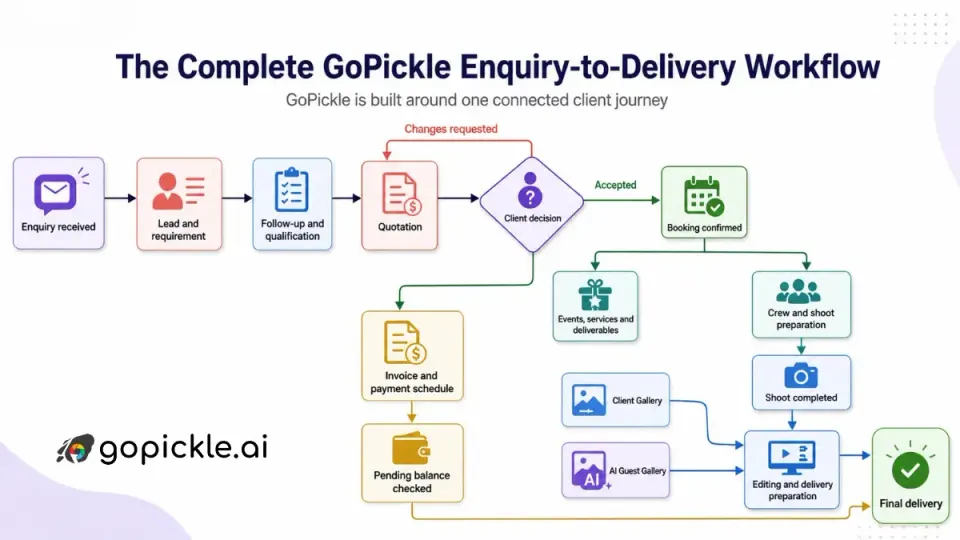
The complete GoPickle enquiry-to-delivery workflow
GoPickle is built around one connected client journey:
1. Capture the complete photography requirement
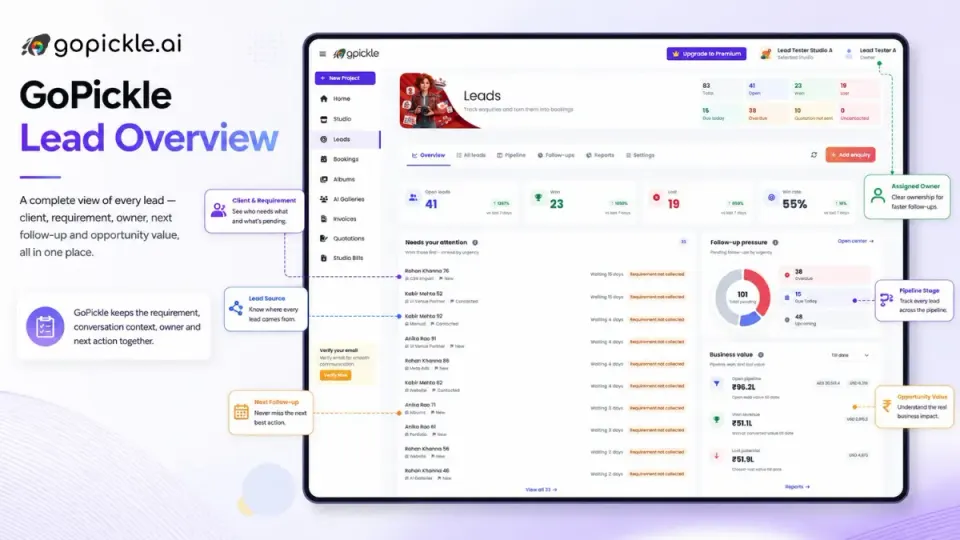
A name and phone number are not enough to manage a serious photography enquiry.
The studio may need to understand:
- Type of shoot or event
- Expected date
- Venue or location
- Required services
- Deliverables
- Budget
- Enquiry source
- Assigned team member
- Current sales stage
- Next follow-up
GoPickle’s lead management software for photographers gives each enquiry a requirement, an owner and a clear next action.
This is particularly useful when enquiries begin in WhatsApp, Instagram, phone calls, referrals or website forms. The conversation can continue in the client’s preferred channel while the business context remains organised inside GoPickle.
GoPickle also separates the client from the requirement. The same person may enquire about a wedding, later return for a maternity shoot and contact the studio again for a family event. Keeping these requirements connected helps the studio understand the complete relationship instead of treating each message as an unrelated lead.
GoPickle’s lead workflow is designed to capture photography-specific details such as shoot type, date, venue, services, budget, source and follow-up activity.
2. Turn the requirement into a professional quotation
A client should understand more than the final price.
A photography quotation may need to explain:
- Events or sessions covered
- Photography and cinematography services
- Number of crew members
- Deliverables
- Package price
- Optional additions
- Taxes and discounts
- Payment stages
- Terms and validity
GoPickle’s quotation management software helps photographers structure the offer around the actual client requirement.
This matters because clients often compare packages that are not equivalent. One quotation may include a candid photographer, cinematographer, album and highlight film, while another may offer only basic coverage. A clearly structured quotation makes these differences easier to understand.
Once the client approves the quotation, the same information can move into the booking workflow. The studio does not need to reconstruct the package from messages or manually type the entire agreement again.
That reduces the risk of:
- Using an outdated package
- Omitting an agreed deliverable
- Creating an invoice with different values
- Giving the operations team incomplete information
A quotation is therefore not only a sales document. It becomes the commercial foundation of the assignment.
3. Manage the complete booking, not only the date
A booking should serve as the studio’s reliable record of what was agreed and what must happen next.
GoPickle’s booking management software for photographers can keep the following information together:
- Client details
- Booking status
- Multiple events
- Dates and timings
- Venues
- Services
- Deliverables
- Crew requirements
- Package value
- Payment schedule
- Notes and files
- Linked quotations
- Linked invoices
- Linked galleries
This structure is especially relevant to wedding and event photographers.
A wedding booking may contain:
- Engagement
- Pre-wedding shoot
- Haldi
- Sangeet
- Wedding ceremony
- Reception
The services required for each event may be different. The Haldi may need one candid photographer and a cinematographer. The wedding ceremony may require a larger team. The reception may have another venue and reporting time.
GoPickle keeps these events under one booking while allowing each event to contain its own schedule, services, deliverables and crew requirements. The platform’s public workflow describes the booking as the central record connecting approved client details, functions, services, crew, payments and delivery.
4. Give the crew the information they need
As a photography business grows, the owner cannot remain the only person who understands every assignment.
A studio may coordinate:
- Lead photographers
- Candid photographers
- Traditional photographers
- Cinematographers
- Drone operators
- Assistants
- Editors
- Album designers
- Coordinators
GoPickle allows the studio to connect crew responsibilities to the relevant booking or event.
Instead of sending the complete plan repeatedly through calls and messages, the assigned person can receive the operational context needed for the work, such as:
- Event
- Date and reporting time
- Venue
- Assigned role
- Relevant notes
- Current status
This also creates accountability. The owner or studio manager can see which roles are assigned, which assignments are pending and where action is required.
Good crew management is not about giving every team member access to everything. Financial details, client information and gallery access should remain appropriate to each person’s role.
GoPickle’s workflow supports photographers working alone as well as studios coordinating shooters, editors and other team members.
5. Connect invoices and payments to the booking
Photography payments frequently occur in stages.
A typical wedding payment plan may include:
- Advance to reserve the date
- Instalment before the event
- Payment after the shoot
- Final balance before album or gallery delivery
GoPickle’s invoice software for photographers helps the studio create invoices and track:
- Booking value
- Invoice total
- Advance received
- Partial payments
- Due dates
- Pending balance
- Payment status
- Payment history
The important distinction is between booked revenue and collected money.
A studio may have several confirmed assignments but still have significant outstanding balances. Connecting invoices to bookings makes that financial position easier to understand.
It also improves client communication. The client can see what was booked, what has already been paid and what remains due without the photographer manually reconciling old messages and payment screenshots.
GoPickle’s published invoicing workflow includes booking-linked invoices, advance adjustment, instalments, pending-balance visibility, invoice sharing and payment reminders.
6. Manage the business from the studio or the venue
Photography businesses do not operate only from a desk.
Photographers respond to clients while travelling, check event details at venues, record payments after meetings and coordinate team members between functions.
GoPickle is available through web, iPhone and Android. Its mobile workflow includes access to leads, quotations, bookings, invoices, payments, crew, albums and galleries.
This means a photographer can use the same business context across desktop and mobile rather than maintaining separate notes on the phone.
Common mobile actions may include:
- Adding a new enquiry
- Checking the next shoot
- Reviewing venue details
- Sending a quotation
- Creating an invoice
- Recording a payment
- Confirming crew
- Sharing a gallery
- Checking a pending balance
Mobile access is most valuable when it supports genuine business actions, not merely dashboard viewing.
7. Deliver photographs through Client Galleries
The client experience does not end when the shoot is complete.
The paying client may need:
- A branded gallery
- Organised collections
- Private access
- Download controls
- Favourites
- Photo selections
- Easy sharing
- Gallery activity visibility
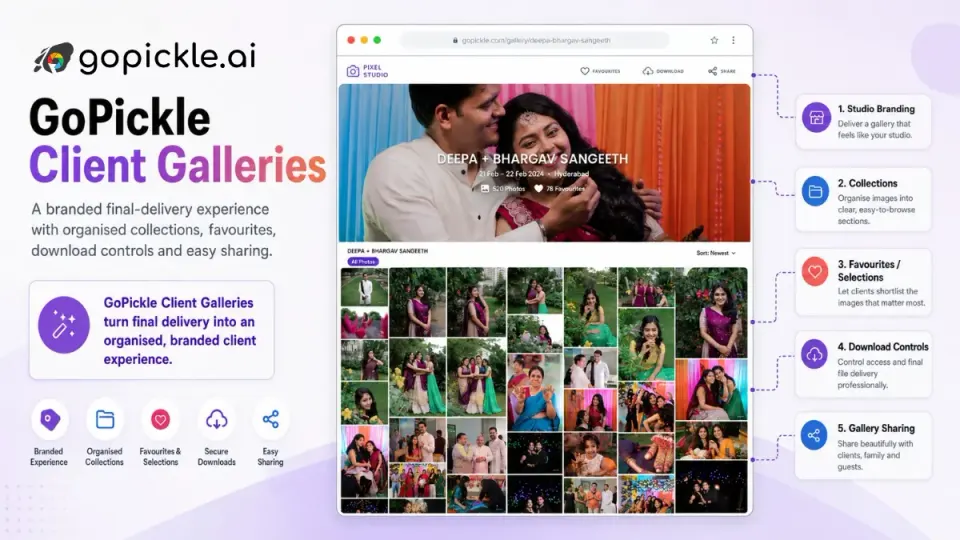
GoPickle Client Galleries provide a structured final-delivery experience connected to the wider studio workflow.
This is different from sending a general cloud-storage folder. A gallery presents the work as a completed photography product rather than as a collection of files.
Keeping delivery connected to the booking also helps the studio check:
- What was promised
- Which gallery belongs to the client
- Whether selections are complete
- Whether downloads are enabled
- Whether payment remains pending
- Whether the booking can be closed
GoPickle positions Client Galleries as curated delivery for the paying client, with collections, favourites, access controls, downloads and sharing.
8. Help event guests find their own photographs
Large weddings, conferences, celebrations and public events create a different delivery challenge.
A gallery may contain thousands of photographs, but each guest usually wants only the images in which they appear.
GoPickle AI Guest Galleries allow guests to open a link or scan a QR code, provide a selfie and view photographs matched to them.
This reduces the need for:
- Manually searching for individual guests
- Creating separate folders for each person
- Responding to repeated photo requests
- Sharing the entire event archive with everyone
Client Galleries and AI Guest Galleries serve different audiences.
| Gallery type | Primary audience | Main purpose |
|---|---|---|
| Client Gallery | Paying client, couple, family or organisation | Curated final delivery |
| AI Guest Gallery | Individual event attendees | Personal photo discovery |
The client receives the complete organised delivery. Guests receive a simpler way to discover their own event photographs.
GoPickle describes AI Guest Galleries as a photo-discovery workflow in which guests use an event link or QR code and a selfie to locate matching images.
What makes GoPickle an all-in-one photography software platform?
“All-in-one” does not mean that a platform contains many unrelated menu items. It means that information continues through the business workflow.
In GoPickle:
- A lead contains the original client requirement.
- The requirement becomes a quotation.
- The approved work moves into a booking.
- The booking contains events, services and deliverables.
- Crew members are connected to the relevant work.
- Invoices and payments remain linked to the booking.
- Client and guest galleries complete the delivery workflow.
This creates four practical forms of continuity.
- Client continuity: The studio retains the same client history from enquiry through delivery.
- Commercial continuity: The package, services, deliverables, pricing and payment stages remain attached to the assignment.
- Operational continuity: The team can see the events, responsibilities and next actions required to fulfil the booking.
- Delivery continuity: The gallery remains part of the client journey rather than becoming an unrelated final link.
This is the primary reason to consider GoPickle instead of assembling a separate lead tracker, calendar, quotation tool, invoicing system, crew spreadsheet and gallery-delivery process.
A clearer way to run the business behind photography
A professional photography studio must protect more than its images.
It must protect the original client requirement, the accepted package, event details, crew responsibilities, payment position and final delivery commitment.
GoPickle connects those responsibilities through one photography business management workflow:
Lead → Quotation → Booking → Crew → Invoice → Payment → Gallery
The platform is not intended to replace the photographer’s creative tools or personal client relationships. Its role is to keep the business context organised while the photographer and team concentrate on the work.
Photographers can review GoPickle pricing, start with a free account or book a personal demonstration using one real studio booking.
Frequently asked questions
What is photography business management software?
Photography business management software helps photographers organise enquiries, clients, quotations, bookings, events, crew, invoices, payments and photo delivery. It connects the commercial and operational stages surrounding the shoot.
Is GoPickle only for wedding photographers?
No. GoPickle is designed for solo photographers, wedding studios, portrait photographers, event photographers and growing photography teams. The required workflow may differ according to the type and complexity of work.
Can GoPickle manage multiple events under one booking?
GoPickle is designed to support photography bookings containing multiple events, dates, venues, services, deliverables and crew requirements. This is particularly useful for weddings and multi-day events.
What is the difference between Client Galleries and AI Guest Galleries?
Client Galleries are intended for curated delivery to the paying client. AI Guest Galleries allow individual event guests to use a selfie to discover photographs in which they appear.
Does GoPickle work on mobile?
Yes. GoPickle provides mobile access through iPhone and Android alongside its web platform. Mobile workflows include leads, quotations, bookings, invoices, payments, crew and galleries.
Can photographers start using GoPickle for free?
GoPickle currently offers a free Viewfinder plan. Current limits and paid-plan details are available on the pricing page.