Photography Client Onboarding Workflow: From Enquiry to Shoot Day
Build a photography client onboarding workflow from first enquiry to shoot day, covering leads, quotations, booking details, payments, planning, crew and final checks.

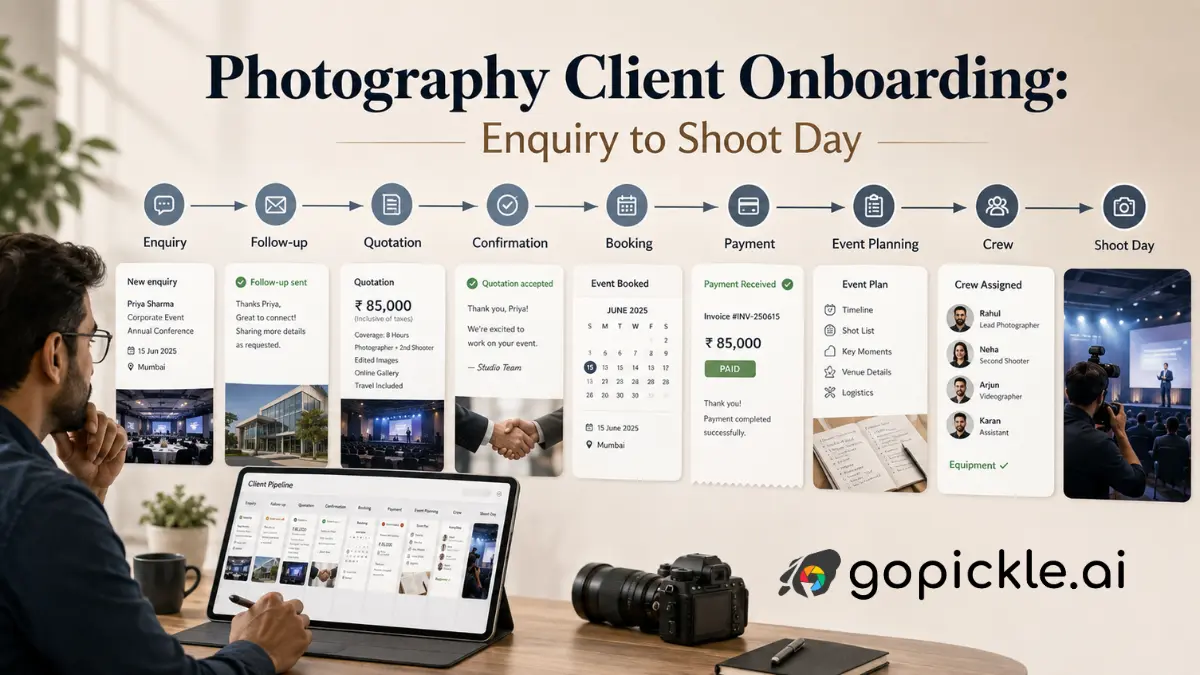
A photography client does not become operationally ready the moment they say, “We would like to book you.” By that point, the studio may already have exchanged several messages, discussed dates, suggested packages, revised the price and collected pieces of information that now need to follow the client into the confirmed job.
That is why photography client onboarding should begin with the enquiry rather than the welcome email sent after booking.
For a professional studio, the real workflow is closer to this:
Enquiry → Requirement → Follow-up → Quotation → Confirmation → Terms & Payment → Booking → Event Planning → Crew Preparation → Final Check → Shoot Day
The quality of that handoff matters. If the salesperson understands the job but the photographer does not, or the final package lives in a quotation while the crew is working from an older WhatsApp message, the studio technically has a booking but does not yet have a reliable plan.
Capture the Enquiry Before the Conversation Gets Lost
Photography enquiries rarely arrive in one predictable place. Someone may contact the studio through Instagram, WhatsApp, a website form, telephone or referral while the team is photographing another event. The first objective is not to collect every detail immediately. It is to make sure the opportunity enters a system where somebody can see it and take responsibility for the next action.
At minimum, record the prospective client, enquiry source, type of photography required, known date or date range, location if available, budget context and the next follow-up. For wedding enquiries, the initial requirement may later expand into Haldi, Sangeet, ceremony and reception coverage. A commercial enquiry may begin with little more than a rough production brief.
GoPickle’s Lead Management Software for Photographers is designed around this stage. Studios can keep the client requirement, source, ownership and follow-up context together and move serious opportunities towards quotation and booking instead of leaving the conversation dependent on someone remembering to reopen a chat.
The important distinction is that an enquiry is still an opportunity. Do not create the operational booking before you know enough to understand what the client is actually considering.
Qualify the Requirement Before Building the Quotation
The next part of the photographer client process is understanding the assignment well enough to quote responsibly.
For a wedding, that means identifying the events, dates, approximate timings, locations, photography or cinematography requirements, expected crew level and major deliverables. A portrait photographer may need session duration, location and output requirements. A commercial studio may need usage, production scale, retouching expectations and deadlines before a meaningful price can be prepared.
Not every detail has to be final. The objective is to separate what is known, what still needs confirmation and what materially affects the price.
This is also where structured follow-up matters. A lead who says, “I need to check with my family and confirm the reception venue tomorrow” has given the studio a next action. That should become a scheduled follow-up rather than another conversation the photographer hopes to remember.
Turn the Requirement Into a Clear Photography Quotation
Once the scope is understood, the quotation should make it easy for the client to understand what they are buying.
Instead of sending only a total price, show the relevant events, coverage, package, services, deliverables, add-ons, pricing and commercial terms. This is particularly important for multi-day weddings and larger assignments because two quotations with similar totals can contain very different amounts of coverage, crew and final output.
GoPickle’s Photography Quotation and Proposal Software allows photographers to create client-facing proposals containing portfolio work, event scope, packages, add-ons, pricing and terms, then track whether the quotation has been sent, viewed, revised or approved. Approved quotation information can continue into the booking rather than being reconstructed manually.
That continuity matters more than the document itself. The version the client approved should become the basis of the job the studio prepares.
Confirmation Should Trigger Terms, Payment and the Booking Record
A client agreeing to the quotation does not automatically mean the studio should treat every pre-shoot requirement as complete.
Apply whatever contract, agreement, cancellation, rescheduling and usage terms are appropriate for your photography business and jurisdiction. If your studio requires an advance or retainer before protecting the date, make that requirement explicit. GoPickle should not be treated as a substitute for legal advice or a photography contract where one is required.
Financially, the studio should be able to distinguish the total booking value, advance received, later instalments and outstanding balance. GoPickle’s Invoice Software for Photographers supports professional invoices, advances, balances, payment links and payment tracking, helping the studio see what has been collected and what still needs attention.
Once the confirmation conditions are met, the job should move from a sales opportunity into an operational booking.
Make the Booking the Single Operational Record
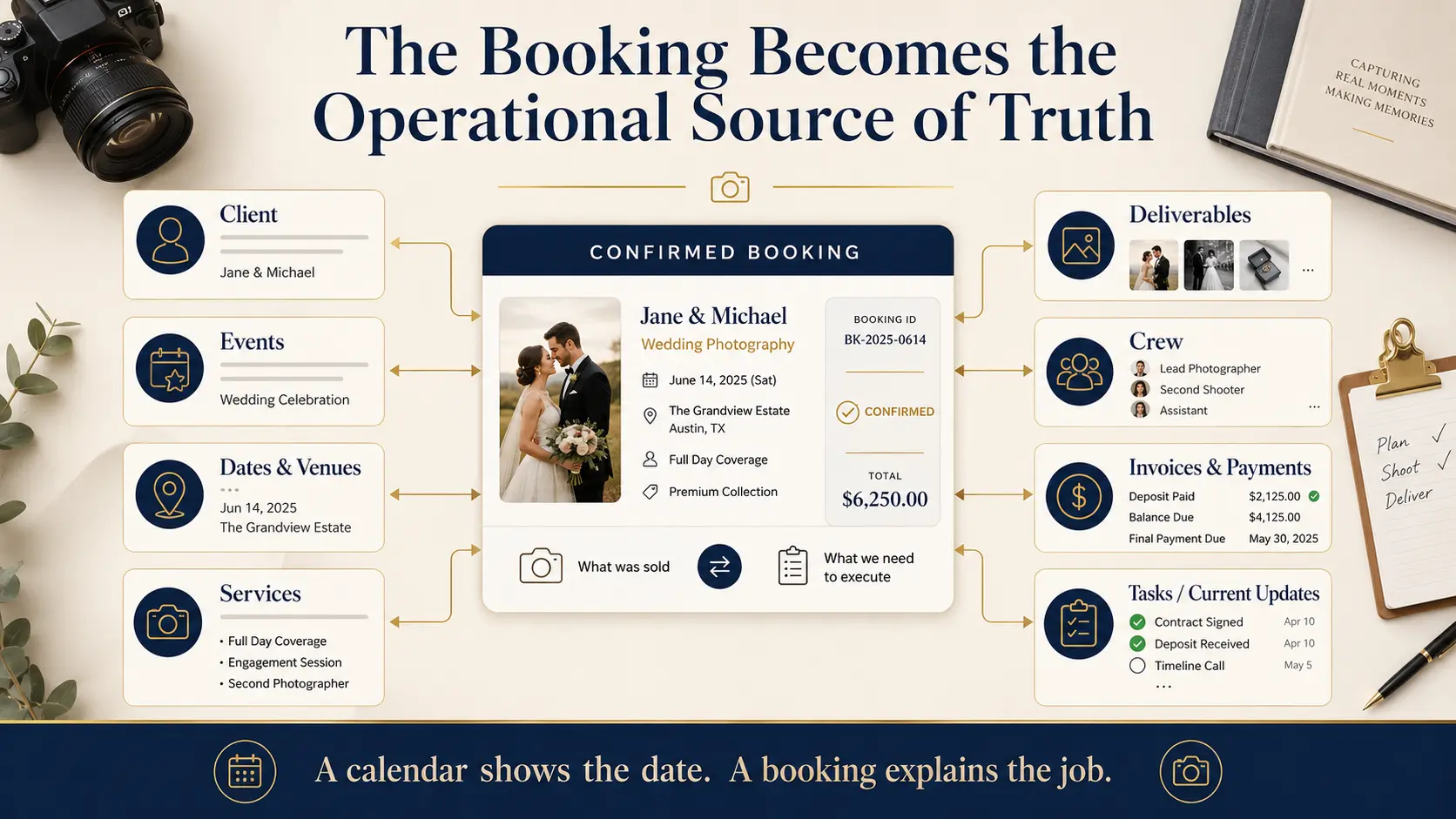
This is the point where photography booking workflow becomes more than blocking a date in a calendar.
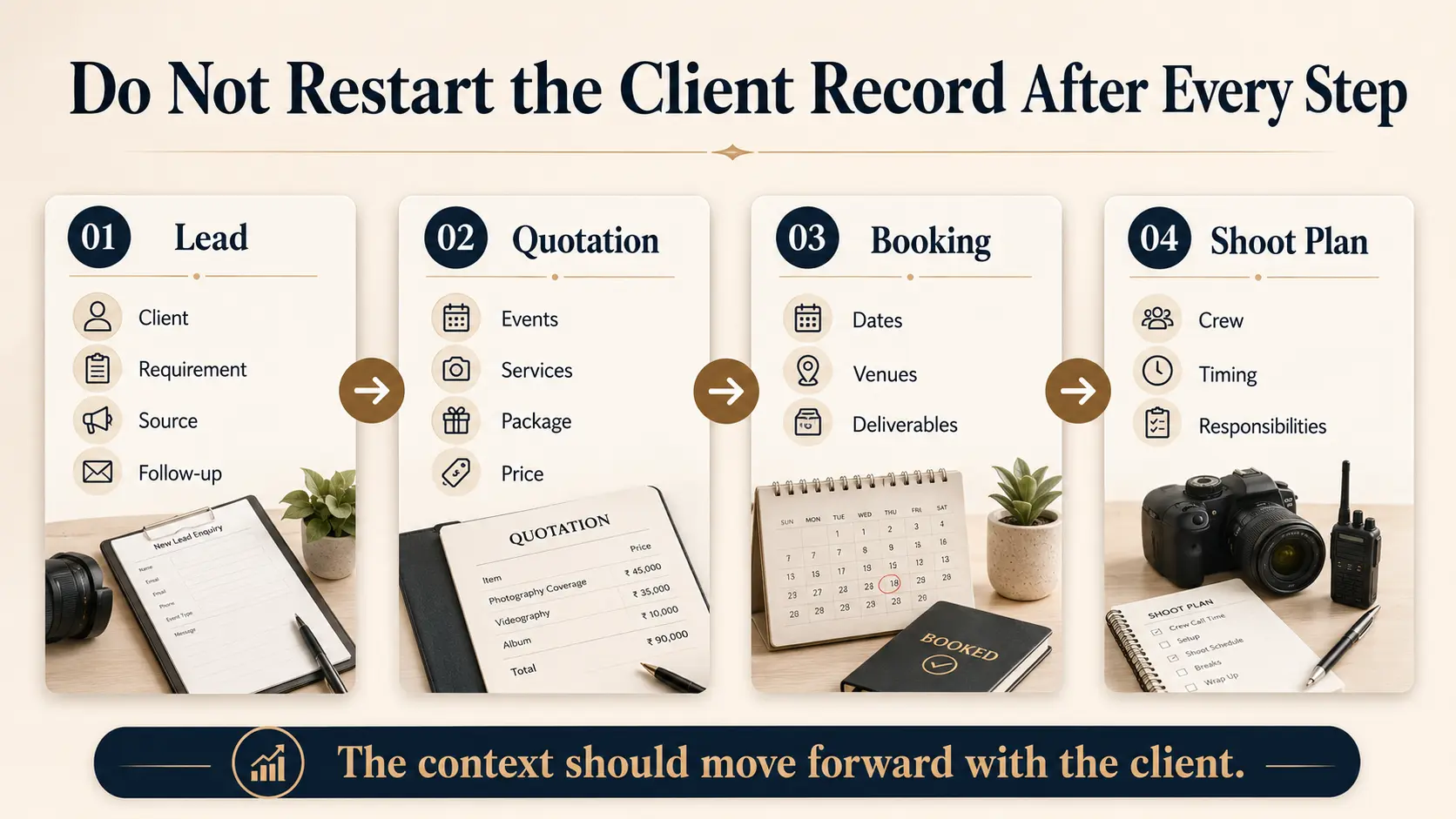
A confirmed booking should carry forward the client, approved services, events, dates, venues, deliverables, pricing and payment context. From there, the studio can continue adding operational details as the shoot approaches.
GoPickle’s Photography Booking Management Software is built around that model. One booking can contain multiple events with their own dates, timings and venues while keeping services, deliverables, crew, invoices and payments connected. For a wedding studio, Haldi, Sangeet, ceremony and reception can therefore remain parts of the same client commitment rather than becoming disconnected calendar entries.
This is one of the most important transitions in the entire onboarding process: the information used to win the client becomes the information used to fulfil the job.
Collect Client Details, Then Convert Them Into a Shoot Plan
After booking, most photographers need more detailed information than they collected during the sales conversation.
A wedding questionnaire might cover event schedules, important family members, ceremonies, priority photographs, vendors and special circumstances. Portrait photographers may ask about participants, clothing, accessibility, location preferences and desired images. Commercial photographers may need brand guidelines, shot priorities, decision-makers and usage requirements.
Current photography onboarding guidance recommends adapting questionnaires to the type of session rather than asking every client the same generic questions.
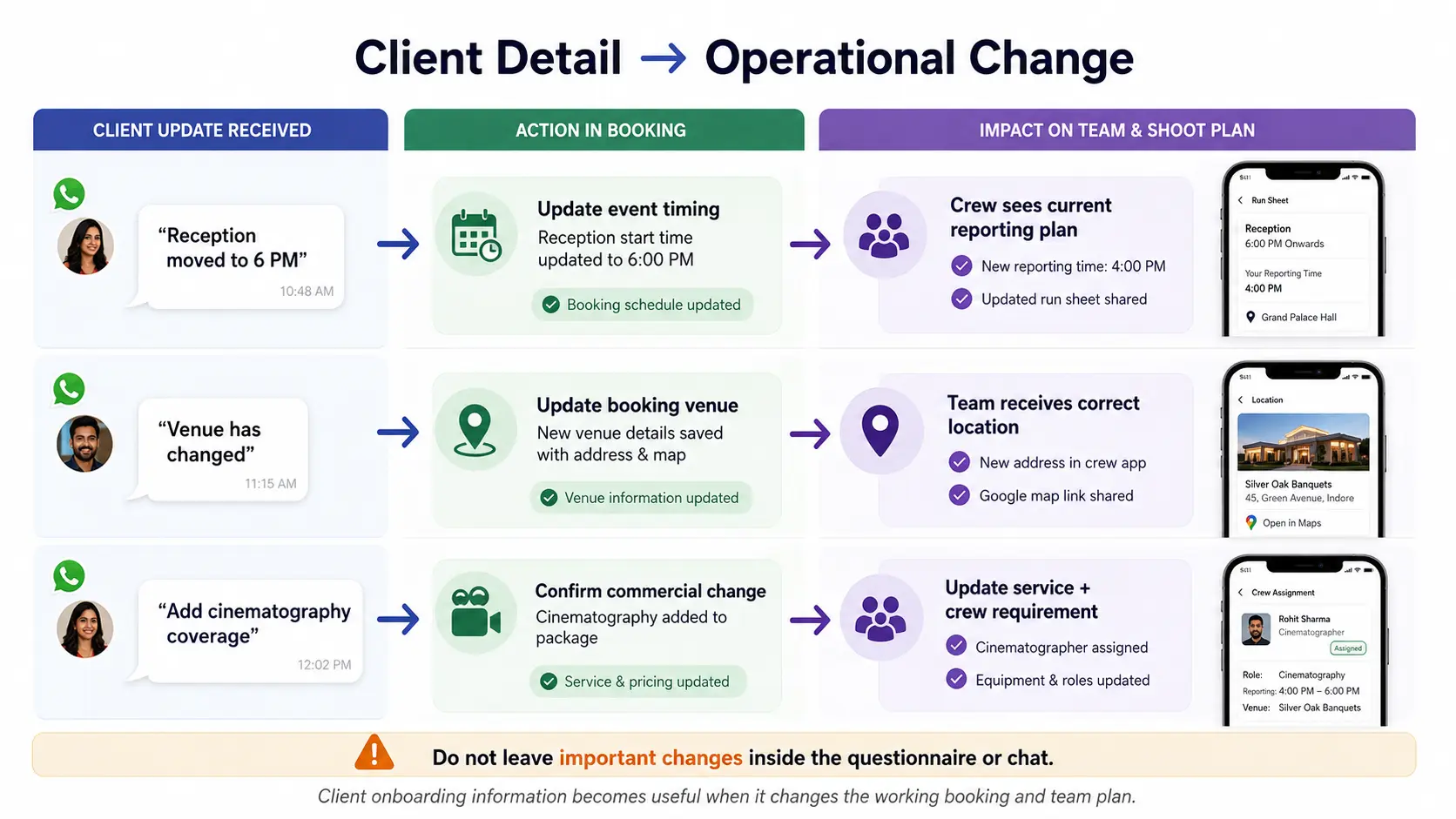
GoPickle does not need to be the questionnaire tool for this step to be valuable. The important part is what happens after the client answers it. If the questionnaire confirms that the reception venue has changed, update the booking. If the schedule now requires an additional cinematographer, update the crew requirement. If a new deliverable has been agreed commercially, make sure the scope and financial record reflect it.
A questionnaire that nobody converts into operational information is only a form.
Prepare the Crew Around the Actual Events
For studios with multiple photographers, cinematographers, editors or freelancers, onboarding now moves from client preparation into team preparation.
Before assigning people, check availability and conflicting work. Then assign the appropriate crew at event level and make reporting times, venues, roles and responsibilities clear.
GoPickle’s Crew Management Software for Photographers connects availability, event assignments, roles, tasks and crew context to the bookings the studio is actually running. Its current workflow also surfaces missing roles, pending confirmations and assignment conflicts before shoot day.
For a six-event wedding, “crew assigned” is too vague. The studio should know who is covering each function, in what role, at which venue and at what reporting time.
Use the Final Reminder to Confirm, Not Rediscover
The final client communication should not be the moment when the studio discovers that a venue changed three days ago.
By this stage, client reminders are primarily for confirmation: current date, arrival or reporting time, venue, primary contact and any immediate preparation instructions. Missing information should already have been identified during planning.
Internally, review the same job from the studio’s perspective. Does the confirmed booking match the approved scope? Are all event timings and venues current? Is the required payment status clear? Are crew roles filled? Does each person have the latest information? Are there unresolved tasks that could affect tomorrow’s coverage?
GoPickle’s connected workflow is useful here because Lead Management, Quotations, Booking Management, Invoices and Payments, and Crew Management are not isolated stages. The product currently positions the booking as the operational record that connects client details, events, services, deliverables, crew and money before the shoot begins.
Shoot Day Should Be the Result of the Workflow, Not the Start of It
A well-run shoot often looks simple from the client’s side. The photographer arrives at the right place, already understands the assignment and does not repeatedly ask the client to explain what was agreed. That apparent simplicity is the result of preparation.
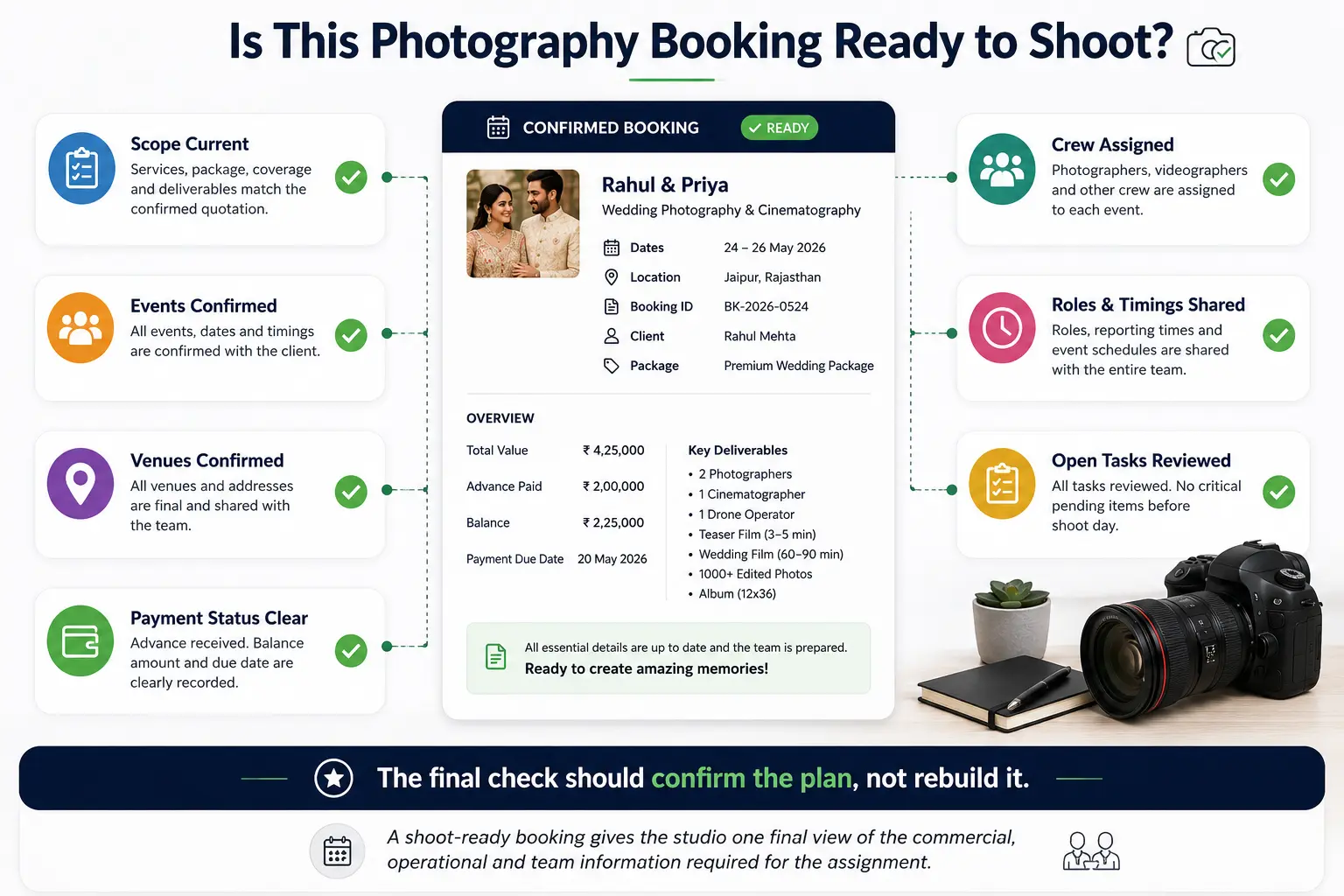
A strong photography onboarding workflow preserves context as the client moves from enquiry to quotation, from quotation to confirmed booking and from booking into production. Client communication, agreements and questionnaires remain important, but the studio also needs an operational system that converts those conversations into dates, events, responsibilities, payments and actions.
That is the role GoPickle is designed to play. Rather than starting with every feature, take one real upcoming enquiry and follow it through the complete path: capture the requirement, schedule the next action, create the quotation, confirm the booking, track the payment, organise the events and assign the crew.
By shoot day, nobody should need to ask, “What did we finally agree with this client?”
The answer should already be in the workflow.