Photography CRM vs Spreadsheet: When a Studio Has Outgrown Manual Lead Tracking
Compare photography CRM vs spreadsheet lead tracking and learn when follow-ups, team ownership, repeat clients, quotations and booking history justify switching.


A spreadsheet can run photography lead tracking surprisingly well. For a solo photographer with a manageable enquiry pipeline, a few columns for name, contact details, shoot date, requirement, status and follow-up may be all the structure the business needs.
The difficulty begins when the spreadsheet stops being the system and becomes only one part of the system.
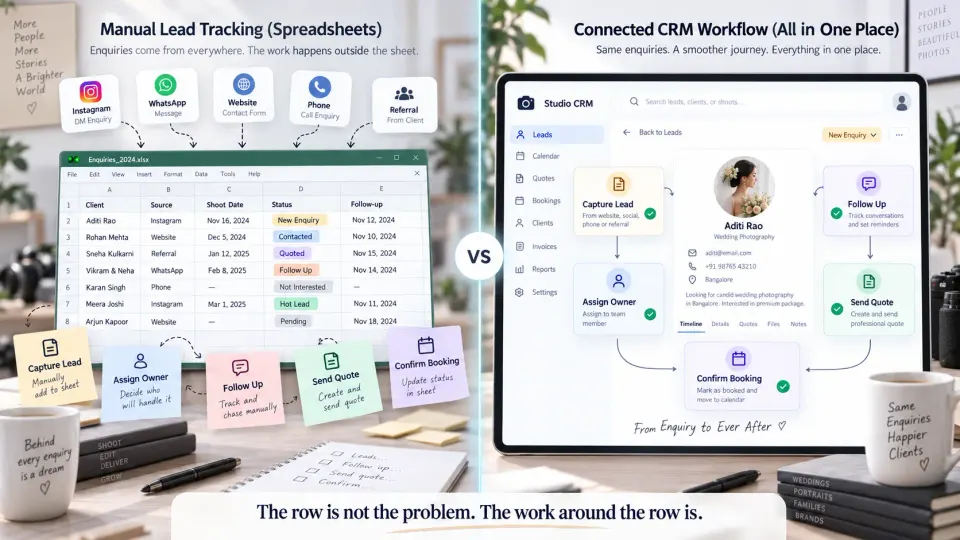
The lead may be listed in a sheet, but the conversation is in WhatsApp. The quotation is a PDF in a folder. Somebody on the team remembers the last call. A calendar reminder holds the follow-up date. The client's previous booking is somewhere else. At that point, the spreadsheet itself may still look perfectly organised while the actual sales process around it is becoming unreliable.
That is the useful way to approach photography CRM vs spreadsheet. There is no universal number of leads at which every studio should switch. The better question is whether your current method can reliably tell you, for every active enquiry: who the client is, what they need, who is responsible, what happened last, what should happen next and whether the opportunity eventually became a booking.
If answering those questions requires several tools and somebody's memory, the studio may have outgrown manual lead tracking.
What spreadsheets do well at the beginning
Spreadsheets deserve more credit than they usually receive in CRM comparisons.
They are inexpensive, flexible and familiar. A photographer can create a basic enquiry tracker in minutes and change the structure whenever the business changes. New service? Add a column. Want to track source? Add another. Need a separate view for wedding enquiries? Apply a filter.
For an owner-operated photography business, that flexibility can be enough because much of the missing context exists in the photographer's head. You remember speaking to the couple yesterday. You remember which package they asked about. You know which commercial client needs another call and which family enquiry is unlikely to proceed.
In that situation, the spreadsheet is supporting a sales process that one person already understands.
It can remain a perfectly sensible choice when:
- only a small set of enquiries is active at a time;
- one person is responsible for nearly all sales conversations;
- follow-ups are reviewed consistently;
- quotations are infrequent enough to track manually;
- repeat-client history is simple;
- there is little need to hand an enquiry from one team member to another.
The weakness is not that spreadsheets cannot contain more data. They can contain enormous amounts of data.
The weakness is that each additional business action around that data usually requires another manual habit.
The warning signs that manual photography lead tracking is breaking
Studios often notice the problem first as a series of small mistakes rather than one obvious failure.
Enquiries come from more places than one person can comfortably watch
A prospect messages on Instagram. Another starts on WhatsApp. A referral phones the studio. A website form reaches email. An existing client speaks directly to a photographer who covered their previous event.
The issue is no longer simply recording contact information. Someone has to notice each enquiry, capture it, understand the requirement and decide what happens next.
A spreadsheet cannot help with an enquiry that nobody remembered to enter.
This becomes especially relevant during busy shooting periods, when enquiry handling competes with travel, client calls, production and post-production.
Follow-up depends on checking a date column
A well-designed spreadsheet can absolutely contain a Next Follow-up column.
But the date itself does not make the follow-up happen.
Someone still has to open the sheet, filter or sort it correctly, identify overdue entries, understand the previous interaction and take action. When there are only five active prospects, that process may be trivial. When several enquiries and quotations are moving simultaneously, it becomes easier for an opportunity to sit untouched.
The operational question is therefore not, “Can my spreadsheet store a follow-up date?”
It is, “Can our studio reliably see what needs attention today?”
Nobody is completely sure who owns an enquiry
Shared spreadsheets solve access more easily than they solve responsibility.
Consider a lead that was initially answered by the studio owner, discussed later with a sales coordinator and then quoted by somebody else. If the prospect does not respond, who follows up?
Adding an Owner column helps, but it only works if ownership remains consistently maintained as responsibility changes.
For growing studios, this is one of the most important reasons to consider a lead management system built around photography enquiries. A lead should have both a current stage and a clearly responsible person, rather than simply being visible to everyone.
Repeat clients start creating duplicate or confusing rows
Photography businesses frequently work with the same people more than once.
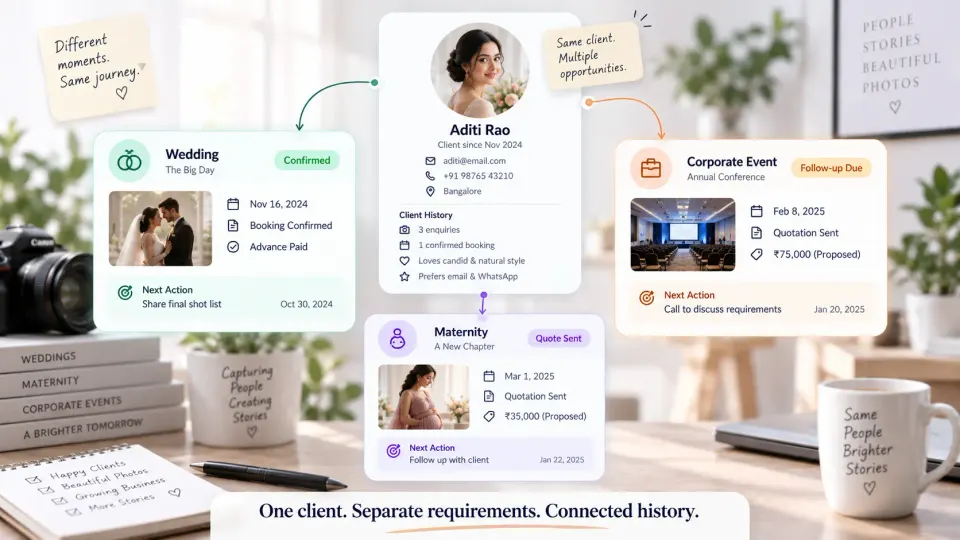
A wedding client may later enquire about a maternity session. A corporate client may return for another annual event. A family may book portraits repeatedly.
A spreadsheet creates two awkward options. You can create a new row and duplicate the client's contact information, or keep editing the original row until several distinct requirements are mixed together.
Neither approach is inherently impossible to manage, but both become increasingly fragile as client history grows.
“Quote sent” is recorded, but the quotation history is somewhere else
This is a common point where manual systems begin to fragment.
The spreadsheet says Quotation Sent.
The quotation PDF is stored elsewhere. The client's changes are inside a chat. The revised amount may be in another document. If the enquiry converts, key information is copied manually into whatever the studio uses for bookings. The data exists, but the relationship between the data is weak. That creates the conditions for duplicated entry, inconsistent versions and lost context.
The CRM records a photography studio actually needs
A useful CRM for photographers should not simply replace rows with prettier cards.
Its value comes from structuring the relationships a studio already has to manage.
At the client level, you need enough information to identify the person and recognise relevant history.
At the enquiry or requirement level, the useful information may include:
- photography service or event type;
- shoot date or expected timeframe;
- city or venue;
- services requested;
- budget or estimated value where relevant;
- enquiry source;
- current sales stage;
- responsible team member;
- previous notes;
- next action and follow-up date;
- quotation status;
- whether the opportunity was booked or lost.
The distinction between client and requirement becomes particularly valuable.
One person can return with several different photography needs over time. Their contact identity should not have to be recreated for each enquiry, but a wedding, portrait session and commercial assignment should not share one status, one quotation or one outcome either.
Good photography client management software preserves both levels: the ongoing relationship with the client and the individual opportunity being sold.
Photography CRM vs spreadsheet: compare the work that actually matters
The difference becomes clearer when you compare daily studio operations rather than feature lists.
| Studio task | Spreadsheet | Photography CRM |
|---|---|---|
| Record an enquiry | Manual row with flexible fields | Structured client and requirement record |
| Track next follow-up | Date, note or manual reminder | Next action attached to the opportunity |
| Assign responsibility | Owner column | Explicit lead ownership within the workflow |
| Handle repeat clients | Duplicate or manually linked rows | Separate requirements connected to client history |
| Track quotations | Manual status; document often elsewhere | Quotation status can remain connected to the lead journey |
| Convert to booking | Information commonly copied into another system | Lead context can move into the booking workflow |
| Share with a team | Shared file gives access | Team sees operational context and responsibility |
| Review source performance | Filters and formulas | Structured source and pipeline data can support reporting |
| Understand history | Often distributed across notes and other tools | Relevant client and opportunity history stays connected |
Follow-up is where the difference usually becomes visible first
A spreadsheet primarily records information.
A CRM should help organise work that must happen because of that information.
For a photography studio, this distinction matters because enquiries rarely progress in a single conversation. A prospect may need package details, a consultation, a revised quotation and another follow-up before confirming.
When every next step is manually reconstructed from chats and notes, the process becomes dependent on individual discipline.
Ownership matters as soon as the lead can change hands
A studio does not need a large sales department for ownership to matter.
Even an owner plus one studio manager is enough to create handoffs.
The system should make it obvious who is expected to move an enquiry forward. Otherwise shared access can create the opposite of accountability: everyone sees the lead, so everyone assumes somebody else is handling it.
History matters more as repeat business grows
For a photographer, client history is not simply a list of old messages.
It can provide useful business context: previous requirements, booked work, quotations and the fact that this is an existing relationship rather than a completely new prospect.
The goal is not to collect every possible fact about the client. It is to preserve enough commercial context that the next person handling the enquiry is not starting from zero.
Reporting is only useful when the underlying workflow is disciplined
A spreadsheet can produce sophisticated reports. CRM software can produce useless ones.
The difference is data consistency.
If half the team records the source as “Instagram,” another person uses “IG,” and some leads have no source at all, no reporting dashboard can make that data trustworthy. The same applies to lead stages and outcomes.
Once stages, ownership, sources and outcomes are used consistently, however, the studio can begin asking better questions:
Which enquiries still need action? Which quotations are waiting for decisions? Where are leads getting stuck? Which sources are creating booked work rather than merely generating messages?
This is one reason a broader photography business management workflow becomes valuable as a studio grows. The goal is not simply to have a better lead table. It is to keep the client journey connected as an enquiry becomes a quotation, confirmed booking, payment workflow and eventually delivery.
How to move from a spreadsheet without losing active enquiries
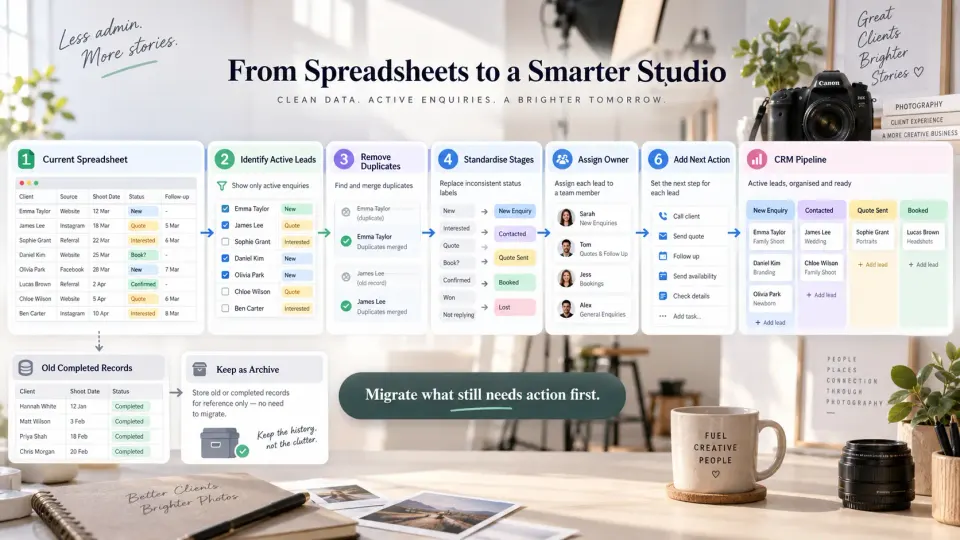
A CRM migration does not have to begin with every contact your studio has collected since it opened.
Start with the records that can still affect upcoming revenue.
1. Identify active opportunities
Separate enquiries that still require a decision or action from completed, lost, stale and duplicate records.
For each active lead, confirm the basics: client, requirement, stage, last meaningful interaction, owner and next action.
2. Remove obvious duplicates
Do not import several versions of the same client simply because they appeared in different sheets.
Where possible, clean obvious duplicate contact records before migration while preserving genuinely different enquiries.
3. Simplify your lead stages
A migration is a useful opportunity to remove status clutter.
Your stages should describe meaningful progress through the sales process. “New enquiry,” “Contacted,” “Quote sent,” “Booked” and “Lost,” for example, describe the state of an opportunity.
“Call Tuesday” is not really a sales stage. It is a next action.
Keeping those concepts separate makes the pipeline easier to understand.
4. Assign an owner to every active lead
If more than one person works on enquiries, decide who currently owns each opportunity before importing it.
Do not use CRM adoption to postpone an existing responsibility problem.
5. Give every live opportunity a next action
A lead with no next step remains vulnerable regardless of the software.
The next action could be calling the prospect, preparing a quotation, following up after a proposal or waiting until an agreed date. What matters is that somebody can see what happens next.
6. Start with new enquiries and active deals
You can retain older spreadsheet data as an archive instead of forcing a perfect historical migration on day one.
Move the live pipeline first. Then run new enquiries through the new workflow and validate what happens all the way through quotation and booking.
When a spreadsheet is still enough
Do not adopt photographer CRM software simply because CRM sounds more professional.
If one person handles almost every enquiry, active opportunities remain easy to review, follow-ups are rarely missed and client history is simple enough to understand without searching across several systems, the spreadsheet may still be the better tool.
There is also little benefit in moving an undefined sales process into software. If nobody agrees on lead stages, ownership or follow-up responsibilities, a CRM will organise the confusion rather than fix it.
The threshold is operational reliability.
If your current spreadsheet lets you open the pipeline and immediately understand every active enquiry, what happened, who owns it and what should happen next, it is still doing its job.
If it only gives you part of the answer, the studio has started needing something more.
When the switch becomes worth making
The strongest case for a photography business CRM appears when several changes happen together: enquiries arrive through multiple sources, more than one person handles them, repeat clients are common, quotations need follow-up and confirmed work has to move into a separate booking workflow.
At that stage, the business does not primarily need more columns. It needs continuity.
GoPickle's Lead Management workflow is built around that transition. Studios can keep the client and photography requirement together, record the enquiry source and next action, establish ownership and move an opportunity toward quotation and booking. The wider GoPickle workflow then connects lead management with the operational work that follows rather than turning CRM into another isolated database.
That does not mean migrating the entire studio on the first day. A practical starting point is one real active enquiry. Put it through the workflow, follow it properly and see what happens when it becomes a quotation or booking.
The purpose of moving beyond a spreadsheet is not to make lead tracking look more sophisticated. It is to make the studio less dependent on people remembering what the spreadsheet cannot tell them.
If your current system is beginning to leak enquiries between first contact and confirmed booking, the next useful step is to look at how to turn more photography enquiries into organised booking opportunities.