Photography Lead Management Software for Studios
Track photography enquiries, client requirements, follow-ups, lead owners and booking value with GoPickle photography lead management software.

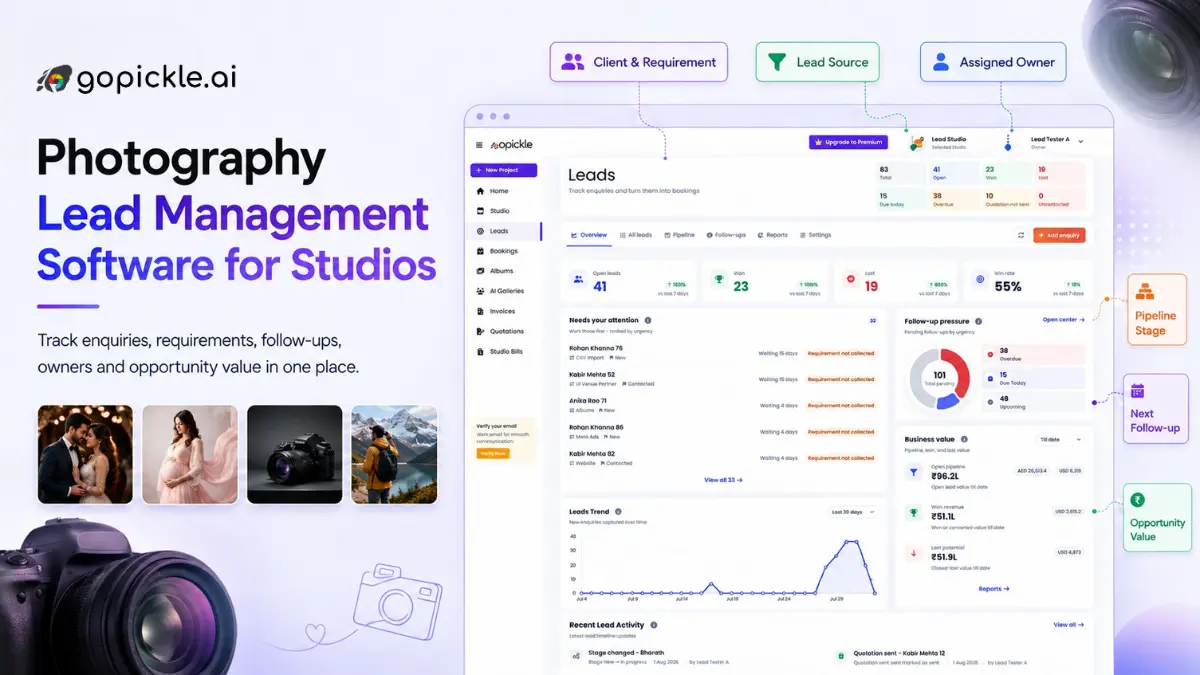
Photography enquiries rarely arrive in one orderly inbox.
A wedding client may send a WhatsApp message while you are shooting. A commercial enquiry may come through a website form. Another prospect may call after finding your studio on Instagram. A past client may refer someone directly to a team member.
The problem is not capturing a name and phone number. It is preserving the context required to move that enquiry toward a quotation and confirmed booking.
Photography lead management software helps studios record what the client needs, assign responsibility, schedule the next action and track the opportunity until it is won or lost.
GoPickle is built around photography-specific requirements such as shoot dates, venues, event functions, services, deliverables, budgets and booking value. It connects the lead workflow with quotations, bookings and the wider studio-management process.
Why photographers need more than a contact list
A spreadsheet can store a client’s name, number and enquiry date. It becomes less reliable when the studio needs to answer:
- What type of photography does the client need?
- Which dates and venues are involved?
- Has the requirement been collected?
- Was a package or quotation sent?
- Who is responsible for the lead?
- When is the next follow-up?
- What is the likely booking value?
- Why was the lead won or lost?
These questions become difficult when details are divided between chats, calls, notes and team members.
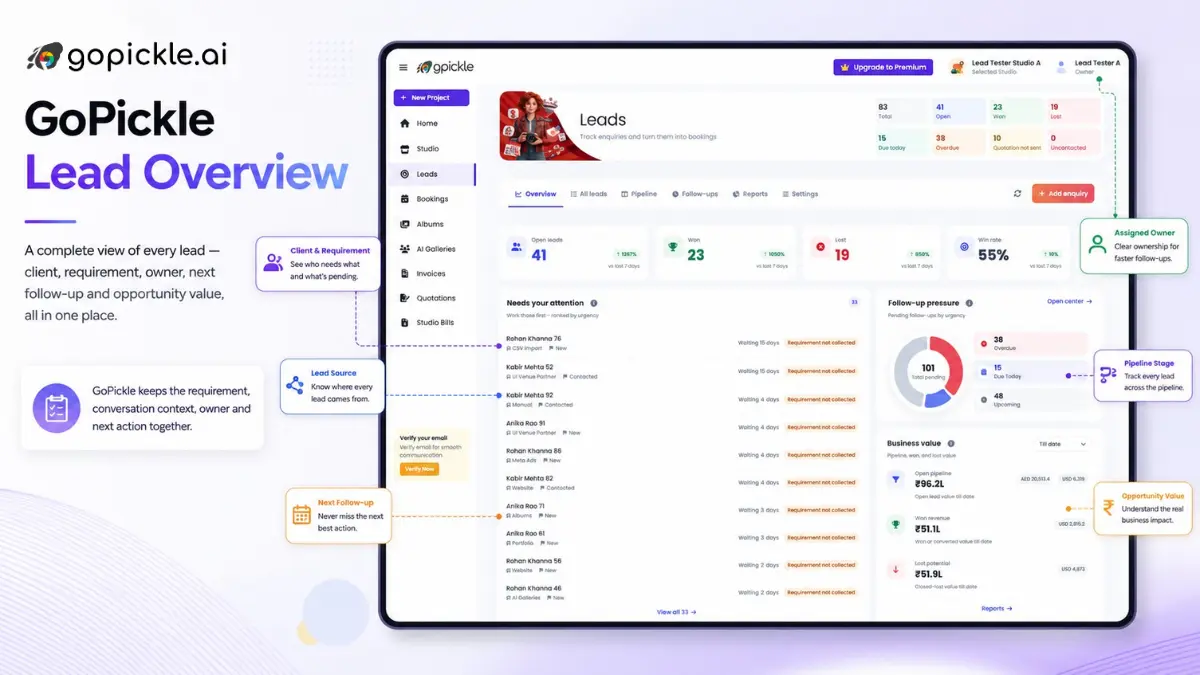
GoPickle gives each enquiry four pieces of structure: context, ownership, a next action and a path to booking. Its lead dashboard also surfaces open opportunities, overdue follow-ups, requirements awaiting collection and pipeline value.
The complete photography lead workflow
A useful photography CRM should support the entire sales process rather than function as a database of contacts.
1. Capture the enquiry and its source
The first step is recording where the opportunity came from.
Possible sources include:
- Website forms
- Referrals
- Phone calls
- Album or gallery enquiries
- Advertising campaigns
Source tracking matters because enquiry volume alone does not show marketing quality. A source may generate many messages but few qualified bookings. Another may produce fewer enquiries with a higher average booking value.
GoPickle keeps the source attached to the lead so studios can understand where opportunities originate and which channels deserve further attention.
2. Separate the person from the requirement
A client and a photography requirement are not always the same record.
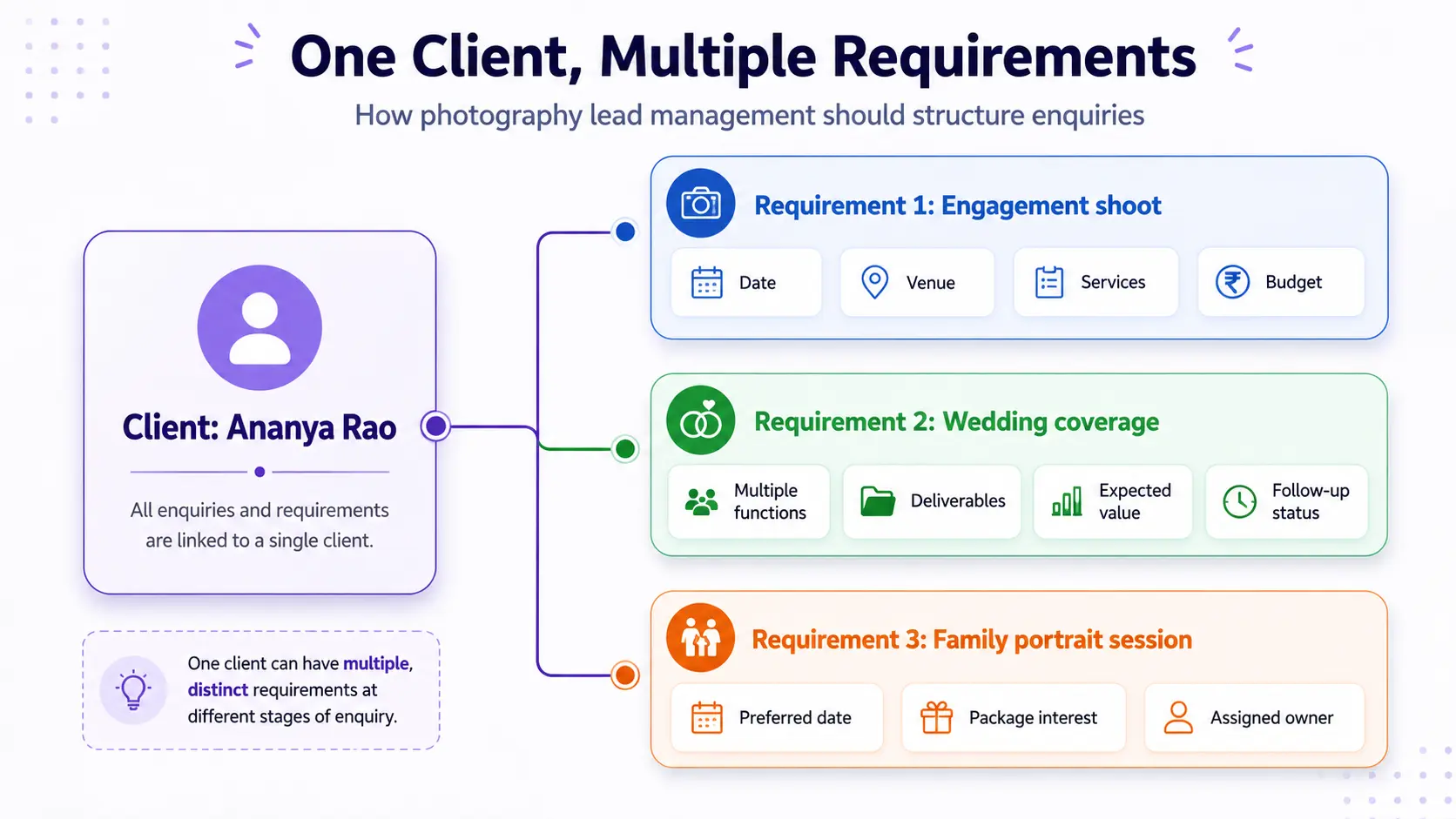
One person may contact the studio for an engagement, return later for a wedding and enquire again for a maternity or family session. Treating each enquiry as a completely unrelated client creates duplicates. Treating all enquiries as one project makes the current requirement unclear.
A better structure connects one person to one or more requirements.
3. Collect enough context to quote accurately
A lead is not ready for a quotation merely because the client asked for a price.
The studio may first need to collect:
- Shoot genre
- Dates and venues
- Number of functions or sessions
- Photography and cinematography services
- Expected deliverables
- Approximate budget
- Package preferences
- Special requirements
GoPickle allows this information to remain beside the opportunity so the team can quote with greater confidence and avoid repeating the same questions across multiple conversations.
4. Assign one clear owner
Shared responsibility often becomes no responsibility.
A lead may have several team members involved, but one person should own the next action. GoPickle allows studios to assign a lead manager while retaining shared context for the wider team. This is particularly useful when an owner, sales coordinator and studio manager all communicate with prospects.
Clear ownership helps prevent two common failures:
- Nobody follows up because everyone assumes someone else will.
- Several people contact the same client without knowing what was already discussed.
5. Schedule the next action
A pipeline stage describes where the lead stands. A next action explains what must happen.
Examples include:
- Collect the event brief
- Confirm date availability
- Call the client
- Send a package
- Prepare a quotation
- Follow up on the quotation
- Schedule a meeting
- Record the client’s decision
GoPickle separates overdue, due-today and upcoming follow-ups so the studio can prioritise action rather than scanning every open lead manually.
6. Move qualified context into a quotation and booking
A photography lead should not restart from zero after the client is ready to proceed.
GoPickle connects the sequence:
Enquiry → Requirement → Quotation → Booking → Invoice
The client, event context, expected services and commercial details can move forward into the next stage instead of being reconstructed from old messages. GoPickle positions this connected workflow as part of its broader photography business-management platform.
What to look for in photography lead management software
A long feature list is less useful than testing whether the system answers the studio’s daily sales questions.
| Evaluation criterion | What the software should show |
|---|---|
| Requirement depth | Dates, venues, services, deliverables and budget |
| Ownership | One clear lead manager and shared team context |
| Follow-up control | Overdue, due-today and upcoming actions |
| Pipeline visibility | Current stage and movement toward booking |
| Commercial value | Expected, won and lost opportunity value |
| Conversion workflow | Lead-to-quotation and lead-to-booking handoff |
| Source reporting | Where leads originate and what they produce |
| Mobile access | Ability to update leads away from the studio |
A generic CRM may offer deeper marketing automation or extensive customisation. The trade-off is additional configuration before it reflects photography work.
A photography-specific CRM is generally easier to adopt when the studio needs event dates, package discussions, multiple functions and booking conversion without building those structures from scratch.
Where GoPickle fits
GoPickle is best suited to studios that want photography lead tracking connected to the rest of the assignment.
It is particularly relevant to:
- Solo photographers managing enquiries between shoots
- Wedding studios handling multi-day requirements
- Event teams coordinating leads across several staff members
- Commercial studios collecting detailed production briefs
- Growing studios that need ownership and pipeline visibility
The platform does not replace personal conversations. It provides the context and reminders required to make sure those conversations happen at the right time.
Studios can use the lead module independently and later connect successful opportunities to GoPickle business management software, booking management, quotations, invoices and delivery workflows. GoPickle offers a free starting option and a personal product demonstration; current inclusions should be confirmed on the pricing page.
Test GoPickle with one real enquiry
A practical evaluation is more useful than importing an entire database immediately.
Choose one active enquiry and enter:
- The client and requirement
- The source
- Event dates and venue
- Services and deliverables
- Expected booking value
- Assigned owner
- Next follow-up
- Current pipeline stage
Then check whether another team member can understand what has happened and what must happen next without searching through messages.
That is the standard photography lead management software should meet.
Photographers can start managing leads, review GoPickle pricing or book a product demo using a real studio enquiry.