Photography Studio Management Software: Features to Compare
Compare photography studio management software for leads, bookings, quotations, invoices, galleries, teams, reports, pricing and migration.

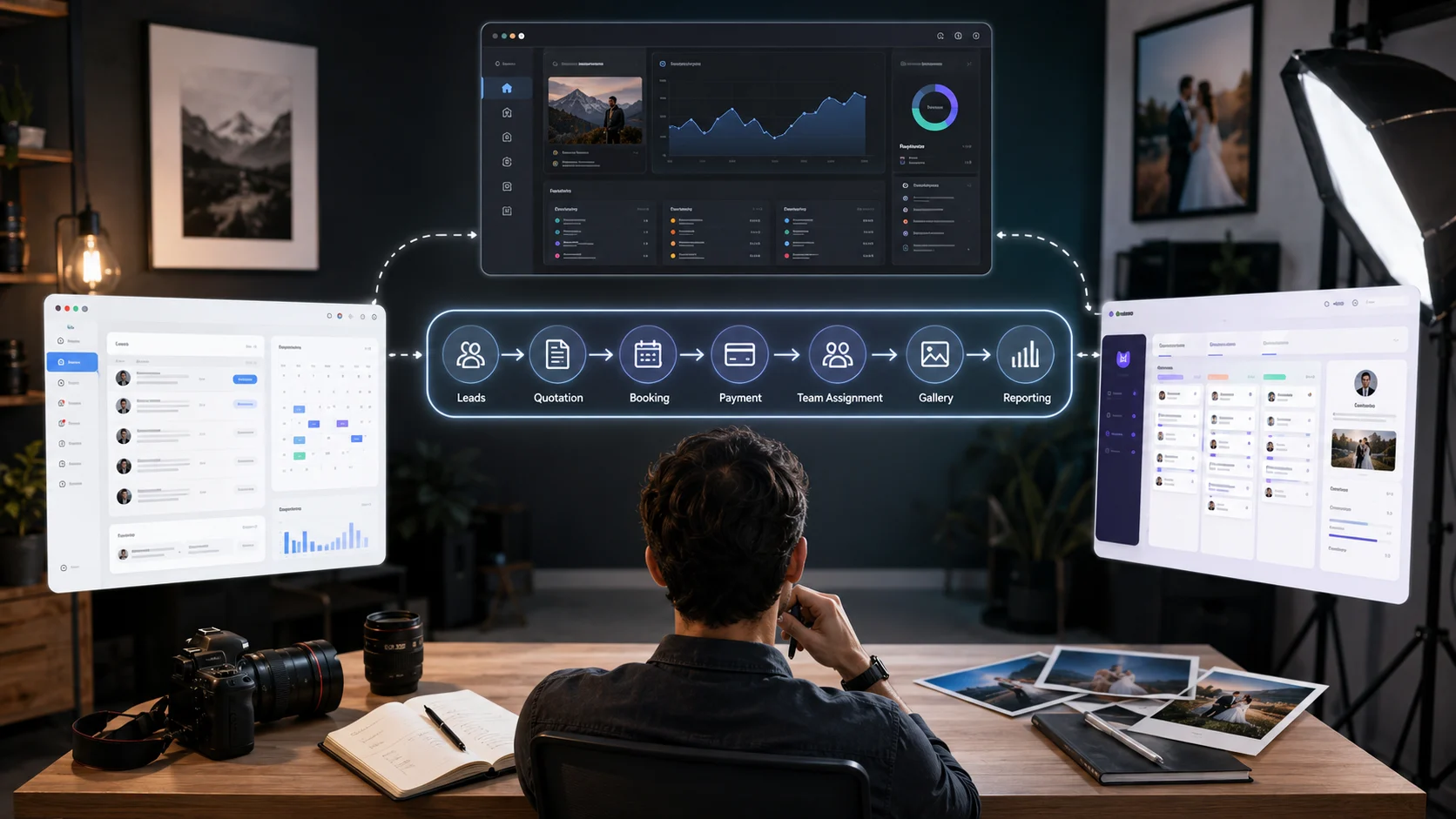
Photography studio management software can promise dozens of features: CRM, bookings, invoices, automation, galleries, reports, mobile access and team collaboration.
A long feature list does not automatically mean the platform will fit your studio.
The better question is:
Can this software carry one real client smoothly from the first enquiry to the final photo delivery?
Photography business management software should reduce repeated data entry, missed follow-ups and disconnected tools. It should not create another dashboard that the team avoids using.
Before choosing a photography CRM or studio management platform, compare how it handles the complete workflow your studio already follows.
Lead Tracking: Can Every Enquiry Get a Next Action?
Most studios receive leads from several places:
- Website forms
- Meta Ads
- Referrals
- Phone calls
The software should allow the team to record the lead source, event date, location, photography requirement, budget and next follow-up.
Look beyond a basic contact list.
Ask whether you can:
- Assign one lead owner
- Create custom lead stages
- Record calls and notes
- Schedule follow-ups
- Filter leads by date, source or status
- Mark lost reasons
- Track which sources produce confirmed bookings
Lead management is useful only when it helps the studio decide what must happen next. General photography CRM guidance also treats custom pipelines, follow-up management and source tracking as core capabilities rather than optional extras.
Booking Management: Does It Hold the Complete Event Scope?
A calendar entry showing “Wedding – 14 December” is not a complete booking.
Photography booking software should store:
- Client and event details
- Venue and timings
- Confirmed package
- Services and deliverables
- Payment stages
- Crew assignments
- Travel requirements
- Client instructions
- Production and delivery status
Check whether the information approved during the enquiry and quotation stages moves into the booking automatically.
If your team must type the same event date, client name and package into several modules, the system is connected in appearance but fragmented in use.
GoPickle’s workflow is structured around keeping enquiries, quotations, bookings, invoices and delivery connected instead of rebuilding the client record at each stage.
Quotations: Can You Sell the Service Clearly?
A useful quotation tool should do more than calculate a total.
Compare whether the platform supports:
- Reusable photography packages
- Event-specific services
- Optional add-ons
- Taxes and discounts
- Payment schedules
- Deliverables
- Terms and conditions
- Revisions
- Client approval
- Sharing by link and PDF
The approved quotation should become the reference for the booking and invoice.
For example, when a couple adds another event or upgrades the album, the revised package should flow into the final booking value and payment balance.
A quotation system that remains separate from bookings and invoices may save document-design time without solving the larger workflow problem.
Invoices and Payments: Can You See What Is Still Pending?
Photography projects frequently use staged payments rather than one full payment.
The software should clearly show:
- Package value
- Add-ons
- Advance received
- Instalments
- Tax
- Balance due
- Payment due dates
- Invoice status
- Reminder history
Ask whether partial payments can be recorded without marking the complete invoice as paid.
Also check whether the client receives a clear view of the amount booked, amount paid and current balance. GoPickle’s invoicing workflow supports advance adjustment, outstanding-balance tracking, invoice links, PDFs and payment reminders connected to the relevant booking.
Client Galleries: Are Delivery and Business Management Connected?
Some photography studio platforms manage the business side but stop after invoicing. The photographer must then move to another tool for photo delivery.
That may be acceptable, but it creates another subscription, login and handover.
When comparing client gallery software for photographers, check for:
- Branded gallery presentation
- Password or PIN protection
- Organised moments or folders
- Mobile viewing
- Favourite selection
- Album shortlisting
- Individual downloads
- Full-gallery downloads
- Download controls
- Client activity or status
- Gallery expiry
The important question is whether the gallery remains connected to the client, booking and deliverables.
A studio should be able to see that the event is booked, payment is pending, editing is complete, the gallery is shared and the album selection is still awaiting action.
GoPickle positions client galleries as part of the same workflow as enquiries, quotations, payments and album delivery.
Team Access: Can People See Enough Without Seeing Everything?
A solo photographer may not need complex permissions. A growing studio will.
Compare whether the software supports:
- Multiple team members
- Role-based access
- Lead ownership
- Event crew assignment
- Editor access
- Album-designer access
- Finance or payment access
- Freelancer access
- Activity history
- Schedule conflict visibility
The editor may need the event details and delivery deadline but not complete financial reports. A freelance photographer may need the venue, call time and coverage instructions but not every client record.
Team access should improve accountability without exposing unnecessary business information.
Reporting: Does It Help You Make Decisions?
A dashboard full of colourful charts is not useful unless it answers practical questions.
Look for reports that show:
- Leads by source
- Lead-to-booking conversion
- Lost reasons
- Upcoming bookings
- Revenue by service
- Outstanding payments
- Team workload
- Event profitability
- Delayed edits or deliveries
- Package performance
Ask whether reports use data the team can realistically maintain.
If the platform needs twenty fields completed for every enquiry, but the sales team regularly enters only five, the reports will appear advanced while remaining unreliable.
Start with the numbers your studio will genuinely use every month.
Pricing: Compare the Total Cost, Not the Headline Price
Photography studio software pricing may be based on:
- Monthly or annual plans
- Number of users
- Number of projects
- Gallery storage
- Automation limits
- Payment-processing fees
- SMS or WhatsApp usage
- Premium modules
- Onboarding or migration support
Create a realistic annual comparison.
Include:
Subscription + additional users + storage + messaging + payment fees + gallery tools + migration effort
A lower monthly plan can become expensive when team access, reports or galleries require upgrades. A more complete platform may replace several existing subscriptions.
Do not buy a higher plan simply because it contains more features. Pay for the capabilities your actual workflow needs.
Migration Effort: How Difficult Will It Be to Start?
Software value is lost when setup becomes so difficult that the studio returns to spreadsheets after two weeks.
Before buying, ask how you will move:
- Existing client records
- Active leads
- Upcoming bookings
- Package templates
- Payment balances
- Team members
- Current gallery links
- Previous invoices
- Ongoing album projects
Also check:
- Whether CSV import is supported
- Whether onboarding help is available
- Whether templates can be created quickly
- Whether active jobs can be migrated in stages
- Whether data can later be exported
Some photography platforms now promote migration assistance as part of onboarding, which shows how important switching effort has become in this category.
You do not always need to migrate every historical client. Start with active leads, upcoming events and incomplete projects.
Test One Real Booking Before You Commit
Do not evaluate software only through a sales demonstration.
Create one test client and complete this process:
- Add the enquiry.
- Record the requirement and next follow-up.
- Create a quotation.
- Revise the package.
- Convert it into a booking.
- Record an advance.
- Assign a crew member.
- Create an invoice.
- Check the pending balance.
- Deliver a test gallery.
- Review the client and team experience.
- Export the data.
This reveals more than a feature checklist.
You will quickly see whether information stays connected, whether the interface is practical on mobile and whether your team can understand the workflow without constant training.
Use a Workflow Comparison Scorecard
Rate each platform from 1 to 5:
| Area | Questions to score |
|---|---|
| Lead management | Can we record, assign, qualify and follow up? |
| Booking workflow | Does the full event scope stay connected? |
| Quotations | Can we build, revise and approve packages? |
| Invoicing | Can we track advances, instalments and balances? |
| Galleries | Can clients view, shortlist and download securely? |
| Team access | Can roles see the right information? |
| Reporting | Does it answer real business questions? |
| Pricing | What is the complete annual cost? |
| Migration | Can we move active work without disruption? |
| Usability | Will the team consistently use it? |
Give extra weight to the three areas causing the most problems in your studio today.

A studio losing leads should prioritise follow-up visibility. A studio struggling after the shoot should focus on editing, gallery and album workflows. A growing team should prioritise assignments and permissions.
Choose the Software That Connects the Work
The best photography studio management software is not necessarily the platform with the longest feature list.
It is the system that helps your team move from:
Enquiry → Quotation → Booking → Payment → Crew → Production → Gallery → Album → Closure
without losing information between stages.
GoPickle.ai is built around this connected photography workflow, combining leads, quotations, bookings, invoices, payments, teams and client galleries in one platform.
Before buying any photography business management software, test it with the way your studio actually works. The right platform should remove operational gaps and not simply give those gaps a new interface.