Photography Task Management: Tie To-Dos to Leads, Bookings and Delivery Deadlines
Build a photography task management workflow that connects to-dos to leads, bookings, shoots, editing, delivery and payment deadlines with clear owners.

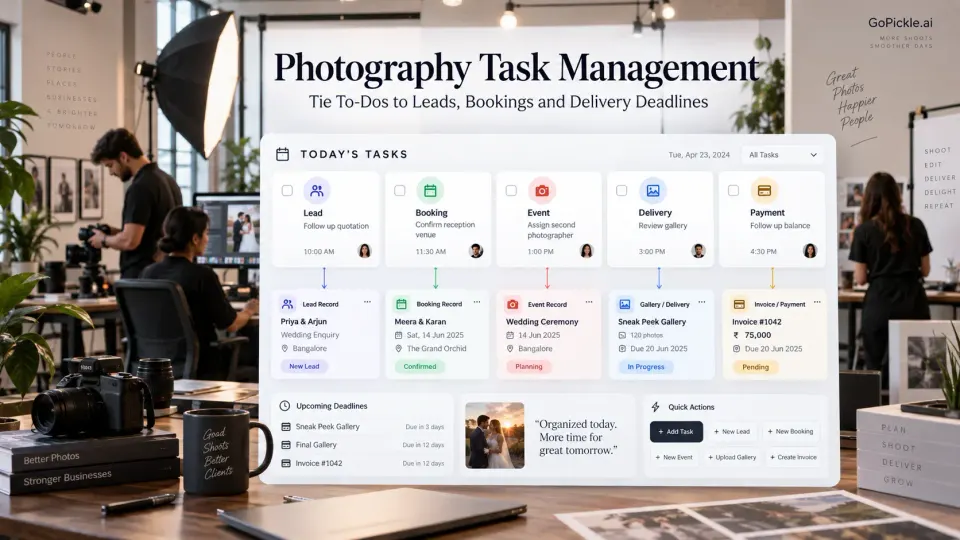
Photography studios rarely run out of to-do lists. The harder problem is knowing what each task belongs to.
“Call client.”
“Confirm venue.”
“Send files to editor.”
“Collect balance.”
“Share gallery.”
Each instruction makes sense when the person who created it still remembers the conversation. Two weeks later, or when the task is handed to somebody else, the missing context becomes the real work. Which client needs the call? Is the venue confirmation for an enquiry or a confirmed booking? Which editor receives the files? Is the balance due before the shoot or before final delivery?
Good photography task management is therefore less about producing more tasks and more about attaching every action to the right piece of the photography business.
A lead follow-up should live with the lead. A crew confirmation should belong to the relevant booking or event. An editing handoff should point back to the job whose files are being transferred. A gallery deadline should remain connected to the promised deliverable. When tasks carry that context, a studio can manage dozens of moving actions without turning the owner into the person who explains every one of them.
This is the difference between a generic to-do system and photography project management built around real client work.
Why generic to-do lists break at studio scale
A personal task list works well when one photographer is responsible for almost everything and can mentally fill in the missing information. “Call Emma” is enough if there is only one Emma, you remember her wedding enquiry and you know why you planned to call.
That stops working reliably once the studio has several active leads, overlapping shoots, editors, freelancers, outstanding payments and delivery deadlines.
The task itself needs context.
Compare these two instructions:
Confirm details
and:
Maya & Daniel Wedding · Reception · Confirm revised reporting time with venue coordinator · Owner: Studio Manager · Due Thursday
The second task does not require somebody to reconstruct the reason for the work before doing it.
This is the basic architecture we recommend for photography studio task management:
Business object → Specific task → Owner → Due date → Completion condition
The business object may be a Lead, Booking, Event, Deliverable, Invoice or another operational record. The task then describes the action required inside that context.
A practical task record might therefore contain:
| Field | Example |
|---|---|
| Attached to | Maya & Daniel Wedding |
| Event | Reception |
| Task | Confirm venue reporting entrance |
| Owner | Studio Manager |
| Due | 3 days before event |
| Priority | Normal |
| Blocked by | Venue coordinator response |
| Complete when | Entrance and crew instructions recorded |
This structure is more useful than a large undifferentiated list because opening the booking immediately explains why the task exists.
GoPickle's photography booking management workflow already treats confirmed work as more than a calendar entry, connecting clients, events, venues, crew, services, deliverables, invoices, payments and delivery context. Booking-related tasks can therefore remain understandable in relation to the job instead of becoming detached reminders.
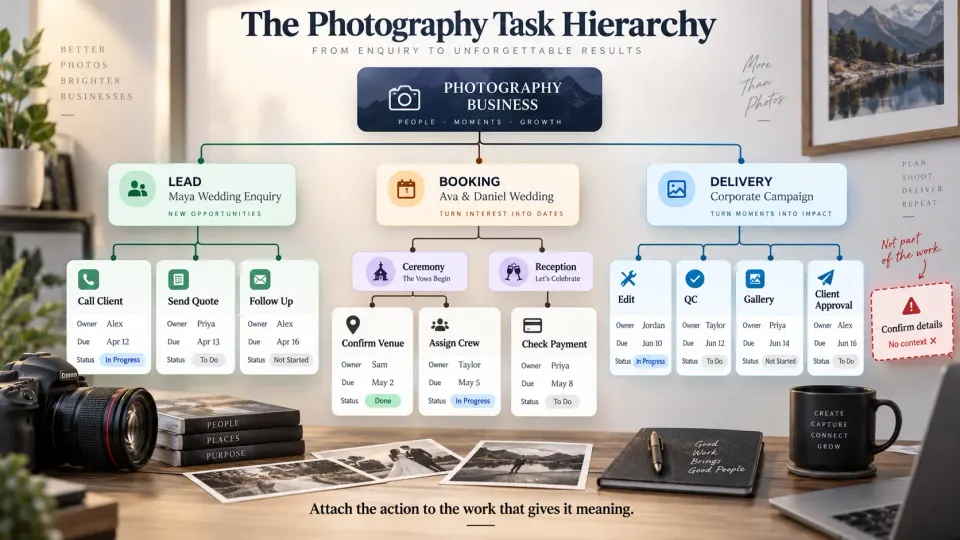
Lead tasks and booking tasks should solve different problems
One of the easiest ways to make a photography task system noisy is to treat sales work and confirmed production work as the same category.
A lead task exists to move an opportunity toward a decision.
Examples include:
- call the client after the first enquiry;
- collect the missing event date;
- schedule a consultation;
- send package information;
- prepare a quotation;
- follow up after the quotation;
- confirm whether the client wants to proceed.
The task should remain connected to the enquiry because the useful context is commercial: requirement, source, expected value, conversation history and what needs to happen next.
GoPickle's Lead Management for photographers is structured around this distinction between pipeline stage and next action. The stage describes where the opportunity currently stands; the next action tells somebody what must happen to move it forward.
Once the client confirms, the nature of the work changes.
A booking task exists to fulfil an accepted commitment.
Now the studio may need to confirm venues, collect planning details, assign photographers, arrange travel, prepare equipment, issue the next invoice, complete a shoot brief or prepare a delivery workflow.
Keeping those two task types separate prevents an important conceptual mistake: a lead is something the studio is trying to win; a booking is something the studio has already promised to execute.
Pre-shoot tasks should attach to the part of the booking they affect
A wedding with four functions should not necessarily have one enormous checklist called “Wedding tasks.”
Suppose the Sangeet requires a drone operator, the ceremony venue has restricted access and the reception requires a second cinematographer. Those actions belong to different events even though they sit under one client booking.
Pre-shoot photography workflow tasks might include:
- confirm final event timing;
- collect venue access instructions;
- assign lead and supporting crew;
- verify crew acknowledgement;
- check travel or accommodation;
- confirm specialist equipment;
- collect client reference material;
- verify permissions where required;
- review outstanding payment milestone;
- prepare event-specific shoot notes.
Attach the task as closely as practical to the thing it affects.
This is especially valuable in wedding photography task management because the word “wedding” can hide several separate production units. The same principle applies to multi-location corporate photography, school photography, conferences, sports coverage and multi-day commercial productions.
For crew-related actions, GoPickle's Crew Management workflow connects responsibilities to the bookings and events the team is actually covering, including task context before, during and after the shoot.
The useful question is not simply “What needs doing before this booking?”
It is “What needs doing, for which event, by whom, before what deadline?”
Post-production and delivery need their own task chain
Shoot completion should create the next set of responsibilities rather than make the project disappear from active work.
A typical post-production path might look like:
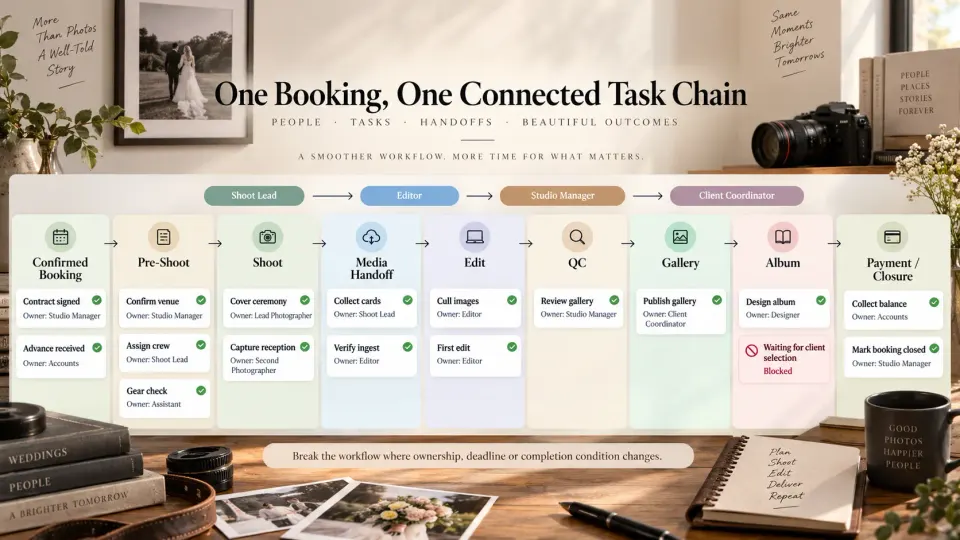
Media handoff → Ingest verified → Backup confirmed → Cull → Edit → Internal review → Client proof or selection → Revisions → Final export → Gallery delivery → Remaining deliverables → Closure
Not every photographer uses every stage. A portrait studio may complete selection before final editing. A wedding studio may deliver photographs while an album remains active for several more months. A commercial client may require an approval cycle before files are released in final resolutions.
The important point is that “edit wedding” is usually too broad to function as a useful task.
Break the workflow where ownership, deadline or completion state changes.
For example:
Transfer RAW files to editor
Owner: Shoot Lead
Complete when: editor confirms verified receipt
Complete first edit
Owner: Editor
Complete when: review set is ready for internal QC
Review gallery
Owner: Studio Manager
Complete when: corrections are resolved and gallery is approved for release
Send client gallery
Owner: Client Coordinator
Complete when: gallery access is verified and the client has been notified
This creates a visible handoff rather than one large task sitting “in progress” for three weeks.
Every meaningful task needs an owner, a due date and a way to expose blockers
Assigning a task to “Team” often means nobody owns the result.
A task may involve several people, but one person should normally be accountable for moving it to completion or escalating it when it cannot move.
Due dates need similar discipline. Setting every task to the shoot date is rarely useful. Work should be due when it needs to happen relative to the business deadline.
If a wedding is on Saturday, crew confirmation may be due Monday, final venue details Wednesday and equipment readiness Friday. The deadlines create operating space before the client-facing commitment arrives.
Blockers should also remain distinguishable from ordinary incomplete work.
Consider:
Task: Prepare album design
Owner: Designer
Due: 20 November
Status: Blocked
Blocked by: Client has not completed image selection
That information tells a manager something very different from a task that is merely overdue because nobody started it.
A strong photographer project management system should make it possible to answer three questions without calling the owner:
Who owns this? When does it need to happen? What is preventing it from moving?
Use recurring task structures without making every booking identical
Many photography workflow tasks repeat.
Every wedding may require a crew check. Every portrait booking may need a preparation message. Every corporate shoot may require a brief review. Every completed project may need media verification and delivery checks.
Rebuilding those actions from memory for every client creates unnecessary variation.
Create reusable task structures around your most common booking types and workflow stages. A wedding template could include planning, crew, shoot-readiness, file-handoff, gallery, album and payment tasks. A headshot-session template might contain only preparation, studio readiness, selection, retouching and delivery.
Templates should provide the starting structure, not prevent adjustment.
The moment a booking has multiple venues, unusual deliverables, travel, specialist equipment or client-specific approval stages, add or modify the tasks required for that job.
This is where the relationship between task management and studio SOPs becomes useful: the procedure defines how the studio normally works; the task structure turns the relevant parts of that procedure into actions for a real client.
Your daily task view and booking view should show the same work differently
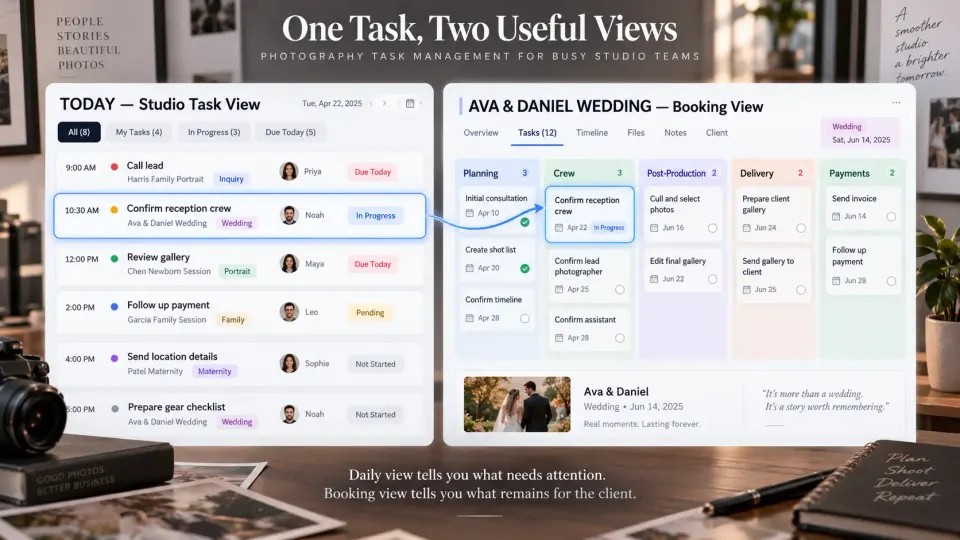
A photography business needs at least two perspectives on pending work.
The daily view answers:
What needs attention across the studio today?
It might contain:
- call a warm wedding lead;
- confirm tomorrow's second photographer;
- review a gallery before delivery;
- send an invoice reminder;
- approve an album correction.
Those tasks belong to completely different clients and workflow stages, but they compete for today's attention.
The booking-level view asks a different question:
What remains to be done for this particular client?
Open one wedding booking and the studio should be able to see its unresolved planning, crew, payment, post-production and delivery work without mixing in unrelated clients.
These should not be two separate sets of tasks.
The same task should appear in the appropriate daily workload because of its owner and due date, while remaining attached to its original lead or booking for context. That is the architecture that keeps task management useful as the business grows.
Our existing guide to the simple daily routine that keeps a photography studio organised explains how to review urgent work each day, while the weekly studio review checklist takes a broader management view. The task architecture underneath those routines is what makes either review trustworthy.
GoPickle is built as a connected photography business management platform spanning leads, quotations, bookings, crew, invoices, payments and galleries. The practical value of connecting tasks to that workflow is simple: instead of seeing “Follow up”, “Confirm crew” or “Send gallery” in isolation, the studio can understand the client, job and responsibility behind the action.
A good task system should reduce the number of explanations your team needs.
When somebody opens a task, they should know what needs to happen, who or what it concerns, who owns it, when it is due and what completion looks like. When a manager opens a booking, they should see everything still preventing that client commitment from being finished.
That is photography task management at studio scale: not a longer list of things to remember, but a reliable connection between the work that needs doing and the photography business promise it exists to protect.