What Photo Download Sizes Should Photographers Offer Clients?
Learn which photo download sizes to offer clients for printing, albums, social media, WhatsApp sharing and long-term backup.

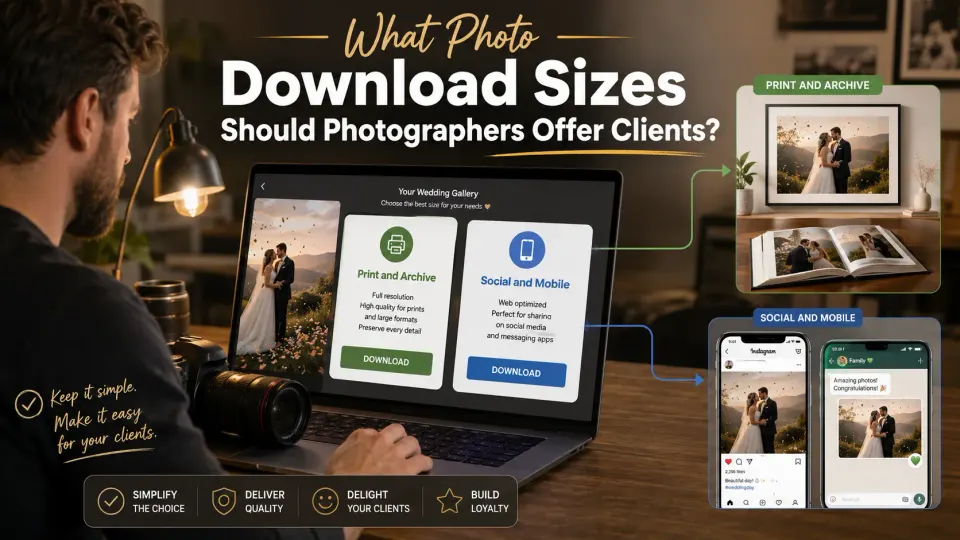
Photographers often give clients several download choices: Original, High, Medium and Low resolution. The intention is helpful, but the labels can create more questions than clarity.
Clients usually do not think in terms of image resolution. They think about what they want to do next:
- Print a photograph
- Make an album
- Post it on Instagram
- Send it through WhatsApp
- Save the complete event collection
A better client-gallery experience explains the purpose of each download instead of presenting four technical labels without context.
Start With the Client’s Use
The largest file is the right choice for printing and long-term storage. It is not always the most convenient file for everyday sharing.
A wedding client who wants to send ten photographs to a family WhatsApp group does not need to download ten large original files. At the same time, a small mobile-friendly copy should not be used for a wall frame or album.
The photographer should make that difference clear inside the gallery.
Original or Full Resolution
Original resolution should normally be the photographer’s largest finished delivery file.
It is best suited for:
- Large and regular prints
- Wedding album design
- Wall frames
- Cropping
- Long-term backup
“Original” should mean the final edited photograph supplied by the studio. It should not suggest that the client is receiving RAW files or unedited camera files.
Clients should be encouraged to download this version at least once and keep it safely backed up.
High Resolution
A separate High-resolution option is useful when the studio wants to provide a print-friendly file that is smaller than the largest delivered version.
It may be appropriate for regular photo prints, photo books and general computer storage.
However, offering both Original and High is not compulsory. If the difference is unlikely to matter to the client, the studio can provide one clearly labelled Print and Archive option instead.
Too many similar choices can make delivery harder rather than better.
Medium Resolution
Medium-resolution photographs are usually the most practical option for everyday digital use.
They work well for:
- Instagram and Facebook
- Digital invitations
- Mobile viewing
- Personal websites
- Quick sharing with friends and family
These files are easier to download and take up less phone storage while still looking clear on normal screens.
A client-friendly label could be:
Social and Mobile: Recommended for Instagram, Facebook, email and phone viewing.
Low Resolution
Low-resolution files are mainly useful for quick previews, lightweight WhatsApp sharing or situations where internet speed and mobile storage are limited.
Many studios may not need to offer this as a separate option. A properly prepared Medium version can often handle both social media and everyday messaging.
Offer Low resolution only when it serves a clear purpose. Do not add it merely because the gallery supports another download size.
A Simpler Download Setup
For most wedding, portrait and event galleries, photographers can keep the options simple:
| Download option | Best use |
|---|---|
| Print and Archive | Prints, albums, frames and permanent backup |
| Social and Mobile | Instagram, Facebook, email and phone sharing |
| Quick Preview | WhatsApp previews and low-storage use |
This wording is easier for clients to understand than Original, High, Medium and Low.
Add a Short Download Note
Place a simple explanation near the download button:
Download Print and Archive files for albums, frames and backup. Choose Social and Mobile for WhatsApp, Instagram and everyday sharing.
Also tell clients how long the gallery will remain available. A professional delivery process should not assume that clients understand file sizes, backups or gallery expiry.
Make Download Choices Part of the Client Experience
Photo delivery is not complete when the files are uploaded. Clients must also understand how to download and use them.
A clear gallery reduces repeated questions, prevents small files from being sent for large prints and helps clients keep a proper full-quality backup.
GoPickle Client Galleries can be used to deliver photographs through an organised, branded experience. The photographer should pair that delivery with simple download labels based on client use—not technical terminology the client must decode.
The best setup is usually the simplest one: one version for printing and permanent storage, and one smaller version for everyday digital sharing.