When Should a Photography Studio Hire Its First Dedicated Photo Editor?
Learn when to hire a photo editor for your photography business. Spot editing bottlenecks, compare outsourcing costs, and decide when a dedicated editor makes financial sense.

For many photographers, editing starts as part of the job. You shoot the assignment, back up the files, cull the photographs, edit them, export the final set and deliver everything to the client.
That works while volume is manageable. Then the studio grows.
Three weddings are waiting to be edited. Another shoot is tomorrow. A couple is asking when their gallery will be ready. New enquiries need replies. Quotations are pending. The owner is still in Lightroom at midnight.
At that point, editing is no longer simply post-production. It may be the bottleneck controlling how much business the studio can handle.
The question is not whether you could continue editing yourself. It is whether you still should.
The First Sign: Your Editing Backlog Keeps Growing
A temporary backlog after a particularly busy weekend is normal. A backlog that grows month after month is different.
Track every active job and record:
- Shoot date
- Number of photographs
- Culling status
- Editing status
- Retouching still required
- Client delivery deadline
- Album or selection work waiting on the final edits
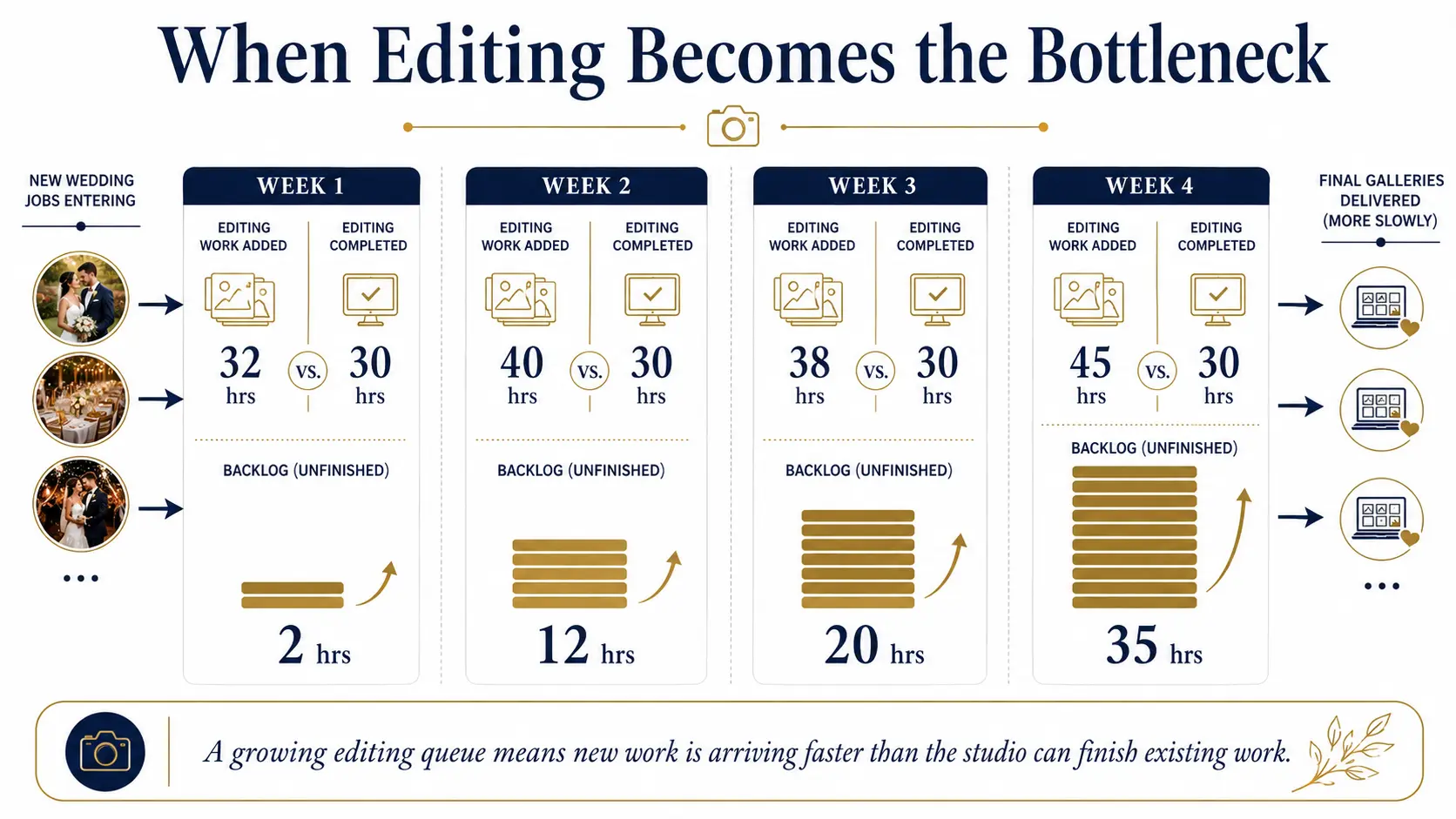
If new assignments are entering the queue faster than completed galleries are leaving it, you have a capacity problem.
For example:
| Week | Editing work added | Editing work completed | Backlog |
|---|---|---|---|
| Week 1 | 32 hours | 30 hours | 2 hours |
| Week 2 | 40 hours | 30 hours | 12 hours |
| Week 3 | 38 hours | 30 hours | 20 hours |
| Week 4 | 45 hours | 30 hours | 35 hours |
The important number is not how many weddings you booked.
It is whether your available editing capacity can keep pace with the work those bookings create. That is the first point at which a studio should seriously evaluate whether to hire a photo editor for the photography business.
The Second Sign: Delivery Dates Are Starting to Slip
Clients rarely see the complexity inside your post-production workflow. They remember what you promised.
If a gallery was expected in four weeks and arrives in seven, the problem eventually becomes a client-experience issue rather than an internal workload issue.
Professional photography workflows can include backup, culling, editing, retouching, export and gallery delivery before a job is finished. Current workflow tools aimed at photographers increasingly focus on these post-shoot stages precisely because substantial work continues after the camera is packed away.
Watch for patterns such as:
- promised delivery dates repeatedly being extended;
- previews going out later than planned;
- completed shoots sitting untouched for several days;
- album work waiting because edited photographs are not ready;
- clients having to ask for progress updates.
One delayed project may be an exception. Repeated delays mean production capacity is no longer matching sales capacity.
Calculate What the Owner Is Actually Spending on Editing
The most useful calculation is not simply:
What would an editor cost?
Start with:
What does owner-led editing already cost the business?
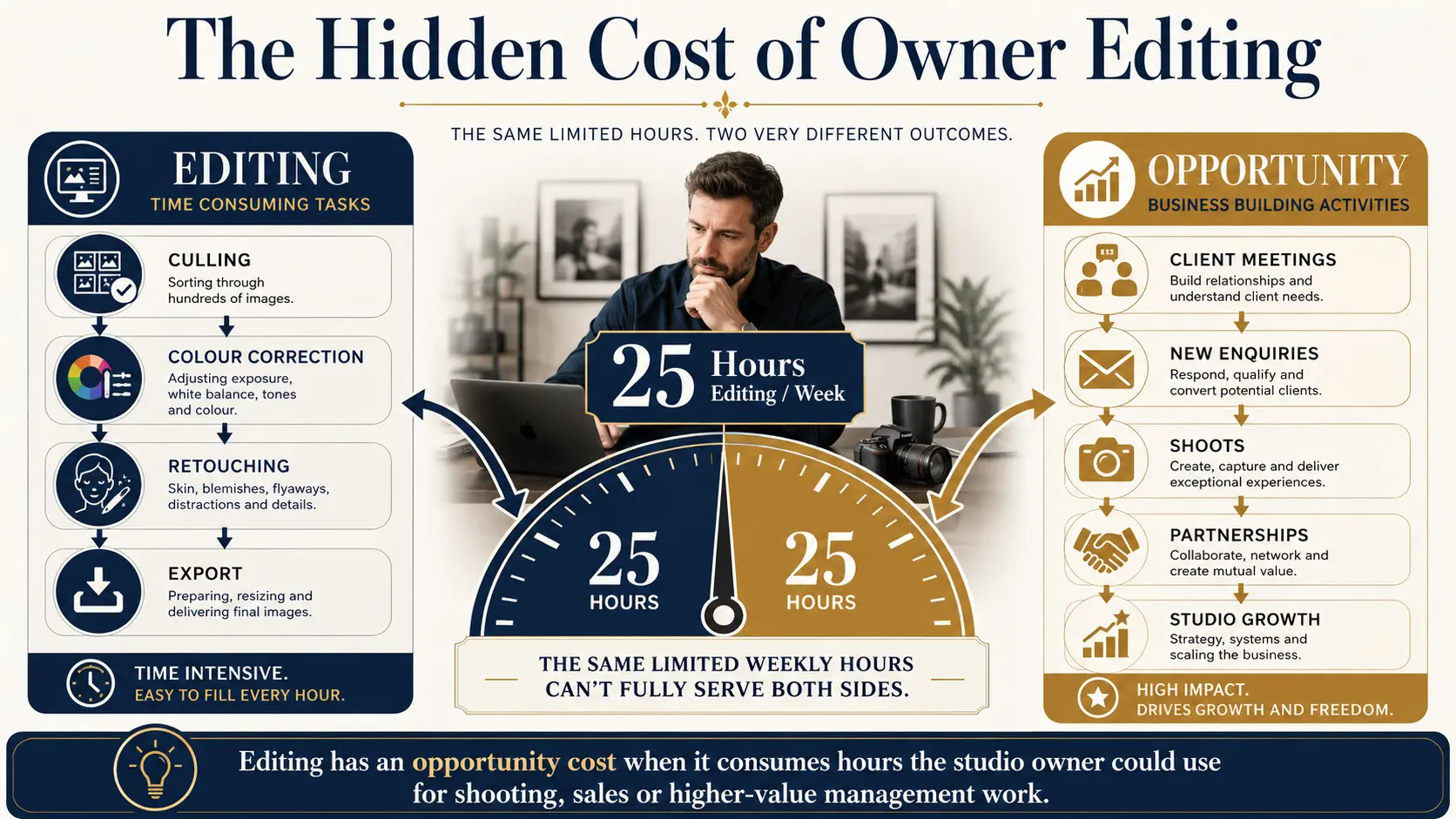
Suppose the studio owner spends 25 hours each week culling and editing.
Those 25 hours cannot simultaneously be used for:
- client consultations;
- responding to strong enquiries;
- shooting another assignment;
- building vendor relationships;
- reviewing studio finances;
- marketing;
- training photographers;
- improving packages and pricing.
This is opportunity cost.
If the founder is also the studio's strongest salesperson or highest-value photographer, their editing time may be particularly expensive.
Consider this example.
If another wedding produces ₹100,000 in contribution after direct shoot costs, and editing workload prevents the studio from accepting one additional suitable booking each month, the economic question changes.
You are no longer comparing:
Editor salary vs zero cost.
You are comparing:
Editor cost vs owner time + delayed work + potentially lost capacity.
Measure Editing Hours Per Booking
Before hiring anyone, establish how much editing work the studio actually generates.
For each job type, estimate:
Wedding
- Culling: 3 hours
- Base editing: 8 hours
- Detailed corrections: 4 hours
- Export and checks: 2 hours
Portrait session
- Culling: 30 minutes
- Editing: 2 hours
- Retouching: 1 hour
- Export: 30 minutes
Your numbers will differ considerably depending on shooting volume, style, software, retouching requirements and deliverables.
That is exactly why generic advice such as “hire after ten weddings per month” is not very useful.
One studio may deliver 500 lightly edited images. Another may deliver 1,500 photographs with extensive retouching. Measure hours, not only bookings.
Then calculate:
Monthly editing demand = total editing hours generated by all booked work
Compare that with:
Current editing capacity = realistic editing hours available each month
The gap tells you whether the problem is occasional or structural.
Should You Outsource Photo Editing First?
Hiring a permanent employee is not the only answer. Many studios outsource photo editing before employing someone internally.
Outsourcing can work particularly well when:
- booking volume changes sharply between seasons;
- editing demand is still unpredictable;
- you need temporary relief from a backlog;
- you want to test delegation before hiring;
- you primarily need repetitive colour correction rather than continuous studio support.
Professional editing services position outsourcing specifically around removing post-production workload so photographers can redirect time toward shooting, client work and business development.
AI-assisted editing is another option. Current photography workflow products can automate portions of culling, batch editing and retouching, which may materially reduce manual workload before another salary is justified.
Neither option automatically removes the need for an editor. Automation can reduce repetitive work. Outsourcing can add flexible capacity.
A dedicated editor becomes more attractive when editing volume is regular enough that someone needs to own post-production continuously.
Watch Your Outsourcing Costs
Outsourcing is attractive because the cost is variable. During a quiet month, you spend less. During peak season, you buy more capacity. But studios should track the cumulative cost.
Record:
Outsourcing cost per job × number of jobs outsourced each month
Then compare annual outsourcing spend with the total cost of employing an editor.
Include more than salary when evaluating a hire:
- employment costs;
- editing workstation;
- monitor and calibration equipment;
- software licences;
- storage;
- training;
- management time;
- quieter months when utilisation may fall.
A dedicated editor should not be hired simply because a freelancer's invoice feels expensive.
The full-time model begins to make sense when workload is sufficiently predictable and the studio can keep that person productively occupied.
Consistency Can Become a Reason to Bring Editing In-House
Cost is only part of the decision. A growing studio is often selling a recognisable photographic style.
Different outsourced editors may interpret:
- skin tones;
- white balance;
- contrast;
- colour grading;
- crop choices;
- exposure;
- black-and-white conversion
slightly differently.
Reliable outsourcing partners can build excellent consistency, especially with clear references and presets. But if the owner is repeatedly correcting outsourced work before delivery, the supposed time saving begins to disappear.
A dedicated editor can gradually learn how the studio handles different cameras, lighting conditions, venues and photographers.
That knowledge becomes especially useful as the photography studio team grows and several shooters are sending work into the same post-production pipeline.
A Dedicated Editor Should Own More Than Lightroom
Hiring an editor should not mean transferring an unstructured folder of files to another person.
Define the role properly.
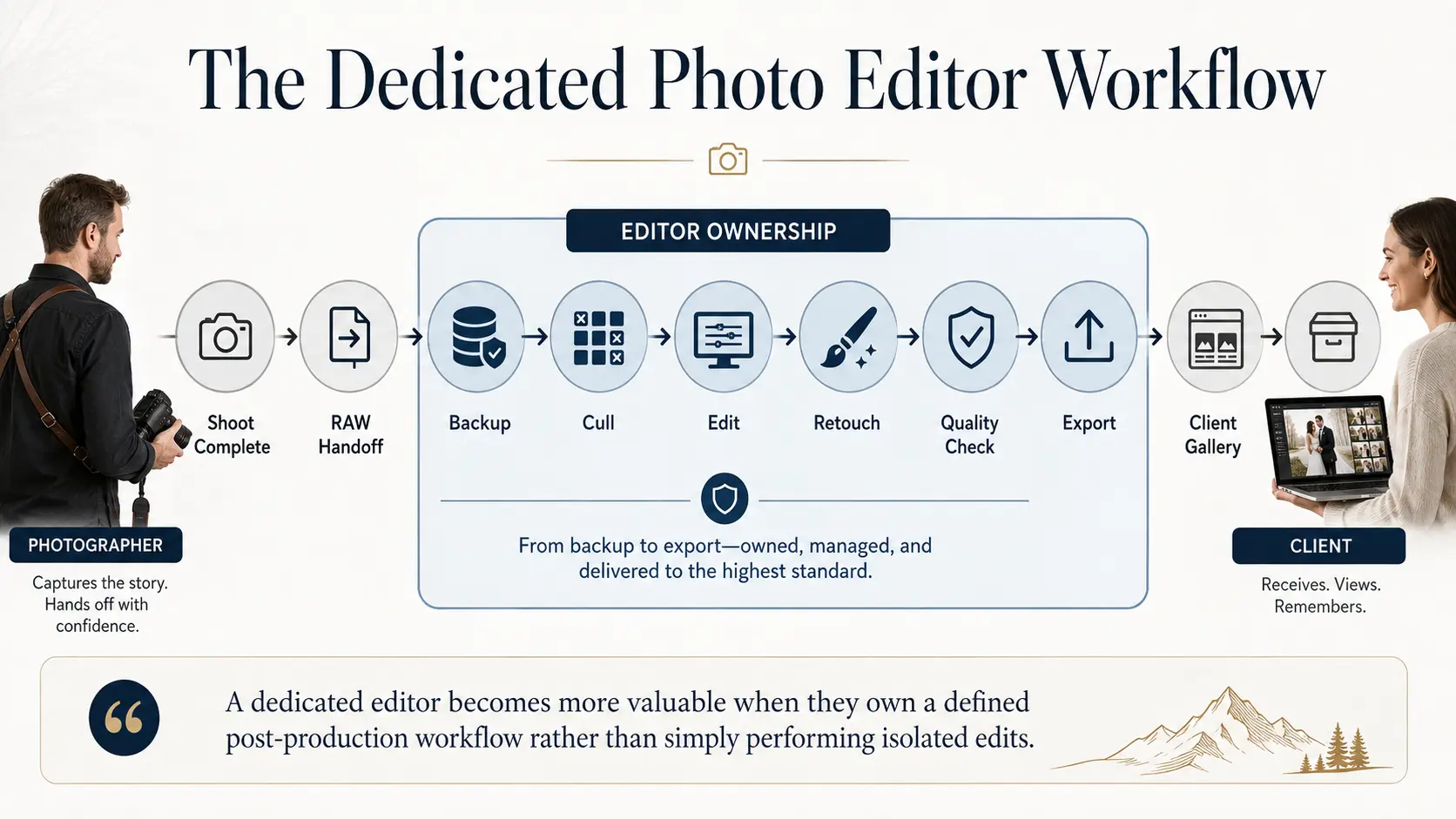
A studio editor might own:
RAW handoff → backup verification → culling → editing → retouching → quality check → export → gallery preparation → archive
Your workflow may differ, but ownership should be explicit.
This is also where crew and booking visibility matter.
GoPickle's Crew Management for Photographers allows studios to assign editors alongside photographers and other crew, while keeping responsibilities connected to the bookings and events they are working on. GoPickle's current crew workflow specifically includes photographers, editors and assistants rather than treating the team as shoot-day crew only.
Use This Five-Part Hiring Test
Before creating the role, review the previous three to six months.
1. Is the backlog persistent?
If editing falls behind even during normal months, the workload is probably structural.
2. Are deliveries being affected?
Once editing capacity starts changing what clients experience, postponing the decision has a cost.
3. Is the owner spending high-value time editing?
If the person responsible for generating sales, shooting premium work or managing the studio spends most evenings processing files, examine the opportunity cost.
4. Is outsourced editing becoming predictable?
Regular outsourced volume can be evidence that the studio already has enough work for dedicated editing capacity.
5. Will the editor remain useful outside peak season?
Consider culling, retouching, gallery preparation, backups, archives, album preparation and internal production support.
If the answer to most of these is yes, you are no longer hiring ahead of growth. You are hiring to remove a bottleneck that already exists.
The Best Time to Hire Is Before the Backlog Becomes Normal
Studios often wait until editing becomes painful enough that something has to change immediately. That is usually late.
A better trigger is when the numbers show that editing demand is repeatedly approaching or exceeding available capacity.
At GoPickle, we see post-production as part of the complete studio workflow, not something that starts after the “real work” ends. A wedding can move from enquiry and quotation through booking, crew, shooting, client selection and final gallery delivery. GoPickle's wedding photography workflow reflects those connected stages, including post-shoot selections, approvals and delivery.
Once edited images are ready, GoPickle Client Galleries can handle organised client viewing, selections and final delivery rather than ending the workflow with another loose folder or transfer link.
Your first dedicated editor should not simply make editing easier. The hire should increase the amount of good work your studio can reliably finish.