Where AI Actually Helps Photographers Without Replacing Their Creativity
Learn where AI actually helps photographers in culling, editing support, captions, reminders, and workflow without replacing creative judgment.

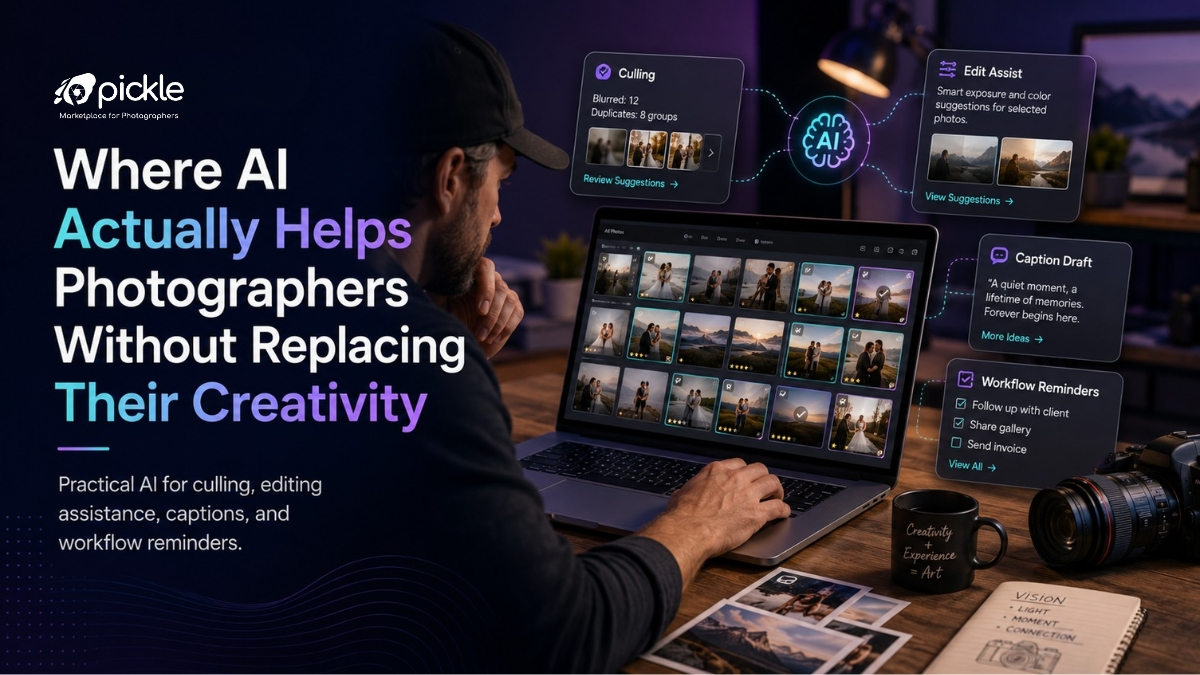
Short Answer
AI helps photographers best when it reduces repetitive work, not when it tries to replace creative judgment.
It can support culling, editing assistance, caption drafts, workflow reminders, album organisation, client communication, and task tracking.
The photographer should still decide the story, mood, style, final selection, and client experience.
The Real Problem AI Should Solve
Many photographers are not short of creativity.
They are short of time.
From working with photography studio workflows, the pressure usually comes after the shoot. Thousands of images need sorting. Clients want previews. Editors need clear instructions. Captions need to be written. Albums need to be shared. Follow-ups are pending. Payments need reminders. New enquiries are still coming in.
This is where AI can be useful.
Not as a fake creative director.
Not as a replacement for taste.
But as a quiet assistant that handles the boring parts faster.
The mistake is thinking AI should create the photographer’s style. The better use is making sure the photographer has more time and energy to protect that style.
1. AI Can Help With First-Level Culling
AI photo culling can save time, especially for weddings, events, sports, and large shoots.
It can help identify:
- Blurry images
- Closed eyes
- Duplicate frames
- Similar burst shots
- Poor exposure
- Faces not visible
- Technical rejects
But AI should not make the final emotional selection.
A technically perfect photo may still be boring. A slightly imperfect photo may carry the best emotion of the day.
For wedding photographers, this matters a lot. A parent’s expression, a nervous smile, or a small ritual moment may not score well technically, but it may be important to the family.
So use AI for first-level cleanup. Let the photographer make the final story selection.
2. AI Can Speed Up Editing, But Not Define the Style
AI editing assistance can help with repetitive adjustments.
Useful areas include:
- Exposure correction
- Noise reduction
- Skin cleanup suggestions
- Background distraction removal
- Colour matching across a set
- Straightening and cropping suggestions
- Batch consistency checks
This is helpful when the studio has hundreds or thousands of images to deliver.
But editing style is still a creative decision.
A photographer’s tone, contrast, warmth, skin colour preference, black-and-white treatment, and mood should not be randomly decided by software.
The better approach is to use AI to reach a clean base faster, then apply the photographer’s style carefully.
AI should reduce editing fatigue, not flatten the work.
3. AI Can Draft Captions, But Photographers Should Add Context
Many photographers struggle with captions.
They have good images but delay posting because writing feels like another task.
AI caption writing for photographers can help create first drafts for:
- Instagram posts
- Client gallery announcements
- Wedding highlights
- Blog summaries
- Portfolio descriptions
- Google Business Profile updates
- Email updates to clients
But captions should not sound generic.
A useful method is to give AI the real context:
- Couple names or event type
- Location
- Mood of the shoot
- One real moment from the day
- Service being shown
- Target audience
Then rewrite the caption in your own voice.
The rarely spoken point is this: AI is better at giving you a starting point than giving you a final brand voice.
Your experience still needs to show.
4. AI Can Help Studios Remember What Humans Forget
This is one of the most valuable AI use cases for photography studios.
Not image creation.
Not fake creativity.
Reminders.
A studio loses time and money when small tasks are forgotten:
- Follow up with a lead
- Send quotation
- Confirm booking timing
- Remind client about payment
- Share gallery link
- Ask for album selection
- Check pending edits
- Update delivery status
- Send review request after delivery
AI and automation can help by surfacing what needs attention.
For example:
“Three wedding leads have not been followed up.”
“Two galleries were shared but selections are pending.”
“One invoice is overdue.”
“One booking has no confirmed reporting time.”
This kind of assistance is not glamorous, but it is highly valuable.
It protects the studio from operational gaps.
5. AI Can Turn Scattered Notes Into Clear Action
Photographers often collect client details through WhatsApp, calls, Instagram DMs, and voice notes.
The problem is that these details stay scattered.
AI can help summarise messy client communication into clean action points.
For example:
Client said:
- Wedding is in Kochi
- Two-day function
- Needs candid photography and video
- Album optional
- Budget is not final
- Wants quote by evening
AI can turn this into:
- Requirement: Two-day wedding coverage
- Location: Kochi
- Services: Candid photography + video
- Pending: Album confirmation
- Next action: Send quotation today
- Follow-up: Tomorrow evening
This is where AI becomes useful for photography business management.
It helps convert conversation into workflow.
6. AI Can Improve Client Experience Without Being Visible
Clients do not need to know every tool behind the studio.
They only feel the result.
If AI helps the studio reply faster, send clearer quotes, remember follow-ups, prepare galleries, track selections, and avoid missed delivery promises, the client experience improves.
This is the practical side of AI photography workflow.
The client should not feel like AI is replacing the photographer.
They should feel the studio is organised, responsive, and professional.
What Photographers Should Avoid
AI becomes risky when photographers use it blindly.
Avoid:
- Posting generic AI captions without editing
- Over-smoothing skin and losing natural texture
- Letting AI choose final emotional images
- Using fake portfolios or unrealistic samples
- Depending on AI for pricing without business understanding
- Automating client replies without checking tone
- Replacing real communication with robotic messages
Trust is important in photography.
AI should never make the client feel the work is impersonal.
Where GoPickle Helps
GoPickle helps photographers manage the practical workflow around creativity.
A studio can manage leads, bookings, quotations, invoices, client albums, galleries, delivery, team members, and follow-ups in one place.
As AI becomes more useful in photography workflows, the bigger benefit comes when creative work and business operations are connected.
For example, a studio may use AI to draft reminders or organise tasks, but GoPickle helps keep the actual client journey structured: enquiry, quotation, booking, payment, album delivery, and follow-up.
That gives photographers more time to focus on the work only they can do.