Why Photographers Need GoPickle.ai Booking Management Software
See how GoPickle helps photographers prevent double bookings, track payments, organise teams and keep every booking detail in one place.

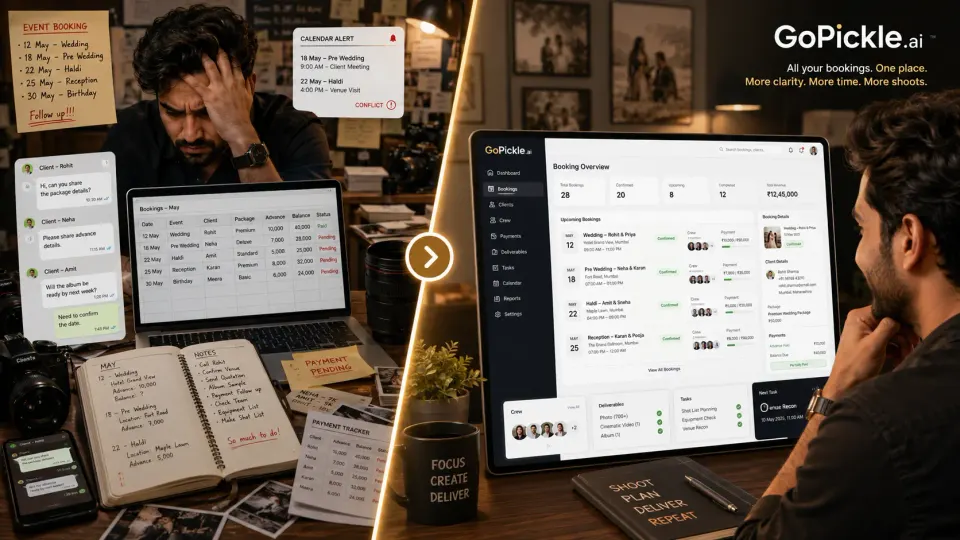
Many photographers begin by managing bookings in a diary, Excel sheet, Google Calendar or WhatsApp.
That can work when the studio handles only a few shoots. The owner remembers the client, the event date and the agreed package. Crew arrangements happen through calls, while advances and balances are written into a spreadsheet.
The system becomes unreliable as booking volume increases.
A wedding may contain several events, different venues, multiple crew members, staged payments, albums, films and client-specific instructions. No single diary entry or WhatsApp chat can show the complete state of that booking.
GoPickle Booking Management gives photographers one structured record for the client, events, services, deliverables, team, tasks, payments and documents. GoPickle’s current workflow connects booking information with quotations, invoices, crew coordination and album delivery rather than keeping each stage in a separate tool.
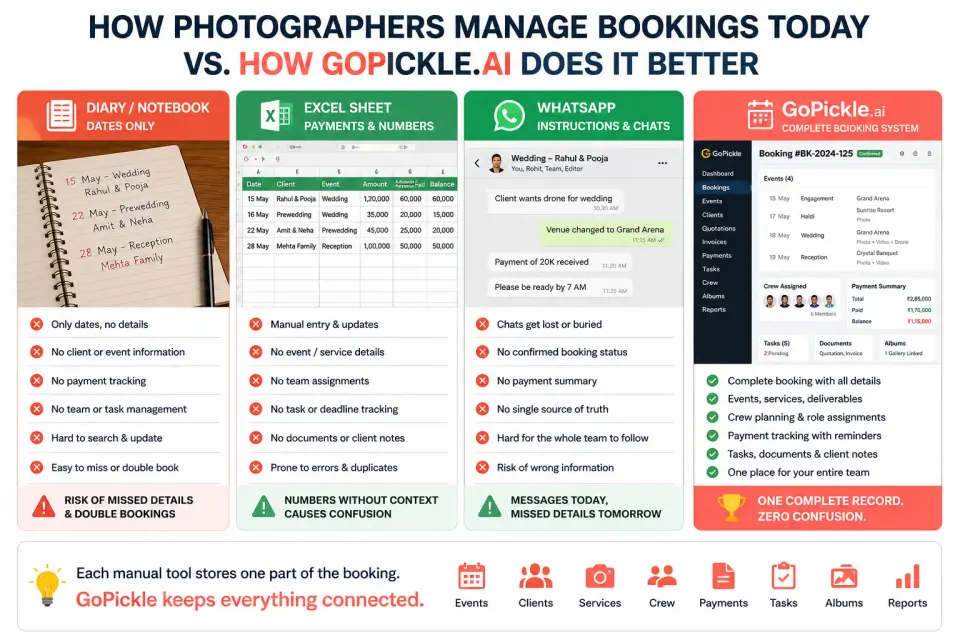
Why Diaries Stop Working
A diary is useful for checking whether a date appears free. It is weak as a photography booking system.
An entry such as:
18 December Rahul wedding
does not explain:
- Whether the date is tentative or confirmed
- Which functions are included
- Where each event will happen
- What time the crew must report
- Which package the client selected
- How much advance was received
- Which deliverables were promised
- Who is responsible for the shoot
- What still needs to be completed
The photographer may know these details today, but another team member cannot confidently work from the same entry.
GoPickle treats a booking as a complete business workflow containing client details, shoot information, assigned crew, quotations, invoices, payment status and album delivery.
Why Excel Becomes Difficult to Maintain
Excel can store more information than a diary, but a spreadsheet still depends on consistent manual updates.
One row may contain the event date and package amount. Another sheet tracks payments. Crew availability may live in a different file. Album delivery may be recorded elsewhere.
The problems appear when something changes.
A client adds a reception event, upgrades cinematography or requests another album. Someone updates the quotation but not the booking sheet. Accounts follows the older amount. The crew receives the original schedule.
The spreadsheet is not necessarily wrong. It is incomplete in different places.
Photography booking management software should keep the final booking scope connected so changes to events, services, deliverables and costs remain visible to the studio.
Why WhatsApp Is Not a Booking Record
WhatsApp is useful for client communication. It should not be the only place where booking information lives.
A single booking conversation may contain:
- The first enquiry
- Package discussions
- Venue changes
- Payment screenshots
- Crew instructions
- Reference photographs
- Delivery promises
- Album corrections
Important details become difficult to locate after weeks of messages, voice notes and attachments.
The client may also speak with several studio members. The owner has one conversation, the accounts person has another, and the crew receives a separate group message.
GoPickle keeps bookings, payments, shoot details and studio activity together so the team does not have to reconstruct the project from chats, spreadsheets and calendars.
Prevent Double Bookings
A calendar can show that a date is occupied, but double booking can still happen when the studio manages tentative and confirmed projects inconsistently.
For example:
- One client verbally blocks a date.
- Another pays an advance.
- The first client remains written in a diary.
- The second appears in the spreadsheet.
- Neither record shows the complete booking status.
A structured photographer scheduling system should distinguish between stages such as tentative, confirmed, ongoing, completed, delivered and cancelled.
It should also show every event within a booking. A multi-day wedding may block Friday evening, Saturday morning and Sunday night even though it belongs to one client.
GoPickle’s workflow-management page describes booking tools with scheduling, conflict visibility and connected shoot information, helping studios avoid treating each date as an isolated note.
Read our blog on What Every Photographer Should Confirm Before Accepting a Booking
Keep Every Client Requirement Visible
Booking confusion often begins when the studio confirms the date but leaves the remaining details in chat.
A complete booking should record:
- Client contact details
- Event names
- Dates and timings
- Venues
- Services per event
- Deliverables
- Crew requirements
- Travel or accommodation
- Special instructions
- Payment stages
- Cancellation or date-change terms
GoPickle’s own booking checklist emphasises that photographers should confirm timings, deliverables, team requirements, travel and payments before accepting a job.
The booking detail page then becomes the place the studio checks before making a decision or briefing a team member.
Make Payments Easier to Understand
Photography bookings often involve an advance, one or more instalments and a final balance.
When payments are tracked in messages or bank screenshots, the studio may struggle to answer:
- What is the total booking value?
- Which payment has been received?
- When is the next instalment due?
- Has an add-on been invoiced?
- Can final delivery proceed?
- Who last followed up with the client?
GoPickle connects photography bookings with invoices, payment stages and outstanding balances. Its current product pages describe tracking shoot dates, packages, advance payments, balance payments and booking status together.
The benefit for the photographer is not aggressive payment collection. It is clarity about what has been agreed, paid and left pending. Read our blog on How Photographers Can Collect Payments Without Awkward Follow-ups.
Reduce Team Confusion
A studio may have photographers, cinematographers, assistants, editors and album designers working on the same booking.
Team confusion happens when members are told only part of the plan.
The photographer receives the venue. The cinematographer receives the timing. The editor knows the delivery deadline but not which events are included. The album designer receives a selection without the correct album scope.
GoPickle connects crew planning to the booking. Studios can assign people by event and responsibility while keeping role-appropriate information visible. Its crew-management workflow is designed around booking-linked roles, availability and responsibilities rather than generic group-chat coordination.
Each team member can understand:
- Which booking they are working on
- Which event they are assigned to
- Their reporting time and venue
- Their role
- What must be handed over next
Use One Booking for Multiple Events
A wedding booking may contain engagement, haldi, sangeet, wedding and reception events.
Managing these as five unrelated calendar entries creates problems. The client relationship, package, payment plan and deliverables belong to one larger booking.
GoPickle allows the studio to keep multiple events connected while recording separate dates, services, crews and requirements for each one.
For example:
| Event | Services | Crew |
|---|---|---|
| Engagement | Candid photography | Photographer and assistant |
| Sangeet | Photography, video and reels | Photo and video crew |
| Wedding | Full photography and cinematography | Complete team |
| Reception | Photography and guest gallery | Photographer and gallery operator |
The team can plan each function separately without losing the complete client context.
Connect Quotations, Invoices and Delivery
A booking should connect what was sold with what must be delivered.
GoPickle’s quotation workflow supports client approval and conversion into a booking, helping prevent the final booking from becoming disconnected from the accepted package.
The booking can then remain connected to:
- The accepted quotation
- The invoice
- Advance and balance payments
- Assigned crew
- Tasks
- Client Galleries
- Album selection
- Final delivery
This is why booking management becomes the backbone of the studio rather than another administrative feature.
A Practical Studio Example
Consider a studio managing a wedding with four functions.
The details are currently spread across:
- WhatsApp for client requirements
- Google Calendar for dates
- Excel for payments
- A crew group for assignments
- A PDF quotation
- Drive folders for delivery
The client adds an extra cinematographer for the reception and changes the wedding timing.
The quotation is updated, but the spreadsheet still shows the old total. One crew member receives the new timing, while another follows the original schedule. Accounts sends a reminder for the wrong balance.
Inside GoPickle, the studio updates the central booking.
The revised reception service, total cost, payment balance, event time and crew assignment remain visible from the same booking context. The studio manager can check the current scope instead of deciding which message or file is latest.
That is the practical value of a structured booking record.
Why GoPickle Booking Management Matters
Booking software for photographers should not create extra administrative work.
It should give the studio one reliable answer to four questions:
- What did the client book?
- What must the team do?
- What has been paid?
- What remains pending?
GoPickle Booking Management connects client details, multiple events, services, deliverables, crew, tasks, quotations, invoices, payments and galleries within one photography workflow.
Diaries show dates. Excel stores rows. WhatsApp carries conversations.
A structured booking record shows the actual state of the project.
Use GoPickle.ai to move booking information out of scattered tools and give your studio one shared source of truth from confirmation to final album delivery.