How GoPickle Can Replace Scattered Tools in a Photography Studio
See how GoPickle connects leads, bookings, quotations, invoices, crew, payments and client galleries in one photography workflow.

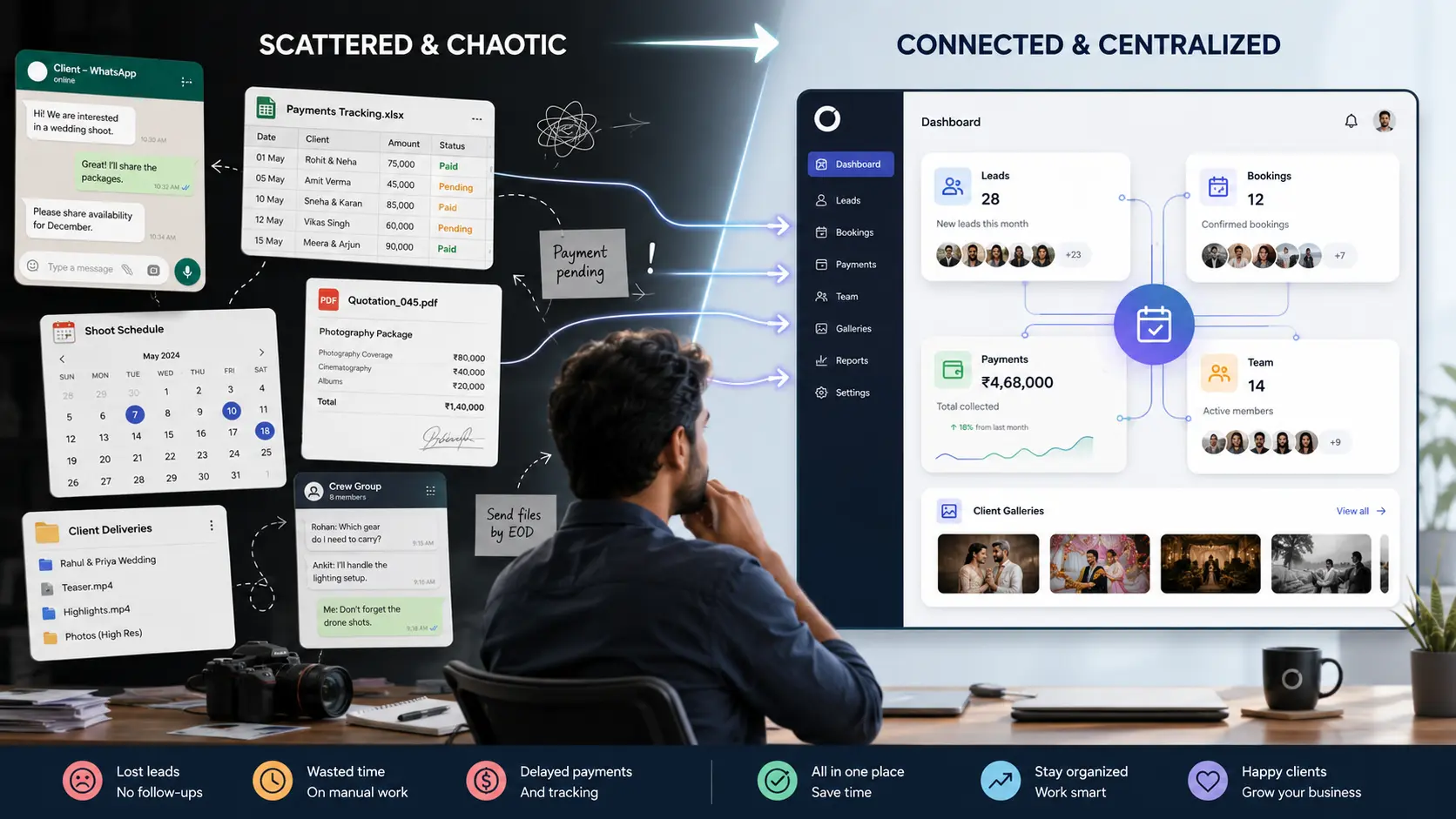
A photography studio may use WhatsApp for enquiries, Excel for payments, Google Calendar for shoot dates, PDF files for quotations, Drive folders for delivery and separate chats for crew updates.
Each tool can work well on its own.
The problem is that the studio must manually carry information from one tool to another. A client changes the date in WhatsApp, but the calendar is not updated. A package is revised in a quotation, but the payment sheet still shows the old total. The gallery is delivered, but nobody records that album selection is pending.
GoPickle does not need to replace every specialist tool a photographer uses. Its main role is to become the workflow hub that keeps the client, booking, documents, payments, team and delivery connected.
The Real Problem Is Disconnected Information
Scattered tools create repeated questions:
- Was the client followed up?
- Which quotation was approved?
- Is the booking confirmed?
- How much advance was paid?
- Who is assigned to the event?
- Has the gallery been shared?
- Is album selection complete?
- What must happen next?
The answer may exist somewhere, but finding it requires checking several places.
GoPickle brings leads, bookings, quotations, invoices, crew coordination, payments and client galleries into one photography-focused workflow. Its workflow-management page is built around moving the studio from enquiry through booking, billing, shoot coordination and delivery without keeping each stage isolated.
Enquiries Can Move Into Bookings
A new enquiry may arrive from Instagram, WhatsApp, a website, referral or phone call.
Inside GoPickle, the studio can record the client, event date, requirement, budget, source and next follow-up. Once the client confirms, the enquiry can move into the booking workflow instead of being recreated from old messages.
The booking can then hold the event dates, services, deliverables, crew, payment status and pending work. GoPickle describes this as a connected process from first enquiry to final payment and delivery.
Quotations and Invoices Stay Connected
Many studios prepare quotations in one tool and track payments in another.
This creates problems when the client changes the package.
GoPickle quotation management keeps the client requirement, package scope, pricing, revisions and approval connected. The accepted scope can continue into the booking and invoice rather than being typed again.
Its invoicing workflow supports advances, instalments, pending balances, invoice links and payment reminders connected to the relevant booking. This helps the studio see what the client booked, what has been paid and what remains due.
Crew Planning Becomes Part of the Booking
Crew coordination often happens in calls and WhatsApp groups.
That is useful for communication, but it should not be the only record of who is working on an event.
GoPickle allows studios to connect photographers, videographers, editors, assistants and freelancers to specific bookings and event responsibilities. Crew details, availability, assignments and editing handovers remain part of the same photography workflow.
The crew can receive the context needed for the assignment without every team member needing access to the entire studio operation.
Client Delivery Does Not Need to End With a Folder Link
Google Drive can remain useful for internal storage, backups and file transfers.
For final client delivery, GoPickle provides branded Client Galleries with organised viewing, protected access, downloads and album-selection support. This allows the delivered photographs to remain connected to the client and booking rather than becoming a separate folder link with no visible next stage.
A studio can therefore see that the shoot is complete, the gallery has been shared and the client still needs to finish a selection or approval.
What GoPickle May Not Replace
An all-in-one photography business platform does not mean every application must disappear.
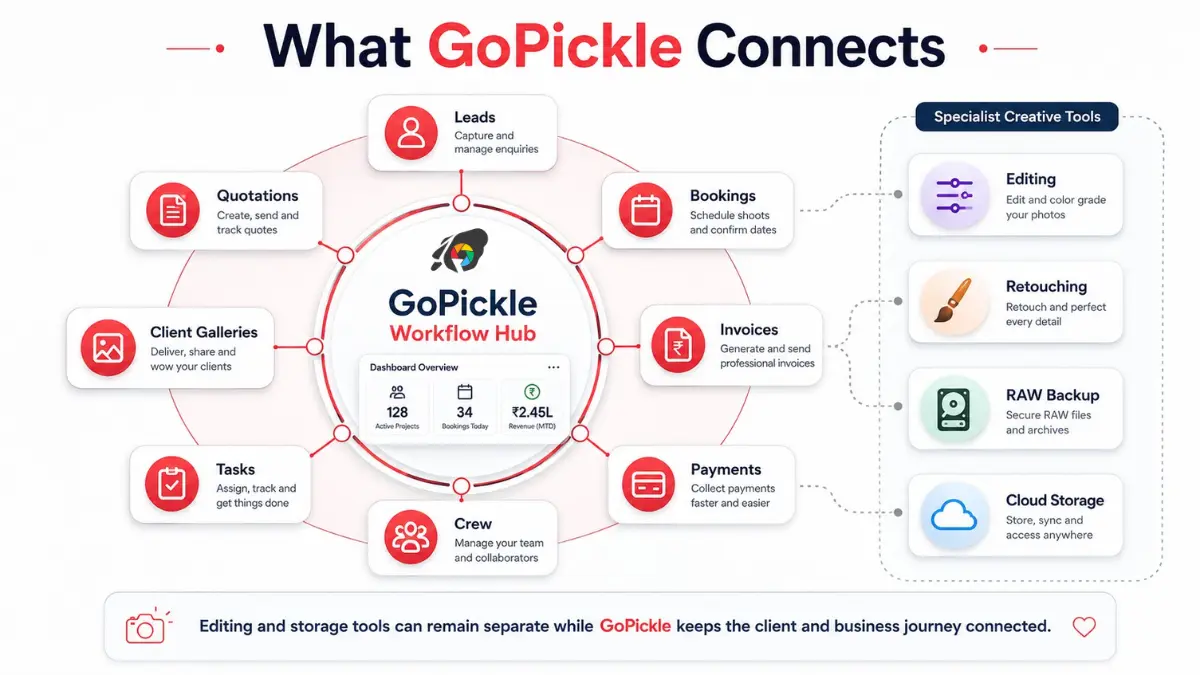
A studio may still use:
- Lightroom or Capture One for editing
- Photoshop for detailed retouching
- Cloud or local storage for RAW-file backup
- WhatsApp for quick client communication
- Accounting software for statutory bookkeeping
- Google Calendar for personal calendar syncing
The value of GoPickle is not that these tools become unnecessary.
The value is that the business workflow no longer depends on those tools being manually stitched together.
A Practical Studio Example
Consider a wedding studio using five separate tools.
The enquiry arrives on WhatsApp. The quotation is prepared as a PDF. The booking date is added to Google Calendar. The advance goes into Excel. Crew details are shared in a group chat. Final photographs are sent through Drive.
When the couple adds another event, every system must be updated separately.
Inside GoPickle, the studio updates the central booking. The added event can be reflected in the services, quotation, invoice, payment balance, crew assignment and upcoming workload.
The editing software and backup storage can remain unchanged. GoPickle manages the business context around the job.
Start With the Workflow Causing the Most Confusion
A studio does not need to move everything at once.
It can begin with:
- Active leads and follow-ups
- Upcoming bookings
- Quotations and invoices
- Pending payments
- Crew assignments
- Client galleries and album selections
GoPickle’s own product pages note that some photographers begin with client gallery delivery and later add bookings, quotations, invoices and other modules as the studio grows.
This phased approach is often easier than trying to migrate every historical client and project immediately.
One Hub, One Client Journey
The purpose of photography studio management software is not to create more data entry.
It is to keep one client journey connected:
Enquiry → Quotation → Booking → Payment → Crew → Shoot → Gallery → Album → Closure
GoPickle.ai brings these business stages into one photographer-focused workflow while allowing specialist creative and storage tools to continue doing what they do best.
The studio may still use several applications. It should no longer need several disconnected versions of the same booking.