How Many Weddings Can Your Photography Studio Take Per Month Without Delaying Delivery?
Learn how to calculate photography studio capacity using shoot dates, crew availability, editing workload, albums, revisions, travel and delivery commitments.

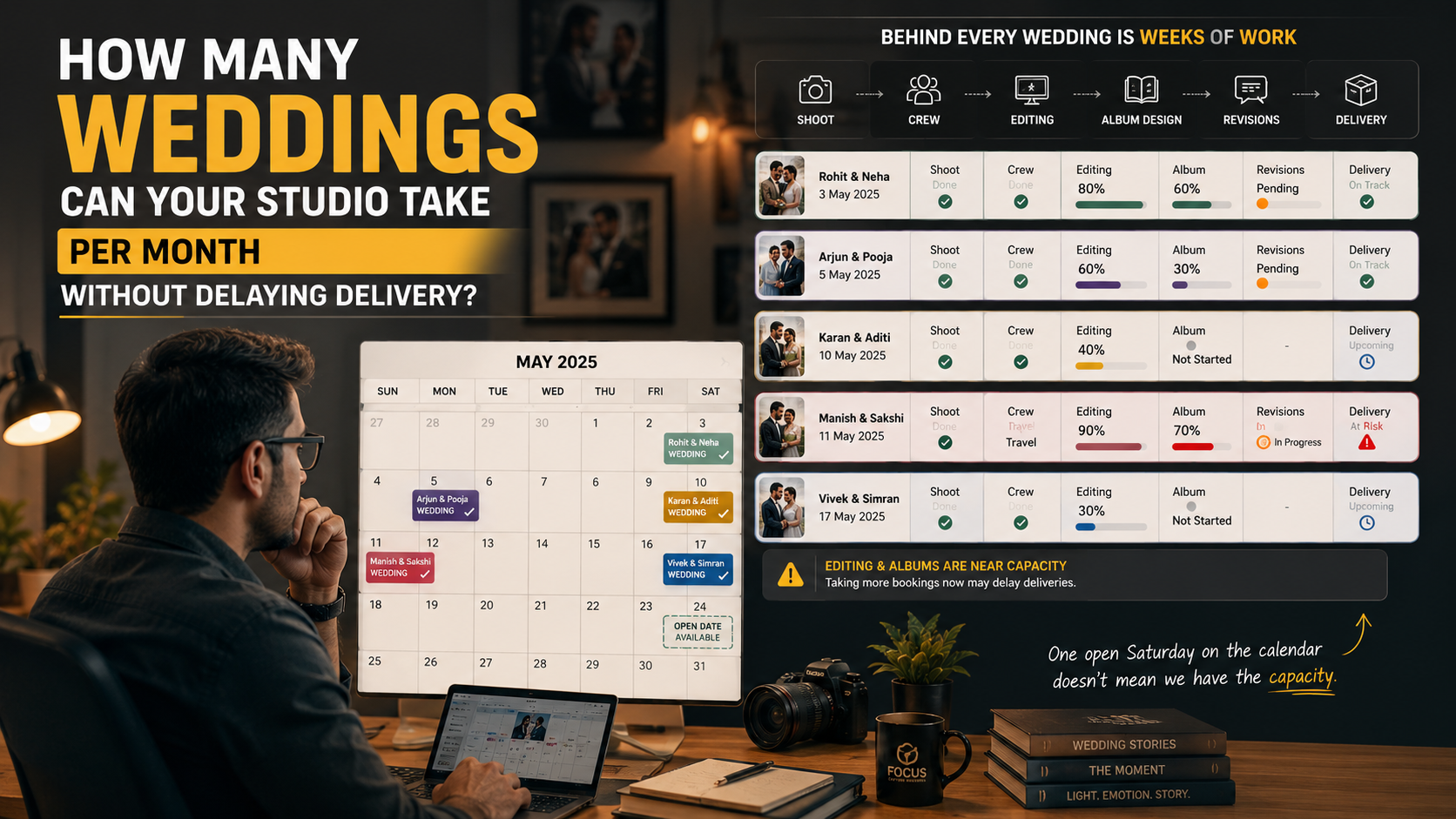
An open Saturday does not necessarily mean your photography studio can take another wedding.
The photographers may be available to shoot it. But the editing team could already be working through three previous weddings. Two albums may still need designing. Another client may be waiting for revisions, while half the crew is travelling for a destination event the following weekend.
This is the part of photography studio capacity planning that a calendar cannot answer on its own.
Your real capacity is not the number of dates available for shooting. It is the amount of work your studio can accept, produce and deliver without allowing one stage of the workflow to overwhelm the next.
For wedding studios in particular, that distinction can decide whether growth feels controlled or constantly behind schedule.
Your Calendar Shows Availability, Not Capacity
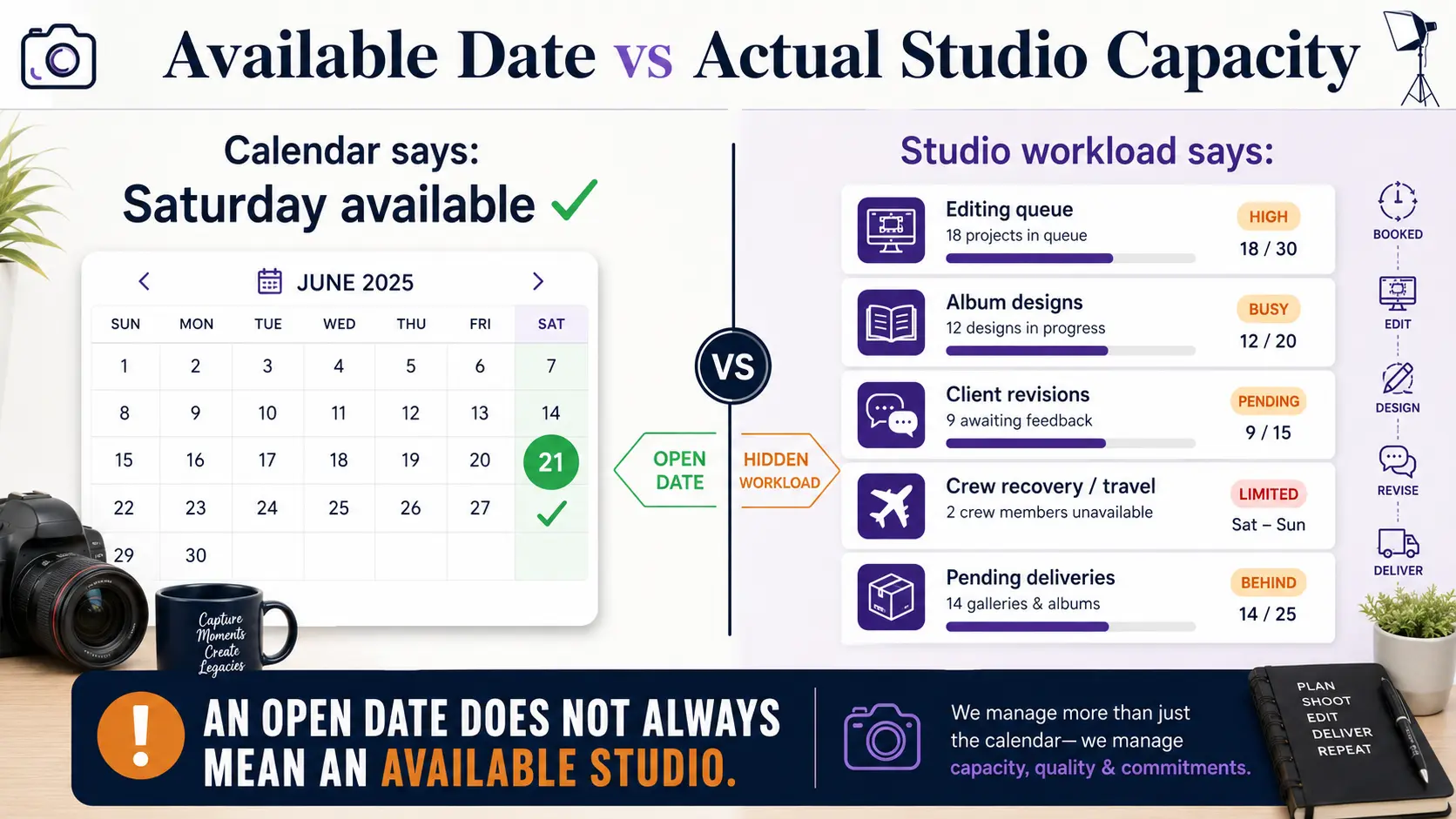
A calendar answers a useful question, Are we already shooting on this date?
Capacity planning asks a much larger one:
If we accept this wedding, can we fulfil everything we have already promised and still deliver this one properly?
Those are not the same question.
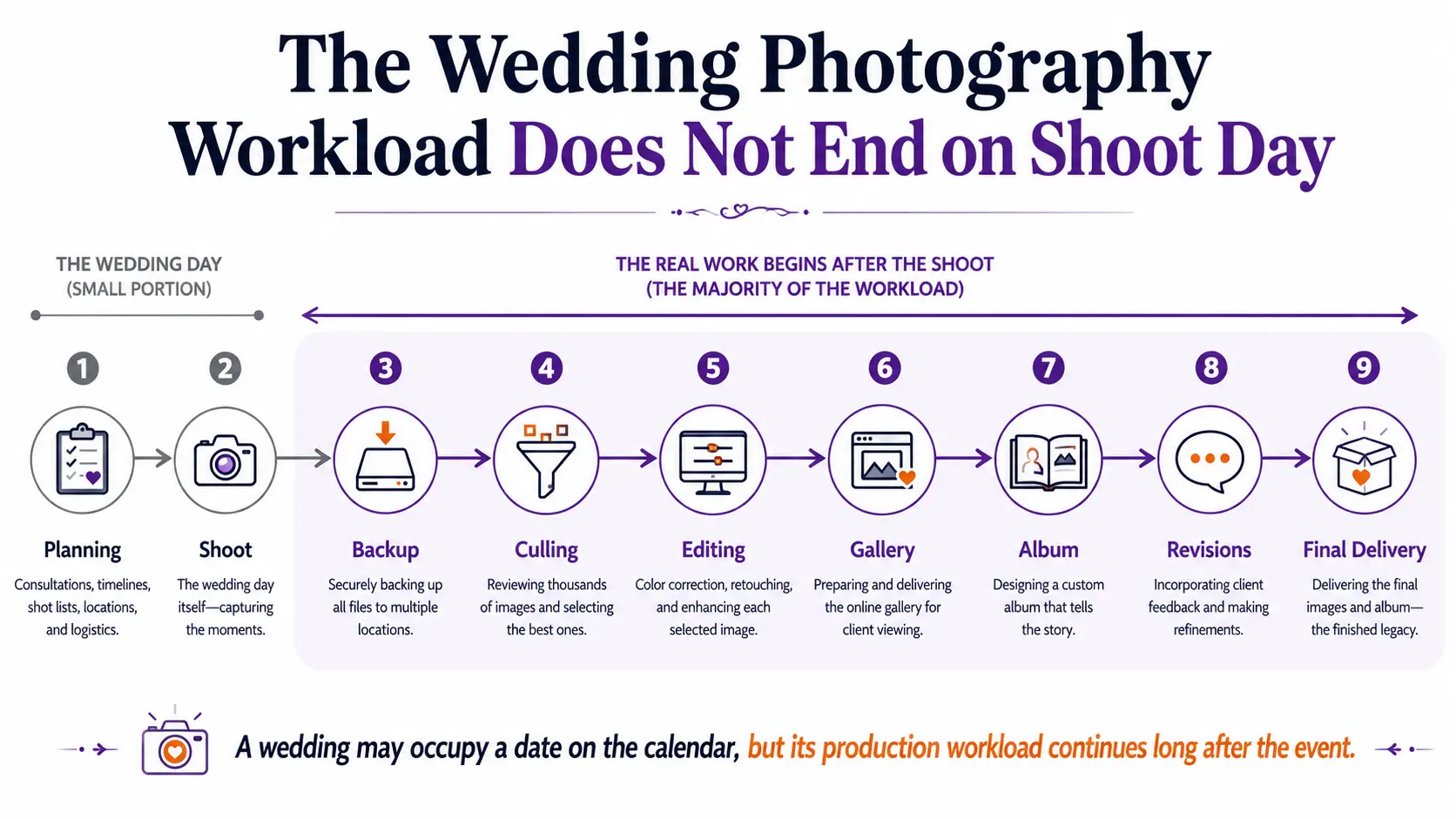
A wedding can occupy one or two dates on the calendar while creating several weeks of work around them. Files need to be transferred and backed up. Images are culled and edited. Video work may move through a separate team. Galleries need preparing. Album selections come back later. Revisions can reopen apparently completed jobs.
This is why a studio with free shooting dates can still be operating above capacity.
Think of Every Wedding as a Workload That Moves Through the Studio
A confirmed wedding creates a chain of work.
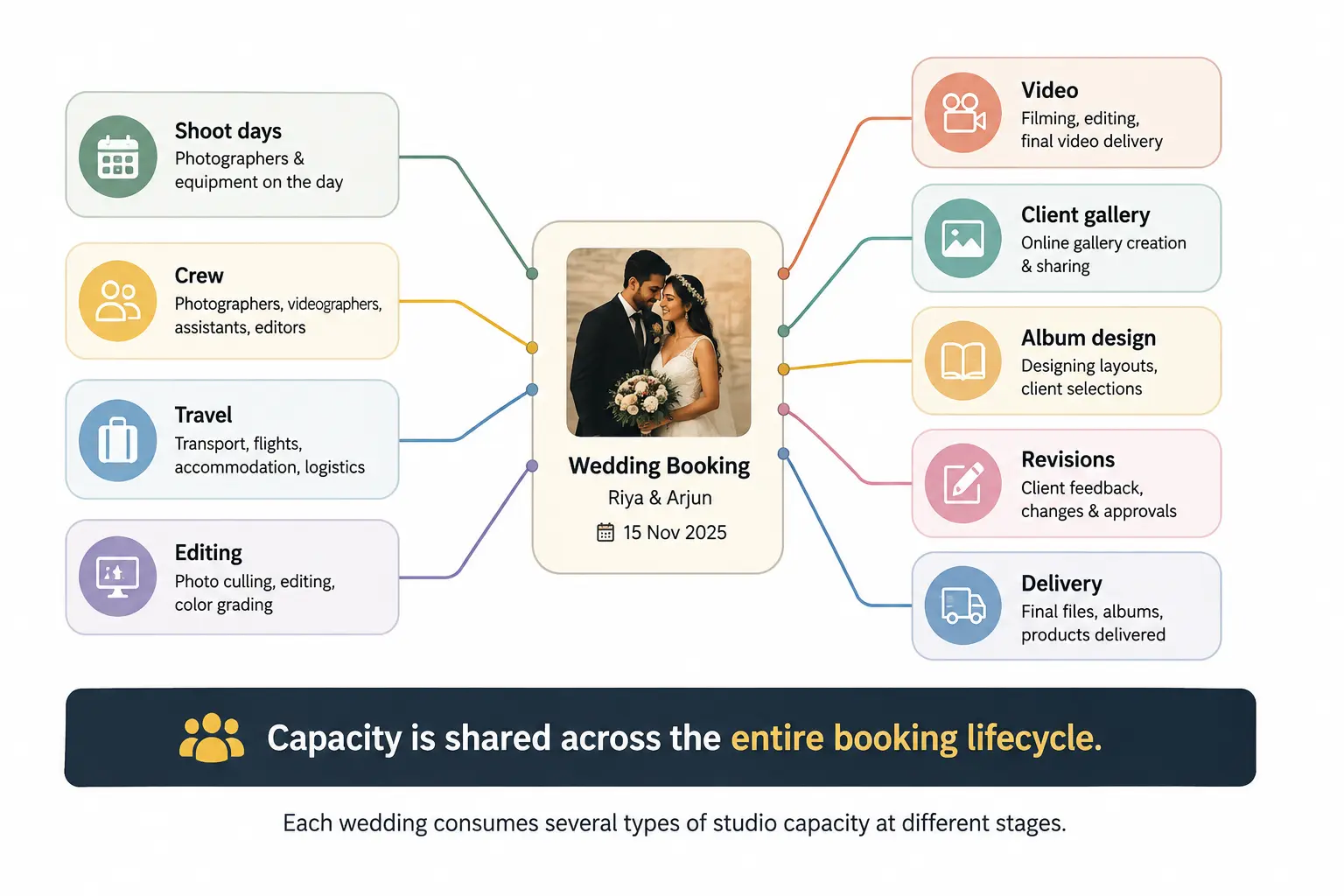
Before the wedding, the studio may handle planning, timelines, venue information, crew allocation, client communication and travel. Then comes the shoot itself.
Afterwards, the workload moves into backup, culling, editing, video production, gallery preparation, selections, album design, revisions and final delivery.
So instead of asking how many weddings the studio can shoot, ask how many weddings the complete photography studio workflow can carry at the same time.
That is a much more useful definition of capacity.
Editing Is Often Where Booking Capacity Becomes Visible
Photographers naturally plan around event dates because those dates cannot move.
Post-production is easier to postpone. That is exactly why it can become dangerous.
A studio accepts another wedding because the shooting crew is free. Editing from previous events quietly moves into the following week. Another large wedding arrives. The editor catches up by pushing galleries later. Album work is moved again.
Eventually, the studio is not dealing with a busy weekend. It is carrying a growing production backlog.
Current workflow guidance from Pixieset also connects organised workflows with faster turnaround and fewer process errors, while PPA highlights structured post-production as a way to maintain consistent delivery rather than allowing work to accumulate indefinitely.
Watch the oldest unfinished wedding, not just the newest booking.
If older projects are moving later each time new work enters the studio, capacity has already become tight.
Crew Availability Is More Than Finding Someone for the Wedding Day
Growing studios often appear to have more capacity because they have access to freelancers. But the relevant question is not whether someone is available.
It is whether the right crew is available for the right event without creating problems elsewhere.
A multi-event wedding may require lead photographers, second shooters, cinematographers, assistants, drone operators and later editors. Destination work adds travel time. Events may overlap. The same senior photographer may be required for two premium bookings that happen on adjacent dates.
GoPickle's crew management software for photographers is built around this event-level structure. Studios can assign photographers, editors and freelancers to specific events and keep overlaps and confirmations visible rather than treating every person as generically “available.”
Crew capacity should therefore include both shoot-day availability and what happens immediately before and after the event.
A team returning from a destination wedding at 3 a.m. may technically be free on the calendar the next morning. That does not automatically make another full wedding a sensible booking.
Read our article on How Photography Studios Can Manage Crew Without Last-Minute Confusion
Albums and Client Revisions Create Delayed Capacity
Albums behave differently from editing.
The studio can finish the gallery and still have an open project because the client has not completed selections.
Then the selection arrives during an already busy month.
Album design starts. The first proof goes out. Changes come back. A family member asks for another adjustment. The album returns to the designer.
This work is difficult to predict by looking only at this month's shoot schedule.
GoPickle's existing guidance on post-wedding operations makes the same point: final delivery can continue through photo selection, edits, album work, invoices and client follow-ups long after the event itself has finished.
For capacity planning, keep active post-production projects visible even when their shoot dates are months behind you.
Otherwise completed weddings disappear from the calendar while continuing to consume production capacity.
Travel Can Remove More Capacity Than the Wedding Date Suggests
Destination weddings make this particularly clear.
The event may be on Saturday, but the assigned photographers could travel Friday and return Sunday or Monday.
For operational purposes, that is not one occupied day.
Travel also affects equipment logistics, backup timing, staff recovery and the point at which post-production can begin.
A studio that handles frequent destination weddings should therefore treat travel blocks as part of photography booking capacity, rather than viewing only the ceremony date.
The same applies to large multi-day weddings. GoPickle's booking-management structure supports multiple events, timings, venues, services and crew within one wedding booking precisely because a wedding often represents a chain of connected operational commitments rather than a single calendar entry.
Set Capacity Around the Bottleneck, Not Your Fastest Team
Imagine your photographers can comfortably shoot more weddings.
That does not automatically increase studio capacity if editing cannot absorb the additional work.
Likewise, adding another editor will not solve a problem caused by limited senior photographers.
Your real capacity is governed by the part of the workflow that becomes overloaded first.
For one studio, that may be editing.
For another, it is cinematography.
For another, album design.
And in a smaller owner-led business, the bottleneck may simply be the owner approving edits, answering clients, coordinating crew and handling sales at the same time.
This is one reason outsourcing and workflow automation can increase capacity in some studios. PPA has highlighted batching, automation and outsourced editing as ways high-volume photography businesses can reduce operational pressure, but those changes only help when they address the actual constraint.
The goal is not maximum utilisation everywhere.
You need enough breathing room to handle reschedules, client changes, illness, equipment problems and unusually heavy weddings without every delivery date slipping.
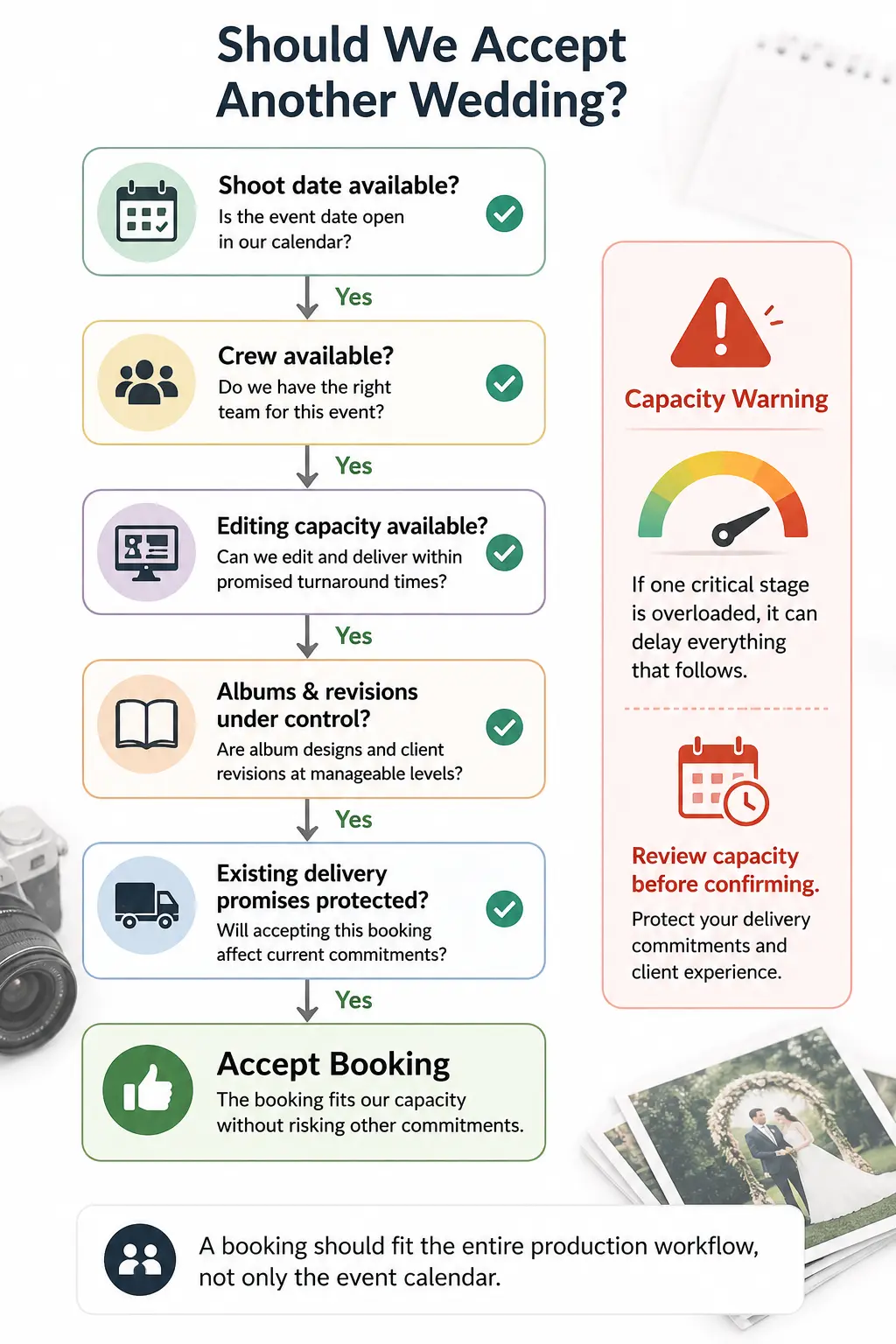
Use a Simple Capacity Check Before Accepting Another Wedding
You do not need a complicated forecasting model.
Before confirming another major booking, look at the month as a complete workload.
Ask whether the shoot dates fit, whether the required crew is genuinely available, whether existing editing work will remain within promised turnaround times, and whether albums or revisions are already creating a backlog.
Then look at delivery.
If accepting the new wedding requires quietly pushing existing clients later, you are not creating capacity. You are borrowing it from work that has already been sold.
That distinction is important because delayed delivery eventually becomes a client-experience problem. GoPickle's own photo-delivery guidance notes that a strong shoot can still leave a weaker final impression when clients have to repeatedly chase the studio for delivery.
Read our article on What Every Photographer Should Confirm Before Accepting a Booking
Keep the Whole Booking Visible in One Photography Studio Workflow
Capacity becomes harder to judge when every part of the business lives somewhere different.
The event date is in a calendar. Crew assignments are in WhatsApp. The package is in a quotation. Editing status is known by one employee. Album approval is buried in a conversation. Payment status sits somewhere else.
That makes it difficult to answer a basic question:
What is this studio already committed to delivering?
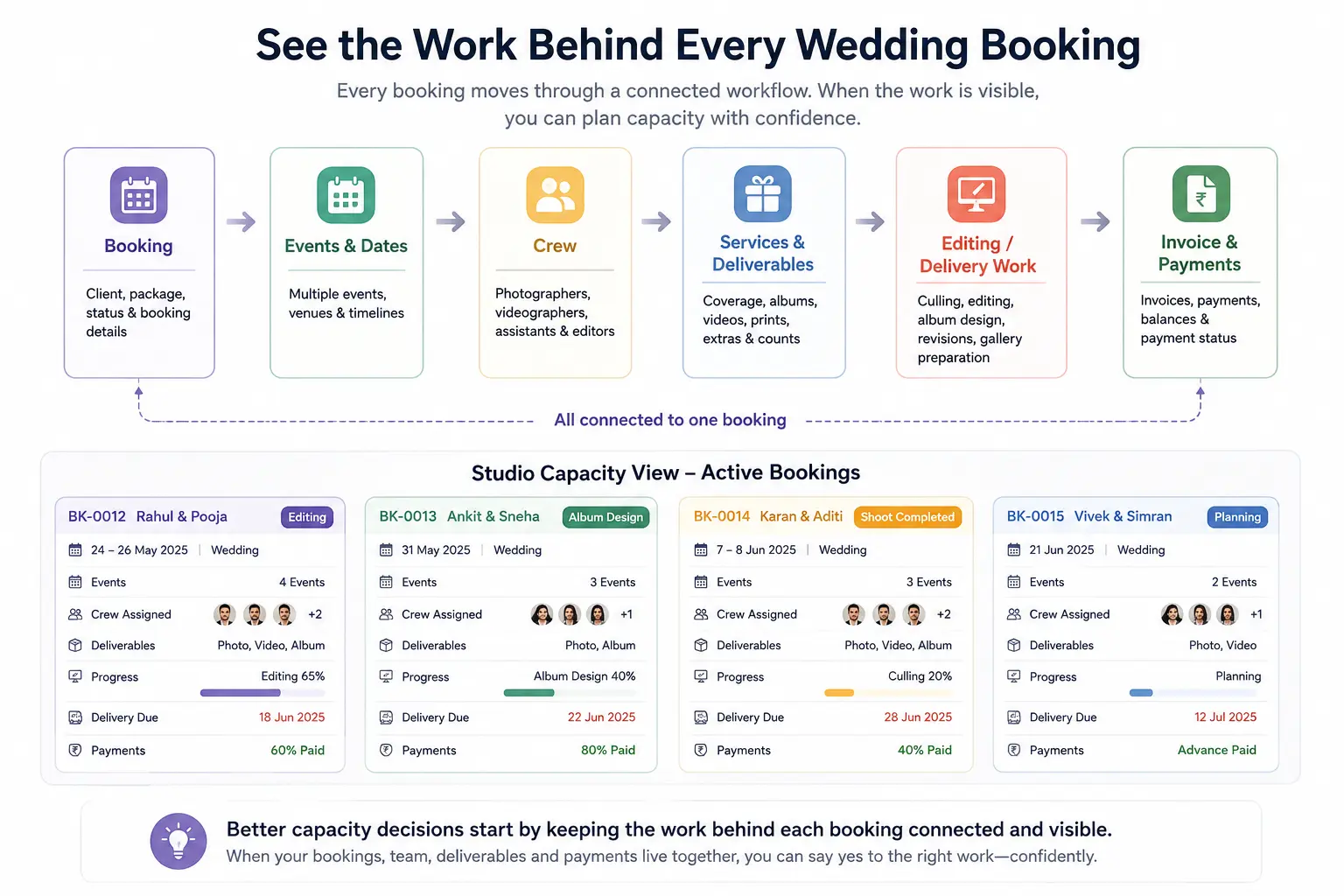
At GoPickle, we designed Booking Management for Photographers around the complete booking rather than just the event date. A booking can hold the client, multiple wedding events, venues, services, deliverables, crew, quotations, invoices, payments and delivery context together.
For wedding studios, our broader wedding photography workflow software connects bookings, team coordination, payments and delivery around the same client workflow.
That does not mean software decides how many weddings your studio should accept.
Your team still decides what quality, turnaround time and workload are sustainable.
The value of a structured photography workflow management system is that the commitments behind each booking become easier to see before the studio says yes to another one.
Read our article on Why Wedding Photographers Need a Better System After the Shoot Is Over
A Full Calendar Is Not the Goal
A studio operating at sensible capacity may sometimes turn down a wedding even though the date appears open.
That can be the correct decision.
The alternative is accepting work that pushes editing behind, overloads the crew, delays albums and weakens delivery for clients who have already paid.
The better question is not:
“How many weddings can we fit into this month?”
It is:
“How many weddings can we take while delivering every existing booking at the standard and timeline we promised?”
That is what useful photography studio capacity planning should tell you.