How to Collect Guest Details for Event Photos and Share Them Later in GoPickle.ai
Learn how to collect guest details for event photos in GoPickle.ai, let guests register through a QR code, upload edited photos later and notify everyone when their gallery is ready.

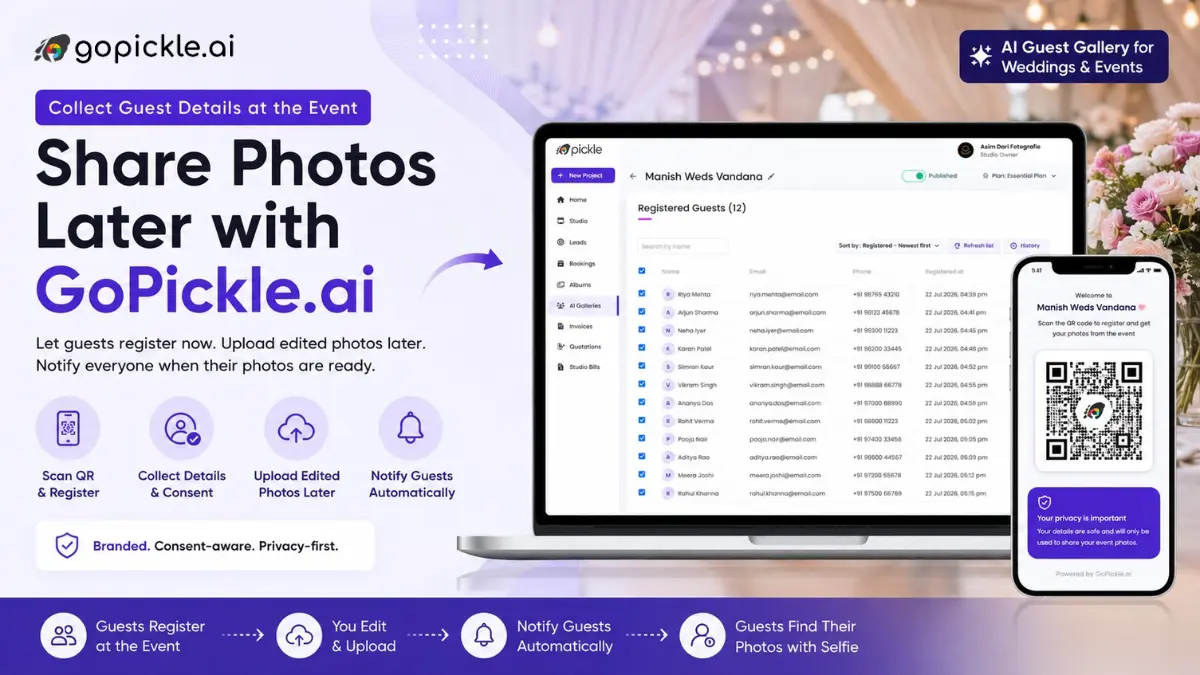
You do not need to upload wedding or event photographs live to use a GoPickle AI Guest Gallery.
The studio can create the gallery before the event, let guests scan a QR code and register while they are at the venue, then complete the normal selection and editing process. When the finished photographs are uploaded, GoPickle can notify the registered guests so they can return, upload a selfie and find the photographs they appear in.
This workflow is useful when you want to collect guest details for event photos without publishing unfinished images.
Read our take on How to Sell an AI Guest Gallery Add-On to Wedding Clients and AI Guest Gallery for Weddings and Events: Give Every Guest Their Own Photos
Before the Event: Create the AI Guest Gallery
Create an AI Guest Gallery for the wedding, reception, conference or event before guests arrive.
GoPickle provides a shareable gallery link and QR code that can be displayed at the venue. Guests can open the gallery directly from a mobile browser without installing an app.
Use your studio branding clearly on the guest-facing experience and on any printed QR display. Guests should understand which photography studio is providing the gallery rather than feeling that they are entering an unrelated third-party system.
Step 1: Let Guests Scan and Register
Place the QR code somewhere guests can easily notice it, such as the reception entrance, photo booth, registration desk or event display.
The guest scans the QR code and enters the required contact information to register for gallery access. GoPickle keeps that guest registration connected to the event so the photographer has a structured guest list instead of anonymous gallery traffic.
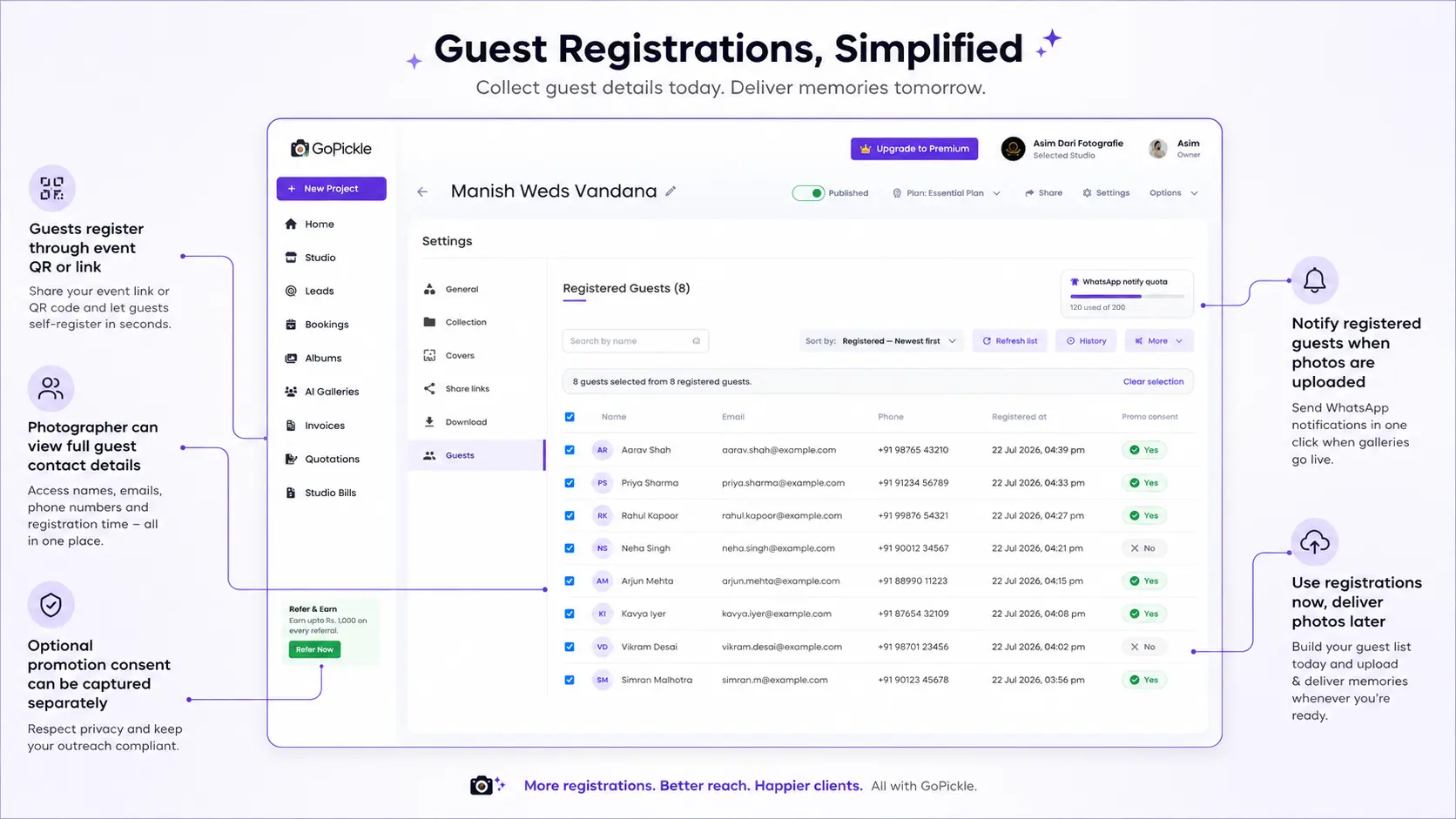
The photographer can view the registered guest contact details inside the studio workflow, making it easier to understand who has registered and who should receive the later photo notification.
Step 2: Keep Photo Access Consent Separate From Promotions
Guest registration should clearly explain why the information and selfie are being collected.
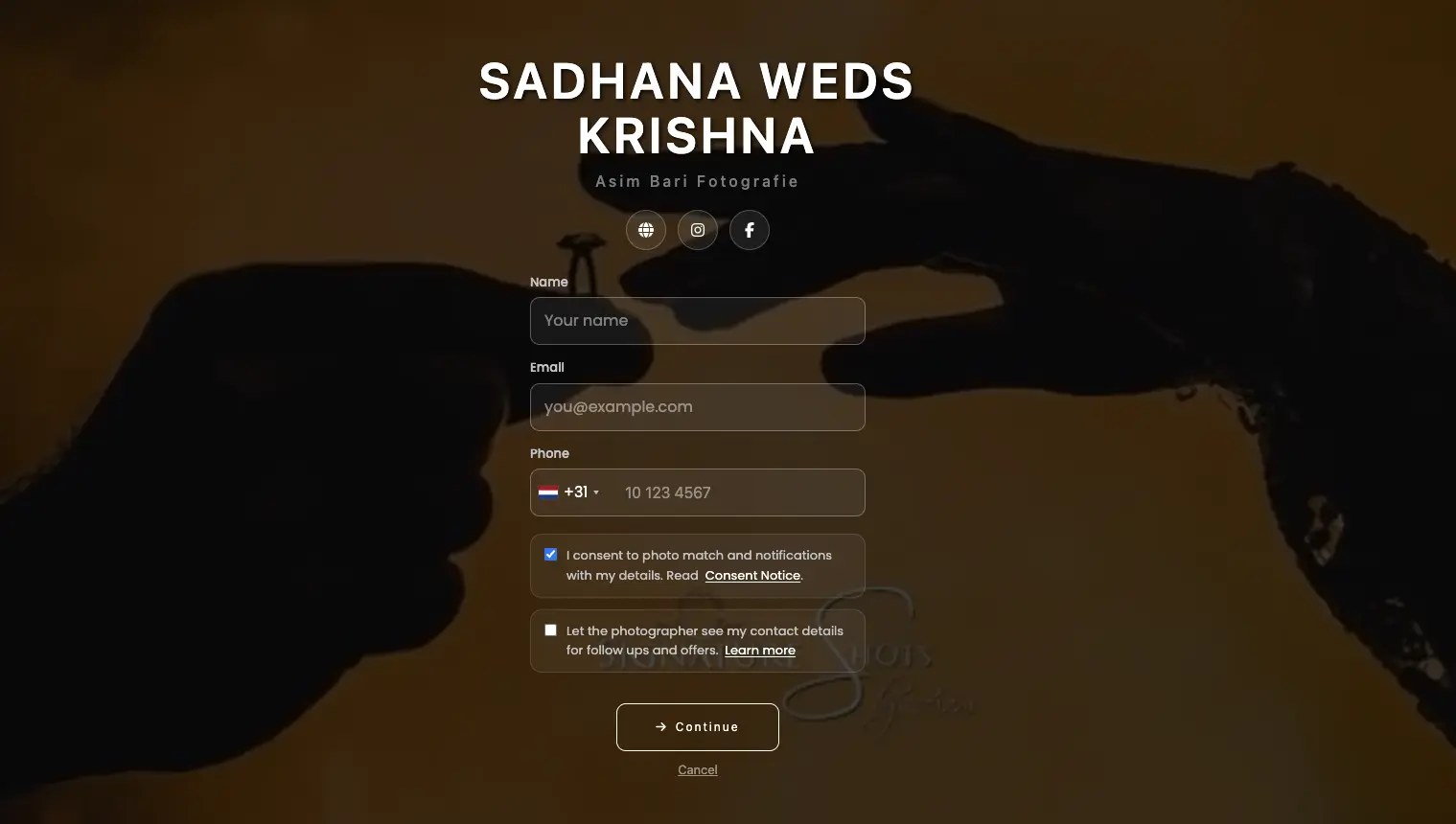
The first consent is for the service itself: the guest agrees to provide the required information and selfie so GoPickle can identify matching event photographs and notify them when those photographs are available.
If the photographer also wants permission to contact the guest later about photography services, offers or promotions, that should be a separate optional consent rather than being bundled into photo access.
GoPickle's current positioning explicitly separates consent-aware guest access from optional lead opt-in, so someone can use the gallery without automatically becoming a marketing lead.
This distinction is important for both guest trust and future marketing quality.
Step 3: Finish the Event and Edit Normally
Once guests have registered, you do not have to rush images straight from the camera into the gallery.
The studio can continue its normal workflow:
- Back up the event.
- Cull duplicates, test frames and weak images.
- Complete colour correction and editing.
- Export the approved JPEGs.
- Upload them to the same AI Guest Gallery.
GoPickle supports this register now, deliver later workflow specifically so photographers can collect guest interest at the venue without sacrificing their normal editing standards.
Step 4: Upload the Finished Photographs
When the photographs are ready, upload them to the existing event gallery.
You do not need to create another album or send guests a completely different link. The original guest registration remains associated with the event, while GoPickle's AI Guest Gallery handles selfie-based discovery once the photographs become available.
For large weddings, this can mean thousands of finished images without asking every guest to browse the full collection manually.
Step 5: Notify Everyone Who Registered
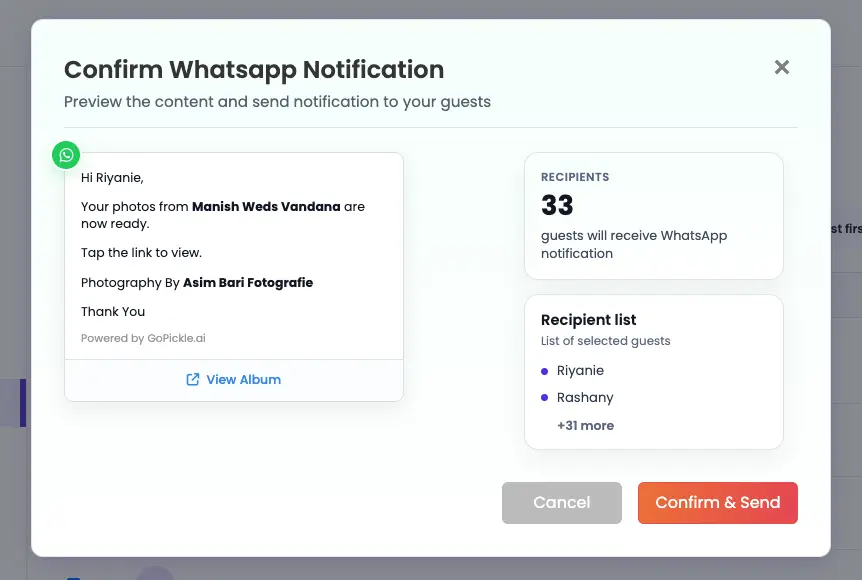
After the upload is complete, the studio can send a prepared notification to the registered guest list through WhatsApp and email.
The message only needs to tell them what matters:
Your event photographs are ready. Open the gallery, upload a selfie and find the photographs you appear in.
Guests then return through the event link, use selfie matching and receive a personalised gallery containing relevant photographs.
That is much cleaner than manually collecting phone numbers and repeatedly forwarding the same gallery update.
Example: A 500-Guest Wedding
A wedding studio creates the GoPickle guest gallery before the reception and places branded QR cards near the entrance and photo booth.
During the wedding, guests register their details, but the studio does not publish any photographs. The team finishes the wedding, edits over the following days and uploads only the approved images.
Once the gallery is ready, all registered guests are notified. Each guest opens the link, uploads a selfie and sees the professional photographs in which they appear.
The couple still receives the final curated Client Gallery separately; the AI Guest Gallery is for guest discovery rather than replacing final client delivery.
Common Setup Errors
Uploading before the studio is ready. Live delivery is optional. If your studio's quality depends on editing, use registration first and publish later.
Hiding the consent purpose. Explain photo-discovery consent clearly and keep promotional opt-in separate.
Using an unbranded QR card. Guests should know which photography studio is providing the experience.
Waiting until after the event to collect registrations. Interest is usually highest while guests are still at the venue, so register them there and deliver when your work is ready.
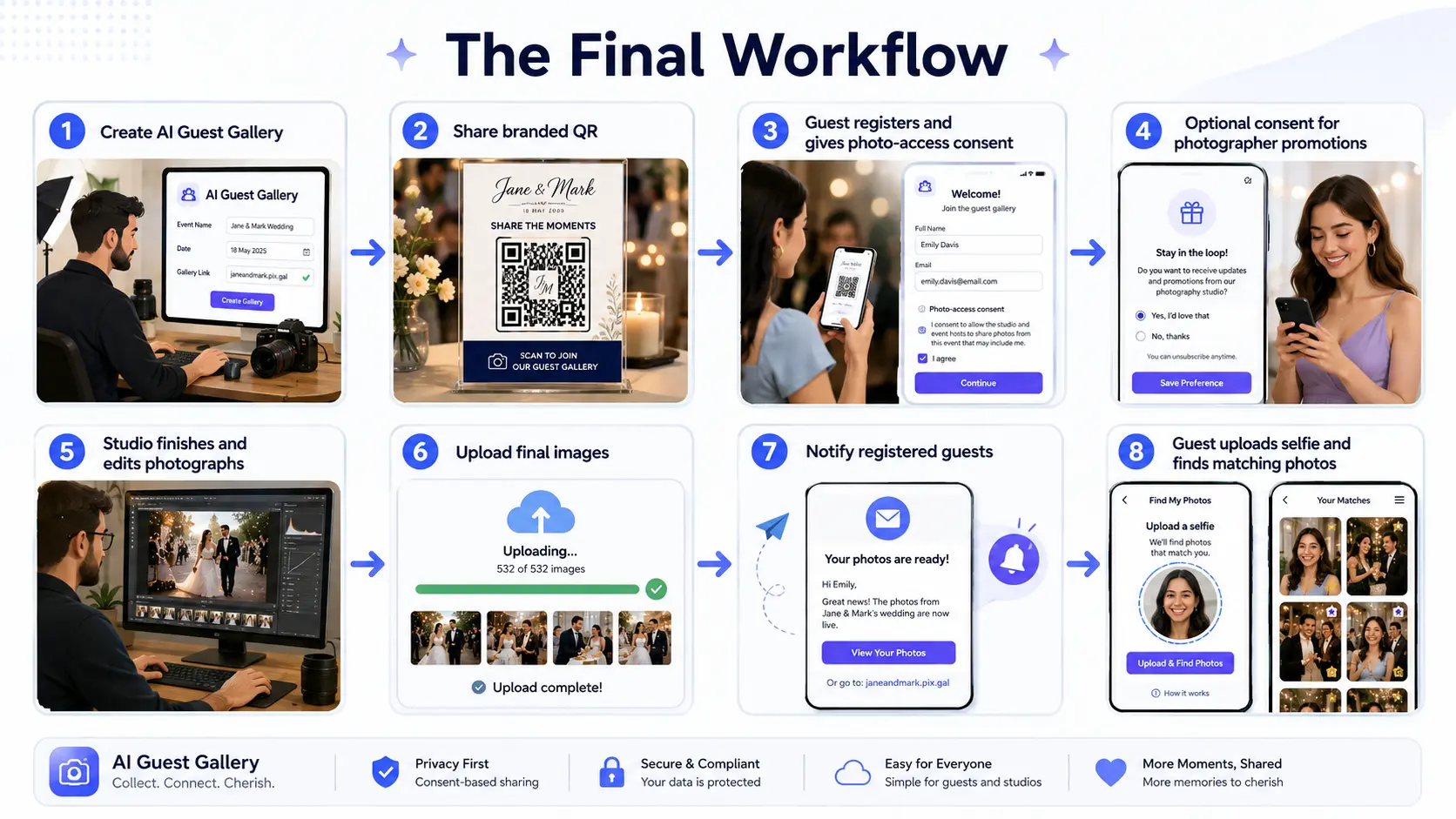
This gives the photographer control over image quality while GoPickle handles the guest registration photo gallery and later event photo notification workflow.