Photography Business App: What Should You Be Able to Run From Your Phone?
Choosing a photography business app? Learn which CRM, booking, quoting, invoicing, crew and gallery workflows photographers should be able to run from a phone.

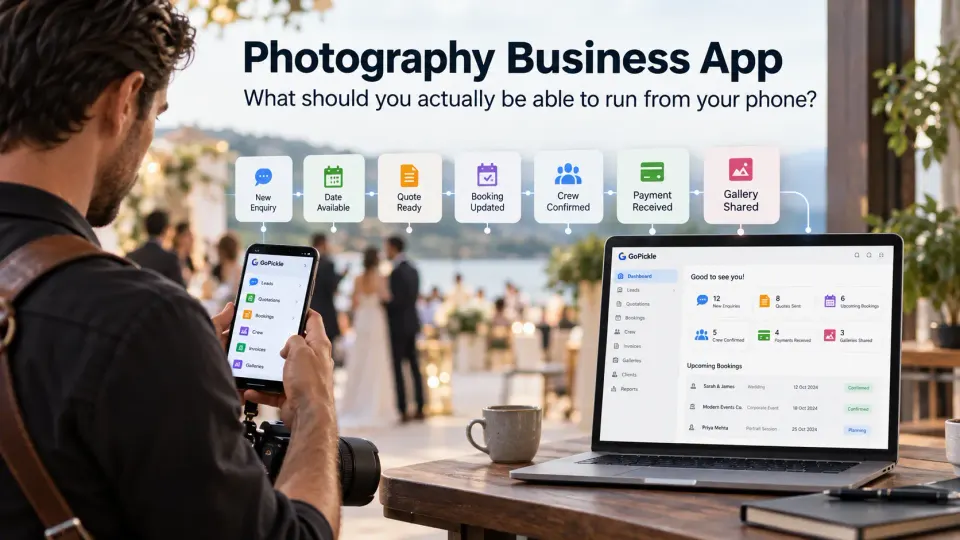
A photography business rarely stays at a desk.
An enquiry arrives while you are photographing another client. A couple asks whether their wedding date is available while you are visiting a venue. The coordinator changes the reporting time after the crew has already left home. A commercial client approves a quotation while you are travelling. Someone pays an instalment during a shoot. A client asks for their gallery link while you are nowhere near your computer.
That makes mobile access unusually important for photographers. But there is a large difference between photography software that can be opened on a phone and a photography business app that lets you actually move work forward from one.
When we evaluate mobile workflow at GoPickle, that distinction matters more than the presence of an App Store or Google Play badge. The useful question is not, “Does this photography CRM have an app?” It is, “When something important happens away from my desk, can I make the next business decision without waiting until I get back?”
For most professional photographers, the answer depends on how completely the mobile workflow handles enquiries, availability, quotations, bookings, event changes, crew, invoices, payments and client delivery.
Why photographers need more than a desktop CRM
Desktop software still has an important place in a photography studio. Large displays are better for certain planning, financial and administrative tasks, and nobody needs to turn every part of studio management into a phone-first activity.
The problem is that many of the decisions that keep a photography business moving do not happen while the owner is sitting in front of a computer.
Wedding photographers can spend entire weekends moving between functions and venues. Event photographers may be inside a conference centre for twelve hours while new enquiries continue arriving. Portrait photographers move between outdoor locations and studio sessions. Commercial photographers may be on set with a client when another project needs confirmation. Freelancers can spend as much time travelling, scouting and meeting clients as they do at their desks.
A desktop-only system therefore creates an artificial delay. You may have excellent photography business management software, but if the information you need cannot be comfortably viewed and acted on from your phone, important decisions still fall back into messages, notes and memory.
A useful mobile CRM for photographers should protect continuity. The enquiry you update at a venue should be the same enquiry you see later on desktop. A booking change made from the road should not create a second version of the schedule. Mobile should be another way into the same operating system, not another place where information has to be maintained.
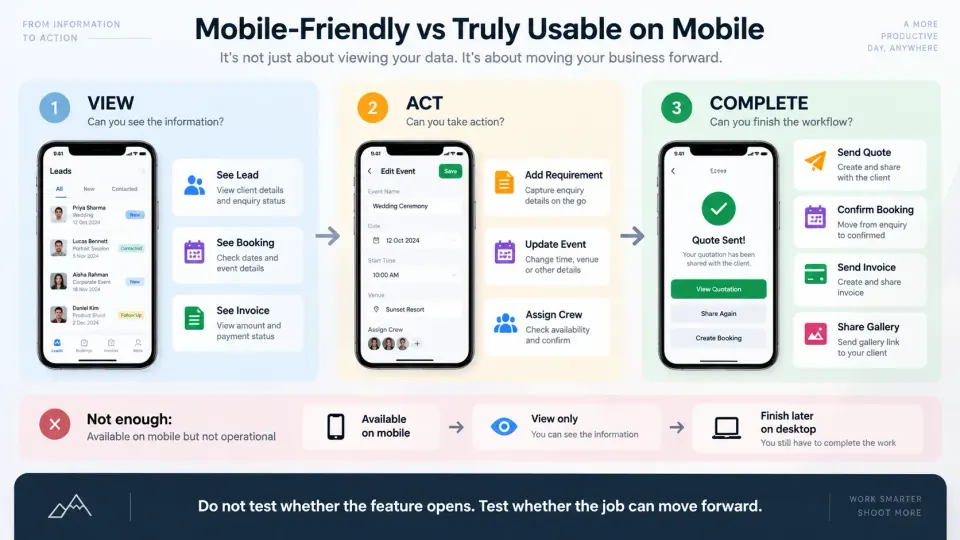
Mobile-friendly vs truly usable on mobile
Almost any modern web application can claim to be mobile-friendly. The interface shrinks. Cards stack vertically. Buttons become touchable. Technically, the software works on a phone.
That is not enough.
A genuinely useful photography management app should let you complete the actions that are time-sensitive away from the studio. There are three progressively more useful levels to test.
View: Can you see the client, enquiry, booking, payment or event?
Act: Can you change the relevant information, assign responsibility, create a document or send something?
Complete: Can you finish the mobile workflow without eventually thinking, “I will have to do the real part when I get back to my computer”?
Consider a new wedding enquiry. A weak mobile experience may show the contact name. A better one lets you record dates and requirements. A genuinely useful photography CRM should let you preserve the sales context, decide the next action and continue toward a quotation.
Use the same test throughout the product. Do not ask only whether a feature appears in the mobile navigation. Ask what happens after you tap it.
Responding to new photography enquiries
Speed matters most when the enquiry is fresh, but replying quickly is only part of the job.
Suppose a prospective client contacts you while you are covering another event. You can reply through messaging immediately, but the business still needs to remember who the person is, what they are asking for, when the shoot may happen and what should happen next.
A photography CRM app should make it practical to capture the minimum useful commercial context from the phone: client details, shoot or event type, expected date, location where relevant, lead source, budget or expected value where your sales process uses it, requirement notes and a specific next action.
The objective is not to spend ten minutes doing CRM administration in the middle of a shoot. It is to prevent a valuable enquiry from becoming an unidentified chat thread that someone must reconstruct later.
For a studio with several people handling enquiries, mobile lead management also becomes an ownership issue. The team needs to know whether somebody is already handling the opportunity and what has been promised. That is much safer than several people independently responding to the same client or everyone assuming somebody else will follow up.
Checking availability before promising a date
One of the highest-value things a photographer business app can put in your pocket is reliable availability.
A client often asks about dates before they ask detailed questions about packages. The temptation is to answer from memory: “That weekend should be free.”
For a solo portrait photographer, checking availability may be relatively simple. For a wedding or event studio, the calendar can be more complicated. One booking may contain several functions. Some crew may already be committed elsewhere. Travel between venues may affect feasibility. A tentative hold may exist even though the date is not yet confirmed.
This is why a photography booking system should give the mobile user more than coloured calendar blocks. You need enough booking context to understand what occupies the date before making another commitment.
A photography booking app becomes particularly useful when the question changes from “Do I have something that day?” to “Can we responsibly take this job?”
Creating and sending quotations from the phone
There are times when quotation building deserves a large screen, especially for a complicated commercial production or a highly customised multi-event package. But that does not mean every quotation should have to wait for a laptop.
After a consultation or venue meeting, you may already understand the client's requirement clearly. Delaying the proposal until the following day adds an unnecessary handoff: remember the discussion, reopen the notes, recreate the scope, build the document and send it later.
A capable mobile photography quotation workflow should allow you to carry the requirement forward, choose or build the relevant package, include services and deliverables, review pricing and terms, and share the quotation from the phone.
The important test is accuracy, not speed alone. A fast quotation that omits a promised event, album, additional photographer or delivery item creates more work later.
Mobile quotation creation is valuable when it shortens the path between a productive sales conversation and a clear proposal without sacrificing the scope you agreed with the client.
Opening the complete booking at the venue
This is where many generic business apps stop feeling like photography software.
A confirmed photography booking is rarely just a contact, date and amount. Depending on the type of work, it may contain several events, venues, start times, reporting times, services, deliverables, crew assignments, payment details and operational notes.
That information becomes most valuable precisely when the team is away from the office.
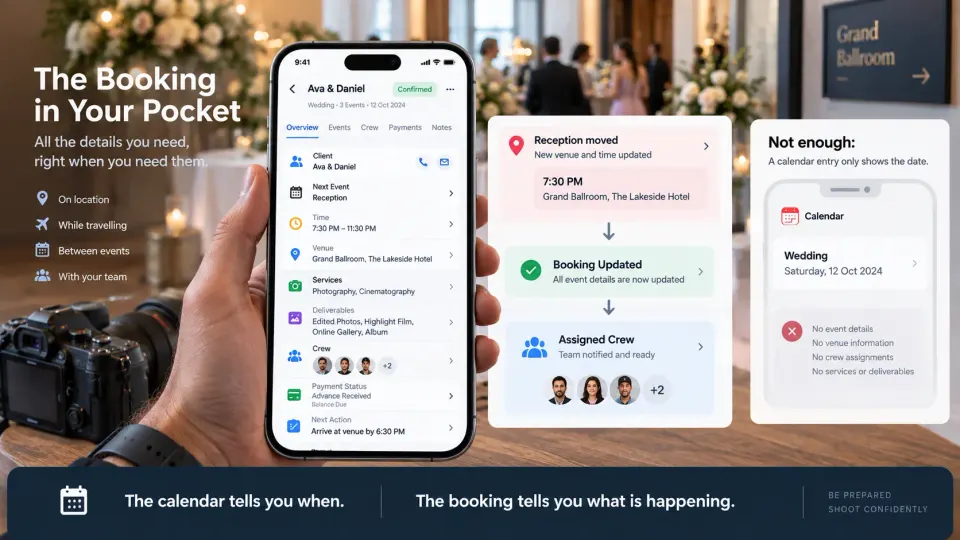
Imagine arriving at a wedding venue and discovering that the reception has moved to another hall. You should be able to open the booking and immediately see which event is happening next, where it is happening, who is assigned, what coverage was promised and whether something still needs attention.
For a corporate event, the same principle applies to session timings, stage coverage, executive portraits or different rooms. For a portrait photographer, the booking may be simpler, but location, timing, package and client notes still need to be readily available.
The phone should function as a compact operational view of the booking, not merely a calendar reminder that says “Smith Wedding, Saturday.”
Updating event details when plans change
Photography schedules are unusually vulnerable to live changes.
Weather moves an outdoor portrait session. A ceremony starts late. A conference organiser swaps rooms. A wedding planner changes the reception entrance. A client asks to add coverage. A location changes after the original quotation was approved.
When those changes are confirmed, updating the source of truth immediately is safer than telling yourself you will fix the booking later.
A photography workflow app should therefore make common booking changes straightforward from mobile. Date, event time, venue, status and relevant notes should not be buried behind a desktop-only editing experience.
There is an important operational boundary here: editing the record is not the same as agreeing to a commercial change. If the client adds coverage, deliverables or another event, the studio may also need quotation, approval and billing steps. Good mobile workflow should make the change visible without encouraging the business to lose control of scope.
Checking crew assignments and confirmations
Once several photographers, cinematographers, assistants or editors are involved, mobile access is no longer only for the owner.
Before a shoot, you need to know who is assigned. During a multi-event job, you may need to know which person covers which function. When a schedule changes, the studio needs to identify who is affected.
A mobile crew management workflow for photographers should make assignment status, role, event context and confirmation easy to check. The owner should not need to scroll through a large messaging group to reconstruct who said yes.
This matters especially for studios that use a mixture of employees, freelancers and second shooters. “Six people are booked for the wedding” is not sufficient operational information if nobody can immediately tell who is covering the morning preparation, ceremony, reception or same-day production.
Mobile crew visibility turns the phone into a coordination tool without making another messaging thread the official staffing record.
Sending invoices and checking payment status
Money questions often arise at inconvenient moments.
A client may ask for the invoice immediately after accepting a quotation. Someone may say they transferred the advance while you are shooting. A corporate client may need the document resent to an accounts contact. Before final delivery, the studio may need to confirm whether a balance remains outstanding.
A photographer invoicing app should make those checks possible without making the photographer guess from bank notifications and messages.
At minimum, you should be able to understand the relationship between the client, booking, invoice, amount already recorded and remaining balance. When appropriate, you should also be able to create or share an invoice and keep payment progress attached to the job.
GoPickle's invoice management for photographers is built around that booking-linked approach rather than treating an invoice as an isolated document.
Tax treatment, invoice requirements and accepted payment methods vary by jurisdiction, so photographers should configure their documents according to local legal and accounting requirements. The mobile requirement is operational: when a client asks “What is still due?”, you should be able to answer from the current record.
Opening and sharing client galleries
Mobile matters at the other end of the client journey too.
Clients frequently receive photography through their phones. They open gallery links from chat or email, show images to family, share them with colleagues and revisit them away from a desktop. The photographer also needs mobile access when a client asks for a gallery link during a conversation.
A photography studio app does not necessarily need to turn a phone into a workstation for heavy image preparation. Large exports, culling, colour work and high-volume uploads often belong elsewhere.
But once the gallery exists, the photographer should be able to access the relevant delivery context and share it without returning to the studio. GoPickle Client Galleries are designed for mobile-friendly client viewing with organised collections, controlled access, download options and branded delivery.
The distinction is useful: the phone does not have to replace the production workstation. It should remove unnecessary delays around accessing and delivering finished work.
Notifications that are useful vs notification overload
A photography business can generate an enormous number of events. Most do not deserve an interruption.
Useful mobile notifications should help somebody make a decision or recognise something that materially changed: an important new enquiry, a quotation action, a payment update, a crew response or activity requiring attention.
The opposite approach turns the photography business app into another source of background noise. If every minor view, edit and status change produces the same alert, users eventually stop paying attention.
When testing a photography CRM app, look beyond the statement “push notifications included.” Ask what creates a notification, who receives it and whether the alert takes you directly to enough context to act.
The best mobile notification is not the one that tells you the most. It is the one that helps you notice the right thing before it becomes a problem.
What still works better on desktop
Mobile operational completeness does not mean running every part of the studio permanently from a six-inch display.
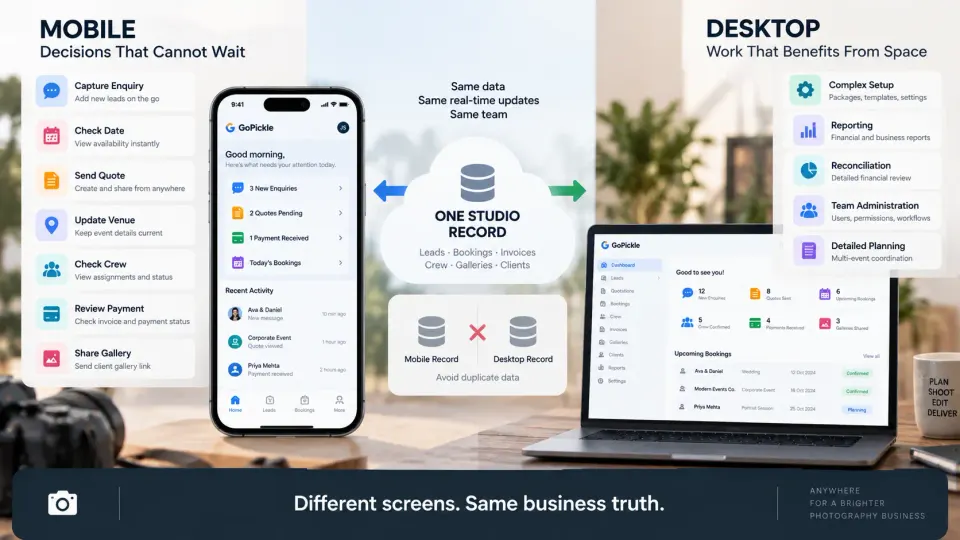
Desktop remains better for work that benefits from space, comparison or sustained concentration. Building a complex package library, reviewing detailed reports, doing extensive financial reconciliation, setting up a large multi-event project, administering team permissions or making broad changes across the studio may all be more comfortable on a larger screen.
Photography production creates an even clearer boundary. Culling thousands of RAW files, detailed retouching, video editing, album design and storage administration belong in specialist creative or production tools rather than being forced into a business-management phone app.
The better model is mobile for immediacy, desktop for depth.
You should be able to start on one device and continue on the other without reconstructing what happened. A lead created from the phone should appear on desktop. A booking updated on mobile should already contain the revised information when the studio manager opens it later. The devices should be different windows into the same operating record.
What to test before choosing a photography business app
Do not evaluate a photography business app by scrolling through screenshots. Test it with a real working day.
Create a realistic enquiry from your phone. Add the requirement and next action. Check whether a date is available. Build or send a quotation. Turn the confirmed work into a booking. Open that booking as though you were at the venue. Change an event time. Check the assigned crew. Review an invoice and payment position. Find the final gallery and share it.
While doing that, pay attention to these questions:
- Can I find the right record quickly? Mobile navigation matters when you are working between shoots rather than calmly exploring software.
- Can I act, rather than only view? A mobile dashboard that constantly sends you back to desktop is not operationally complete.
- Does context survive the handoff? Information entered during the enquiry should not need to be manually rebuilt inside quotations, bookings or invoices.
- Does mobile update the same record as desktop? Avoid systems where the phone experience feels like a disconnected companion.
- Can I understand the next action? The app should help you decide what needs attention, not simply display more data.
- Does the workflow fit your kind of photography? A mini-session photographer, wedding studio, commercial team and high-volume event business do not need identical mobile depth.
- Can your team use it under real conditions? Test it from a venue, between appointments and on an ordinary mobile connection, not only on fast studio Wi-Fi.
Also check plan limits and current feature availability rather than assuming every capability shown by a vendor is included in every subscription. The useful buying question is not which photography studio app has the longest feature list. It is which one lets your studio complete the time-sensitive work that actually happens away from the desk.
How GoPickle connects mobile and desktop studio operations
We built the GoPickle Mobile Application around a straightforward reality: photographers cannot organise their working day around being in front of a computer.
The current mobile workflow provides access to the core parts of GoPickle used while a studio is moving: leads, quotations, bookings, invoices and payments, crew coordination, galleries and notifications. GoPickle is available on iOS and Android, and mobile activity remains connected to the broader desktop workflow.
That does not mean every task should be done from a phone. It means the phone should be capable when the next meaningful decision cannot wait.
A new enquiry arrives while you are shooting: capture it.
A client asks whether a date is available: check it.
A quotation needs to go out after a meeting: send it.
The venue changes: update the booking.
Crew status is unclear: check the assignments.
A package is approved: move the payment process forward.
A client needs their gallery: share it.
Then, when you return to the studio, continue from the same business context on desktop rather than rebuilding a day of decisions from messages and memory.
That is the standard we would use when choosing any business management app for photographers. Do not buy a photography business app merely because it fits on your phone. Choose one because the important parts of your studio can keep moving when you do.