Photography Client Portal: What Clients Should See From Booking to Final Gallery
Learn what a photography client portal should show, from booking details, quotes and payments to pre-shoot actions, photo selection and final gallery delivery.

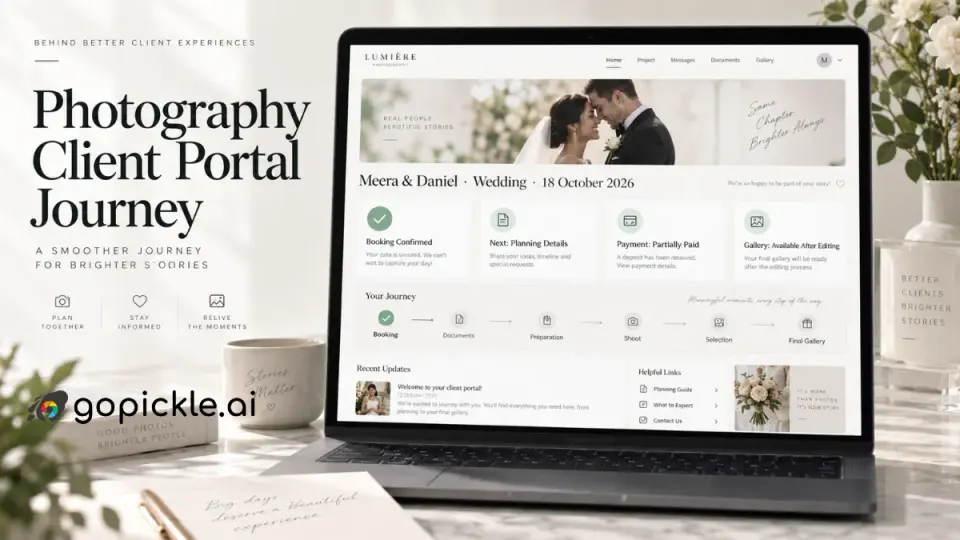
A photography client portal should answer a surprisingly simple question for the person who hired you: where do I go when I need something from my photographer?
After a booking is confirmed, clients may need to check the shoot date, find a venue note, review what they purchased, open an invoice, see how much they have already paid, complete pre-shoot information, make a photo selection and eventually return to their final gallery. When each of those actions arrives through a different email, message thread, PDF or file-sharing link, the studio may know exactly what is happening while the client experiences a fragmented process.
A good client portal for photographers gives the client a controlled view of the relationship from confirmation to delivery. It is not the photographer's CRM exposed to the customer. It is the client-facing layer of the studio workflow: the information the client needs, the actions they are expected to take and the content they are entitled to access, without exposing everything the studio tracks internally.
That distinction matters when evaluating photography client management software. More information does not automatically create a better portal. The right information does.
What a photography client portal is supposed to solve
A client portal becomes useful when a client no longer needs to search old conversations to understand the current state of their booking.
Consider a wedding client six months after paying an advance. They may want to confirm which events are covered, check the remaining balance, revisit the quotation, update a contact detail or find the questionnaire they still need to complete. After the wedding, the same couple may need access to proofs, favourites, album selections and finally the completed photographs.
Without a consistent client-facing workspace, the studio often answers routine questions manually:
- Can you resend the invoice?
- How much have we paid?
- What time did we finalise for the shoot?
- Where is the questionnaire?
- Which gallery link should we use?
- How do we select photographs for the album?
- Can you resend the photos?
None of those questions is difficult. The problem is their cumulative operational cost.
A photography client portal should therefore work less like a database and more like a project home page for the client. When the client opens it, the most important current information should be immediately visible: what the booking is, what happens next and whether the client needs to do anything.
For studios, the portal should be connected to the underlying booking rather than maintained as another independent record. GoPickle's photography booking management workflow is built around keeping the client, events, services, deliverables, invoices, payments and final delivery connected. That same source of truth is what should determine what a client-facing experience displays.
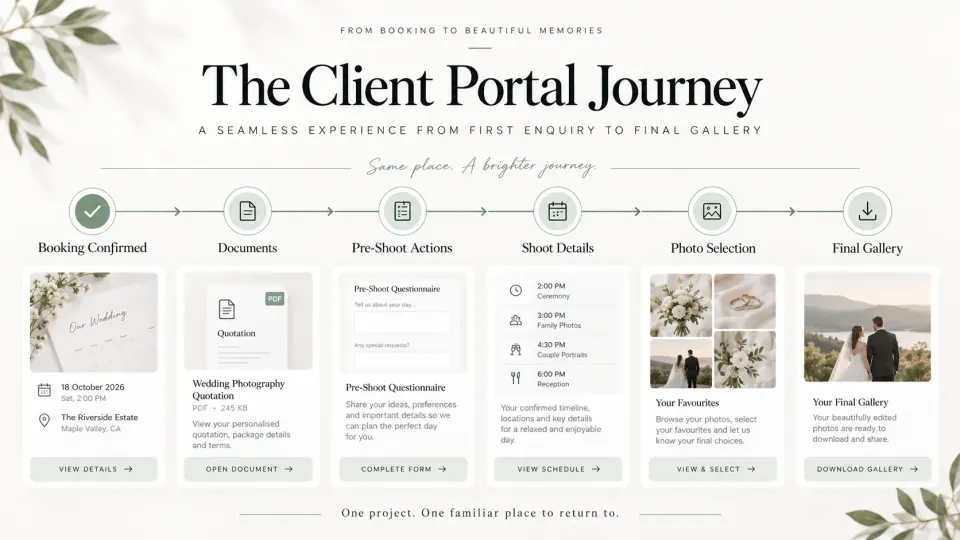
Booking and contact information clients should see
Once a shoot is confirmed, the portal should give the client enough booking information to recognise exactly what has been agreed.
For a simple portrait session, that may be little more than the session type, date, start time and location. A wedding photography client portal may need to represent several events across multiple days, different venues and agreed photography or video coverage. Commercial assignments may have production dates, locations, project names and specific deliverables.
The client-facing booking summary should generally include the confirmed client or project name, photography service, relevant dates, agreed locations, current booking status and the studio's primary contact route. If the assignment includes multiple events, they should be presented as separate, understandable entries rather than compressed into one vague booking date.
There is also an important difference between information that is visible and information that is editable.
Allowing a client to correct a phone number or email address can be useful. Allowing them to directly change a confirmed wedding date, package, event time or venue without studio approval can create serious operational problems. A change that looks like a simple field edit to the client may affect crew availability, travel, pricing, equipment, other bookings or contractual obligations.
For consequential changes, the safer portal behaviour is usually request a change, not silently rewrite the booking.
The portal should also show the latest confirmed information, not every historical version. If a ceremony venue was changed after booking, the client should see the current venue prominently. The studio may retain the change history internally, but the client should not have to interpret an audit trail to understand where the photographer is supposed to arrive.
Quotes, invoices and payment status should be easy to understand
Money is one of the strongest arguments for giving clients a consistent portal.
A photography booking may involve an initial quotation, an advance, one or more instalments, add-ons and a final balance. If those documents arrive independently, the client can easily lose track of what the latest amount represents.
A useful photography booking portal should let the client open relevant commercial documents and understand their current payment position without doing arithmetic across old emails.
At minimum, the financial area should make the following clear when applicable:
| Client should understand | Why it matters |
|---|---|
| What was agreed | Prevents uncertainty about the purchased service |
| Invoice total | Establishes the amount being billed |
| Amount already paid | Confirms received payments |
| Balance remaining | Removes the need for the client to calculate it |
| Due date | Makes the next obligation explicit |
| Payment status | Distinguishes paid, partially paid and pending amounts |
| Available payment action | Gives the client a clear next step where online payment is supported |
GoPickle's invoice management for photographers connects invoices with bookings, advances, balances, payments and reminders rather than treating the invoice as an isolated PDF. From a client-experience perspective, this is important because the information presented to the client should agree with what the studio's finance view says.
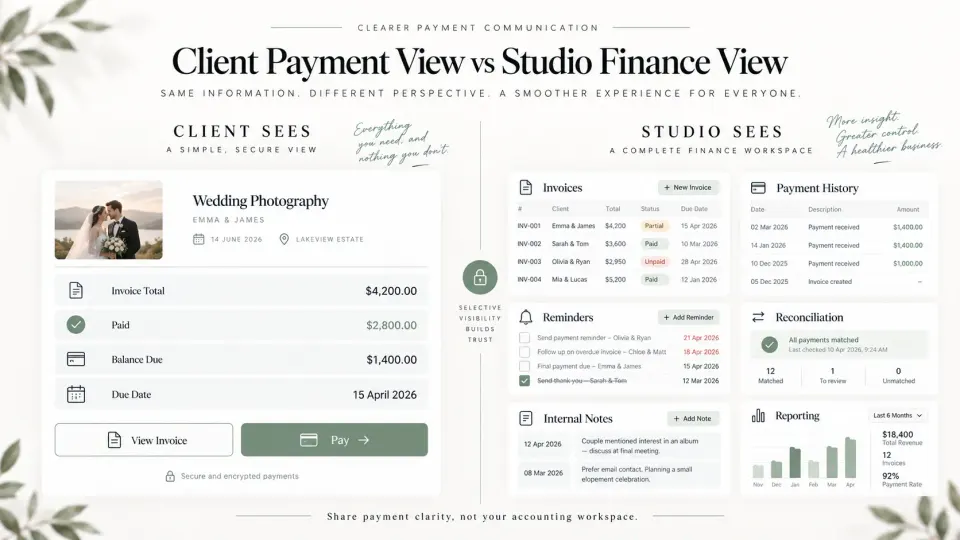
Studios should still configure invoices and tax information according to the rules that apply in their jurisdiction. A portal can improve presentation and access, but it does not replace local invoicing, tax or record-keeping requirements.
The client also does not need to see the studio's entire financial picture. Internal profitability, supplier costs, crew payments, processing costs, margins and other studio accounting information belong behind the operational boundary.
Pre-shoot details should focus on actions, not internal production management
Between booking and shoot day, a client portal becomes most valuable when it clearly separates information to read from things the client needs to do.
A portrait client might need wardrobe guidance and a location note. Wedding clients may need to provide final timings, important family information or other requested details. A commercial client may need to approve production information or provide access instructions.
Instead of placing everything into a large collection of documents, the portal should surface pending actions clearly:
Complete questionnaire
Due before the planning call.
Confirm final venue details
Awaiting client response.
Review updated quotation
New version available.
Balance payment
Due before the agreed milestone.
The language should describe the action from the client's perspective. Internal labels such as "Task 14", "Production Pending", "CRM Stage 6" or "Workflow Blocked" belong in the studio system.
The client also should not be able to modify historical agreements casually through a questionnaire. Once information affects scope, pricing or a confirmed production plan, subsequent changes may need explicit studio review.
This is one reason the photographer client portal and the studio management system must remain separate interfaces even when they draw from the same underlying record.
Gallery, selection and delivery access should continue the same client journey
Many photography businesses effectively create a completely new client experience after the shoot. Everything before the event happens through one set of tools, then the client suddenly receives an unrelated gallery link at delivery.
A stronger client journey treats the gallery as the next stage of the same project.
When photographs become available, the portal can move the gallery or selection task into prominence. The client should be able to understand whether they are looking at proofs, a selection gallery or final delivered photographs, because each carries different expectations.
For proofing or album workflows, the action might be Select your favourites. For completed work, it might become View final gallery or Download photographs.
GoPickle's Client Galleries for photographers support organised collections, favourites, access controls and downloads for client delivery. For studios that require clients to shortlist images before album design or retouching, a structured gallery is substantially clearer than asking clients to send filenames or screenshots. Our guide to making photo selection easier for photography clients explains that workflow in more detail.
The portal does not need to display the entire gallery interface on its home screen. A clear gallery card showing the project, current availability and appropriate action may be enough. The important part is that the client always knows where the final photographs belong.
What clients should not be able to edit
A useful rule for portal design is that client access should extend only as far as the client genuinely needs to participate in the job.
Clients may reasonably need to submit requested information, make selections, approve something, access documents or update limited personal details. They should not have direct editing control over the operational source of truth.
That usually means protecting fields such as confirmed package pricing, recorded payments, invoice amounts, booking status, internal deadlines, crew assignments, service configuration, studio notes and historical records.
Internal notes require particular care. Studios regularly record information that is useful operationally but inappropriate or confusing in a client-facing environment: negotiation history, lead quality notes, internal reminders, staffing concerns, profitability, discount reasoning or comments intended only for colleagues.
The portal should never expose those simply because they happen to sit inside the same photography client management system.
Permissions should also consider the relationship itself. A wedding may involve a couple, family members and planners. A commercial assignment may involve a marketing contact, producer and accounts department. Each person does not necessarily require identical access to financial documents, galleries or project decisions.
As studio workflows become more complex, role-appropriate client access becomes more valuable than simply giving everyone one shared password.
Client portal vs internal studio record
The easiest way to design a photography client portal is to define the boundary explicitly.
| Client-facing portal | Internal studio record |
|---|---|
| Confirmed dates and venues | Availability checks and conflicts |
| Client contact information | Lead source and sales history |
| Agreed services and deliverables | Costing and margin information |
| Quotes and client documents | Internal document history and notes |
| Invoice and payment status | Finance reconciliation and reporting |
| Client questionnaires/actions | Staff tasks and reminders |
| Gallery and photo selections | Editing and production workflow |
| Approved changes | Audit trail and internal discussions |
| Relevant project status | Operational pipeline stages |
| Studio contact route | Assigned team members and management notes |
This separation makes the software easier for both sides.
The photographer needs a detailed operational system because running the job requires detail. The client needs a much narrower interface because consuming the service requires clarity.
Trying to make one screen serve both audiences usually produces one of two bad outcomes: the studio loses information it needs, or the client gets overwhelmed with information they do not.
For studios evaluating a photography client management portal, this is therefore a better buying question than asking how many features the portal contains:
Can the client see the right information and complete the right action without being exposed to the complexity required to run the studio?
What a good photography client portal should feel like
Clients should not need training to use their photographer's portal.
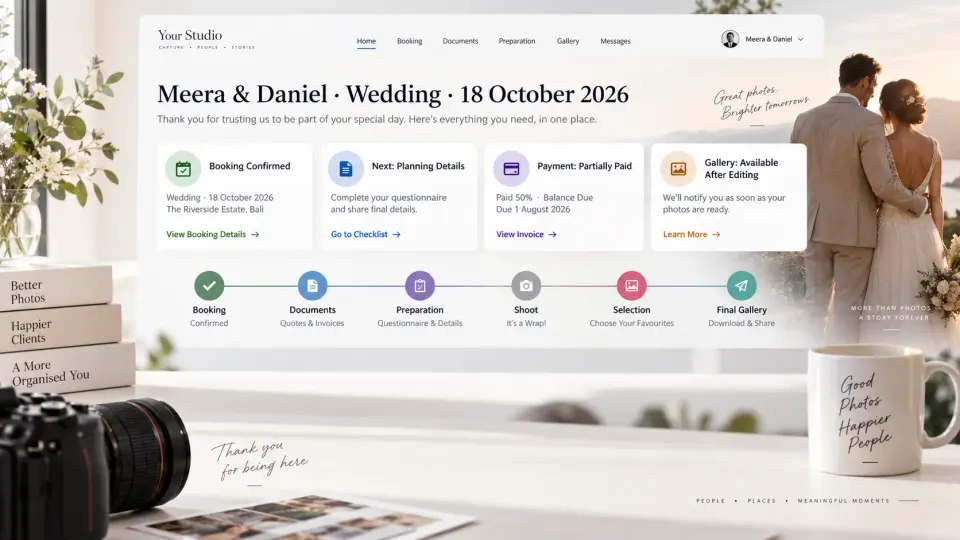
The homepage should identify their project immediately, show the next important event or milestone and make pending actions difficult to miss. Completed items can remain available without competing visually with what needs attention now.
On mobile, this becomes even more important. Many clients will open booking information, invoices and galleries directly from a link received through messaging or email. A portal that works beautifully on desktop but requires horizontal scrolling, tiny controls or repeated navigation on a phone has missed a major part of the real client experience.
Branding should also be restrained. The photographer's logo, studio identity and photography can make the portal feel like part of the service, but branding should not obscure information. Clients are entering the portal to accomplish something.
The standard worth aiming for is simple: a client who returns three months after booking should be able to open one familiar place and immediately understand what they booked, what has happened, what they need to do next and where their photographs will eventually appear.
That is the real value of a photography client portal.
For the studio, the corresponding goal is equally important: client-facing information should come from the same workflow used to manage the actual job. GoPickle connects bookings, invoices and payments, and Client Galleries within the wider photography workflow. As client-facing experiences evolve, that separation between a complete internal record and a deliberately simple client view is what keeps both sides of the booking clear.