Photography CRM Pricing: What Should Photographers Actually Pay for Business Software?
Understand photography CRM pricing, hidden software costs, storage, team seats, galleries and add-ons. Learn what photographers should actually pay for business software.

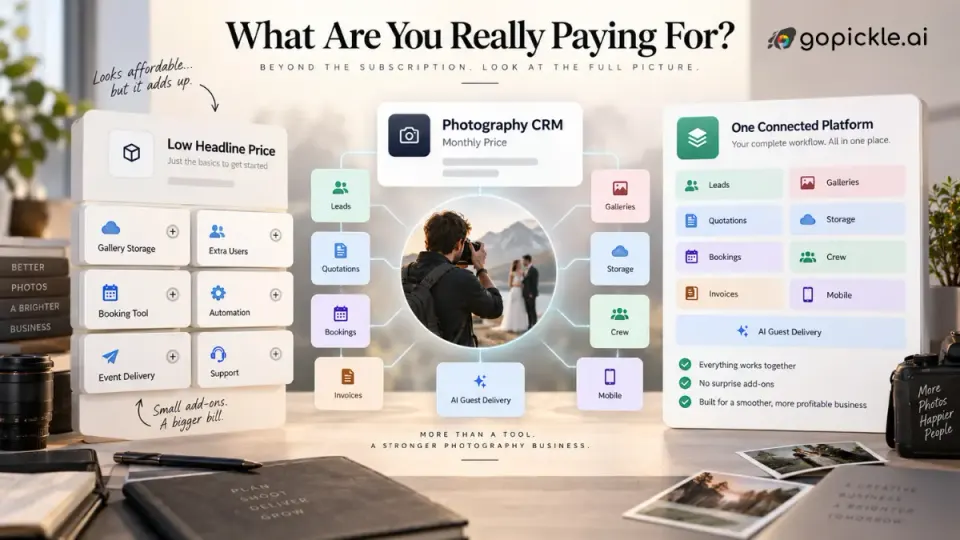
Photography CRM pricing is easy to compare until you try to work out what you are actually paying for.
One platform may advertise an inexpensive monthly subscription but limit active bookings, team members, automation or client-facing documents. Another may include CRM and invoicing but leave you paying separately for galleries, storage or event photo delivery. A third may cost more each month but replace several subscriptions that your photography business already uses.
That is why the cheapest photography CRM is not necessarily the lowest-cost system, and the most expensive plan is not automatically the most capable one for your studio.
At GoPickle, we think photographers should evaluate software in the same way they would evaluate any other operating cost in the business: against the work it replaces, the capacity it creates and the problems it prevents. The useful question is not simply, "How much does a photography CRM cost?" It is, "What will my photography business still need to pay for after I buy it?"
This guide breaks down the real cost behind photography CRM subscriptions so solo photographers and growing studios can compare plans without being distracted by the headline monthly price.
How much does photography CRM software cost?
There is no single standard photography CRM monthly cost. Current photographer software ranges from free entry plans through relatively inexpensive solo subscriptions to substantially higher team and studio tiers. Across the market, paid entry plans can begin in roughly the mid-teens to around US$30 per month, while more advanced plans rise as automation, multiple users, additional businesses, reporting and other capacity are added.
Those figures are useful for orientation, but they are a poor way to decide what your own studio should pay.
A photographer who needs lead tracking, quotations and five active jobs has a very different software requirement from a wedding studio coordinating several photographers, multi-event bookings, staged payments and hundreds of gigabytes of client galleries. A corporate photography team may care more about permissions and operational handoffs, while a portrait photographer running mini sessions may care more about booking volume and scheduling.
The better way to compare CRM for photographers pricing is to separate the cost into four questions:
| Pricing question | What to investigate |
|---|---|
| What is included? | CRM, quotations, bookings, invoices, payments, galleries, mobile access, automation |
| What is limited? | Clients, active jobs, documents, galleries, storage, users, workflows |
| What becomes an add-on? | Extra storage, AI delivery, messaging, payment features, team seats |
| What other software remains necessary? | Gallery delivery, file storage, scheduling, accounting, contracts, communication |
A low starting price matters only if the plan can support the workflow you actually intend to run.
Why the monthly subscription is only one part of the cost
Most pricing pages lead with a monthly or annual subscription. That number deserves attention, but it should be the beginning of your calculation rather than the end.
Imagine that a photography business pays for a CRM to track leads and clients. Quotations are produced somewhere else. Shoot dates are managed in a scheduling application. Invoices come from another service. Client galleries require a separate subscription with its own storage allowance. Crew coordination happens through messaging, and the studio uses another event photo-sharing service when clients request guest delivery.
None of those tools is necessarily expensive in isolation. The problem is cumulative.
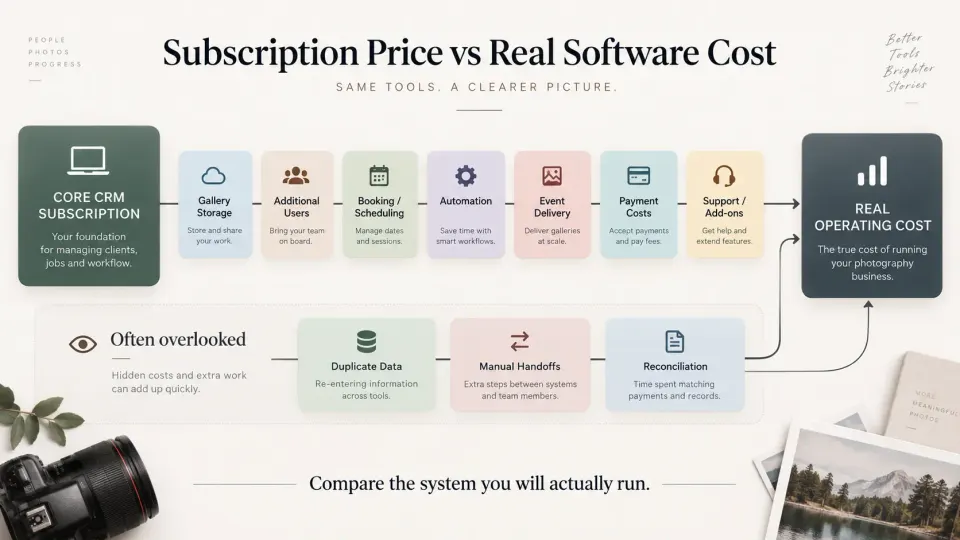
Your real photographer software cost may include CRM, booking software, invoicing, gallery hosting, cloud storage, additional users, payment-processing charges, automation, messaging allowances, AI event delivery and premium support. There is also a less visible cost: somebody has to keep the same client, booking and payment information consistent between those systems.
A useful pricing comparison should therefore look at the entire operating stack.
Real monthly software cost = core subscription + required add-ons + separate supporting tools + additional users + storage + usage-based services
Payment-processing charges deserve their own line in this calculation because they are often transactional rather than part of the software subscription. The rules, fees and available payment methods can also differ by platform and country, so photographers should compare them separately from the CRM price.
Free vs paid photography CRM: when does free stop being economical?
Free photography CRM software can be perfectly sensible for an early-stage photographer.
If you have a small number of enquiries, work alone and are mainly trying to establish a repeatable process, a free plan can help you understand whether structured lead management, quotations, booking records or invoicing actually improve the way you work. Paying for advanced automation, large storage capacity or team permissions before you need them is not good software buying.
The important detail is what "free" limits.
A free photography CRM may restrict active jobs, contracts, quotations, bookings, galleries, storage or branding. Those limits are not automatically a problem. They become a problem when normal business activity repeatedly pushes you outside the plan.
A free plan that supports three active jobs may be generous for a photographer booking occasional assignments and unusable for someone running dozens of mini sessions. Limited gallery storage may be irrelevant if you deliver files elsewhere, but decisive if the platform is intended to replace your existing client gallery software.
The point at which a paid photography CRM becomes worthwhile is therefore not a particular revenue figure. It is the point at which the free tier begins changing the way you have to operate.
If you are splitting real clients between systems, deleting information to remain under a limit, avoiding useful workflows or paying separately for features that the next plan already includes, compare the combined cost rather than protecting the zero-dollar subscription.
Per-user pricing vs studio pricing
Team pricing can change the economics of photography studio software very quickly.
Some platforms price primarily around the account or business. Others place user limits on lower plans and require an upgrade as the team expands. Either structure can work, but photographers should model the studio they expect to run rather than evaluating software using a one-person trial account.
Ask who actually needs access.
A studio owner may need complete financial and booking visibility. A studio manager may need leads, quotations and bookings. Photographers and cinematographers may only need assignment information. Editors may need post-production tasks and delivery context. Finance staff should not necessarily require the same operational permissions as the shooting crew.
Good crew management software for photographers should therefore be evaluated on both capacity and access control. "Five users included" tells you less than whether those five people can see and do the right things.
This becomes especially important for studios that combine permanent staff with freelancers. Paying a full administrative seat for every second shooter or occasional editor can make inexpensive photography studio software unexpectedly costly.
Storage and gallery limits can matter more than the CRM price
Photography businesses produce unusually large files. That makes storage one of the most important pricing variables when CRM and client galleries are offered within the same platform.
A conventional CRM mostly stores text records, documents and activity. Gallery software has a different cost structure because it may need to host thousands of high-resolution photographs across active client projects.
When comparing all-in-one photography business software, check:
- how much gallery storage is included;
- whether the limit applies to active galleries or all uploaded media;
- how many albums or galleries can be created;
- whether larger plans increase only storage or also unlock operational features;
- how long completed galleries can remain online;
- whether download controls and access controls require a higher tier;
- what happens when you reach the storage limit.
Do not compare "100 GB" with "1 TB" in isolation. Estimate the number and average size of the galleries your studio actually keeps live.
If final delivery is an important part of your workflow, client gallery software and its storage economics belong in your photography CRM cost calculation, even when another vendor sells gallery delivery as a separate product.
Lead, booking and document limits need to match your busy season
Plan limits often look generous when the studio is quiet. The better test is your busiest month.
Suppose a photographer normally handles six assignments but runs forty seasonal portrait sessions in November. A low-cost plan with a small active-job allowance may work for most of the year and fail exactly when the business becomes busiest.
The same applies to quotations, contracts, questionnaires, invoices and booking forms. Before choosing an affordable CRM for photographers, look for limits tied to real operating volume.
Your CRM should comfortably hold the number of opportunities you are selling, not only the number you have already booked.
This is also why lead management matters when evaluating price. A platform that helps you organise the entire pipeline may have more operational value than one that starts working only after the client has confirmed. GoPickle's photography lead management workflow, for example, is designed around the enquiry, requirement, ownership, next action and movement toward quotation and booking rather than treating CRM as a static contact list.
Team members and permissions are a capacity cost
Adding people creates more than a seat-count problem.
Once several people are involved, the studio needs to control who can see clients, prices, invoices, payments, crew information and operational tasks. That makes permissions part of the photographer business management software decision.
A solo photographer can often operate with one administrator account. A studio owner plus a manager, sales coordinator, photographers, editors and finance staff cannot safely assume that one shared login is still adequate.
Look at the cost of the workflow you will need six or twelve months from now. If your chosen plan becomes dramatically more expensive the moment another person needs access, include that future upgrade in the buying decision today.
The same principle applies to mobile access. Photographers rarely operate entirely from a desk. If the workflow needs to follow you to venues, client meetings and shoots, confirm that useful mobile functionality is part of the subscription rather than an incomplete companion experience. GoPickle's mobile application for photographers connects leads, quotations, bookings, invoices, payments, albums and crew workflows with the wider desktop system.
Add-on costs for photo delivery and AI features
Not every photography feature makes sense as an unlimited monthly inclusion.
Certain services have a genuine usage component. AI-powered event photo discovery is a good example because the workload may change dramatically between a small private event and a conference or wedding containing thousands of photographs and hundreds of guests.
When evaluating photography CRM pricing, distinguish normal studio capacity from event-specific consumption.
Ask whether an advanced feature is included in the subscription, restricted to certain plans, sold as a fixed add-on or priced per event. Then compare that structure with how often you expect to use it.
A wedding photographer offering guest photo discovery on a few premium bookings has a different cost profile from an event company deploying it every weekend.
GoPickle treats AI Guest Galleries as an event-scale workflow with plans based on photo and guest capacity rather than pretending that every studio needs the same amount of AI processing. That cost should be considered separately from the everyday CRM subscription when you calculate the economics of a particular event.
The hidden cost of using several separate photography apps
A software stack can look economical because no individual application seems expensive.
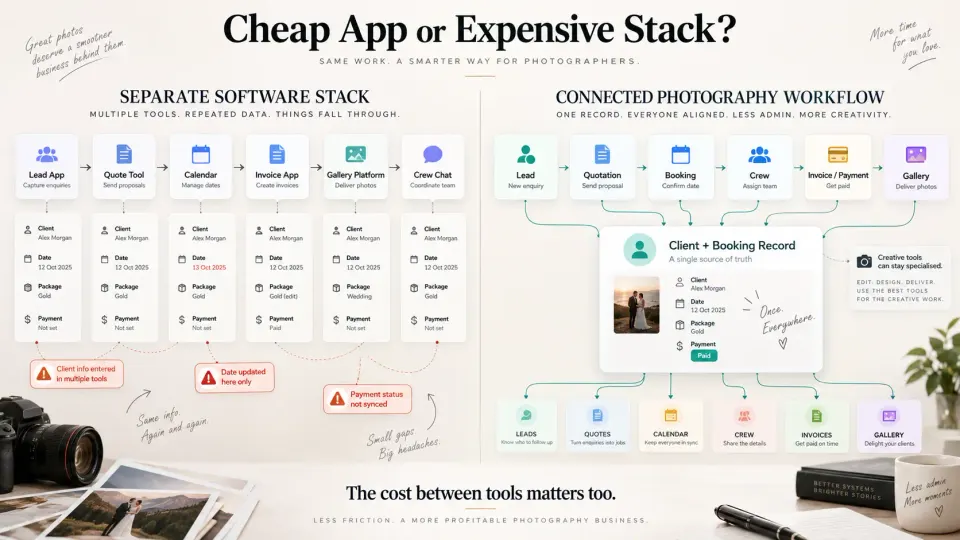
Your lead tracker costs a little. Your scheduling app costs a little. Your gallery subscription costs a little. Your storage subscription costs a little. You create invoices somewhere else because that tool was already available. Crew communication continues through messaging because messaging itself is free.
The problem appears between those tools.
A client approves a different package but the booking still shows the original scope. An event date changes in chat but not in the calendar. A payment arrives but the studio's tracking sheet is not updated. The photographer delivers the gallery while finance still thinks the final balance is outstanding.
The cost is no longer subscription cost. It is reconciliation.
This is why we believe photography business software should be assessed around connected work. GoPickle's photography workflow software connects lead management, quotations, bookings, invoices, payments, crew and galleries so the studio is not recreating the client journey at every handoff.
That does not mean one application must replace Lightroom, Photoshop, specialised accounting software or every other professional tool you use. Those products solve different problems.
Consolidation is most valuable where the same photography client information needs to move through several operational stages.
How to calculate your current photography software-stack cost
Open your business expenses and list every service involved from enquiry to delivery.
Do not group everything under "software." Separate the actual purpose.
| Cost area | What to record |
|---|---|
| CRM / lead management | Subscription and user costs |
| Scheduling / bookings | Subscription, booking limits or transaction costs |
| Quotations / contracts | Separate document software if applicable |
| Invoicing / payments | Subscription plus applicable payment fees |
| Client galleries | Subscription and storage tier |
| General cloud storage | Extra storage used for client workflow |
| Team management | Seats, scheduling or project-management tools |
| Communication | Paid messaging, email or automation allowances |
| Event delivery | AI gallery, face-search or event-specific charges |
| Integrations | Automation or connector services needed to make the stack work |
Now calculate both the monthly and annual totals.
Next, mark which subscriptions would genuinely disappear if you adopted new photography management software. Do not give the replacement platform credit for costs it cannot actually eliminate.
Finally, identify the manual handoffs that remain. The most useful comparison is:
Current stack cost + required manual coordination
versus
New platform cost + remaining specialist tools
This method gives you a far more realistic number than comparing two pricing-page headlines.
What should a solo photographer realistically pay for?
A solo photographer should pay for reliability before paying for scale.
You need enough system to capture enquiries, understand upcoming work, produce the documents you regularly use, know what clients owe you and keep delivery organised. You usually do not need enterprise permissions, large team capacity or enormous storage allowances on day one.
Current market pricing shows that there are credible paid entry plans in roughly the mid-teens to around US$30 per month before higher-level capabilities and bundled services are considered. That makes this a useful reference point, but it should not become an artificial spending rule.
If a US$20 photography CRM requires another US$25 gallery subscription and additional software for the workflow you use every week, it is not really a US$20 system.
Likewise, paying more for an integrated platform is wasteful if you only need a simple enquiry tracker and rarely use the rest.
Buy around your real bottleneck. A photographer who still manages five straightforward clients comfortably in a spreadsheet may not need to pay for CRM yet. If that describes your business, our guide to photography CRM vs spreadsheet tracking provides a better decision point than an arbitrary revenue threshold.
What changes when a photography studio adds team members?
As the business grows, the reason for paying for software changes.
A solo photographer buys software largely to reduce personal administration. A studio buys it to create a shared operating system.
The owner should no longer be the person who has to remember every client discussion, package revision, outstanding payment, crew assignment and delivery commitment. Another person needs to open the system and understand what is happening without reconstructing the project from messages.
That makes connected booking management for photographers, team access, role permissions, payment visibility and crew coordination much more valuable.
This is also the stage at which separate low-cost applications can become expensive operationally. Every additional staff member creates another person who needs to know which system contains the current truth.
For growing studios, pricing should therefore be compared against operational capacity rather than administrative convenience alone.
When does photography CRM start paying for itself?
You do not need an exaggerated ROI calculation to justify business software.
Use your own numbers.
Start with the full monthly cost of the CRM. Then ask what financial event would recover that expense.
Monthly software cost ÷ average contribution from one additional booking = the fraction of one additional booking required to cover the software
You can run the same exercise against recovered outstanding payments or reduced software subscriptions.
The CRM does not automatically create that return. The system only becomes valuable when your studio actually uses it to improve follow-up, reduce duplicated administration, maintain booking context or consolidate tools.
The biggest warning sign is paying for software that the team does not use. An inexpensive subscription with poor adoption is still wasted money.
Before purchasing, run one real client through the workflow. Capture the enquiry. Create the quotation. Convert it into a booking. Record the advance. Assign the people involved. Create the invoice. Check what the delivery process looks like.
That test exposes more than a feature checklist ever will.
How to evaluate GoPickle pricing based on your workflow
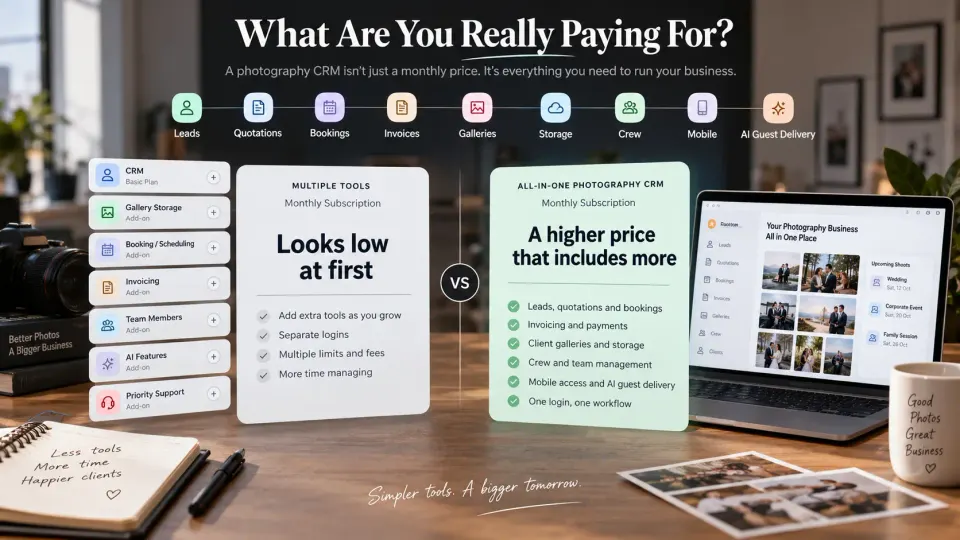
GoPickle's current pricing plans are structured around the stage and operating capacity of a photography business rather than offering one identical plan to every studio.
The Free plan provides a starting point with limited bookings, invoicing, quotations and billing, alongside 2 GB of album storage and up to five albums. That makes it possible to put a real photography workflow into the system before deciding whether a larger subscription is justified.
Prime expands the operating capacity with 100 GB of album storage, up to 50 albums, unlimited invoicing and bookings, unlimited quotations and billing, viewer analytics, access and download controls and capacity for additional crew members.
Focus is designed for larger studio requirements, with 1 TB of album storage, unlimited albums, advanced viewer analytics, unlimited crew with custom role controls and expanded support and platform capabilities.
These plan details can change as the product evolves, so the live pricing page should always be treated as the source of truth before purchasing.
More importantly, compare GoPickle against the tools it would actually replace in your studio.
If you only need a lead database, evaluate it as a lead database.
If your real workflow is enquiry → quotation → booking → events → crew → invoice → payment → client gallery, calculate the cost of that entire process today and compare it with a connected system.
That is the pricing question that matters.
The right photography CRM subscription is not the cheapest plan you can find. It is the lowest sensible cost for keeping the parts of your photography business that need to work together reliable.
Pay for the stage your studio is in now. Understand what will trigger the next upgrade. Keep specialist creative tools where they are genuinely better. Consolidate the operational work where disconnected systems are already costing you time, clarity or client confidence.
That is how photography CRM pricing becomes a business decision rather than another monthly subscription.