Photography Equipment Checkout Workflow: Track Gear Responsibility Across Crew and Shoots
Build a photography equipment checkout workflow to track cameras, lenses and lighting by booking, crew member, condition, accessories and return status.

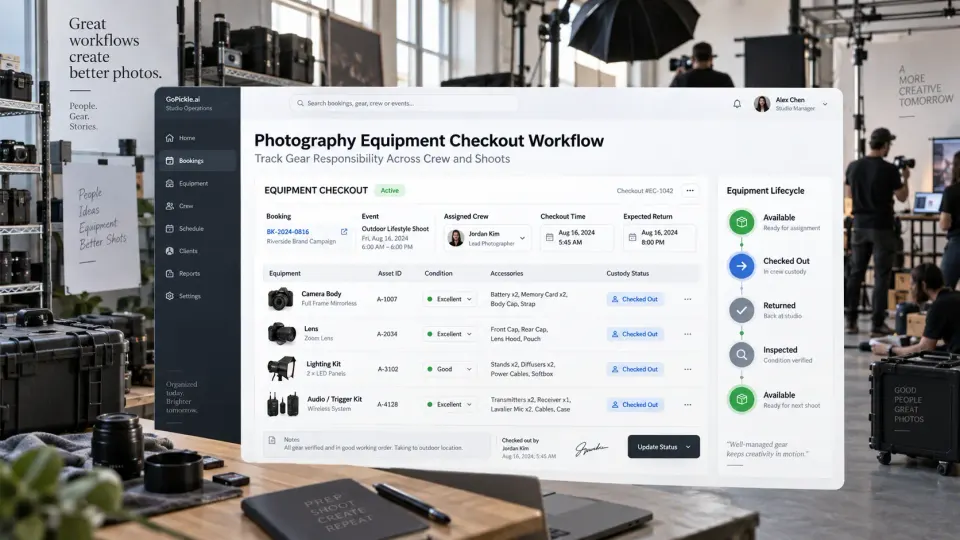
A camera can be inside the studio and still be unavailable. A lighting kit can return from a wedding while one trigger remains in somebody's backpack. A lens can be sitting safely on a shelf even though nobody has recorded the damage noticed during the previous shoot. When several photographers share equipment, knowing that the studio owns an item is not enough. The studio also needs to know where it is, who has custody of it, which booking it belongs to, what left with it and what condition it came back in.
That is the purpose of a photography equipment checkout workflow.
For a solo photographer with one camera bag, a formal checkout process may be unnecessary. For a studio running overlapping weddings, corporate events, school assignments or commercial productions with shared cameras, lenses, lights, audio kits, stands and storage media, the situation changes quickly. Equipment becomes an operational resource that moves between people and bookings.
This guide focuses on that movement. It does not recommend camera brands, build a gear-review system or imply that GoPickle currently provides a dedicated equipment-inventory module. The useful connection to the wider studio workflow is simpler: equipment responsibility should line up with the same booking, event and crew plan that tells the team who is shooting what.
When does a photography studio need checkout records?
A checkout record becomes useful when equipment can leave its normal storage location without the owner personally controlling every movement.
That usually begins when a studio has shared equipment, multiple photographers, assistants who prepare bags, several events running simultaneously, freelancers borrowing studio-owned gear or production equipment that moves between locations.
The failure mode is rarely dramatic at first. Someone takes a flash because they need it for tonight's reception. Another photographer assumes the flash is still available for tomorrow's shoot. A stand returns without its adapter. A battery charger remains at the venue. Nobody is certain who last used a lens with a damaged filter thread.
A gear list does not solve this. A shoot checklist tells you what the production needs. A photography gear checkout record tells you which actual equipment has been allocated, who took responsibility for it and whether it returned complete.
For each movement of shared gear, the studio should be able to answer:
- What exact item or kit left?
- Which booking or event is it supporting?
- Who accepted custody?
- What condition was it in?
- Which accessories left with it?
- When did it leave?
- When is it expected back?
- Did it return complete and usable?
- Is it available for the next assignment?
If those questions matter to your operation and cannot be answered reliably, you have reached the point where informal camera inventory checkout is becoming a business risk.
Identify each owned item before trying to track it
Photography equipment tracking becomes unreliable when the inventory itself is vague.
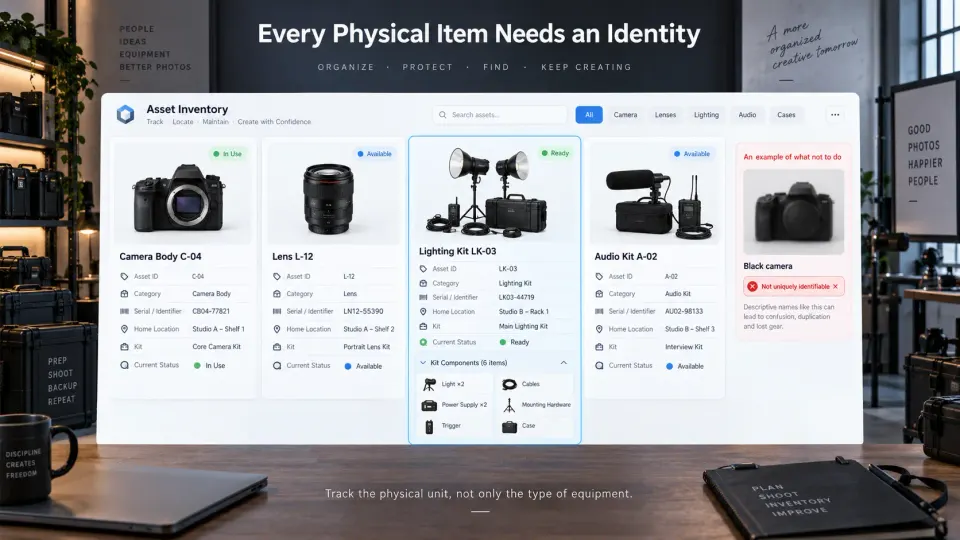
“Sony body,” “70–200,” “LED kit” or “tripod” may make perfect sense when the equipment room contains one of each. It stops working when the studio owns several similar bodies, matching lenses or identical light stands.
Every significant studio-owned asset should therefore have a persistent identity.
A useful equipment record can include:
| Field | Example of what it records |
|---|---|
| Asset ID | Studio's unique internal identifier |
| Category | Camera, lens, light, audio, stand, storage, computer |
| Make / model | Exact equipment identification |
| Serial number | Manufacturer identifier where applicable |
| Kit membership | Whether it normally belongs to a larger kit |
| Home location | Shelf, cabinet, studio, office or case |
| Normal status | Available, checked out, maintenance, retired |
| Condition notes | Existing wear or known issue |
| Included accessories | Charger, caps, cables, plate, trigger, case |
| Purchase / ownership record | Optional internal administrative reference |
The important distinction is between identifying the type of gear and identifying the physical unit. Two identical camera bodies are still two separate assets because one can be assigned to a wedding while the other remains available.
Kits need similar discipline. If the studio checks out a “Lighting Kit A,” define what makes that kit complete. A case containing two lights but missing the trigger, power cable or mounting hardware is not necessarily ready for production just because the expensive equipment came back.
Assign equipment to the booking and the person using it
Equipment should not simply move from Available to Checked Out. The record should say why it moved and who now owns the responsibility for returning it.
A useful photography gear sign-out might contain:
Booking: Maya & Daniel Wedding
Event: Reception
Assigned crew: Second Photographer
Equipment: Camera Body C-04
Accessories: Battery ×2 · Charger · Body cap
Checkout: Friday 16:30
Expected return: Sunday 11:00
Status: Checked Out
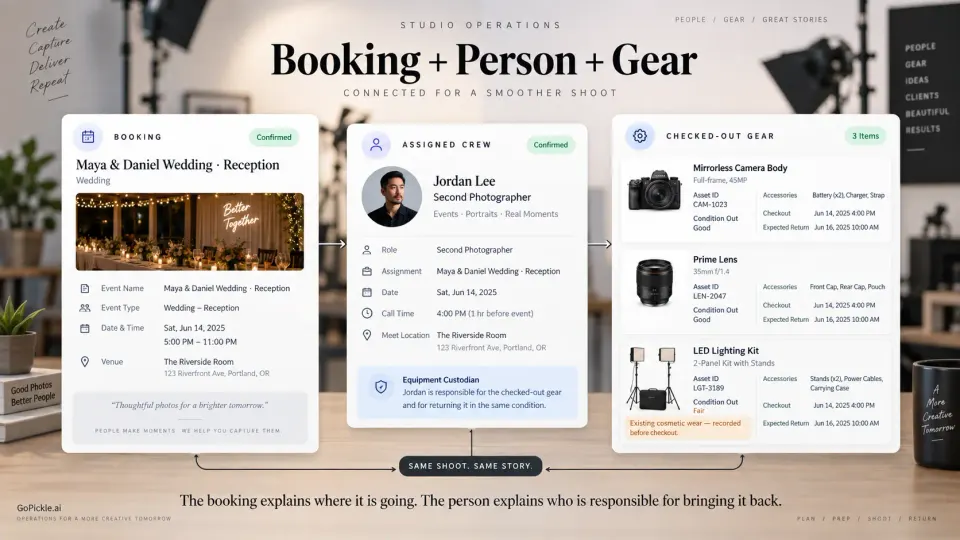
Connecting the asset to both the booking and the person solves two different problems. The booking explains where the gear is being used; the assigned person establishes custody.
That matters when several crew members work on the same job. Saying “equipment went to the wedding team” is not sufficient if a lens later goes missing. One person should normally accept custody of each individual asset or defined kit, even when other crew members will use it during the shoot.
This is where equipment planning connects naturally with photography crew management. GoPickle's Crew Management workflow supports event-level crew assignments, roles, reporting details, tasks and handoffs around actual bookings. Your equipment checkout record can use that operational plan as the context for deciding who needs which gear, without treating GoPickle as the physical inventory register itself.
For complex bookings, allocate shared equipment at the event level where necessary. A drone kit may belong to the outdoor ceremony. A portable lighting system may be reserved for the reception. A tethering setup may be needed only for the corporate portrait station. The more precisely the equipment requirement follows the production plan, the less likely the same asset is promised to two teams.
Check condition and accessories before the gear leaves
The checkout moment is the last practical opportunity to distinguish an existing problem from something that happens during the assignment. You do not need an elaborate inspection report for every cable. You do need enough information to recognise meaningful changes.
For higher-value or production-critical items, confirm basic condition before handoff. A camera body should power on. Lenses should not have newly obvious damage. Lights, triggers and chargers should be present and functioning where practical to test. Cases should contain the accessories required for the assignment.
For kits, use a component checklist rather than relying on memory.
A lighting case might contain:
- two light heads;
- two power supplies;
- trigger and receiver where required;
- mounting hardware;
- cables;
- modifiers;
- protective caps;
- carrying case.
The checkout should confirm the kit's actual contents rather than assuming everything inside the named case is complete.
Condition notes should also be neutral. If a lens already has cosmetic wear that does not affect operation, record that once. The purpose is not to make crew members nervous about touching studio equipment. It is to create a fair before-and-after reference when a real problem appears.
Record pickup and return times, not only the shoot date
A camera assignment can conflict with another booking even when the two shoots happen on different days.
Suppose one wedding finishes late Saturday night and another crew needs the same lighting equipment at 6:00 AM Sunday. The first job and second job do not overlap on the calendar, but the equipment may not have enough time to return, be inspected, recharged, repacked and reach the next location.
For that reason, a photography studio equipment management workflow should distinguish:
Checkout time → Assignment period → Expected return → Actual return → Inspection complete → Available again
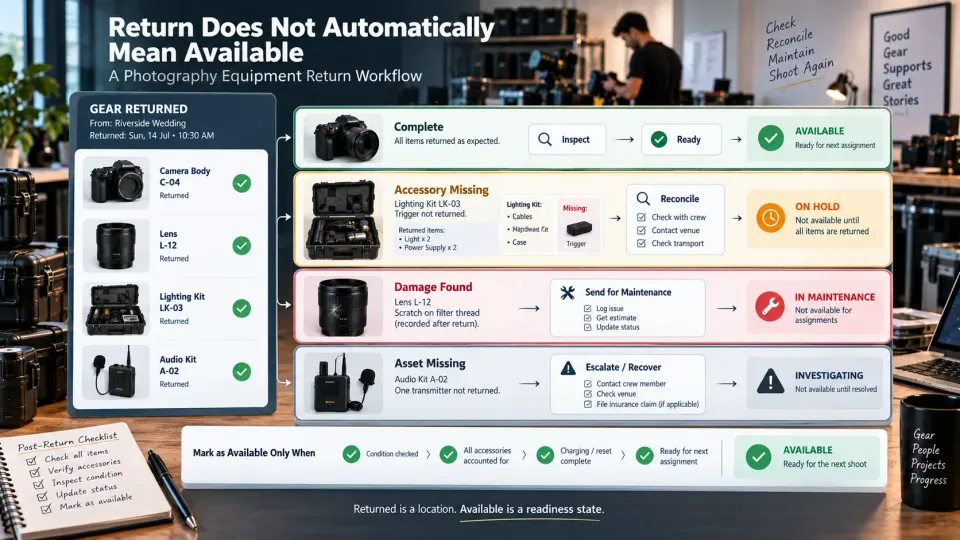
The gear is not necessarily available the moment somebody walks through the studio door with the case.
Cards may need to be removed and handled under the studio's media workflow. Batteries need charging. Equipment may need cleaning. Missing accessories have to be reconciled. A damaged item should move to maintenance rather than straight back into the available pool.
This distinction between returned and ready for reassignment becomes particularly valuable during busy weekends.
The studio's wider booking view can help identify those operational pressures. GoPickle's Booking Management for photographers keeps event dates, venues, crew and production context together, while the physical equipment record can separately control the asset's checkout and return lifecycle.
Handle damage and loss as an escalation workflow
Something will eventually return incomplete, damaged or not at all. The quality of the equipment system is tested by what happens next.
Do not close the checkout simply because most of the gear came back.
A returned record should be able to distinguish at least:
Returned complete
Returned with damage
Accessory missing
Asset missing
Under inspection
Sent for maintenance
When damage is reported, record which asset is affected, who reported it, when it was noticed, what the visible or functional problem is and whether the equipment remains safe and usable. Photographs of physical damage can be useful supporting evidence when appropriate.
The goal of the first record is factual documentation, not immediate blame.
A lens that stops communicating with the camera after a shoot may have failed without anyone mishandling it. A stand may have been damaged when a guest knocked it over. A cable may simply have been left at a venue. The studio should establish what happened before deciding whether the issue is ordinary wear, production damage, insurance-related, recoverable from another party or something requiring an internal conversation.
For missing items, assign an owner to the recovery action. That may mean contacting the venue, checking the transport vehicle, speaking to the assigned crew member or reviewing which case the item should have entered.
Do not leave the affected asset marked as available while that investigation happens. Studios working with freelancers should also define shared-equipment responsibility before the first assignment. Our freelance photographer onboarding checklist covers equipment expectations, technical standards and handoff responsibilities that should be clear before a freelancer represents the studio on a paid job.
Reconcile the physical inventory periodically
Even a good checkout process needs occasional reconciliation against reality.
Over time, small inconsistencies accumulate. An accessory may have been replaced without the inventory record changing. A camera body may have gone into long-term repair. A case may contain a different number of batteries than originally defined. A rarely used cable can remain missing because nobody has needed it yet.
Periodically compare the register with the physical equipment your studio actually holds.
The frequency depends on the size and movement of the inventory. A small studio may reconcile quarterly or before a busy season. A high-volume event team with gear leaving almost every day may need smaller rolling checks much more frequently.
Review:
- whether every listed asset physically exists;
- current storage location;
- availability status;
- active checkouts;
- overdue returns;
- maintenance items;
- incomplete kits;
- missing accessories;
- equipment that should be retired;
- unrecorded new purchases or replacements.
Do not make the process unnecessarily heavy. A studio with 40 meaningful shared assets needs a different system from a rental warehouse holding thousands of items.
The purpose is operational confidence, not inventory administration for its own sake.
GoPickle's existing weekly studio review checklist already recommends reviewing equipment allocation alongside upcoming bookings and crew capacity. An equipment checkout record gives that review something concrete to inspect instead of asking everyone whether the gear is “probably ready.”
Photography equipment checkout checklist
Before an item leaves the studio:
- confirm the booking and event;
- identify the exact asset or defined kit;
- confirm that it is genuinely available;
- assign one responsible crew member;
- record important condition notes;
- check required accessories;
- record checkout time;
- record expected return time;
- confirm any special transport or handling requirements.
When equipment returns:
- record actual return time;
- reconcile every assigned asset;
- check kit components and accessories;
- inspect for new damage;
- report anything missing;
- move damaged equipment to maintenance status;
- complete any charging, cleaning or reset process;
- mark the asset available only when it is ready for another assignment.
A reliable photography equipment checkout system creates a simple chain:
Asset → Booking → Crew member → Checkout condition → Shoot → Return → Inspection → Available again
That chain matters more than the software used to store it.
For a growing photography business, equipment responsibility should sit beside the rest of the production plan rather than living as an unrelated spreadsheet nobody checks until something goes missing. GoPickle can provide the booking, event, crew and task context around the assignment; a dedicated physical asset record should then control custody, condition and return without pretending the two systems are the same thing.
The result is less detective work before the next shoot. Your team knows what belongs to the studio, what has already been allocated, who currently has it and whether it is genuinely ready to leave the shelf again.