Photography Payment Plan Software: What to Track Beyond Paid and Unpaid
Learn what photography payment plan software should track beyond paid and unpaid, including scheduled payments, invoices, instalments, due dates, overdue balances, refunds and credits.

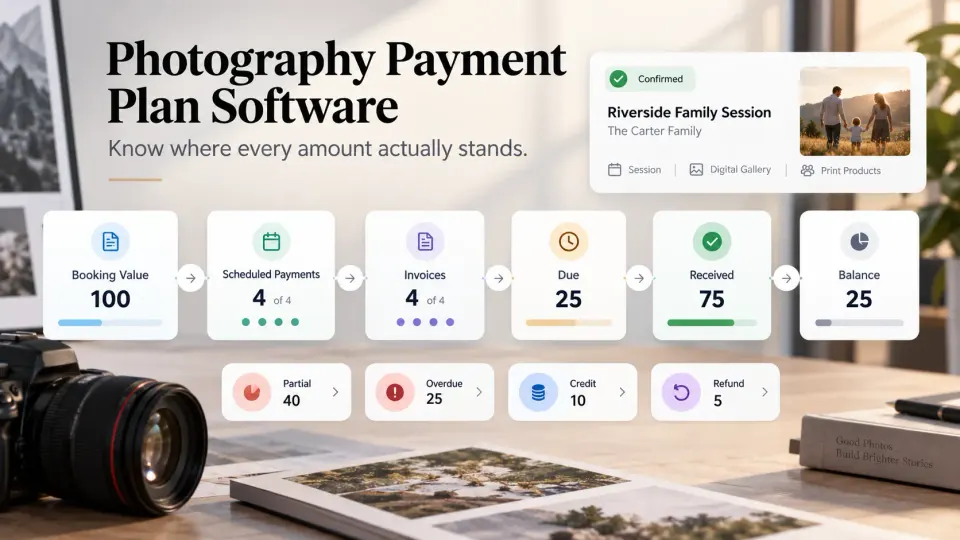
A photography booking can be worth thousands and still have no simple answer to the question, “Has the client paid?”
Perhaps the booking advance has arrived, the second instalment has been invoiced but is not due until next week, and the final payment is scheduled for before delivery. Another client may have paid part of an invoice. A third may have overpaid and now has credit against an album upgrade. A cancelled project may require a partial refund while another invoice has quietly crossed its due date.
Calling all of those bookings either paid or unpaid hides the information a studio actually needs.
That is the real job of photography payment plan software. It should not merely store a total and subtract payments from it. It should show where every amount sits in the payment lifecycle, what the client needs to pay next, what has genuinely reached the studio, and what requires action.
This is different from deciding how much advance to collect or how many instalments a photography package should have. We have covered that separately in our guide to advance, milestone and final payments. Here, the question is what your software should track once that payment plan exists.
Why paid and unpaid is too crude for photography businesses
For a simple portrait session that is paid in full when booked, a binary status may be enough. For a wedding, multi-day event, commercial production, school photography contract, corporate retainer or a project involving albums and post-production, it usually is not.
Imagine a photography booking worth $6,000. The agreed payment plan is:
| Payment stage | Amount | Current state |
|---|---|---|
| Booking advance | $1,500 | Received |
| Pre-shoot instalment | $2,000 | Invoice sent, due next week |
| Post-shoot payment | $1,500 | Scheduled for later |
| Final delivery balance | $1,000 | Scheduled for later |
Is this booking paid?
No.
Is $4,500 currently overdue?
Also no.
The client has paid exactly what they were required to pay so far. Only $2,000 has entered the current invoicing cycle, while the remaining $2,500 belongs to future stages.
This distinction matters because each number drives a different decision. Received money tells you what has actually been collected. Due money tells you what the client should pay now. Overdue money tells you what needs follow-up. Scheduled money tells you what is expected later.
A useful photography payment tracking system therefore needs more than an invoice status. It needs a financial timeline.
Build the payment schedule from the booking
The cleanest photography payment plan starts with what the client actually booked.
Once a quotation or proposal is accepted, the commercial agreement usually contains a total value, services, deliverables, taxes or adjustments where applicable, and agreed payment stages. That information should become part of the confirmed booking rather than being recreated manually in a separate spreadsheet or invoice tool.
This is especially important when the job changes.
A wedding client may add another event. A corporate client may request additional retouching. A family portrait client may add prints or an album after the shoot. A destination assignment may gain approved travel costs. When the booking value changes, the studio needs to know whether the additional amount belongs to an existing payment stage, requires another invoice, or remains an approved future charge.
That is why payment management works better when it is connected to Booking Management. The booking provides the commercial context; the payment record shows how that commitment is being collected.
The objective is not to make every booking use the same schedule. It is to preserve the relationship between what was sold and how it will be paid.
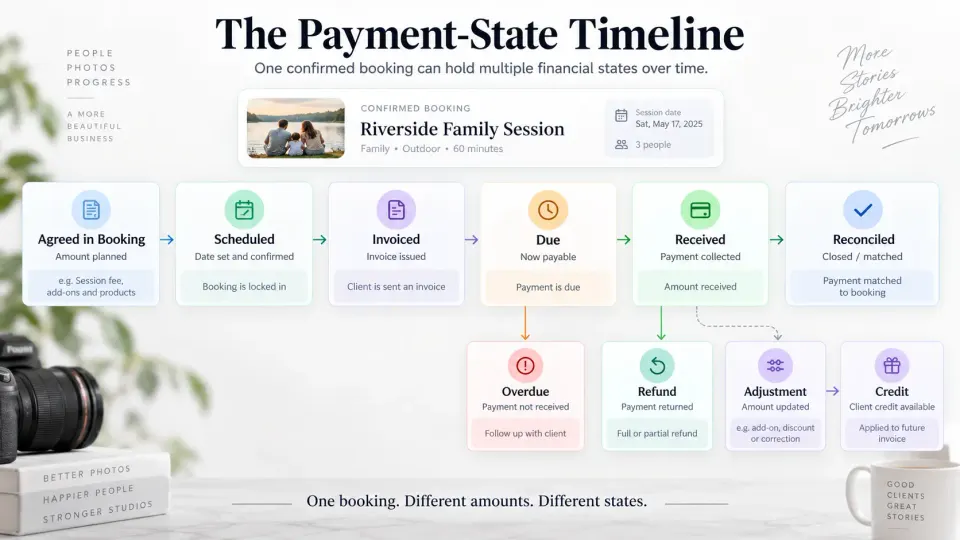
Scheduled, invoiced and due are three different states
These three amounts are often merged together, and that creates some of the worst payment reporting.
A scheduled amount is part of the agreed payment plan but is not necessarily ready for collection. A final balance due before gallery delivery may already exist in the schedule several months before the shoot.
An invoiced amount has moved from an internal plan into an actual billing document or payment request. The studio has formally asked the client for that amount.
A due amount is an invoiced payment whose agreed payment date has arrived or whose payment condition has been met.
Those distinctions allow the studio to answer much better questions:
- How much money is expected from confirmed bookings in the coming months?
- How much has actually been invoiced?
- How much should clients pay now?
- What amount requires a reminder today?
- How much future booking value should not yet be treated as receivable?
Good photography invoicing software should make that progression visible rather than showing every remaining amount as one large unpaid balance.
For example, if a client has a $1,000 final payment scheduled for two weeks before an event six months away, displaying that amount as overdue would be misleading. Showing it as scheduled preserves the financial commitment without suggesting that the client has failed to pay.
Partial payments and instalments need their own history
Real payment behaviour rarely follows a perfectly clean sequence.
A client may owe 2,000 and transfer 1,200 today, then the remaining 800 a few days later. Another may divide a planned instalment across two cards or bank transfers. A corporate buyer may pay several invoices together. A studio may accept an offline payment that needs to be recorded manually.
Photography payment plan software should preserve each receipt instead of overwriting the instalment with a generic “partial” status.
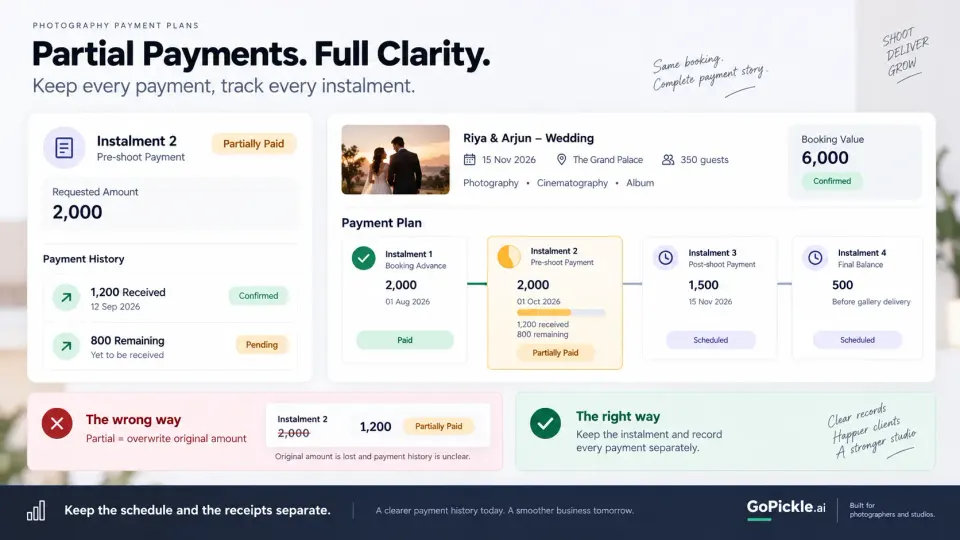
At minimum, a received payment record should retain the amount, date, related invoice or instalment, and enough reference information for the studio to reconcile it later. The important point is that the payment history remains separate from the payment schedule.
If a $2,000 instalment receives $1,200, the software should be able to represent:
Scheduled instalment: $2,000
Received: $1,200
Remaining on this stage: $800
Total booking balance: whatever remains across the entire job
That is much more useful than simply changing the invoice from “unpaid” to “partial.”
The same principle applies across a studio. When several bookings are active simultaneously, photographers should be able to distinguish collected, pending, due and overdue money without reconstructing payment history from bank transactions, chats and screenshots. GoPickle's Get Paid Faster workflow is designed around this booking-linked view of advances, instalments, balances and payment follow-up.
Credits, refunds and adjustments should not erase the original payment story
Payment tracking becomes more difficult once money starts moving backwards or a balance changes.
Suppose a client has already paid for an album but later changes the order. Perhaps the replacement is cheaper, creating a client credit. Another booking may be cancelled under the studio's agreed terms and require part of the money received to be refunded. A commercial client may have paid too much because of an accounting error.
Simply editing the original payment amount destroys useful history.
A better model keeps the events separate:
Payment received → Adjustment approved → Credit created → Credit applied or refund issued
This matters because a refund is not the same as an unpaid balance. A credit is not the same as cash received. An invoice reduction is not the same as deleting a payment.
Studios should therefore look for payment tracking that can preserve adjustments without making the original transaction disappear. Your accounting and tax treatment may vary by jurisdiction, so financial records and any credit or refund documents should also follow the requirements that apply where your business operates.
Outstanding balance should always be visible, but it needs context
“Outstanding” sounds like one number. Operationally, it can contain several different types of money.
Consider a studio with 50,000 still uncollected across all confirmed work. That figure becomes much more useful when broken down as:
| Payment position | What it tells the studio |
|---|---|
| Scheduled | Agreed future payments that are not yet ready to collect |
| Invoiced | Amount already billed to clients |
| Due | Amount expected now |
| Overdue | Amount past its agreed payment date |
| Received | Money actually collected |
| Refunded | Money returned after collection |
| Credit | Value available to offset another charge |
| Outstanding | Remaining amount after relevant payments and adjustments |
This is also why booked revenue and collected revenue should not be treated as interchangeable. A busy calendar can represent substantial future business while the amount available in the bank today is much smaller. Our guide to booked revenue versus collected revenue covers that distinction in more detail.
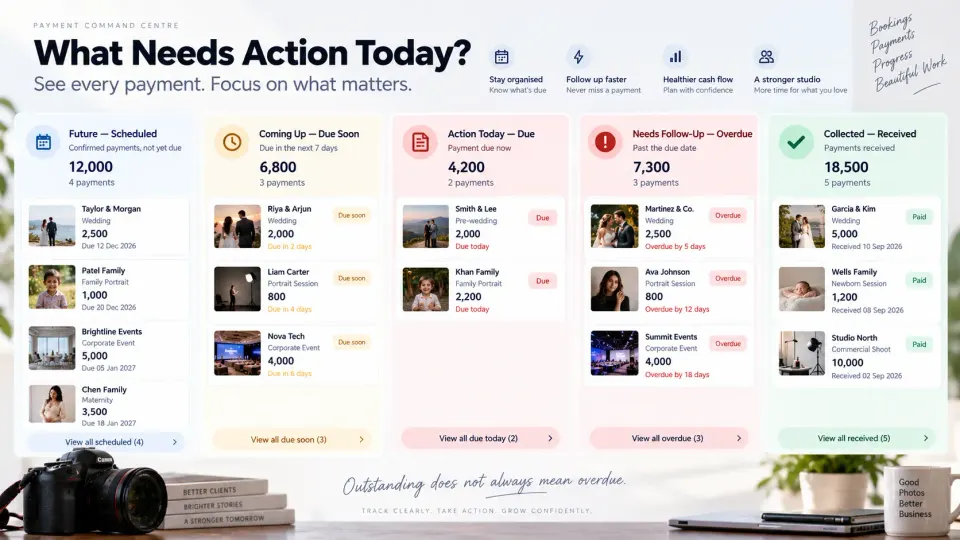
For day-to-day operations, the most useful outstanding-balance view is usually the one that answers what requires action next. A future balance may need no attention. An invoice due tomorrow might need a scheduled reminder. An overdue invoice from three weeks ago probably needs somebody to take ownership.
What to look for when choosing photography payment plan software
A payment feature can look impressive in a demo while still leaving the studio with manual reconciliation afterwards. Before choosing photography payment tracking software, test it against one of your real multi-payment bookings.
Look beyond whether the system can “accept instalments.” Check whether it can preserve the full payment lifecycle:
- Booking-linked payment schedules. Can the payment plan remain connected to the client, package or project it belongs to?
- Separate scheduled, invoiced, due and overdue states. Can you tell future money apart from money that requires action now?
- Partial-payment tracking. If a client pays less than the requested instalment, does the system retain the receipt and calculate the remaining balance correctly?
- Multiple payment records. Can one booking contain several advances or instalments without losing transaction history?
- Clear outstanding balances. Can both the studio and, where appropriate, the client understand what has already been paid and what remains?
- Payment reminders. Can follow-up relate to the correct invoice, due date and balance rather than relying on someone remembering to send a message?
- Adjustments, credits and refunds. Can the financial history survive a change without somebody editing old records to make the numbers fit?
- Studio-level receivables visibility. Can you see what is collected, pending and overdue across all active bookings rather than opening projects one at a time?
- A usable audit trail. Can your team understand how the current balance was reached?
- Workflow connection. Does payment information remain connected as the job moves from quotation to booking, production and delivery?
For a studio that only handles small sessions paid completely upfront, some of this may be unnecessary. Complexity should follow the business model.
But once you manage longer projects, larger packages, recurring commercial work or wedding photography installment payments, the difference between a basic invoice generator and genuine photography payment plan software becomes significant.
The goal is not more payment statuses. It is a clearer next action
The point of separating scheduled, invoiced, due, received, overdue, refunded and credited amounts is not to create extra administration. It is to remove ambiguity.
When a photographer opens a booking, the financial position should be understandable without checking the bank account, searching messages, opening an old spreadsheet and recalculating what remains. The studio should know what the client agreed to pay, what has already been requested, what actually arrived, what is expected next and whether anything needs intervention.
That is the standard we use when thinking about payments inside GoPickle. Smart Invoicing, Booking Management and the broader Get Paid Faster workflow are built around keeping the money side of a photography job connected to the booking rather than treating invoicing as an isolated document task.
A photography payment plan is the agreement. The payment tracker is the record of what is actually happening. Good software needs to understand both.