Photography Studio Gear Inventory: What to Track for Cameras, Lenses, Lights and Repairs
Build a photography gear inventory that tracks asset IDs, serial numbers, purchase records, condition, location, repairs, warranty references and retirement.

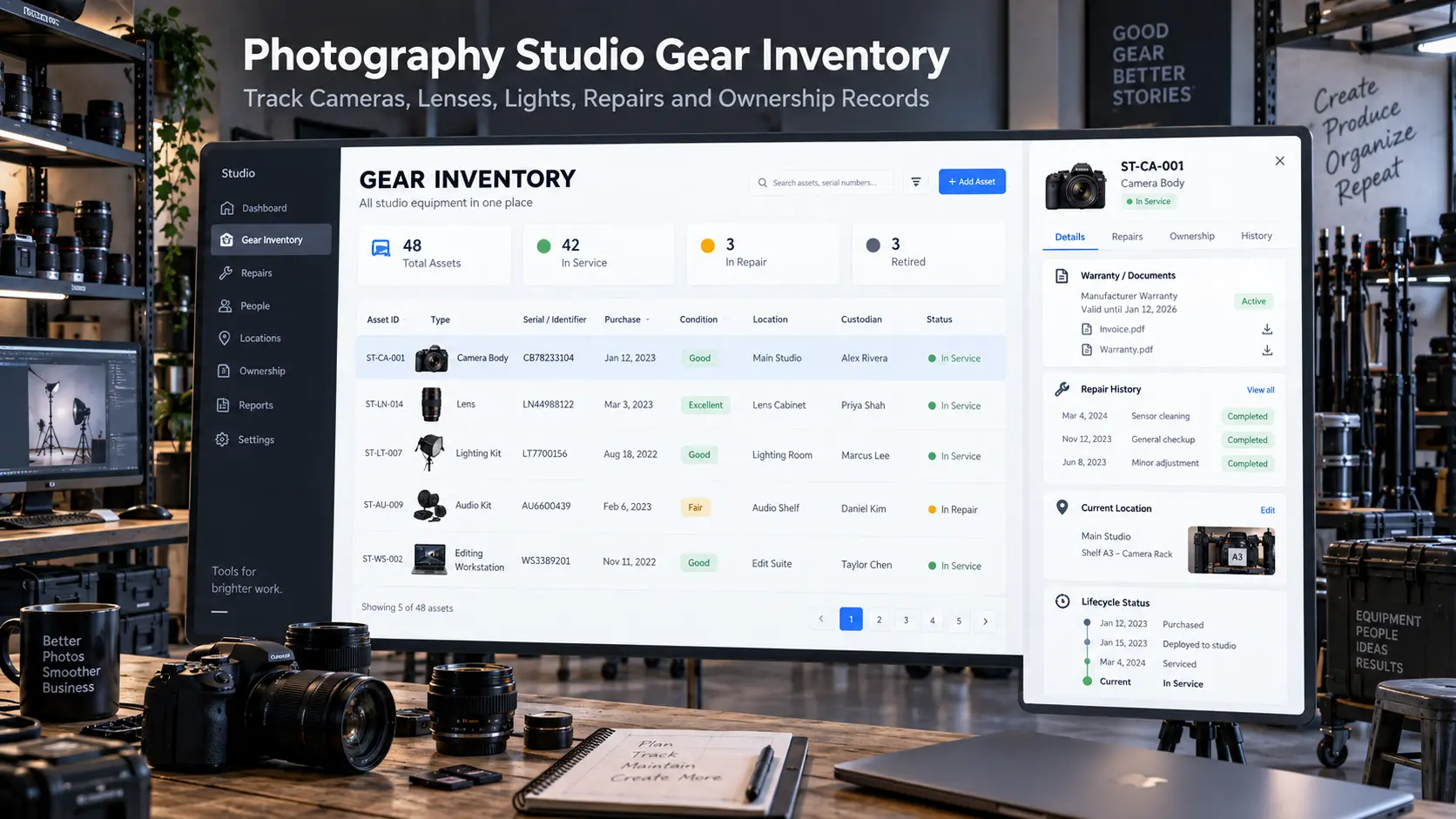
A photography studio can own a substantial amount of equipment and still have a surprisingly weak understanding of its inventory. Everyone knows there are four camera bodies somewhere in the studio, several flashes in the lighting cabinet and a collection of lenses accumulated over the years. What becomes harder to answer is which exact body has the damaged card-door latch, whether the 85mm lens is with a photographer or at the repair centre, when a light was purchased, which receipt belongs to it, or whether an older backup camera should still be considered production-ready.
That is the job of a photography gear inventory.
A useful inventory is not simply a shopping list of everything the studio has purchased. It is the permanent asset record behind the equipment: identity, ownership, purchase information, condition, current location, custodian, repair history and eventual retirement. A separate gear-checkout workflow can record the temporary movement of equipment between shoots and crew members; the inventory remains the long-term source of truth about what the studio actually owns.
For small studios, this may begin as a carefully structured spreadsheet. Larger teams may eventually use dedicated photography asset management or equipment-tracking software. The tool matters less than the discipline of maintaining one reliable record for every asset important enough that the studio would care if it were unavailable tomorrow.
Why memory fails once photography gear is shared
A solo photographer can often recognise every body and lens without reading a label. That familiarity creates the illusion that formal camera equipment tracking is unnecessary.
The problem appears as soon as other people begin touching the gear.
A studio manager prepares equipment for one assignment. A freelancer borrows a body. Another photographer takes a lighting case to a different venue. One lens goes for repair while the owner is travelling. Someone purchases three new batteries but never updates the old equipment spreadsheet. Months later, everybody can remember roughly what the studio owns, but nobody can confidently reconstruct its current state.
A photography equipment inventory should answer a different set of questions from a checkout sheet:
Do we own this asset? Which exact unit is it? When and how was it acquired? What condition is it in? Where does it normally belong? Who currently has responsibility for it? Has it been repaired? Is it still active equipment?
Current camera-inventory tools aimed at working photographers consistently organise gear around records such as serial numbers, purchase information, receipts, condition, location, warranty documentation and maintenance history rather than treating inventory as a simple list of product names.
That distinction matters for studios because the inventory should survive changes in staff. A new operations manager should not need the founder beside them to identify which camera is which.
Create stable asset IDs for every important physical item
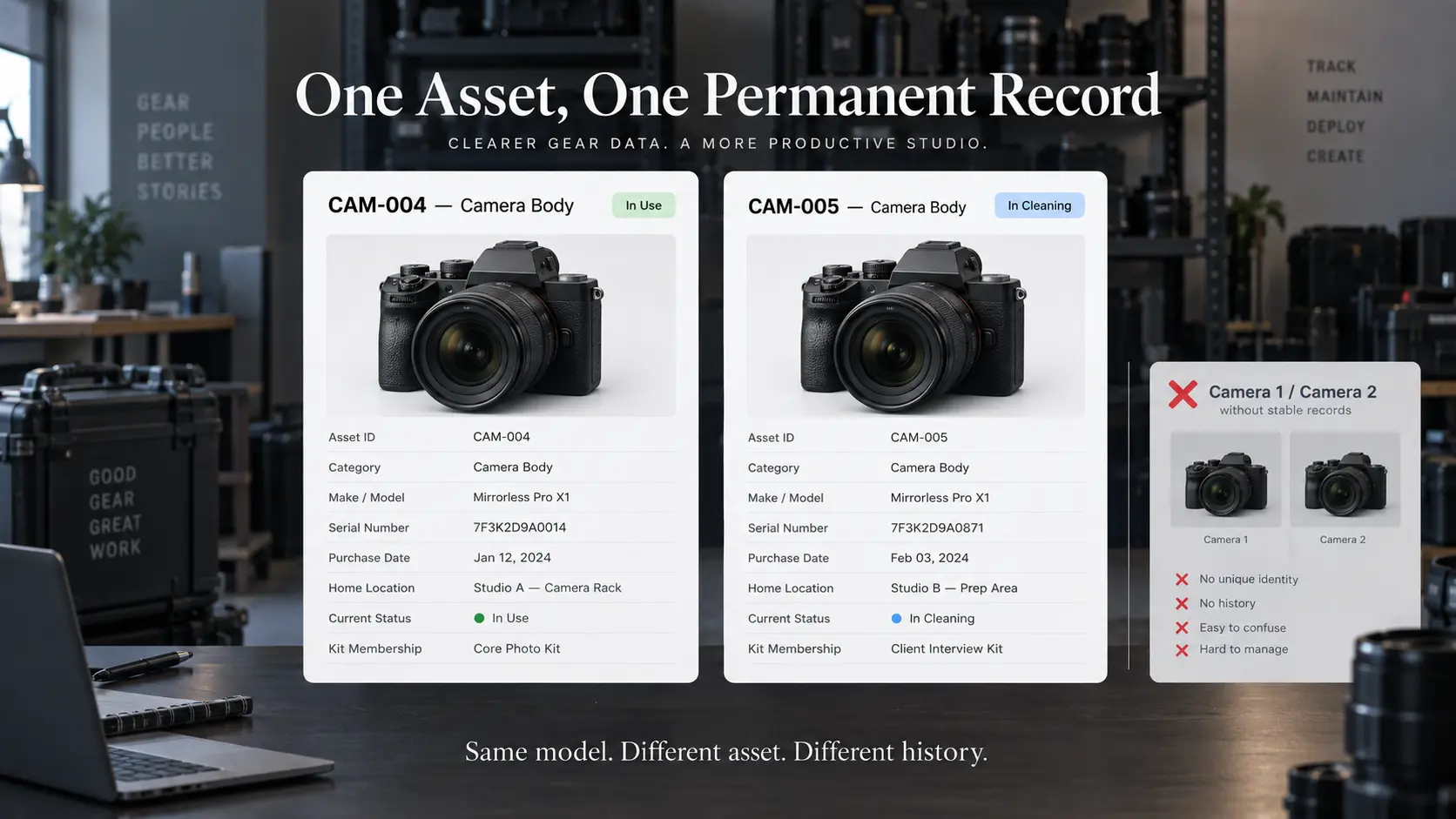
Begin with identity. The studio may own two identical camera bodies bought on the same day. They are still different assets because they will develop different usage, damage, repair and custody histories.
Give each meaningful piece of equipment a unique internal asset ID that remains attached to the item throughout its life. The format can be simple:
CAM-004— camera bodyLEN-012— lensLGT-007— lightAUD-003— audio kitCMP-002— editing computerDRV-018— studio storage drive
Do not encode too much changing information into the ID itself. An asset identifier should not need to change because equipment moves shelves, joins another kit or is assigned to another photographer.
The permanent record can then contain:
| Inventory field | What it tells the studio |
|---|---|
| Asset ID | Studio's permanent unique identifier |
| Category | Camera, lens, lighting, audio, storage, computer, grip |
| Make / model | Product identification |
| Serial number | Manufacturer-specific physical identifier |
| Kit / group | Whether it belongs to a defined working kit |
| Home location | Where it should normally be stored |
| Status | Active, maintenance, unavailable, retired, sold |
| Condition | Current working / physical state |
Serial number and asset ID serve different purposes. The serial comes from the manufacturer; the asset ID belongs to your operational system. Keeping both makes the record easier to work with even when serial plates are difficult to read or several items share similar model names.
Don’t use any logo. Use GoPickle.ai incase required in the image
Record ownership, purchase and warranty information once
The next layer is the administrative history behind the equipment.
For assets with meaningful financial or operational value, record the purchase date, seller or supplier, purchase reference, original cost and receipt or invoice location. If equipment was acquired used, transferred into the business or obtained through another arrangement, record the relevant acquisition context rather than forcing every item into a standard retail-purchase format.
Where applicable, also keep:
- warranty period or warranty-expiry reference;
- proof-of-purchase location;
- manufacturer or dealer support reference;
- insurance-policy or scheduled-equipment reference where your insurance arrangement requires one;
- ownership notes;
- financing or lease reference if relevant.
Do not assume that recording an item in an internal photography studio inventory automatically satisfies an insurer, tax authority, warranty provider or accountant. Documentation requirements vary by provider and jurisdiction. The asset register is the place where the studio can organise references to those records so they are easier to retrieve when required.
The same caution applies to depreciation and tax treatment. This article does not assign depreciation periods, residual values or tax classifications to cameras and lenses because accounting rules differ between jurisdictions and business structures. Keep the original acquisition data accurate and let your accountant or local adviser determine how the equipment should be treated financially.
For operating-cost analysis, GoPickle's guide to photography expense tracking explains the useful distinction between costs caused by one booking and wider studio spending. Equipment purchased for repeated use across many assignments should not be confused with a lens rented specifically because one client job required it.
Maintain condition and maintenance history instead of one condition field
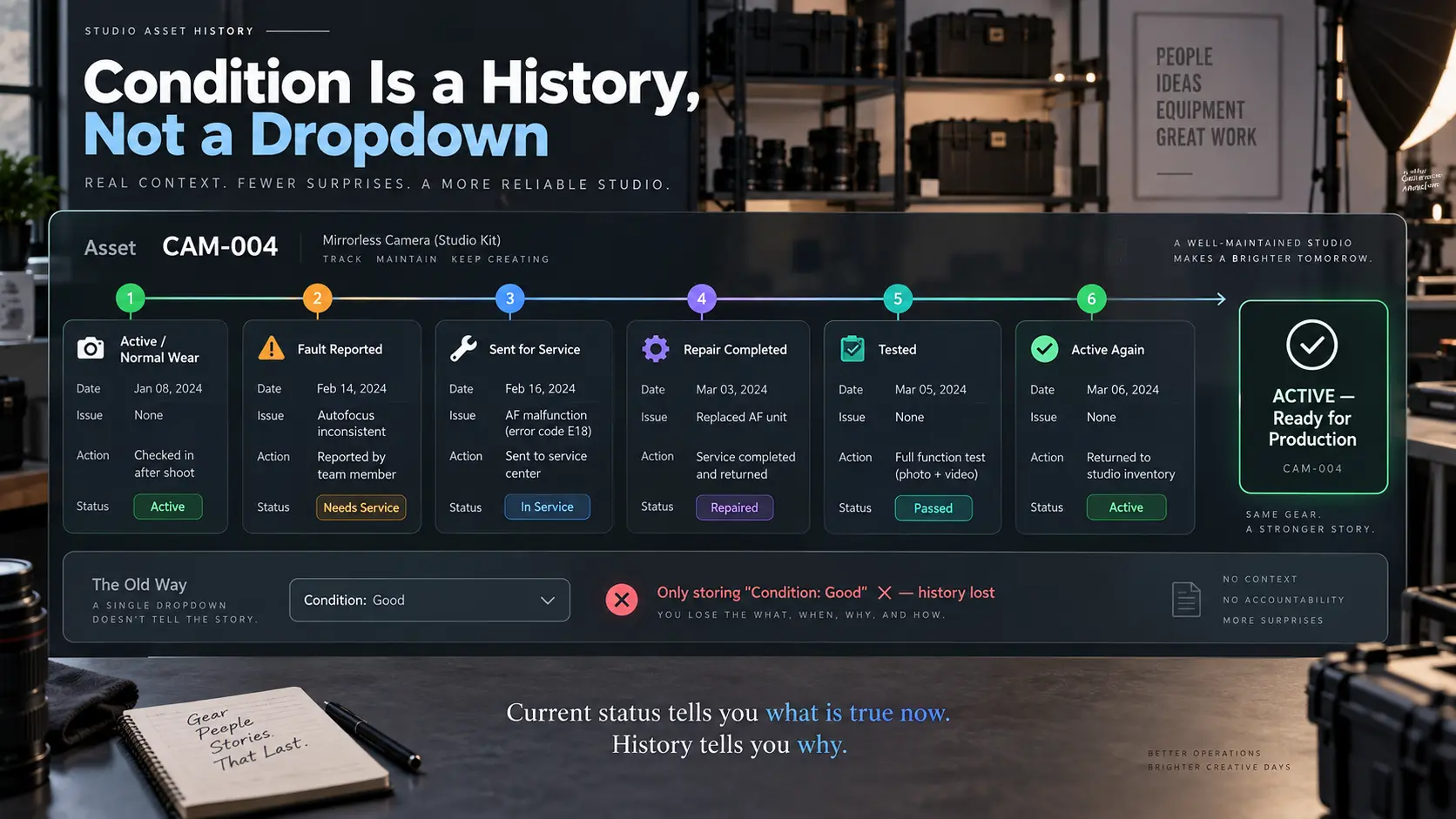
A field reading Condition: Good becomes much less useful after several years.
Working photography equipment changes over time. A camera develops cosmetic wear. A lens goes for autofocus repair. A flash foot is replaced. A light becomes unreliable at full output. A tripod is still functional but no longer trusted for heavy equipment.
Instead of continually overwriting the previous condition, maintain a short history of material events.
For example:
14 Feb 2026 — Active — normal wear
02 Jun 2026 — Fault reported — intermittent card-slot error
04 Jun 2026 — Sent for service
12 Jun 2026 — Returned from service — card assembly replaced
13 Jun 2026 — Tested — returned to active inventory
The current status tells the team what is true now. The maintenance history explains how the item reached that state.
This helps the studio distinguish an isolated failure from a recurring problem. If the same flash has been repaired three times in a year, replacement may deserve consideration even though it currently works.
Do not turn the inventory into a diary of every fingerprint or tiny scratch. Record changes that affect identification, reliability, operation, availability or future decisions.
Track current location and custodian separately
Where is the equipment? and Who is responsible for it? are related questions, but they are not identical.
A camera may physically be at the studio while still being allocated to a crew member preparing for tomorrow's job. A lens may be at a repair centre with no internal crew custodian. Equipment can also be stored permanently at a second branch, editing suite or remote office.
Useful fields include:
Home location: where the asset normally belongs
Current location: where it is now
Current custodian: person responsible for it, where relevant
Current assignment: booking or operational reason for the movement
Expected return: where temporary custody is involved
Do not repeatedly overwrite the asset's home location whenever it leaves for a shoot. Home location answers where it should eventually come back to; current location answers where it is today.
For multi-person photography businesses, equipment custody should also align with the crew plan. GoPickle's Crew Management for photographers keeps people, roles, assignments, timing, tasks and handoffs connected to the bookings they work on. GoPickle does not currently position itself as a dedicated gear-inventory system, but that crew context gives the studio a clear operational reference for who is working on the assignment for which equipment has been allocated.
Repair tracking should include downtime, not only the repair invoice
When equipment fails, studios often record the repair cost but lose the operational information.
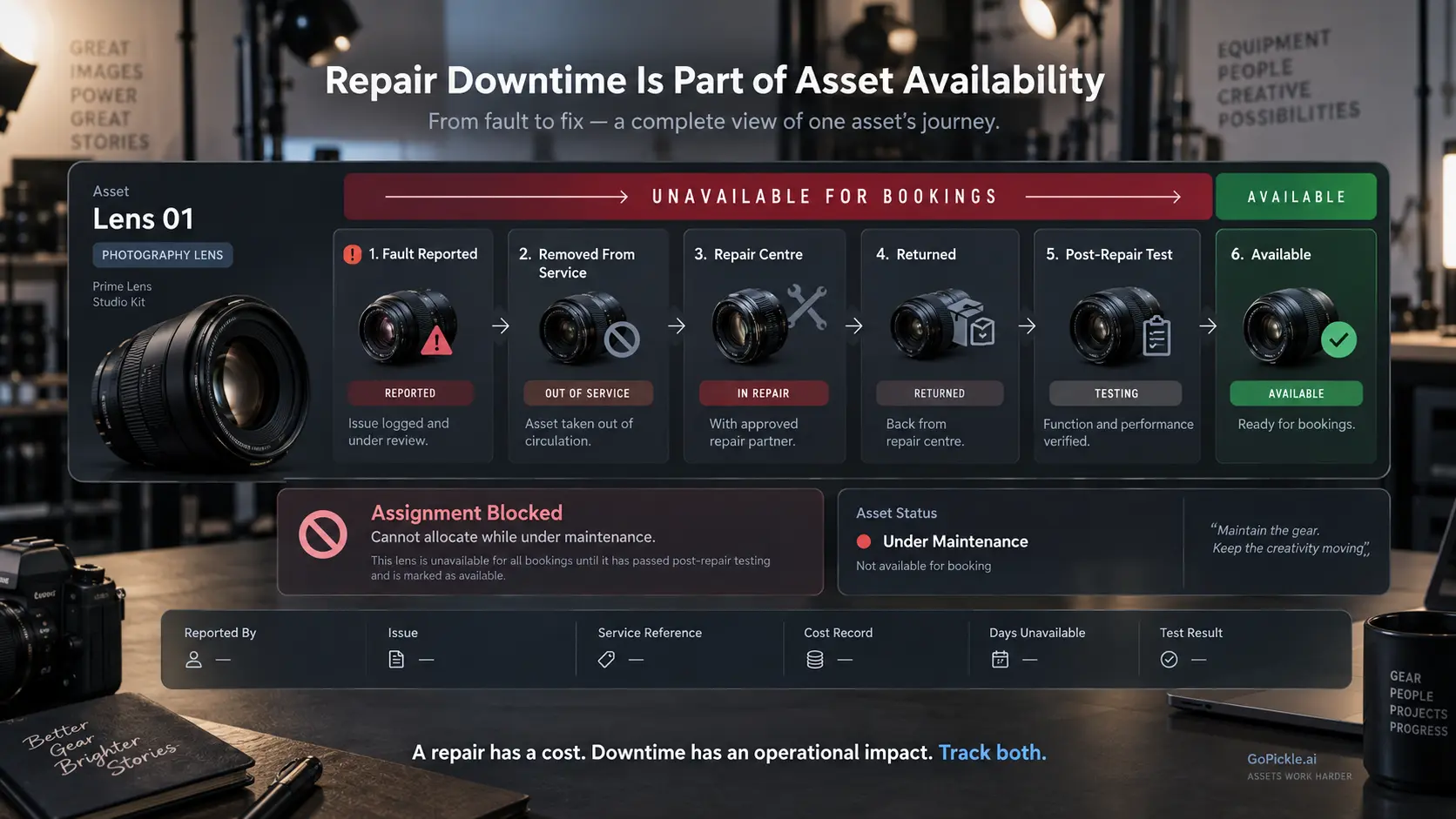
For production planning, the important question is also: when did this item become unavailable, and when was it genuinely ready again?
A repair record can contain:
- fault reported;
- date removed from service;
- symptoms or visible damage;
- person who reported it;
- service provider;
- estimate or approval reference;
- repair cost;
- repair completion date;
- returned date;
- post-repair test;
- final status.
An item marked At Repair should not appear available to the team simply because it still exists in the inventory.
Likewise, receiving the equipment back from a service centre should not automatically make it active. For production-critical gear, somebody should verify that the reported issue is resolved before the item returns to the working pool.
Downtime history becomes valuable when planning replacement decisions. The cheapest repair is not always the cheapest operational outcome if an unreliable camera keeps disappearing from availability during peak periods.
Retire, sell or replace photography equipment cleanly
One of the easiest ways for a photography studio inventory to become untrustworthy is to delete old equipment.
A sold camera was still part of the studio's history. A retired light may explain old repair records. A stolen or written-off asset may still need administrative documentation. If you simply remove the row, the historical record disappears with it.
Instead, change lifecycle status.
Useful states might include:
Active — available for normal production
Restricted — usable only under defined conditions
Maintenance — temporarily unavailable
Retired — retained but no longer used for paid production
Sold — ownership transferred
Lost / written off — no longer held by the studio
Disposed — removed from service and ownership
When an asset leaves the business, record the retirement or disposal date and reason. Where relevant, keep the sale, disposal, insurance or other supporting reference.
Do not automatically reuse an old asset ID for the replacement. If CAM-004 is retired and another camera is purchased, the new body should receive a new identity. Otherwise its purchase, repair and condition history become mixed with equipment that no longer exists.
What should a photography gear inventory contain?
For most working studios, the useful asset record is compact enough to maintain but detailed enough to survive a problem.
At minimum, consider recording:
- unique asset ID;
- category;
- make and model;
- serial number or physical identifier;
- purchase or acquisition date;
- purchase reference and original cost;
- receipt/document location;
- warranty reference where applicable;
- insurance reference where applicable;
- normal storage location;
- current location;
- current custodian;
- current operational status;
- current condition;
- kit membership and important accessories;
- maintenance and repair history;
- last verified date;
- retirement, sale or disposal status.
Dedicated photography inventory products now expose many of these same categories, including identity, receipts, purchase data, location, condition, warranty and service history, which reflects the practical information working photographers repeatedly need from an equipment register.
The register does not need to include every inexpensive consumable. A memory-card reader the studio would immediately replace may not justify the same administrative effort as a camera body, cinema lens, workstation or lighting system. Define a sensible threshold based on value, production importance and difficulty of replacement.
Inventory is the permanent record; checkout is the movement record
This distinction keeps the system clean.
Your photography gear inventory answers:
What equipment does the studio own, and what is its long-term state?
Your equipment checkout record answers:
Where did this asset go for this assignment, who accepted custody and did it return correctly?
Your booking and crew system answers:
Which client work and team created the need for that equipment?
Those records should support one another without being forced into one enormous spreadsheet.
For the GoPickle team, this is the same principle we apply to the wider photography-business workflow: keep the information close to the operational object it describes. GoPickle connects client work through leads, bookings, events, crew, invoices, payments and delivery; a dedicated asset register can independently protect the physical equipment required to fulfil those bookings.
A photography studio does not need to obsess over inventory because cameras are expensive. It needs a reliable asset register because equipment is part of production capacity.
When the inventory is accurate, the studio can tell what it owns, which exact unit has a problem, who currently has it, what has been repaired, what documentation exists and which equipment should no longer be relied on. That gives managers a far stronger basis for purchasing, scheduling and maintenance decisions than walking into the gear room and trying to remember what should be there.