Photography Studio Management Software: A Buyer’s Checklist for Multi-Person Studios
Compare photography studio management software for growing teams. Use this buyer's checklist to evaluate crew scheduling, permissions, bookings and costs.


A client confirms a booking. The studio manager assigns two photographers and a videographer. Someone from sales updates the package, the client changes the venue, and the editor is still working from the original delivery brief. Everyone has completed their individual task, but the studio is now operating with different versions of the same booking.
This is where choosing photography studio management software becomes a different decision for a multi-person studio.
For a solo photographer, a calendar, client database and invoicing tool may provide everything needed. Once several people handle enquiries, coordinate shoots, manage payments and deliver photographs, the software must also control responsibility, information access and operational handoffs.
At GoPickle.ai, we believe the most useful way to evaluate photography business management software is to test how it handles real work across different people. This checklist focuses on the capabilities that matter when your studio has a team, including permissions, crew assignments, financial visibility and delivery accountability.
When Solo-Photographer Tools Stop Being Enough
The first sign that a studio has outgrown its software is rarely the number of employees. It is the amount of information that must travel between people before a booking is completed.
A portrait studio with three photographers sharing one coordinator may need stronger operational software than a larger business where every photographer independently manages their own clients. Similarly, a wedding studio using freelancers for different functions can have complicated scheduling requirements without maintaining a large permanent team.
Look for these signs that your current photography studio software is becoming restrictive:
Staff repeatedly ask the owner for client details already recorded elsewhere.
Crew availability and assignments are managed in separate calendars or spreadsheets.
Several people contact the same client without knowing who owns the conversation.
Editors discover changes to deliverables after production has started.
Team members share administrator logins because individual access is unavailable.
The owner cannot see booking progress without contacting different people.
If these situations occur regularly, the problem is coordination rather than simply administrative workload.
Our broader guide to photography business management software explains the complete enquiry-to-delivery workflow. For a growing team, the buying decision needs an additional test: can that workflow operate reliably without everyone depending on the studio owner?
Lead and Booking Source of Truth: Can Everyone Trust the Same Record?
A multi-person studio needs one authoritative record for each enquiry and confirmed booking.
Consider a corporate photography assignment. Sales receives the initial requirement for employee headshots. A coordinator confirms dates and locations. Another photographer discusses additional executive portraits with the client. If these changes remain inside separate conversations, nobody has a dependable view of the final scope.
When evaluating studio management software for photographers, check the following:
Each enquiry has an identifiable owner and next action.
Client details remain connected to their enquiries and bookings.
Approved quotations and revisions are accessible to authorised team members.
Bookings retain event dates, venues, services, deliverables and relevant notes.
Changes can be communicated to the people responsible for execution.
Multiple events can remain connected to one commercial booking.
The practical test: Create a quotation, confirm the booking, then change a venue or deliverable. Ask the coordinator and assigned photographer to find the current details using their own accounts.
If either person must contact sales to discover what changed, the workflow is not sufficiently connected.
GoPickle's lead management software for photographers and booking management workflow are designed to preserve this relationship between client requirements, commercial commitments and confirmed work.
Roles, Permissions and Ownership: Who Should See What?
Permissions are one of the most important differences between personal photography software and photography team management software.
A freelance second shooter needs the date, reporting time, venue and coverage instructions. They do not automatically need access to every client, quotation, invoice or studio financial report.
Likewise, an editor may need files, selection instructions and a delivery deadline without needing the client's contact information or complete contract value.
A practical starting access model looks like this:
| Studio role | Information needed | Access to restrict |
|---|---|---|
| Owner | Complete studio operations | None beyond standard security controls |
| Studio manager | Bookings, schedules, assignments and progress | Unnecessary financial administration |
| Sales coordinator | Leads, quotations and client discussions | Unrelated crew payments and private files |
| Photographer or freelancer | Assigned events, timings and briefs | Other clients and studio-wide revenue |
| Editor | Assigned media, instructions and deadlines | Sales pipeline and financial reports |
| Finance team | Authorised invoices, balances and crew costs | Shoot files and unrelated creative material |
This is a suggested permission policy, not a claim about the default roles available in every platform.
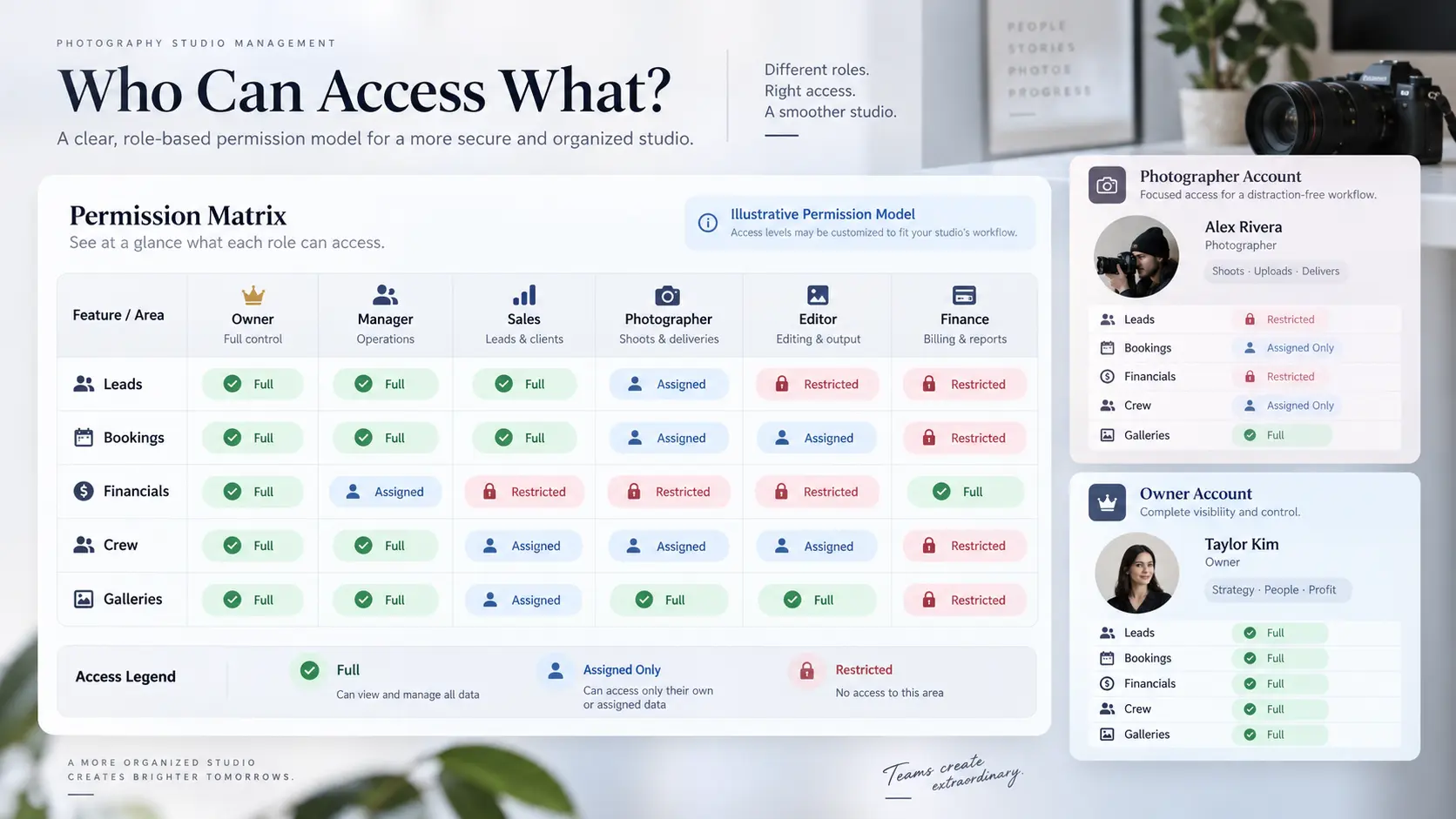
During a product demonstration, request separate accounts for a manager, photographer and editor. Attempt to access financial information from the photographer account. Check whether the editor can view unrelated client records and whether a departing freelancer's access can be revoked.
Also distinguish ownership from visibility. Several people may need to see an enquiry, but one person should remain accountable for its next action. The same principle applies to editing, client approvals and final gallery delivery.
Crew Scheduling and Assignment: Can the Studio Prevent Conflicts?
For a growing photography business, crew management cannot stop at storing names and phone numbers.
A typical event may require a lead photographer, additional shooters, cinematographers, lighting assistants and editors. Each assignment carries a date, location, responsibility and sometimes a different payment arrangement.
Good photography team management software should help the coordinator answer practical questions before promising coverage.
Can we review availability before assigning someone?
Can we assign different crew members to individual events within one booking?
Can we distinguish proposed assignments from confirmed ones?
Can we identify overlapping dates, timings or production commitments?
Can we replace an unavailable photographer without losing the original assignment context?
Can we associate agreed crew costs with the work performed?
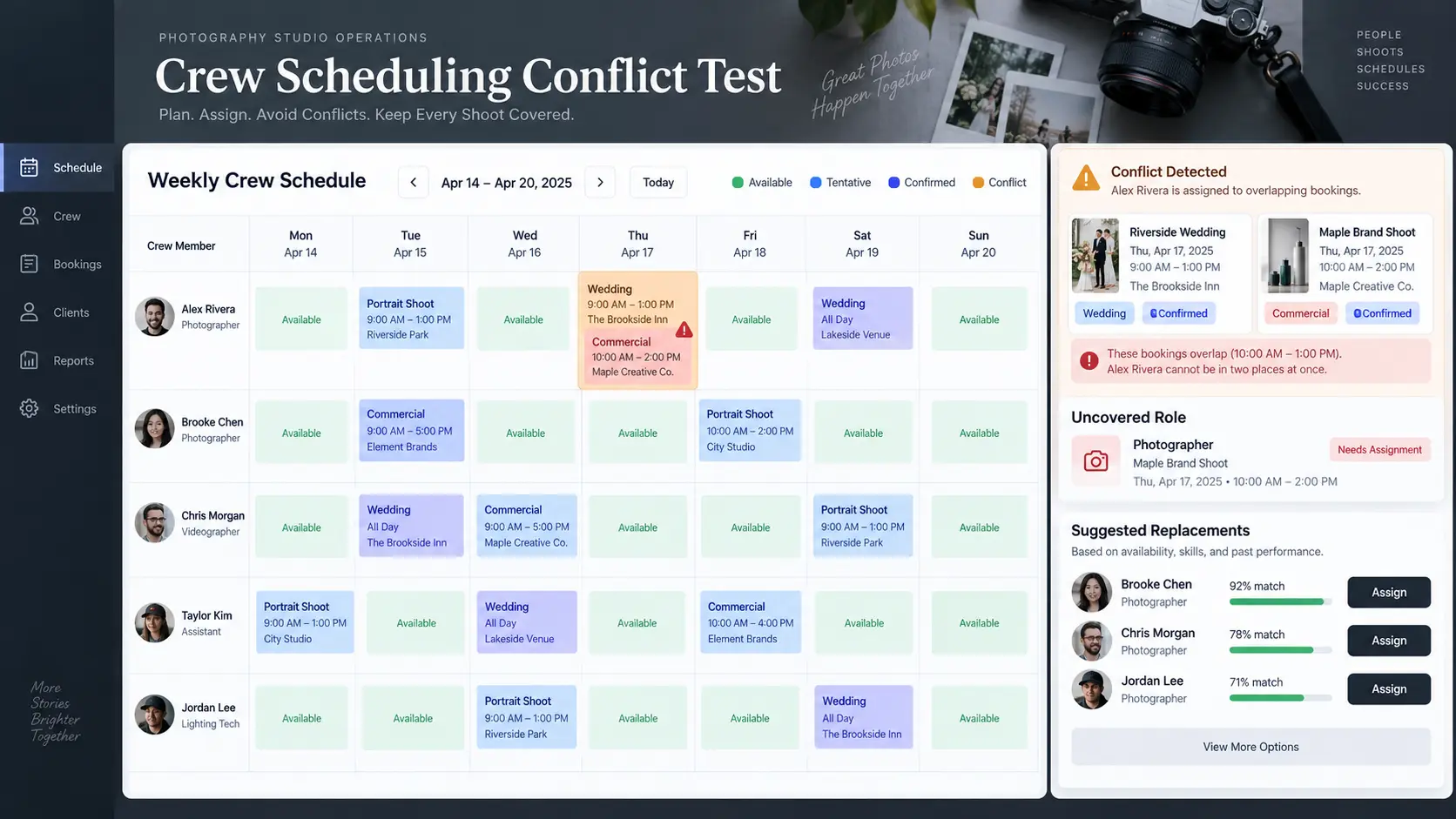
Run a conflict test during the demo. Assign the same photographer to two shoots with overlapping times. Check whether the conflict is visible and whether it prevents or warns against an unrealistic assignment. Then have one crew member decline and confirm that the coordinator can identify the uncovered role.
A calendar that shows the assignment but fails to highlight the operational problem may still require manual supervision.
GoPickle's crew management software for photographers connects crew records, availability, event assignments, responsibilities and payment context to photography bookings.
Quotes, Invoices and Financial Context: Can Teams Work Without Exposing Everything?
Financial visibility becomes more complicated when the person selling the assignment is different from the person organising production.
Sales must understand what was promised. The coordinator needs the approved coverage and production budget. Finance needs the invoices, advances, payment due dates and outstanding balances. Individual crew members generally need their own agreed compensation rather than the entire client's commercial arrangement.
Before choosing photography studio software, verify that it can support this separation.
The quotation should identify the agreed scope and approved changes. The booking should reflect those commitments. Invoices and payment records should remain connected to the client and the assignment, while financial editing permissions stay limited to authorised people.
For studios that want profitability reporting, ask whether actual crew, travel, editing and production expenses can be recorded against the relevant job. A dashboard cannot calculate meaningful project margins if those costs are missing.
Tax handling, invoicing requirements and accounting integrations also differ across countries. Verify the software's support for your jurisdiction instead of assuming a generic invoice template meets every local requirement.
Post-Production and Gallery Visibility: Does Accountability Continue After the Shoot?
Production rarely finishes when the photographers return from an assignment.
Someone must receive and verify the files, complete the editing, review the output, prepare client selections and deliver the agreed photographs. Different team members may own each stage.
This is an important test for photography workflow management software because many platforms handle bookings well but provide limited visibility after capture.
Look for a workflow that makes the following responsibilities clear:
Who is responsible for transferring and verifying the original files?
Which editor owns the current assignment?
What deliverables and deadlines were approved?
Who reviews the photographs before release?
Who is authorised to publish or share the gallery?
Which client selections, approvals or final deliverables remain outstanding?
The management system does not necessarily need to replace professional editing or digital asset management software. It does need to keep the production status and delivery commitments understandable to the studio.
GoPickle's Client Galleries for photographers support branded delivery, organised collections, controlled access, favourites and downloads. Studios should still evaluate their separate editing, file-backup and long-term archival requirements.
Mobile Access and Audit Requirements: Can You Manage Work Away From the Studio?
Photography teams regularly make decisions at venues, during travel and between sessions.
Mobile access should therefore be evaluated through actual tasks rather than screenshots of a responsive dashboard.
Ask a photographer to open their assignment and find the latest reporting time. Ask the studio manager to update an event and check whether the information appears correctly for the affected person. Test whether a coordinator can review an enquiry or payment status without returning to a desktop.
GoPickle provides a mobile application for photographers covering core business workflows, including bookings, quotations, payments, crew coordination and galleries. Exact functions should be checked against the current app release and account permissions.
For team accountability, investigate activity history as a separate requirement. Can the platform identify who changed a booking, reassigned a crew member or updated a sensitive record? Is the earlier information recoverable?
Also check individual logins, access removal, data export, retention options and backup responsibilities. Privacy and data-protection obligations vary internationally, and a software subscription does not remove the studio's own responsibilities.
How to Evaluate Total Tool Sprawl Before Buying
A cheaper subscription is not necessarily cheaper for a multi-person studio.
Your existing workflow may involve a CRM, shared calendar, quotation software, accounting platform, crew spreadsheet and separate gallery delivery service. Even when every tool works individually, someone must keep their records consistent.
Calculate the realistic annual cost of your current setup:
Annual software cost = subscriptions + team-seat charges + storage and delivery + messaging and transaction charges + paid integrations + migration costs.
Then examine the administrative work that remains. How frequently must someone copy booking information, reconcile payment records, update calendars or repeat instructions? Estimate that time from your own operations rather than relying on advertised productivity claims.
An integrated platform may remove several handoffs. However, an established studio might reasonably retain specialised editing, accounting or asset-management tools. The goal is to eliminate unnecessary duplication, not force every process into one application.
The Multi-Person Studio Software Buyer’s Scorecard
Use this scorecard during a trial with actual studio roles. Record each result as Pass, Partial or Fail, and request a working demonstration for anything essential.
| Buying requirement | Acceptance test | Priority |
|---|---|---|
| Shared client records | Two staff members access the same current booking | Essential |
| Role-based permissions | Freelancer cannot access restricted financial data | Essential |
| Crew scheduling | Overlapping assignments become visible | Essential |
| Assignment ownership | Unconfirmed work has an accountable owner | Essential |
| Quote-to-booking continuity | Approved changes reach the operational record | Essential |
| Payment visibility | Authorised staff identify pending balances | Essential |
| Production handoffs | Editor receives current instructions and deadlines | Essential |
| Gallery responsibility | Delivery access and ownership are controlled | Essential |
| Mobile access | Assigned staff complete relevant actions on mobile | Important |
| Activity history and export | Changes can be traced and records retrieved | Important |
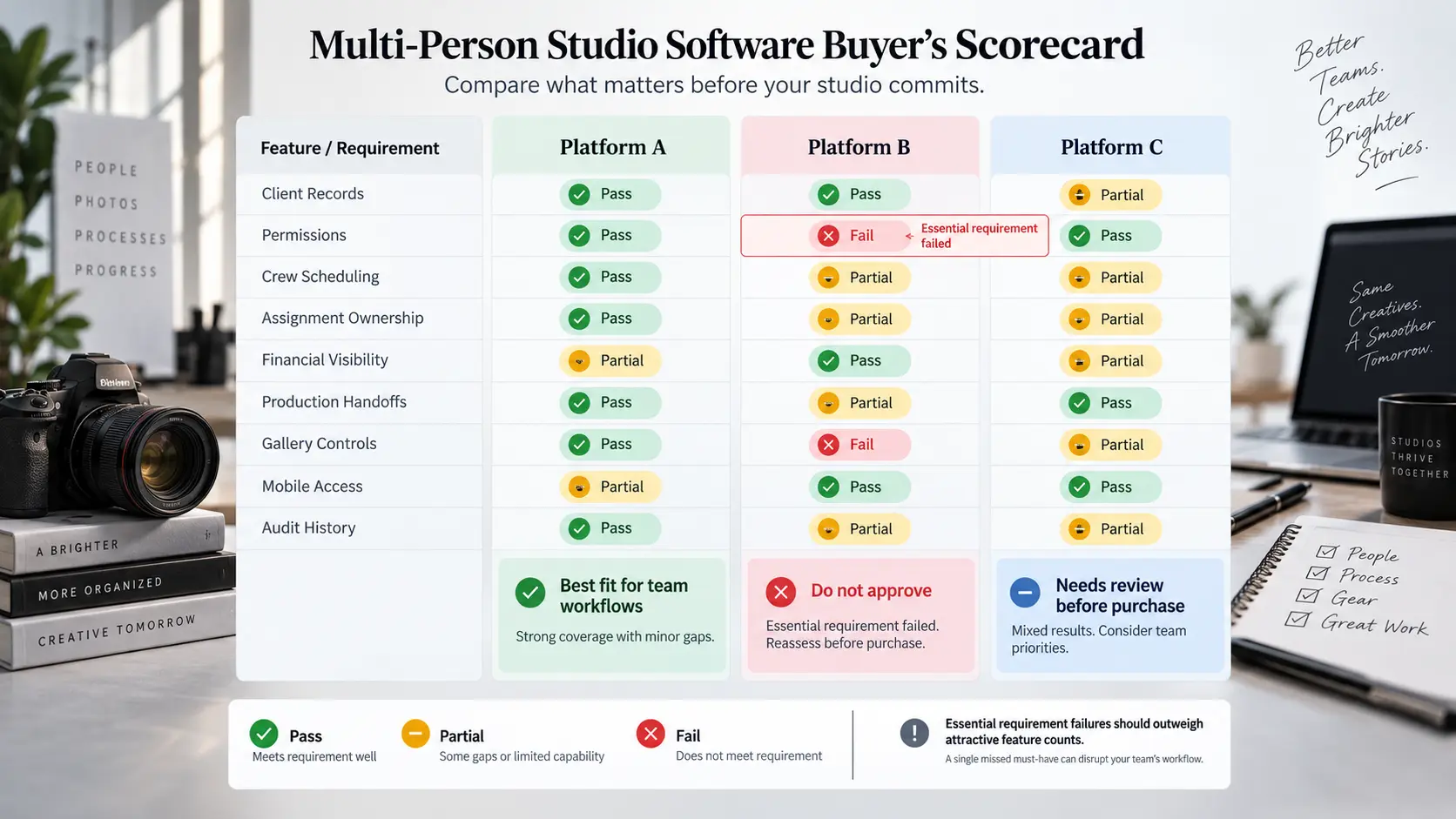
An essential failure should not disappear inside a high overall feature score. If the software exposes confidential information to freelancers or repeatedly creates staffing conflicts, impressive dashboards will not compensate for the operational risk.
Before purchasing, run one representative project through the system with different team accounts. Involve the coordinator, a photographer, someone from finance and a production team member. Ask each person to complete the tasks they would normally perform, then review where information was missing or access was inappropriate.
Finally, review the GoPickle pricing plans against your actual crew size, gallery storage, required features and expected bookings. Confirm current limits and plan inclusions before committing.
The strongest purchasing decision is the one your whole studio can validate. Choose software that helps each person understand their responsibilities, access the information they need and hand work forward without making the owner the permanent coordinator of every small decision.