Wedding Photography CRM: A Buyer’s Guide for Multi-Event Wedding Studios
Compare wedding photography CRM software by leads, multi-event bookings, quotations, payments, crew coordination and post-production workflows.

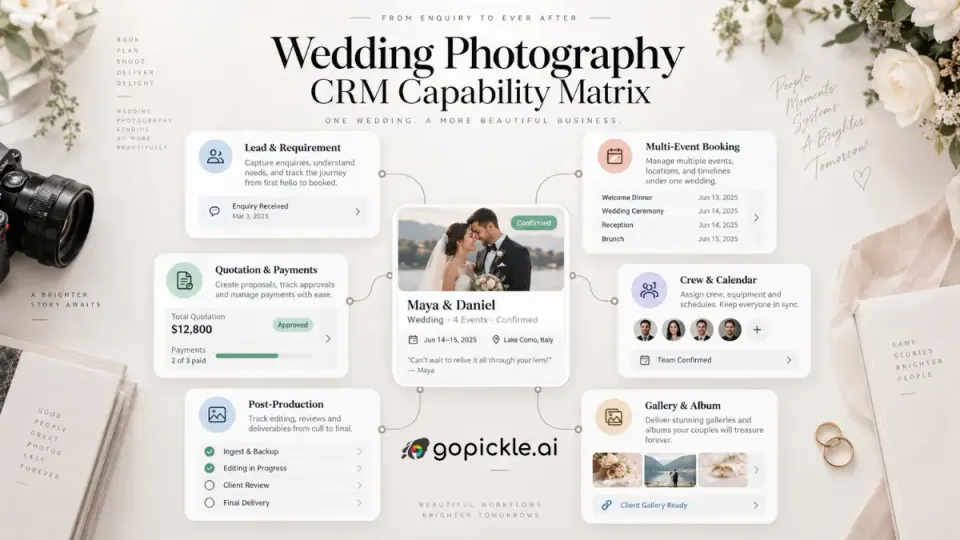
A wedding photography CRM should be tested against a real wedding, not a generic feature list.
Take one enquiry that eventually becomes a three-day celebration. The couple first asks about availability. A few conversations later, the requirement includes an engagement session, welcome dinner, ceremony and reception. Different venues need different arrival times. Photography and video teams change between functions. A quotation is revised twice. The booking is secured with an advance, another payment is due before the wedding and the final balance may remain open while editing or album work continues.
That is considerably more complicated than putting a client's name beside a date on a calendar.
For a solo photographer handling a small number of straightforward sessions, many CRM products can manage contacts, emails and appointments adequately. A multi-event wedding studio needs something more operational. The CRM has to preserve the commercial context of the enquiry and then carry it into booking, crew coordination, payments, production and delivery without forcing the studio to reconstruct the job at every stage.
If you are comparing CRM for wedding photographers, the question is therefore not simply, "Does it have CRM?" The better question is: can it carry one complicated wedding accurately from the first enquiry until every promised deliverable is complete?
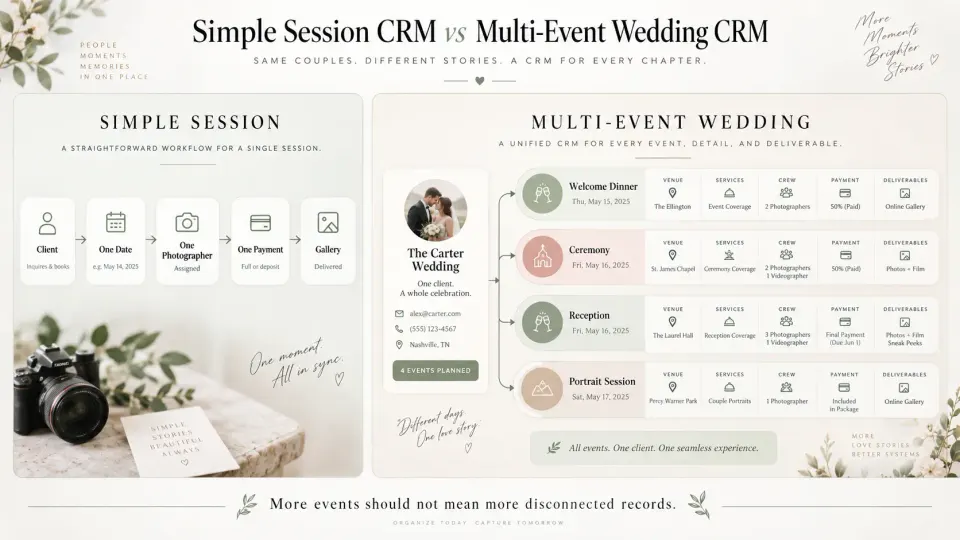
Why wedding CRM requirements differ from simple session booking
A portrait session might involve one client, one date, one location, one photographer, one fee and one set of images. Wedding work can multiply almost every one of those variables.
One client relationship may contain several functions. The wedding ceremony could be at one venue while the reception is somewhere else. Some events may require a lead photographer and cinematographer; another may need several photographers, video crew, assistants or drone coverage. A pre-wedding shoot might happen months earlier. An album may remain active long after the gallery has been delivered.
The timeline is also unusually long. A couple may enquire many months before the wedding, negotiate packages over several conversations, pay in stages, revise timings closer to the date and return after delivery for album selections or additional products.
That means good wedding photographer CRM software needs to manage relationships between information, not merely store fields.
The wedding date should relate to availability. The requirement should inform the quotation. The accepted scope should become the confirmed booking. Booking events should drive crew assignments. The agreed amount should connect with invoices and payments. Promised deliverables should remain visible after the photographers leave the venue.
Generic CRM terminology can hide this distinction. A pipeline, contact record and task list may look impressive during a demo while leaving the studio to maintain the actual wedding in spreadsheets, calendars and group chats.
Start with the lead and requirement, not just the client's contact record
Wedding enquiries rarely arrive fully formed.
A first message may say little more than, "Are you available for our wedding in November?" The initial CRM record therefore needs to accommodate uncertainty without forcing the team to invent details simply to save the lead.
As the conversation develops, the requirement becomes more useful. The studio may learn the approximate dates, city, number of functions, venues, photography services, video requirements, deliverables, budget range and decision timeline.
For multi-event studios, one important design question is whether the CRM can keep all those wedding functions under one commercial opportunity. Creating separate leads for the engagement, ceremony and reception can fragment one sales conversation into several unrelated records.
A stronger structure looks more like:
Client → Wedding Requirement → Multiple Functions → Quotation → Booking
The sales side also needs accountability. Someone should be able to see who is responsible for the opportunity, its current stage and the next action. A lead marked simply "Interested" is much less useful than one that shows:
Quotation sent → follow-up due Thursday → waiting for couple to confirm reception coverage
GoPickle's lead management software for photographers follows this requirement-based approach, keeping the enquiry source, shoot context, ownership, next action and path towards quotation and booking connected. The practical benefit is not replacing personal communication with automation. It is making sure an important wedding enquiry does not disappear because the person who remembers the context is shooting another event.
A wedding booking needs a multi-event structure
This is one of the most important tests when buying wedding photography business software.
Ask the vendor to create an actual multi-event wedding during the demo.
For example:
| Function | Date | Venue | Coverage |
|---|---|---|---|
| Welcome dinner | Friday | Hotel terrace | Photography |
| Ceremony | Saturday morning | Garden venue | Photo + video |
| Reception | Saturday evening | Ballroom | Multi-camera photo + video |
| Portrait session | Sunday | Outdoor location | Couple portraits |
Can all four sit inside one client booking while retaining their own times, locations and service requirements?
If the software treats the entire wedding as one calendar entry, the studio will eventually create workarounds somewhere else. If it requires four independent bookings, client history, payments and deliverables may become unnecessarily fragmented.
The booking should become the reliable operational record after the sale. GoPickle's photography booking management software supports multiple wedding events within one booking, with individual functions carrying their own timing and venue while services, deliverables, crew, quotations, invoices and payments remain associated with the wider job.
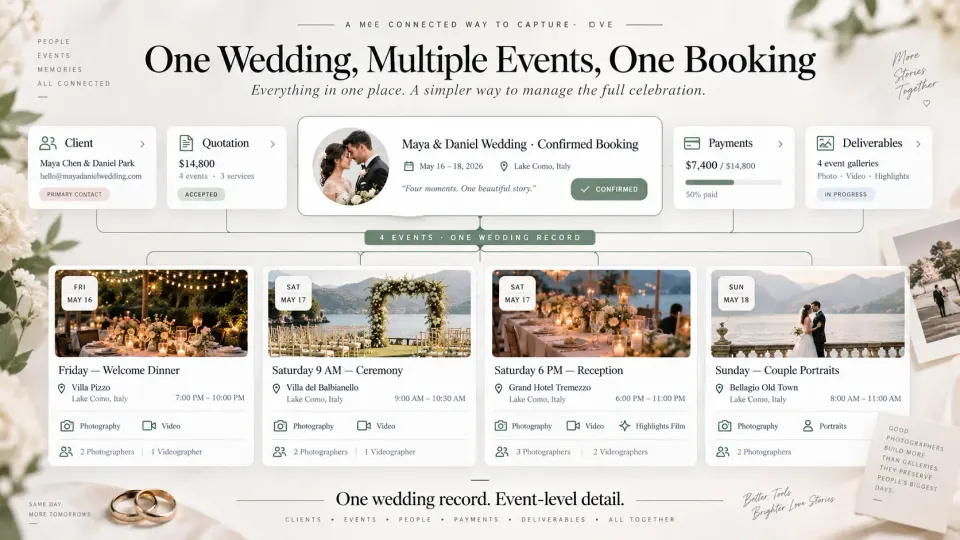
This structure also matters when plans change. Wedding schedules frequently evolve between initial confirmation and event week. The CRM should make the current event information easy to identify so the crew is not relying on an old quotation or message containing a previous venue or reporting time.
Quotation approval should hand cleanly into payments and booking
The transition from enquiry to confirmed wedding is where disconnected systems often reveal themselves.
The salesperson understands the requirement. A quotation is prepared somewhere else. Once the client agrees, another person manually creates the booking. Accounts then recreates the price and payment schedule. Each handoff introduces another opportunity to omit a function, service, deliverable or negotiated change.
When evaluating wedding studio management software, examine the complete transition rather than judging the quotation builder alone:
Requirement → Quotation → Client confirms → Booking → Invoice / payment plan
The important question is how much information survives that transition.
A quotation for a complex wedding may contain event coverage, photography and cinematography services, albums, edited images, video deliverables, travel or other agreed items. When the client approves it, those commitments should remain easy to reference from the confirmed job.
Payments need the same continuity. Wedding studios commonly collect money in stages rather than as one transaction. The system should clearly distinguish booking value from money actually collected, show advances and later payments, and keep the outstanding balance visible.
GoPickle connects quotation, booking and payment workflows within its broader photography workflow management system. Its quotation workflow can be explored through Quotation Management, while booking records can carry the associated commercial and payment context forward.
The exact invoice, tax and contractual requirements will differ by jurisdiction, so studios should configure their documents for the countries in which they operate rather than assuming one universal legal format.
Crew and calendar coordination becomes part of the CRM decision
For a multi-event wedding studio, selling the date is only half the capacity problem. The other half is whether the correct people are available to fulfil what was sold.
A calendar showing "Wedding — Saturday" does not tell you enough.
You may need a candid photographer for the ceremony, two traditional photographers for another function, cinematographers at the reception and an editor ready for the post-production handoff. One freelancer may be available Saturday evening but already travelling for another assignment that morning.
Before buying a wedding photography CRM, test whether the wider platform can answer:
- Which crew members are already committed?
- What roles can each person fulfil?
- Can assignments be made per wedding function?
- Can reporting times and venues stay attached to those assignments?
- Can the studio spot overlapping work before confirming another job?
- Can photographers, editors and managers receive only the information relevant to their roles?
A CRM that stops at the client's contact record may still be useful for sales, but a growing wedding studio will need another operational system immediately after the booking.
GoPickle's crew management for photographers is built around the booking and its individual events. Studios can organise crew roles, availability and assignments around real functions and continue those responsibilities into production handoffs and crew payment context.
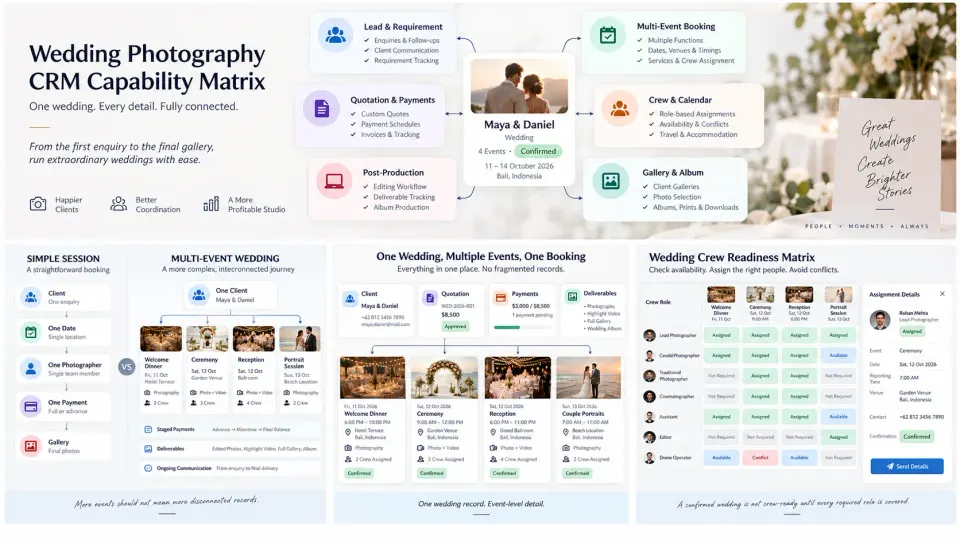
The wedding lifecycle continues long after the event
A major weakness in many CRM evaluations is stopping the test at "booking confirmed".
That is not where a wedding studio's responsibility ends.
After the final function, files need to move from several cameras or shooters into production. Images may need culling, editing, proofing and client selection. Video has its own production cycle. The client may be waiting for a gallery, album, prints, edited video or several deliverables with different timelines. An outstanding payment may still need follow-up.
A useful wedding client management system should therefore keep the promises made before the wedding visible after it.
For each booking, the studio should be able to answer:
What has been delivered, what is still pending and who owns the next action?
This becomes especially important for album work. A gallery may be delivered while album selection is still pending. The client may submit selections weeks later, request revisions and then wait for production. Treating the booking as finished immediately after gallery delivery can hide work that remains commercially and operationally open.
If this part of your studio is currently spread across folders and messages, our guide to the end-to-end photography workflow from enquiry to final album maps the handoffs worth defining before choosing software.
Buyer checklist before switching wedding photography CRM software
Before committing to a platform, run one real wedding through it. Do not limit the test to the vendor's prepared demo account.
Use a recent job that contained enough complexity to expose weaknesses and check whether the system can handle:
- One client with several wedding functions
- Different dates, timings and venues for each function
- A requirement that becomes progressively more detailed
- Multiple photography and video services
- A quotation built from that requirement
- Revisions before confirmation
- Clean conversion into a confirmed booking
- Advances, instalments and an outstanding balance
- Different crew roles across individual events
- Availability or overlapping-assignment visibility
- Promised galleries, albums, video and other deliverables
- Work that remains open for weeks or months after the shoot
- Team access without exposing unnecessary client or financial data
- Searchable history when the client returns later
Then test migration.
You do not necessarily need to import years of completed weddings before the new CRM becomes useful. Start by identifying active enquiries, upcoming confirmed weddings, outstanding payments and bookings with unfinished delivery work. Those records are where losing context would hurt.
Also test mobile usability with the actual people who will use the system. Wedding operations happen at venues, in cars, between functions and while the studio owner is away from a desk. A feature technically available on mobile but cumbersome to use under real conditions may not survive adoption.
Finally, count the systems that remain necessary after implementation. A CRM can be good at lead management yet leave bookings, crew, payments and delivery disconnected. That is not automatically a reason to reject it, but it should be an intentional architecture rather than a surprise discovered after migration.
Where GoPickle fits for a multi-event wedding studio
The independent checklist above is the standard we would use before recommending any wedding photography CRM, including our own.
GoPickle is most relevant when the studio's problem extends beyond maintaining a contact database. Its workflow connects Lead Management, Booking Management, Quotations and Crew Management so that a multi-event wedding can move from enquiry into actual studio operations without rebuilding the same job in unrelated systems. That distinction is important.
The best wedding photography CRM for your studio is not necessarily the software with the largest feature count. It is the system your team can trust when a client calls, the quotation changes, three functions happen across two days, different crews need different instructions, an advance has been received and an album is still pending months later.
If the system can preserve that entire story clearly, it is doing more than managing contacts. It is helping you run the wedding business behind the photographs.