Wedding Sneak Peek Workflow: Deliver Fast Previews Without Derailing Final Editing
Build a wedding sneak peek workflow that delivers fast preview photos without disrupting final editing, creating extra approvals or delaying the full gallery.

Wedding sneak peeks can improve the client experience without forcing a photography studio to rush an entire wedding through post-production. The problem begins when the preview has no defined scope. A couple asks for “a few photos,” someone opens the RAW files between other jobs, another editor makes a different selection the next morning, images are sent through several message threads, and suddenly the studio has created an extra production workflow that nobody planned for.
A better wedding sneak peek workflow treats the preview as a real deliverable with its own boundaries. The studio decides what is included, how the photographs will be selected, how far they will be edited, where they will be delivered and when that preview task is considered complete. The main wedding then continues through the normal culling, editing, quality-control and final-delivery process.
That distinction matters even more when a studio is handling several weddings at once. A fast wedding photo teaser should make the client experience feel quicker. It should not make the final gallery slower.
Build the sneak peek as a branch of the delivery workflow
The easiest way to understand wedding photography sneak peeks is to stop thinking of them as the first few photographs from the final gallery.
They are a separate branch.
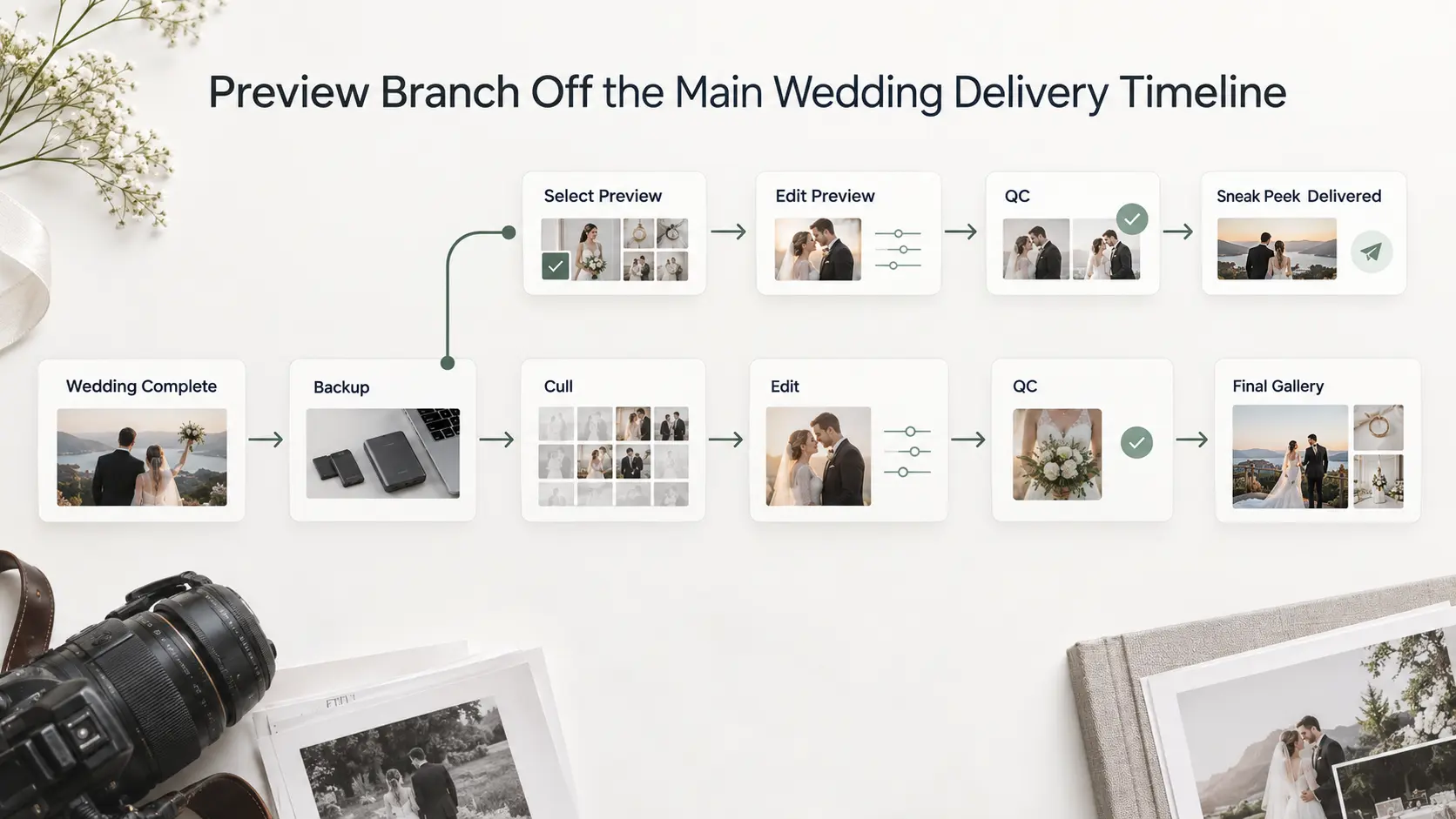
A typical wedding production workflow may run:
Wedding completed → File ingest and backup → Cull → Edit → Quality control → Gallery preparation → Final delivery
The sneak-peek branch can leave that workflow after the files are safely ingested and the studio has enough visibility to choose suitable images:
File ingest and backup → Preview selection → Preview edit → Preview QC → Preview delivery
Then it closes.
The main job continues through its existing production queue rather than waiting for comments on the preview or restarting because the couple has seen a small number of photographs.
This is particularly useful for studios trying to improve perceived delivery speed without making unrealistic promises about the complete wedding. As we explain in our guide to photography turnaround time, previews, proofs and final photographs are different deliverables and do not need to share the same deadline.
Decide whether previews are actually part of the package
Do not wait until the night of the wedding to decide what a sneak peek means.
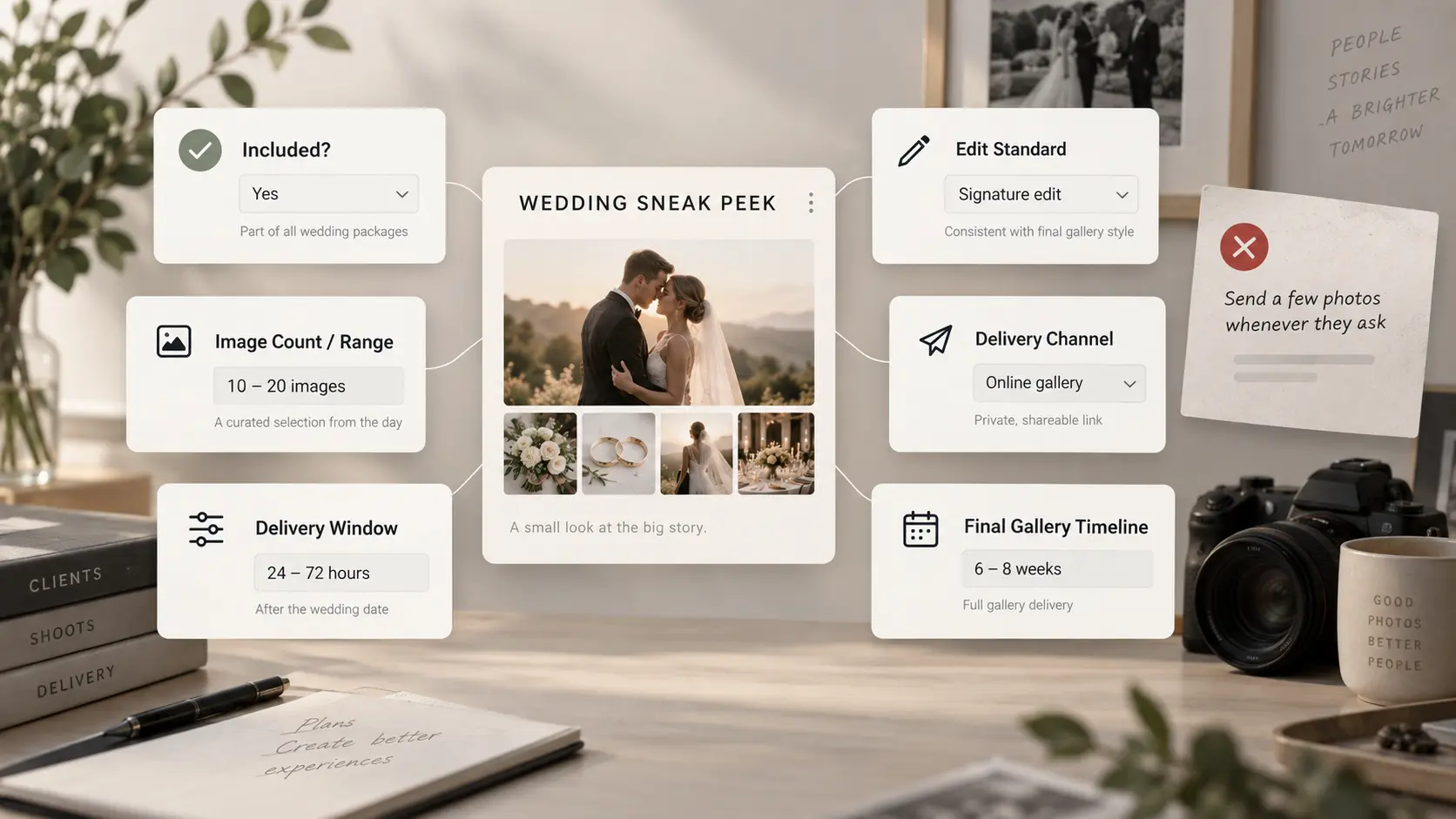
If wedding preview photos are included in the service, define that during booking. The wording does not need to become a page of contract language, but the commercial expectation should be clear enough that the photographer, editor and client understand the same thing.
Define the preview by answering a few practical questions: Is it included in every wedding package or only selected packages? Is there a fixed number of photographs, a range, or simply a small curated set? What delivery window has the studio committed to? What editing standard will those photographs receive? Where will they be delivered? Are they intended to be downloaded and shared immediately? When will the complete wedding gallery follow?
There is no universal photographer sneak peek timeline that every studio should copy. A same day wedding photo preview may be perfectly workable for a studio with an editor at the venue, a deliberately designed same-day service and enough production capacity. For another photographer, forcing same-day previews into an already full shoot schedule may create rushed selections and push the actual wedding edit further behind.
The useful promise is therefore not “fastest.” It is a preview deadline your studio can repeatedly deliver without compromising the final work.
If previews are not included, make that equally clear. An improvised favour offered to one client can quickly become an assumed package feature when images are shared publicly and future couples begin asking for the same service.
Select preview moments intentionally
A sneak peek should feel like a miniature editorial selection, not a random collection of photographs that happened to be easy to find.
Start with moments rather than filenames. Depending on the wedding and the coverage actually booked, you may look for a strong couple portrait, an important ceremony moment, meaningful reactions, family interaction, atmosphere, details and an energetic reception frame. A multi-event wedding may need a slightly different balance from a single-day ceremony. The objective is not to represent every person or every event in miniature. It is to give the couple a coherent first glimpse of the work.
Avoid rigid online formulas for how many wedding sneak peek photos must be delivered. Your preview size should be large enough to feel intentional and small enough that preparing it does not become an unofficial first version of the complete gallery. Once the team is editing dozens of similar sequences, resolving every duplicate and polishing every part of the day, it is no longer doing a sneak peek. It has started the master edit under an artificial deadline.
Selection also affects editing workload. Prioritise frames that can be finished confidently at the preview stage. An image requiring extensive compositing, object removal or other detailed work may be an excellent final-gallery photograph without being a sensible early preview.
The test we would use is straightforward: Would the studio be comfortable with this photograph being downloaded, shared and associated with its finished work today? If the answer is no, it is not ready for the wedding photo teaser.
Keep preview editing separate from the master queue
This is where a good idea often becomes an operational problem.
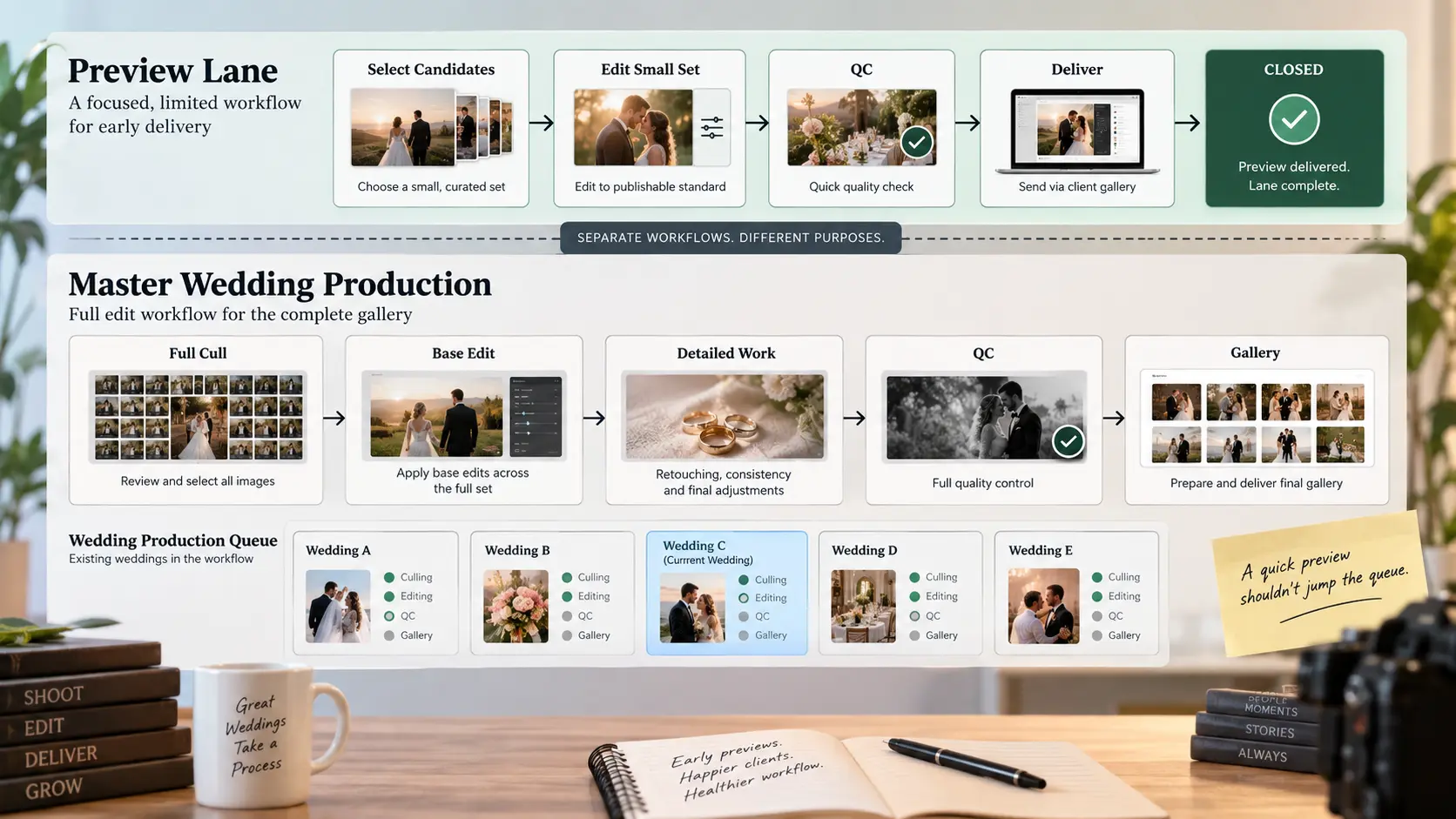
Suppose an editor begins looking for preview photographs and decides to “quickly get ahead” on the full wedding. They start rating thousands of files, adjusting whole sequences and revisiting colour decisions. Several hours later, the preview may look excellent, but the studio has quietly pulled a large wedding ahead of jobs that were already promised first.
Instead, give the preview its own limited production pass.
The files should already be safely transferred and backed up according to the studio's normal process. A designated photographer or editor selects the preview candidates, edits only that selection to the studio's publishable standard, performs a quick quality-control check, exports the required files and closes the preview task. Any adjustments that can sensibly carry into the final edit can remain in the studio's editing environment, but the preview should not require the entire wedding to be processed first.
Ownership matters as the team grows. “Someone needs to make the sneak peek” is not a production system. Decide who selects it, who edits it, who checks it and who is responsible for delivery. In a small studio those may all be the same person. In a larger wedding business, separating those responsibilities can stop urgent previews from interrupting every editor in the team.
Set expectations for coverage that is not yet complete
The preview delivery message should explain exactly what the client has received.
Calling the images a “sneak peek,” “wedding preview” or “first look” is useful because it signals that this is an early curated release rather than the complete coverage. Make it clear that the final gallery is still moving through the studio's normal post-production process and that the preview should not be used to judge whether every person, event or requested moment was photographed.
That prevents a common misunderstanding. A couple receives a beautiful selection but does not see one particular family group, so they immediately ask whether the photograph exists. The studio then interrupts the full cull to investigate a frame that may already be sitting safely among thousands of images waiting to be reviewed.
The solution is not a defensive disclaimer. It is simple expectation setting: these photographs are a small curated preview; the complete coverage is still being prepared; the final gallery follows according to the agreed delivery timeline.
The editing standard should also be clear internally. Sneak peeks should look finished enough to represent the studio, but that does not mean every photograph from the wedding has reached the same production stage. The client needs to understand the difference between these photographs are ready and the wedding is ready.
Deliver through a controlled channel
Speed often pushes photographers toward the easiest available delivery method. A few images are exported, attached to a chat and sent. The client forwards some of them, another family member asks for the originals, someone requests an uncompressed version, and the preview ends up distributed across multiple conversations before the studio has even returned to the editing queue.
A controlled delivery channel avoids much of that friction.
Give the couple one clearly named place to view the preview and define what they can do there. If downloads are enabled, make that obvious. If sharing is allowed, make the intended client-facing link easy to reuse. If access should remain private, apply the appropriate controls rather than relying on the client not to forward a folder.
For studios using an online gallery workflow, GoPickle Client Galleries provide branded photo delivery with organised collections, access controls, favourites, downloads and sharing. The important operational principle applies regardless of platform: the client should know which link represents the current delivery instead of accumulating separate folders, transfer links and message attachments throughout the project.
The delivery channel should also preserve the distinction between preview and final work. Label the preview clearly. When the completed wedding is eventually delivered, the final gallery should feel like the definitive handoff rather than another link in a long chain of temporary ones.
Avoid turning the sneak peek into a second approval workflow
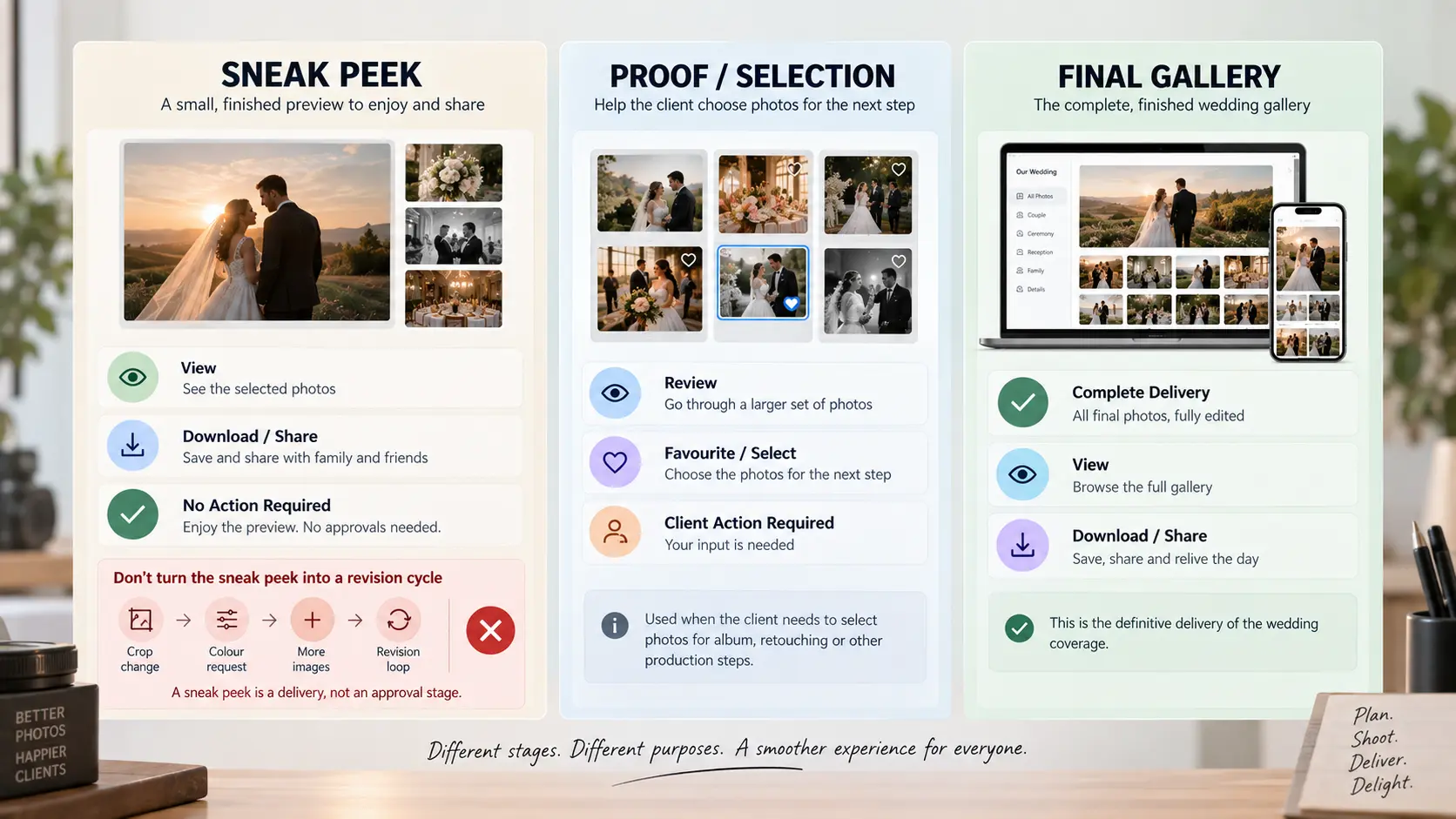
A sneak peek is normally a delivery moment, not an approval stage.
That difference needs protecting.
Sending a preview with “let us know what you think and we can change anything” can create an editing loop before the studio has even completed the wedding. One image receives a colour request, another gets a crop request, a relative sends screenshots, and the team begins processing feedback against photographs that were meant to be an early finished teaser.
If the client genuinely needs to select photographs before retouching, that is a proofing workflow and should be designed as such. If album selections will happen later, that is another workflow. Neither needs to be attached to the sneak peek simply because the client now has access to some photographs.
A useful distinction is:
| Delivery stage | Purpose | Client decision required? |
|---|---|---|
| Sneak peek | Small finished preview of the wedding | Normally no |
| Proof or selection gallery | Help the client choose photographs for a defined next step | Yes |
| Final gallery | Deliver the completed photographic coverage | Normally no production approval required |
There may be exceptions depending on the services you sell, but those exceptions should be intentional. Do not accidentally create an approval process because the preview message invited one.
Return immediately to final production
The sneak-peek workflow is successful when it ends cleanly.
Once the preview has passed QC, been delivered and been recorded as complete, the wedding should return to its correct position in the production system. The team continues the master cull, editing, retouching, quality control and final gallery preparation according to the actual delivery commitment.
Do not leave the job waiting for the client to react to the preview. Do not repeatedly add “just five more” photographs every few days unless rolling previews are an intentional service you have designed and priced. Do not allow social-media requests to consume the production capacity reserved for the complete wedding.
For a busy wedding studio, this becomes a workflow-management problem rather than an editing problem. GoPickle's wedding photography workflow is designed to keep bookings, teams, payments, selections, galleries and delivery activity connected so that the work surrounding a wedding does not disappear into unrelated chats, spreadsheets and folders.
A simple internal wedding sneak peek SOP can be as lean as:
Wedding complete → Secure files → Select preview → Edit preview → QC → Deliver → Mark preview complete → Resume master production → Deliver final gallery
The important step is the one in the middle: mark preview complete. It tells the team that this branch is closed.
Fast previews work when their boundaries are clear
Couples do not need the complete wedding edited immediately to feel that progress is happening. A carefully selected preview can give them something meaningful to enjoy and share while the full collection receives the time it actually requires.
But speed only improves the experience when it is controlled.
Define the wedding preview before the shoot. Keep the selection small and intentional. Finish those photographs to a standard you are comfortable publishing. Deliver them through one clear client-facing channel. Do not turn the preview into proofing or revisions unless those services were deliberately included. Then close the task and get the wedding back into final production.
That is the difference between a useful wedding sneak peek workflow and another urgent request competing with the work your studio already promised.
Should wedding photographers deliver sneak peeks on the same day?
Only when same-day delivery is an intentional part of the studio's service and the team has the production capacity to support it consistently. There is no universal requirement for a same day wedding photo preview. Define a timeline that works with your actual shooting, travel and editing workflow rather than copying another photographer's promise.
How many wedding sneak peek photos should a photographer deliver?
There is no single correct number. Define a fixed count, a sensible range or a clearly described small curated set based on the package and the amount of production you can sustain. The preview should feel substantial enough to be valuable without becoming a premature edit of the entire wedding.
Are wedding sneak peeks the same as proofs?
No. A sneak peek is generally a small set of photographs prepared for early enjoyment and sharing. Proofs are normally supplied because the client needs to choose photographs or make another production decision. Combining the two can create unnecessary approvals during the final editing process.
Should sneak peek photos look the same as the final wedding gallery?
They should represent the studio's finished visual standard closely enough that you are comfortable with clients publishing them. The rest of the wedding may still be undergoing culling, consistency work, retouching and quality control, which is why preview delivery should never be interpreted as completion of the entire gallery.