Photography Turnaround Time: How to Set a Delivery Promise Your Studio Can Actually Keep
Learn how to calculate photography turnaround time using your editing queue, production hours, client selections and peak-season buffer before promising a delivery date.


A client asks, “How long will it take to get our photos?” They want a simple answer. For the photographer, that answer depends on everything already happening behind the scenes: the jobs waiting to be edited, how many photographs the new shoot produces, whether detailed retouching is included, whether the client has to make a selection, who is doing the editing and how much production capacity is actually available over the next few weeks.
That is why photography turnaround time should be treated as a capacity commitment, not a number chosen because it sounds competitive.
If you search for wedding photography turnaround time, you will find plenty of advice suggesting a certain number of weeks. Those ranges can be useful for understanding client expectations, but they are a poor way to set your own delivery promise. A solo wedding photographer, a large event studio, a portrait photographer and a commercial production team can all have completely different post-production workloads.
The better question is not, “How quickly are other photographers delivering?”
It is, “Given the work already in our editing queue, when can we finish this job properly and still keep the date we give the client?”.
This guide shows how to calculate that date.
What Photography Turnaround Time Actually Includes
Photography turnaround time is the period between an agreed starting point and the delivery of the promised photographs or another clearly defined milestone.
That sounds obvious, but many delivery disputes begin because the photographer and client are counting different things.
A studio might think it promised final photographs four weeks after the client submits their selections. The client may think four weeks started on the day of the shoot. A wedding photographer may consider the digital gallery delivered while the couple believes “delivery” includes the printed album. A commercial photographer may be waiting for the agency to approve the selected frames while the end client thinks retouching is already underway.
Define the stages before you define the timeline.
A straightforward photography post-production workflow might look like this:
Shoot → File transfer and backup → Cull → Edit → Quality control → Export → Gallery preparation → Final delivery
A portrait workflow that uses client selection before detailed retouching may instead look like:
Shoot → Cull → Prepare proofs → Client selection → Selection confirmed → Retouching → QC → Final delivery
The second workflow contains a dependency that the photographer does not fully control. If the client takes ten days to choose their photographs, those ten days should not quietly consume a five-day final-retouching commitment.
The same issue appears with album selections, commercial approvals, print production and third-party suppliers.
This is why we recommend explaining what happens after the shoot as part of your photography client onboarding workflow. Clients do not need your entire production manual, but they should know what they are waiting for, when they need to act and which stage starts the next delivery deadline.
Turnaround time, editing time and delivery time are not always the same
These terms are often used interchangeably, but separating them makes planning easier.
Photography editing turnaround covers the production work required to prepare the photographs.
Photo delivery turnaround covers the broader period before the client receives the promised files or gallery.
Client turnaround covers a stage where the studio is waiting for a selection, approval or other decision.
A useful delivery promise makes those boundaries clear instead of putting every delay under one vague number of weeks.
Calculate Production Time by Job Type
Start with your own completed work. Look at several recent weddings, portraits, corporate events, product shoots or other assignments and estimate how much working time each stage consumed. Do not calculate only the hours spent in Lightroom, Capture One or Photoshop. The job includes everything required to turn the captured files into completed delivery.
Depending on the assignment, post-production can include:
| Production stage | What to count |
|---|---|
| Ingest and backup | Transfer, verification and organisation |
| Culling | Reviewing and reducing the captured set |
| Base editing | Exposure, colour, crop and consistency |
| Detailed retouching | Image-specific finishing, cleanup or compositing |
| Client proofing | Preparing and managing a selection stage |
| Revisions | Corrections or agreed client changes |
| Quality control | Final review before export |
| Export | Preparing the required resolutions or file formats |
| Gallery preparation | Upload, organisation, permissions and testing |
| Final communication | Delivery instructions and project handoff |
This calculation also exposes why shoot duration can be misleading.
A $600 portrait session photographed in two hours may still require planning, travel, backup, culling, editing and delivery. Our guide to photography revenue per hour looks at the same problem from a pricing perspective: what looks like a short job on the calendar can consume considerably more studio time once the complete workflow is counted.
For turnaround planning, record the production hours rather than guessing.
Suppose your recent weddings of a particular size typically require around 18 hours of post-production. That could include three hours of culling, eleven hours of editing, two hours of detailed finishing and another two hours for exports, quality control and gallery preparation.
Those numbers are only an example. They are not a recommended wedding editing benchmark.
The important change is that the studio now sees:
Wedding = approximately 18 hours of production
rather than:
Wedding = editing pending
Account for Work Already in the Editing Queue
Knowing that the new job requires 18 hours still does not tell you when it can be delivered.
You also need to know what is ahead of it.
Imagine the studio currently has 46 hours of unfinished post-production across several confirmed jobs. The new wedding is expected to add another 18 hours.
Existing editing queue: 46 hours
New wedding: 18 hours
Total production ahead: 64 hours
Now calculate the studio's usable post-production capacity.
If you work 45 hours during a typical week but 20 to 25 of those hours are usually consumed by photography, meetings, enquiries, travel, administration and client communication, you do not have 45 editing hours available.
Suppose your realistic post-production capacity is 22 hours per week.
64 hours ÷ 22 available production hours = approximately 2.9 weeks
Three weeks is therefore close to the theoretical production requirement. It is not necessarily the date you should promise the client because the calculation still assumes that nothing changes.

This is where an editing queue becomes much more useful than a list saying “five shoots pending.”
One wedding may have two hours of work remaining while another has twenty. A commercial project may be almost finished but waiting for approval. A portrait job may require only ten final retouches once the client submits their selection.
For each active project, try to know:
Current stage → Estimated work remaining → Owner → Client dependency → Promised delivery date
This matters particularly during seasonal peaks. Our guide to planning photography studio workload during peak wedding season explains why a calendar can still look bookable while the editing team is already overloaded.
If editing is divided between team members, freelancers or specialist retouchers, calculate capacity by the people who actually perform that work. GoPickle Crew Management can help studios keep crew assignments and responsibilities connected to active bookings, but the principle applies regardless of the tools you use.
Separate Sneak Peeks, Proofs and Final Photos
One of the easiest ways to improve perceived photo delivery speed is not to rush the entire job. It is to separate different types of delivery.
A sneak peek or preview is a small set of finished photographs delivered before the complete job.
A proof gallery exists because the client or another reviewer still needs to make a decision.
A final gallery contains the photography that is ready to be treated as completed delivery.
These should not automatically share the same turnaround promise.
A wedding photographer might offer a small preview before completing a much larger final wedding gallery. A corporate event photographer may deliver a handful of priority photographs for press or social use before finishing the complete event collection. A portrait photographer may send proofs quickly but begin detailed retouching only after the client chooses the images included in the package.
The workflow could therefore be:
Shoot → Preview → Proofs → Client selection → Retouching → Final gallery
Or, for a photographer who controls the full selection:
Shoot → Preview → Cull and edit → Final gallery
There is no reason to add proofing if the client does not actually need to make a decision.
Our guide to photo proofing vs a final client gallery explains this distinction in more detail, while client photo selection before retouching covers workflows where only the client's selected photographs should receive detailed finishing.
Corporate photography may require another delivery pattern altogether. Some clients need a few photographs quickly for communications while the larger set can follow later. We cover that situation in our guide to corporate event photography delivery.

The important point is simple: do not promise “photos in two days” when you mean ten preview photographs in two days and the finished collection several weeks later.
Name the deliverable and name its deadline.
Add Buffer Before You Promise the Delivery Date
A calculation based on 100% utilisation assumes that every working day will go exactly as expected.
Photography businesses rarely work that way.
A wedding produces more images than usual. A photographer has to travel unexpectedly. An editor becomes unavailable. Several clients submit their album selections in the same week. A commercial client returns a revision request. An upload fails. A rush booking enters the schedule. A long shoot leaves less editing time the following day than originally planned.
Your photo delivery timeline needs enough space to absorb normal variation.
The best buffer is not a percentage copied from somebody else's business. Review your own promised and actual delivery dates and find out how much estimates tend to move.
If jobs that look like three weeks of production regularly take closer to four during your busiest months, planning future peak-season work around three weeks is not aggressive scheduling. It is repeating a known forecasting error.
A practical delivery-date model is:
Existing queue time + Job production time + Known dependencies + Operational buffer = Client delivery promise
That buffer also has to remain available. If every empty day is immediately sold to another shoot or allocated to another project, the studio has not created a buffer. It has simply increased utilisation.
What Should You Tell Clients About Photography Turnaround Time?
Clients usually do not need to know how many editing hours are in your queue. They need a clear expectation.
Before the shoot or at booking, tell them:
- what will be delivered;
- whether previews are included;
- when proofs will be available, if applicable;
- whether client selection starts another deadline;
- when the final photographs are expected;
- whether albums, prints or other physical products follow a separate schedule.
Put the important delivery commitment in the agreement or another durable booking record rather than relying on an old WhatsApp message, DM or email.
For example:
Final edited gallery: delivered within 30 calendar days after the event.
Or, for a selection-based portrait package:
Proof gallery: delivered within five working days after the session. Final retouched photographs: delivered within seven working days after the client's final selection is confirmed.
These are examples of clear wording, not recommended turnaround periods.
The difference is that the client can see exactly what starts each countdown.
GoPickle Booking Management keeps events, services, deliverables, crew, quotations, invoices, payments and the surrounding booking context together. For delivery planning, the value of that connected record is straightforward: the team can see what was sold and what still needs to be completed before the booking is closed.
What to Do When the Delivery Timeline Changes
Even a realistic photographer delivery timeline can slip.
The mistake is not necessarily needing more time. The larger client-experience problem is allowing the promised date to pass without saying anything.
If you can already see that a delivery deadline is at risk, communicate before the client has to ask, “Are the photos ready?”
A useful update should tell the client:
where the project is now, what the new expected delivery date is, and whether anything is required from them.
For example:
Your gallery is currently in final editing and quality review. We need three additional working days to complete the remaining photographs, so the revised delivery date is Thursday, 22 October. Nothing further is required from you.
That is much more useful than:
Editing is taking longer. Will send soon.
Avoid repeatedly moving the date by one day. If the schedule has changed, review the actual remaining workload and give the client a revised date that you have a reasonable chance of keeping.
Clear communication also matters when the studio is not responsible for the delay. If final retouching cannot begin until the client submits a selection, remind them of the outstanding action and explain what happens after they complete it.
Track Promised vs Actual Photo Delivery
Once you start recording delivery performance, photography turnaround stops being guesswork.
For each completed project, record a few simple fields:
| Field | Example |
|---|---|
| Job type | Wedding |
| Promised delivery | 30 September |
| Actual delivery | 27 September |
| Variance | 3 days early |
| Period | Peak season |
| Delay reason | — |
| Production owner | Studio editor |
Then compare similar jobs.
If portrait deliveries regularly finish early but wedding galleries repeatedly arrive late, the problem probably is not your general productivity. Wedding production may be underestimated.
If delays happen only during certain months, booking volume may be exceeding editing capacity.
If the queue regularly stalls at client selection, your photo proofing workflow may need clearer deadlines.
If one package consistently creates more editing than expected, the solution might involve changing the package, increasing the turnaround promise, reducing the included production scope or adding editing capacity.
One simple metric is:
On-time delivery rate = Jobs delivered on or before the promised date ÷ Completed jobs
But also record how late delayed jobs are.
Nine jobs delivered on time and one delivered 45 days late tells you something very different from ten jobs that finish within one or two days of their planned dates.
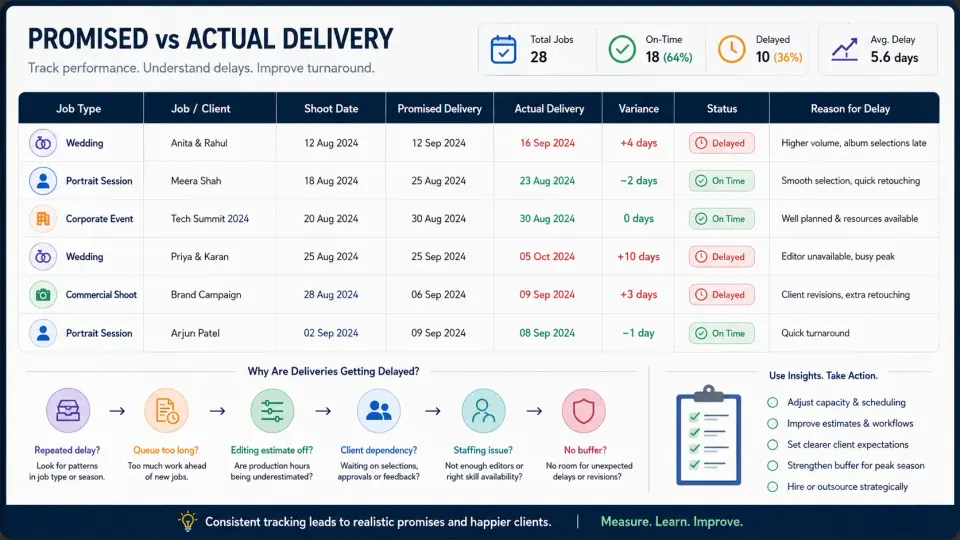
Over time, this data can also help you decide whether you really need to hire another photo editor, outsource part of post-production, accept fewer peak-season bookings or change what you promise for certain services.
How Long Should a Photographer Take to Deliver Photos?
There is no single photography turnaround time that is appropriate for every photographer worldwide.
Wedding guides often discuss delivery in weeks, while urgent corporate or editorial photographs may need to be delivered far sooner. Portrait photographers may separate proof delivery from final retouching. Commercial photography timelines can depend heavily on selections, approvals, compositing and revision rounds.
The number that matters to your studio is the one you can repeatedly support with your actual post-production workflow.
If clients frequently ask how long it takes to deliver photos, give them a clear answer. Just make sure that answer comes from:
the work already waiting + the work this job creates + the capacity available + dependencies + a realistic buffer.
Fast delivery is valuable when you can sustain it. A longer turnaround can also be perfectly workable when it is appropriate for the job and communicated clearly. The problem is not that one photographer takes two weeks and another takes six. The problem is promising two weeks when your editing queue already makes two weeks impossible.
At GoPickle, we see delivery as the final operational stage of the same booking that created the work. The services promised, crew involved, client selections, pending actions and final gallery should not become disconnected simply because the shoot has finished.
Once the photographs are ready, GoPickle Client Galleries provide a branded environment for organised photo delivery, private access, favourites, download controls and client sharing. Client gallery software cannot fix an unrealistic delivery promise, but it can make the final handoff clearer once production is actually complete.
A dependable turnaround starts long before the gallery link is sent. It starts when the studio knows how much work it has already promised.