Photo Proofing vs Final Client Gallery: Selection, Approval and Delivery Are Different Jobs
Understand photo proofing, client proofing galleries and final photo delivery. Learn when clients should select, approve, retouch and receive finished images.

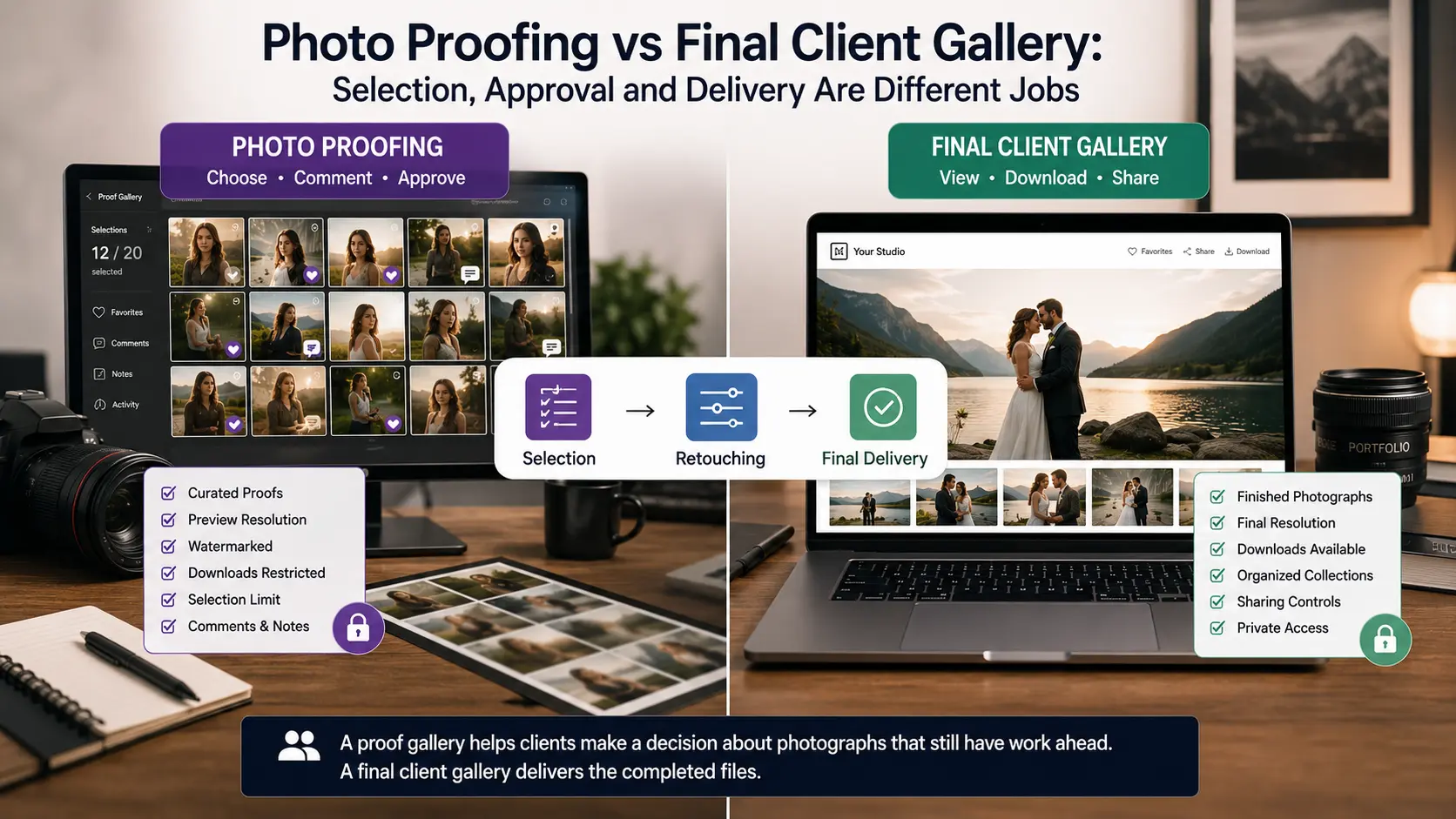
A photographer can send two galleries that look almost identical to the client while those galleries perform completely different jobs.
In the first, a portrait client is reviewing 60 shortlisted photographs and choosing the 15 images included in their package. The selected files will then receive detailed retouching. In the second, a wedding couple is opening 700 fully edited photographs that are ready to view, download and share. The first gallery is part of production. The second is delivery.
This is the distinction that often gets lost when photographers talk about photo proofing.
A proofing gallery exists because somebody still needs to make a decision. The photographer may need the client to choose images, approve an edit, identify a preferred headshot, shortlist album photographs or tell the studio which commercial frames should receive expensive final retouching. A final client gallery exists because those decisions have already been resolved and the finished photographs are ready to receive.
The same online gallery platform may support both workflows. What changes is the purpose of the gallery, the state of the photographs, the permissions available to the client and what happens after the client responds.
For photographers trying to improve selection, approval and delivery, that distinction matters far more than what the software calls the gallery.
What photo proofing actually means for photographers
Photo proofing is a review stage in which a photographer presents a curated group of images so a client or another authorised stakeholder can make a decision before production continues.
Traditionally, photographers could show printed proofs or contact sheets. Today, online photo proofing usually takes place through a private gallery where clients can browse photographs, mark favourites, create selection lists, add comments or submit an approved set.
The key word is curated.
A photography proof gallery should not be an upload of every frame captured during the session. Missed focus, lighting tests, accidental frames, obvious duplicates and photographs the photographer would never deliver should normally be removed before the client sees anything. Proofing transfers a defined decision to the client; it does not transfer the photographer's responsibility for culling.
The proof files also do not necessarily need to be completely unedited. A portrait photographer might apply basic exposure, colour and crop adjustments before asking the client to choose the photographs that deserve detailed skin retouching. A commercial photographer might prepare clean review files before an agency decides which five frames should move into compositing. Another workflow may use photographs that are already fully edited because the client is selecting images for an album rather than selecting images for retouching.
What defines proofing is therefore not the amount of editing already completed. It is the fact that the client's decision determines what happens next.
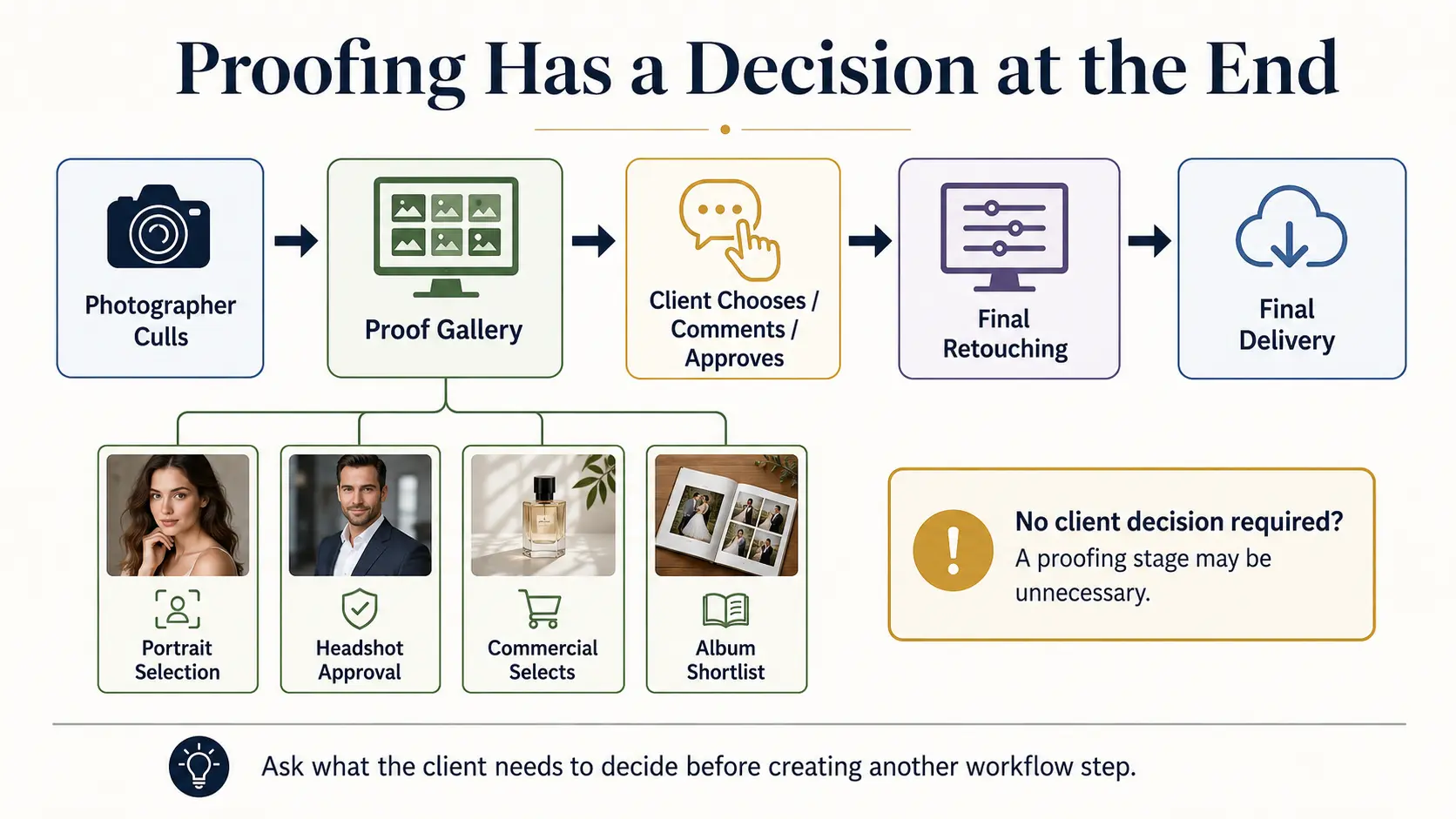
Proofing gallery vs final client gallery
The clearest difference appears when you ask what the client is expected to do after opening the gallery.
| Workflow question | Client proofing gallery | Final client gallery |
|---|---|---|
| Main purpose | Make a selection or approve work | Receive completed photography |
| Typical client action | Select, comment, approve | View, download, share |
| Image state | Curated proofs or review versions | Finished deliverables |
| Detailed retouching | May still be pending | Complete where included |
| Download access | Often limited or unnecessary | Based on purchased delivery rights |
| Selection limits | Often important | Usually not required |
| Comments | Part of production feedback | Usually secondary |
| Next stage | More studio work follows | Delivery can be completed |
A useful proofing gallery vs client gallery workflow can therefore be as simple as:
Proof → Selection → Retouching → Approval, if needed → Final delivery
You do not necessarily need separate software for every stage. Many photography gallery systems combine selection and delivery features. Current platforms such as Pixieset and ShootProof, for example, use favourites, lists, labels and comments inside galleries as proofing tools before photographers continue editing or product fulfilment.
GoPickle follows a similar practical principle rather than treating selection as a completely separate communication channel. GoPickle Client Galleries support favourites and shortlisting alongside organised collections, watermark controls, download permissions and private access. The important part is setting up the gallery according to the stage of the job.
A client should never have to wonder whether “favourite” means I like this photograph, please retouch this photograph, put this in the album or this image is approved.
Your instruction needs to give that action a specific meaning.
Portrait, wedding and commercial photo proofing are not the same workflow
The reason photo proofing for photographers can seem inconsistent is that different genres place the client decision at different points.
Portrait photography: select before detailed retouching
Portrait photography is one of the clearest uses for a client proofing gallery.
Imagine a session in which the package includes 12 fully retouched photographs. After the session, the photographer may cull the shoot to 50 strong options, apply baseline processing and invite the client to choose the 12 photographs they want finished.
The process becomes:
Shoot → Photographer culls → Client chooses 12 → Detailed retouching → Final gallery
This prevents the studio from spending detailed editing time on photographs the client does not ultimately need. It also gives packages with included image limits a much cleaner selection process than collecting filenames through email or screenshots through messaging apps.
Weddings: final delivery may come before album selection
Many wedding workflows reverse that order.
The photographer makes the editorial selection, edits the complete wedding and delivers the finished gallery. Only afterwards does the couple need to make another decision: which photographs should go into the wedding album.
In that case:
Shoot → Cull → Edit → Final wedding gallery → Album selection → Album design → Album approval
The wedding gallery is already final photography delivery. Favourites are being used for a later product-selection workflow.
That distinction is important because forcing every wedding through a separate pre-editing proof gallery can create a client approval stage that the photographer does not actually need.
For studios dealing with album selections, our guide to making photo selection easier for clients after an event explains how structured selections reduce screenshot, filename and messaging confusion. The related guide to faster wedding album selection and approval covers that later album workflow specifically.
Commercial photography: proofing may control expensive production work
Commercial work often gives proofing a stronger approval function.
A brand may commission ten final campaign photographs from a shoot that produces dozens of viable frames. The photographer or creative team performs the first cull, then an art director, agency or client chooses which frames should receive high-end retouching, compositing or product cleanup.
That workflow might be:
Shoot → Photographer shortlist → Client/agency selects → Final retouching → Client approval → Master-file delivery
The issue here is not only efficiency. Commercial projects may involve several people with opinions but only one person with authority to approve the work.
Before proofing begins, establish whose selection actually sends a file into production.
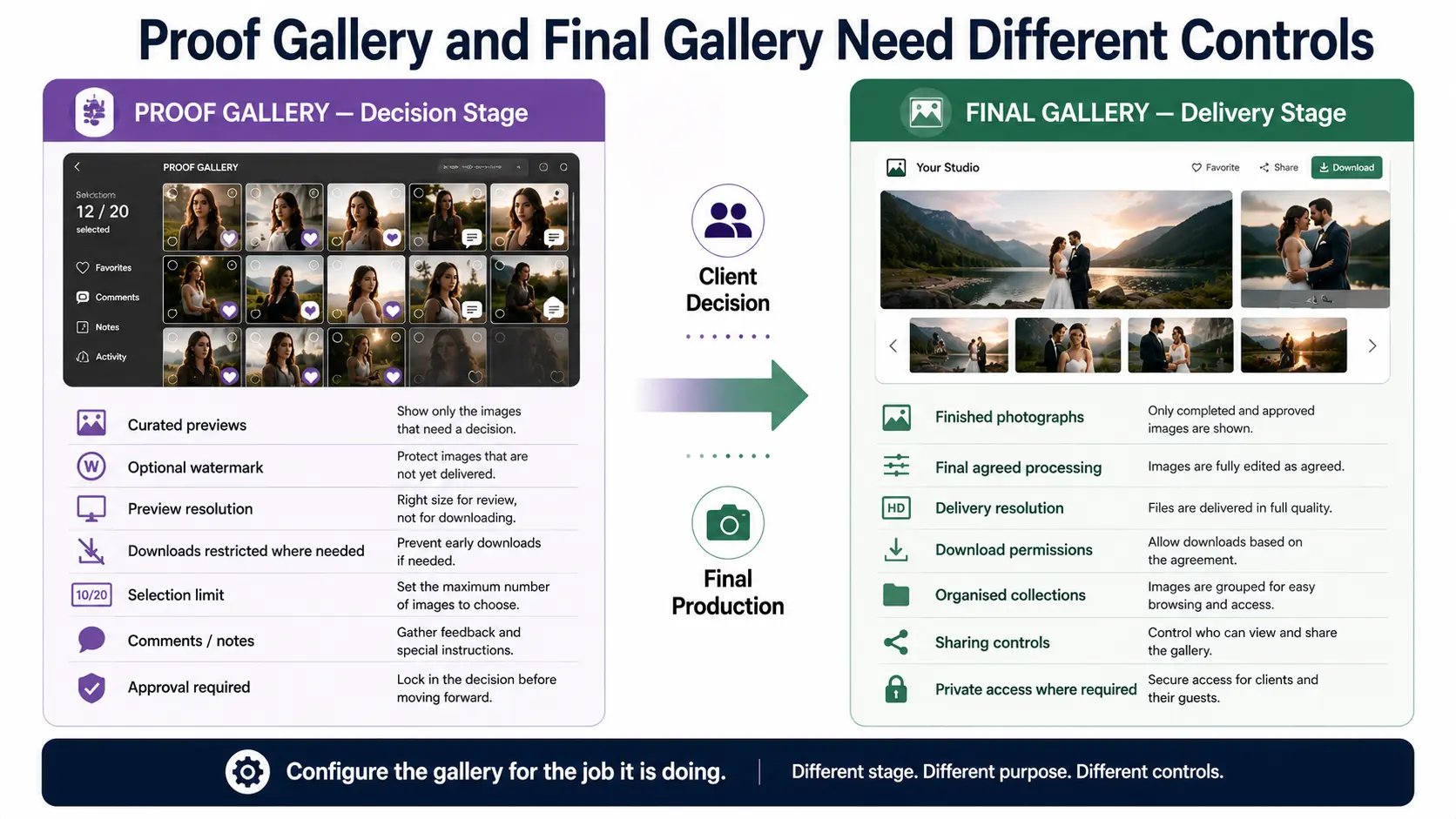
Watermarks, preview resolution and download limits should match the stage
A proof gallery does not have to behave like a delivery gallery.
If the client is reviewing images that have not yet been purchased, fully retouched or approved, unrestricted access to high-resolution files may create confusion about whether delivery has already happened.
A photographer might therefore use preview-sized files, disable downloads, apply watermarks or combine those controls. None of them is mandatory for every proofing workflow.
A long-standing corporate client selecting executive headshots may not need watermarks at all. A portrait studio selling individual finished images may have a good reason to keep downloadable files unavailable until the selection and purchase are complete.
The same applies to selection limits.
If a package includes 10 photographs, the client should know they are choosing 10. If 30 commercial files have been budgeted for final retouching, the person approving the proof set should know the approved count. If an album designer recommends a particular image range, giving clients that range is much more useful than asking them to “pick some favourites.”
The gallery controls should reinforce the commercial scope instead of leaving the photographer to resolve an oversized selection later.
Privacy needs the same attention during proofing as it does during final delivery. Proof galleries can contain unreleased products, confidential corporate material, children, private ceremonies or intimate portraits. Passwords, download restrictions and controlled sharing may therefore be more important during review than after public release.
Our guide to photography client gallery privacy and access covers the practical differences between private client access, download control and wider sharing.
Client comments should lead to a defined action
Comments are useful when the studio knows what to do with them.
“Please remove the background distraction from this one” can become an editing instruction.
“This is our approved CEO headshot” can close a corporate selection.
“Use this photograph as the campaign hero” can move one commercial frame into final production.
The problems start when comments, favourites and approvals all exist at the same level.
One family member favourites 40 photographs. The client favourites another 25. Someone writes editing notes on images that were never selected. Three people from an agency leave conflicting requests. The photographer now has plenty of engagement but no reliable production instruction.
Define the states that matter to your workflow.
A portrait studio might use:
Available → Selected → Selection submitted → Retouching → Final
A commercial studio may need:
Proof → Client shortlist → Final selection approved → Retouching → Review → Approved master
A wedding album workflow might use:
Final gallery → Album selection → Design proof → Revisions → Album approved
The terminology can vary. The transition must be clear.
A favourite icon is a client interaction. It becomes operationally valuable only when the studio knows what that favourite is supposed to trigger.
Move selected photographs into retouching only when the selection is stable
The handoff from proofing to detailed editing deserves more control than it often receives.
Suppose a client submits 15 selected portraits on Monday. The editor spends several hours retouching them Tuesday. On Wednesday, the client replaces six images with new choices.
The client may regard the selection as a flexible list. The studio has already turned it into production work.
Before selected files move into retouching, confirm the final count, check that it matches the package, resolve contradictory comments and make sure the client or authorised approver has actually finished choosing.
A straightforward message can make the handoff explicit:
“We have received your final selection of 15 photographs. These images will now move into retouching. Changes to the selected set after editing begins may require additional production time.”
The wording does not need to sound contractual. It needs to tell the client that the workflow has changed state.
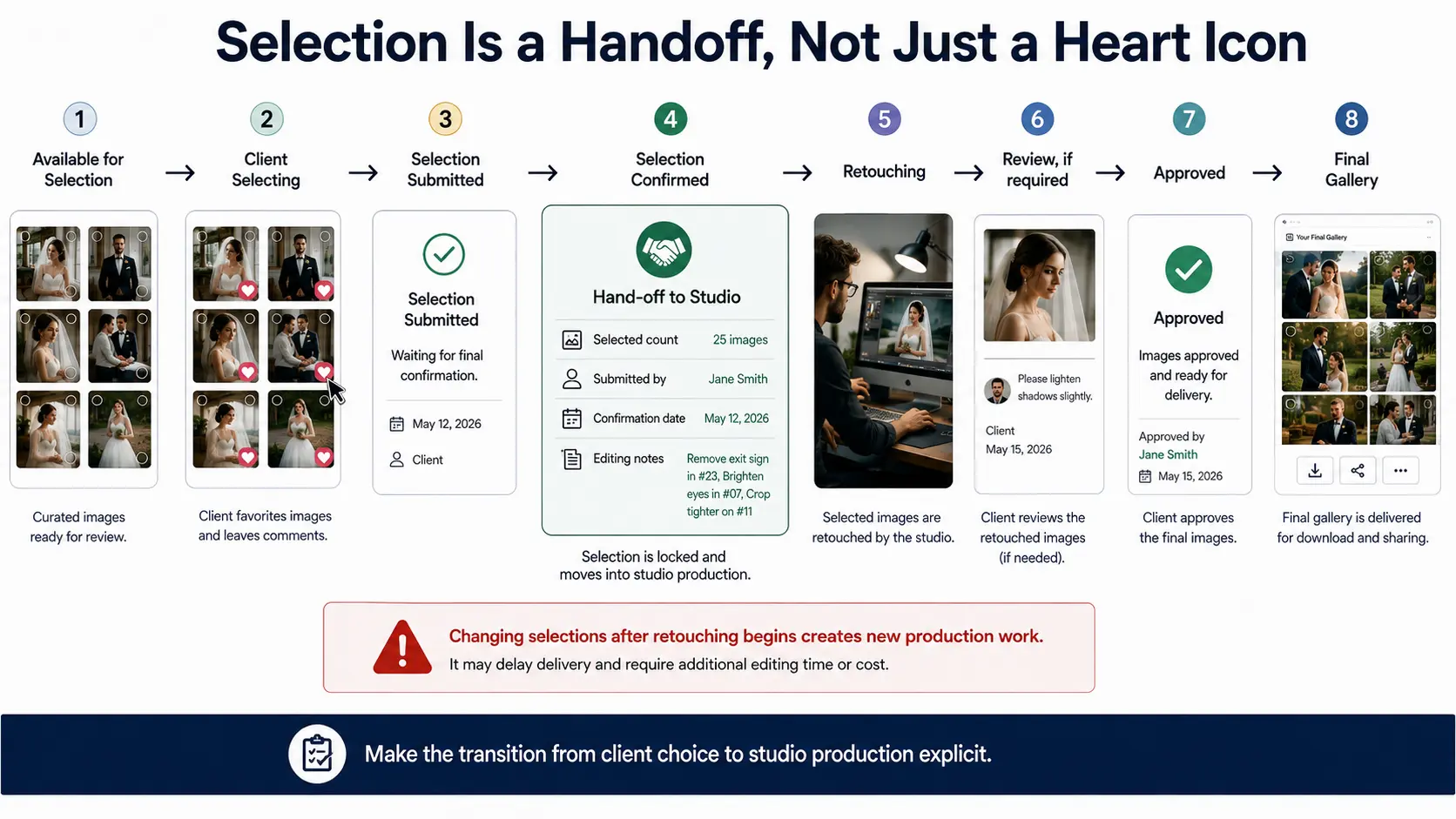
For teams, record the approved filenames or gallery selections in a form the editor can use directly. Avoid turning client choices into screenshots that another employee then has to manually match against thousands of files.
What belongs in the final client gallery
A final gallery should contain photographs the studio is prepared to regard as delivered.
The promised editing has been completed. Approved corrections have been applied. The correct versions have been exported. The client knows which files they can download and what the gallery represents.
The experience should now shift away from decision-making and toward receiving the work.
For a wedding, that may mean sections for preparations, ceremony, portraits and reception. A commercial delivery may be organised by campaign, product, market or approved asset set. A portrait photographer may deliver only the client's final purchased selection.
Download permissions should reflect the agreement. Some photographers provide high-resolution and web-size files. Others provide only the licensed deliverable format required for the assignment. Certain collections may need different permissions from others.
This is also where presentation carries more weight. A photography proof gallery is partly an operational workspace. The final client gallery is the closing part of the service the client purchased.
GoPickle Client Galleries are designed for that client-facing handoff, with branded galleries, organised collections, favourites, download controls, watermark protection, private access and mobile-friendly viewing. The value of connecting selection and delivery in the same environment is that the client does not need to communicate choices through filenames, spreadsheets and scattered messages while the photographer tries to reconstruct the workflow later.
Not every photography job needs proofing
Adding a proofing stage is not automatically more professional.
If you photograph an event, make the final editorial selection yourself, completely edit those photographs and deliver all of them, there may be no useful client decision before delivery.
The same can apply to documentary wedding work, editorial assignments, real-estate photography, standardised ecommerce jobs and recurring corporate-event coverage where the photographer controls selection and the deliverable has already been defined.
Proofing earns its place when client input changes the next stage.
Use a client proofing gallery when the client needs to choose which photographs are retouched, purchased, printed, placed into an album, approved internally or prepared for final commercial use.
Skip the additional stage when there is nothing meaningful for the client to decide.
The simplest test is this:
A proof gallery asks: “Which of these should move forward?”
A final gallery says: “This is the finished work.”
Keeping those two jobs separate makes selection clearer for the client, production clearer for the studio and final delivery much easier to recognise.