- Availability and date visibility
- Invitations and RSVP responses
- Reminders and recurring events
- Shared calendars and locations
- Appointment schedules and video calls
Photography booking management beyond the calendar
Go Beyond Calendar Entries With Complete Photography Booking Management.
Google Calendar can remind you when the shoot begins. GoPickle keeps the client, quotation, events, services, deliverables, crew, invoices, payments and galleries connected to the same booking. Plan every wedding and event with more clarity than a title, date and description field can provide.
No credit card requiredMobile and desktopMulti-event bookingsCrew schedulingPayment visibilityBuilt for photographers worldwide
Use a calendar to see your time. Use GoPickle to run the work behind every date.
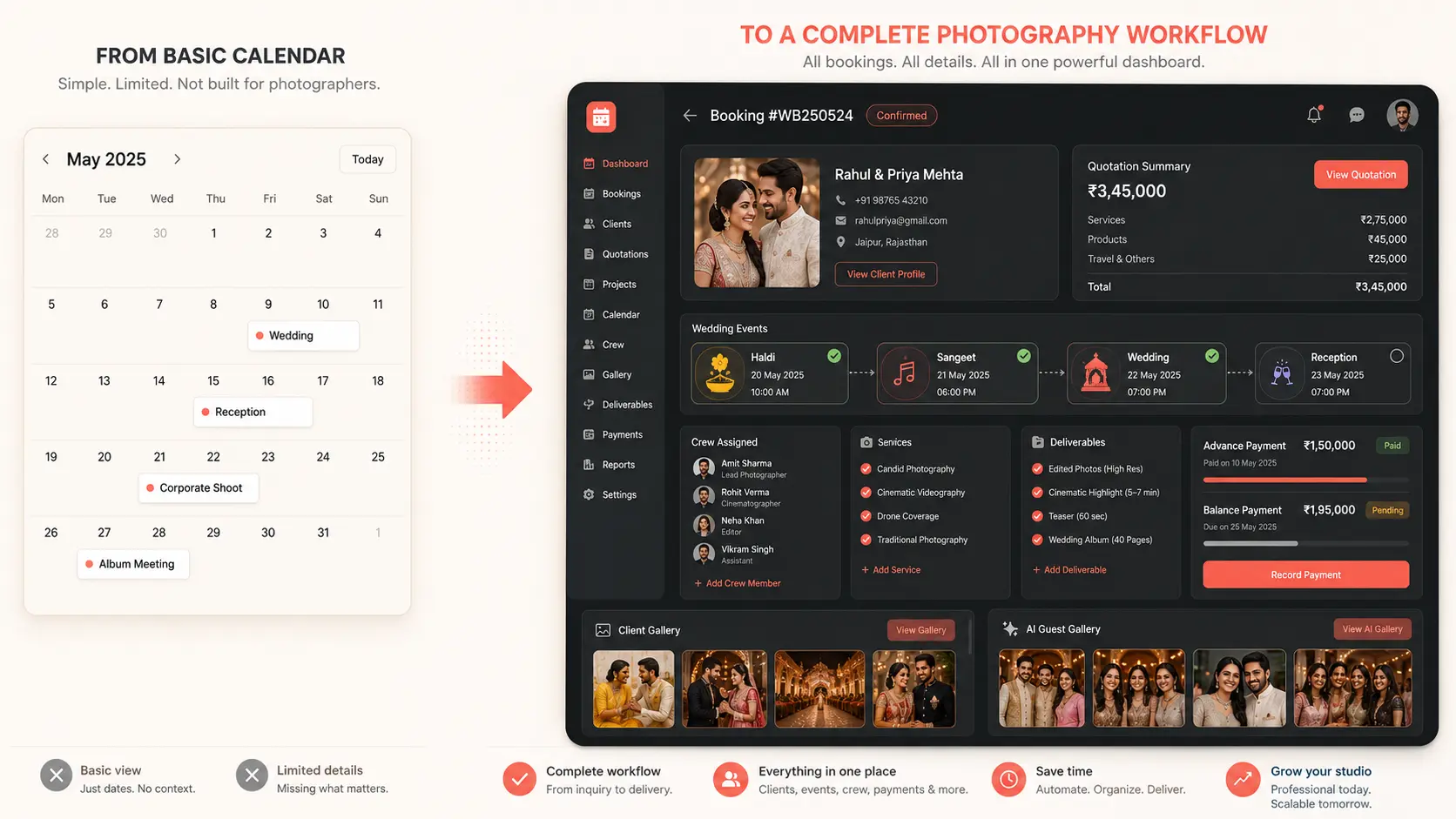
Immediate problem recognition
A Date on the Calendar Is Only the Beginning of the Booking
A calendar entry may show the wedding, date, time, location and invited crew. The studio still needs to know which package was sold, which functions are included, what advance was received, what deliverables were promised and what balance remains.
If the entire booking must be reconstructed from descriptions, attachments, chats and spreadsheets, the calendar is not the booking system.
Calendar event
Wedding · 14 Dec · 7:00 AM
Palace Grounds
Maya and Daniel
Crew invited
PDF attached
GoPickle booking context
ClientConnected
QuotationConnected
EventsConnected
CrewConnected
ServicesConnected
DeliverablesConnected
AdvanceConnected
BalanceConnected
Client GalleryConnected
AI Guest GalleryConnected
Google Calendar records the time slot. GoPickle records the commercial and operational commitment.
Quick verdict
Google Calendar Is Excellent for Time. GoPickle Is Built for Photography Operations.
Use Google Calendar when the question is “When?” . Use GoPickle when the question is “What must the studio sell, prepare, deliver and collect?”Test One Upcoming Booking- Leads and professional quotations
- Multi-event bookings and services
- Crew roles and assignments
- Invoices, advances and balances
- Client and AI Guest Galleries
Calendar event vs booking
A Calendar Event and a Photography Booking Are Not the Same Record
A title, date, time, location, description, guests and attachment work well for meetings. A professional photography booking needs the client, lead source, scope, multiple events, crew, deliverables, payments and delivery context.
Calendar eventTime slot and meeting context
Title · Date · Time · Location · Guests · Description · Attachment · Reminder
GoPickle bookingCommercial and operational commitment
Client · Quote · Events · Services · Deliverables · Crew · Invoice · Payment · Gallery
Photography booking software
Give Every Date the Business Context It Deserves
Not every enquiry is ready to become a calendar event. GoPickle separates tentative opportunities from confirmed bookings, then carries the requirement into the work.
Capture leads before dates
Track tentative enquiries, sources, budgets, follow-ups and conversion without filling the calendar with noise.
ExploreCreate connected quotations
Carry packages, add-ons, taxes, discounts and payment terms into confirmed work.
ExploreBuild multi-event bookings
Keep dates, venues, services, deliverables and notes under one client project.
ExploreAssign the crew
Make role, reporting time, venue and payment context visible to the team.
ExploreTrack invoices and balances
Know what is due, what was received and which booking it belongs to.
ExploreContinue through delivery
Keep Client Galleries and AI Guest Galleries connected after the shoot date.
ExploreCrew availability vs assignment
Seeing That Someone Is Free Is Not the Same as Assigning Them to the Shoot
Google Calendar can support shared availability and event invitations. GoPickle adds the official assignment: role, event, reporting time, venue, responsibility and payment context.
Explore Crew ManagementAvailability
Ravi · Available
Neha · Tentative
Arjun · Busy
GoPickle assignment
Haldi Ravi · Lead Photographer
Wedding Neha · Cinematographer
Reception Arjun · Second Photographer
Role, venue, reporting and payment contextBeyond the shoot date
The Booking Should Continue Beyond the Calendar Date
Editing, selections, final balance, gallery delivery and guest photo discovery all happen after the calendar event ends. GoPickle keeps the post-production work connected.
Explore Client GalleriesClient Galleries
Deliver final photographs through a branded gallery with selections, access and downloads.
AI Guest Galleries
Let event guests use selfie matching to find their own photographs.
Booking continuity
Keep client, event, payment and delivery status connected after the calendar date passes.
Referral visibility
Make every shared gallery a professional brand experience for families and guests.
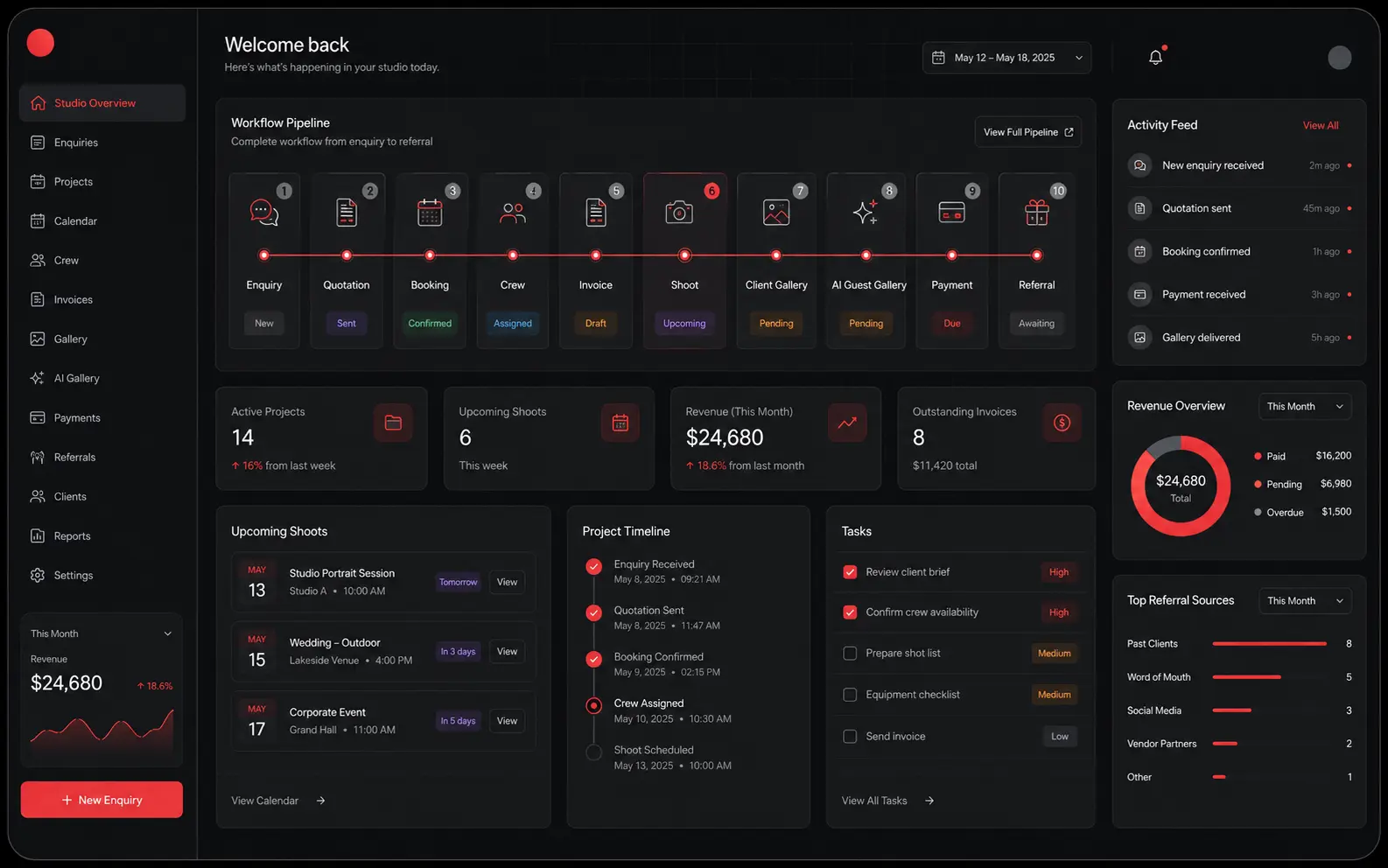
Studio visibility
Your Studio Needs More Than a Monthly Date Grid
Surface new enquiries, pending quotations, upcoming bookings, unassigned crew, outstanding balances, recent payments and galleries awaiting delivery in one view.
Use both, with clear responsibilities
You Do Not Need to Stop Using Google Calendar
Keep Google Calendar for personal availability, meetings, reminders and appointment schedules. Use GoPickle for the client, quote, booking, events, crew, payments and galleries connected to the work.
Google Calendar for time
Personal calendar, shared availability, invitations, reminders, recurring events and meeting links.
GoPickle for the booking
Leads, quotations, master bookings, event details, crew assignments, invoices, payments and delivery.
GoPickle-first comparison
GoPickle vs Google Calendar for Professional Photography Scheduling
Google Calendar helps the photographer see time. GoPickle helps the studio understand what every time block means operationally.
Business needDate and time visibility
GoPickle
Booking and event context around the schedule.
Google Calendar
Excellent calendar, invitations, reminders and availability.
Better fit
Google Calendar strength
Business needLead and requirement management
GoPickle
Dedicated source, requirement, owner, stage and follow-up.
Google Calendar
Calendar event created manually when ready.
Better fit
GoPickle advantage
Business needQuotation and scope
GoPickle
Packages, services, deliverables, price, tax and status.
Google Calendar
Description or attached file.
Better fit
GoPickle advantage
Business needMulti-event wedding
GoPickle
One master booking with event-level dates, venues, services and crew.
Google Calendar
One large event or several fragmented entries.
Better fit
GoPickle advantage
Business needCrew assignment
GoPickle
Role, event, reporting, venue and payment context.
Google Calendar
Invitations and shared availability.
Better fit
GoPickle advantage
Business needInvoices and payments
GoPickle
Quote-to-invoice, advances, milestones, balances and status.
Google Calendar
Reminders and attachments.
Better fit
GoPickle advantage
Business needClient and guest delivery
GoPickle
Client Gallery and AI Guest Gallery after the shoot.
Google Calendar
Calendar ends at the scheduled event.
Better fit
GoPickle advantage
Business needPersonal meetings and availability
GoPickle
Booking context for the studio.
Google Calendar
Personal calendar, appointment pages and RSVP.
Better fit
Use both
Real wedding workflow
See What One Wedding Looks Like Beyond the Calendar Block
One client, one commercial booking, several event records and a connected path from enquiry to gallery delivery.
1Enquiry2Quotation3Booking4Engagement5Haldi6Sangeet7Wedding8Reception9Crew10Advance11Final balance12Client Gallery13AI Guest Gallery14Referral
Hidden operational cost
A Free Calendar Can Still Create an Expensive Manual Workflow
Missed enquiries, repeated questions, fragmented event records, double-booked crew, forgotten balances and delivery confusion all take time and trust.
GoPickle is not an alternative to a calendar grid.
It is an alternative to using a calendar as a CRM, quotation system, booking record, crew tracker, invoice tool and gallery history.
Compare GoPickle PlansFrequently Asked Questions
Questions Photographers Ask About Google Calendar Alternatives
GoPickle is the stronger alternative when you need complete booking management around the date: leads, quotations, multi-event bookings, services, deliverables, crew, invoices, payments and galleries.
Google Calendar is a trademark of Google LLC. GoPickle is not affiliated with or endorsed by Google. This comparison concerns photography workflow and booking management, not a claim that Google Calendar is defective.
More than a date on the calendar