From Consultation Notes to Booking Record: Stop Re-Entering Photography Client Information
Build a photography client information workflow that carries enquiry details, consultation notes and approved quote data into the booking without re-entering everything.

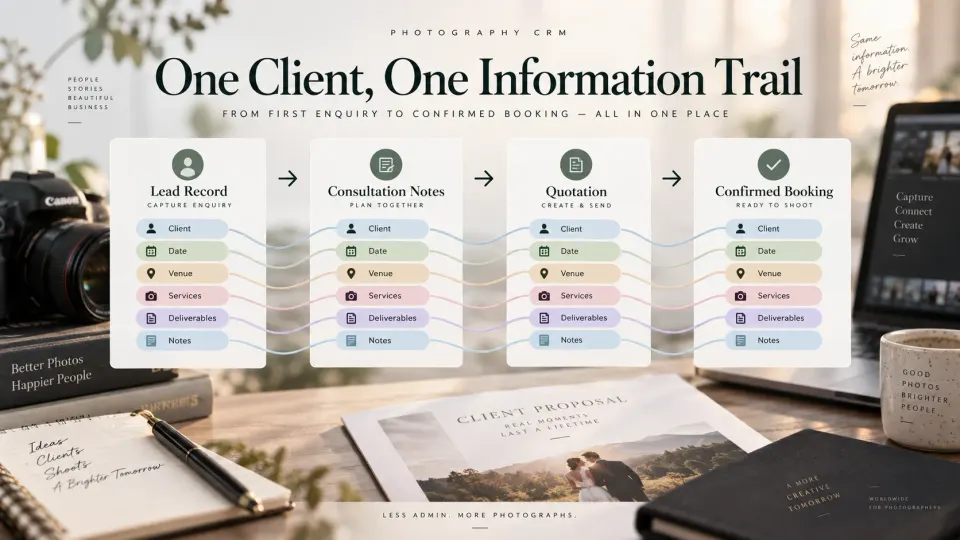
A couple enquires about wedding photography. Someone in the studio records their names, phone number, date and venue. During the consultation, you learn that there are four functions, the reception may move to another venue, the family wants traditional video coverage and they are considering a second album. When the quotation is prepared, some of those details are typed again. When the client confirms, somebody creates the booking and types them for a third time.
By then, there are three versions of the same client information.
The lead record says the ceremony begins at 10:00. The quotation says 11:00 because the client corrected it during the call. The booking still says 10:00 because whoever created it copied the original enquiry. A photographer can have perfectly organised software at every stage and still create operational problems if information does not move correctly between those stages.
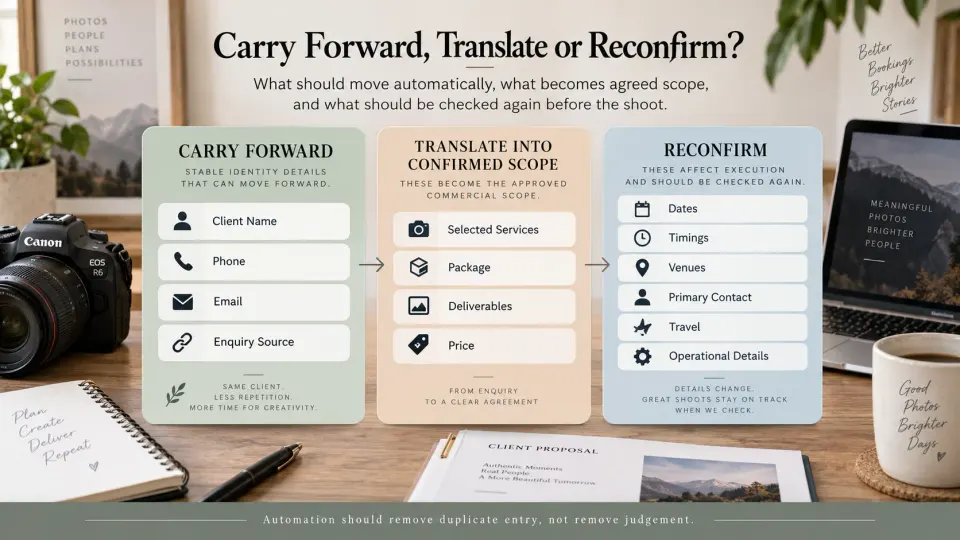
A useful photography client information workflow should therefore do two things at once: carry forward information that is already known, and force the studio to recheck information that may have changed before treating it as confirmed.
At GoPickle, we think the practical sequence is:
Lead record → Consultation context → Approved quotation → Confirmed booking
The booking should not be another blank form. It should be the point where what the client told you, what you sold and what the studio now needs to execute come together.
Map the Information Collected During the Enquiry
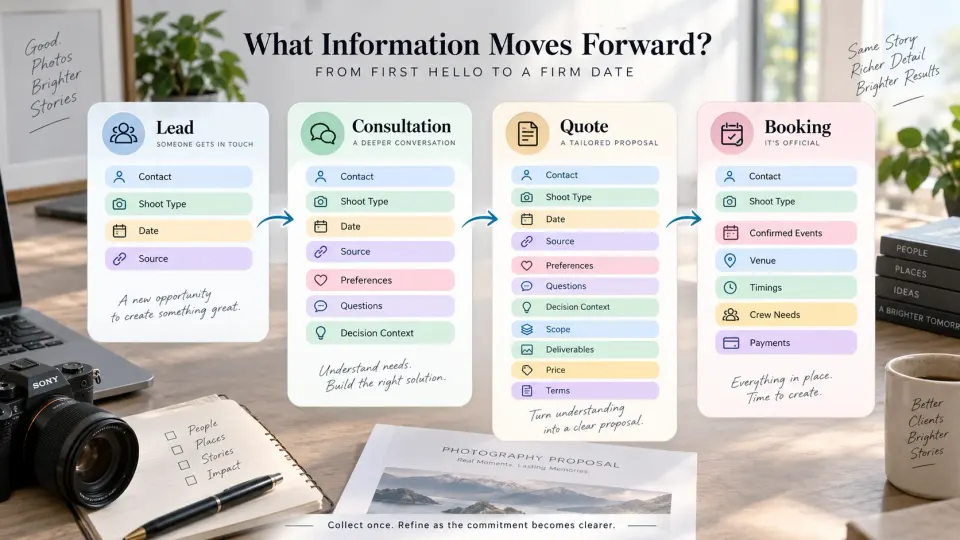
The first enquiry does not need to contain everything required to run the shoot. It needs enough information to identify the opportunity and decide what should happen next.
For most photographers, that means capturing the client's name and contact information, type of photography required, expected date or date range, location if known, enquiry source, broad service requirement, budget context and the next follow-up. Wedding and event studios may also know the number of functions. A commercial photographer might receive a company name, campaign date and a rough brief. A portrait studio may only need the session type, preferred date and number of participants at this stage.
This information belongs in the lead because it describes the opportunity as it currently exists.
A useful photography lead management system should let that requirement stay attached to the client while the conversation develops. GoPickle's lead workflow is built around photography-specific information such as dates, events, services, budget, source, ownership and next action rather than reducing the enquiry to a contact name.
The mistake is treating every early detail as confirmed fact. A client saying “probably Saturday afternoon” is not the same as confirming Saturday at 3:00 PM. Record uncertainty when it exists.
That distinction makes everything downstream cleaner.
Consultation Notes Should Preserve Context, Not Become a Second Database
Good photographer consultation notes contain information that helps someone understand the client or make the next sales decision. They should not simply repeat every field already stored in the CRM.
For example:
Couple prefers candid-heavy coverage. Parents want traditional photography and video for ceremony and reception. Reception venue not final. They liked the Signature package but asked whether the second album can be removed. Need revised scope after venue confirmation.
That note tells another team member much more than:
Had consultation. Interested.
Consultation notes are particularly useful for preferences, objections, decision makers, unanswered questions, priorities and conditional requirements. If the client says their marketing manager must approve commercial image licensing, that belongs in the context. If a bride explains that the ceremony venue is changing but has not confirmed the replacement, preserve that uncertainty instead of replacing the existing venue with a guess.
Structured information should still go into structured fields when possible. If the confirmed event date is known, update the date field. Do not bury it inside a paragraph where reporting, quotation creation or calendar checks cannot use it.
Our guide to managing photography leads inside GoPickle covers this distinction in more detail: structured fields make the requirement usable, while notes preserve client context that does not fit neatly into a field.
The Quote Needs the Requirement the Client Is Actually Considering
The quotation is where enquiry information becomes commercial scope.
A photography quote may need the client details and event information already collected, but it also introduces a different class of data: the services being offered, package or custom scope, deliverables, add-ons, coverage, price, taxes where applicable, payment stages and terms.
This information should come from the current requirement rather than being recreated from memory.
For a wedding, an enquiry may initially say:
Wedding · 12 October · photography + video
By quotation stage, the real scope might be:
Welcome dinner · Ceremony · ReceptionCandid photography · Traditional photography · CinematographyEdited gallery · Highlight film · Two albums
That expanded definition is what the client is considering buying.
With GoPickle Quotation Management, proposals can be built around the actual client, events, packages, services, deliverables, add-ons, pricing and terms, and the approved scope can continue into the booking rather than being manually reconstructed.
That last part matters. The booking should inherit what was approved, not an older version of what was originally requested.
The Booking Becomes the Operational Source of Truth
Once the client has confirmed, the purpose of the record changes.
The lead helped the studio sell the job. The quotation described what the studio offered. The booking must now describe what the studio is actually responsible for delivering.
This is the critical handoff in a photography lead to booking workflow.
A reliable booking record may include:
| Information | Source |
|---|---|
| Client name and contact details | Carry forward from client/lead record |
| Confirmed events and services | Approved quotation |
| Agreed deliverables | Approved quotation |
| Agreed pricing and payment structure | Approved quotation |
| Final dates and timings | Reconfirm at booking |
| Final venue or locations | Reconfirm where necessary |
| Primary event contact | Collect or reconfirm |
| Crew requirements | Derive from confirmed scope |
| Travel/logistics | Confirm from current plan |
| Special production instructions | Carry forward and review |
This is why we describe GoPickle Booking Management as the operational record behind a confirmed shoot. The booking connects clients, events, venues, services, deliverables, crew, quotations, invoices and payments instead of leaving the production team to reconstruct the agreement from old chats.
For a simple portrait session, that record may be small. For a multi-day wedding or commercial production, it may contain multiple events, different locations, crew requirements and several deliverables.
Either way, the principle is the same: type once where possible, confirm before relying on it.
Some Fields Should Never Be Copied Blindly
Reducing duplicate entry does not mean automatically accepting every old value as current.
Dates, timings and venues are obvious examples. These often begin as provisional information. A wedding venue can change after the quotation is issued. An event start time may move. A commercial shoot initially planned for one office can expand to two locations.
Contact information also deserves a quick check, particularly when the person who enquired is not the person coordinating the shoot. A corporate marketing manager may initiate the enquiry while a producer becomes the operational contact. A wedding enquiry may begin with one partner but require a parent or planner as the event-day contact.
Other fields worth reconfirming include deliverables, travel requirements, usage rights for commercial photography, crew expectations, payment schedule and any requirement that materially affects cost or execution.
Our photography booking checklist covers the operational confirmation stage in detail, while the guide to photography booking form fields is useful when deciding which information deserves a structured field.
The practical rule is simple:
Carry forward identity. Carry forward approved scope. Reconfirm anything that could have changed between the sales conversation and the shoot plan.
Record Later Changes Without Rewriting What Was Originally Agreed
The photography booking workflow does not freeze on confirmation day.
The venue changes. The client adds an hour. A commercial client requests another crop format. The wedding reception moves from Sunday evening to Monday. An additional photographer is added. An album is removed.
The current booking needs to reflect the new operational reality, but that does not mean the previous information should vanish without context.
If the venue changes, the crew needs the new venue. At the same time, the studio should still be able to understand that the booking originally contained a different location and when the change occurred. If a deliverable is added after the original quotation, preserve the connection between the original agreement and the later amendment instead of making it look as though the additional work had always been included.
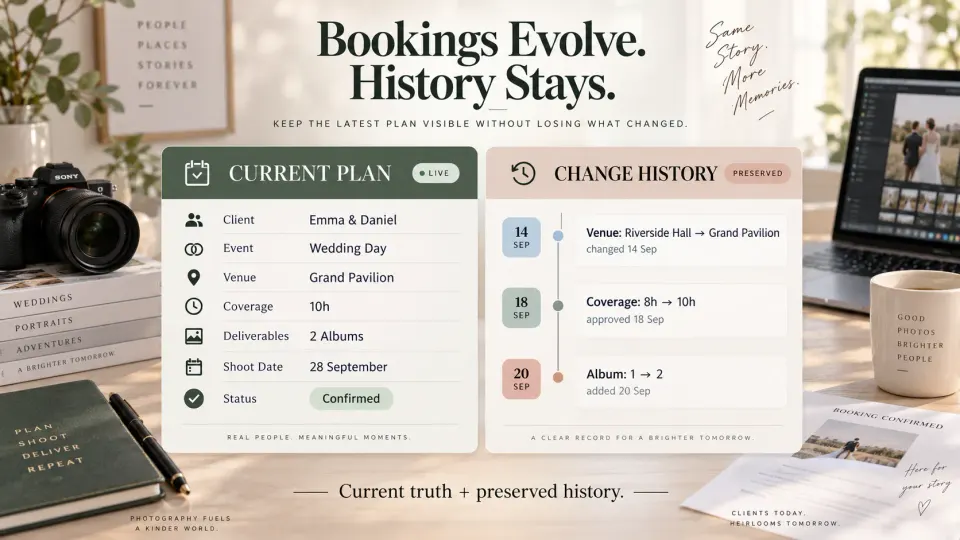
This is where a photography CRM workflow needs both a current state and a history.
The current state answers:
Where are we shooting now?
The history answers:
What changed, when, and why?
Both matter.
Stop Asking the Client for Information the Studio Already Has
There is one final test we use when thinking about photography client data: should the client reasonably expect the studio to know this already?
If they provided their phone number during the enquiry, do not make them type it again simply because a booking form lives somewhere else. If they already approved four events in the quotation, do not ask them to list those four events from scratch during onboarding. If their consultation established the preferred coverage style, preserve that context for the photographer who will actually shoot the job.
Ask again when confirmation has a purpose.
“Is the reception still at Riverside Hall?” is useful because venues change.
“What is your reception venue?” after the client has already told the studio three times is not good onboarding.
Our broader guide to the photography client onboarding workflow covers everything that happens around the booking, payments, planning and shoot preparation. The narrower point here is the handoff underneath that workflow: the same client information should become progressively more reliable as it moves from enquiry to consultation, quotation and booking.
That is how GoPickle approaches connected photography operations. Lead Management captures the opportunity, the quotation defines what the client is agreeing to, and Booking Management turns the approved information into the working record for the studio.
The goal is not to collect less information.
It is to stop collecting the same information again because the previous stage failed to pass it forward.