GoPickle Launches a Free Photography Pricing Calculator for Photographers Worldwide
Use GoPickle’s free Photography Pricing Calculator to estimate what to charge for weddings, events, portraits, product and commercial photography based on location, coverage, crew and deliverables.


Not sure what to charge for a photography assignment?
GoPickle’s free Photography Pricing Calculator helps photographers worldwide build a practical quote range from the actual shoot requirement, including location, coverage, services, crew and deliverables.
A client asks for a price.
Maybe it is a three-hour engagement shoot in California. Maybe it is a two-day wedding in London with separate photography and video teams. Maybe a company in Singapore wants 80 employee headshots. Maybe a brand in Dubai needs product photographs for its website and advertising.
The question sounds simple:
“How much will you charge?”
The answer usually is not.
The hours spent shooting are only one part of the job. Location, crew, editing, video production, albums, travel, turnaround, image usage and your own position in the market can all change what makes sense to quote.
And photographers often have to arrive at that number quickly, sometimes while the prospective client is still waiting for an answer.
That is why we built the GoPickle Free Photography Pricing Calculator.
Try the Free Photography Pricing Calculator
It is built for professional photographers anywhere in the world who want a practical starting point before preparing a quotation.
No generic hourly-rate table. No requirement to complete a full business-accounting worksheet before seeing an estimate.
You describe the actual assignment. The calculator helps you work out what the job could reasonably be worth.
Why photography pricing is difficult to reduce to one rate
Photographers are often told to choose an hourly rate and multiply it by the number of hours they will shoot.
That can work for simple assignments.
It becomes unreliable very quickly once the job involves more people, more locations or more post-production.
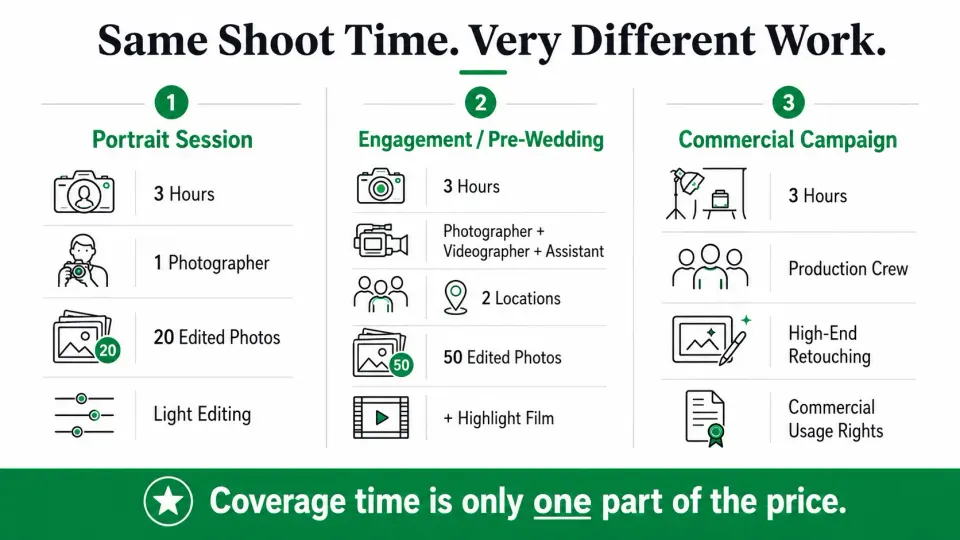
Consider two photographers who are both booked for three hours.
The first is photographing a family portrait session with one photographer and 25 edited images.
The second is covering an engagement or pre-wedding session across two locations with a photographer, cinematographer and assistant, followed by 50 edited photographs and a cinematic highlight film.
Both have three hours of camera time. They do not have three hours of the same work. The second assignment carries more people, more equipment, more coordination, more files and considerably more post-production.
Commercial photography introduces another layer. A photograph being used on a company website is not necessarily worth the same as that image being used in paid advertising, product packaging or a worldwide campaign.
This is why photographers need to understand the work behind the number instead of relying on a single universal rate.
Our guide on how to explain photography pricing without sounding defensive goes deeper into that conversation.
The Photography Pricing Calculator starts from the same principle: Price the assignment that actually exists.
What is the GoPickle Photography Pricing Calculator?
The GoPickle Photography Pricing Calculator is a free interactive tool for estimating a practical price range for a photography assignment.
You enter the details of the work, including:
- type of photography;
- shoot location;
- preferred currency;
- coverage;
- photography and video services;
- crew;
- expected deliverables;
- your current market positioning.
The calculator then returns a pricing estimate you can review before speaking to the client or preparing a formal quotation.
Instead of presenting one supposedly perfect number, the result gives you context. Depending on the assignment and available pricing information, you may see:
Recommended quote
A useful target around which to build the proposal.
Typical pricing range
A wider range that recognises the fact that photographers in the same city can occupy very different positions in the market.
Estimated lower boundary
A reference point based on the scope and available cost assumptions.
Confidence
An indication of how closely the available pricing information matches the assignment and location you entered.
Pricing drivers
The factors materially affecting the recommendation.
Assumptions
Anything the calculator has assumed because you did not provide the information directly.
The intention is not to make pricing decisions for you. It is to give you a more useful place to start.
Who is the free Photography Pricing Calculator for?
The tool is designed for photographers who sell photography services professionally. That includes solo photographers, freelancers, small studios and larger photography teams working in any market.
It can help with assignments such as:
Wedding photography
Estimate pricing around coverage hours or days, photography and video services, crew, albums, films and other deliverables.
Engagement and pre-wedding photography
Account for location count, photographers, cinematographers, assistants, edited images and video deliverables.
Event photography
Build an estimate around event duration, team size, venue requirements and expected delivery.
Portrait and family photography
Price shorter sessions while still accounting for editing, retouching and final-image quantity.
Corporate photography
Estimate assignments such as company events, executive portraits, employee headshots and workplace branding photographs.
Product photography
Consider the number of products, images per product, setup requirements and retouching.
Commercial photography
Build an assignment estimate while accounting for production requirements and, where relevant, image usage and licensing.
For commercial work in particular, production cost is only one part of the discussion. Our guide to usage rights, licensing and buyouts in commercial photography quotes explains why media, territory, duration and exclusivity can change the value of an assignment even when the shoot itself stays the same.
How the Photography Pricing Calculator works
We wanted the calculator to follow the way photographers normally receive an enquiry. You are not asked to become an accountant before you can estimate the job. You start with the assignment.
1. Choose the photography assignment
Select the type of work you are pricing.
For example:
- Wedding
- Engagement / Pre-Wedding
- Portrait
- Event
- Corporate
- Product
- Commercial
Different photography categories involve different production and post-production patterns, so the calculator does not treat every job as the same hourly service.
2. Add the shoot location and currency
Photography pricing does not exist in a vacuum.
A photographer working in New York, Toronto, London, Dubai, Singapore, Sydney, Berlin or Bengaluru can face very different:
- client expectations;
- crew rates;
- production costs;
- market pricing;
- business expenses.
That is why location is part of the estimate.
You can also choose the currency in which you want to view the result.
For example:
- USD
- EUR
- GBP
- CAD
- AUD
- SGD
- AED
- INR
Location provides market context. It does not decide what your work is worth. Your portfolio, reputation, demand and client segment still matter.
3. Describe the coverage
The amount of work matters.
Depending on the assignment, that can include:
- number of shoot days;
- coverage hours;
- number of events or functions;
- number of locations;
- number of employees for corporate headshots;
- number of products or SKUs for product photography.
A two-hour portrait session and a twelve-hour wedding should not begin from the same production assumption.
Neither should a one-location engagement shoot and one requiring the team to move through several locations during the same day.
4. Add the services you are providing
The calculator separates services from the final deliverables.
That distinction matters.
For example, a wedding assignment might include:
- photography;
- cinematic video;
- documentary video;
- drone coverage.
Those services determine the production work being provided. The crew required to produce them is handled separately.
5. Add the crew
A solo assignment has a different production structure from one involving a team.
You can specify crew such as:
- photographer;
- second photographer;
- videographer;
- cinematographer;
- assistant;
- drone operator;
- specialist production roles.
Where you do not know the exact crew cost, the calculator can work from market assumptions.
If you know what you pay your team or freelancers, you can use those figures later to refine the estimate.
6. Add what the client will receive
Deliverables affect the work long after the shoot has finished.
Examples include:
- edited photographs;
- detailed retouching;
- RAW files;
- highlight films;
- cinematic films;
- social media reels;
- albums;
- prints;
- other physical products.
Fifty edited photographs are not the same post-production commitment as 800. A three-minute highlight film is not the same editing job as simply handing over unedited footage. The calculator takes those differences into account.
7. Select your current market position
Years of experience alone do not determine photography pricing.
A photographer with five years of professional work and a strong premium brand can operate in a very different part of the market from another photographer with the same number of years.
The calculator therefore considers how you currently position your work.
Building
You are still developing your paid portfolio, client base or market position.
Established
You have a developed portfolio and regular paid work.
Premium
Your brand, work and demand typically place you above the average local market.
Luxury / Specialist
Your work serves a highly differentiated, high-end or specialised segment.
The purpose is not to assign a label to your talent. It is to avoid pretending that every photographer in the same city should charge exactly the same amount.
What happens after you click Calculate Price?
You receive the estimate along with the context behind it.
Imagine this assignment:
Engagement / pre-wedding photography
New York
3 hours
2 locations
Services:
Photography + Cinematic Video
Crew:
1 photographer
1 videographer
1 assistant
Deliverables:
50 edited photographs
RAW files
3-minute highlight film
Positioning:
Established
The calculator does not simply see:
3 hours × hourly rate.
It also considers the crew required, the movement between locations, the photographic output and the video post-production.
A result could therefore look something like:
Recommended quote: $2,800
Typical range: $2,400–$3,300
The actual output will depend on the assignment details, location, benchmark coverage and your selected position in the market.
More importantly, the calculator can explain why the estimate sits where it does. That matters almost as much as the number.
If you cannot explain to yourself why a quote is $2,800, it becomes much harder to explain the same price confidently when a client asks what is included.
Why does the calculator give a range instead of one exact photography price?
Because photography is not a commodity.
There is no single official price for:
“three hours of wedding photography.”
Two photographers in the same city can charge very different amounts and both have healthy businesses.
One may primarily serve budget-conscious clients.
Another may have stronger demand, a highly distinctive portfolio and a premium client experience.
Another may specialise in luxury weddings.
Another may operate an efficient high-volume studio.
A calculator that tells all four photographers:
The correct price is exactly $2,743
would create the impression of accuracy without having it.
A range is more useful. It gives you context while leaving the final commercial decision with you.
What the calculator is not
The Photography Pricing Calculator is not intended to become an industry rate card.
It does not tell photographers:
“This is what you must charge.”
It also does not mean every client will accept the suggested price.
Pricing and selling are different problems.
The tool helps answer:
What does this assignment reasonably look like from a pricing point of view?
You still decide:
- where within the range you want to sit;
- whether the client fits your business;
- how much margin you need;
- whether you want to alter the scope;
- what you finally put into the quotation.
If you already know your direct costs, you can use those details to make the recommendation more specific to your business instead of relying only on market assumptions.
Why location matters but should not control your pricing
Searching for photography rates online often produces national averages. Those averages can be useful for broad context and almost useless for an actual enquiry.
A photographer serving a major commercial market may face different crew rates and client expectations from someone operating in a smaller city.
Wedding spending also varies significantly by market.
The same is true across countries.
Simply converting:
$2,000 into another currency
does not automatically produce the right local photography price.
Currency conversion and market pricing are different things.
That is why GoPickle treats location as a pricing input instead of applying one universal photography rate worldwide. The calculator is designed for photographers across markets, not for one country or one pricing system.
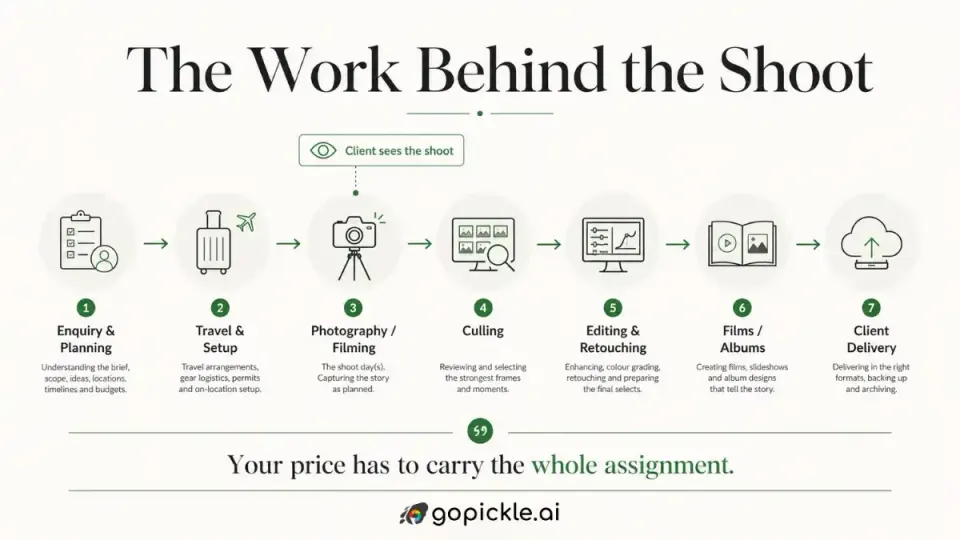
Your shoot is not the whole job
One of the easiest ways to underprice photography is to count only camera time.
A client may book you for four hours.
Your business may carry:
- enquiry discussions;
- planning;
- travel;
- equipment preparation;
- setup;
- four hours of photography;
- backups;
- culling;
- editing;
- retouching;
- uploading;
- delivery;
- revisions;
- album or print work;
- follow-up.
Video introduces its own post-production workload. Commercial projects can add production coordination and licensing. That hidden work is one reason photography pricing becomes difficult to judge from another photographer's rate card.
It is also why we recommend thinking about the complete requirement instead of copying somebody else's package.
Our article on photography packages versus custom quotes explains when a reusable package works and when a custom quotation makes more sense.
When is the calculator particularly useful?
There are several moments where it can help.
When a new enquiry arrives
A prospective client asks:
“What do you charge for this?”
Instead of guessing immediately, structure the requirement and see how the assignment prices.
When working in a different city or country
Perhaps you usually work locally and receive a destination enquiry. Or you have recently moved into a new photography market. The calculator can provide useful market context before you prepare the proposal.
When entering a new photography specialty
Maybe you normally photograph weddings but have received a corporate assignment. Or you usually shoot portraits and have been asked to quote a product campaign.
A structured estimate helps you think through costs and scope you may not deal with every week.
When the scope has grown
The client originally asked for:
Photography only. A few messages later the requirement includes: Photography + video + drone + album.
If the price has barely changed while the scope has grown substantially, it is worth recalculating.
When you are unsure whether your rate is too low
Many photographers are comfortable pricing the assignments they handle every week. The uncertainty often appears around unusual jobs.
A structured estimate gives you something more useful to evaluate than:
“This number feels about right.”
When your studio has more than one person quoting clients
If enquiries are handled by a studio manager, partner or salesperson, a shared pricing framework can help make quoting more consistent.
It gives the team a common way to discuss why a price looks the way it does.
Free means you can actually use it before deciding whether GoPickle is for you
You do not need to become a GoPickle customer before seeing your first estimate. The free tool is designed to be useful on its own.
Open the Free Photography Pricing Calculator
Enter the assignment.
Review the range.
Change the inputs.
See what happens when you add another photographer, increase coverage or include a film. The usefulness comes from being able to test the real decisions involved in the quote.
Once you know what to charge, the next job is explaining it to the client
This is where pricing leaves the calculator and enters the actual sales process.
Suppose your result suggests a quote around:
$2,800
Sending a message that says:
“Price: $2,800”
does not explain very much.
The client still needs to understand:
- what events are covered;
- how many hours;
- which services;
- how many crew members;
- what photographs and films they receive;
- whether an album is included;
- what the payment terms are;
- what happens if the scope changes.
That is why GoPickle's pricing tool stops before becoming a free quotation system.
Once you have decided what you want to charge, you can move the same requirement into GoPickle Photography Quotations and build the proposal around the actual assignment.
GoPickle Quotations brings together the portfolio, scope, packages, deliverables, pricing, payment terms and client approval instead of leaving the number disconnected from the value behind it.
We have also written a practical guide on how GoPickle helps photographers send better price estimates if you want to see how an early estimate can develop into a structured client quotation.
Pricing is one point in a much longer client journey
The quotation is not the end either.
A typical photography client journey might be:
Enquiry → Requirement → Price → Quotation → Follow-up → Booking → Invoice → Crew → Shoot → Delivery
GoPickle is built to keep those stages connected rather than making the studio rebuild the same client information across spreadsheets, PDFs and chat threads.
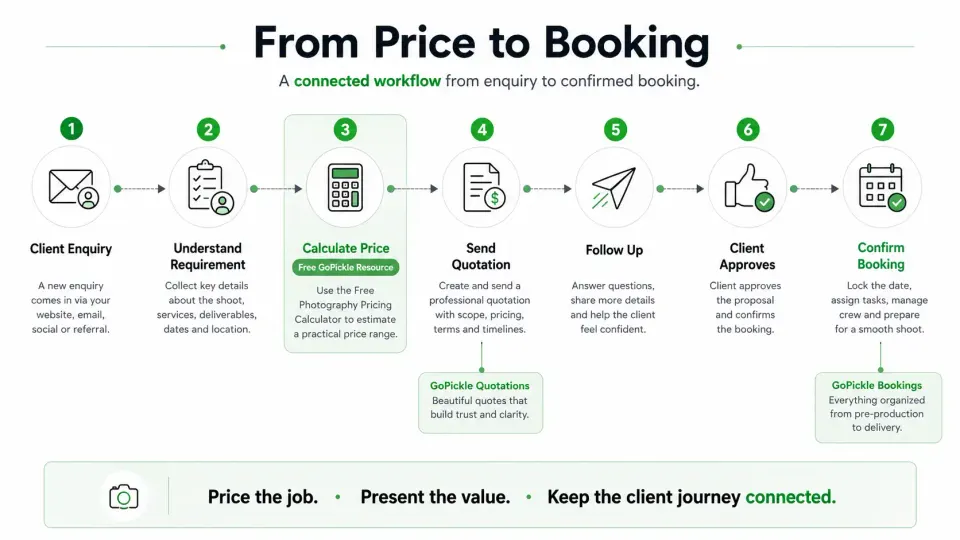
If you are still managing enquiries mainly through WhatsApp, Instagram, email or spreadsheets, GoPickle Lead Management gives each requirement an owner, stage and next action.
When the quotation is approved, GoPickle Booking Management keeps the events, services, crew, deliverables and financial information around the confirmed job.
The Pricing Calculator is intentionally earlier than all of this.
It starts with one immediate question:
What should I charge for this assignment?
Built for photographers worldwide
GoPickle is not designed around one country's photography market. The Photography Pricing Calculator is built to work with photographers serving clients across different cities, countries and currencies.
A wedding photographer in Canada, an event photographer in the UAE, a product photographer in Germany and a portrait photographer in Australia may all structure their businesses differently.
The calculator uses location as context while allowing photographers to work in the currency relevant to their assignment.
That makes it useful not only for local work, but also for:
- destination weddings;
- international corporate assignments;
- photographers relocating to another market;
- studios serving clients across multiple countries;
- remote commercial production;
- photographers quoting clients in a different currency.
The goal is not to flatten global photography pricing into one international rate.
It is to recognise that the same assignment can sit in a different commercial context depending on where it is being produced and sold.
A better photography quote begins with a better understanding of the job
Photographers do not need another universal rate card telling them what their work is worth.
They need better context.
A practical quote should make sense against:
- the actual assignment;
- the local market;
- the amount of coverage;
- the team required;
- the work delivered;
- the post-production involved;
- the photographer's own position in the market.
That is the job of the GoPickle Photography Pricing Calculator.
Use the estimate as a reference.
Challenge the assumptions.
Add your actual costs when you know them.
Then decide what you want to quote.
Try the GoPickle Free Photography Pricing Calculator
And when the number is ready to go to the client, turn the same scope into a professional GoPickle quotation instead of rebuilding it from scratch.
Frequently Asked Questions
Is the GoPickle Photography Pricing Calculator free?
Yes. The calculator is designed to let photographers generate an initial pricing estimate without paying for the tool.
Can photographers anywhere in the world use it?
Yes. The calculator is designed for international use and supports location-aware pricing context and multiple currencies.
Do I need a GoPickle account to calculate a photography price?
You can use the free calculator for the initial estimate without signing up. Creating an account becomes useful when you want to save the estimate or carry the scope into GoPickle, such as creating a quotation.
How much should I charge for photography?
There is no single rate that works for every photographer. A useful photography price should consider the assignment type, location, coverage, services, crew, deliverables, post-production, photographer positioning and any direct costs involved.
Can I use the calculator for wedding photography pricing?
Yes. Wedding assignments can include coverage duration, multiple events or locations, photography, cinematography, crew, edited photographs, films and albums.
Can I use it for engagement or pre-wedding photography?
Yes. You can build the estimate around coverage, number of locations, photography and video services, crew and final deliverables.
Can I use it as an event photography pricing calculator?
Yes. Event photography can be priced around coverage, location, crew, production requirements and expected outputs rather than only an hourly rate.
Does the calculator work for portrait photography?
Yes. Portrait and family sessions can be estimated using coverage time, final-image quantities, retouching requirements, location and photographer positioning.
Can product and commercial photographers use the calculator?
Yes. Product and commercial assignments can require different inputs, including product quantity, retouching complexity, usage rights, territory, duration and exclusivity.
Does location affect photography pricing?
Yes. Production costs, crew rates, client budgets and market conditions differ significantly across cities and countries. The calculator uses location as one of the pricing inputs.
Does the calculator tell me exactly what I must charge?
No. The output is a pricing recommendation and range. Your final quote remains your decision.
Can my actual photography business costs be included?
Yes. The estimate can be refined with direct costs such as crew, travel, accommodation, rentals, albums, editing and other production expenses where those details are available.
What should I do after calculating the price?
Once the scope and price make sense, create a structured client quotation. GoPickle Quotations can carry the assignment forward into a proposal and, if approved, into the wider booking workflow.