High-Volume Event Photo Delivery: Organize Thousands of Images Without One Giant Gallery
Learn how to deliver thousands of event photos using segmented galleries, search, permissions, notifications and retention without one giant gallery.

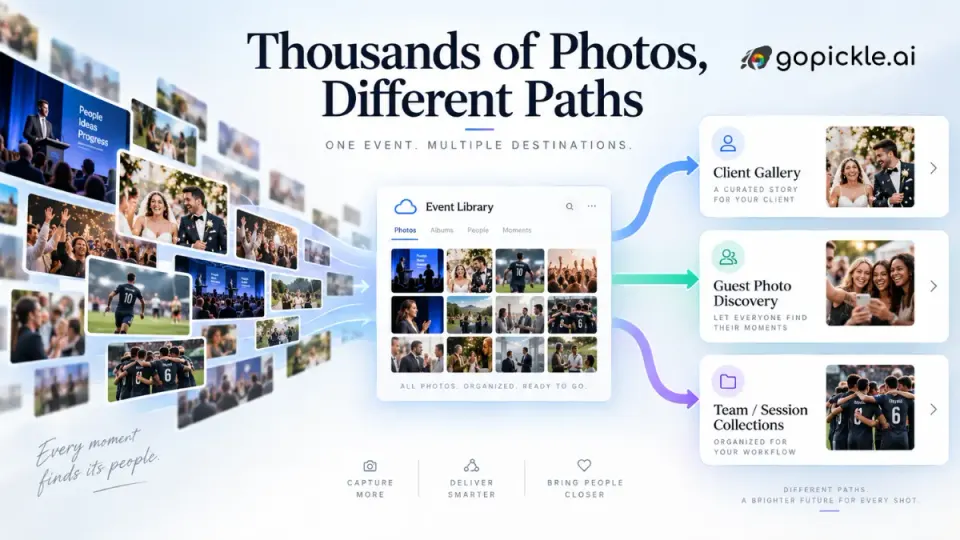
High-volume event photo delivery usually becomes difficult after the photographs are ready, not while they are being captured. A conference, multi-day wedding, school function, sports tournament, festival or corporate gathering can produce thousands of usable images across different people, teams, stages and sessions. Uploading all of them into one large event photo gallery may be technically possible, but that does not automatically create a good delivery experience.
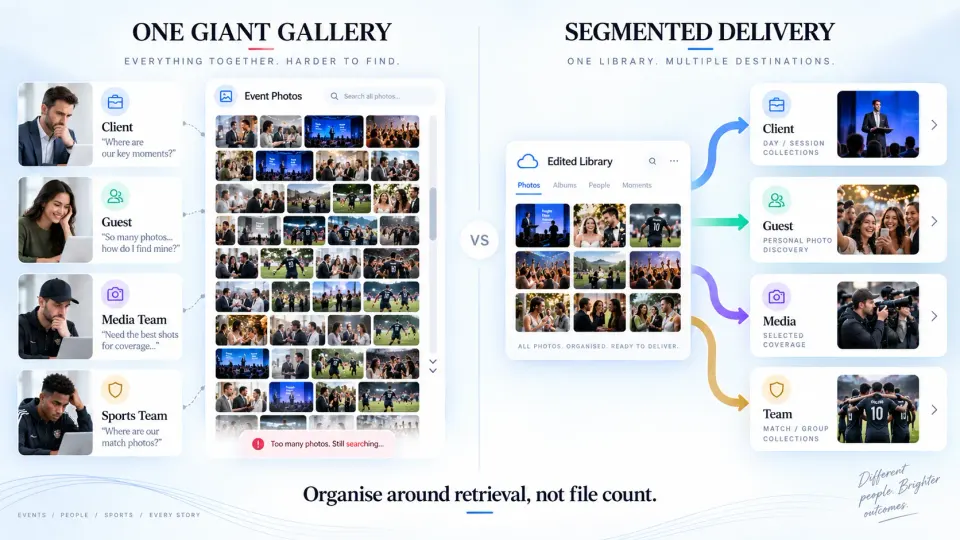
The real question is not, “How many photos can this gallery hold?” It is, “How will each person find the photographs they actually came for?” A paying client may want a complete record of the event. A guest may only want the six photographs they appear in. A marketing team may need sponsor branding and keynote images. A sports team may want one match or one squad. If everyone receives the same undifferentiated gallery, the studio has moved the sorting work from its own team to the viewer.
At GoPickle, we think the best event photo delivery workflow starts with the audience and retrieval method before the upload begins. The structure should help people reach the right photographs with fewer decisions while preserving a complete delivery for the client.
Define the delivery audience before you build the gallery
A large event rarely has only one audience. The organiser, couple, brand or institution may need curated coverage, including wide shots, details, speakers, branding, group photographs and candids. Attendees usually need only the photographs relevant to them. A communications team may need another subset for press or social use, while performers, speakers, teams or departments may need their own collections.
This distinction also determines the delivery experience. Client Galleries make sense for the final curated handoff to the paying client, especially when the work should be organised into meaningful collections and presented as one complete event story. For attendee-scale sharing, AI event photo sharing can be more appropriate because guests should not have to understand the photographer’s folder structure before finding a photograph.
Before exporting, write down the delivery audiences and what each one is trying to retrieve. That prevents the studio from building a gallery around its internal file system instead of the viewer’s task.
Choose a segmentation strategy that matches how people remember the event
There is no universal number of photographs at which a gallery becomes “too large.” A well-structured gallery containing several thousand images can be easier to use than a poorly organised gallery containing a few hundred. The problem is not only volume. It is the amount of searching, scrolling and interpretation required from the viewer.
For most high-volume photo delivery, segmentation works best when it follows day, session, subject, team or collection. A multi-day wedding might be organised by function. A conference can be separated by day, stage and session. A sports tournament may be easier to browse by division, team and match. A school event could be split by class, performance or activity. A corporate awards night might use arrivals, networking, stage, award recipients and group photographs.
Use labels the viewer can predict. If an attendee remembers “Day 2 / Main Stage / Product Keynote,” those labels are useful. If the client thinks in terms of “Ceremony / Portraits / Reception,” use that language instead of internal folder codes. Avoid dozens of tiny collections simply because the editing folders already exist. Segmentation should reduce decisions, not create another menu people have to decode.
Use naming and collection structure that survives a large delivery
Naming becomes more important as the number of collections increases. Use short, human-readable labels and keep the sequence consistent. A conference might use Day 1 - Registration, Day 1 - Main Stage, Day 1 - Breakouts, then repeat the pattern for Day 2. A tournament might use U14 - Group Stage - Match 01 or Team Name - Match vs Team Name.
Internally, filenames can carry more production detail, but the public gallery should not expose editing labels such as FINAL_v2, Export_New, Selects_Updated or camera-card folder names. Those labels mean something to the studio because the team watched files move through post-production; they mean little to the client.
Keep gallery terminology aligned with the event schedule and client language as well. If the organiser calls a session “Leadership Forum,” do not rename it “Corporate Stage 2” in the gallery. Consistent naming reduces support questions and makes later archive retrieval easier.
Decide where people should browse and where they should search
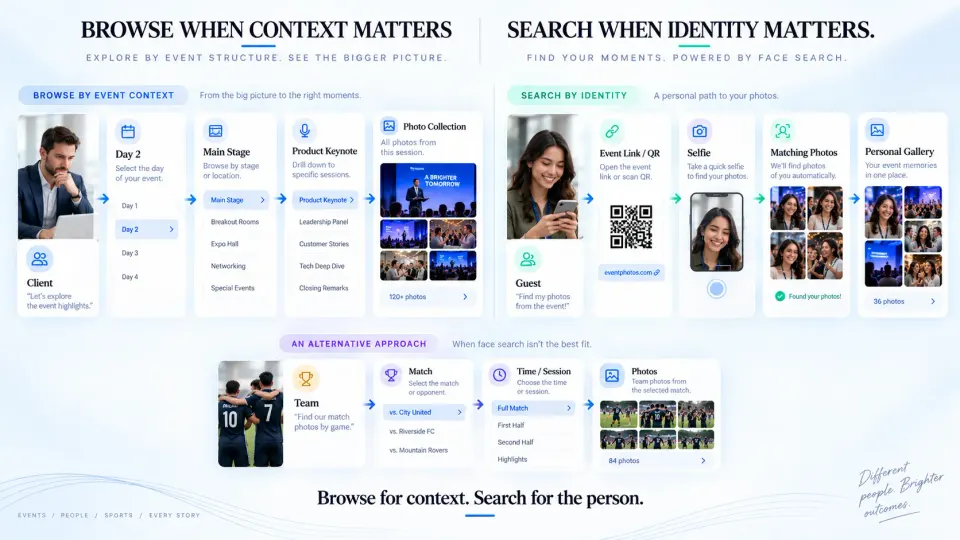
Browse and search solve different problems. Browsing works when the viewer understands the event structure and wants to explore it. Search works when the viewer knows what they want but not where the photographer placed it.
The paying client often benefits from browsing because they may want to review coverage by session, select photographs or download a complete collection. An attendee at a large wedding, marathon or conference usually has a different goal, “Show me the photographs I am in.” Asking that person to browse thousands of images is manual filtering.
A searchable event photo sharing workflow can remove much of that effort. Face-based discovery is useful when photographs clearly show the attendee’s face. For events where faces are obscured, helmets are common, or people are photographed mostly from a distance, retrieval may need additional structure such as team, race, session, stage or time-based collections. Search should complement sensible organisation, not become a reason to publish an uncurated dump.
A strong workflow can therefore offer two views of the same event: a structured large event photo gallery for the client and a personalised discovery path for attendees. For the client side of large deliveries, our guide on how to share large photo albums with clients without confusion covers gallery presentation, downloads and avoiding scattered delivery links.
Set permissions based on who should see what
Decide before publishing whether a collection is intended for the client only, invited attendees, a specific team, internal staff, press or the general public. Events can contain children, backstage areas, VIP guests, employee-only sessions or photographs that were captured as part of the job but were never intended for broad distribution. A single public link may be convenient, but convenience is not an access policy.
For private client delivery, use appropriate gallery controls and give the client clear instructions about who may receive the link. Our guide to client album privacy and access covers this in more detail. If you use face recognition or selfie-based matching, treat that as a separate privacy decision from ordinary gallery browsing. Requirements vary by country and region, so the studio and organiser should understand the rules that apply, explain the process clearly, collect any required consent and define what happens to registration and matching data after the event.
The practical principle is simple: someone who needs one photograph should not automatically receive access to everything captured at the event.
Make delivery notifications specific enough to be useful
A message saying “Your gallery is ready” can be too vague for a complex event. It does not tell the recipient whether the full event has been delivered, whether only Day 1 is available, whether more edited images will be added, or whether the link is intended for browsing or personal photo discovery.
Write notifications around the action the recipient should take. A client might be told that the complete two-day conference gallery is ready and organised by day and session. Registered attendees might instead be told that their event photographs are available and that they can use the event link to find their own images. If delivery is phased, say so clearly and keep the destination consistent.
With GoPickle AI Guest Galleries, guests can access an event through a link or QR code and use selfie-based photo discovery. In GoPickle’s registration-first workflow, photographers can also let guests register at the event and notify them by WhatsApp or email after the edited photographs are ready. That separates guest interest from the pressure to publish every final image live from the venue.
Separate gallery retention from your studio archive
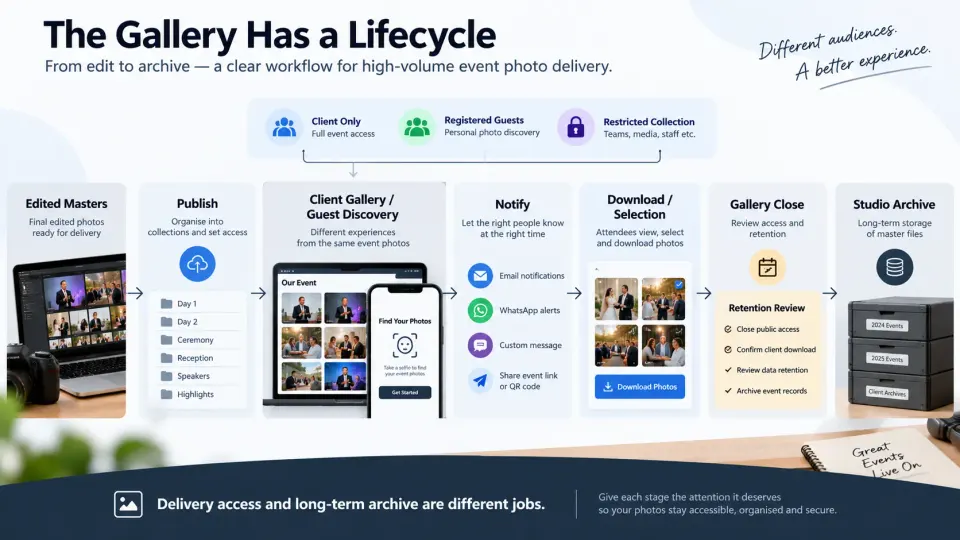
A delivery gallery is not the same thing as a permanent archive. The gallery exists to help a client or attendee access finished work. Your archive exists to protect the studio’s master files, fulfil contractual obligations and support future retrieval.
Before delivery, decide how long the published gallery will remain available, whether downloads have a deadline, whether the client has been asked to keep their own copy, and what the studio will retain after the gallery closes. There is no single retention period that is correct for every photographer, event or jurisdiction. Your contract, client expectations, storage policy and applicable privacy rules all matter.
For AI-assisted guest discovery, review retention separately for the delivered photographs and any personal or biometric information used for matching. Data-protection guidance commonly follows the principle that personal information should not be kept longer than necessary for its purpose. Whatever platform you use, the studio should be able to explain the lifecycle rather than leaving old event registrations and public links active indefinitely.
The cleanest workflow has three stages: production files while the job is being edited, a published gallery designed for the intended audience, and a controlled studio archive after delivery is complete.
High-volume event photo delivery works best when the studio stops thinking of the job as “one event, one link, one gallery.” One event can have a complete client delivery, segmented collections and a separate attendee discovery experience built around the same finished photographs. The goal is not to create more galleries for the sake of organisation. It is to give each viewer the shortest sensible path to the images they need.
If your studio regularly needs to deliver thousands of photos, GoPickle’s photo delivery software for photographers can support both sides of that workflow: structured Client Galleries for the final client handoff and AI Guest Galleries for large-scale guest discovery. For studios managing the entire event around that delivery, our event photography workflow also connects the operational work before and after the shoot. Design the delivery path before you upload the first image.