How to Share Wedding Photos Professionally Using GoPickle.ai
Learn how photographers can share wedding photos professionally using GoPickle client galleries, downloads, access control, selection, and follow-ups.


To share wedding photos professionally, photographers should move from casual file sharing to a structured client gallery.
Instead of sending WhatsApp images, Google Drive folders, hard disk copies, or random download links, a wedding studio should use a branded gallery where clients can view, download, select, and share photos with clear access control.
GoPickle.ai helps photographers create this kind of organised wedding photo delivery workflow through client galleries, photo selection, access options, downloads, and follow-up clarity.
Why Wedding Photo Delivery Needs More Care
Wedding photography does not end after the shoot.
After the event, clients wait for previews, edited photos, full albums, family access, downloads, and sometimes guest photo sharing. This is the stage where many studios either look very professional or very scattered.
A couple may love the photos, but if the delivery is confusing, the experience becomes weak.
They may ask:
“Where is the full gallery?”
“Can my parents download?”
“Which folder has edited photos?”
“How do we select album images?”
“Can guests find their own photos?”
“Can you resend the link?”
These follow-ups usually happen because the delivery system is not clear enough.
For wedding photographers, professional photo delivery is not only about sending files. It is about making the final experience feel organised, branded, and easy for the client.
Why WhatsApp and Drive Links Create Confusion
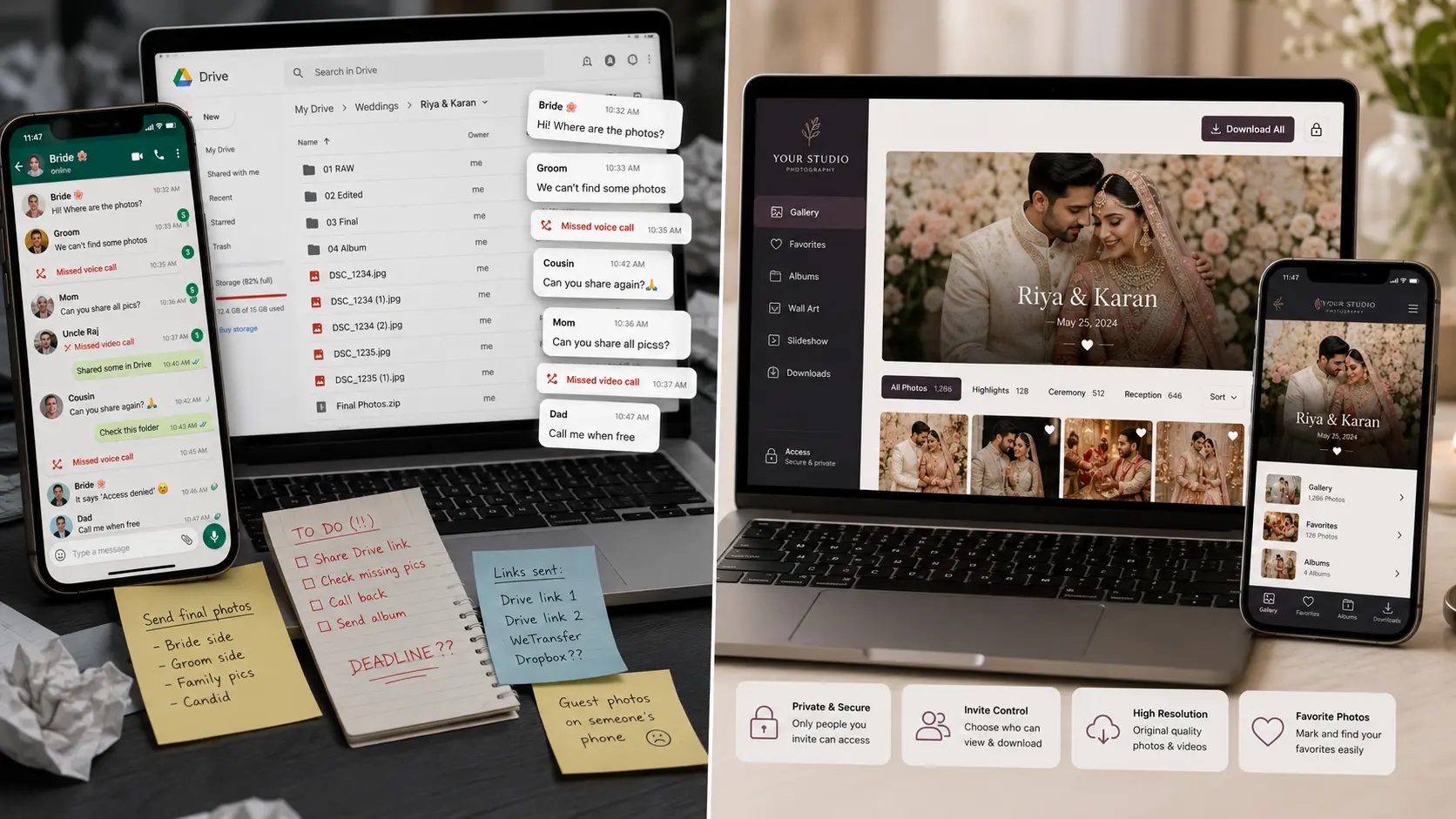
WhatsApp is useful for communication, but it is not built for wedding photo delivery.
When photographers send images or screenshots on WhatsApp, the client may lose track of what is final, what is preview, and what is only for selection. File quality can also become confusing.
Google Drive is better for storage, but it still feels like a folder system. Clients see files, folders, and download options, not a polished wedding experience.
Read our detailed comparison on photographer album delivery using GooGle Drive vs GoPickle.ai Client Albums.
In many studios, the delivery process becomes messy because of:
- Multiple Drive links
- Repeated file names
- WhatsApp screenshots for album selection
- Hard disk copy-paste requests
- Family members asking separately
- Confusion between edited and unedited folders
- No clear download or selection status
The problem is not that these tools are bad. The problem is that they are not designed as a professional wedding photo sharing workflow.
What a Professional Wedding Gallery Should Do
A professional wedding gallery should make the client feel confident from the moment they open it.
It should show the couple’s name, event title, cover image, organised sections, download options, and clear instructions.
For a wedding, the gallery can be organised by functions such as engagement, haldi, mehendi, sangeet, wedding, reception, couple portraits, family photos, and candid moments.
This makes browsing easier for the couple and their family.
A branded photo gallery also helps the studio look more premium. When the client shares the gallery with relatives or friends, the experience carries the studio’s identity, not only a folder link.
That matters because wedding galleries are often shared widely.
Every person who opens the gallery is also seeing the studio’s presentation.
A Better Wedding Photo Delivery Workflow
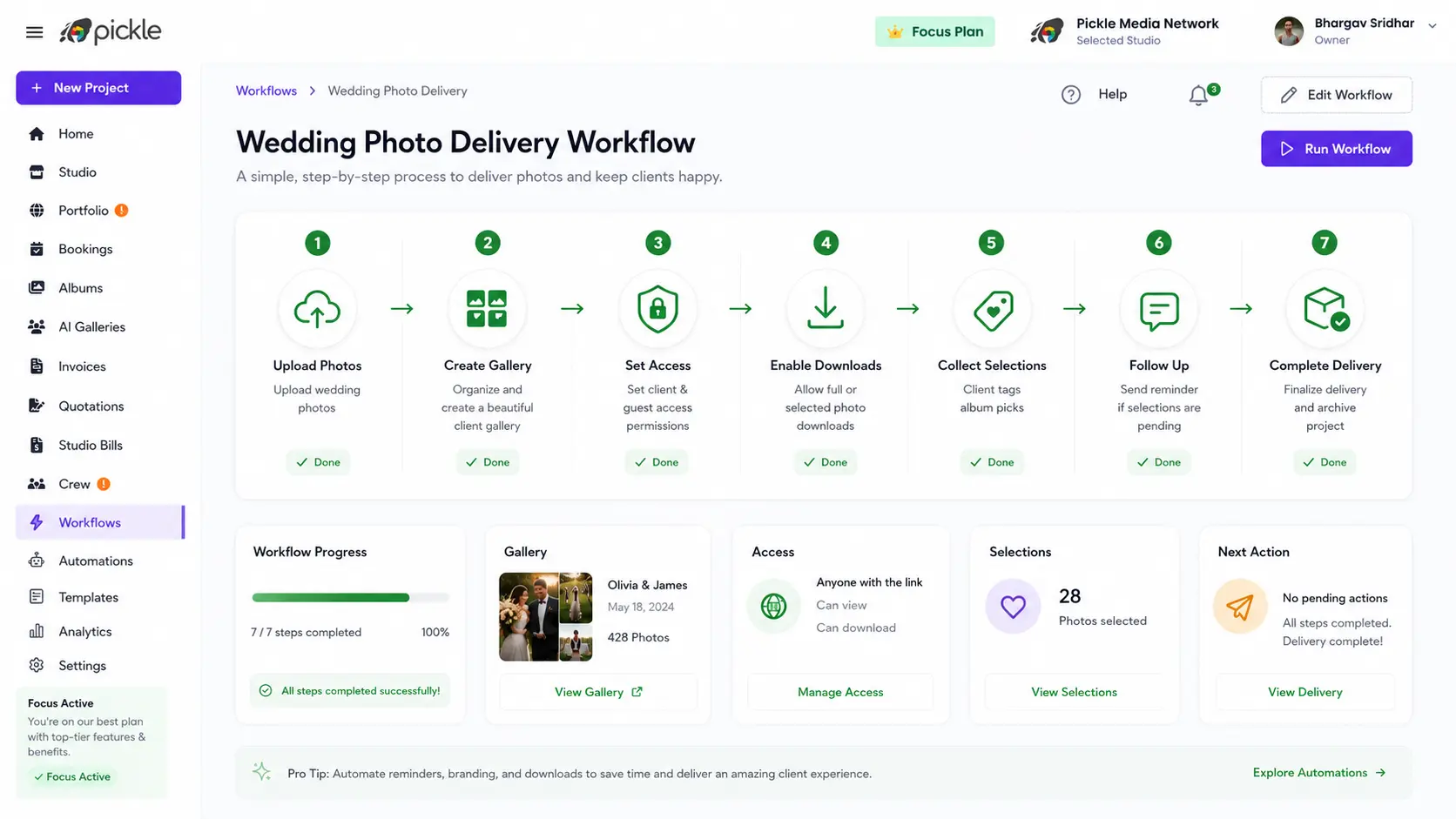
A simple GoPickle-style wedding photo delivery workflow can look like this:
- Drag & Drop: Upload the wedding photos into the client gallery.
- Collections: Organise photos by event, moment, or category.
- Branding: Add the couple name, cover image, and studio branding.
- Access Control: Set access rules for the client, family, or guests.
- Download Control: Enable downloads based on the studio’s delivery policy.
- Photo Selection: Allow clients to select or tag photos.
- Analytics: Track view, download & selection status and follow-up.
- Process: Move selected photos into album, editing, frame, or delivery workflow.
This is much cleaner than sending a folder and waiting for the client to figure it out.
Access Control Makes Sharing Safer
Wedding galleries often need multiple access levels.
The couple may need full access. Parents may need view and download access. Guests may only need limited access. Some photos may be private. Some may be allowed for sharing.
With access control, photographers can decide who can view, download, or select photos. This is useful because wedding galleries usually include personal family moments, rituals, private ceremonies, and guest photos.
Read our article on How Photographers should handle client album access & privacy.
Instead of making everything public or forwarding everything manually, the studio can give controlled access based on the client’s comfort.
This makes delivery easier without losing privacy.
Downloads Should Be Clear
A common reason clients follow up after delivery is download confusion.
They do not know whether they can download one image, selected images, or the full album. They may not know whether the files are high resolution or web-sized. Family members may also ask for download access separately.
A professional wedding gallery download setup should make this clear.
The gallery should show what can be downloaded, who can download, and whether any PIN or access permission is required.
This reduces repeated calls and messages after the gallery is shared.
Make Album Selection Easier
Album selection is one of the biggest post-wedding delays.
Clients often send screenshots, file names, cropped images, or mixed selections from different family members. The photographer then has to match each selected photo manually.
This slows down album design.
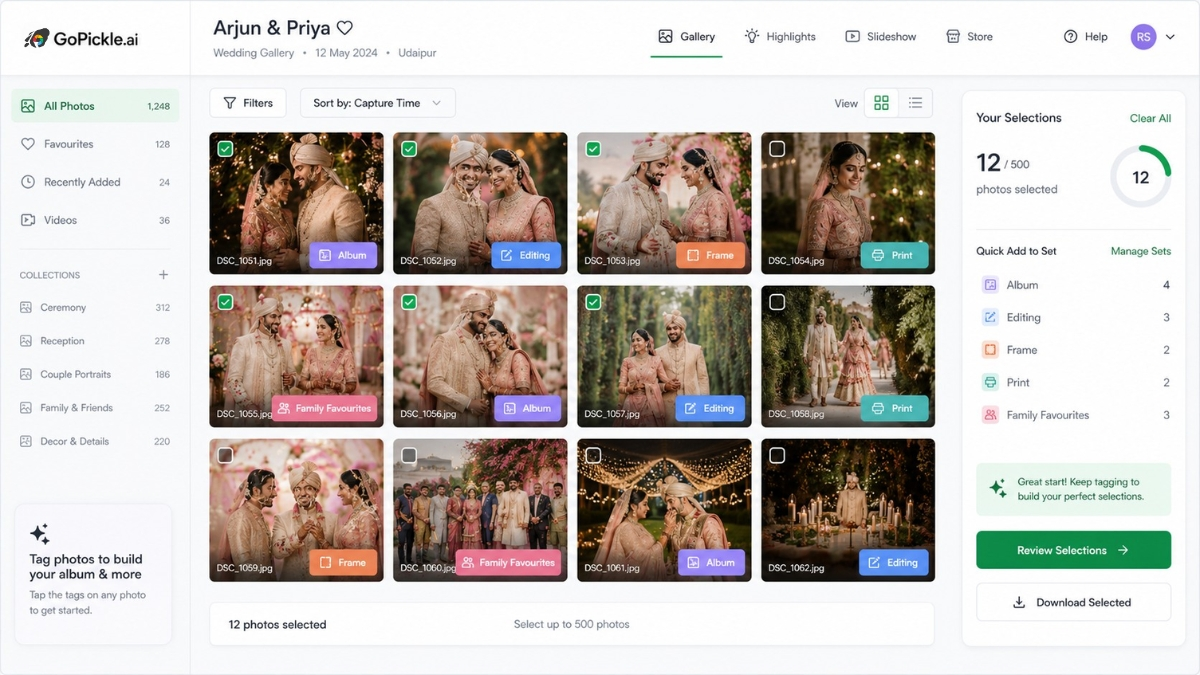
With GoPickle client galleries, clients can view images and add tags while selecting. A studio can handle tags such as album, editing, frame, print, favourites, bride selection, groom selection, or family favourites.
The photographer receives organised selections and can move faster.
Album designers get cleaner inputs. Editors understand what needs work. Clients do not need to send confusing WhatsApp screenshots.
Reduce Follow-ups After Delivery
A clear delivery page reduces client follow-ups because the client knows what to do next.
Instead of asking repeatedly, the couple can see:
How to open the gallery.
How to download photos.
How to select album images.
Who can access the gallery.
What is pending.
What happens after selection.
This is valuable for wedding studios because post-shoot work is already heavy. Sorting, editing, album design, invoice closure, guest requests, and final delivery all need attention.
A professional delivery workflow saves time for the studio and makes the client experience smoother.
Where GoPickle Helps
GoPickle.ai helps photographers share wedding photos through branded client galleries instead of depending only on WhatsApp, Drive links, hard disks, or scattered folders.
Photographers can use GoPickle to manage gallery access, downloads, photo selection, tags, album workflow, client instructions, and follow-ups.
It also connects naturally with the broader studio workflow: bookings, quotations, invoices, payments, client details, and delivery.
So when a wedding booking moves into delivery, the studio does not have to start a separate manual process.
The client journey can stay organised from enquiry to booking to gallery delivery.
What is the best way to share wedding photos with clients?
The best way is to use a branded client gallery where clients can view, download, select, and share photos with clear access control.
Is Google Drive enough for wedding photo delivery?
Google Drive can work for basic file sharing, but it does not provide the same branded experience, selection workflow, access control, or delivery clarity as a professional client gallery.
How can photographers collect wedding album selections easily?
Photographers can use a client gallery where clients select or tag photos while viewing, instead of sending screenshots or file names on WhatsApp.
Can family members access a wedding photo gallery?
Yes, if the gallery supports guest or family access. Photographers can control who can view, download, or select photos.
How does GoPickle help with wedding photo sharing?
GoPickle helps photographers share branded client galleries, manage access, enable downloads, collect photo selections, track follow-ups, and keep wedding delivery organised.
Final Takeaway
Wedding photo delivery should not feel like casual file sharing.
Clients expect a clean, organised, and professional experience after the shoot. WhatsApp messages, Drive links, hard disk copies, and screenshots may work temporarily, but they often create confusion, follow-ups, and album delays.
A branded client gallery gives photographers a better way to present photos, control access, manage downloads, collect selections, and reduce repeated questions.
If your studio wants to share wedding photos professionally using client galleries, GoPickle.ai can help move the workflow from scattered file sharing to organised client delivery.