Multi-Event Wedding Photography Booking Workflow: One Client, Many Functions, Locations and Crews
Learn how to manage a multi-event wedding photography booking with separate functions, locations, schedules, services, crews, payments and final delivery under one client booking.

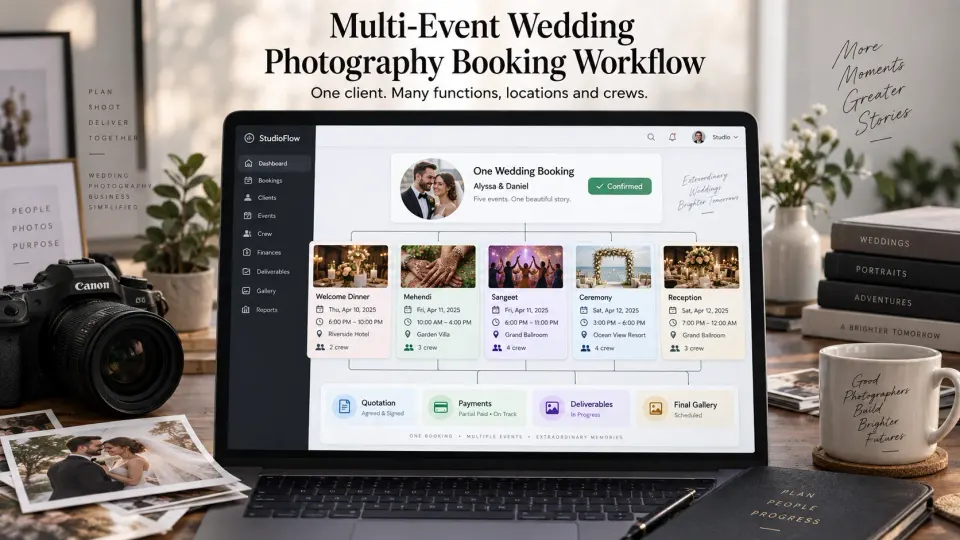
A four-day wedding should not become four unrelated bookings. It should not become one oversized calendar entry either.
That distinction matters once a wedding includes a welcome event on Friday, a ceremony at another venue on Saturday morning, a reception that evening, and a farewell gathering on Sunday. The client relationship is one. The quotation and overall commercial commitment are usually one. Yet the photography operation contains several different events, each with its own timing, location, coverage requirement and crew.
The same challenge appears across many kinds of celebrations. A South Asian wedding might include Mehendi, Haldi, Sangeet, ceremony and reception. A destination wedding may include a welcome dinner, ceremony, after-party and brunch. Other celebrations may combine a traditional ceremony, civil or religious ceremony, tea ceremony, family events or receptions across different days and locations.
A strong multi event wedding photography booking workflow keeps those functions together without flattening their differences.
At GoPickle, we think of this as a simple hierarchy: one commercial booking, many operational events. The booking carries the complete client commitment. Each event carries what the team needs to execute that part of the celebration.
Why one calendar entry is not enough
A calendar is excellent at answering one question: when is something happening?
It is much weaker at answering everything else a wedding photography studio needs to know.
Consider a calendar entry labelled “Alex & Sam Wedding, 12–15 October.” It tells the studio those dates are occupied, but it does not tell the Saturday crew that the welcome dinner is at one hotel while the ceremony is at a different property. It does not explain that Friday needs one photographer, Saturday morning needs photography and cinematography teams, and Saturday evening also requires a second shooter. It cannot reliably show which deliverables belong to each function, where the crew should report, or which event has changed since the original quotation.
The opposite approach is also problematic. Creating a completely independent booking for the welcome dinner, ceremony and reception duplicates the same client relationship across several records. Payments become fragmented. Package changes are harder to reconcile. The studio may eventually have five “projects” that are commercially one wedding.
The cleaner model separates two levels:
| Booking level | Event level |
|---|---|
| Client relationship | Function or event name |
| Overall quotation and package | Date and coverage window |
| Total booking value | Venue and meeting point |
| Payment schedule | Reporting time |
| Contract and commercial changes | Services required |
| Overall deliverables | Crew and roles |
| Final delivery status | Event-specific notes |
This is the model behind GoPickle Booking Management: the booking remains the reliable parent record while individual events retain the detail required to run them.
Create one booking with separate events
Once a multi-day wedding is confirmed, build the booking around the full celebration rather than around whichever function happens first.
Suppose the client has booked:
- Thursday: welcome dinner
- Friday afternoon: Mehendi
- Friday evening: Sangeet
- Saturday morning: wedding ceremony
- Saturday evening: reception
The studio should create one wedding booking containing five event records. Each event should have a meaningful name rather than vague labels such as “Day 1” or “Day 2.” Specific names remain understandable when a freelancer joins midway through the wedding or someone is viewing the schedule months later during editing and delivery.
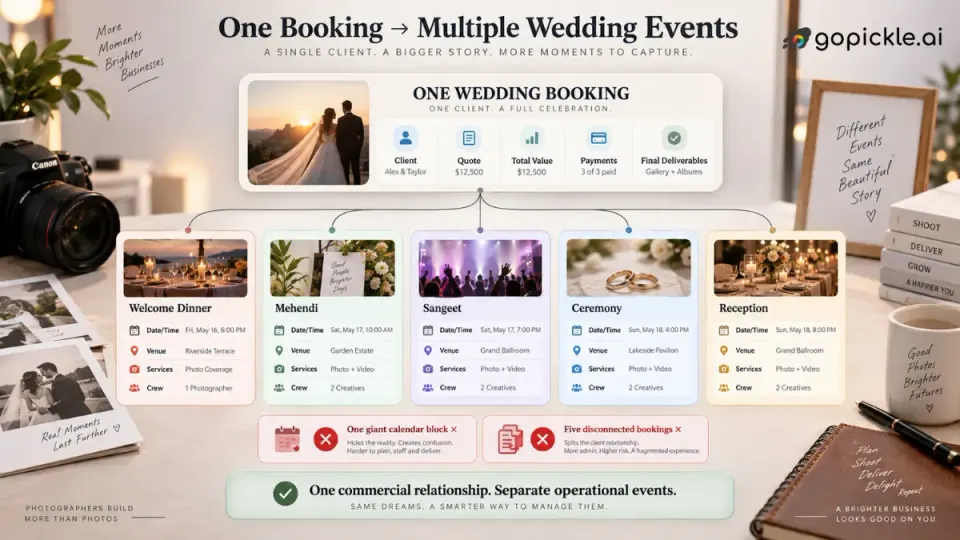
This structure also handles changes much better. If the Friday evening function moves to another venue, the studio updates that event rather than rewriting the entire wedding. If another function is added, it becomes another event within the same commercial relationship. If the reception timing changes, the ceremony schedule can remain untouched.
A wedding photography booking workflow becomes much easier to trust when the team knows there is one place to check the current version of every function.
Times, locations and travel belong to each function
Multi-day wedding photography becomes operationally difficult at the transitions.
A ceremony might end at 3:00 PM and the reception may begin at 6:00 PM, but that does not necessarily create three usable hours. The crew may need to pack equipment, move between venues, park or pass security, set up lighting, eat, change batteries and cards, and be ready before guests begin arriving.
For each event, record more than the client-facing start time. The working schedule should distinguish information such as:
Crew reporting time → Coverage start → Key moments → Coverage end → Pack-down → Travel → Next reporting time
When functions happen at different venues, record the actual venue or address against the event rather than adding several locations to one generic wedding note. Destination and cross-border weddings may also need local time-zone awareness, accommodation information, transport plans or access instructions.
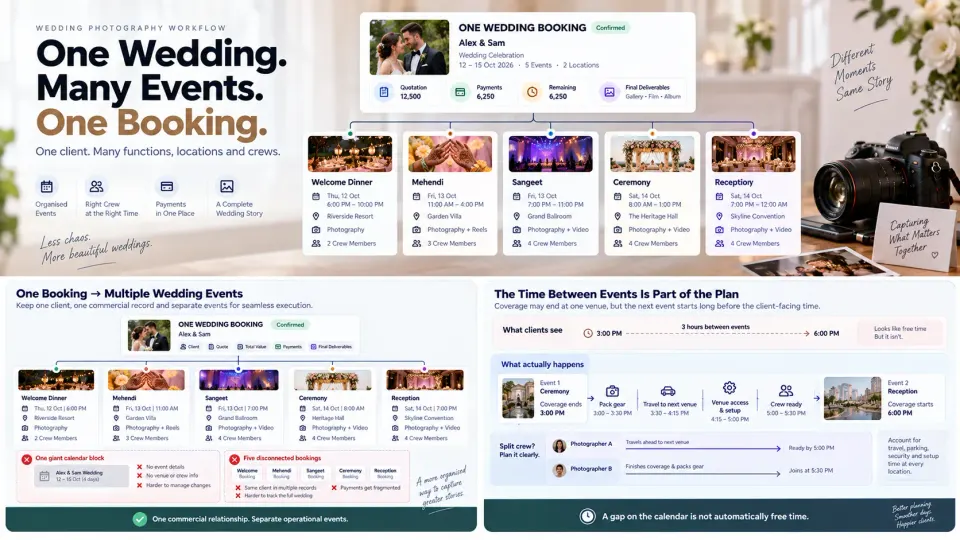
Do not assume travel time is spare time. A gap between two functions only becomes usable capacity after the studio has accounted for movement, setup and the buffer appropriate to that assignment.
The same principle applies when different teams split up. One photographer may stay with preparations while another travels ahead to the ceremony location. A video team may need earlier access for audio or lighting setup. The booking should make those movements visible instead of relying on a group chat to reconstruct the plan on shoot day.
Services and deliverables should match the event that creates them
A wedding package may be sold as one overall offer, but the services required are rarely identical at every function.
For example:
| Event | Photography services |
|---|---|
| Welcome dinner | Candid photography |
| Mehendi | Candid photography + short-form video |
| Sangeet | Photography + cinematography |
| Ceremony | Full photography + cinematography coverage |
| Reception | Photography + video + guest delivery workflow |
This event-level distinction matters when the client later asks whether something was included.
If drone coverage was approved only for the ceremony, the booking should not leave the team guessing whether it applies to the reception. If reels were promised for two functions, the editor should be able to identify those functions. If one event has photography but no video coverage, that distinction should survive from quotation through production.
Deliverables need similar clarity, although some belong to the entire booking rather than one event. A short event reel may relate specifically to the Sangeet, while a wedding film, Client Gallery or printed album may combine material from the complete celebration.
A useful workflow therefore allows the studio to answer two different questions:
What are we producing from this event?
and
What have we promised for the wedding as a whole?
Keeping that scope visible is particularly important when clients add services after confirmation.
Assign crew by role and event, not only by wedding
“Eight crew assigned” is useful at the booking level. It is not enough to run Saturday morning.
A wedding photography crew booking should identify who is needed for each function and what role that person is performing. The lead photographer might cover all four days for creative continuity while second photographers, cinematographers, assistants, drone operators or editors join only where required.
The working plan could look like this:
| Crew member | Welcome | Sangeet | Ceremony | Reception |
|---|---|---|---|---|
| Lead photographer | Lead | Lead | Lead | Lead |
| Second photographer | — | Candid | Second | Second |
| Cinematographer | — | Video lead | Video lead | Video lead |
| Assistant | — | Support | Support | Support |
| Drone operator | — | — | Drone | — |
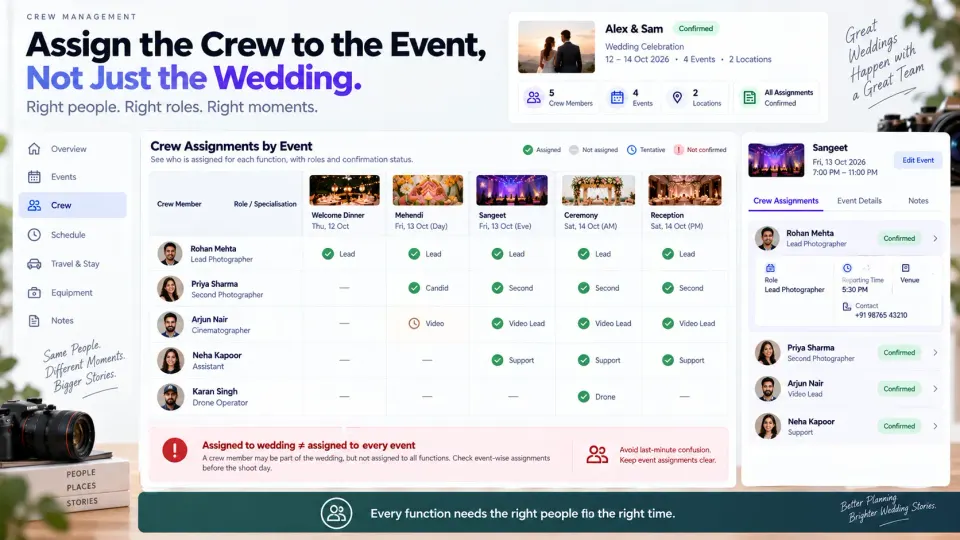
The important information is not merely the person's name. Each assignment should carry enough context to be useful: event, role, reporting time, location and any responsibility specific to that function.
Before confirming the plan, check availability across the complete wedding period. Someone being available for the ceremony does not mean they are available for the rehearsal, reception or preceding event, and overlapping studio bookings can create conflicts that are invisible if assignments live in personal messages.
GoPickle Crew Management is designed around this event-linked model, including availability, roles, assignments, reporting information and workload around real photography bookings. For studios running several weddings during peak periods, our guide to planning photography studio workload during wedding season covers the wider capacity problem.
Keep payments and commercial changes at booking level
Operational events need detail. Commercially, however, the studio still needs one clear answer to: what has this client booked and what do they owe?
If the couple pays an advance to secure the wedding, that payment usually secures the booking rather than one specific ceremony. The same applies to milestone payments and the final balance. Splitting every function into an independent financial record can make it unnecessarily difficult to understand the client's complete position.
Keep the overall quotation, invoices, payment schedule, amount received and remaining balance connected to the wedding booking.
Then record changes against that same commercial history.
Suppose the client adds two hours to the reception and requests another photographer. The operational change affects the reception event and crew plan. The commercial change affects the overall booking value and, potentially, the next invoice. Both should remain connected so the studio can trace:
Original scope → Approved change → Updated event → Crew impact → Revised amount
That is much safer than updating the event schedule while leaving the old quotation or payment calculation unchanged.
The booking-level status should also describe the overall wedding rather than bouncing between states for every function. Once coverage begins, the full project may remain ongoing until the final contracted event is complete; individual functions can still have their own operational progress. Our guide to photography booking statuses from Draft to Closed explains that distinction in more detail.
Final delivery should reunite the wedding
The event hierarchy remains useful after the final camera is packed away.
Files arrive from different photographers, cameras and functions. Editing may happen in batches. Event-specific previews or reels may be delivered before the full collection. Yet the couple ultimately bought one wedding story.
That means post-production should preserve event structure without accidentally turning delivery into a pile of unrelated shoots.
A practical flow is:
Event capture → Media handoff → Backup → Event-level organisation → Cull and edit → Booking-level delivery review → Gallery / films / albums → Final completion
Event names provide useful organisational boundaries during culling and editing. They help the studio verify that every covered function is represented and that material from different crews has arrived. The booking level then becomes the final reconciliation point: have all promised photographs, films, galleries, albums or other deliverables been completed across the entire wedding?
This is why a multi-event wedding should not be marked finished simply because the last reception has ended. There may still be editing, selections, films, albums, remaining payments and client approvals ahead. The post-shoot side of that workflow is covered in our guide to managing wedding photography after the shoot.
One relationship, many events, one source of truth
The operational model for a complex wedding does not need to be complicated:
One client → One booking → Multiple events → Event-specific schedules, services and crews → Booking-level payments and delivery
That structure works across cultures and wedding formats because it does not assume what the celebration must contain. A two-day destination wedding, a multi-function South Asian celebration, a ceremony followed by a separate reception, or a week of family events can all use the same model. The event names and requirements change; the relationship between the booking and its functions does not.
For wedding studios evaluating software, this is one of the most useful tests to run. Do not create a demo booking called “Wedding, Saturday 4 PM.” Build one of your real complicated jobs. Add every function, venue, timing, service and team assignment. Change one event and see whether the rest of the booking remains intact. Then check whether payments and final delivery still make sense at the client level.
That is the problem GoPickle's wedding photography workflow is built to handle: one connected wedding record carrying the studio from confirmed booking through events, crew coordination, payments and delivery.
A large wedding contains many moving parts. Your system should preserve those differences without losing sight of the fact that, for the client and the studio, they all belong to one promise.