Photography CRM Automation: Which Follow-Ups, Reminders and Tasks Are Safe to Automate?
Learn which photography CRM automations are safe for leads, bookings, payments and delivery, when workflows should stop, and what should remain human.

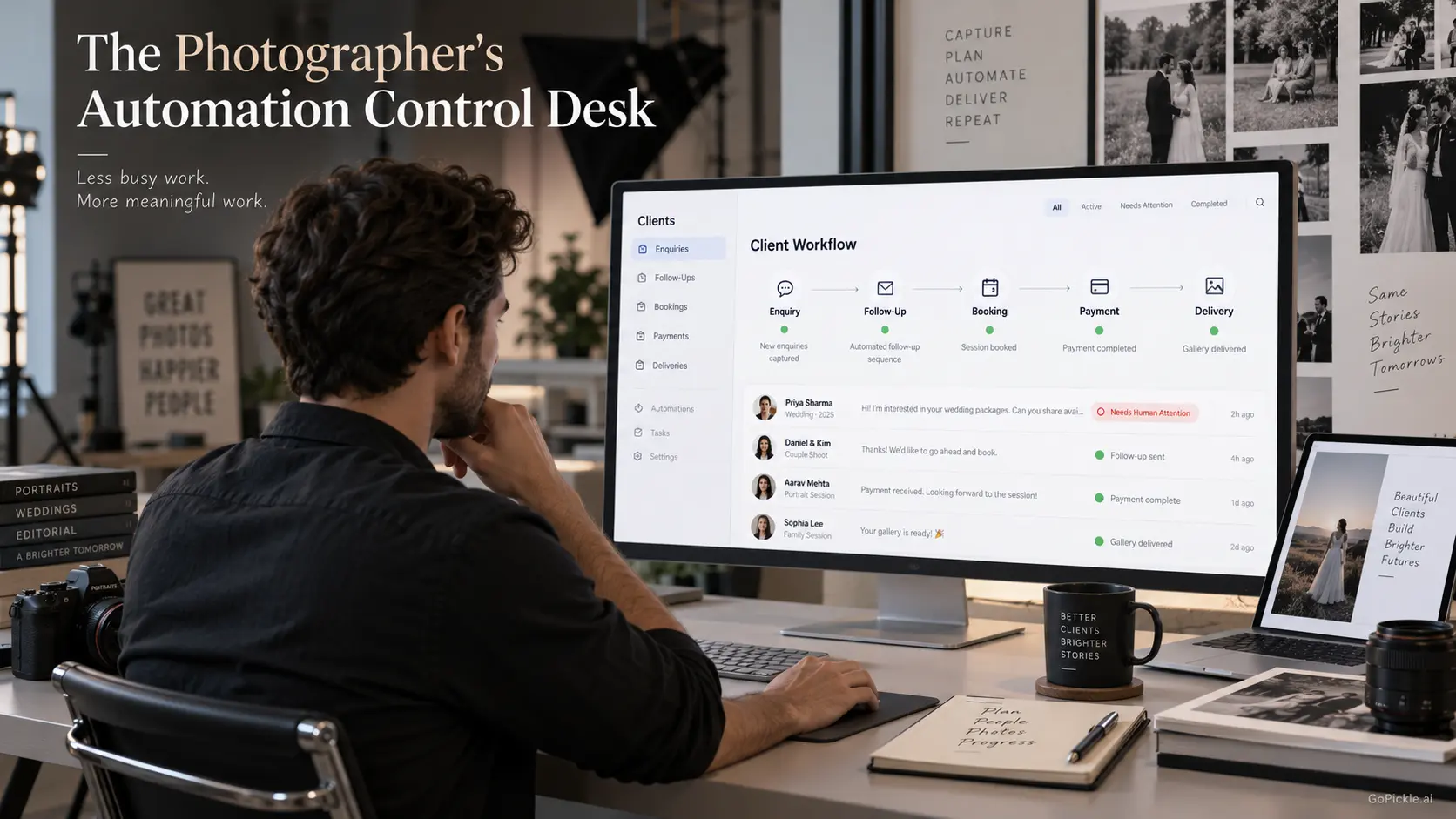
Photography CRM automation becomes attractive for an obvious reason: there are too many small things to remember between an enquiry and a finished photography job. A lead needs another call. A quotation has been sitting unanswered. A client has an instalment due next week. Tomorrow's crew needs the latest reporting time. A delivered gallery is waiting for feedback. None of these jobs is particularly difficult, but missing one at the wrong moment can cost a booking, delay payment or make an otherwise professional studio look disorganised.
The answer is not to automate every client interaction.
The most useful photography workflow automation handles predictable administration while preserving human judgement for conversations where context, tone, negotiation or trust matter. At GoPickle, we think of the distinction this way: automate remembering and routing before you automate deciding and speaking.
That principle becomes especially important as photographers compare CRM software based on workflow automation. An impressive list of triggers and sequences means very little if the system sends a quotation reminder after the client has already declined, asks for money that has already been paid, or requests a public review while a complaint is unresolved.
Good photography CRM automation needs four parts: a reliable trigger, enough context to know the action is still appropriate, a useful action and a clear reason to stop.
Automation should start with a clear trigger
Before automating anything, describe the workflow without mentioning software.
For example:
Quotation sent → no response after three working days → create follow-up task → stop if client replies, books or declines.
That is much safer than a rule that simply says, "Send a follow-up every three days."
The first version understands what happened and what would make the reminder unnecessary. The second understands only the calendar.
This trigger-condition-action-stop structure is one of the most useful ways to evaluate photographer CRM automation:
| Workflow part | Question to answer | Example |
|---|---|---|
| Trigger | What happened? | Quotation was sent |
| Condition | Is follow-up still appropriate? | Lead remains active and no response is recorded |
| Action | What should happen next? | Create a task or prepare a reminder |
| Stop | What makes the automation irrelevant? | Client replies, books, declines or is marked invalid |
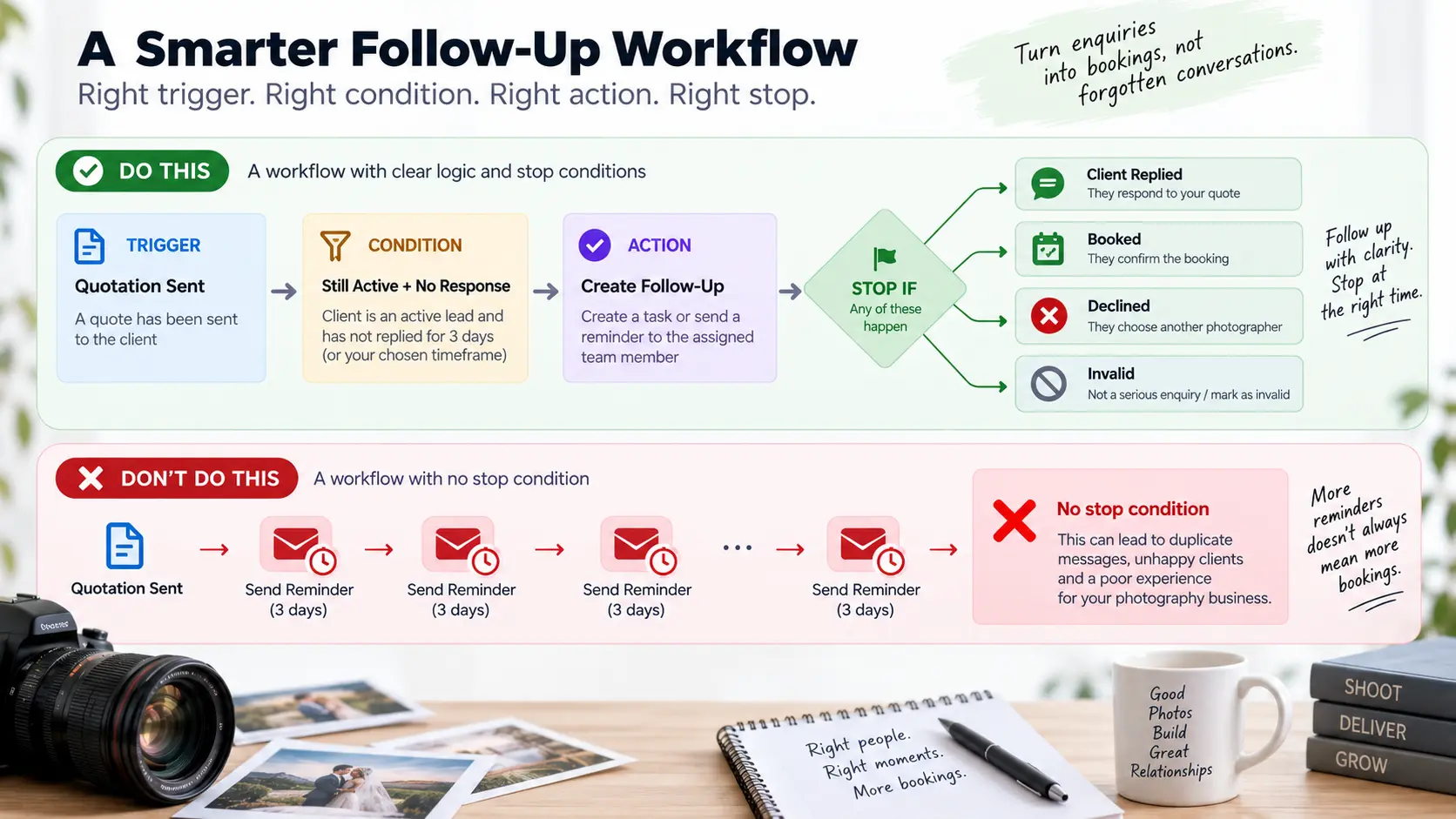
Weak automation usually fails in the condition or stop stage. A photographer configures what should happen next but never defines when it should not happen.
That is why we prefer workflow systems where the client, requirement, status, owner and next action stay connected. GoPickle's lead management software for photographers is built around giving every enquiry an owner and a visible next step, so the studio can organise follow-up without turning every conversation into an autonomous sequence.
Safe automations: reminders and task creation
The safest photography business automation normally starts with internal actions rather than client-facing messages.
Creating a task does not misrepresent the studio. Neither does surfacing an overdue follow-up, reminding a salesperson that a quotation needs attention or flagging an unpaid invoice for review. The automation is helping a human notice something; the human still decides how to handle it.
Useful examples include:
- Create a follow-up task two days after a quotation is sent.
- Remind the booking owner when required information is still missing.
- Flag tomorrow's booking if the reporting time or venue has not been confirmed.
- Surface an invoice approaching its due date.
- Create a post-delivery task to check whether the client has viewed the gallery.
- Remind the studio to request feedback after the project reaches the appropriate closing stage.
For many studios, this layer produces most of the value they actually wanted from photography studio automation. Nobody has to keep the entire business in their head, but clients still receive considered communication.
This is also a useful threshold when deciding whether you have outgrown manual systems. Our guide to photography CRM vs spreadsheet workflows explains why ownership, history and consistent next actions become increasingly important as enquiry volume grows.
Lead follow-up automation needs stop conditions
Lead follow-up is where automation can help enormously and embarrass a studio just as quickly.
A new enquiry may reasonably trigger an acknowledgement, an internal task or a deadline for the assigned person to respond. After a quotation is sent, the CRM can remind the owner that the opportunity is waiting. What should not happen is an endless sequence of increasingly enthusiastic sales messages regardless of what the client has said.
Consider a wedding enquiry. The couple asks for coverage, discusses dates and receives a quotation. Three days later there is no answer. An automated follow-up task is sensible. A carefully configured reminder may also be sensible.
But the workflow should stop immediately when the couple:
- replies with a question;
- says they need more time;
- requests a revised scope;
- books;
- says the date changed;
- chooses another photographer;
- asks not to be contacted again.
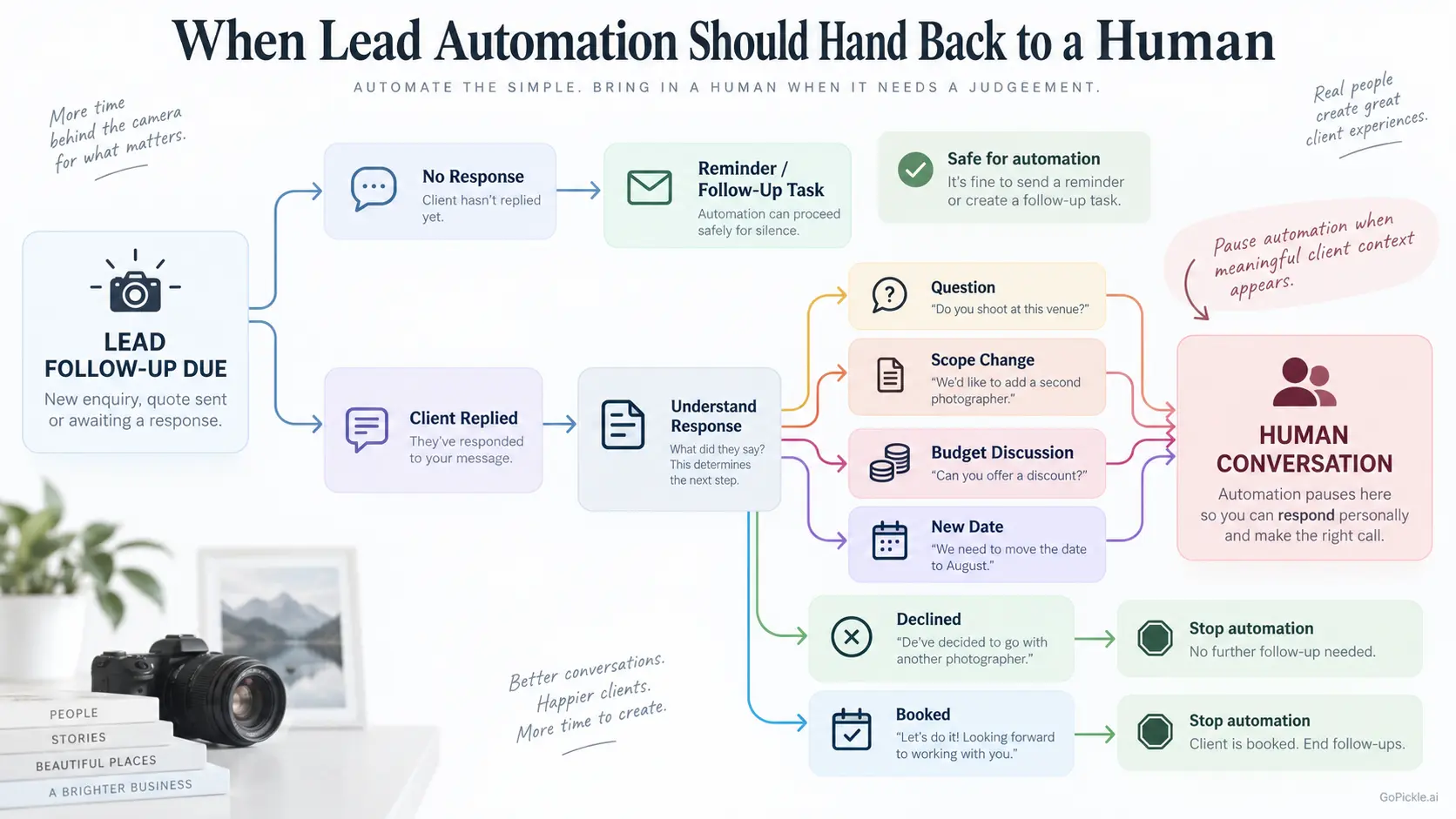
The moment a response requires interpretation, the conversation should move back to a person.
A sentence such as "We love your work but we're still discussing the budget with our families" is not the same as no response. Neither is "Can you remove the album and quote again?" A timer cannot understand the commercial meaning of either message unless the workflow has been deliberately designed around that context.
The same principle applies to enquiries starting on social platforms. Our Instagram DM to CRM workflow treats the CRM as the place that protects the commercial opportunity while allowing the actual client conversation to remain natural.
There is also a compliance distinction worth protecting. Pure booking or service messages and promotional marketing are not necessarily treated the same way under privacy and electronic-messaging rules, and those rules differ by jurisdiction. A studio working internationally should keep administrative reminders genuinely administrative, maintain appropriate consent and opt-out handling for marketing, and check the requirements that apply to the recipients it contacts.
Booking and payment reminders are strong automation candidates
Confirmed bookings contain more deterministic events than early-stage sales conversations, which makes them better candidates for automation.
The event has a date. An instalment has a due date. The client may need to provide final details before production. A meeting may need to happen a defined number of days before the shoot. These events create objective triggers.
A useful photography booking management workflow might surface a missing venue, upcoming event, pending advance or unconfirmed crew requirement before it becomes a last-minute problem. The system can remember the checkpoint; the studio decides whether the circumstances call for a standard reminder or a personal conversation.
Payment automation can go further because invoice status provides an unusually clear stop condition: payment received.
GoPickle's current invoice management and payment reminder workflow supports pre-due, due-day and overdue reminders while keeping advances, instalments and balances connected to the invoice. The important part is not simply that a reminder can be scheduled. The workflow is designed to stop chasing when the client pays or replies.
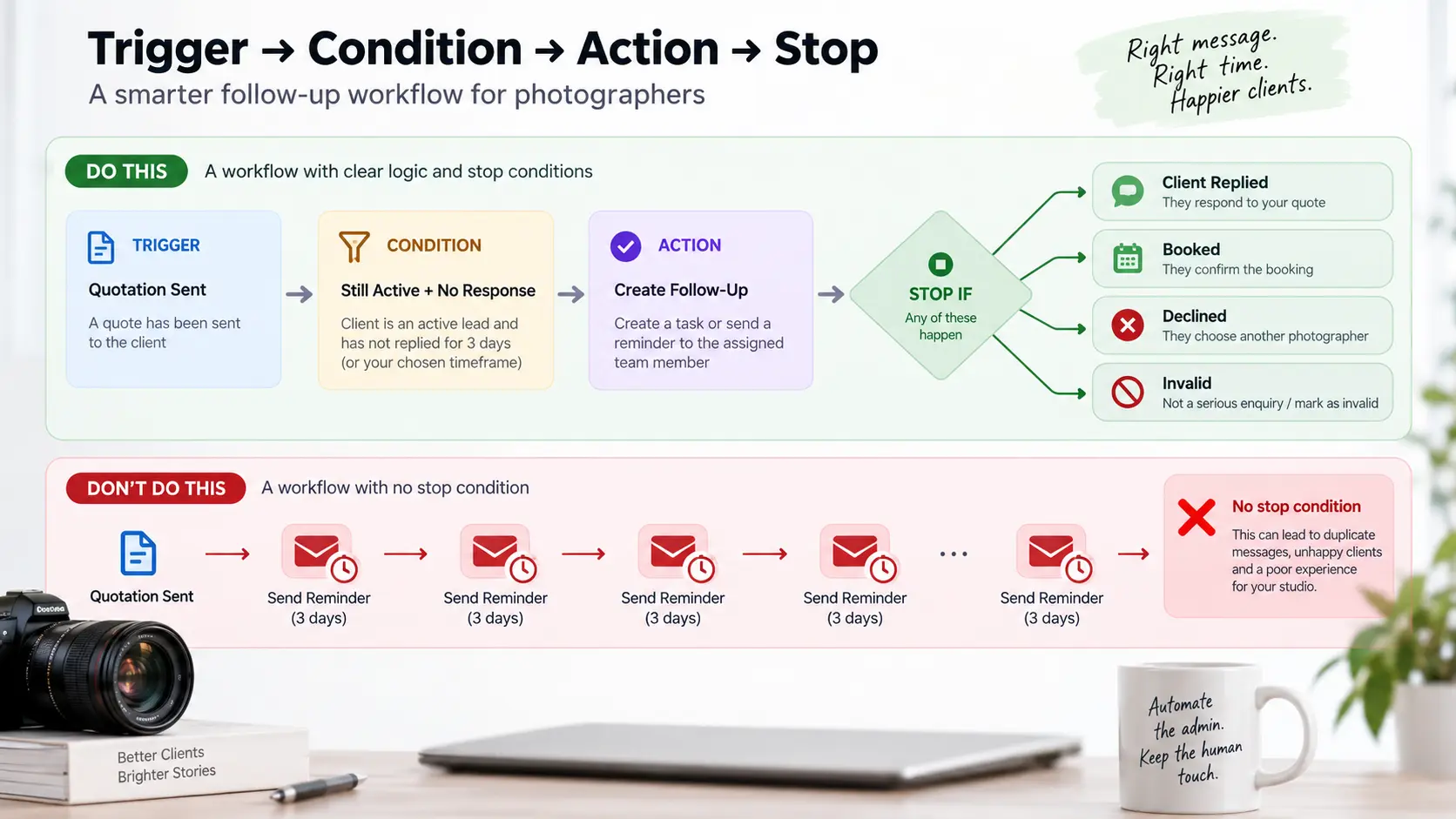
That is the model to look for in photography CRM automation. The message should respond to the current commercial state, not continue because somebody configured a five-email sequence months ago.
There are still exceptions. If a client has formally disputed an invoice, requested a correction or agreed a different payment arrangement, normal reminders should pause while the issue is handled. "Invoice overdue" may be technically true while "send another automated payment message" is operationally wrong.
Client delivery and review prompts need context
Post-production contains several useful automation opportunities: reminding the studio about an approaching delivery commitment, checking whether a gallery is ready, following up on client selections or creating a review-request task after delivery.
The timing matters.
A review request should not fire simply because a gallery link was created. The client may not have opened it yet. An album may still be outstanding. A complaint may be unresolved. The remaining balance may be under discussion. In those situations, a cheerful automated message asking for a five-star review can make the workflow feel disconnected from the actual relationship.
A better trigger is a meaningful completion state such as final delivery completed, followed by a condition that no unresolved client issue remains.
If the studio uses Google reviews, the automation also needs to respect Google's review policies. Asking genuine customers for honest reviews is allowed, but businesses should not offer incentives for reviews or selectively solicit positive reviews from only favourable customers.
Our guide to asking photography clients for reviews naturally covers the communication itself. Automation's job should mainly be to help the studio reach the right client at the right stage, not manufacture positive sentiment.
What should remain human
A useful rule is to look at how much judgement the next step requires.
Anything involving negotiation should normally remain human. So should complaints, scope changes, unusual client requests, emotional conversations, exceptions to payment terms and decisions that could materially change what the studio has promised.
Pricing discussions are another obvious example. Software can tell you that the client has not accepted the quotation. It cannot safely decide that the right response is a discount.
The same applies when a commercial client requests additional usage rights, when a wedding client changes dates, when a portrait client is unhappy with retouching or when somebody says the package is outside their budget. These conversations contain information that may change the quotation, booking, production plan or relationship itself.
A sensible photography CRM should therefore make it easy to move from automation back to a person. Automation is not successful because humans never touch the workflow. It is successful when humans spend their attention on the parts where their judgement actually improves the result.
Audit automations for duplicate or inappropriate messages
Automations should be reviewed like any other studio process. A workflow that made sense six months ago may become incorrect after you change your packages, payment terms, team responsibilities or client journey.
Run test records through every important automation and look specifically for collisions.
Could the quotation workflow and general lead workflow contact the same person on the same day? Does a payment reminder continue after somebody manually records a bank transfer? Can two team members each trigger a follow-up? Could a client receive a review request before an album or other promised deliverable is complete? What happens when a booking is cancelled, postponed or moved to another date?
Also inspect the sender experience. A technically correct automation can still be poorly timed. A client does not care that two messages came from separate workflows; they experience both as communication from your studio.
The most useful audit question is therefore simple: If this automation runs at exactly the wrong moment, what stops it?
If the answer is "someone will hopefully notice," the workflow needs another condition.
For photographers comparing CRM platforms, we would place this capability above flashy automation counts. Look for clear workflow states, ownership, current payment information, task visibility and reliable stop conditions. Those foundations determine whether automation reduces administration or simply sends mistakes faster.
GoPickle is built around a connected photography business management workflow spanning enquiries, quotations, bookings, crew, invoices, payments and gallery delivery. The purpose of connecting those stages is not to remove photographers from their client relationships. It is to give the system enough business context to remember what needs attention while the photographer handles the conversation, creative judgement and exceptions that should remain personal.
Good photography CRM automation should make a studio feel more attentive, not more robotic. Start with reminders and internal tasks. Automate client communication only where the trigger and outcome are predictable. Define the stop condition before activating the workflow. When context changes, hand the conversation back to a person.
That is usually where automation delivers its greatest benefit: not by doing everything for the photographer, but by making sure the right thing is not forgotten.