Photography Delivery Deadline Dashboard: Track Promised Dates, Blockers and Client Dependencies
Track photography delivery deadlines across active bookings with promised dates, internal targets, production stages, blockers, forecasts and risk flags.

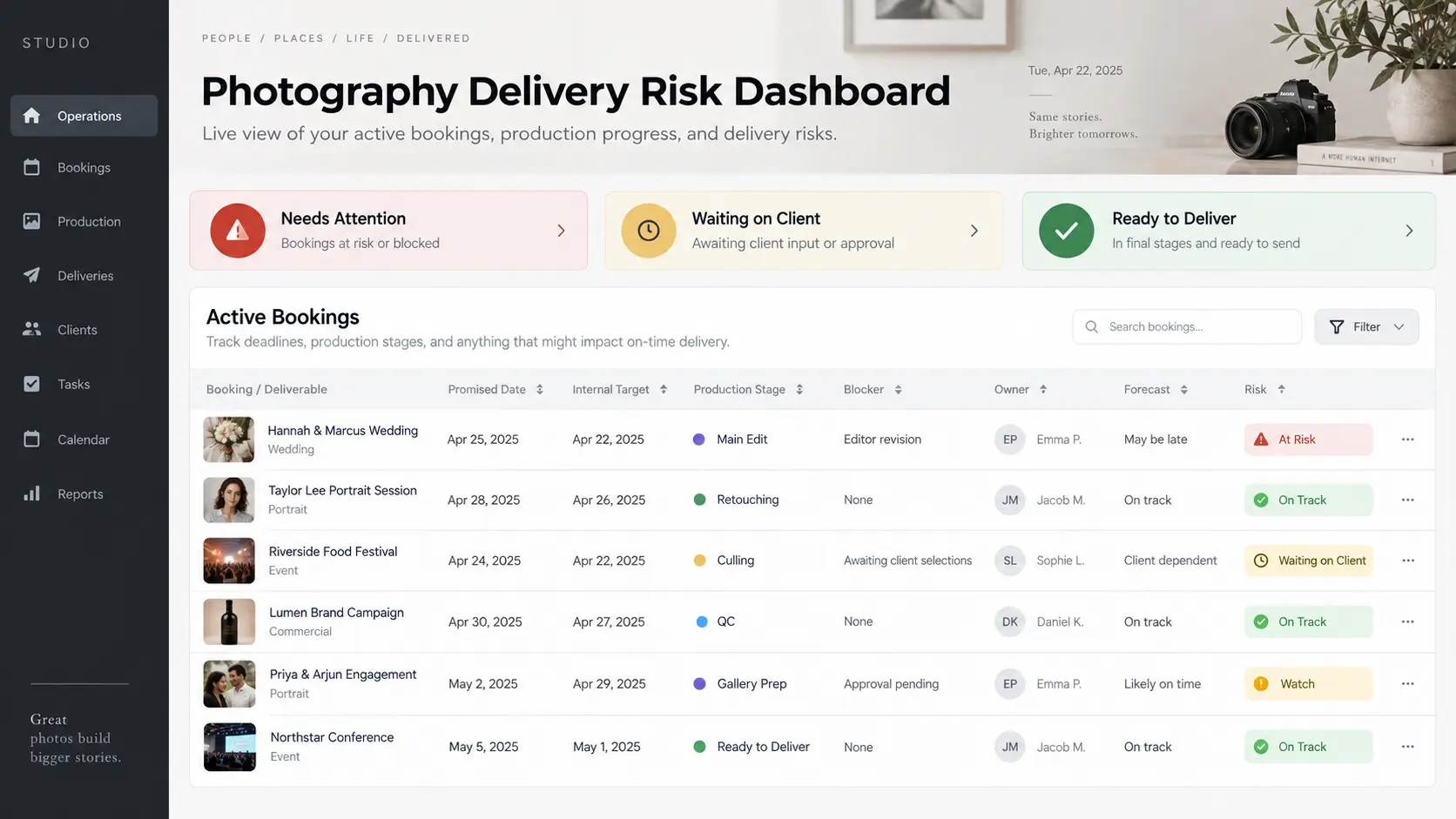
A photography studio can have every shoot correctly entered in the calendar and still lose control of delivery.
The problem usually appears after the event. One wedding is being culled, another is with an external editor, a portrait client has not submitted their selections, a commercial campaign is waiting for approval, an album is blocked on corrections, and three finished galleries still need final quality control. Each booking has a delivery promise, but those promises are scattered across contracts, messages, spreadsheets, task lists and somebody's memory.
Photography delivery deadline tracking becomes useful when it brings those active commitments into one operational view. The purpose is not to create another list of jobs. It is to show which client-facing dates are safe, which work is moving, what is blocked, and which delivery is likely to become a problem unless the studio acts now.
This is different from calculating photography turnaround time. Our guide to setting a photography turnaround time your studio can actually keep explains how to establish a realistic promise using workload, capacity and dependencies. The deadline dashboard begins after that promise exists. Its job is to protect the promise across every active booking at the same time.
Promised date vs internal target
The first mistake in photography delivery management is using one date for everything.
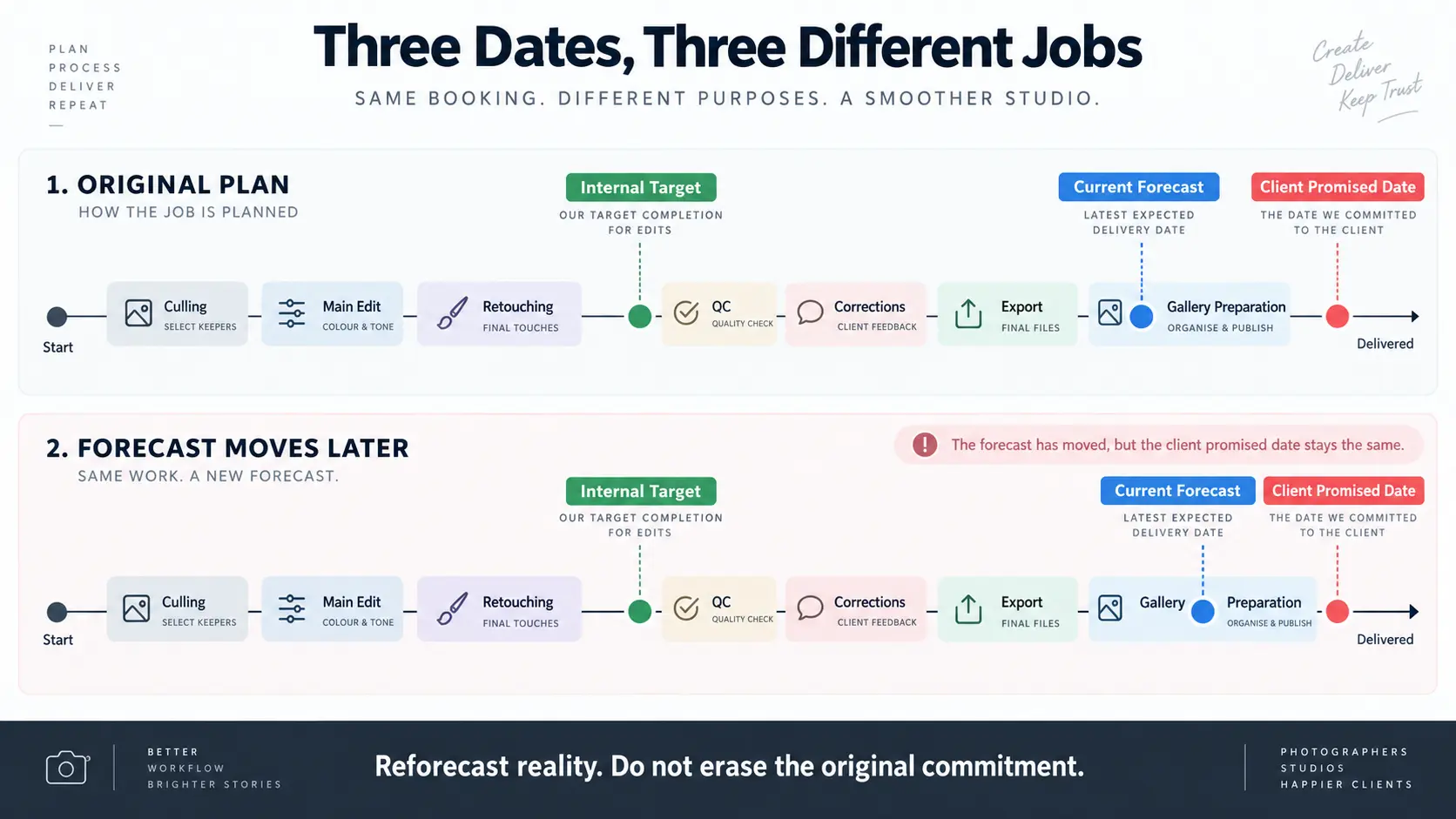
A client-facing promised date and an internal production target serve different purposes. The promised date is the commitment the client has been given. The internal target is when the studio intends to have production substantially finished so there is still room for quality control, corrections, export, upload and final delivery preparation.
If a studio plans to finish editing on the exact day the final gallery is due, there is no operational space left. A failed export, an editor correction, a missing image sequence or an upload problem immediately becomes a client-facing delay.
That does not mean every studio should finish a fixed number of days early. The margin should reflect the job. A small portrait session may need relatively little finalisation after editing, while a multi-event wedding with photographs, films, reels and album-related work may need several internal handoffs before the client commitment is truly complete.
A useful deadline record therefore keeps at least three dates separate:
| Date | What it means |
|---|---|
| Promised date | The delivery commitment communicated to the client |
| Internal target | When production should reach the point required for final QC and delivery preparation |
| Current forecast | The studio's latest realistic estimate based on what is happening now |
Do not overwrite the promised date when the plan changes. If the studio originally promised 30 October and now expects to finish on 2 November, both facts matter. Replacing the original date destroys the evidence that allows the studio to understand its delivery performance later.
Track every active delivery in one view
Once a studio is managing several shoots simultaneously, opening each booking individually is too slow for deadline control. The useful view is a portfolio of all active client commitments.
A photography delivery deadline dashboard might contain one row per deliverable or one row per booking, depending on how complex the work is. A portrait photographer delivering one final gallery may be comfortable tracking the booking as a single unit. A wedding studio promising photographs, a teaser, highlight film, long film and album may need separate delivery lines because each can move on a different production schedule.
At minimum, the dashboard should answer:
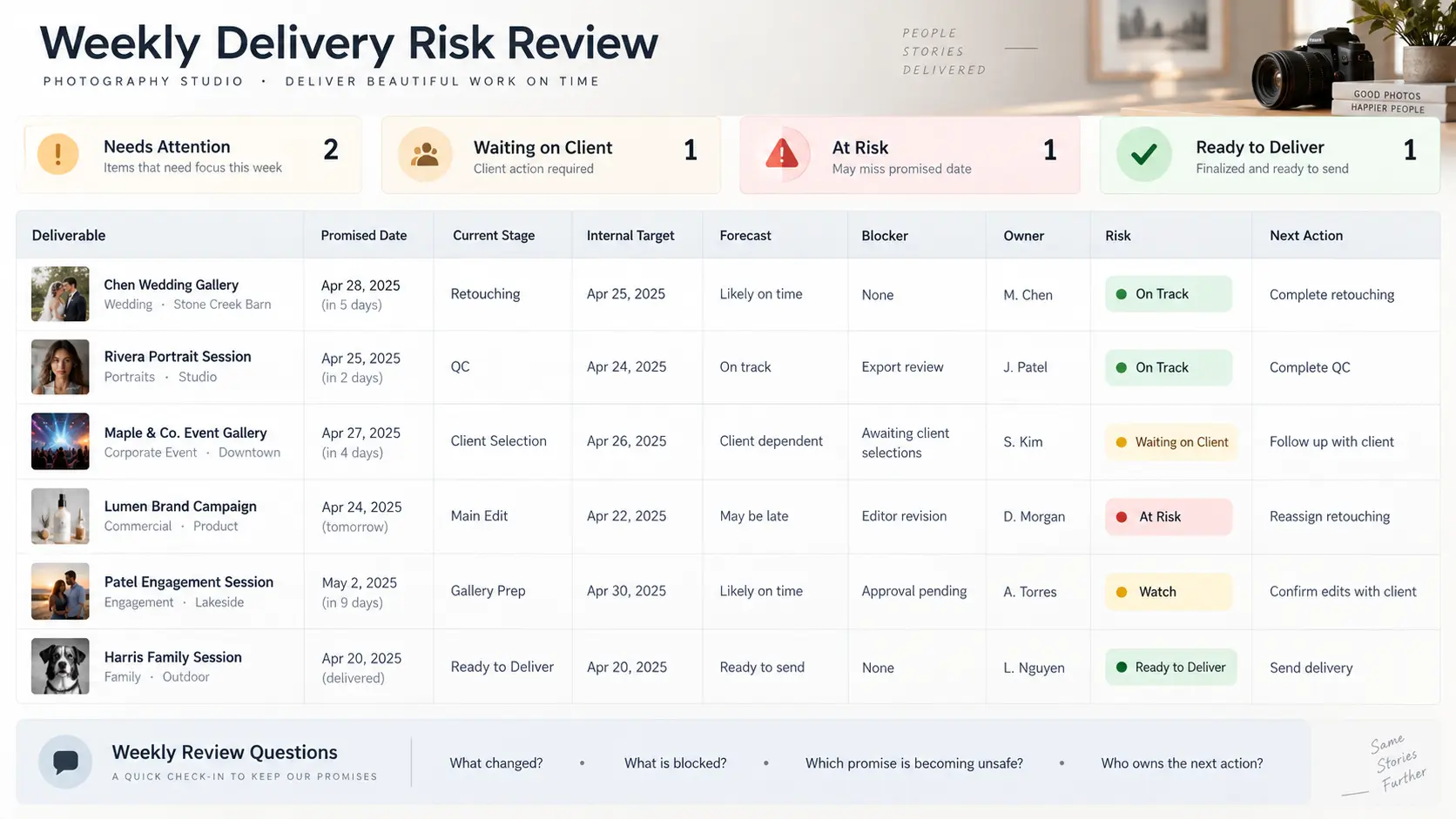
Booking · Deliverable · Shoot date · Promised date · Internal target · Current stage · Owner · Blocker · Next action · Current forecast · Risk state
Those fields turn "Rahul wedding – editing" into something operational. The studio can see that the final gallery is in colour correction, the internal target is approaching, a particular editor owns the work, nothing is blocking it and the current forecast still sits comfortably inside the client promise.
This is where photography delivery tracking becomes different from a calendar. A calendar tells you when something is due. A delivery dashboard tells you whether the work required to meet that date is actually moving.
For studios with many bookings, keep the default view focused on unfinished commitments. Completed jobs belong in history. Future shoots with no active post-production work can remain in the booking schedule. The deadline dashboard should concentrate attention on work that has entered, or is about to enter, the production chain.
Show the current production stage
A promised date without production state tells the studio very little.
Two galleries can both be due next Friday while carrying completely different risk. One may already be through quality control and simply need publishing. The other may still be waiting for culling. Treating both as "due in seven days" hides the most useful information.
Use stages that represent real handoffs in your studio. A typical photography workflow might include:
Backup verified → Culling → Client proofing → Main edit → Retouching → Studio QC → Gallery preparation → Ready to deliver → Delivered
Not every photographer needs every stage, and video or album deliverables may follow different paths. What matters is that the status tells the team what has actually happened rather than offering a vague label such as "In Progress."
The stage also needs an owner. "Editing" is not enough when two in-house editors and three freelancers are working that week. If nobody can identify who owns the next movement, the dashboard has described the work without managing it.
When the editing queue itself becomes crowded, use a separate prioritisation process. Our guide to photography editing backlog triage explains how to decide what production work should move first. The deadline dashboard sits above that decision: it shows which bookings are becoming exposed so the production queue can respond.
Client-dependent blockers need their own status
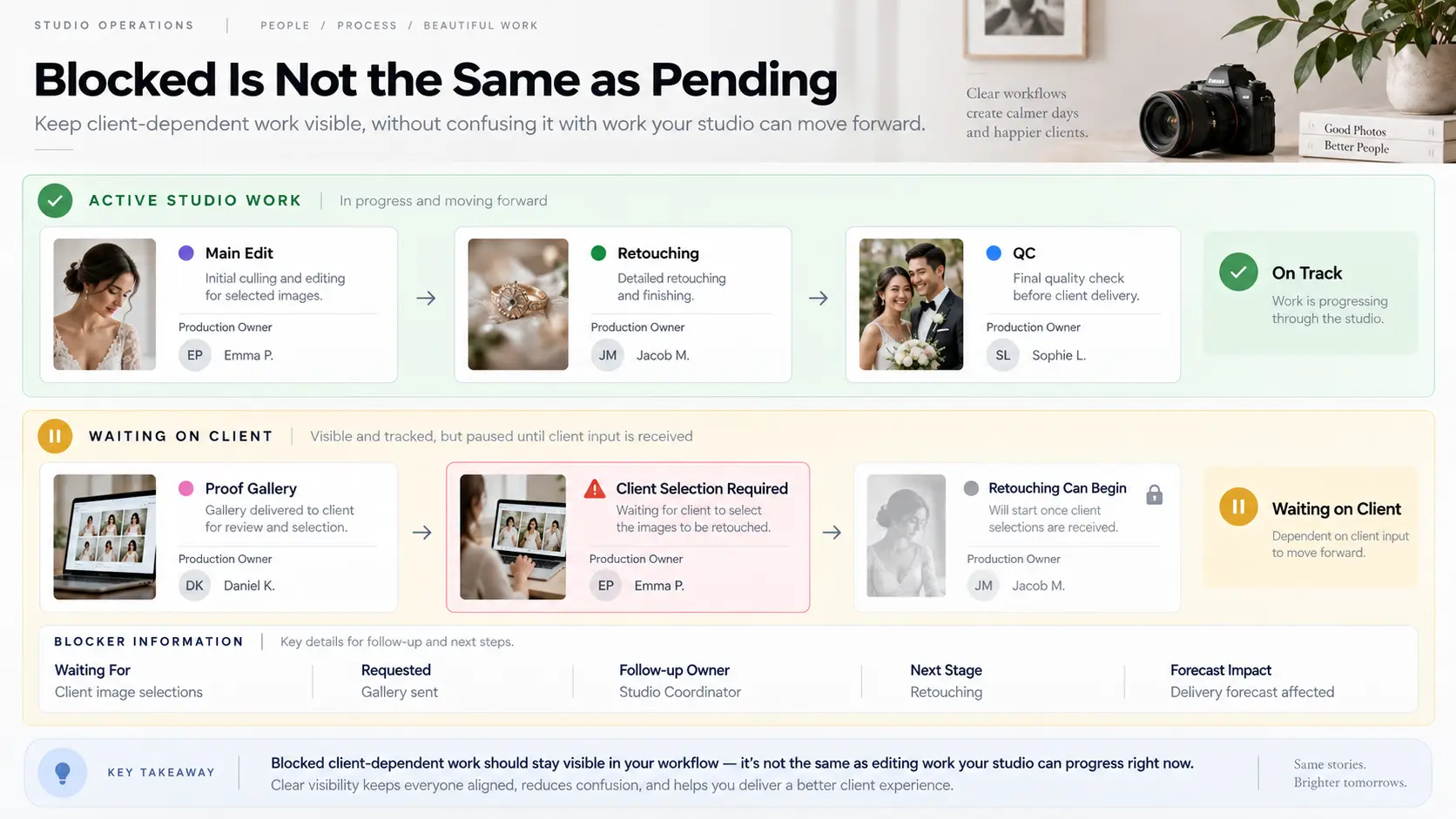
One of the easiest ways to misread a photography workflow is to treat every unfinished job as studio work.
Some jobs are not progressing because there is nothing the editor can do yet.
A portrait client may need to select the photographs included for retouching. A wedding couple may be choosing album images. A commercial client may need to approve a first-round edit before expensive compositing begins. A brand agency may be holding final usage selections. These are client dependencies, not ordinary editing backlog.
Do not leave these bookings marked simply as "Pending."
Use a visible blocker state such as Waiting on Client, and record what is required. The row should make it possible to see:
- what the client needs to provide or approve;
- when the request was sent;
- who is responsible for following up;
- what production stage starts after the response;
- whether the dependency changes the current delivery forecast.
The exact effect of client delay depends on what the studio agreed with the client. Some workflows have a delivery period that starts only after final selections are received; others have a fixed project deadline that still needs active management. The important operational rule is to distinguish elapsed calendar time from time the studio can actually use for production.
Use risk flags before a deadline is missed
A useful dashboard should surface trouble before the promised date turns red.
The risk state does not need an elaborate scoring model. In fact, a few understandable states are usually better because somebody reviewing the board should know why a job is flagged.
For example:
| Risk state | What it means |
|---|---|
| On track | Current stage and forecast still support the promised date |
| Watch | Limited margin remains or progress has slowed |
| At risk | Current workload, blocker or remaining stages make the promise unsafe |
| Waiting on client | Progress depends on a client action or approval |
| Overdue | The promised date has passed without completed delivery |
The important part is what triggers the change. A job might enter Watch because an internal target has passed even though the client deadline remains several days away. It might become At risk because an editor returned incomplete work, an unexpected revision round appeared, or several stages still remain with little production time available.
This is more useful than waiting for the client-facing date itself. By the time a wedding gallery is technically overdue, the studio has already lost the opportunity to solve the problem quietly through reassignment, outsourcing, reduced queue pressure or earlier communication.
Your deadline review should therefore focus first on exceptions rather than reading every healthy booking from top to bottom.
Reforecast when workload changes
Photography production plans change. The dashboard should change with them without rewriting history.
A long event produces more material than expected. An editor becomes unavailable. Several clients submit their selections at once. A commercial client requests another review cycle. Travel removes a production day. A large rush assignment enters the studio. None of these situations means the original delivery promise should disappear from the record.
Update the current forecast instead.
This gives the studio three useful pieces of information at once: what was promised, when the team originally intended to finish internally, and what the latest production evidence says is likely to happen.
If the forecast moves beyond the promised date, the dashboard should stop being a passive reporting tool. Somebody needs a next action. That may be reallocating editing, reducing lower-priority work, resolving a blocker, obtaining the missing client decision or communicating a revised date.
Avoid repeatedly moving the forecast by one day without addressing the underlying reason. Reforecast from the remaining workflow, not from optimism.
This is also where photography workflow software becomes more useful than a standalone due-date spreadsheet. A deadline is easier to manage when the team can open the underlying booking and see what was actually sold, which events were covered, what deliverables remain and what the next operational step is. GoPickle Booking Management keeps the client, events, services, crew, deliverables, invoices, payments and surrounding booking context together so delivery does not become disconnected from the work that created it.
Review promised vs actual after completion
Do not remove a job from the dashboard the moment the gallery is sent and forget what happened.
The completed booking contains useful planning data.
Record the promised delivery date and actual delivery date. If the job finished late, record the reason in a form you can analyse later: production overload, client selection, external editor delay, revision request, technical issue, unclear scope or another relevant cause. It is also useful to know where the first warning appeared. A studio that repeatedly discovers risk during final QC has a different problem from one whose weddings spend too long waiting to enter editing.
The purpose is not to create a performance scoreboard for individual photographers or editors. It is to improve future promises.
If photo delivery deadlines repeatedly move during peak season, the studio may be accepting more post-production work than the team can absorb. If portrait deliveries are regularly held by client selections, the proofing workflow may need clearer instructions or follow-up. If galleries reach "Ready to Deliver" but remain there for days, the bottleneck may be final review or gallery publishing rather than editing.
Over time, the deadline dashboard becomes more than a list of current jobs. It becomes a record of how reliably the studio converts booked work into completed delivery.
Once production is approved, the final handoff should be just as deliberate. GoPickle Client Galleries provide a branded environment for organised photo delivery, downloads, access control, favourites and sharing. Gallery software cannot rescue a missed production deadline, but it can make the final client gallery delivery tracking and handoff cleaner once the work is actually ready.
The practical goal is simple: nobody in the studio should need to ask, "Which deliveries are we worried about?"
A strong photography delivery deadline tracking system should already show the answer. The promised date is visible. The current stage is visible. The blocker is visible. Somebody owns the next action. The current forecast tells the studio where reality is moving before the client has to find out first.
For a solo photographer, that may begin as a disciplined spreadsheet. For a growing wedding or event studio, it usually becomes part of a broader photography project management or studio workflow system. The tool matters less than the operating discipline behind it: every client promise stays visible until the work has genuinely reached delivery.