Editing Backlog Triage: Which Photography Jobs Should Be Edited First?
Manage a photography editing backlog by prioritising deadlines, blocked work, ageing jobs and editing effort without letting client deliveries slip.

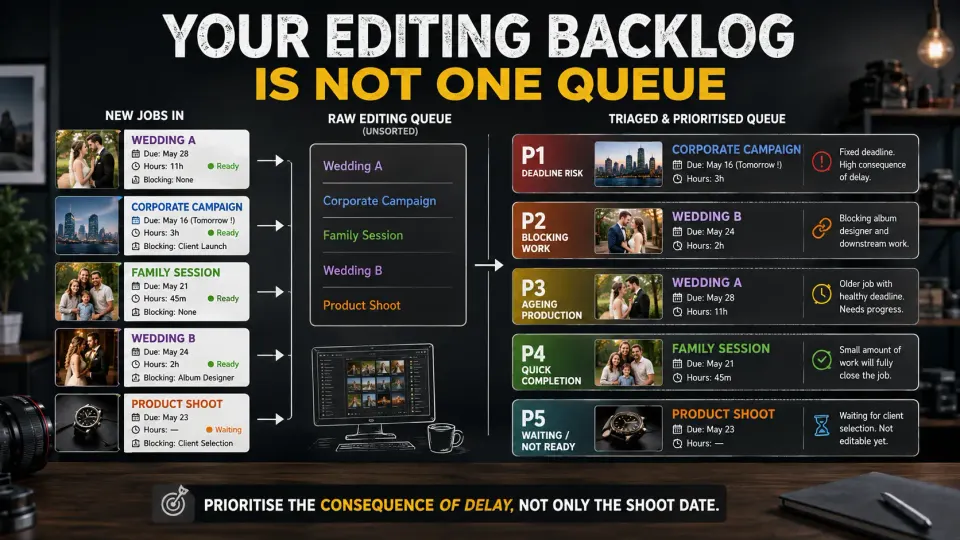
A photography editing backlog rarely arrives as one obvious problem. It usually looks like seven weddings waiting for colour correction, two portrait sessions that should be quick to finish, a commercial client asking for final selects, an album designer waiting for retouched photographs, and another shoot landing on the studio tomorrow. Every project needs attention, but they do not all need attention in the same order.
The instinctive response is often to edit the oldest job first. That is a reasonable default, particularly when clients have been waiting for similar lengths of time. It is not always the safest way to manage a photography post-production queue.
A stronger system looks at what was promised, what is blocking somebody else, how close each job is to completion, how old it is and what happens if it moves another day. The goal of photography backlog management is not simply to keep editors busy. It is to move the right work through the studio without allowing contractual deadlines, approvals, albums or client relationships to quietly become problems.
Why first-in-first-out is not always enough
First-in-first-out sounds fair: the oldest shoot gets edited first, followed by the next oldest. If every assignment has roughly the same scope, turnaround time and delivery process, that approach can work reasonably well. Professional photography rarely behaves that neatly.
Imagine four jobs in the queue. A wedding photographed 12 days ago has a six-week delivery commitment. A corporate headshot project photographed six days ago must reach the client's marketing team tomorrow because the photographs are needed for a launch. A portrait session from nine days ago is already 90% complete and needs another 40 minutes of work. Meanwhile, another wedding photographed ten days ago is waiting for ten retouched hero images before an album designer can begin the next production stage.
Editing only by shoot date would ignore the actual consequences of delay.
The wedding photographed first may still deserve substantial editing capacity, particularly as it gets older, but age should be one input rather than the entire priority system. This becomes especially important during peak wedding season, when the shooting calendar can remain manageable while the studio's post-production workload continues accumulating.
Build a production queue before deciding what gets edited
A folder called Pending Editing is not a production queue.
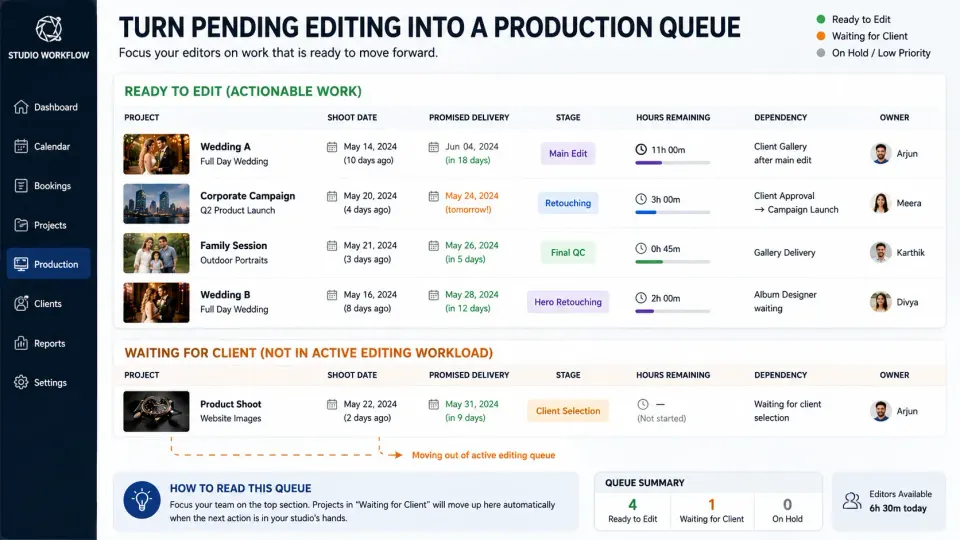
For every active photography job, record enough information to understand its current position. At minimum, the studio should know the shoot date, promised delivery date, current production stage, estimated work remaining, next dependency and who owns the next action.
A useful photography post-production queue might look like this:
| Job | Promised delivery | Current stage | Work remaining | Next dependency | Current concern |
|---|---|---|---|---|---|
| Wedding A | 18 days | Main edit | 11 hrs | Client gallery | None yet |
| Corporate campaign | Tomorrow | Retouching | 3 hrs | Client approval → campaign launch | Deadline critical |
| Family session | 5 days | Final QC | 45 min | Gallery delivery | Almost complete |
| Wedding B | 12 days | Hero retouching | 2 hrs | Album designer | Blocking another team |
| Product shoot | 9 days | Client selection | Studio waiting | Client approval | Not currently editable |
This immediately changes the conversation. The product shoot does not belong in the active editing workload while the studio is waiting for the client. The corporate campaign has very little scheduling flexibility. Wedding B has work behind it waiting to start. The family session may be cleared with less than an hour of production.
Studios that have not yet calculated whether the entire booking load fits their available production hours should first look at how many weddings a photography studio can realistically take without delaying delivery. Backlog triage helps decide how existing capacity should be used; it does not create capacity that does not exist.
Separate urgency, importance and effort
A useful photography editing workflow needs more nuance than a single priority label marked High, Medium or Low.
Start with contractual urgency. When did you promise the client delivery? A project approaching its agreed date deserves more attention than one with several weeks of legitimate production time remaining.
Then look at blocking impact. Is somebody unable to continue because this edit has not been completed? Ten commercial photographs waiting for retouching may be preventing client approval, artwork production or publication. Twenty wedding portraits may be holding an album designer. A proof set may need preparing before the client can make the selections that determine what gets fully retouched.
Next comes age. An older project should steadily gain priority even when its official due date remains some distance away. Without this safeguard, large jobs can repeatedly lose editing time to newer urgent assignments until they suddenly become urgent themselves.
Finally, consider effort to clear. A job requiring 30 minutes of QC should not necessarily sit untouched behind a 14-hour wedding edit. Finishing a small amount of remaining work can remove a project entirely from the production board, reduce client follow-up and free mental capacity. This is useful only when it does not steal time from genuinely endangered deadlines.
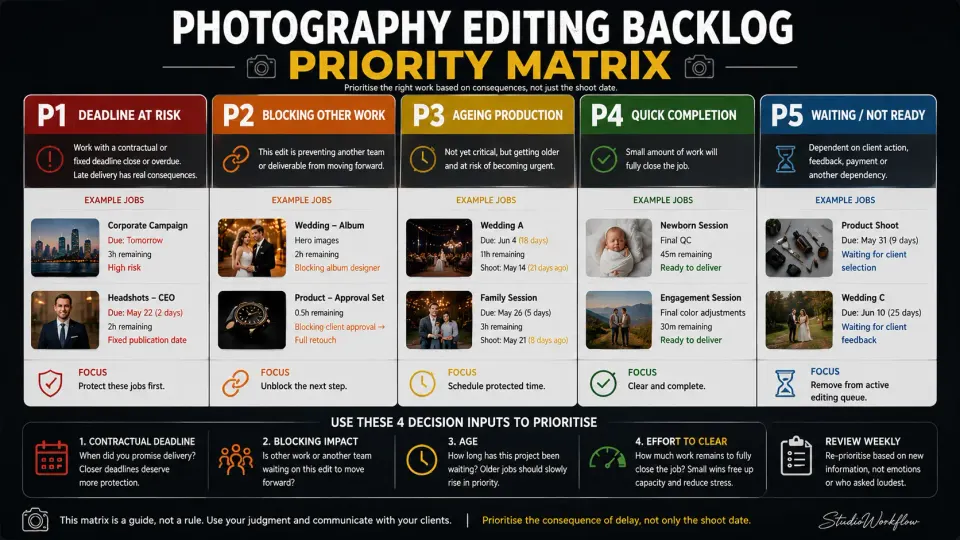
A practical backlog priority matrix can therefore look like this:
| Priority | What belongs here | Typical action |
|---|---|---|
| P1 - Deadline at risk | Contracted delivery close or overdue; fixed commercial/publication deadline | Protect editing time immediately |
| P2 - Blocking work | Edit is stopping approval, album design, printing, campaign production or another team | Complete the blocking stage |
| P3 - Ageing production | Healthy deadline but job has been waiting too long or repeatedly displaced | Schedule protected production time |
| P4 - Quick completion | Small amount of work will fully close the job | Clear around P1/P2 work |
| P5 - Waiting / not ready | Client selection, feedback, payment or another dependency missing | Remove from active editing queue |
Move jobs up when they are blocking other work
Not every valuable edit ends with a gallery being delivered. Sometimes editing is only a handoff.
Consider a wedding where the client needs to choose 80 photographs for detailed retouching and the album. Spending two days fully retouching hundreds of images before that decision may consume scarce production capacity without moving the actual project forward. A controlled client photo selection before retouching workflow can separate proof preparation from expensive final production so the editor works on photographs that have actually been selected.
The same principle applies elsewhere. A commercial photographer may need to process five representative images before the client approves the grade for the remaining 120. A corporate studio may need approved headshots before the client's design team starts building staff pages. A wedding studio may need hero portraits before album design can begin.
These jobs deserve priority because completing a relatively small production step releases another piece of the workflow.
For the same reason, do not treat work that is waiting for client action as if it is consuming active editing capacity. Give it a separate status such as Awaiting Selection, Awaiting Approval or Awaiting Feedback. Otherwise, a queue containing 18 projects may appear frightening even though only 11 are currently actionable.
Protect contracted delivery dates before clients have to chase you
The client who sends three messages this week will naturally feel more urgent than the client who has said nothing. That is a dangerous way to prioritise production.
A quiet client with a delivery date next Tuesday still has the same promise. If the studio only moves jobs upward after somebody asks for an update, the workflow rewards chasing rather than protecting commitments.
Your production board should therefore contain two dates: the client delivery deadline and an earlier internal completion target.
The internal date creates room for final QC, export problems, gallery preparation, revisions or an unexpectedly slow upload without consuming the promise made to the client. If the client deadline itself is being used as the day editing should finish, almost any production problem can become a late delivery.
This is also why a photography studio should think about post-production before accepting another booking. A free Saturday does not mean the editing team is free. If another major booking pushes existing promises outside their delivery windows, the studio is borrowing capacity from clients who have already purchased it.
When the backlog exceeds capacity, change the plan before changing the promise
There is a point where better prioritisation is no longer enough.
Suppose the team has 95 hours of genuinely actionable post-production and only 55 production hours available before the relevant deadlines. Rearranging the queue may protect the most important work, but it cannot manufacture the missing 40 hours.
At that point, decide deliberately what changes.
You might reassign work inside the studio, bring in a trusted freelance editor, separate basic processing from senior retouching, postpone non-client-facing internal work or reduce production interruptions for several days. Outsourcing can be sensible when demand is temporarily above internal capacity, but it should solve a clearly identified constraint rather than becoming an automatic response to every busy week.
If a delivery date genuinely has to move, tell the client before the original deadline wherever possible. Give a specific revised date and enough context to be useful without writing a long defence of the studio's workload.
For example:
Your gallery is currently in final post-production. We need a little more time than originally planned to complete the remaining work to the expected standard, so the revised delivery date is 18 September. We wanted to update you now rather than leave you waiting for the original date without an explanation.
Avoid vague messages such as “almost finished”, “soon” or “a few more days” when the production queue does not support them. A revised date should come from actual remaining workload and available editing capacity, not from what sounds reassuring at the time.
Once photographs are completed, a structured client gallery delivery workflow can take the job from finished files into organised viewing, selection and download instead of creating another loose handoff at the end of production.
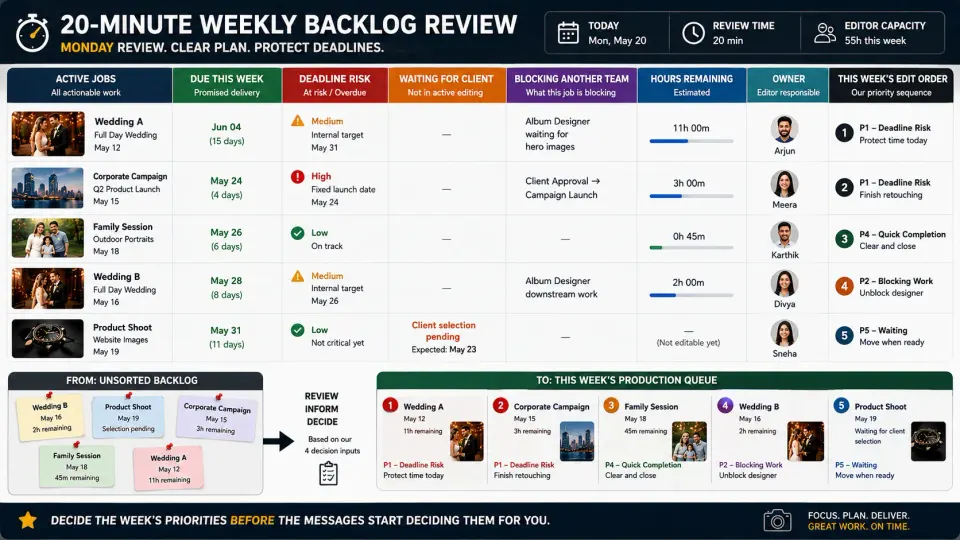
Review the photography editing backlog every week
A backlog should not be reprioritised every time somebody receives a WhatsApp message. Constant interruption creates a different form of inefficiency: editors keep switching jobs without finishing enough of them.
Instead, run a short production review at the beginning of the week and make smaller daily changes only when something material happens.
For each project, review the promised delivery date, internal target, current stage, estimated hours remaining, client dependency, downstream dependency and whether the person responsible has enough capacity to complete the next stage. Then ask three uncomfortable questions.
- Which job will become a problem first if we do nothing?
- Which small piece of work would unblock the most downstream production?
- Which project has been repeatedly pushed backwards even though nobody is complaining yet?
Those questions are more useful than asking only, “What should the editor work on today?”
A broader weekly photography studio review can combine this production check with upcoming shoots, crew requirements, payments, selections and other unfinished client work.
The best editing queue tells you what happens next
A photography editing backlog becomes dangerous when it is represented only as a pile of folders.
A useful queue shows movement.
Shoot completed → Backup verified → Cull → Proofs if required → Client selection → Main edit → Detailed retouching → QC → Gallery → Approval or delivery
Some jobs will skip stages. Others will wait between them. The important part is knowing where each assignment sits and who or what is preventing it from moving.
That is also where photography workflow software can be useful. At GoPickle, we do not think software should decide which photograph deserves your creative attention. The photographer or studio still owns that judgment. What a connected photography workflow management system can do is keep the booking, deliverables, crew responsibilities, client status and final delivery context easier to see around the work.
For larger studios, booking management for photographers also matters because the production team needs to know what was actually sold. An editor should not have to search old chats to discover whether the package included 300 edited photographs, 40 detailed retouches, an album or a particular delivery commitment.
The backlog should answer one simple question every morning, What is the most valuable use of our next hour of production capacity?
Sometimes the answer will be the oldest wedding. Sometimes it will be the commercial job due tomorrow. Sometimes it will be 45 minutes of QC that removes an entire project from the queue. Sometimes it will be ten photographs that allow another team to start working. That is the difference between having an editing backlog and managing one.