Photography Gallery Delivery Email Template: What Clients Need to Know When Their Photos Are Ready
Use these photography gallery delivery email templates for weddings, portraits, proofing and commercial shoots, with clear instructions for access, downloads, selections and next steps.

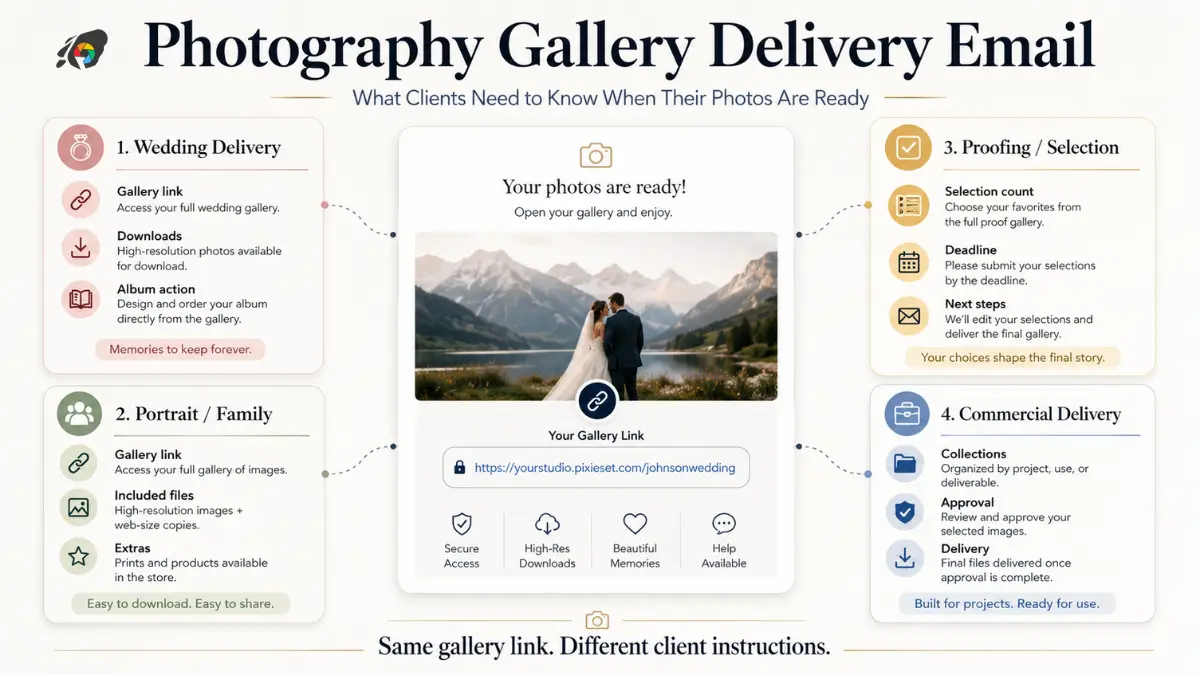
The message that delivers a photography gallery has a practical job to do. The client needs to know where the photographs are, how to get into the gallery, what they can download, whether they need to make a selection, whether anything expires, and what happens after they have viewed the images.
A message that says only “Your photos are ready, hope you love them” may feel warm, but it leaves the operational details to a second round of messages. At the other extreme, a long delivery email packed with policies can make a simple handoff feel complicated.
The best photography gallery delivery email sits between those two extremes. It celebrates the finished work, gives the client the exact instructions needed for this gallery, and makes the next action obvious.
The templates below are deliberately adaptable. Replace every bracketed field with the rules for the actual assignment rather than borrowing another photographer's turnaround time, expiry policy, download allowance or album deadline.
What every photography gallery delivery message must answer
Before choosing the wording, identify what this particular gallery allows. A final wedding gallery and a portrait proofing gallery may look similar on screen while asking the client to do completely different things.
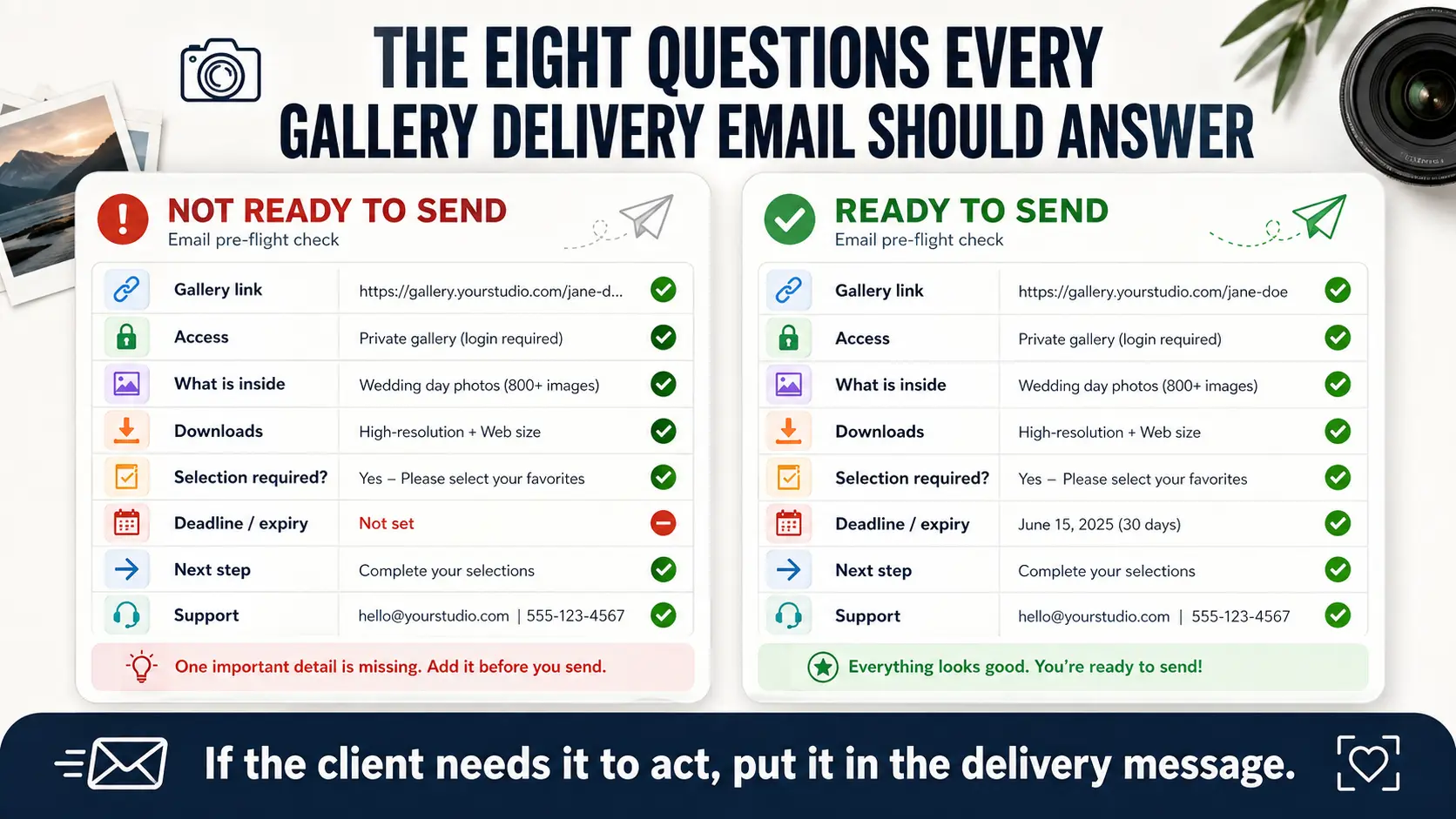
A useful client gallery delivery email should answer these questions:
- Where is the gallery? Give the exact client-facing link.
- How does the client access it? Include a password or access PIN if required.
- What is inside? Say whether these are final photographs, proofs or another stage of delivery.
- What can the client download? Explain individual, full-gallery or limited downloads where relevant.
- Does the client need to make a selection? If yes, state what they are selecting and the allowed number.
- Is there a deadline or expiry? Give the actual date rather than saying “soon.”
- What happens next? Album selection, retouching, print ordering, approval, project completion or another defined stage.
- How should they get help? Give one simple support route.
Do not include a field simply because it appears in a template. If the gallery never expires, remove the expiry paragraph. If there is no download PIN, do not introduce one. If the client is receiving finished images rather than proofs, do not ask them to approve photographs unnecessarily.
GoPickle's guide to what clients expect from a professional photo delivery experience covers the wider delivery experience. The email itself should remain focused on what the client needs to do now.
Wedding photo delivery email template
Wedding galleries are often large, emotionally significant and likely to be shared with family. The message should make the first viewing feel special without hiding practical instructions underneath several paragraphs of celebration.
Subject: Your wedding photographs are ready
Hi [Client First Name / Couple Names],
Your wedding gallery is ready. It has been wonderful going back through the photographs from [Wedding / Event Name or Date], and we are excited for you to see the finished collection.
View your gallery: [Gallery Link]
Gallery password: [Password, if applicable]
Download PIN: [PIN, if applicable]You can [download individual photographs / download the complete gallery / share the gallery with family] using the options available inside the gallery.
[If applicable: Your gallery will remain available until [Exact Date]. Please download and safely back up your photographs before then.]
[If an album follows: The next step is your album selection. Please choose up to [Number] photographs by [Exact Date] using [favourites / album-selection option / agreed selection method].]
If you have any difficulty opening the gallery or downloading your photographs, reply to this email and we will help.
We hope you enjoy going through them together.
[Studio / Photographer Name]
If album production follows gallery delivery, keep that instruction separate from general favourites. Clients should know whether tapping a heart simply saves an image for themselves or formally sends it into an album workflow. Our wedding album selection guide explains how to make that next stage more controlled.
Portrait and family photo delivery email template
Portrait and family sessions generally involve a smaller gallery, but the delivery message still needs to distinguish between included files, optional purchases and final downloads.
Subject: Your photographs are ready
Hi [Client First Name],
Your photographs from our [family / maternity / newborn / portrait] session are ready to view.
Gallery: [Gallery Link]
Access password: [Password, if applicable]This gallery contains [brief description: e.g. “your final edited photographs”]. Your package includes [download entitlement, if relevant], and you can [download the full collection / download your included photographs] directly from the gallery.
[If applicable: The gallery will be available until [Exact Date].]
[If prints or other products are part of the job: Your next step is [choose print photographs / confirm sizes / approve the order] by [Exact Date].]
If you run into any problems with access or downloads, reply here and we will help.
Thank you again for trusting us with the session.
[Studio / Photographer Name]
For private family, maternity or newborn photography, the delivery email is also a good place to make access expectations clear. If the gallery should not be forwarded beyond the client, say so plainly. See our guide to client album privacy and gallery access for the underlying access decisions.
Proofing and client-selection email template
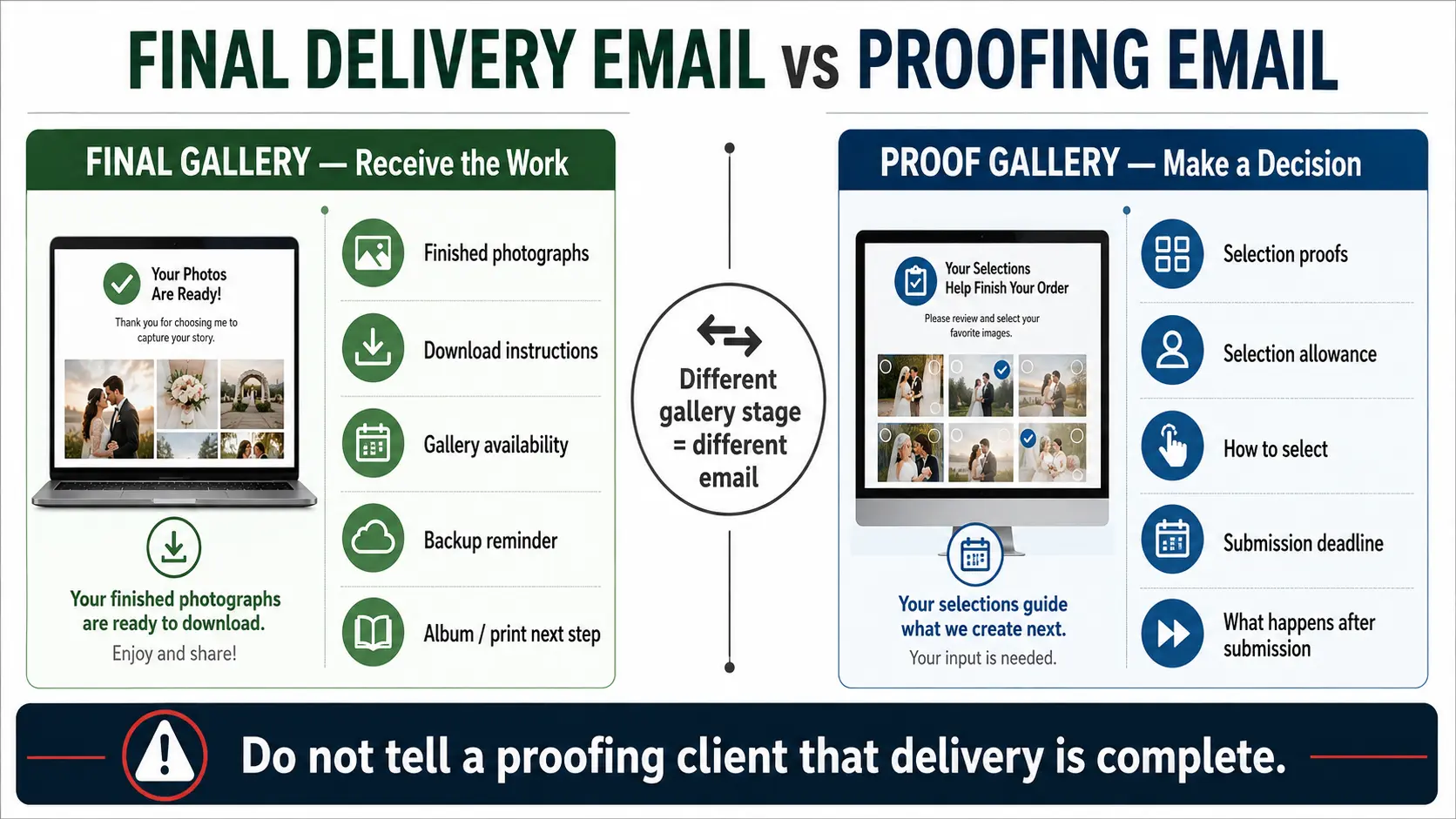
A proofing gallery is where wording matters most because delivery does not mean completion. The client is receiving images to make a decision, and that decision may determine which files receive detailed retouching or final production.
Subject: Your photo selection gallery is ready
Hi [Client First Name],
Your proof gallery is ready for selection.
Open the gallery: [Gallery Link]
Access password: [Password, if applicable]Please review the photographs and select up to [Number] images for [final retouching / your package / final delivery] using [the gallery selection control].
These are selection proofs rather than the final delivered files, so [watermarks / preview resolution / unfinished detailed retouching] may differ from the completed photographs.
Please submit your final selection by [Exact Date]. We will begin [detailed retouching / final production] after the confirmed selection is received.
[If relevant: Additional selections beyond the included [Number] can be added according to [your agreed extra-image/package policy].]
If you need help with the selection process, reply here before submitting the final list.
[Studio / Photographer Name]
The sentence explaining what happens after submission is important. Otherwise a client may continue changing favourites while the studio has already started retouching. If your workflow uses client selection before final production, our photo selection guide provides more detail on keeping selections organised.
Commercial photography delivery email template
Commercial delivery needs less emotional language and more precision. The person receiving the link may also need to pass files to designers, marketers, agencies or another internal team, so usage of the gallery should be clear.
Subject: Final photography delivery — [Project / Campaign Name]
Hi [Client Name],
The final photographs for [Project / Campaign / Assignment Name] are ready.
Gallery: [Gallery Link]
Access: [Password / PIN, if applicable]The gallery contains [describe delivered collections or file sets]. Files are available as [delivery sizes/formats actually provided] for [agreed purpose, where useful to clarify].
[If several collections exist: The gallery is organised into [Collection A], [Collection B] and [Collection C].]
[If applicable: Please download the final files by [Exact Date] before the gallery closes.]
[If approval remains: Please confirm [specific approval/action] by [Exact Date].]
For questions about files or gallery access, contact [Named Contact / Support Route].
Regards,
[Name]
[Studio / Company]
Do not use the delivery email to casually rewrite the licence agreed for a commercial assignment. If image usage, territories, duration or other rights are governed by the contract or licence, keep the authoritative terms there and reference them when necessary rather than creating slightly different legal wording at delivery.
What not to bury in the email
Anything that can stop the client from completing the next step should be easy to find. The gallery link, access credentials, download instructions, selection limit and hard deadline should not be hidden inside a long paragraph.
Also avoid sending conflicting information across channels. If the email says the gallery expires on 30 November while a WhatsApp message says it remains online indefinitely, the studio has created its own support problem. The same applies when the gallery password and download PIN are different: label each one by purpose instead of sending two unexplained codes.
GoPickle Client Galleries support organised photography delivery with private access, download controls, favourites and mobile-friendly viewing. Whatever gallery software you use, the message and the gallery configuration should tell the same story.
Record delivery status internally
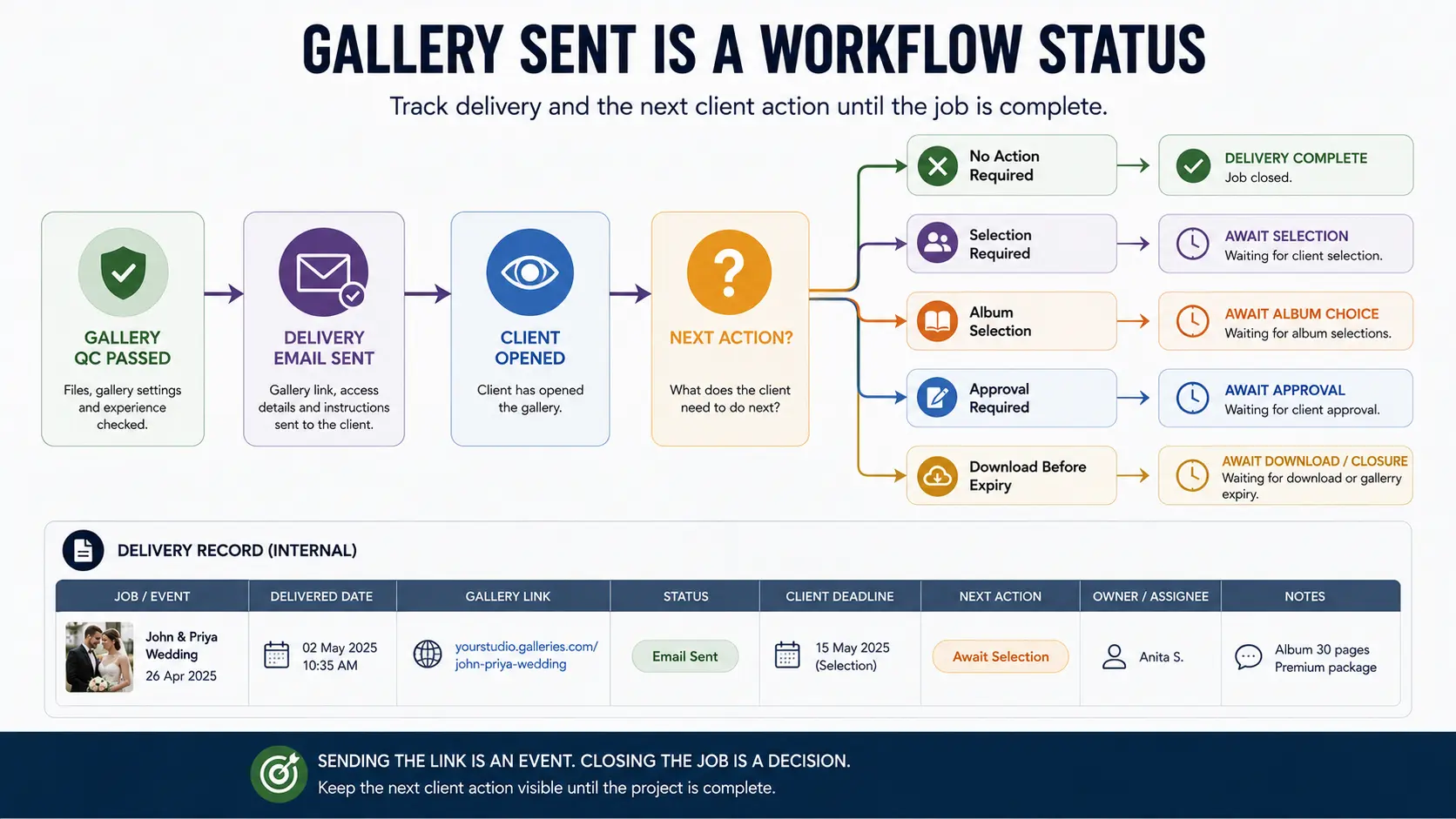
Sending the email should create an internal milestone, not disappear into the photographer's sent folder.
Record at least the delivery date, gallery link, gallery status and next required client action against the job. If selection is due, record its deadline. If album work follows, the job should remain open until that stage is completed. If everything has been delivered and no action remains, mark the delivery accordingly.
This becomes increasingly important in a studio where photographers, editors, album designers and client coordinators share the same workload. A team member answering a client two weeks later should be able to determine what was delivered and what is still pending without reconstructing the project from old messages.
A good photo delivery email template is therefore less about finding perfect wording and more about supplying the right variables for the job. Keep the welcome human, keep the instructions specific, and make the next action impossible to misunderstand. The photographs should be the memorable part of the delivery; opening, downloading or selecting them should not require another conversation.