Photography Invoice Software Buyer’s Checklist: What Matters Beyond a PDF Generator
Compare photography invoice software by deposits, instalments, partial payments, reminders, taxes, mobile use, reporting and booking integration.


Most photography invoice software looks capable during a quick demo. Add a client, enter a package, apply tax, export a polished PDF and send it. That part is relatively easy.
The useful differences appear several weeks later.
A wedding client has paid an advance but still owes two instalments. A commercial customer wants the invoice sent to accounts payable rather than your creative contact. A portrait client adds prints after the session. Another payment is overdue. Someone on your team needs to confirm whether money arrived while you are away shooting. At month-end, you need to know what has actually been collected rather than what has merely been invoiced.
That is why we would not evaluate photography invoice software primarily by the appearance of its invoice templates. The better buying question is whether the software can manage the complete financial journey attached to a real photography booking.
This checklist is designed for photographers and studios comparing invoicing software for photographers, a photographer invoice app, a broader photography CRM, or a dedicated photography billing system. It deliberately goes beyond invoice basics and focuses on the capabilities that start to matter once you are handling several clients, staged payments and outstanding balances at the same time.
1. Start with the full payment journey
Before comparing templates or subscription prices, map what happens to money during one representative booking.
For a simple headshot session, that journey may be invoice → payment → receipt. For a wedding studio, it could be quotation → booking confirmation → advance → pre-event instalment → add-on → final balance → paid. Commercial photographers may work with purchase orders, deposits, project milestones and payment terms that continue well after the shoot.
Your photography payment software should make that journey easier to follow rather than creating another disconnected record.
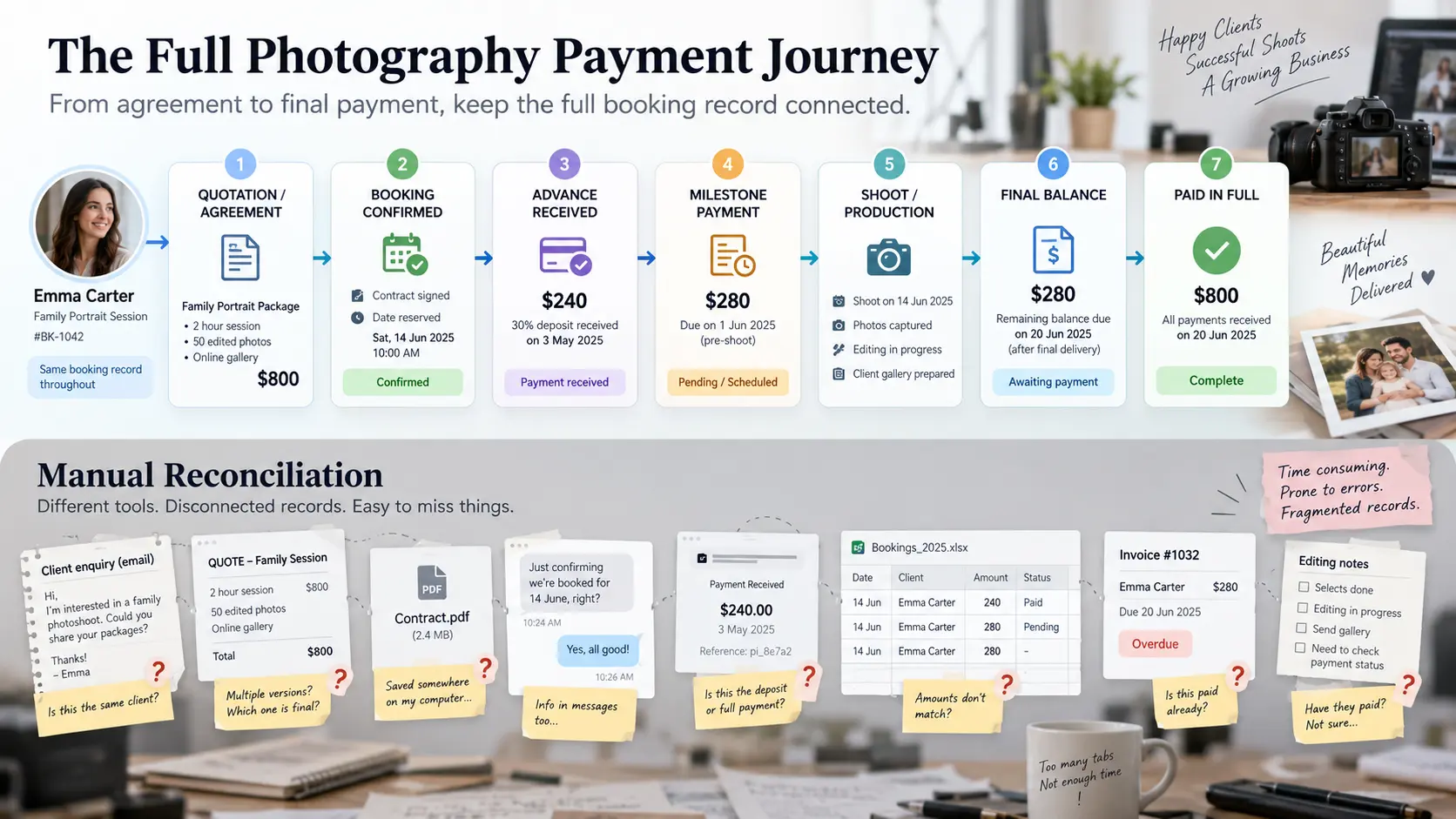
Take one completed assignment from your own studio and try to reproduce it during a software trial. Can you tell, without opening messages or a spreadsheet, what the client agreed to buy, the total booking value, what has already been received, what is due next and when?
That test reveals much more than generating a sample invoice.
At GoPickle, this distinction is why we treat Smart Invoicing as part of the booking and payment workflow. An invoice is much more useful when its client, booking, package, advance, balance and payment status remain connected.
2. Invoice creation should be fast, but the document still has to be good
A capable system should make routine invoicing quick without reducing every assignment to an unexplained total.
Check whether you can clearly show the client and studio details, invoice number, issue and due dates, services, quantities where appropriate, packages, add-ons, discounts, taxes, payment instructions and terms. A wedding invoice may need to separate photography coverage, cinematography, albums, travel or additional events. A commercial invoice may need production fees, retouching, licensing or other client-specific line items.
Branding also matters, although it should not dominate your buying decision. Your invoice is a client-facing business document. Studio identity, consistent formatting and a clean mobile view can make the payment experience feel connected to the rest of your client experience.
GoPickle supports branded photography invoices with multiple templates, studio identity, services, add-ons, terms, taxes, discounts and line-item detail. The more important test, however, is what happens after that invoice is created.
If you are still deciding whether you need software at all, our guide to invoice generators versus invoicing software for photographers covers that earlier decision separately.
3. Booking-linked advances and balances are a major buying test
Photography rarely follows the clean one-invoice, one-payment model that generic billing demos tend to show.
A wedding photographer may collect an advance to reserve the date, another instalment before the wedding and the remainder before album production or final delivery. A commercial studio may invoice against production milestones. Even portrait photographers can have a session fee followed by prints, framing or additional retouching.
That makes booking context particularly important when evaluating wedding photography invoice software.
Suppose the agreed package is 6,000 in your working currency and the client has already paid a 1,500 booking advance. When the next payment is due, does the system clearly understand that the client owes part of the remaining 4,500, or are you manually reconstructing the calculation every time?
Good software should let the studio answer three different questions without confusing them:
- What is the total agreed booking value?
- How much money has actually been received?
- How much remains outstanding?
Those numbers are related, but they are not interchangeable.
A photography billing system becomes much more valuable when the financial record follows the booking instead of existing as a standalone PDF. This is also why we recommend defining the payment structure before invoicing begins. Our guide to advance, milestone and final payments for photographers explains how to build that structure around the actual project.
4. Partial payments need a history, not just a “Partially Paid” badge
A status label is useful. A payment ledger is better.
Imagine that a client owes 4,000 and transfers 1,000 today, 1,500 next week and the remainder later. Six months from now, you should still be able to see when each payment was recorded and what balance remained afterwards.
This becomes particularly important when clients pay through different methods, when several people in the studio handle administration, or when a long booking runs across multiple months.
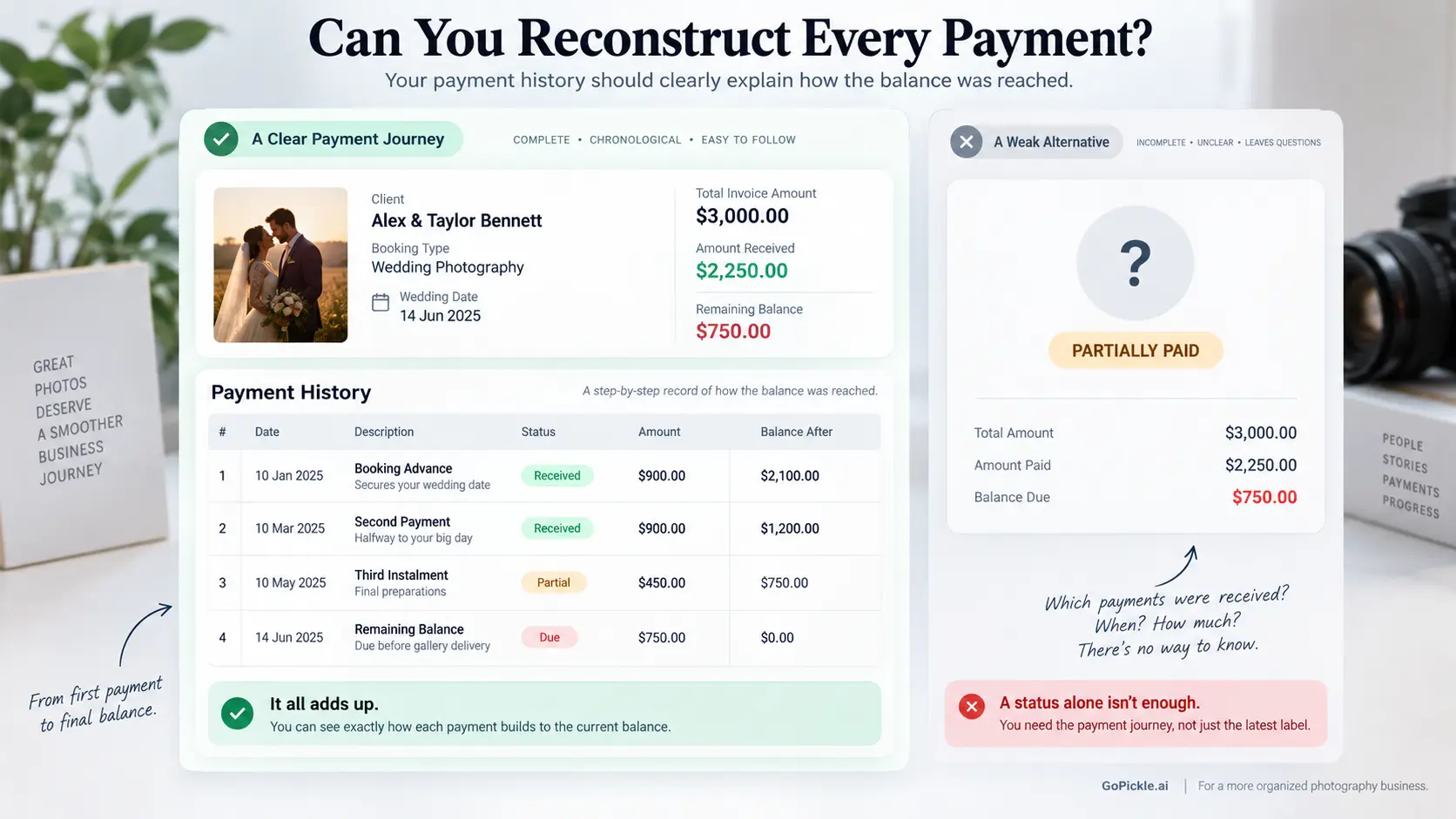
When testing software, deliberately create a messy example rather than a perfect one. Record an advance, make a partial payment, add another payment and inspect what the software retains. Then ask what happens if a payment is corrected, reversed or recorded incorrectly.
You should be looking for a reliable history of the financial record, not merely the current state.
This is the same reason a simple paid/unpaid toggle becomes inadequate as a studio grows. Our deeper guide to photography payment plan software covers the operational difference between scheduled, due, partially paid, overdue and completed payments.
5. Reminders and overdue visibility should reduce chasing, not create more noise
Sending an invoice is an administrative action. Collecting the money is the business outcome.
Before buying photography invoice software, inspect how it handles invoices approaching their due date and balances that have already become overdue. Can you see them together? Can the system distinguish between an upcoming payment and one requiring action? Can reminders carry the correct client, booking, amount, due date and payment action?
The best reminder workflow is predictable enough that clients understand it and controlled enough that the studio does not accidentally keep chasing someone who has already paid.
Look at the experience from the client's side too. Opening an invoice on a phone, finding the outstanding amount and understanding how to pay should not require hunting through an old email or asking you to resend bank details.
GoPickle's Get Paid Faster workflow connects payment links, due-date follow-up and visibility into collected, pending and overdue amounts. GoPickle's invoicing workflow also supports pre-due, due-day and overdue reminders, so reminders remain attached to the financial context rather than becoming another manual calendar task.
6. Check tax and currency requirements for the markets you actually serve
This is one area where a worldwide buyer's checklist cannot responsibly give every photographer the same answer.
Invoice requirements differ by jurisdiction. Depending on where your business and customer are located, you may need particular tax-registration details, invoice numbering, supply dates, customer information, tax rates, currency presentation or electronic-invoicing processes. Requirements can also differ between business-to-consumer and business-to-business transactions.
Do not buy photography invoice software simply because its website says “tax supported.”
Instead, create a checklist from the requirements that apply to your business and test them. Can the invoice contain the registration details your jurisdiction requires? Can taxes be shown correctly? Can discounts and taxable items be represented properly? Does invoice numbering fit your accounting process? If you invoice clients in more than one currency, what exactly happens to the invoice, payment record and reporting?
The same scrutiny applies to currency. Being able to type “USD” or “EUR” beside an amount is not necessarily the same as having a robust multi-currency accounting workflow.
Software can provide the fields and structure, but your studio remains responsible for configuring invoices according to applicable local tax and invoicing rules. For anything material to tax reporting or statutory invoicing, confirm the setup with your accountant or relevant local authority.
7. Test the mobile workflow, exports and record history before committing
A photographer invoice app becomes useful when it works where photographers actually work.
You may receive an advance while travelling to a venue, need to resend an invoice between sessions or get a client message asking for their remaining balance while you are away from the studio. A desktop-only workflow can turn a small financial action into something you postpone until later.
During the trial, use your phone rather than merely looking at screenshots of the mobile interface. Try opening a client, checking an invoice, viewing the balance, sending the invoice link and confirming payment status.
GoPickle's invoicing workflow is available across web, iPhone and Android, with mobile-friendly invoice links and downloadable PDFs, which is useful for studios where administration frequently happens between shoots rather than at a desk.
Also investigate what happens when you eventually leave the software. Ask whether invoices and financial records can be exported, what formats are available, whether attachments or payment histories are included, and how long records remain accessible after cancellation. If your accountant requires periodic exports, test one before purchasing.
Finally, ask about record history. Can you determine when important financial changes occurred? If an invoice is edited after being sent, what is preserved? If several staff members have financial access, can you understand who changed something? Do not assume an “activity” feature provides an accounting-grade audit trail; ask the vendor exactly what is retained.
8. Use this photography invoice software buyer scorecard
A feature comparison is most useful when every feature is weighted by the consequences of not having it.
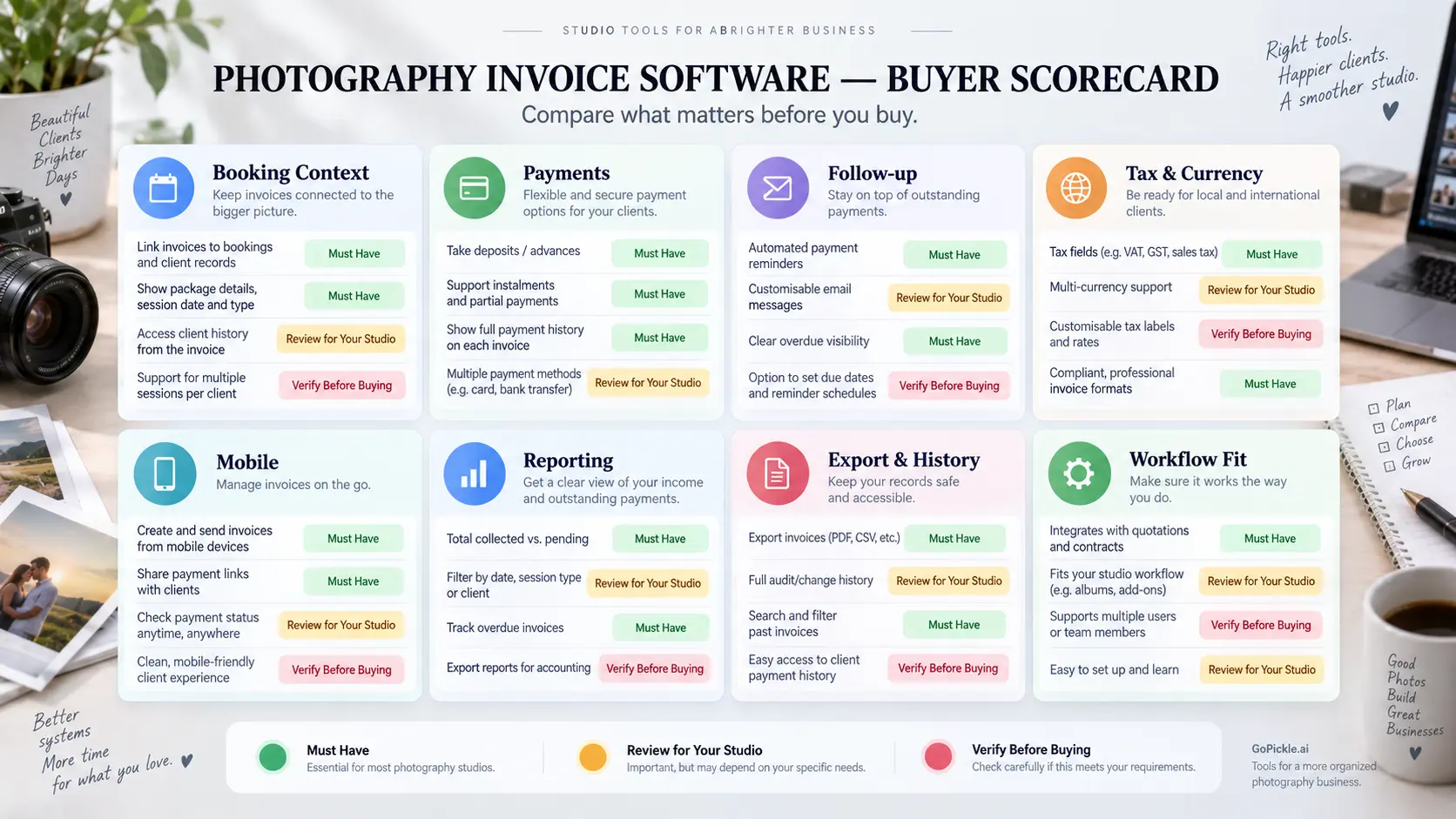
| Buying criterion | What to test | Priority for most studios |
|---|---|---|
| Booking connection | Invoice retains the correct client, service and booking context | High |
| Advance handling | Advance is recorded without losing sight of total booking value | High |
| Instalments | Multiple payment stages can be tracked clearly | High for weddings and larger projects |
| Partial payments | Amount received and remaining balance update correctly | High |
| Payment history | Individual payments remain traceable | High |
| Due dates | Upcoming and overdue payments are easy to distinguish | High |
| Reminders | Follow-up can happen without rebuilding client/payment context | High |
| Client payment experience | Invoice and payment action work properly on mobile | High |
| Taxes | Required fields can be configured for your jurisdiction | High |
| Currency | Invoice currency works for the markets you serve | Depends on business |
| Invoice design | Documents remain professional and on-brand | Medium |
| Mobile workflow | Core financial actions work from a phone | High for photographers on location |
| Reporting | Invoiced, collected, pending and overdue money are distinguishable | High |
| Export | Financial records can leave the platform in a usable format | High |
| Change/audit history | Important financial changes can be reconstructed | Medium to high for teams |
| Wider workflow | Quotations, bookings and payments avoid duplicate data entry | High as volume grows |
| Price | Cost is reasonable relative to admin replaced and workflows included | Important, but compare last |
The final row deserves emphasis. Comparing subscription prices before comparing workflows can be misleading.
A low-cost invoice generator may be excellent for a photographer who sends five straightforward invoices a month. A more connected invoicing system starts to justify itself when you repeatedly reconcile advances, chase instalments, look up balances, copy client information between tools or maintain another spreadsheet purely to understand receivables.
If you are comparing GoPickle against that threshold, review the current GoPickle pricing plans alongside the invoicing, booking and wider studio features included in the plan. The useful comparison is not simply “invoice app A costs less than platform B.” It is which parts of your existing workflow the software will actually replace.
Buy for what happens after the invoice is sent
The fastest way to choose photography invoice software is to stop testing it with an imaginary perfect client.
Use one of your awkward real bookings.
Take a project with an advance, multiple services, an instalment, an add-on and a pending balance. Create the booking, issue the invoice, record two payments, make one overdue and then try to understand the financial position from both desktop and mobile.
If the software still gives you a clear answer about what was agreed, what has been collected, what remains due and what needs attention next, you have found something more useful than a PDF generator.
For us at GoPickle, that is the standard that matters. Invoicing should sit inside the real client journey, from booking confirmation through the final balance, so photographers spend less time reconstructing payment history and more time running the business with accurate information.