Invoice Generator vs Invoicing Software for Photographers: When a PDF Is No Longer Enough
Compare invoice generators and invoicing software for photographers. Learn when advances, instalments, reminders, balances and payment tracking justify upgrading.

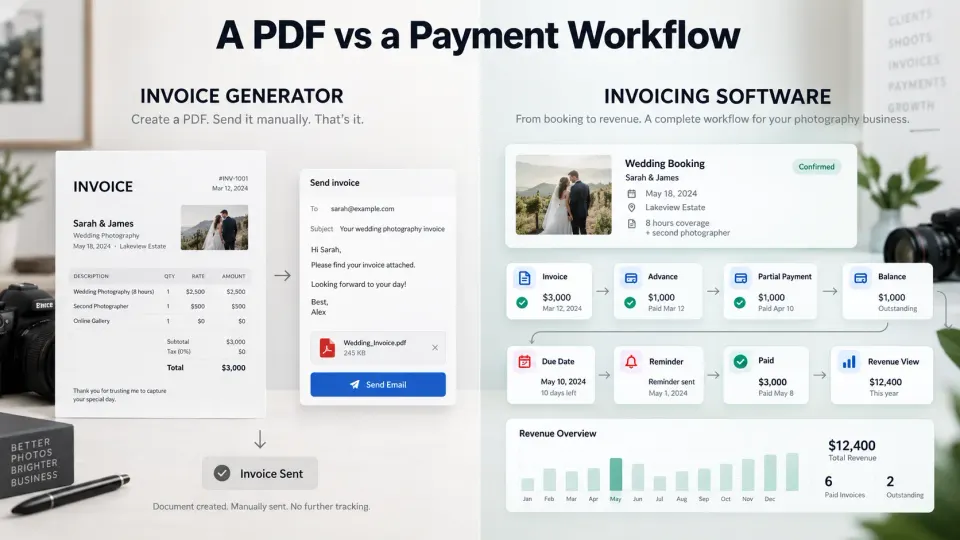
A photography invoice generator and invoicing software can produce documents that look almost identical to a client. The difference becomes visible after the invoice is sent.
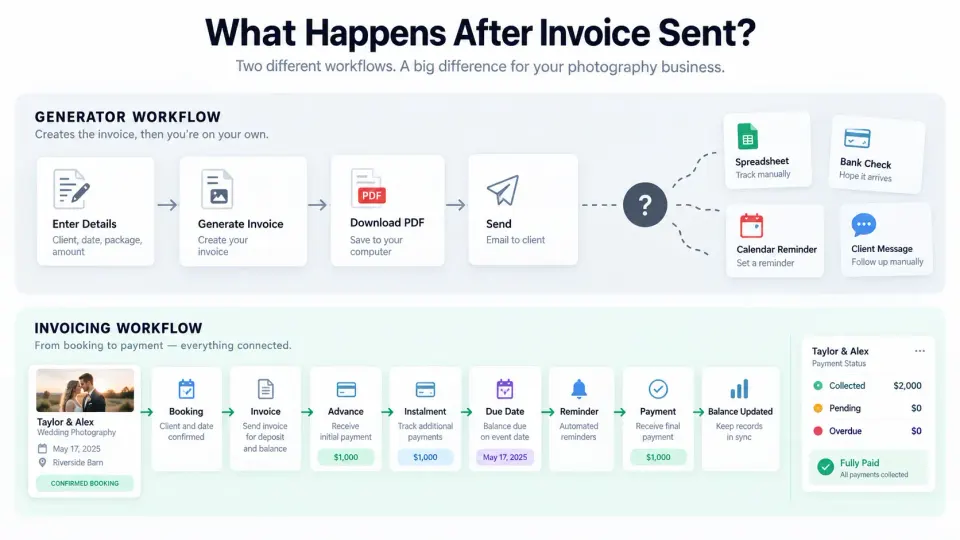
A generator helps you create the invoice. You enter the client details, services, amounts, taxes where applicable, payment instructions and due date, then export or share the document. For an occasional portrait session, a small commercial assignment or a photographer who sends only a handful of straightforward invoices each month, that may be everything required.
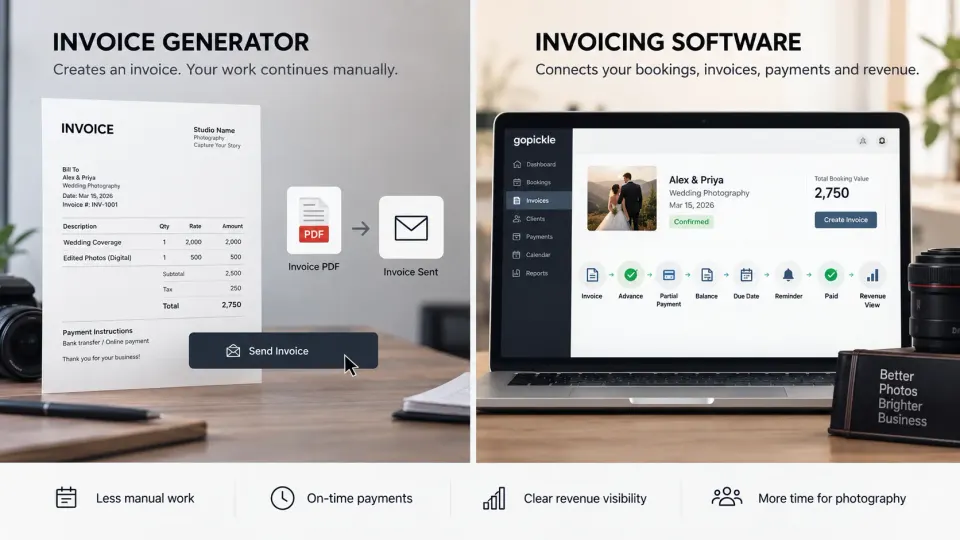
Invoicing software solves a wider problem. It remembers the client and the job, connects the invoice with the booking, records advances, tracks partial payments, shows the remaining balance, watches due dates, supports payment follow-up and gives the photographer a clearer view of money that has actually been collected.
That distinction matters because photography businesses rarely operate on a simple “send invoice, receive full payment” cycle. Weddings can run across several payment stages. Commercial assignments change scope. Albums and additional deliverables may be ordered later. Event clients may pay an advance and clear the balance closer to the shoot. A photography billing system therefore becomes useful long before a studio feels large enough to need complicated accounting software.
If you are comparing an invoice generator vs invoicing software for photographers, the right question is not which one creates the better-looking PDF. Ask what needs to happen after that PDF exists.
Invoice generator vs invoicing software: the short answer
An invoice generator is primarily a document-creation tool. Invoicing software is a payment-management system.
| Need | Invoice generator | Invoicing software |
|---|---|---|
| Create a professional invoice | Yes | Yes |
| Download or share an invoice | Usually | Yes |
| Save clients and repeat billing details | Sometimes | Usually |
| Connect an invoice to a photography booking | Usually no | Photography-specific systems can |
| Record an advance | Manual | Yes, depending on the software |
| Track instalments and partial payments | Usually manual | Yes |
| Calculate the remaining balance | Manual or document-level | Yes |
| Track due and overdue invoices | Manual | Yes |
| Send payment reminders | Manual | Often supported |
| See collected versus outstanding revenue | Separate spreadsheet | Usually available |
| Keep payment history with the client | Manual filing | Yes |
| Continue the workflow on mobile | Varies | Common in modern invoicing apps |
Neither category is automatically better. A free photography invoice generator can be the sensible choice when there is little to manage after the document is created. Paying for photography invoicing software only makes sense when the workflow around invoicing is costing more time, creating more risk or making the financial position of the business harder to understand.
When a free invoice generator is completely enough
There is no reason to buy photographer invoice software merely because paid software exists.
Imagine a freelance photographer who completes four or five small assignments each month. Clients normally pay the entire fee upfront or immediately after the shoot. There are no instalments, no employees checking payment status, few package changes and almost no need to revisit an invoice once the money arrives.
A photography invoice generator can handle that situation perfectly well. Create the document, store the PDF in a sensible folder, record the payment somewhere reliable and move on.
A generator also works well for genuinely occasional invoices: a licensing fee from an older photograph, a one-off assistant job, a print sale, a small editorial assignment or an infrequent client who requires a formal invoice.
The important condition is not invoice volume alone. It is administrative complexity. Ten simple invoices that are always paid immediately can be easier to control manually than three wedding bookings involving advances, instalments, extras and final balances.
Before purchasing another application, identify the problem you are trying to solve. If the problem is simply “I need to create a professional invoice”, a generator may already solve it.
Where generators begin to break for professional photographers
The limitation appears when the invoice stops being an isolated document.
Consider a wedding studio with eight active bookings. One client has paid the booking advance. Another has received the second instalment invoice. A third paid only part of the requested amount. A fourth added an album. One balance is due next week. Another is overdue. The studio owner received a payment while travelling but has not yet updated the spreadsheet.
Every individual PDF may still be perfectly accurate. The weakness is the system around those PDFs.
The photographer now has to answer questions the generator was never designed to answer:
- Which bookings have paid the required advance?
- Which invoices have been sent but remain unpaid?
- Which clients owe only part of an instalment?
- What is due this week?
- What is genuinely overdue?
- Which booking changed after the original quotation?
- How much has the business actually collected?
- What still needs to be collected?
Once those answers require searching PDFs, bank transactions, messages and spreadsheets, the studio has moved from an invoice-creation problem into photography invoice management.
Saving client and booking context
Professional photography billing begins before the invoice.
The client usually entered the business as an enquiry. A quotation followed. The client approved a package. A booking was created with dates, locations, services and deliverables. Payment terms were agreed. Only then was an invoice needed.
Re-entering all of that information into an unrelated invoice generator creates another version of the job.
This is particularly risky when bookings change. The package in the original PDF might not include the extra hour approved later. The client name may be correct, but the billing company may have changed. An album upgrade may exist only in a message. The person preparing the invoice may not know what the sales conversation included.
A stronger photography billing workflow keeps the financial document close to the underlying booking. GoPickle's Booking Management for photographers is designed around that principle: services, deliverables, quotations, invoices, advances and balances remain connected to the work rather than being reconstructed each time.
Tracking the booking advance
For many photographers, the first meaningful payment is the amount used to secure the booking.
That creates a deceptively simple question: has the advance actually been received?
A manually generated invoice may show an advance amount, but the document itself does not necessarily tell you whether the client later paid it. The photographer needs another place to record the transaction and update the booking.
Now multiply that across several active assignments.
Useful invoicing software for photographers should make a distinction between an advance requested and an advance received. It should also preserve that payment when later invoices or balances are created, rather than forcing the photographer to remember what was already collected.
That becomes especially valuable for weddings, destination assignments, commercial productions and longer event projects where a significant period may separate booking confirmation from final delivery.
Handling partial payments and instalments
Photography businesses often receive money in stages rather than one clean transaction.
A client might pay an advance when the booking is confirmed, another instalment before the event and the final balance before delivery. A commercial client may operate against internal approval dates. A wedding client may transfer only part of an instalment and clear the remainder a few days later.
A binary Paid / Unpaid status cannot describe these situations properly.
Suppose an instalment is 2,000 and the client pays 1,200. The useful information is:
- Instalment: 2,000
- Received: 1,200
- Remaining on this instalment: 800
- Other future payments: still scheduled according to the booking
Changing the entire job to “unpaid” hides too much information. Marking it “paid” is obviously wrong.
We cover this in more depth in our guide to photography payment plan software and what it should track beyond paid and unpaid. The practical buying lesson is simple: if staged payments are normal in your business, evaluate the payment model of the software, not merely its invoice templates.
Showing the remaining balance
The remaining balance should never require detective work.
Clients should not need to search an old quotation, find an advance receipt and subtract the figures themselves. Your team should not need to do it either.
A good photography invoice should make the financial position easy to read:
- Approved package or current booking value
- Payments already received
- Amount currently due
- Remaining balance after payment, where relevant
This becomes particularly important when several payments have already occurred.
The same clarity should exist internally. If a booking is worth a certain amount, the studio should be able to distinguish the booking value from the amount invoiced so far and the money actually collected. Our guide to booked revenue vs collected revenue for photography studios explains why those numbers answer different business questions.
Due dates and automatic reminders
A due date has limited operational value if nobody notices when it arrives.
With a PDF workflow, photographers often create the invoice correctly and then rely on memory, a calendar reminder or a spreadsheet to follow up. That works until the same week contains client calls, shoots, editing deadlines, crew changes and several outstanding balances.
A better photography invoicing app keeps the due date attached to the invoice and makes invoices requiring attention easy to identify. Where automatic reminders are supported, photographers can establish a consistent pre-due, due-date and overdue follow-up process rather than deciding from scratch whom to message every morning.
This is not about bombarding clients with automated messages. Payment communication should still suit the relationship and the circumstances. Automation is useful when it removes forgetfulness while the photographer retains judgement over exceptions and sensitive conversations.
GoPickle's Get Paid Faster workflow supports pre-due, due-day and overdue reminders alongside booking-linked payment status.
Package changes, extras and revised amounts
The moment a booking changes, an isolated invoice becomes harder to trust.
Perhaps the client adds extended event coverage. A corporate shoot requires another location. Additional retouching is approved. The wedding runs longer than planned. An album is upgraded. The client removes one service but adds another.
The final invoice should reflect the current approved commercial agreement, not simply copy the first quotation or absorb unexplained changes into a new total.
We recommend treating every meaningful change as part of the commercial history of the booking. The photographer should be able to understand what was originally approved, what changed afterwards and how the change affected the amount payable.
Our photography quote-to-invoice workflow covers that reconciliation in detail. For software buyers, test how easily a tool carries approved booking context forward and how clearly it handles later changes. Fast invoice generation is less valuable if the photographer must still rebuild the financial story from old messages.
Taxes, discounts and photography line items
Photography invoice software should support the structure of the bill without pretending that tax rules are universal.
Tax registration, invoice requirements, tax names, required identifiers and treatment of discounts vary by country and sometimes by region or type of client. Software can help calculate and present the information, but it does not replace the photographer's responsibility to configure invoices according to the rules that apply to the business.
At the document level, look for flexible line items, taxes where applicable, discounts, add-ons, payment terms and clear payment instructions. Photography work often contains a mixture of services and deliverables: coverage, additional hours, travel, assistants, albums, prints, editing, licensing or other agreed items.
If the structure of the invoice itself needs attention, use our photography invoice basics checklist before evaluating advanced software. Automation cannot rescue unclear billing.
Tracking collected vs outstanding revenue
This is one of the clearest signs that a PDF is no longer enough.
A studio owner should be able to answer two separate questions:
How much work have we sold?
and
How much money have we actually collected?
A busy calendar can create the impression of healthy cash flow even when significant balances remain outstanding. The opposite can also happen during a quieter booking period when earlier invoices are being collected.
Photography payment tracking software becomes valuable when it can show invoiced, collected, pending, due and overdue amounts without requiring the owner to reconcile a folder of PDFs against a bank statement before every decision.
That visibility affects more than collections. It helps studios plan crew payments, equipment purchases, production costs and other commitments against money that has actually arrived rather than revenue that exists only inside confirmed bookings.
Mobile invoicing
Photographers do not run their businesses exclusively from desks.
Packages get approved while travelling home from consultations. Clients ask about balances during events. An advance can arrive between two wedding functions. A corporate client may request an invoice while the photographer is already on location.
This makes mobile invoicing more than a miniature invoice editor.
When evaluating an invoice app for photographers, test whether you can create or access the correct invoice, confirm what has already been received, see the current balance, share the payment request and record or verify payment without losing the connection to the booking.
GoPickle's mobile application for photographers keeps invoices, payments, bookings and the wider studio workflow available across mobile and desktop rather than making the phone a separate billing system.
What to test before paying for photography invoicing software
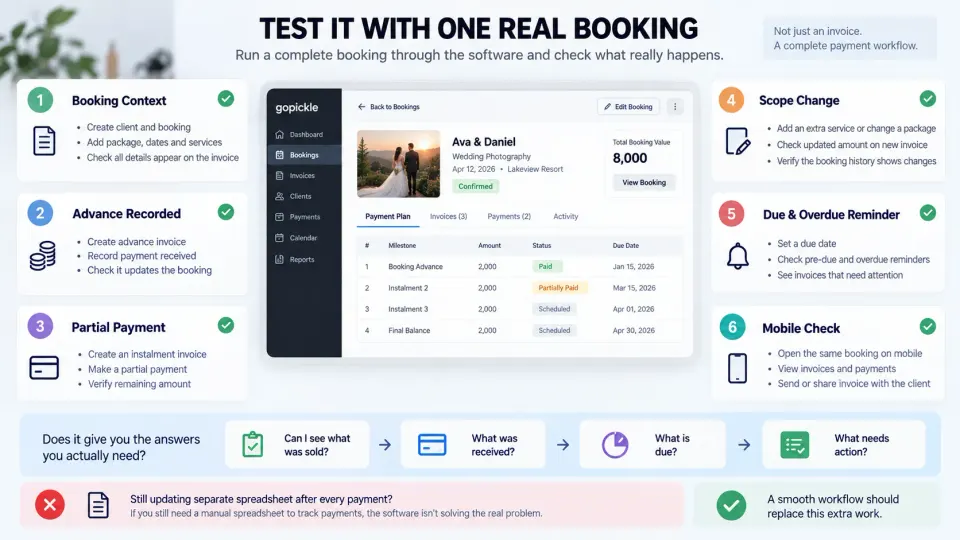
Do not choose the best invoicing app for photographers from a feature checklist alone. Put one realistic booking through it.
Create the client and booking. Add the actual package. Record an advance. Create an instalment. Make a partial payment. Change one service. Add an extra. Apply the tax or discount structure your business normally uses. Move an invoice past its due date. Check what the client sees. Then open the software from your phone and try to determine the current financial position without referring to your usual spreadsheet.
The test should answer five questions:
- Can I see the real booking behind the invoice? Client, project, package and relevant payment context should remain understandable.
- Can I reconstruct the money without checking another tool? Advances, partial payments and balances should be visible.
- Does the software tell me what requires action? Due and overdue amounts should not disappear inside an invoice list.
- Can the client understand what to do next? Amount, due date and payment action should be obvious.
- Does the system reduce duplicate work? If you still maintain the same payment spreadsheet after adopting the application, the workflow has not really improved.
This is the purchasing threshold we would use. Do not pay merely for a more sophisticated invoice designer. Pay when the system replaces recurring administrative work and gives you financial information you could not reliably see before.
How GoPickle Smart Invoicing fits into the booking workflow
At GoPickle, we built Smart Invoicing for photographers around what happens before and after the invoice rather than treating the PDF as the end product.
The invoice can remain connected to the client and booking. Advances, instalments, partial payments and final balances can be tracked together. Invoices support photography line items, taxes, discounts and payment instructions. Clients can receive an invoice link or PDF, while due dates and reminders continue the payment workflow. The studio can see paid, partial, due and overdue positions and review collected versus pending money instead of stopping at “invoice sent”.
That does not mean every photographer needs full invoicing software immediately.
If a free photography invoice generator still gives you a reliable process, keep using it. Good software should remove a problem, not manufacture another subscription.
The point to switch comes when creating the document has become the easiest part of invoicing. When the real work is remembering advances, reconciling instalments, updating balances, following up due payments, reflecting booking changes and understanding outstanding revenue, you no longer need a better PDF generator.
You need a payment workflow.