Photography Package Architecture: Build Clear Base Packages, Add-Ons and Upgrade Paths
Learn how to structure photography packages with complete base offers, clear pricing tiers, optional add-ons and profitable upgrade paths without confusing clients.

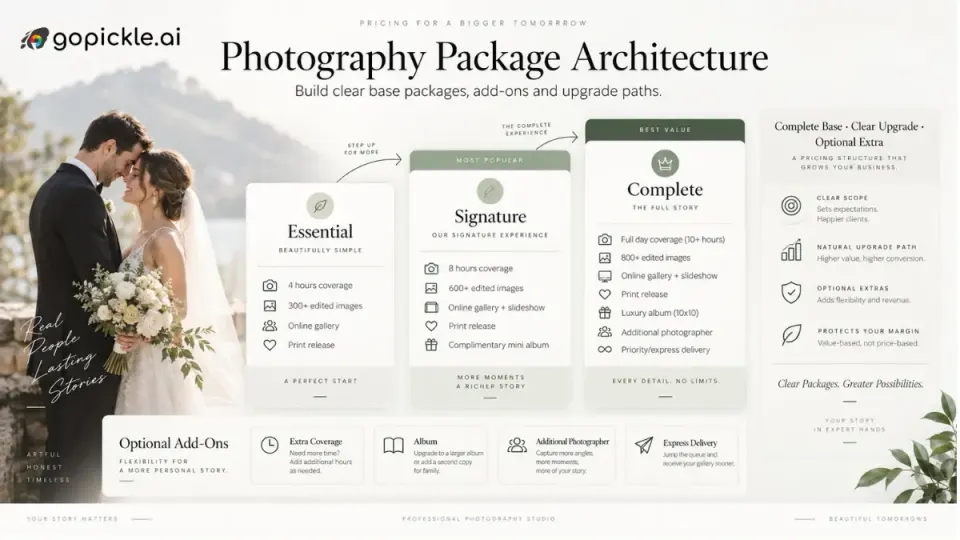
A photography package should make buying easier without making the photographer's work harder to deliver.
That sounds obvious, but many pricing menus evolve in the opposite direction. A studio starts with one package, adds a second when clients ask for more coverage, creates a premium option after introducing albums, then adds video, extra photographers, rush delivery, drone coverage, additional edits and several other extras. A year later, the price list contains overlapping packages that even the sales team struggles to explain consistently.
The problem is not necessarily the price. It is the architecture.
A strong photography package pricing structure gives the client a clear starting point, makes meaningful upgrades easy to understand and keeps optional services separate from the work required to deliver the base promise properly. It should also help the studio protect scope, margin and operational consistency.
This guide focuses on that architecture: how base packages, tiers, add-ons and upgrade paths should fit together. If you are still deciding whether to use fixed packages at all, our separate guide to photography packages vs custom quotations covers that decision in more detail.
Start with the job the base package must solve
The easiest mistake in photography package pricing is starting with the list of things you can sell.
Start instead with the job the client is trying to buy.
For a portrait photographer, that might be a complete family session with enough coverage to create a useful set of finished images. For a wedding studio, it might be photography coverage of one defined function with professional editing and final gallery delivery. For a corporate photographer, it could be a half-day event assignment with a clear number of final images and an agreed turnaround.
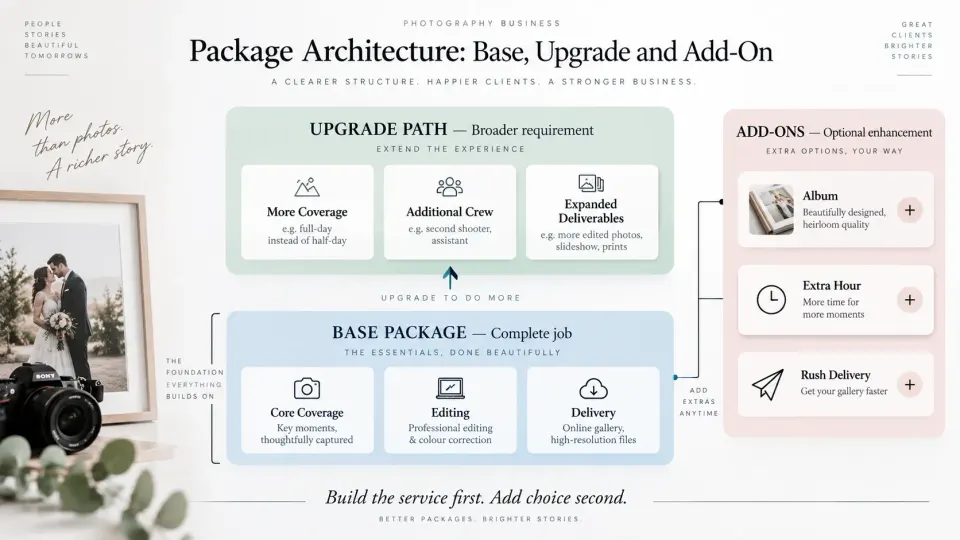
The base package should be capable of solving that job on its own.
If nearly every client has to buy an extra hour, another photographer, editing or delivery simply to make the package usable, those items are probably not optional add-ons. They are part of the real base service.
This is where package architecture differs from simply creating a price list. You are defining the minimum commercially complete version of the service.
Suppose a wedding studio sells:
Essential Wedding Photography
- One photographer
- Six hours of coverage
- Edited final photographs
- Private online gallery
- Standard delivery timeline
That can be a complete package if one photographer and six hours genuinely suit the type of wedding it is intended for.
Now consider:
Essential Wedding Photography
- Four hours of coverage
- No editing included
- Gallery charged separately
- Additional photographer required for ceremonies
- Travel charged separately even within the normal service area
That may appear cheaper, but its architecture is weak because the advertised package does not represent the service most buyers will actually receive.
The purpose of the entry package is not to create the smallest possible number. It is to create the smallest version of the service that you are still comfortable delivering under your name.
Define the non-negotiable inclusions before creating tiers
Every photography business has costs and responsibilities that do not disappear because a client selects the lowest package.
Those should shape the package before the sales language does.
Depending on your photography category, non-negotiable inclusions may include planning time, minimum crew, basic editing, colour correction, file preparation, gallery delivery, data handling, equipment redundancy or a realistic amount of post-production. The exact mix will differ between studios.
The distinction is important:
A package inclusion is part of the promise. An operational necessity is part of the cost of keeping that promise.
Clients do not need to see every internal production expense, but your photography package pricing needs to account for them.
For example, a studio may not list "backup storage" or "file ingest" as package features because clients are not choosing between them. Those activities are simply part of delivering professional photography.
Before building your package ladder, calculate what each level actually costs to fulfil. GoPickle's free Photography Pricing Calculator can help you think through assignment scope, coverage, crew, deliverables and production context before you decide what the package should sell for.
Your own historical costs remain even more important. Crew rates, album production, editing, travel, software, payment fees and owner time can materially change profitability. Our guide to calculating photography profit margin on every booking explains how to evaluate the economics after those costs are included.
Separate optional services from hidden necessities
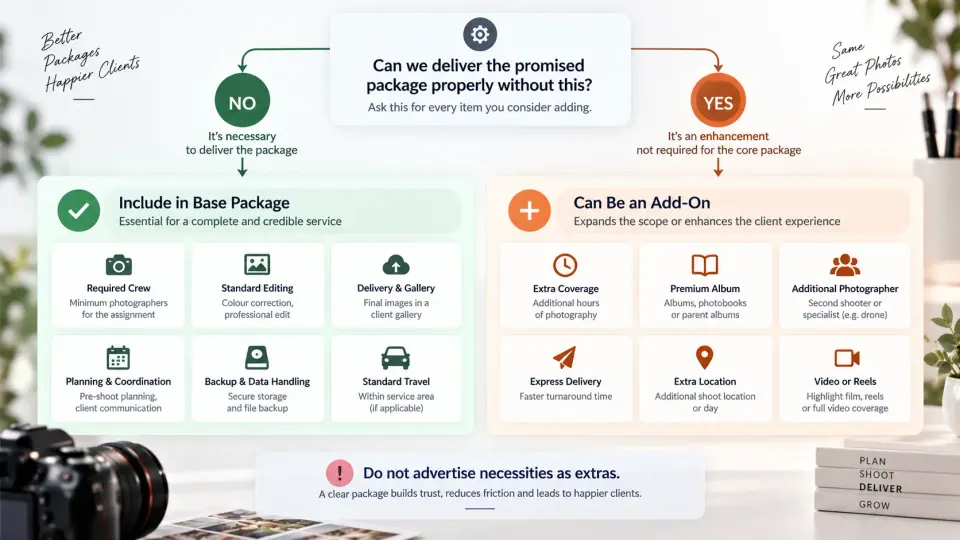
A useful add-on changes the client's experience or expands the agreed scope. It should not repair an intentionally incomplete package.
Good photography add-ons can include:
- Extra coverage beyond the included time
- Additional photographers where the event genuinely requires broader coverage
- Premium albums or parent albums
- Additional edited images
- Express turnaround
- Extra locations
- Engagement or pre-wedding sessions
- Reels or short films
- Drone coverage where legally and operationally feasible
- Prints and wall products
- Extended commercial image usage where relevant
What qualifies as optional depends on the assignment.
An additional photographer may be optional for a small event but operationally necessary for a large multi-location wedding. Drone coverage may be a genuine optional creative service. Basic image editing is usually not a sensible optional extra if the studio's normal finished product is edited photography. That means the same item can sit in different places in different package architectures.
The test is simple: If the client declines this item, can we still deliver the core package properly and honestly?
If the answer is no, build it into the package. This also protects the sales conversation. Clients become frustrated when the advertised price grows through a sequence of charges that feel unavoidable. Transparent photography add-on pricing works best when the base package already stands on its own and the add-on has an understandable reason to exist.
Good-better-best works only when each tier has a purpose
Three-level package structures are common across current photography pricing pages, but simply naming three columns "Essential", "Signature" and "Premium" does not create useful differentiation. Current SERP pages frequently recommend tiered packaging, clear buyer-fit descriptions and distinct differences between packages rather than multiple versions of essentially the same offer.
A better way to build the ladder is to give each package a job.
For example:
| Package | Designed for | Meaningful difference |
|---|---|---|
| Essential | Clients with a straightforward requirement | Complete core coverage |
| Signature | The typical client your studio serves | More coverage, stronger experience or broader deliverables |
| Complete | Clients with greater scope or premium requirements | Additional production capability and premium outputs |
The middle package should not simply contain arbitrary extras added to make it look better. It should reflect a common real-world requirement.
For a wedding studio, that may mean moving from one-function photography in the entry package to broader multi-event coverage and additional crew in the next level. The premium package could then add cinematography, longer coverage or a premium album experience.
For portraits, the progression might be session duration, number of looks or locations, finished-image quantity and physical products.
For commercial photography, a fixed package ladder may be less suitable when production requirements and image usage vary substantially. In those cases, use the package architecture only where the service is repeatable and move bespoke work into a custom quotation.
The key is that clients should be able to answer, Why would someone choose the next package?
If the answer is simply "because it contains more stuff", the distinction probably needs more work.
Prevent packages from overlapping each other
Package overlap is one of the most common sources of pricing friction.
Suppose you offer:
Package A
6 hours, one photographer, gallery.
Package B
8 hours, one photographer, gallery, album.
Then the client asks, "What if I want Package A plus two extra hours and the album?"
If those add-ons create almost exactly Package B but at a lower or higher price, the package ladder starts to compete with itself.
You should therefore test every common combination.
Create a simple matrix containing:
- Base package
- Common add-ons
- Upgrade price
- Resulting total
- Nearest higher package
Then compare them.
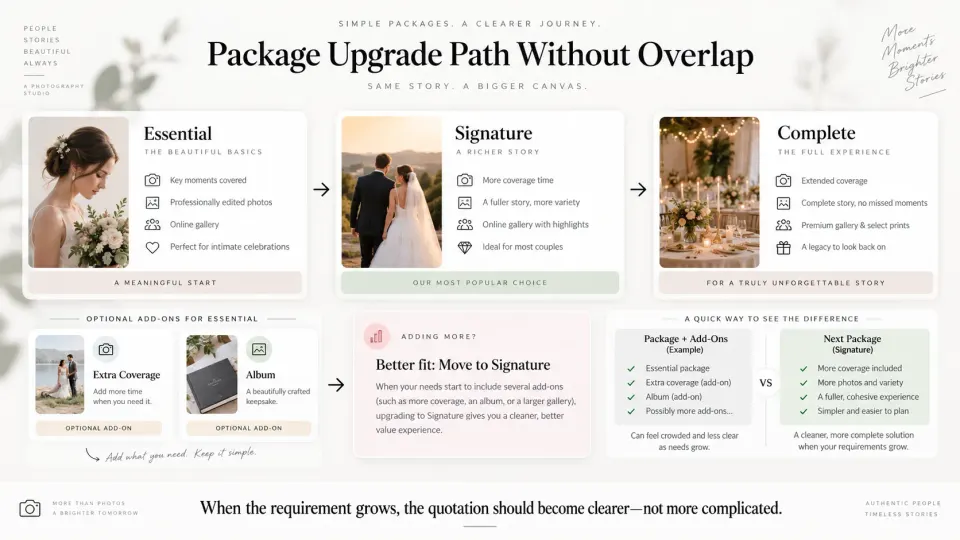
If a client can reconstruct the premium package more cheaply by stacking add-ons onto the entry package, your upgrade path is weak. If adding one small item to the lower package suddenly costs much more than moving to the next tier, the pricing can feel arbitrary.
The architecture should reward logical upgrading without making clients feel trapped.
A good rule is that packages bundle common combinations; add-ons handle exceptions.
If an add-on is selected by a large share of clients in the same package, it may no longer be an exception. Consider moving it into that package at the next review.
Make upgrades easy to quote
The client should not have to restart the pricing conversation because the scope changes.
Suppose a couple initially chooses:
Wedding Signature
- Ceremony coverage
- Reception coverage
- Two photographers
- Edited photographs
- Client gallery
Later they add a pre-wedding shoot and premium album.
The updated quotation should make the change obvious:
Original package: Wedding Signature
Added: Pre-wedding Session
Added: Premium Album
Updated total: clearly shown
This is better than creating an entirely different package name or rewriting the commercial offer from scratch.
The same principle applies when the upgrade is large enough to justify moving to another tier.
If the client adds extra coverage, another photographer and a premium album, the studio may be better off saying:
Your updated requirement now matches our Complete package more closely, so we have moved the quotation to that package rather than charging each addition separately.
That is a cleaner sales experience and can also simplify delivery.
GoPickle's photography quotation workflow is designed around keeping package scope, add-ons, deliverables, pricing, payment terms and client approval together rather than reducing the quotation to a single total. Our guide to creating a professional photography quotation goes deeper into how those elements should be presented to the client.
Review package performance using real bookings
Your package architecture should not be permanent.
The most useful evidence comes from what clients actually buy and what those bookings actually cost to deliver.
Review your bookings periodically and ask:
- Which package is selected most often?
- Which add-ons are repeatedly added to the same package?
- Which packages produce the healthiest margin?
- Which packages create the most scope questions?
- Which services are regularly removed during negotiation?
- Where does the final booking differ from the original quotation?
- Which package produces excessive crew, editing or revision costs?
- Are clients repeatedly building the same custom combination?
These patterns tell you whether the architecture reflects the market you are actually serving.
For example, suppose most Signature clients also buy an album. That may indicate the album belongs inside Signature rather than remaining optional.
Or perhaps the premium wedding package sells well but repeatedly produces lower profit because extra crew, video editing and album production cost more than expected. In that case, selling more of the premium package will not fix the pricing problem. The premium package itself needs redesigning.
This is also where package performance should be separated from raw booking value. A larger package is not automatically a better package for the business.
Keep the final package, add-ons, discounts and actual booking outcomes attached to the job wherever possible. That gives you a usable record when you review pricing later instead of relying on memory.
A strong package ladder reduces negotiation without removing flexibility
Photography packages should make the client feel that the studio has already thought through the service.
That does not mean every enquiry has to fit perfectly into one predefined option.
The architecture should give you three useful layers:
Base package: the complete minimum version of the service.
Upgrade path: a more suitable package for clients whose requirement becomes broader.
Add-ons: clearly priced exceptions or enhancements that do not belong in every booking.
Once those layers are defined, customisation becomes much easier because you are modifying a structure rather than inventing a quote from zero.
That is also why package architecture belongs before quotation design. The quotation is where the client sees the offer; the architecture determines whether the offer makes commercial sense.
At GoPickle, we think the strongest workflow starts by understanding the actual requirement, estimating the price, selecting or adapting the appropriate package and then carrying the agreed scope into the formal quotation. The GoPickle Photography Pricing Calculator can help evaluate the assignment before quoting, while GoPickle Quotations keeps the final package, add-ons, deliverables and payment context together once the commercial offer goes to the client.
A good photography package pricing structure does not need dozens of options.
It needs a complete base, meaningful differences between tiers, add-ons that are genuinely optional and an upgrade path that becomes clearer as the client's requirement grows.