Client Gallery Expiration Policy: Decide What Stays Live, What Gets Archived and What Clients Are Told
Build a client gallery expiration policy covering access windows, download reminders, extensions, archiving and gallery reactivation without confusing gallery access with file retention.


The awkward moment in a client gallery workflow is not usually when the gallery expires. It is three months later, when a client opens an old message, discovers that the link no longer works and assumes the photographs themselves have disappeared.
That problem starts much earlier. If the studio never defined a client gallery expiration policy, the client is left to decide what the gallery means. Some will treat it as a temporary delivery link. Others will assume it is their permanent photo archive. The photographer may have intended something completely different.
A professional expiration policy removes that ambiguity. It defines how long an online gallery remains available, when the client will be reminded to download photographs, what happens after access ends, whether an extension is possible and whether an expired gallery can later be restored.
This is a client-service decision, not simply a storage decision. Your RAW files, edited masters, exported photographs and backups can all follow different retention rules. This guide is specifically about the lifecycle of the gallery the client sees.
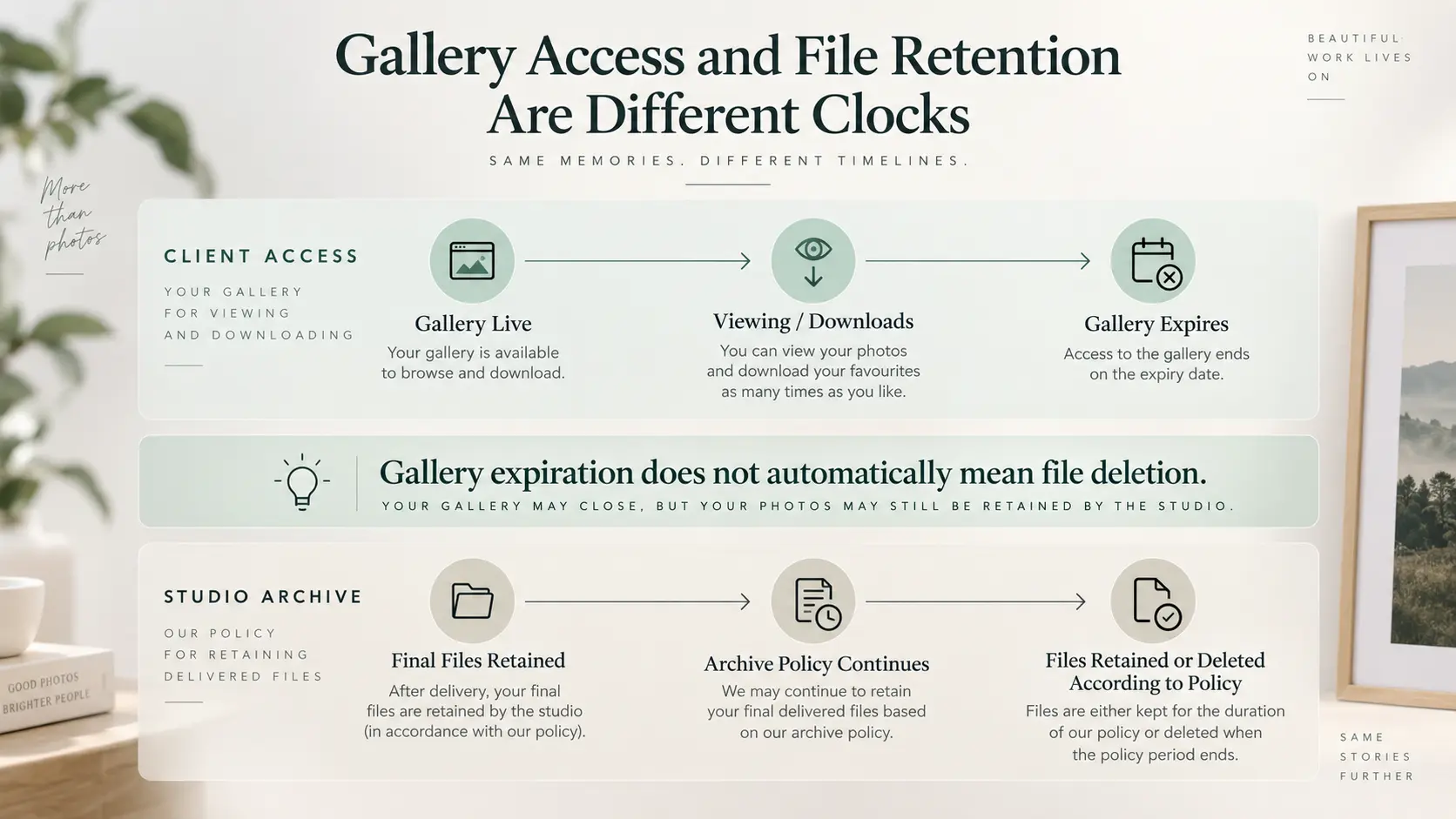
Gallery availability is different from file retention
The first distinction should be written into the studio's workflow:
Gallery live does not mean files retained, and gallery expired does not necessarily mean files deleted.
A client gallery is a delivery and viewing environment. It may let clients browse photographs, download files, mark favourites, make selections or share photographs with family and collaborators. Your internal archive has a different job: preserving whatever files the studio has decided or agreed to retain after delivery.
Those two systems should not depend on each other.
A wedding gallery might stop being publicly accessible while the studio continues to retain final JPEGs in its archive. A commercial client's gallery might stay live while production files are moved away from active storage. A portrait proofing gallery might disappear once selections are complete even though the selected photographs remain safely preserved.
If you need to define the second part of that workflow, our guide to how long photographers should keep RAW files, edited photos and client galleries deals with file retention, recovery value and archive decisions separately.
Keeping that boundary clear also prevents a common client misunderstanding: an online gallery should not quietly become the client's only backup. The client should download the files they are entitled to receive and keep their own copy.
Choose an active gallery availability policy instead of deciding job by job
There is no universal answer to how long to keep a client gallery online. The useful question is what period makes sense for the service you sell and the behaviour you expect from the client.
A short proofing assignment may need access only until the client completes a selection. A wedding gallery may benefit from a much longer sharing window because different relatives return to the photographs over time. A corporate delivery may remain useful while an active campaign is running. School, event and volume photography can have entirely different operational requirements.
The important part is consistency.
Instead of choosing an arbitrary expiration date every time you upload an album, define a small number of studio policies. For example:
| Gallery type | Access policy | What closes the gallery |
|---|---|---|
| Proofing / selection gallery | Available through the selection period | Final selection or agreed deadline |
| Standard portrait delivery | Fixed client download window | Published expiry date |
| Wedding / major event delivery | Longer sharing and download window | Published expiry date |
| Commercial delivery | Based on project or campaign requirements | Contract or project completion |
| Special extension | Additional temporary access | New communicated expiry date |
The table does not need to become a complicated pricing matrix. A studio with one straightforward service can have one default policy. A larger photography business may need several.
What should disappear is the accidental policy where old galleries stay online simply because nobody remembered to remove them.
This becomes particularly important when comparing client gallery software for photographers. Storage capacity tells you how much you can upload; it does not tell you how many completed galleries you intend to keep active simultaneously. A lower-cost gallery plan can become restrictive if your service promise effectively requires a large part of your historical client library to remain online.
Our photography client gallery cost guide explains why storage should be evaluated against what remains online, not only against this month's uploads.
Tell clients about gallery expiration before it becomes relevant
A photo gallery expiry date should never arrive as a surprise.
The ideal place to establish the policy is before the photographs are delivered. Depending on how your studio operates, that can mean the contract, booking terms, package description or another agreed client document.
Then repeat the relevant information at delivery.
The client does not need your entire internal storage policy. They need a few practical answers:
- When will this gallery stop being available?
- What should they download before that date?
- Are full-resolution downloads available?
- Should they make selections or favourites before expiry?
- Will shared links stop working?
- Can access be extended?
- Can an expired gallery later be restored?
- Is restoration guaranteed, or only possible while the studio still retains the files?
That final distinction matters. Do not promise indefinite gallery restoration unless the studio has deliberately built a service around providing it.
Your gallery delivery message is a useful place to communicate the exact date rather than saying that access is available "for a limited time." Clients should not have to calculate a deadline from a vague policy.
GoPickle's guide to writing a photography gallery delivery email covers the wider handoff, including access instructions, downloads, selections and next steps.
Send reminders before access ends
An expiration policy works much better when the client has a realistic chance to act on it.
A single sentence buried in the original delivery email may technically disclose the deadline, but clients do not organise their lives around photography gallery expiry dates. Weddings end, work resumes, relatives travel home and an email containing hundreds of finished photographs can easily be left for later.
A better workflow treats expiration as a short sequence:
Gallery Delivered → Active Access → Expiry Reminder → Final Reminder → Gallery Expires
The exact reminder timing should fit the length of your gallery window. The principle matters more than a universal schedule: give the client enough notice to download a large gallery, complete selections or contact the studio if there is a genuine problem.
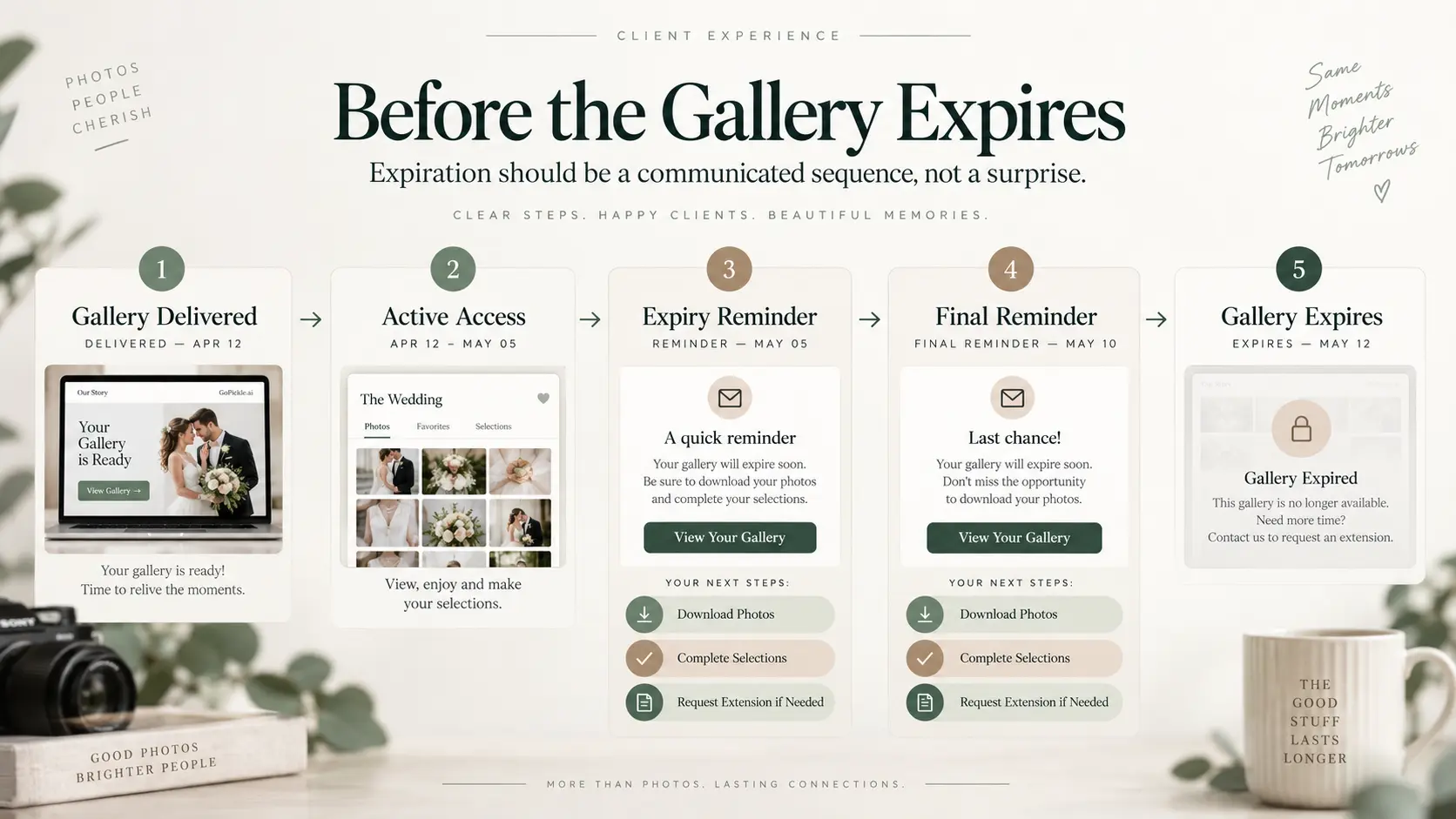
The reminder should be operational rather than promotional. State which gallery is expiring, the exact deadline, what the client should do before then and what happens afterwards.
For example:
Your gallery remains available until 18 December. Please download and back up any photographs you would like to keep before that date. If you need additional time, contact the studio before the gallery expires.
That message is much clearer than manufacturing urgency with language such as "Last chance!" when the actual reason for expiration is routine gallery management.
Expiry reminders can also reveal unfinished work. A client who has not submitted album selections, favourites or retouching choices should not necessarily be pushed through the same expiration process as a fully completed delivery. Check the state of the job before closing access.
Decide when extensions are free, paid or simply sensible
Clients will occasionally need more time.
The reasons vary. A wedding couple may have delayed downloading because they were travelling. A commercial client may need a campaign gallery for another month. A family may be waiting for relatives to complete downloads. A client may simply have missed the reminders.
Your extension policy should answer two questions:
- Can an active gallery be extended?
- What happens after it has already been archived?
Those are not necessarily the same service.
Extending a still-active gallery may require almost no operational work. Reactivating something that has already been removed can involve locating the archived delivery, verifying that the correct version still exists, restoring access and checking that permissions and downloads behave as intended.
Charging for the second process can therefore be reasonable, particularly when restoration creates real staff or storage work. The fee should reflect a service being provided rather than functioning as a penalty for forgetting to download photographs.
There is also no need to charge mechanically for every exception. A short courtesy extension for a strong long-term client may make more business sense than enforcing a small fee. What matters is that the team knows what the normal policy is, who can approve an exception and what the new expiry date becomes.
Avoid extensions with no new endpoint. "We'll leave it open for a bit longer" recreates the same ambiguity the expiration policy was meant to remove.
Build an archive and reactivation process
When a gallery expires, decide what the studio actually does next. Expiration can mean several different things:
Inactive: the gallery remains in the system but client access is switched off.
Archived: the gallery is removed from active client delivery but the studio retains the necessary finished files elsewhere.
Deleted: the gallery and possibly its hosted files are removed according to the studio's retention policy.
Those states should not be treated as interchangeable.
A useful gallery lifecycle looks like this:
Live → Reminder Period → Expired → Archived → Reactivated if Eligible
Reactivation then becomes a controlled process rather than an improvised favour. Before restoring an old gallery, confirm that the studio still has the correct final delivery, that the files have not passed the studio's retention period, that the person requesting access is authorised to receive them and that any relevant access controls are reinstated. A reactivated gallery should receive a new access window. It should not silently return to permanent status.
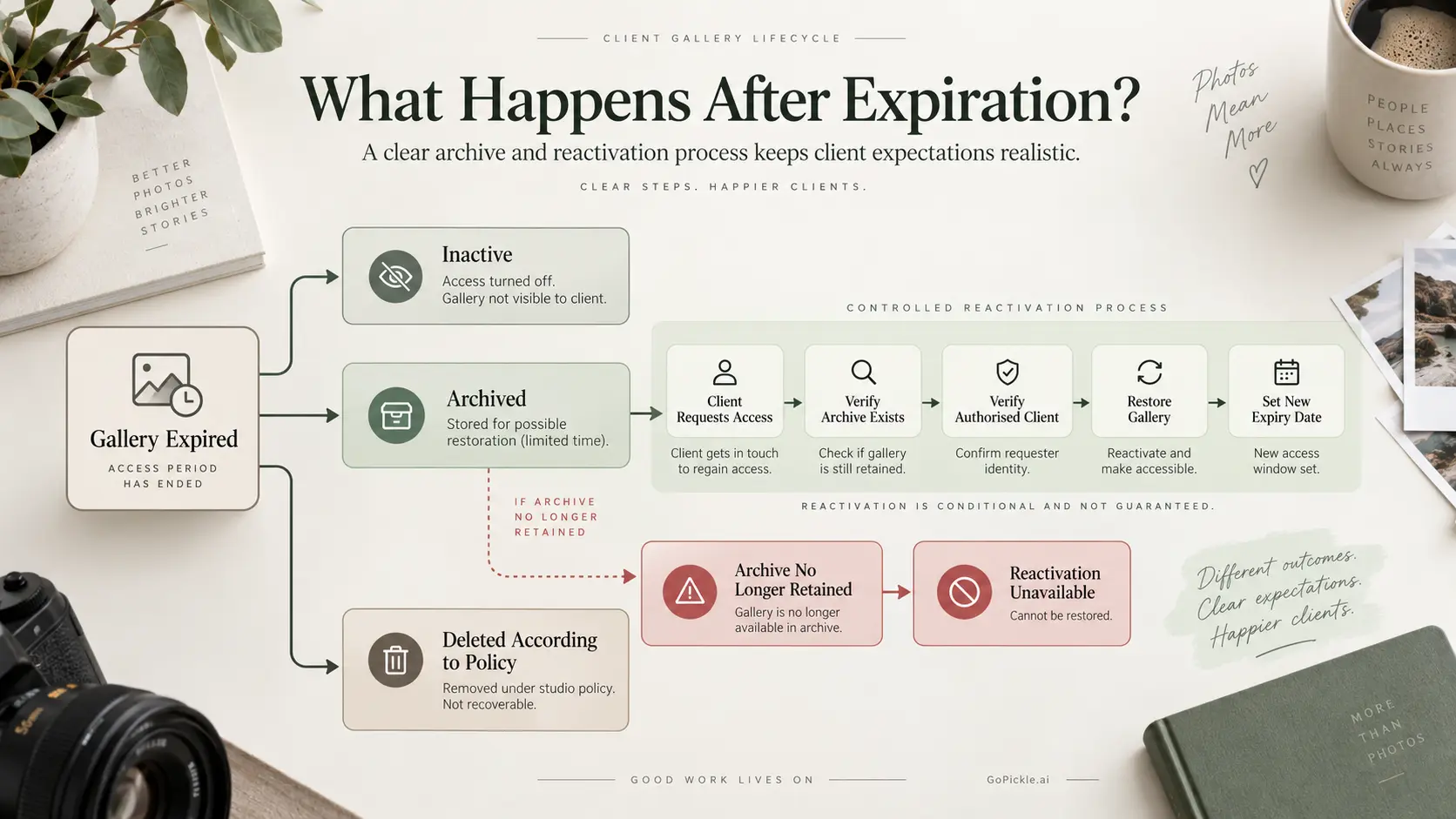
There is another important failure case: the requested archive may no longer exist. If the studio's documented file-retention period has already ended, the correct answer may simply be that restoration is unavailable. This is why client-facing expiration wording should distinguish between "gallery access can sometimes be restored" and "we guarantee permanent recovery of your photographs." The latter is a considerably larger service promise.
Record exactly what the client was promised
Problems arise when the website says one thing, a contract says another and a photographer sends a different expiry date over chat.
Choose an authoritative policy and record any exceptions. For each delivered gallery, the studio should ideally be able to answer:
- when the gallery was published;
- what expiry date was communicated;
- which client received the delivery;
- whether downloads or selections were required;
- whether reminders were sent;
- whether an extension was granted;
- what the revised expiration date became;
- whether the gallery was archived, deleted or reactivated.
This becomes more important as the team grows. The photographer who shot the wedding may not be the person answering the client's message two years later.
A professional Client Gallery should sit inside a broader delivery process rather than operate as an isolated link that somebody uploads and forgets. For studios evaluating new online photo gallery software, expiration handling deserves the same attention as gallery design, favourites, download experience, privacy and storage.
A client gallery expiration policy should make the ending predictable
The strongest gallery policies do not try to keep every client gallery online forever, and they do not remove galleries without warning. They make the lifecycle understandable.
Decide what "active" means for each type of photography you deliver. Give clients a specific expiry date. Remind them before access ends. Make extensions deliberate. Separate archived files from active gallery hosting. Define when restoration is possible and never promise permanent recovery unless that is genuinely part of the service.
At GoPickle.ai, we see the client gallery as the final-delivery layer of a larger photography workflow. The value of that layer is not only how photographs look while the gallery is open. It is also how clearly the client understands what to do next and what will happen when the delivery period ends.
A client should never discover your gallery expiration policy by clicking an old link and finding nothing there.