Photography Client Gallery Cost: Compare Storage, Branding, Proofing and Delivery Before You Buy
Compare photography client gallery costs by storage, gallery limits, proofing, branding, downloads, team access and workflow. Calculate the real cost per booking before you buy.


A client gallery plan can look inexpensive on a pricing page and become considerably more expensive once a photography studio starts using it at real volume.
The difference usually appears during a busy season. Storage fills sooner than expected. Old galleries remain online because clients still need access. Proofing requires another tool. A second photographer needs a login. The studio discovers that branding, download controls or additional capacity sit on a higher plan. Someone has to copy selections from one system into another before retouching can begin.
This is why photography client gallery cost should be evaluated as an operating cost, not simply as a monthly subscription.
For a working photographer, the useful question is: what does this system cost to deliver one year of real client work with the storage, proofing, branding, access and workflow your studio actually needs?
Why the subscription price is not the whole cost
Photography gallery software pricing is usually structured around one or more constraints: storage capacity, number of active galleries, number of photographs, client or event limits, feature tiers, team access or a combination of these. Some services charge a recurring subscription, while others use per-gallery or per-event pricing.
None of those models is automatically cheaper.
A wedding photographer delivering 40 large galleries each year has a different cost profile from a headshot photographer sending hundreds of small proofing galleries. A commercial studio may use relatively little storage but need strong approval controls and several internal users. An event studio may care much more about keeping large galleries accessible for months after delivery.
Before comparing client gallery pricing for photographers, build a simple requirement sheet around the work you actually deliver.
| Cost area | What to check before buying |
|---|---|
| Subscription | Monthly versus annual billing, renewal price and plan upgrades |
| Storage | Included capacity, overage options and what counts toward usage |
| Gallery capacity | Active gallery, album, client or event limits |
| Retention | How long completed galleries realistically need to remain online |
| Downloads | Original size, web size, ZIP, individual and full-gallery controls |
| Proofing | Favourites, selections, comments, approvals and selection limits |
| Branding | Studio identity, gallery branding and domain options |
| Team access | Included users, additional seats and permissions |
| Workflow | Whether galleries connect to bookings, clients and delivery records |
| Other charges | Taxes, currency conversion, payment or sales-related fees where applicable |
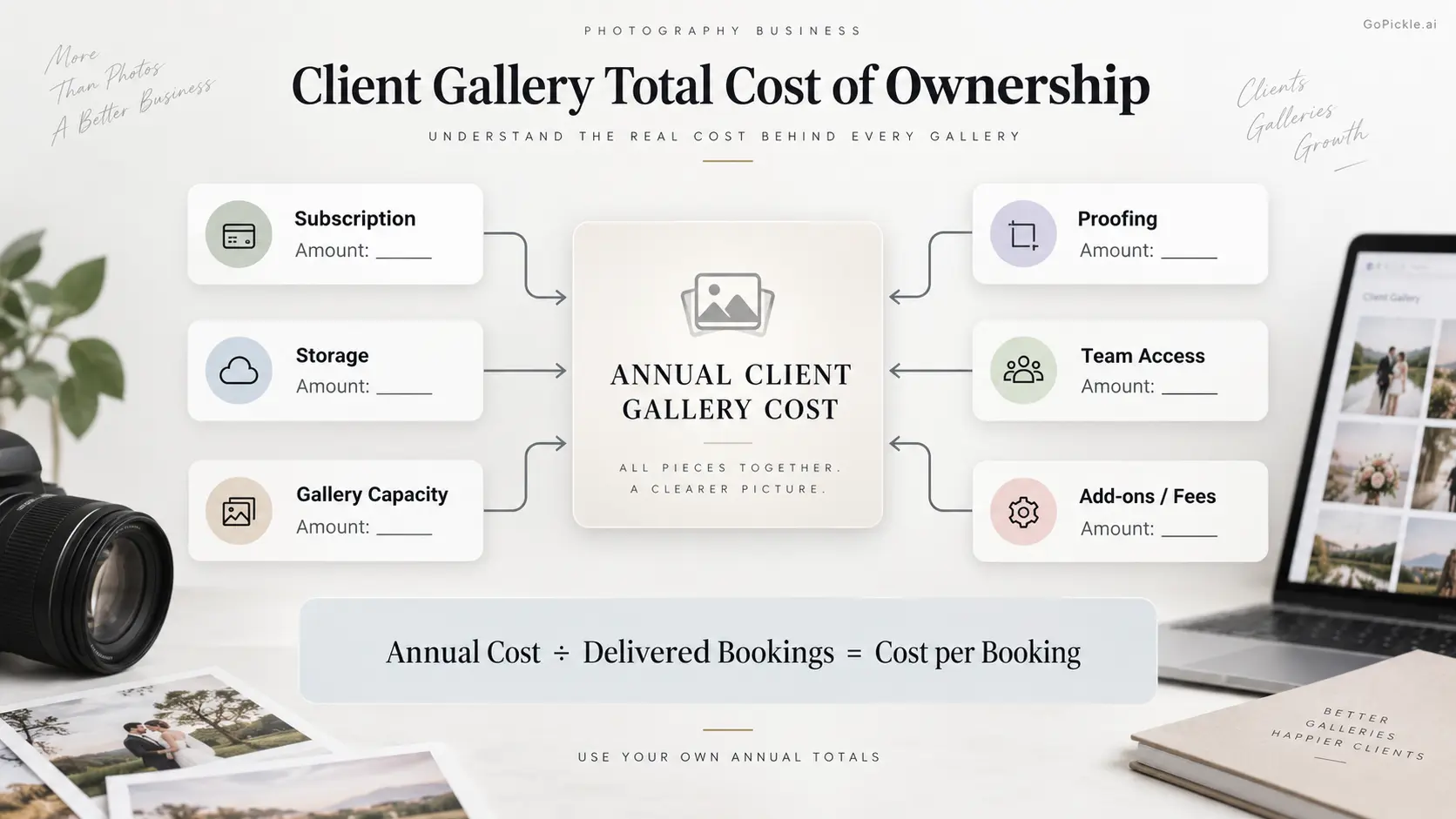
Two plans with the same advertised price can therefore have very different effective costs. Likewise, a more expensive plan can be better value if it removes another subscription or several hours of administrative work every month.
Storage and archive model: calculate what stays online, not just what you upload
Storage deserves more attention than almost any other item in a photography client gallery cost comparison.
Start with an average completed gallery rather than the size of your RAW shoot. If a wedding delivery averages 25 GB and you deliver 30 weddings annually, that is already 750 GB of finished photographs before portrait sessions, engagement shoots, commercial projects or previous-year galleries are considered.
The next question is retention.
Photographers rarely delete a client gallery the moment a project is marked complete. Couples may continue sharing wedding photographs with relatives. Commercial clients may return for an asset months later. Album selections can remain unresolved. Some studios deliberately keep galleries accessible as part of their service.
A 500 GB plan may therefore be sufficient for your annual uploads but insufficient for your actual archive behaviour.
Look closely at what happens when storage is exhausted. Can capacity be increased without changing the rest of your plan? Must you upgrade to a much larger package? Can completed galleries be archived economically? If you delete old work, how difficult is it to restore that gallery when a client asks for access again?
Storage that forces a photographer into repeated download-delete-reupload cycles has an administrative cost even if the cloud-storage bill looks low.
The same principle applies to “unlimited” plans. Check the provider's current terms, fair-use conditions and file restrictions instead of treating the word unlimited as a substitute for understanding the storage model.
Gallery and client limits should match your booking pattern
Storage is only one form of capacity. Some photography gallery software limits the number of galleries, albums, events, clients or collections that can exist at the same time.
This matters because image volume and gallery volume are not the same thing.
A family photographer may deliver 150 small sessions while consuming less storage than a wedding studio delivering 20 large weddings. A school or corporate photographer can create many separate client deliveries from a relatively modest total file volume.
Count how your studio works during peak periods:
- galleries created per month;
- galleries that remain active simultaneously;
- average collections per booking;
- average finished gallery size;
- how long clients retain access.
Pay particular attention to active-gallery limits. A limit may appear generous until a new season begins while half of the previous season's deliveries are still online.
For a broader evaluation beyond pricing, use our 15-point client gallery software buyer's checklist before committing to a platform.
Proofing and photo selection can change the economics completely
A beautiful delivery gallery does not necessarily replace photo proofing software.
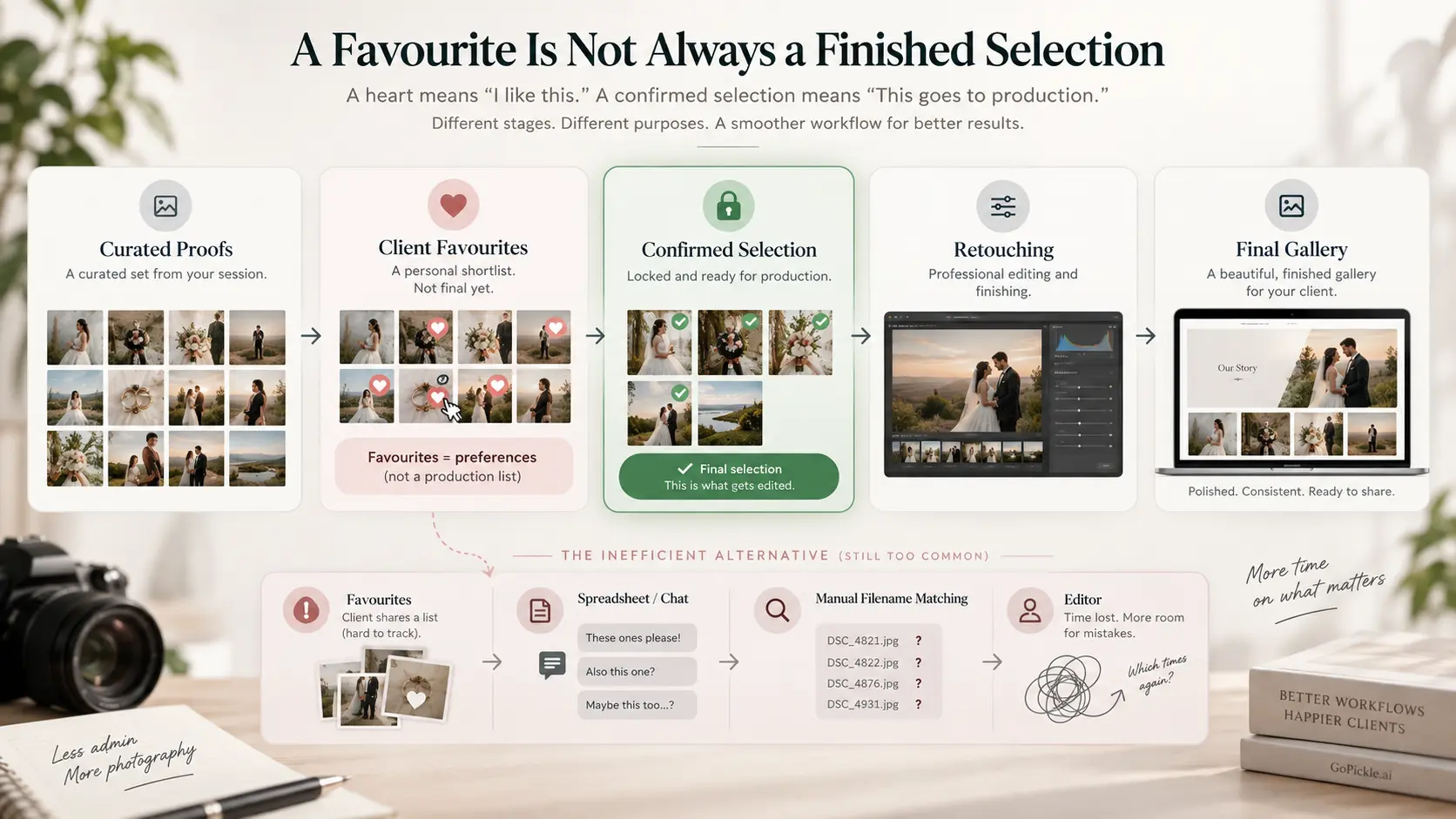
Suppose a portrait package includes 15 fully retouched photographs. The photographer culls the shoot to 70 strong proofs, the client chooses 15, and only those files move into detailed retouching. In that workflow, a heart icon may be useful, but the studio may also need a clear final selection, an enforceable selection count, comments or approval status.
A wedding workflow may be different. The couple receives 800 completed photographs first and later chooses 100 for an album.
A commercial photographer may need an agency to shortlist frames before expensive compositing starts.
We cover those distinctions in our guide to client photo selection software for photographers and in the explanation of photo proofing versus final client galleries.
When comparing photo proofing software pricing, ask what happens after a client makes a choice. If the selection still has to be copied into a spreadsheet, matched manually to filenames and sent to the editor through chat, the gallery has solved the client interface but not the production workflow.
Favourites are useful. A controlled selection and approval process is a different requirement. Buy for the one your studio actually needs.
Branding and the client experience have operational value
Branding can look like a cosmetic feature in a pricing table. For professional photography businesses, it is part of delivery.
A client often spends far more time inside the finished gallery than they spend looking at your quotation or invoice. They may reopen it repeatedly and share it with family, colleagues or other potential clients.
A gallery should therefore be evaluated as a client-facing property.
Check what the client sees on mobile and desktop, whether your studio identity remains visible, how collections are presented, whether access instructions are understandable, and whether downloads are obvious without being intrusive.
Also distinguish gallery branding from custom-domain support. A platform can provide a well-branded client experience without necessarily providing a studio-owned domain, while another may reserve custom domains or white-label presentation for higher plans. Decide whether that difference is commercially important to your business before paying for it.
GoPickle's Client Galleries for photographers are designed around branded delivery, organised collections, private access, watermarking, favourites, download controls and mobile-friendly viewing. Those are the kinds of client-facing details we recommend testing with an actual assignment rather than judging from a pricing grid alone.
Team and workflow costs often sit outside the gallery
This is where client gallery software value becomes harder to see on a feature-comparison page.
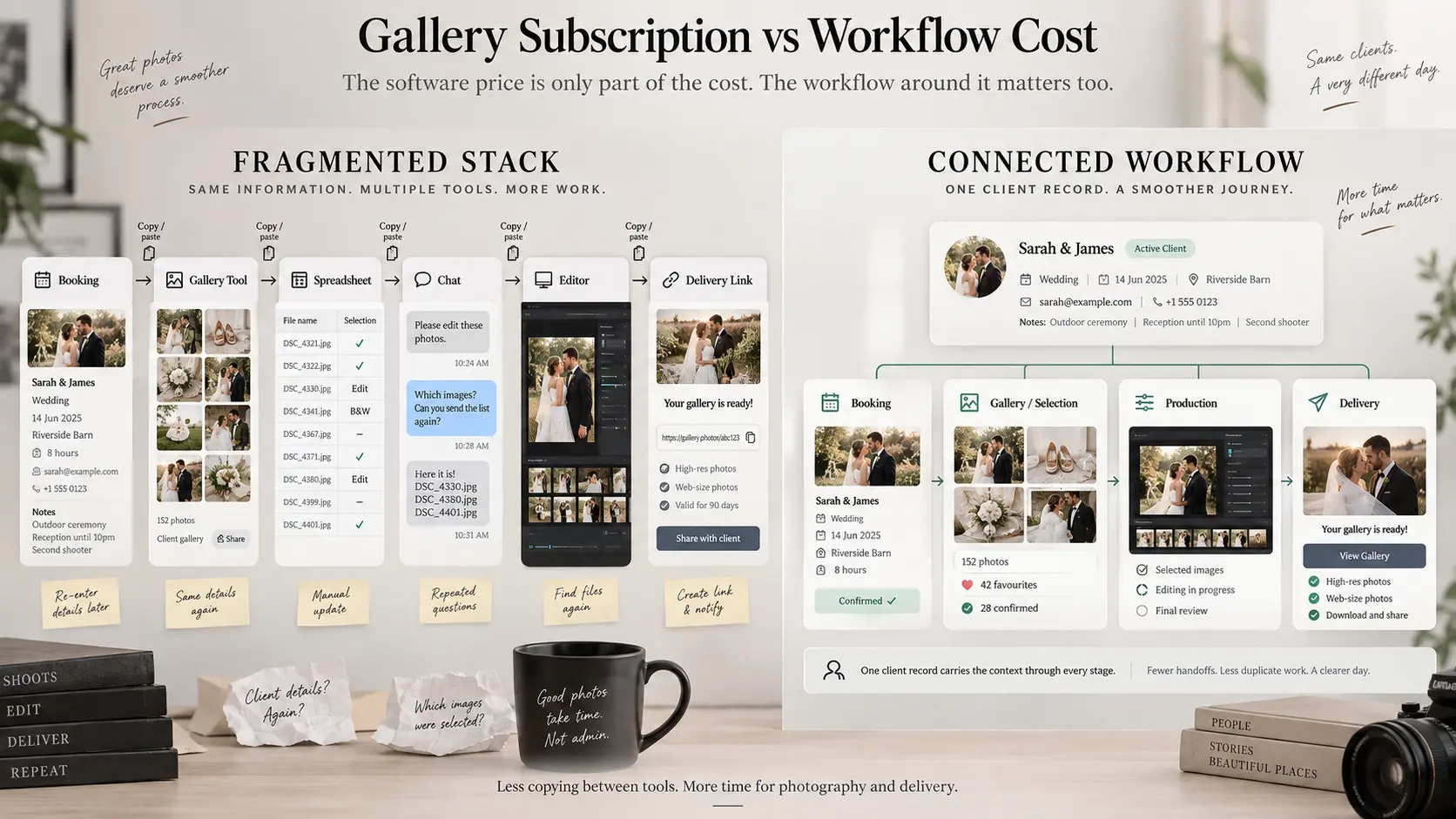
Imagine a studio using one application for leads and bookings, another for client galleries, another for proofing, a spreadsheet for deliverables and chat messages for editor handoffs.
Each individual tool may be reasonably priced. The studio still has to maintain the connections between them.
A new booking is created. Someone creates a client folder elsewhere. Later, another employee creates the gallery. Client selections are downloaded or copied. An editor receives filenames. The gallery link is pasted back into the booking record. When the client asks whether an album selection has been completed, somebody searches across several systems to reconstruct the answer.
That labour is part of the total cost.
For solo photographers handling a modest number of jobs, specialised standalone tools can work perfectly well. As booking volume and team size increase, workflow duplication becomes more expensive because every repeated handoff creates another opportunity for missing information or unclear ownership.
Team pricing also deserves inspection. Check whether additional photographers, studio managers or delivery staff need paid seats, and whether those users receive appropriate permissions rather than full account access.
Calculate gallery cost per active booking and per year
The simplest way to compare online gallery cost for photographers is to stop looking at monthly price and calculate annual total cost of ownership.
Use:
Annual gallery TCO = subscription + storage upgrades + gallery/event charges + team access + required add-ons + related software + applicable taxes/fees
Then calculate:
Cost per delivered booking = annual gallery TCO ÷ number of bookings delivered through the system
For example, imagine a studio spends 1,600 units of its local currency over a year across its gallery subscription, required capacity and a separate proofing tool. If 40 paid bookings are delivered through that stack, the direct software cost is 40 per booking.
Now compare an alternative that costs 1,850 annually but eliminates the separate proofing subscription and reduces recurring administration. The second option is not automatically expensive simply because its subscription line is higher.
Run the calculation at your actual volume.
For seasonal studios, also compare annual billing with the months in which the software is genuinely needed. Annual plans may offer a lower equivalent monthly price, but that saving only matters when the capacity and features remain useful throughout the year.
International photographers should calculate the amount that actually reaches the card statement. VAT, GST, sales tax, foreign-currency conversion and card charges vary by country, provider and payment method, so treat the checkout total rather than a converted headline price as your final cost.
A client gallery is good value when it fits the work you sell
There is no universally correct amount that photographers should pay for gallery software.
A photographer delivering ten small assignments each year should not buy infrastructure designed for a high-volume studio simply because it appears more professional. A studio delivering terabytes of weddings should not build its workflow around an inexpensive entry plan that requires constant deletion and re-uploading. A portrait business that depends on client selections should not choose delivery software solely because its galleries look beautiful.
Start with capacity. Then test the client experience. Then test proofing, access and downloads. Finally, look at what happens inside the studio after the gallery has been sent.
At GoPickle, this last part matters to us because galleries are only one stage of running a photography business. The booking, promised deliverables, client, gallery, payment and final handoff eventually need to describe the same job. The closer those pieces remain connected, the less time a studio spends rebuilding context between systems.
If you are currently comparing photography gallery software pricing, use the current GoPickle pricing page to check available plans and capacity, but compare those numbers against your own annual gallery workload rather than choosing from the monthly figure alone.
The cheapest client gallery is the one with the lowest subscription fee. The better business decision is the system that gives your studio the right storage, client experience and workflow at a sustainable cost per delivered booking.