Client Photo Selection Software for Photographers: Proofing, Retouching and Album Selection
Compare client photo selection software for photographers. Learn what to look for in proofing, favourites, selection limits, retouching handoff, album selection and mobile galleries.

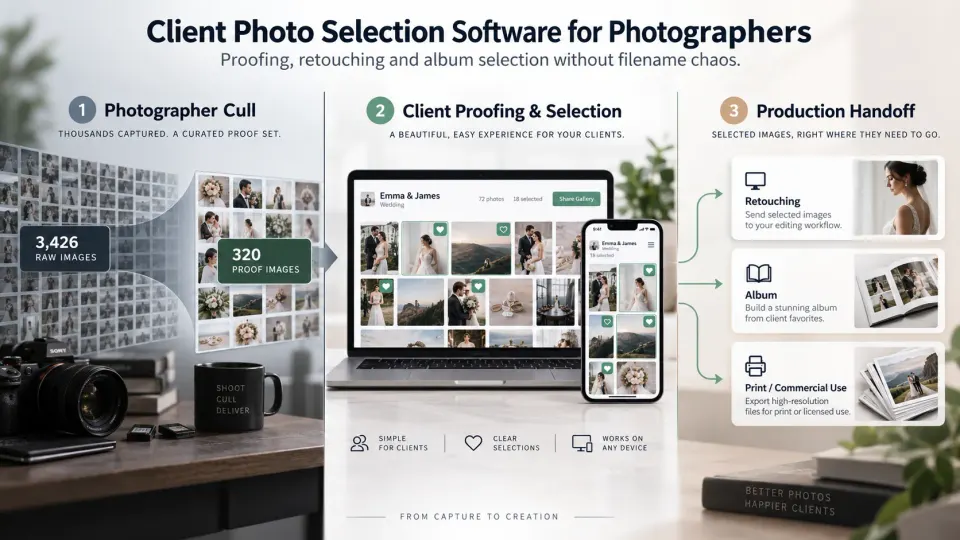
Photographers use the word “selection” for two completely different jobs, and that distinction matters when choosing software.
The first happens inside the studio. You return from a wedding with several thousand photographs, remove test frames, missed focus, blinks, duplicates and weaker moments, then decide which images deserve to continue into editing. That is photographer culling. AI culling software and tools such as Lightroom-assisted workflows can help with that stage.
The second happens after the photographer has already made that professional cut. A portrait client chooses the 12 photographs included for detailed retouching. A wedding couple selects images for an album. A marketing team chooses six frames from a commercial shoot for final compositing. A family identifies photographs for prints. That is client photo selection.
This guide is about the second category.
Good client photo selection software for photographers gives the client a controlled place to review photographs and return a decision the studio can actually use. The real value is not the heart icon. It is what happens after the heart is clicked: whether the correct filenames remain attached, whether package limits are respected, whether a shortlist can become a confirmed selection, and whether those selected photographs can move cleanly into retouching, album design, printing or delivery.
For studios comparing photography proofing software, online galleries and client-selection tools, those operational details matter far more than how attractive the gallery looks in a product screenshot.
What is client photo selection software?
Client photo selection software is a client-facing system that allows a photographer to present a defined set of photographs, ask the client to choose specific images, and receive those choices in a form that can be used in the next stage of production.
That next stage varies by job. A headshot photographer may be waiting for the client's five final selects before detailed skin retouching. A wedding studio may already have delivered hundreds of edited photographs but still needs 80–120 images for the album. A commercial photographer may need an art director to approve particular frames before expensive compositing begins.
The gallery is therefore only the visible part of the system. Underneath it, useful photo selection software for photographers needs to preserve the relationship between the photograph the client sees and the actual file the photographer must work with later.
This is also why a generic cloud folder is not automatically photography proofing software. A client may be able to open JPEGs in a shared folder, but if they return a message saying “we want 24, 37, the fourth image in the beach section and the close-up of the rings,” the studio still has a matching problem.
A purpose-built client gallery for photographers can keep viewing, favourites, access rules and the wider delivery experience together rather than forcing the client to translate visual decisions into file administration.
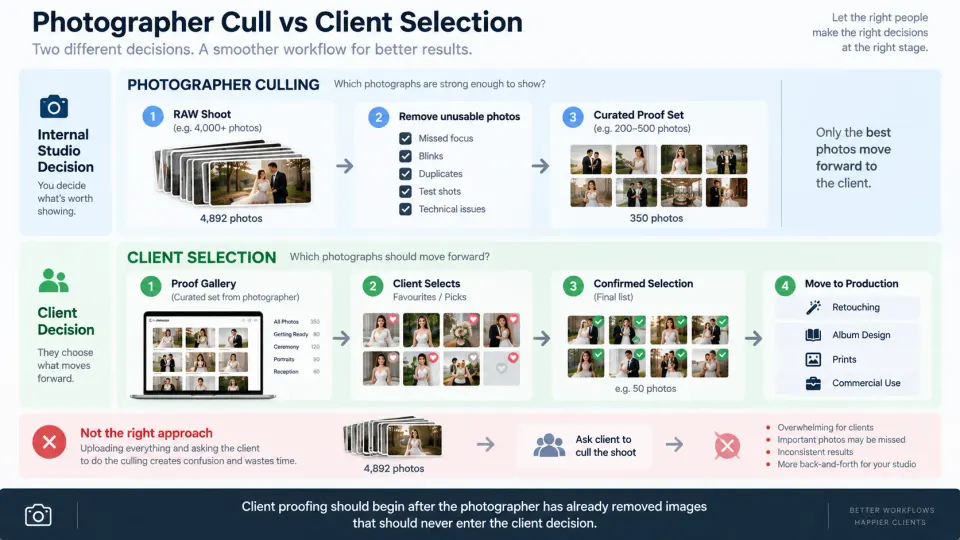
Client selection vs photographer culling
The easiest way to buy the wrong tool is to search only for “photo selection software.”
That phrase now covers a large category of AI culling products designed to help photographers make their own internal first-pass selection. Those tools may analyse focus, closed eyes, duplicate frames or similar sequences and help the photographer narrow a large RAW shoot.
Client selection starts later.
A practical workflow may look like this:
Shoot → Photographer culls → Client reviews proofs → Client selects → Studio confirms selection → Retouching / album / print work
The photographer should normally remove images that should never reach the client before proofing begins. Soft frames, accidental photographs, obvious duplicates and technically unusable photographs do not become a client decision simply because proofing software exists.
We cover the internal side separately in our guide to AI culling for photographers. The important distinction when shopping for software is that AI culling evaluates the photographer's capture set, while client proofing records a client's decision from a set the photographer has intentionally prepared.
If your actual requirement is “help me choose the strongest photographs from 4,000 RAW files,” look at culling software.
If your requirement is “let my client choose the 20 photographs they want retouched,” look at client photo selection and photography proofing software.
Photo proofing vs final delivery
Proofing and final delivery can happen inside visually similar galleries while serving completely different jobs.
A proofing gallery asks the client to make a decision.
A final gallery gives the client completed work.
That sounds simple, but software selection becomes much easier once the distinction is applied consistently. In a portrait proofing workflow, photographs may have basic colour and exposure work but still be waiting for detailed retouching. Downloads might be disabled, previews may be watermarked and the client may have a strict selection allowance.
A final portrait gallery may contain only the photographs the client chose, now fully retouched and available according to the agreed delivery terms.
For a wedding, the order can reverse. The studio may first deliver the edited wedding collection and only afterwards ask the couple to choose photographs from that collection for the printed album. In that case, the same image can already be a final digital deliverable while still being part of a separate album-selection decision.
Our detailed guide to photo proofing vs final client gallery explains this production distinction. From a software-buying perspective, the question is whether the platform lets you configure the gallery around its current purpose rather than treating every collection as the same kind of delivery.
Portrait selection before retouching
Portrait, headshot, personal-branding, school, family and studio sessions are some of the clearest use cases for client selection before retouching.
Imagine a package that includes 10 finished photographs. The photographer captures 400 frames, internally culls them to 50 strong proofs and applies enough preliminary correction for the client to judge the images fairly. The client then chooses the 10 photographs they want finished.
If you fully retouch all 50 before asking, you have spent detailed production time on 40 photographs that may never be purchased or delivered.
A stronger workflow is:
50 prepared proofs → Client chooses 10 → Studio verifies 10 → Detailed retouching → Final delivery
The software should therefore support more than casual favouriting. The photographer needs to communicate what the client is selecting, how many photographs are included, whether extra selections are permitted and what happens after the selection is submitted.
Our guide to client photo selection before retouching covers that production process in detail. When evaluating software, test whether the tool actually supports the process or merely provides a gallery where clients can click hearts.
Wedding album selection after delivery
Wedding album selection presents a different problem because the number of photographs is much larger and several people may be involved in the decision.
A couple may receive 700 finished photographs. Their album package may require roughly 80 or 100 images. Parents might have preferences. The couple may start enthusiastically, stop halfway through, return several weeks later and revise some of their choices.
This is where album photo selection software earns its place.
The gallery should be organised well enough that the couple can move through the wedding naturally, perhaps by preparation, ceremony, portraits, reception and other meaningful sections. Selection controls must work without requiring clients to type filenames or take screenshots. If the album has a recommended image count, the software should help the photographer communicate or enforce it.
The studio also needs to know when the selection is actually finished. “They currently have 94 favourites” is not necessarily the same as “these are the 94 photographs approved for album design.”
Our wedding album selection guide goes deeper into deadlines and client communication. For software selection, the key issue is whether a large wedding gallery can turn browsing into one usable album-production set.
Commercial selects and stakeholder approvals
Commercial photography exposes the limitations of simplistic client-favourites tools very quickly.
The person browsing may not be the final decision-maker. A producer might create an initial shortlist. A creative director may narrow it again. The client's marketing team may approve several images for one campaign while a separate group chooses photographs for editorial or social use.
The photographer may then need to send only the approved files into high-end retouching, compositing or colour finishing.
For this work, evaluate whether the photography proofing software can distinguish between a preference and an approval. Comments attached directly to the correct frame can also matter because “use this image but remove the reflection from the product” is far more actionable than a separate email sent after the selection.
Commercial teams may also need access controls appropriate to unreleased products, private campaigns or confidential corporate material. A beautiful public gallery is not enough if the client cannot review the work under the access conditions the project requires.
The larger principle is universal: the software should return a decision that survives the move from the client-facing gallery into production.
Why filenames must remain connected to selections
Filename continuity is one of the least glamorous features in photo proofing software, and one of the most important.
Suppose the client selects an image displayed as DSC_4387.jpg. The production team may need to find DSC_4387.NEF, DSC_4387.CR3, DSC_4387.ARW or another source file in Lightroom, Capture One, Photo Mechanic or a storage folder.
If the proofing platform renames files unpredictably, strips useful references or exports the client choice in a form that cannot be matched easily, the studio ends up doing manual detective work.
This becomes particularly painful with large weddings, burst sequences and outsourced editing.
A strong client photo selection system should let you identify selected photographs reliably from gallery to source. Depending on the software, that may mean maintaining filenames, exporting a clean list, downloading selected files, syncing to another application or otherwise preserving a stable image reference.
The exact method matters less than the result: the editor should not have to ask which photograph the client meant.
Favorites vs confirmed selections
A favourite is an expression of interest.
A confirmed selection is a production instruction.
Those two states should not be treated as interchangeable.
Clients browse iteratively. They may mark 35 images while exploring a portrait gallery, narrow them to 20 later and finally submit the 15 included in their package. A wedding couple may heart 140 photographs before agreeing on 90 for the album.
If the photographer starts working the moment favourites appear, the production target can change underneath them.
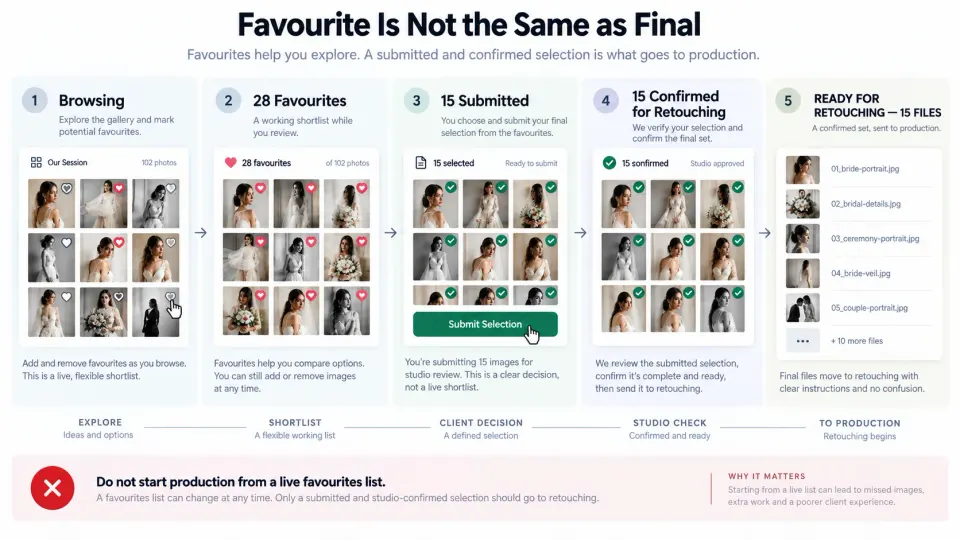
Better client favorites software should therefore give you a way to understand the state of the decision. Some systems provide formal selection requests or submission workflows. Others require the photographer to create an operational confirmation step manually.
Either can work if it is unambiguous.
For a team-based studio, the distinction becomes even more important. The editor or album designer should receive a stable list that effectively says, “Work on these files,” not access to a live favourites list the client may still be changing.
Selection limits and package rules
“Choose your favourites” may sound friendly, but it is a poor instruction if the purchased package includes a fixed quantity.
If a portrait package includes 12 final retouched images, your photo selection gallery should make that limit clear. If additional photographs can be purchased, the workflow should explain what happens when the client goes beyond the included count.
The same principle applies to album design. Giving a couple complete freedom to select 250 photographs for an album designed around 80 creates a negotiation the software could have prevented earlier.
When comparing systems, test whether you can set or clearly communicate:
- the maximum number of images;
- the purpose of the selection;
- whether the client can revise before submission;
- whether extra images are allowed;
- which person is authorised to submit the final choice;
- and what happens after submission.
Do not assume selection limits are a small usability feature. They connect the client interface directly to what was sold.
Watermarks and download restrictions during proofing
A proofing gallery often needs different permissions from a final gallery.
If the client is reviewing unfinished portraits, the photographer may want preview-resolution images, a watermark and disabled downloads. The purpose is to let the client make a decision, not to accidentally create an alternative delivery route around the agreed package.
Once the chosen images have been retouched and approved, the final gallery can use different download settings.
This is why access, watermarking and download permissions should be considered part of the proofing workflow rather than separate technical features.
GoPickle's current Client Galleries support private access, watermark protection, organised collections, favourites and configurable download controls. Those controls are useful beyond final delivery because they let photographers separate “you may review this” from “this is ready for you to receive.”
Privacy requirements differ by assignment and jurisdiction, especially when galleries contain children, private events, unreleased commercial products or other sensitive material. The software provides the controls; the photographer still needs to configure access appropriately for the job.
Mobile selection experience
Many photographers evaluate proofing software from a large desktop display while their clients will make most of the decisions from a phone.
That mismatch can turn a theoretically good workflow into a frustrating one.
A client reviewing 100 wedding photographs on mobile should be able to move between images, mark a selection and understand their progress without constantly zooming, returning to menus or wondering whether a tap was saved.
Portrait selection needs the same care. The user should be able to inspect an image at a useful size while still understanding how to select it. If comments are supported, adding a note should not feel like filling out a desktop form on a small screen.
For wedding work, test a realistic gallery size rather than a five-image demo. For portrait work, test whether the client can compare similar expressions without losing track of their shortlist. For older or less technical clients, ask whether the selection action is obvious without an instruction manual.
GoPickle's current client gallery experience is designed for viewing across mobile, tablet and desktop. Our guide to making client galleries easier for non-technical clients covers the usability side in more detail.
How selected photographs should move into production
The selection interface is only half of the buying decision.
The other half begins when the client finishes.
A portrait studio may need the selected filenames immediately for retouching. A wedding studio needs them passed to an album designer. A commercial photographer may need to separate approved campaign selects from another group awaiting review.
The ideal handoff is simple:
Client decision → Studio verification → Confirmed selection → Production
Not:
Client favourites → Screenshot → Message to photographer → Filename matching → Spreadsheet → Message to editor → Recheck gallery
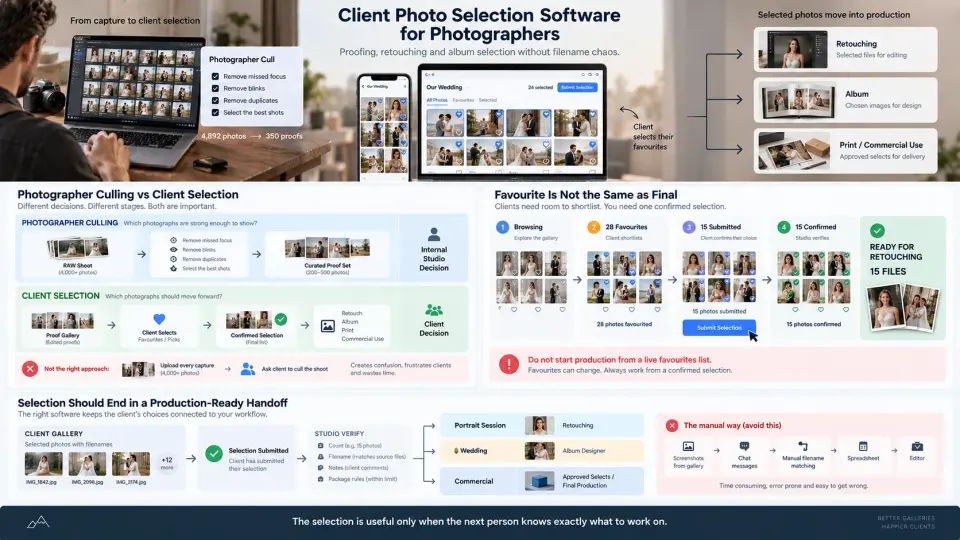
The studio should be able to understand which photographs were chosen, what each choice is for, and whether anything remains unresolved. Where the software supports export, download or application integrations, test them with your real editing workflow rather than assuming an “export selections” button will produce what your team needs.
This is also where a connected photography workflow becomes valuable. Photo selection should not become a dead-end gallery task. It belongs to a client and a booking, and its completion may trigger retouching, album design, printing, balance collection or final delivery.
GoPickle's broader gallery-delivery workflow is built around keeping galleries connected to the client, booking and final handoff rather than treating delivery as an unrelated file-sharing step.
What to test before choosing client-selection software
The best evaluation method is not to compare feature tables. Run one realistic project from both sides.
Upload the type of gallery your studio actually produces. If you photograph weddings, use hundreds of photographs divided into real sections. If you photograph portraits, create a gallery where the client must narrow 40 proofs to 10. If you work commercially, involve a second reviewer.
Then make the selection yourself from the client side and see what the photographer receives.
A practical buyer's test looks like this:
| Test | What you are trying to learn |
|---|---|
| Client can select directly while viewing | No screenshots or filename transcription required |
| Selection stays linked to the correct file | The production team can identify the source image |
| Favourites and final selections are distinguishable | Work does not start from an unfinished shortlist |
| Limits can be enforced or clearly communicated | Package scope survives the proofing process |
| Comments remain attached to the photograph | Editing notes do not become separate message threads |
| Mobile workflow feels natural | Clients can complete selection on the device they actually use |
| Watermark and download rules are configurable | Proofing does not accidentally become unrestricted delivery |
| Large galleries remain organised | Weddings and events do not become endless scrolling |
| Access can be controlled | Private or commercial work can be reviewed appropriately |
| Selected files can move into production cleanly | Retouching, album or print work does not require manual reconstruction |
Also inspect the pricing plan carefully. Proofing functionality is sometimes limited by plan, gallery count, storage, number of selections, workflow tools or advanced exports. Do not buy based on a demo that quietly includes capabilities outside the subscription you intend to use.
Our broader client gallery software buyer's checklist covers gallery presentation, storage, delivery, privacy and business integration. For this decision, however, give disproportionate weight to the path between the client's click and the studio's next production action.
How GoPickle Client Galleries and Photo Selection fit together
At GoPickle, we see Client Galleries and Photo Selection as related but different layers of the same post-shoot workflow.
The gallery is where the client experiences the photographs. GoPickle Client Galleries currently provide branded presentation, organised collections, private access, favourites and shortlisting, watermark controls, download permissions and mobile-friendly viewing. That makes the gallery useful for both professional delivery and the review activity surrounding album choices and approvals.
Dedicated photo selection goes further. Its job is to turn client choices into an explicit instruction for what should move to print, editing, album work or another production stage.
There is an important product distinction to make here. At the time this article was prepared, GoPickle's public pricing page still lists client photo selection as a future capability. We therefore do not want to describe a dedicated, locked-selection workflow as already available when evaluating GoPickle today. Current Client Galleries can be assessed on their live favourites, shortlisting, access, watermark, download and delivery capabilities, while the dedicated Photo Selection layer represents the direction of the connected selection workflow.
That distinction is also useful when comparing any platform. A favourites feature can support selection, but it does not automatically give you every capability of a full proofing system.
For photographers, the buying decision comes down to what happens after the client sees the photographs.
If you simply need clients to enjoy and download finished work, prioritise an excellent delivery gallery.
If clients must choose photographs for albums, retouching, printing or commercial production, evaluate the selection workflow much more deeply.
And if client decisions drive significant production work in your studio, look for client photo selection software for photographers that preserves one reliable path from image review to confirmed choice to the next person who needs to act.
That is where photo proofing stops being a gallery feature and becomes part of running the photography business.