Face Recognition Software for Event Photographers: A Buyer’s Guide to AI Photo Sharing
Compare face recognition software for event photographers by matching, QR access, guest limits, privacy, live delivery, branding and pricing before you buy.

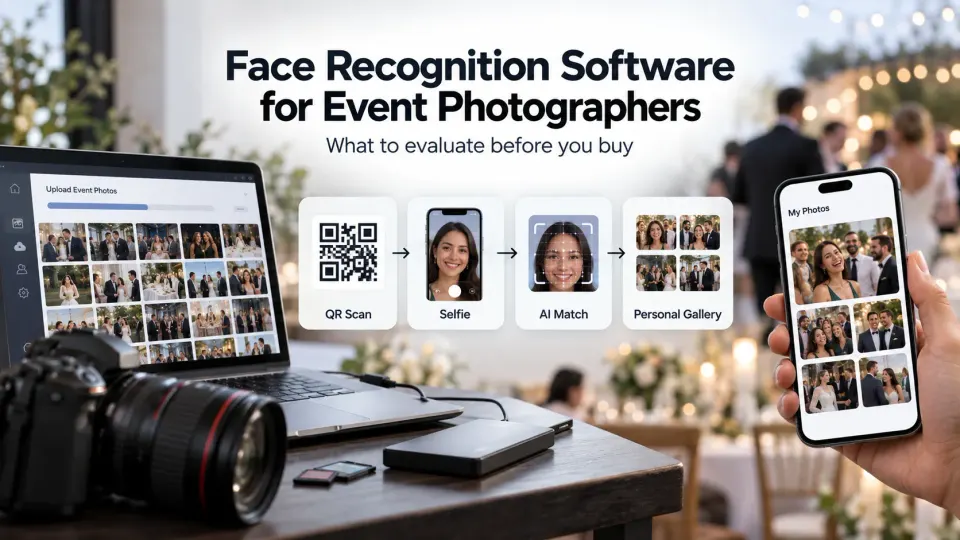
A guest scans a QR code at a wedding, opens a gallery on their phone, takes a selfie and sees photographs in which they appear. From the guest's side, that interaction should take very little thought. From the photographer's side, considerably more is happening: photographs need to reach the platform, faces need to be detected and compared, results need to be returned to the correct guest, gallery access needs to remain manageable, and the entire process has to work when hundreds of people try it during the same event.
That is why choosing face recognition software for event photographers should not come down to a demo in which one clean selfie successfully finds one clean portrait.
Most AI photo sharing software now presents a similar headline workflow. Upload event photographs, share a QR code, let attendees submit a selfie, and use face matching to produce a personalised gallery. The meaningful differences appear underneath that workflow: how well matching performs on your photography, what happens when the match is wrong, how quickly new photographs become searchable, how much guest friction exists, what the plan limits actually mean, how biometric information is handled, and whether the system works with the way you want to deliver photographs.
At GoPickle, we already have a separate guide explaining how AI Guest Galleries work for weddings and events. This guide tackles the next question a working photographer should ask: how do you evaluate an event photo sharing platform before trusting it on a paid assignment?
What face recognition software for event photographers actually does
Face recognition photo sharing changes the discovery layer of an event gallery.
Without it, an attendee may receive the same gallery as everybody else and scroll through hundreds or thousands of photographs looking for themselves. With a face recognition photo gallery, the attendee provides a reference image, usually a selfie, and the system compares facial characteristics from that image against faces detected in the event photographs. Matching photographs can then be presented as that person's personalised result set.
For the photographer, the practical value is not simply "AI." It is reducing the manual relationship between person → photograph → delivery.
That distinction matters when comparing products. A platform may have excellent face search but a weak gallery experience. Another may look polished but make live uploads difficult. A third may process large events well but use pricing that becomes uneconomical for your typical guest count. Face matching is the engine, but you are purchasing an event-delivery workflow around it.
For a studio that regularly handles weddings, conferences, sports tournaments, graduations, festivals or large celebrations, the software should be evaluated as part of the wider event photography workflow, not as a novelty feature attached to gallery hosting.
Face recognition gallery vs standard client gallery
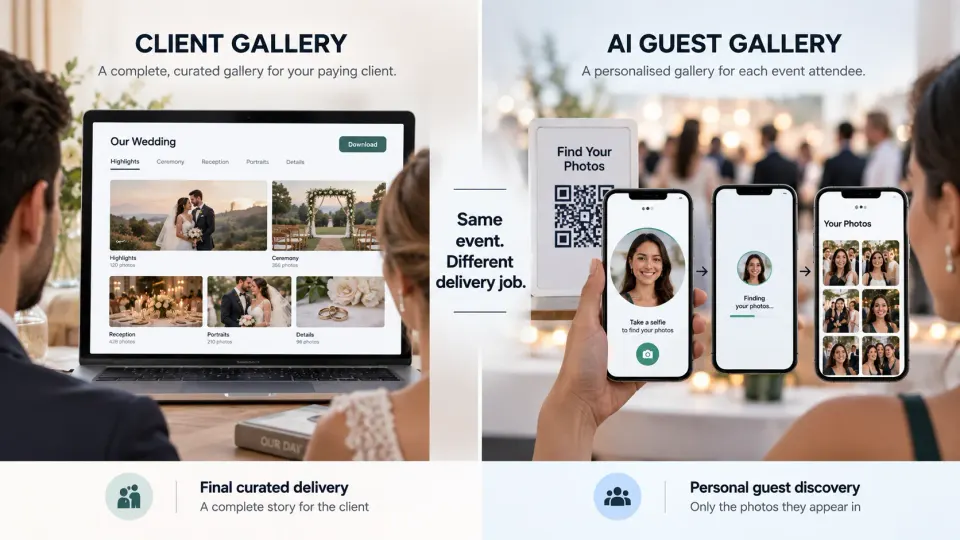
A face recognition guest gallery and a conventional client gallery solve different delivery problems.
| Standard client gallery | Face recognition guest gallery | |
|---|---|---|
| Primary user | Couple, family, company or paying client | Individual event attendees |
| Main purpose | Curated final delivery | Personal photo discovery |
| Typical access | Client opens organised collections | Guest scans link or QR code |
| Discovery method | Browse collections or folders | Selfie-based face matching |
| Audience scale | Usually a small client group | Potentially hundreds or thousands of people |
| Live use | Sometimes | Often valuable |
| Main question | "Where is our finished photography?" | "Which photographs am I in?" |
A wedding couple may need a carefully organised final gallery containing the complete edited story. Their 400 guests do not necessarily need access to that same experience. Each guest is usually trying to answer a much narrower question: did the photographers capture me?
This is why a buyer should be cautious of software that treats AI face search as a replacement for every gallery workflow. It is normally more useful as a different delivery layer.
GoPickle separates Client Galleries for final client delivery from AI Guest Galleries for attendee discovery. A studio can therefore use guest-facing AI during or after the event while still delivering the finished collection to the main client through a dedicated branded gallery.
The complete guest journey
Good event photo sharing software should be evaluated from the attendee's phone, not only from the photographer's dashboard.
The common journey looks simple:
QR or shared link → event page → guest registration or access → selfie → face matching → personalised results → viewing, download or sharing
Every additional decision in that flow creates friction.
If scanning a QR code opens an app-store page, guests have to decide whether installing an application is worth the effort. If registration asks for too much information, some people will abandon it. If the selfie instructions are unclear, poor reference images may reduce matching quality. If the processing state looks broken, guests may submit the selfie repeatedly. If the results page exposes the full event archive rather than the guest's relevant photographs, much of the benefit disappears.
A browser-based experience is therefore worth testing carefully. GoPickle's AI Guest Galleries allow attendees to enter through a shared link or QR code on mobile without requiring a separate app installation. Guests provide a selfie and matching event photographs are returned in a personalised gallery.
Do not evaluate this journey on office Wi-Fi alone. Try it on an ordinary mobile connection, on different phones and with somebody who has never seen the product. If you have to explain each step verbally, imagine trying to explain it to 600 guests at a reception.
Matching accuracy is important, but it is not the only buying criterion
Face-matching accuracy matters, but a single accuracy percentage on a sales page tells you very little unless you know how it was measured.
Event photography is not a passport-photo dataset. Faces may be partially hidden, turned sideways, underexposed, brightly backlit, moving, small within a wide photograph or surrounded by dozens of other people. Guests change glasses, hairstyles and expressions. Reception lighting may be completely different from daylight portraits earlier in the event.
Independent face-recognition evaluation has repeatedly shown that image quality and capture conditions can affect recognition performance. That makes your own photography a better test set than a vendor's carefully selected demonstration.
There are also two different kinds of matching failure to think about. A false non-match means the guest appears in a photograph but the system fails to return it. That creates disappointment. A false match means an image involving a different person is returned. In a guest-delivery system, incorrect matches can become a privacy concern as well as an accuracy problem.
Before purchasing, ask how the platform handles uncertain results. Can thresholds be adjusted? Are low-confidence results withheld? Is there a review workflow? What happens when two relatives look similar? Can a guest try a better selfie without creating a completely new identity?
You do not need access to the vendor's AI model to evaluate the experience. You need enough representative photographs to see what happens when real event conditions replace the demo conditions.
Live upload vs edited-later delivery
"Instant photo sharing" can describe two very different products.
The first is genuinely live event photo sharing software. Photographs are transferred during the event, uploaded, processed and made discoverable while the programme is still underway. A guest photographed at the reception might find that image from the venue a short time later.
This creates an immediate event experience, but it also changes the photographer's production workflow. Someone has to decide which files are uploaded. The venue needs usable connectivity. Transfers need to continue reliably. Your team may need a culling or editing step if you do not want straight-from-camera images reaching guests.
The second model separates guest registration from photograph delivery. Guests can scan the event QR code while interest is high, but the studio completes its normal culling and editing before uploading finished JPEGs. Once the gallery is ready, registered guests can return and search the completed collection.
Neither approach is inherently better.
A conference activation or awards night may benefit from photographs becoming discoverable while attendees are still sharing from the venue. A wedding studio known for carefully colour-graded finished work may prefer not to publish unfinished files merely to claim that delivery is live.
GoPickle supports both workflows. Photographers can add photographs during the event for live discovery or collect guest registrations at the event and upload edited photographs later. That choice is more important than an "instant AI" badge because it determines whether the software adapts to your production standard or forces you to adapt to the software.
Guest limits and photo-volume limits
Face recognition software has to process people and photographs, so buyer pricing frequently revolves around one or both. Read the limits carefully.
A plan might support a certain number of photographs but far fewer registered guests than your event requires. Another might offer generous guest capacity but restrict uploads. Some plans have a validity period. Others may price storage, events or AI processing separately.
Build your comparison around the event you actually shoot.
For a 120-person private celebration, a modest guest allowance might be enough even if your cameras create several thousand frames. A conference may have fewer delivered photographs but thousands of attendees wanting access. A multi-day wedding can create both high guest participation and a large edited image set. A sports event adds another challenge because many participants may be small in frame, moving quickly or partially obscured.
Check what happens when the event exceeds its original plan. Can capacity be increased without recreating the gallery? What happens to registered guests? Do existing QR codes continue to work? Is pricing based on uploaded photographs, processed photographs, matched faces, registered users, storage, event duration or some combination?
A cheap plan is not cheap if crossing one limit halfway through a live event breaks the guest journey.
QR access and a no-app guest experience
QR code photo sharing is useful because the event itself becomes the distribution point.
The photographer can place the code at registration desks, venue entrances, table cards, screens, print counters or other relevant locations. Attendees do not need the photographer to know their contact details beforehand, and the studio does not have to manually create hundreds of individual links.
The QR code itself is not the differentiator. What happens after the scan is.
Test the number of screens between scanning and seeing results. Check whether the guest can use the default browser. Look at the selfie capture on both iOS and Android devices. Test what happens when the browser refreshes. Check whether returning guests remain recognised or have to repeat registration.
There can also be legitimate reasons for adding authentication, OTP verification or additional steps to an event. Greater friction may be acceptable when tighter access control is required. The buyer's job is to understand the trade-off rather than assume that the shortest possible flow is always correct.
Gallery branding and photographer visibility
An AI event gallery may reach more people than almost any other client-facing page your studio creates.
That makes branding commercially useful, but it should remain part of the experience rather than turning the gallery into an advertisement.
Look for sensible control over the studio identity, event name, gallery presentation and any permitted contact or sharing elements. The guest should know whose photography they are viewing without the brand overwhelming the photographs.
This becomes especially valuable at corporate events, public celebrations and large weddings because the studio may have direct visibility with hundreds of attendees who were not the original client.
There is an important boundary here. A guest agreeing to face matching so they can retrieve photographs is not automatically agreeing to every future marketing use of their contact information. If a platform allows lead capture or follow-up, evaluate how the consent for that activity is obtained and whether it can be kept distinct from the access required to use the gallery.
A premium guest experience can create referrals naturally. It should not depend on making access conditional on unrelated marketing.
Guest registration and consent
Registration deserves more scrutiny than the design of the form.
Ask why each field is being collected.
If the system needs an email address or phone number so the attendee can be notified when edited photographs become available, that purpose can be explained clearly. If the studio wants permission to send future promotional communication, that is a different purpose and may need different consent depending on the applicable jurisdiction.
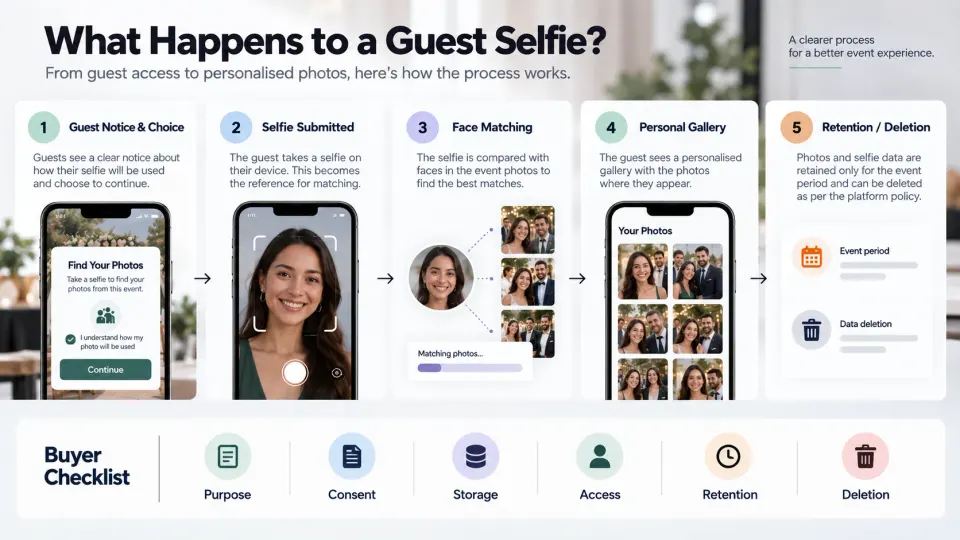
The selfie itself deserves particular attention because face recognition involves technical processing of a person's facial characteristics.
A buyer should understand:
- what the guest is told before providing the selfie;
- what information is generated from it for matching;
- which organisation stores or processes that information;
- how long the selfie and any derived biometric information are retained;
- how a guest can request deletion where applicable;
- whether data is used only for that event or for any additional purpose;
- whether the vendor uses event photographs or selfies for model training;
- what happens when the gallery expires.
Those are product-evaluation questions as much as legal questions.
Privacy, biometric processing and jurisdiction-specific obligations
Face recognition is one area where photographers should avoid copying another studio's privacy wording and assuming it applies worldwide.
Legal treatment varies substantially by jurisdiction. Under UK data-protection guidance, biometric recognition used to uniquely identify someone involves special-category biometric data and requires an appropriate lawful basis and condition for processing; explicit consent is identified as likely to be appropriate in many cases. Illinois' Biometric Information Privacy Act imposes specific notice, purpose, retention and written-release requirements on covered private entities before collecting biometric identifiers or information. California also treats biometric information used to identify a consumer as sensitive personal information.
Those are examples, not a universal rulebook.
A wedding in one country, a corporate event in another, and an international conference with attendees from several regions can create different responsibilities. The studio, event organiser and software provider may also have different controller, processor or contractual roles depending on how the service is implemented.
Before offering face recognition photo sharing commercially, establish which privacy laws apply to your business and event, and obtain jurisdiction-specific professional advice where required. Events involving children, schools, employees or sensitive private gatherings deserve additional scrutiny.
From a software-buying perspective, ask the vendor for clear documentation on data collection, security, subprocessors, storage location where relevant, retention, deletion, incident handling and biometric processing. A vague statement that a product is "AI secure" is not a substitute for understanding the data lifecycle.
GoPickle publishes its current Privacy Policy, but studios remain responsible for understanding their own legal and contractual obligations when deploying any face-recognition workflow.
Download and sharing controls
Finding the correct photographs is only half the delivery experience.
After the match, decide what guests should be allowed to do.
Can they download high-resolution files? Are downloads web-resolution only? Can the photographer disable downloads completely? Can photographs carry watermarks? Can guests share a personal gallery link, and if so, what will another person see when they open it? Does gallery access expire? Can the studio remove an individual image without taking the entire event offline?
The right answer depends on the assignment.
For a wedding, easy download and social sharing may be part of the experience the client purchased. A corporate event may have stricter brand, confidentiality or attendee restrictions. A school or private family event may require tighter access. A sports organiser may want broad distribution but only for approved event photography.
The purchase decision should therefore consider controls around the discovered photographs, not only the quality of discovery itself.
For a broader approach to access, visibility and delivery controls, see our guide to photography gallery privacy and access.
Performance at large weddings, sports and corporate events
Scale should be tested as an operational condition, not accepted as a marketing adjective.
A large wedding can involve multiple photographers, changing lighting, several functions and repeated appearances by the same guests. Corporate events may produce intense bursts of photographs around speakers, award presentations or branded installations. Sports events can generate enormous image volumes while giving the recognition system fewer clean frontal faces.
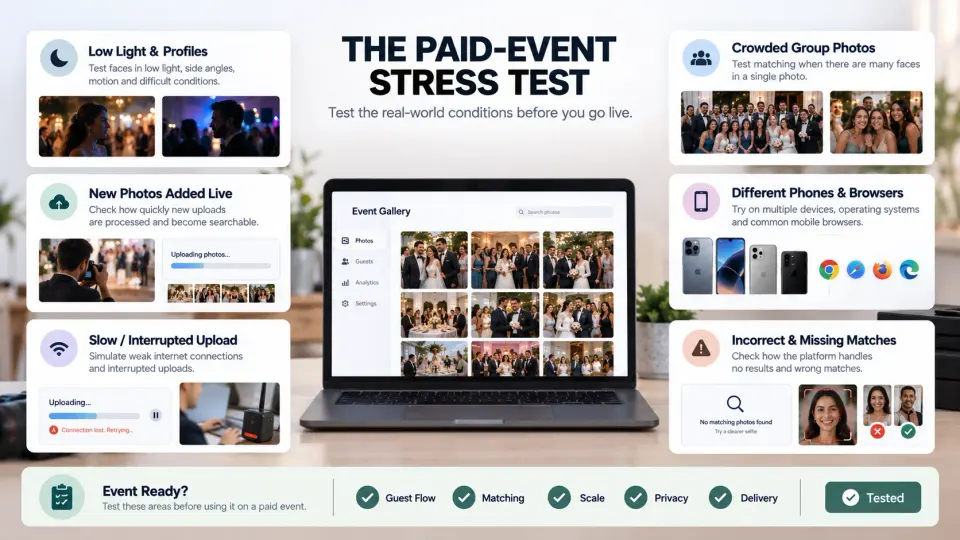
Ask what happens when several photographers upload simultaneously. Does processing queue gracefully