Photography Booking Software vs Scheduling App: Which Does a Studio Actually Need?
Compare photography booking software vs scheduling apps for portraits, mini sessions, weddings, events and multi-crew studios. See which workflow fits your business.

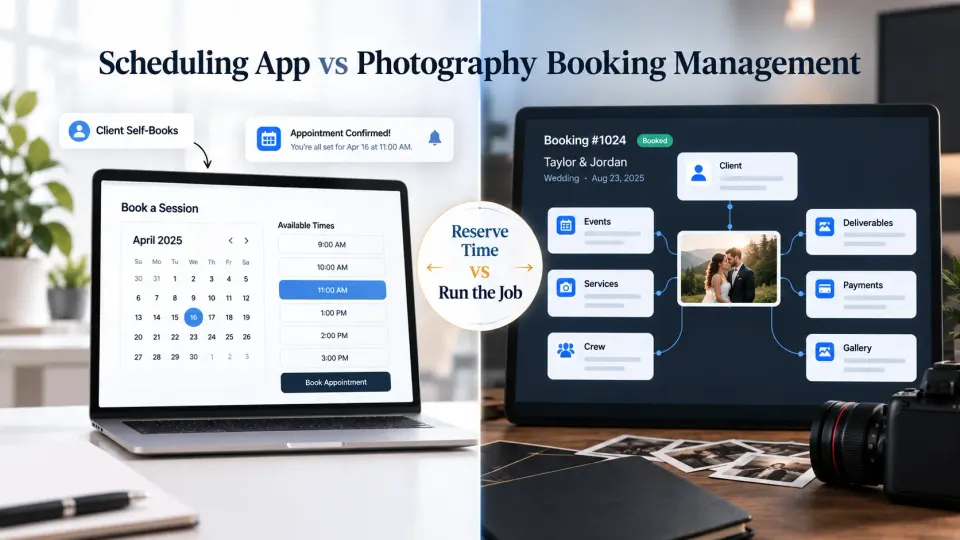
Search for photography booking software and you quickly run into two very different kinds of products being described with almost the same language. One lets clients see your availability, choose a slot and receive reminders. The other becomes the operational record behind a confirmed photography job, holding the client, events, services, deliverables, crew, payments and everything the studio still has to complete.
Both are useful. They solve different problems.
The right choice depends less on how many shoots you handle and more on how predictable those shoots are. A portrait studio selling fixed 30-minute sessions has a very different scheduling problem from a wedding studio coordinating four functions, six crew members, multiple venues and staged payments. A corporate headshot photographer may even need both systems: one booking for the company assignment and a scheduling layer that lets individual employees reserve their own time slots.
The practical question behind photography booking software vs scheduling app is therefore not “Which category is better?” It is “Where does your studio need structure: before the client chooses a time, or after the photography job becomes real?”
What a scheduling app does well
Photography scheduling software is strongest when the service can be translated into an available time slot.
You define when you are available, how long a session takes, how much buffer you need between sessions and, depending on the software, which photographer or resource can accept the appointment. The client opens a booking page, chooses an available time and receives confirmation without several rounds of messages.
That makes a scheduling app especially useful for work such as:
- mini sessions with predefined durations;
- passport, ID or studio portrait appointments;
- headshot sessions;
- consultation calls;
- short family or maternity sessions;
- real-estate shoots with relatively standard time requirements;
- studio rental or other appointment-led photography services.
Current photography appointment software commonly focuses on public booking pages, calendar availability, confirmations, reminders, rescheduling, deposits or upfront payments, and staff calendars. These capabilities remove the friction around the question, “When can we meet or shoot?”
For a photographer running ten similar portrait sessions on a Saturday, that may be exactly the problem worth solving. The client does not need a long discovery process before choosing a slot. The studio needs to expose the right availability without creating conflicts.
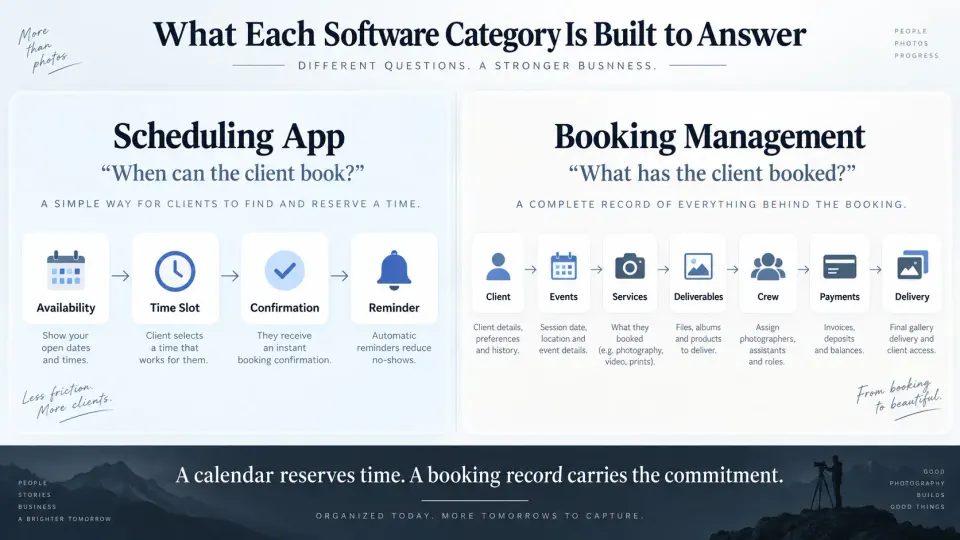
The limitation appears when reserving the time is only the beginning of the work. A calendar entry called “Sarah and Alex Wedding” may protect the weekend, but it does not necessarily tell the studio what happens on Friday evening, which team covers Saturday morning, what the couple purchased, which album was promised or how much of the booking has been paid.
That is where booking management becomes a different software category.
What photography booking management adds
A photography booking system treats the confirmed job as a record that continues through the studio workflow.
Instead of stopping at client + date + time, the booking can hold the commercial and operational context required to fulfil what was sold. For a professional studio, that can include the client, multiple events, venues, services, deliverables, crew requirements, quotations, invoices, payments and eventual delivery.
This is the model behind GoPickle Booking Management. The booking acts as the central record for the work rather than simply representing occupied calendar time.
Consider a wedding covering a welcome dinner, ceremony and reception. Each event may have a different venue, reporting time and crew requirement. The approved package may include photography, cinematography, reels, a printed album and a client gallery. The couple may pay an advance on confirmation, another instalment before the event and the final balance later.
No single appointment adequately describes that job.
The same applies outside weddings. A conference may contain coverage across two days and several stages. A commercial assignment may have a pre-production call, shoot day, multiple deliverables and approval stages. A school photography project may contain several classes or locations under one commercial relationship.
If this is the kind of work you sell, evaluate software around what the booking must remember, not simply what the calendar needs to display. Our separate guide to what photography booking software should manage goes deeper into those platform requirements.
Session businesses and event businesses need different systems
The distinction becomes clearer when you look at how the service is purchased.
A session business usually sells a repeatable block of time. The service, duration and basic deliverables may already be defined before the client books. Availability is often the largest obstacle between interest and confirmation.
An event or project business usually sells a requirement. The studio may first need to understand dates, locations, coverage, services, production complexity, crew and deliverables before the final scope can be confirmed.
| Photography model | Main operational question | Usually needs |
|---|---|---|
| Mini-session photographer | Which slots are still available? | Scheduling first |
| Headshot studio | When can each client attend? | Scheduling first |
| Family or portrait photographer | Can the client self-book a defined session? | Scheduling, or both |
| Wedding photographer | What exactly has the couple booked? | Booking management |
| Wedding studio with multiple crews | Who covers each event and what was promised? | Booking management |
| Event photography company | How do dates, venues, crew, payments and delivery stay connected? | Booking management |
| Commercial photographer | What is the approved scope and production plan? | Booking management |
| Corporate headshot day | What did the company book, and when does each employee attend? | Both |
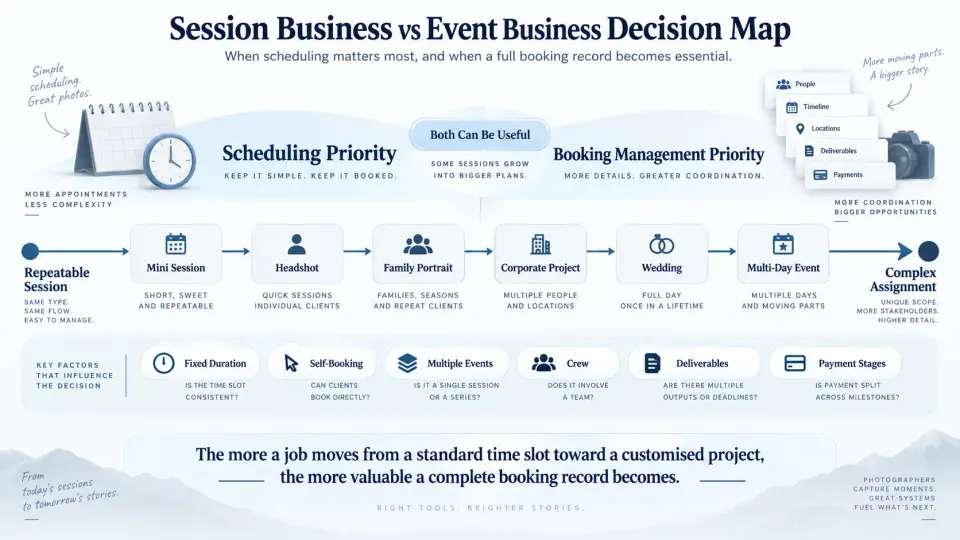
The corporate headshot example is worth studying because it shows why the two categories should not always compete.
A company may commission one photography project for 100 employees. That project has a commercial client, quotation, invoice, production date and agreed deliverables. Inside the project, the 100 employees may need individual 10-minute appointment slots.
The booking record represents the job. The scheduling system represents access to time within that job.
Once that distinction is clear, software decisions become much easier.
Payments, services, deliverables and crew reveal the real difference
Many scheduling platforms can collect a deposit or full session fee. For a simple shoot, that may be all the financial workflow you require.
Complex photography jobs create a different problem. The studio may need to understand the total agreed value, an advance already received, later instalments, additional services, outstanding balances and the financial status of the booking while production continues.
Services and deliverables create the same distinction. “Two-hour portrait session at 3 PM” may be enough information for a straightforward appointment. “Three-day wedding coverage” is not. The team may need to know which functions include candid photography, where cinematography is required, whether drone coverage was approved and which albums, reels, edits or galleries must eventually be delivered.
Crew makes the gap wider still. A calendar can show that the studio is occupied. A working booking needs to show which people are assigned to which parts of the assignment and whether those assignments actually cover the requirement.
For growing studios, that relationship between booking and crew becomes particularly important. A photographer who appears free on one calendar may already have a travel commitment, another held assignment or the wrong role for the job. Our photography crew availability matrix covers that planning problem in more detail.
These are also the reasons a structured photography client onboarding workflow should eventually feed into the booking. Information collected from the client only becomes operationally useful when dates, requirements, responsibilities and payments reach the people who need them.
When both tools create duplicate data
Using a photographer scheduling software tool alongside booking management can be sensible. Using both without deciding which system owns which information is where the trouble starts.
Suppose a client books a consultation in the scheduler. After the call, your team manually creates a lead. Once the client confirms, somebody creates another booking. The date also goes into a shared calendar. Payment is then recorded somewhere else.
You now have several representations of the same client, each capable of becoming outdated independently.
The problem is not the number of applications. It is duplicate ownership.
A cleaner setup gives each system a specific job:
Scheduling app: controls public availability and appointment selection.
Booking management: holds the authoritative record for the confirmed photography assignment.
For example, a wedding studio may use self-scheduling for discovery calls but create the actual wedding only after the requirement, quotation and confirmation are complete. A portrait photographer may use the scheduler for every paid session and require very little additional booking management. A hybrid studio may send mini-session clients through self-booking while keeping weddings and commercial projects in a deeper booking workflow.
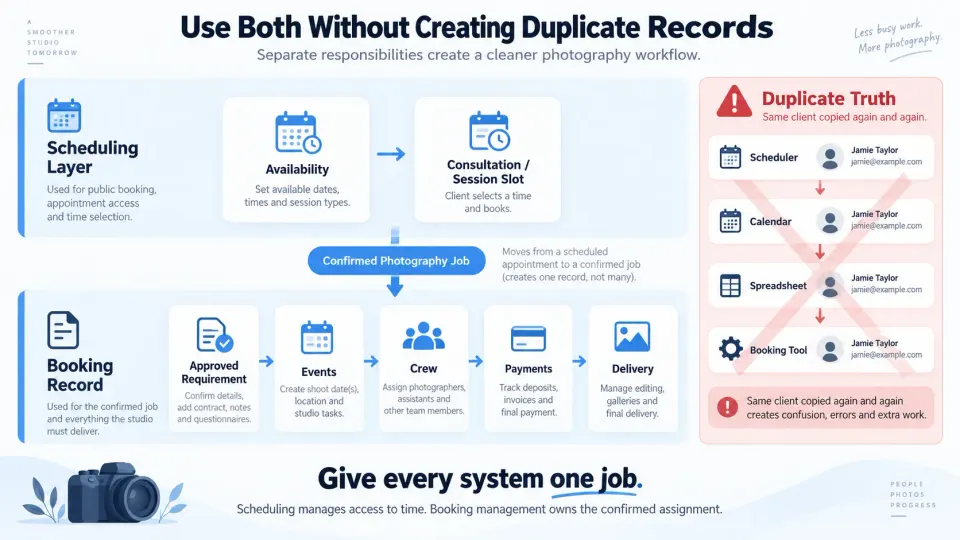
Before adding another tool, map the handoff. Ask what happens after someone books a slot. Does that appointment already contain everything required to complete the job? If not, decide how the information becomes a proper booking without forcing your team to maintain two competing versions.
Decision framework by studio model
You can usually choose between a scheduling app, booking management software or both by answering six questions about the way your studio sells and fulfils work.
1. Can the client safely choose a time before speaking to you?
If yes, self-scheduling has clear value.
If every enquiry needs qualification, scope discussion or availability checking before confirmation, a public booking calendar may be less important.
2. Is the service mostly standardised?
A fixed headshot session with a known duration and price fits appointment software naturally.
A job whose price depends on events, crew, travel, licensing, production requirements or deliverables needs a stronger commercial record.
3. Does one client booking contain several dates or events?
If one job regularly expands into several functions, days, locations or production stages, choose a system that can preserve those relationships under the same assignment.
4. Do you collect more than one payment?
A simple checkout may be sufficient for prepaid sessions. Advances, milestone payments and final balances make booking-linked financial visibility more useful.
5. Does anyone besides you need the booking context?
Once salespeople, photographers, assistants, cinematographers, editors or studio managers participate, “the date is on the calendar” stops being enough. The team needs the approved requirement behind the date.
6. Does work continue long after the appointment ends?
For many photographers, completing the shoot is not closing the booking. Editing, selections, invoices, albums, galleries and other deliverables may continue for weeks. If the software loses the job the moment the appointment passes, you may still need another system to manage completion.
A useful rule is simple:
Choose scheduling software when your biggest problem is letting clients reserve the right time. Choose booking management when your biggest problem is preserving and executing everything the client has actually bought.
Studios that need both should give them separate responsibilities.
Where GoPickle fits
GoPickle is designed for the second problem.
Its photography workflow management connects leads, quotations, confirmed bookings, crew, invoices, payments and galleries around the photography assignment. Within Booking Management, studios can keep clients, events, venues, services, deliverables, crew and financial context attached to the confirmed work.
That makes it particularly relevant when a booking is more complicated than a calendar slot: weddings, events, multi-day assignments, commercial work, or growing studios where several people need access to the current version of the job.
If your business depends heavily on public self-booking for fixed portrait slots, mini sessions or consultation appointments, a dedicated scheduling layer can still have a legitimate role. The objective should not be to eliminate specialist software for the sake of having fewer icons. It should be to stop maintaining the same operational truth in several places.
The strongest setup is the one that matches how your photography is actually sold.
A client choosing 2:30 PM on Saturday needs good scheduling.
A studio asking what did they buy, what happens next, who is responsible and what is still pending needs booking management.
Knowing which question you are trying to answer is the difference between buying another calendar and building a workflow the studio can actually run on.