Photography Client Management Software vs CRM vs Booking Tool: Understand the Difference
Compare photography client management software, CRM and booking tools. Understand their differences and choose the right system for your studio.

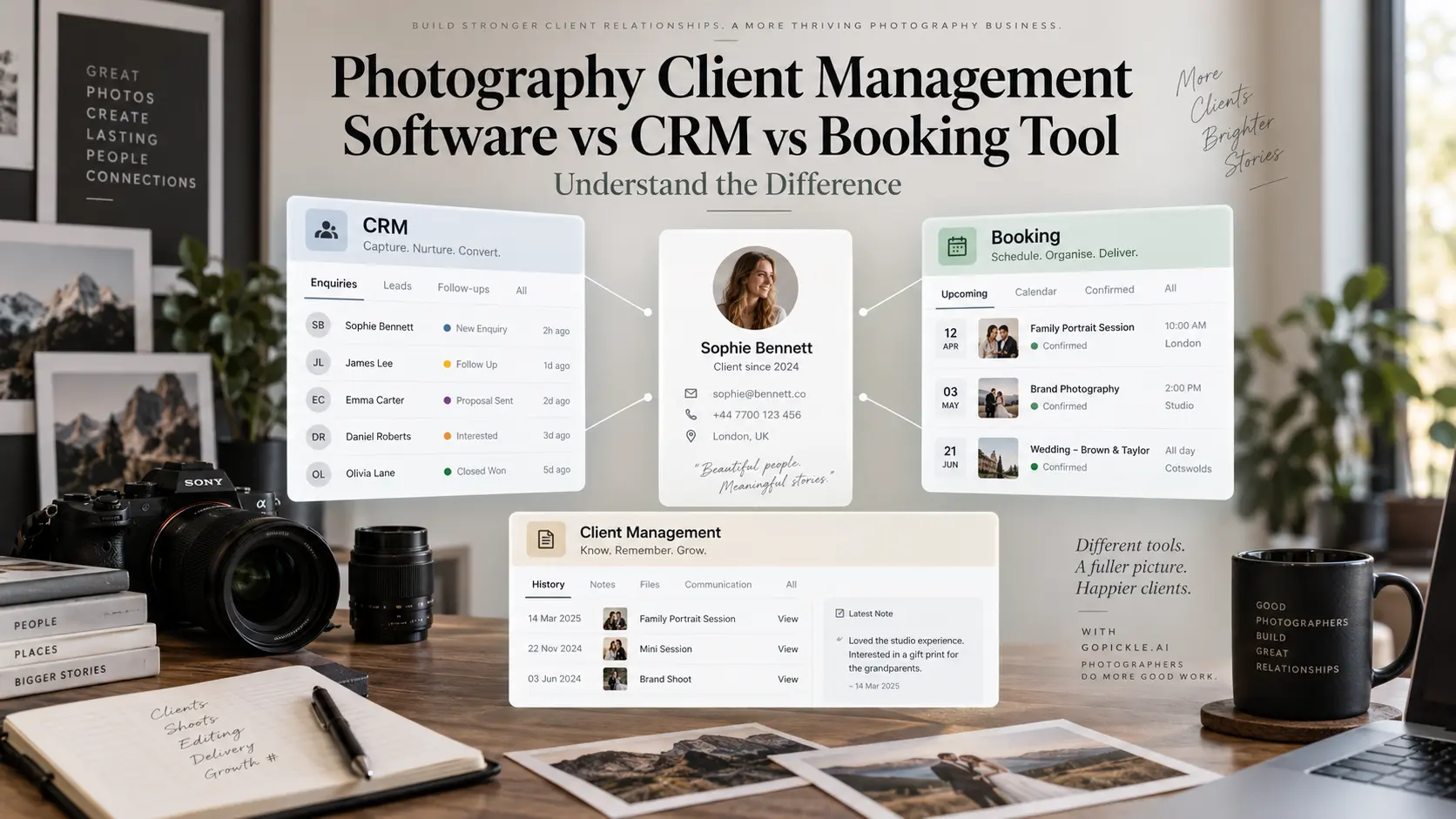
A photographer searching for client management software will quickly notice something confusing. One platform calls itself a photography CRM, another advertises booking management, and a third promises complete studio management. Yet all three may show similar features: client contacts, calendars, quotations, invoices and automated reminders.
The confusion becomes expensive when a studio buys software expecting it to manage the entire client relationship, only to discover that it handles one part exceptionally well and leaves everything else to separate tools.
A booking app might make scheduling portrait sessions effortless but offer little support for managing an enquiry before confirmation. A CRM may organise every potential client and sales conversation but have limited tools for coordinating a multi-day wedding. A client database can remember contact details without showing what the studio has promised to deliver.
Photography client management software, photography CRM software and photography booking software overlap, but they are not necessarily the same thing. Their main difference is the work each system is designed to manage.
At GoPickle, we believe the right software decision starts with understanding those boundaries. Once you know which parts of your workflow require better organisation, it becomes easier to decide whether a specialised application is sufficient or a connected photography studio management system makes more sense.
1. Photography client management is the entire relationship, not one screen
Client management begins when someone first contacts your photography business. It continues through understanding their requirements, preparing a quotation, confirming the booking, arranging the shoot, collecting payments and delivering the finished photographs. For returning clients, the relationship may extend into several separate assignments over multiple years.
Consider a family photographer who first photographs a couple's engagement, later covers their wedding and eventually receives another portrait booking. These are three different projects, but they belong to an ongoing client relationship.
A useful photographer client database should recognise the returning client without merging every assignment into one confusing record. The photographer needs to see relevant history while keeping each project's dates, requirements, quotations, payments and deliverables separate.
This is where client management becomes broader than contact storage. The database holds the relationship, while other parts of the software manage the work generated by that relationship.
Here is how the main categories differ:
| Software category | Primary responsibility | Main question it answers |
|---|---|---|
| Client management software | Organise the client relationship across multiple interactions and projects | What do we know about this client and their history? |
| Photography CRM | Manage enquiries, opportunities, conversations and follow-ups | Which potential clients need attention before they book? |
| Photography booking software | Manage scheduled or confirmed photography work | What has been booked, and what must happen? |
| Photography studio management software | Connect sales, bookings, payments, production and delivery | How is the complete studio operation progressing? |
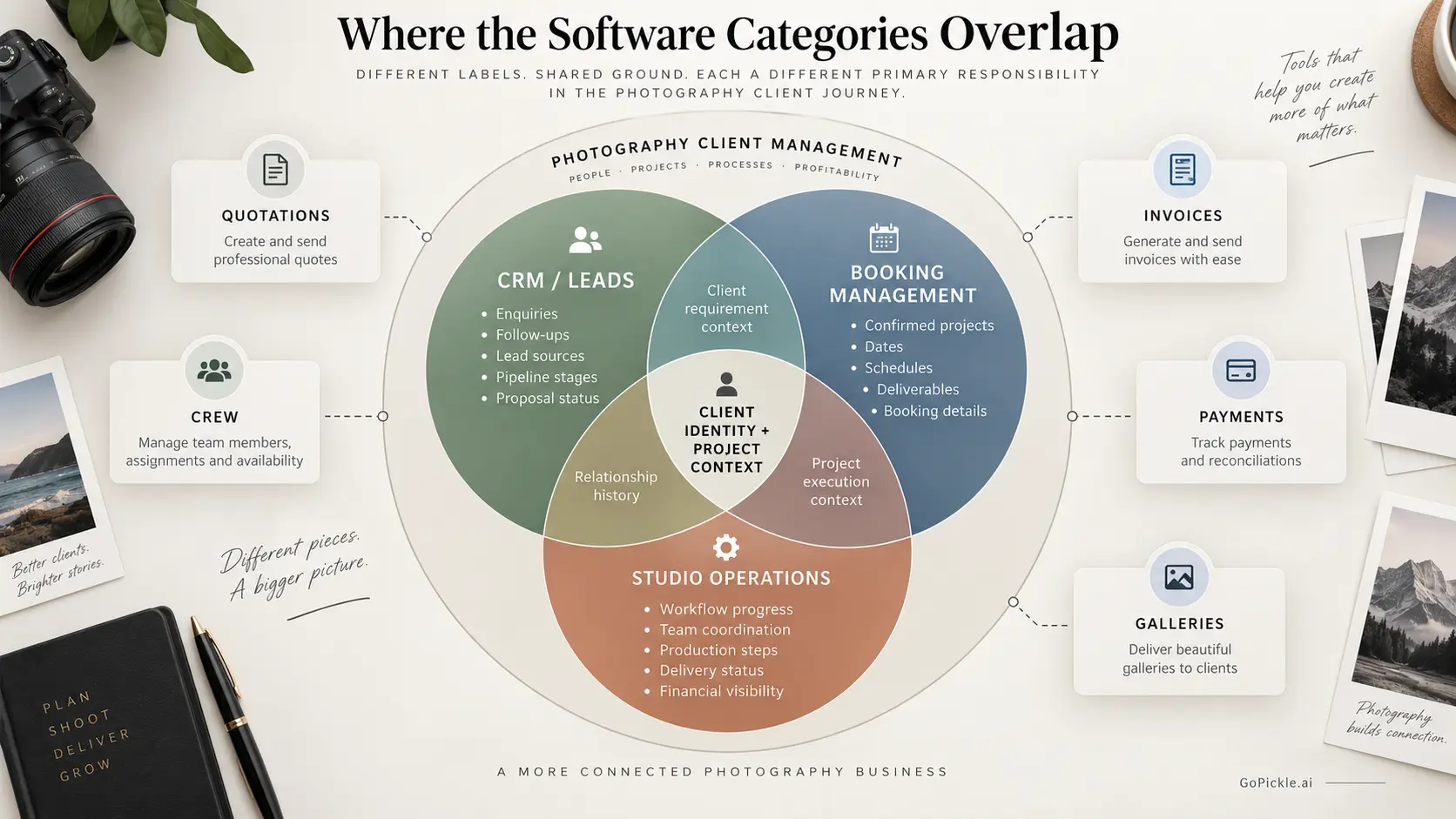
These are functional distinctions rather than strict industry standards. Some photography CRMs include booking, invoicing and project management. Some booking platforms also manage client records, contracts and payments. A complete photography business platform may contain all these functions.
The important thing is to understand what a product actually does rather than relying on the category printed on its homepage.
2. What photography CRM software primarily manages
CRM stands for Customer Relationship Management. In photography businesses, its strongest role is usually organising the relationship and sales process before an enquiry becomes confirmed work.
A photographer may receive enquiries through a website form, Instagram, WhatsApp, email, telephone calls or referrals. Each enquiry has its own requirement, possible shoot date, budget, decision process and next action.
A photography CRM helps the studio retain that information and move the opportunity forward.
For example, a couple enquires about wedding coverage for three days. They request a package, ask about cinematography, compare options and eventually receive a revised quotation. During those conversations, the studio needs to know who is handling the enquiry, what the couple requested, which quotation was sent and when to follow up.
That is fundamentally a sales-management responsibility.
The most useful capabilities include enquiry capture, contact records, lead sources, sales stages, assigned owners, follow-up reminders, quotation status and visibility into open opportunities.
GoPickle's Lead Management Software for Photographers is designed around this process. Studios can organise incoming enquiries, capture photography-specific requirements, assign responsibility and carry qualified lead information toward quotations and bookings.
However, CRM functionality does not automatically mean the software can manage everything that happens after confirmation. A sales-focused CRM might successfully convert a wedding enquiry while providing limited support for event-level crew assignments, production schedules or gallery delivery.
If your immediate problem is choosing between a spreadsheet and a structured lead pipeline, our guide to photography CRM versus spreadsheet management examines that narrower decision.
3. What photography booking software primarily manages
A booking system takes responsibility for the work the studio has agreed to undertake.
For straightforward sessions, photography booking software may primarily provide availability calendars, appointment selection, confirmations and rescheduling. That can be exactly what a portrait, headshot or mini-session photographer needs.
Once assignments become more complex, booking management has a wider responsibility.
Imagine a wedding photography studio covering a welcome dinner, ceremony and reception across different venues. Each event has its own time, team, services and delivery expectations. The studio also needs to monitor advance payments, remaining balances and any changes agreed after confirmation.
A calendar entry with the client's name cannot represent that entire commitment.
A more operational photography booking system should preserve the agreed services, event details, deliverables, schedules, crew responsibilities, documents and payment context for each confirmed assignment.
GoPickle's Booking Management for Photographers connects the client, booking, multiple events, services, deliverables, crew, quotations, invoices and payments within the photography workflow.
There is an important distinction between reserving an appointment and managing a confirmed job. Some products specialise in the first, while others handle the second or both.
Photographers who need a deeper comparison of those two approaches can read our guide to booking software versus scheduling applications.
For this broader buying decision, remember that CRM manages the opportunity to win the work, while booking management makes sure the accepted work is organised.
4. Where quotations, invoices and client galleries fit
Neither CRM nor booking management completely describes the financial and delivery responsibilities of a photography business.
A quotation defines the commercial offer. It explains the services, package, deliverables, pricing and terms the client is considering. Once accepted, those commitments should inform the confirmed booking.
An invoice records the amount being billed, applicable taxes and payment obligations. Payment tracking then establishes what has actually been received and what remains outstanding. These records may be connected to booking management, but a calendar or basic CRM cannot be assumed to provide a complete invoicing workflow.
The distinction matters when a client changes their package after booking. If additional coverage is approved, the updated commercial agreement should be reflected in the appropriate booking and financial records. Otherwise, different team members may work from different versions of what was sold.
Gallery software handles another stage entirely: presenting photographs, managing access, supporting client review where applicable, and providing download or delivery options.
A client gallery is not automatically a CRM merely because it contains the client's name and email address. Equally, a CRM containing a delivery-status field does not necessarily provide professional photo hosting.
GoPickle's Client Galleries for Photographers support organised collections, branded delivery, favourites, access controls and downloads. These capabilities serve the delivery stage rather than replacing the need to manage sales or bookings.
Even a client portal is different from internal client management. A portal should show the client relevant information and actions, not expose the studio's private lead notes, operational costs or internal assignments.
The ideal software arrangement allows these responsibilities to remain distinct while preserving the correct project context between them.
5. When separate tools are enough
An integrated photography business platform is not automatically necessary for every photographer.
A solo photographer offering a small number of straightforward sessions may work perfectly well with a scheduling application, an invoice tool and a gallery service. If most clients choose a fixed package, book an available slot, pay and receive their photographs, the process has relatively few handoffs.
A specialist application may also be preferable when one part of the workflow has unusually demanding requirements. A high-volume school photographer might need a dedicated ordering system. A commercial studio may need specialist accounting or production software. An established gallery platform may offer specific presentation or fulfilment capabilities that the business depends on.
There is little benefit in replacing a reliable specialist tool simply to reduce the number of subscriptions.
Separate applications work particularly well when the boundaries between them are clear, information rarely needs to be copied manually, and someone can easily identify the authoritative record for each project.
The question is not how many tools a professional photographer should own. It is how much work the studio must perform to keep those tools consistent.
6. When integration becomes the bigger problem
The limitations of separate systems usually become visible when information has to move between people or stages.
Imagine a studio receiving a wedding enquiry. The salesperson records the requirements in a CRM and prepares a quotation. After the client confirms, the operations manager manually creates a booking, copies the event dates and sends crew instructions. The accounts team creates an invoice using another application, while the editor eventually receives a separate delivery brief.
Everything might work until the client requests a change.
The ceremony moves to a different venue, an additional photographer is approved and the agreed package price changes. The salesperson updates the conversation, but operations still has the original booking. Accounts has the previous amount, and one crew member receives an outdated schedule.
The problem is no longer a missing feature. It is an unreliable handoff between systems.
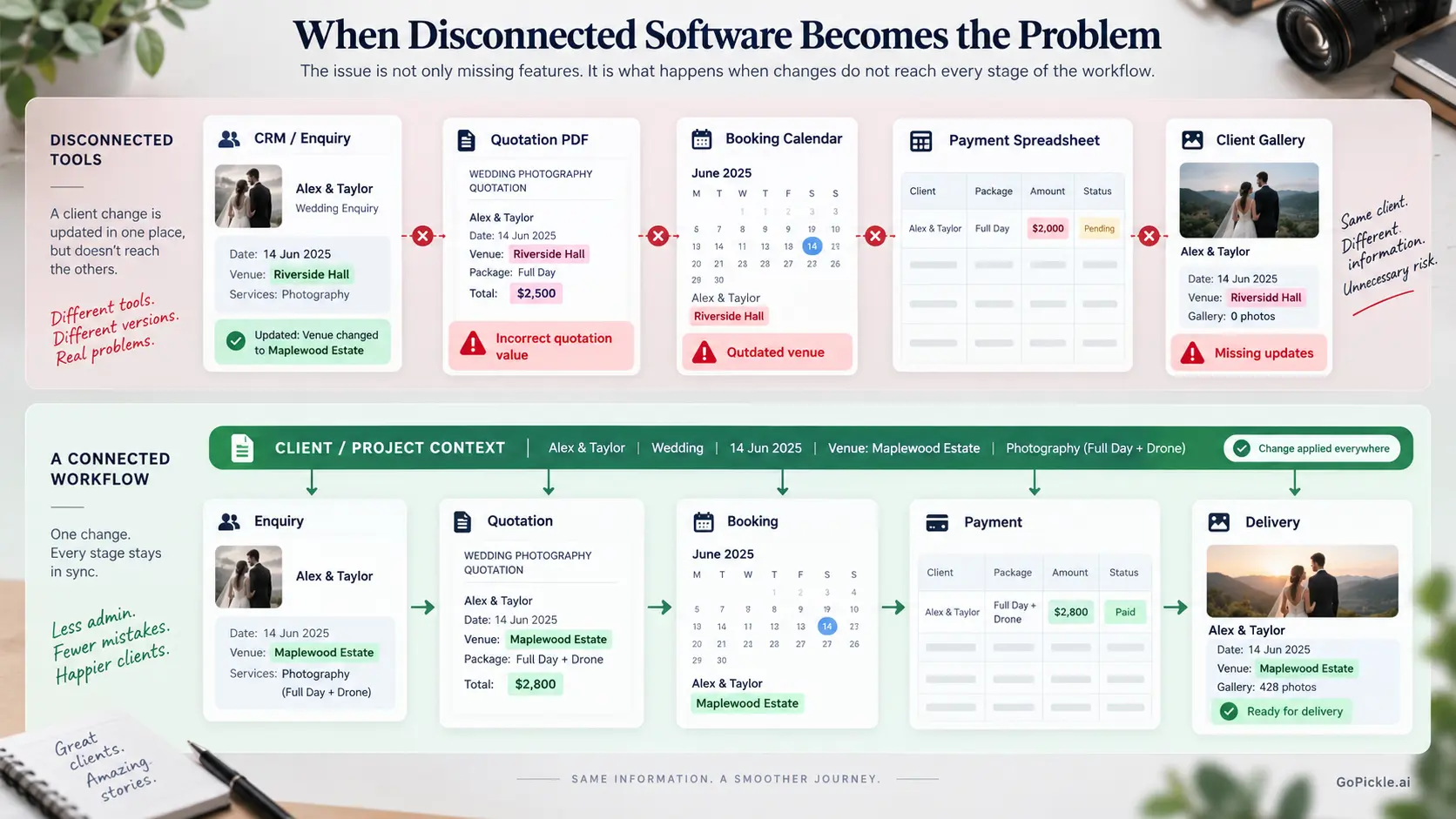
Before investing in photography studio management software, examine how your current tools handle changes, not simply how well they create records.
A useful evaluation should answer these questions:
- Does a confirmed enquiry carry its client, event and service information into the booking without unnecessary re-entry?
- Can staff identify the latest approved scope and distinguish it from older quotations?
- Do invoices and payment balances remain connected to the correct assignment?
- Can production staff find current event details without searching sales conversations?
- Can the studio identify what remains unfinished after the shoot?
- Does the next client assignment retain relevant relationship history without reusing the old project's records?
Integration can be achieved through a well-designed all-in-one platform or through separate applications with reliable integrations. Neither approach is automatically superior.
Where different products are connected, examine which information is actually synchronised, in which direction, and what happens when a record is edited, cancelled or duplicated. A one-time contact import is not the same as continuous workflow integration.
This is the main distinction behind photography business management software. Its purpose is to connect the operational responsibilities surrounding client work rather than treating each activity as a separate administrative task.
7. Choose the software category that fits your studio's complexity
The right choice depends on the structure of your business more than the number of clients in your database.
A photographer handling numerous standardised headshot appointments might need stronger online scheduling than a wedding studio completing fewer but more complicated assignments. A commercial photographer managing long sales cycles may need a more capable CRM before investing in extensive crew-management functionality.
Use the following framework to identify which software category deserves priority.
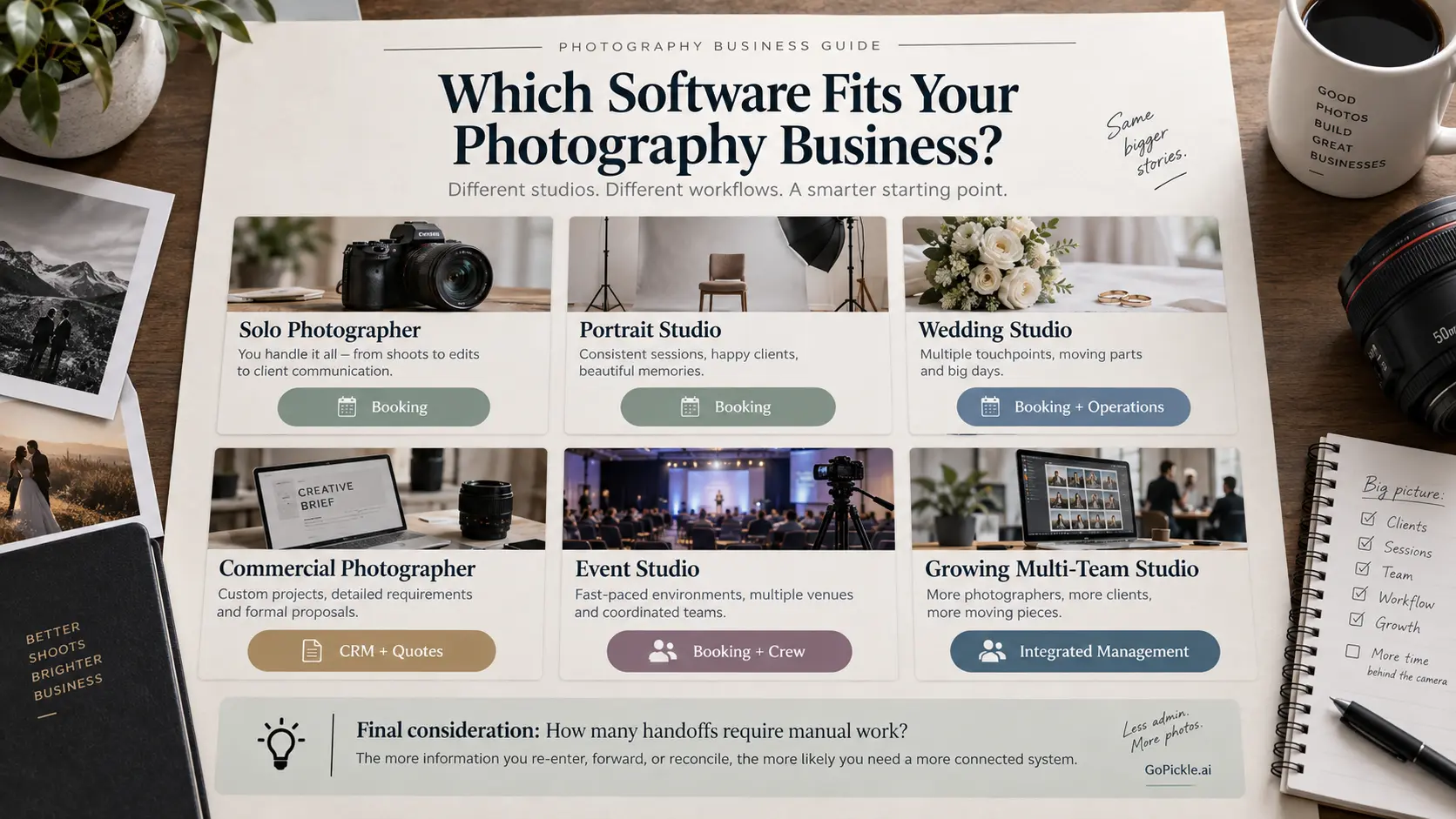
| Studio situation | Best starting point | When to consider an integrated system |
|---|---|---|
| Solo photographer with occasional assignments | Simple client records, booking and invoicing tools | When repeated manual updates become difficult to manage |
| Portrait or headshot studio with fixed sessions | Online booking and scheduling software | When enquiries, packages, payments and repeat-client history need connecting |
| Wedding photographer handling multiple events | Booking management with CRM and payment context | When sales, events, crew and delivery require repeated handoffs |
| Commercial photographer with long sales cycles | Photography CRM and quotation management | When approved scopes must move into production, invoicing and delivery |
| Event photography studio with several teams | Booking and crew management | When overlapping events, responsibilities and payments need a shared operational view |
| Growing studio with dedicated sales and operations staff | Connected photography studio management software | When several people need dependable access to the same client and project information |
Test one client across the complete workflow
We recommend taking an actual completed assignment and recreating its important stages during a product trial.
Start with the original enquiry and client requirements. Prepare the quotation, confirm the booking, record a payment, review the shoot details and locate the final delivery record. Then introduce one realistic change, such as a new venue, additional service or revised payment schedule.
This small exercise tests more than a vendor's feature list. It reveals whether information remains connected, which details need entering again, what different team members can see and how reliably the software handles changes.
Also look at the less exciting buying criteria: mobile usability, access permissions, exports, data portability, support, storage limits and total subscription cost. A platform that fits today's workflow but makes historical client records difficult to retrieve later may create a different administrative problem.
For a growing studio, a useful photographer client database must preserve long-term relationships while allowing each booking to remain operationally independent. That is a stronger requirement than simply storing thousands of contacts.
Choosing between a CRM, a booking tool and complete client management
The distinction becomes clearer when you stop comparing product names and start comparing responsibilities.
If enquiries are being forgotten or follow-ups have no clear owner, prioritise CRM and lead management. If confirmed jobs are difficult to organise, prioritise booking management. If both work reasonably well but quotations, payments, production details and galleries constantly need to be reconciled, the studio may be ready for a more connected platform.
At GoPickle, our approach is to keep those stages connected through one photography workflow management platform, covering leads, quotations, bookings, crew, invoices, payments and client galleries. The objective is to preserve useful context as work moves from the first enquiry through delivery, without making photographers rebuild the same project in several places.
The right photography client management software should make it easier to answer a simple operational question at any point in the relationship: what has this client requested, what have we agreed to provide, and what needs to happen next?
If the system answers that consistently for your real assignments, you are evaluating software that fits the business rather than merely software with an impressive collection of features.